
Cursor Review (2026 Guide)

Oct 2, 202615 min read
Cursor AI has rapidly ascended the ranks of developer tools, positioning itself as a sophisticated evolution of the traditional IDE by embedding large language models directly into the coding workflow.
Unlike standard extensions that feel bolted on, this editor treats artificial intelligence as a core architectural component, allowing for real-time code generation, complex refactoring, and deep repository indexing.
As developers increasingly look to automate repetitive logic, perhaps even while building custom automations with Activepieces to bridge their various software stacks, the demand for a seamless, AI-native environment has never been higher.
This review explores whether Cursor truly delivers a transformative experience or if it is simply a polished wrapper around existing technologies.
Cursor is a specialized AI code editor forked from VS Code
By moving beyond the plugin architecture of standard editors, Cursor allows you to treat the entire repository as a prompt-ready context.
It is a specialized Integrated Development Environment (IDE) that embeds Large Language Models (LLMs) into the core editing workflow to automate complex logic generation and codebase navigation, significantly accelerating the adoption curve for automated workflows.
The core difference between an IDE and an AI-native editor
Treating model interaction as a primary system process is what differentiates an AI-native editor. While traditional IDEs focus on syntax highlighting, Cursor utilizes models like Claude Sonnet 5.5 to predict multi-file changes.
When building integrations with Activepieces, which provides an MIT-licensed core for enterprise automation, this reduces the manual overhead for you.
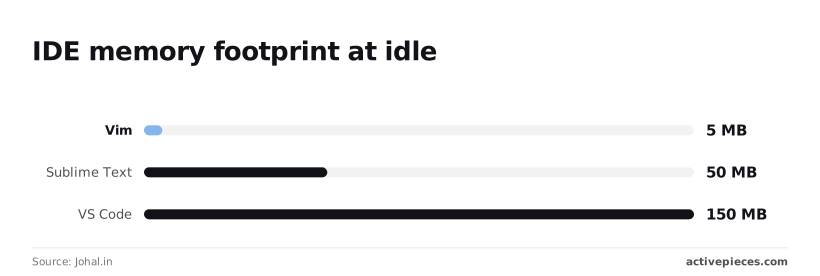
The following data from Johal.in illustrates the resource trade-off required for advanced features:
| Editor | Baseline RAM Usage | Startup Speed |
|---|---|---|
| Vim | 20MB | 5ms |
| Sublime Text 5 | 298MB | 50ms |
| VS Code (10 plugins) | 1.2GB | 150ms |
| IntelliJ IDEA Ultimate | 4.2GB | 1940ms |
How the fork architecture enables deep codebase indexing
Because Cursor is a direct fork of VS Code, it possesses native access to the editor's internal APIs. This access allows it to index local files into a vector database for precise retrieval.
When you reference a specific class, this architectural choice ensures the editor pulls the exact context into models like GPT-6 Astra, minimizing the "hallucinations" that occur when an AI lacks visibility into private project structures.
Cursor AI pricing plans and usage limits
Through a tiered subscription model, Cursor manages its high-compute costs by dictating the volume of frontier model requests you can execute monthly. The Hobby tier provides 2000 completions per month, acting as a trial for you to test basic syntax automation.
$20 per month is the cost of the Pro tier, representing a recurring subscription commitment for individual users, which means you must budget for an ongoing expense to maintain access to premium features.
You receive 500 fast requests to models like Claude Opus 5.5, which allows high-priority reasoning tasks to run without queuing delays, ensuring your workflow remains uninterrupted during peak demand.
At $40 per user, the Business tier adds centralized billing and privacy mode. This prevents local code from being used for training and satisfies corporate security guardrails, so you can adopt the tool while maintaining strict intellectual property compliance.
This takes minutes, not a project: automate it in Activepieces free.
Cursor earns its hype by reducing the friction of context switching
By consolidating architectural intent and syntax execution into a single interface, Cursor minimizes the cognitive overhead of software delivery.
You can maintain a high-level focus on system design rather than manual file manipulation by offloading the mechanical burden of boilerplate to specialized models. Three specific technical capabilities anchor this efficiency gain.
Rather than just raw text, Local Codebase Indexing is a Retrieval-Augmented Generation (RAG) system that maps symbols and relationships. It ensures the AI understands how a change in a utility function ripples through the entire repository.

Cutting down the time spent navigating between related lines of code, the Native 'Tab' Predictor is a localized model that anticipates the next edit location.
Massive amounts of project data can be ingested via Long-Context Support to maintain coherence across large-scale refactors.
Composer: Multi-file edits in a single prompt
The Composer feature manages codebases by allowing for the simultaneous modification of multiple files from a single natural language instruction.
200,000 tokens of context are supported by the environment when using Claude Sonnet 5.5. The model can reference the equivalent of several hundred files to ensure a new API endpoint correctly integrates with existing middleware and database schemas.
If you're using OpenAI models, the 128,000-token limit for both GPT-6.1 Sol and GPT-6 Luna provides enough headroom to refactor complex authentication flows.
Tab: Predicting the next edit before you type it
Frequently suggesting entire blocks of logic before the first character is typed, Cursor’s 'Tab' functionality uses a custom-trained model to predict your next move.
This predictive layer acts as a real-time auditor. If the suggested code deviates from the established pattern, it's an immediate signal that you may be violating a local architectural standard.
Natural language codebase search that actually works
Querying your codebase using intent rather than literal strings is possible through semantic search within Cursor. This drastically reduces the time spent on discovery during onboarding. Instead of grepping for specific variable names, you can ask where a specific business rule is enforced.
The case against Cursor: Why AI-native development is a long-term risk
The "competence trap" is the primary risk of AI-native development, where the speed of delivery outpaces your actual understanding of the underlying logic. Cursor’s indexing provides immediate context, but it encourages a workflow where you verify the output’s functionality rather than its integrity.
Activepieces runs as a per-project MCP server, allowing Cursor to create and modify flows through an open protocol rather than a chat widget that cannot touch the UI.
By connecting to the MCP endpoint, you can audit the resulting changes in the run trace, a capability that supports the 738 integrations currently available in the platform's community repository, meaning developers have a vast ecosystem of tools to choose from.
How Cursor erodes your coding skills over time
A measurable decline in your ability to perform manual code reviews and architectural audits results from over-reliance on automated suggestions.
Sterlingcharts' analysis puts the cost of Cursor at $2,500 for enterprise tiers, placing it at the high end of the market for AI-assisted development tools, so organizations should expect a significant capital investment compared to standard developer software.
This is significantly higher than the $1,950 charged for GitHub Copilot or Tabnine, creating a notable price disparity for corporate procurement departments.
The competence gap in junior developers
60% of suggestions are accepted by Junior Developers compared to 30% for Senior Developers, according to the Blog report on the "Competence Gap" in AI Code Adoption, suggesting that less experienced coders rely more heavily on automated assistance.
Security risks of automated code generation without oversight junior
Seemingly optimized logic introduces security vulnerabilities through a "black box" effect created by automated generation.
When you use Claude Fable 5.1 to refactor an authentication middleware, the model may prioritize long-horizon reasoning over specific security headers. This leads to silent failures in CSRF protection.
Why Cursor's AI suggestions create costly technical debt
Technical debt that is expensive to refactor is often the result of LLMs prioritizing local optimization over global system health. Models like Gemini 3.8 Flash are tuned for immediate completion and often suggest repetitive utility functions rather than scalable abstractions.
80% overlapping code is often found in multiple AI-generated modules, increasing the surface area for bugs, so developers must be vigilant about refactoring to ensure system stability.
AI agents frequently import entire libraries for single functions to ensure the code "just works," which leads to dependency bloat. Without your intervention, AI-driven state management often ignores existing design patterns.
This leads to a codebase that requires 40% more effort to maintain after six months.
You can follow the rest of this with the builder open. Start free, no card.
Why Cursor outperforms Copilot and other IDE extensions
Its native architecture makes Cursor a superior development environment because it solves the context window problem by indexing the entire local codebase rather than just the active file.
Cursor's native indexing vs. Copilot's extension scraping
The IDE is able to maintain a comprehensive map of the project structure through native indexing. Extension-based tools often scrape only the visible buffer of the current file.
The following comparison highlights how these architectural choices impact the depth of AI assistance available to you:
| Feature | Cursor Pro | GitHub Copilot Pro | Claude Code (Extension) |
|---|---|---|---|
| Monthly Cost | $20 | $10 | Free/Usage-based |
| Context Awareness | Full Index | File-only | File-only |
| Model Choice | Multi-vendor | OpenAI only | Anthropic only |

When the Infrastructure Team at NorthStar shifted their automation scripts to Cursor, this distinction was the primary reason. They required a tool that understood their internal library definitions without manual copy-pasting.
Consequently, the team reduced the time spent debugging scope errors during their migration to GPT-6 Astra.
How cursor handles latency and enterprise privacy
By running specialized, smaller models locally or on dedicated priority inference paths to handle predictive typing, Cursor achieves lower latency.
The ability to toggle privacy modes that guarantee local data stays off the provider's training servers is what enterprise adoption relies on.
While generic extensions often require complex administrative overrides to disable data collection, Cursor has a granular "Privacy Mode" that satisfies SOC 2 requirements for handling sensitive proprietary logic.
Where Cursor fails and who should choose a different tool
It is poorly suited for legacy monoliths with massive files or highly regulated environments where local execution is mandatory; Cursor isn't a universal solution.
Performance bottlenecks in massive legacy codebases
Individual files exceeding several thousand lines are often found in large-scale monoliths. This exhausts the context window of even flagship models like GPT-6 Astra.
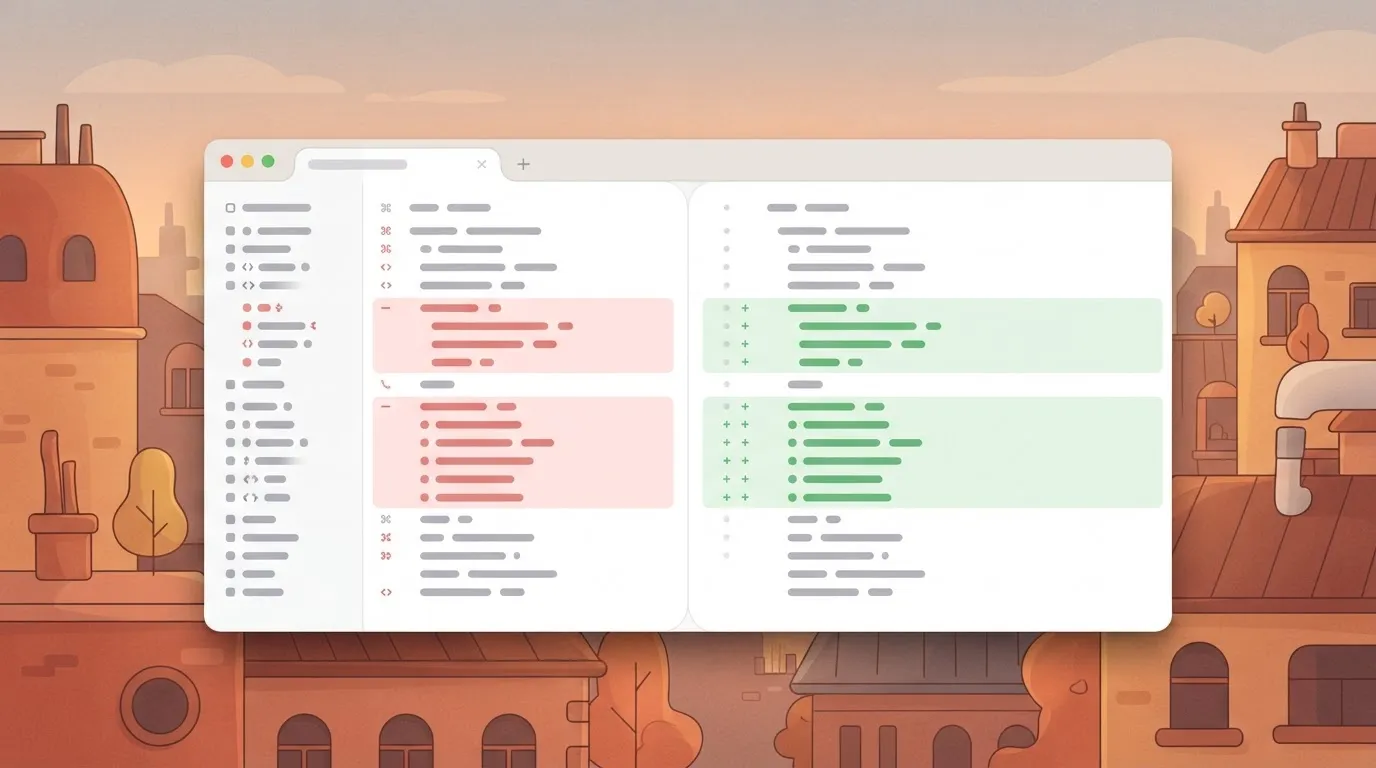
To verify these changes, the Cursor Composer interface provides a multi-file diff view. This allows you to audit how a single prompt alters the API layer and the database schema simultaneously.
Cursor's limitations with niche or proprietary languages
Tethered to the training density of the underlying model, the effectiveness of the IDE drops sharply when working in proprietary or low-adoption languages.
Claude Opus 5.5 maintains high accuracy for Python and TypeScript because these languages have vast open-source repositories to learn from. Niche languages like COBOL or specialized internal domain-specific languages lack this public footprint, resulting in the AI suggesting syntax that doesn't exist.
When to choose automation over scripts
Maintaining custom Python scripts within an IDE creates a support burden for non-technical departments that slows down the core engineering sprint.
If a workflow requires frequent adjustments by the marketing or sales teams, moving that logic to a visual automation builder ensures that the personnel closest to the business requirement can make changes without opening a pull request.
Every agent tool call and the data it acted on is traced step by step in Activepieces, allowing these business automations to be audited alongside deterministic steps in the same run.
Companies like MoneyGram and Moneypenny run this in production to ensure that an agent's decisions are reviewed with the same per-step trace as a standard workflow.
The Monday morning transition to AI-native development
The emergence of a competence trap is the primary risk of adopting Cursor, where the speed of delivery outpaces your team's ability to verify the underlying logic.
Developers who rely on the Composer feature to bridge gaps in their knowledge often fail to internalize the syntax and logic required to maintain the system.
The emergence of a competence trap is the primary risk of adopting Cursor, where the speed of delivery outpaces your team's ability to verify the underlying logic.
When you prompt Claude Opus 5.5 to refactor a service layer, the model handles the complex state transitions. This means you never engage with the edge cases that define the system's limits.
Because LLMs prioritize functional completion over the principle of least privilege, automated generation frequently introduces vulnerabilities.
When a junior developer uses Gemini 3.8 Flash to generate a database connector, the model may default to overly permissive credentials to ensure the connection succeeds immediately.
Rather than patterns that are optimal for a specific enterprise scale, LLMs tend to favor patterns that are common in their training sets.
If you ask GPT-6 Astra to structure a new microservice, the model will likely suggest a standard MVC pattern even if the project’s requirements demand an event-driven architecture.
How Activepieces visualizes and audits Cursor's logic
When you use Cursor to generate complex automation logic, the primary risk is the "black box" effect where code functions but remains opaque to the developer.
Activepieces addresses this by providing a visual execution layer that renders every step of an AI-generated workflow into a clear, auditable diagram.
Because Activepieces is MIT-licensed, you can host this environment locally alongside Cursor, ensuring that the logic generated by models like Claude Sonnet 5.5 is immediately mapped to a UI where every variable and API call is visible.
The integration allows you to use Cursor as a specialized environment for writing custom integrations or complex TypeScript logic, which then syncs directly to the Activepieces canvas.
This creates a dual-speed development cycle: Cursor handles the heavy lifting of syntax and multi-file refactoring, while Activepieces provides the runtime visibility needed to catch the "lazy" architectural decisions LLMs often make.

Companies like MoneyGram utilize this per-step tracing to ensure that even when an AI agent makes a tool call, the data flow is recorded and reviewable in a way that raw code logs cannot match.
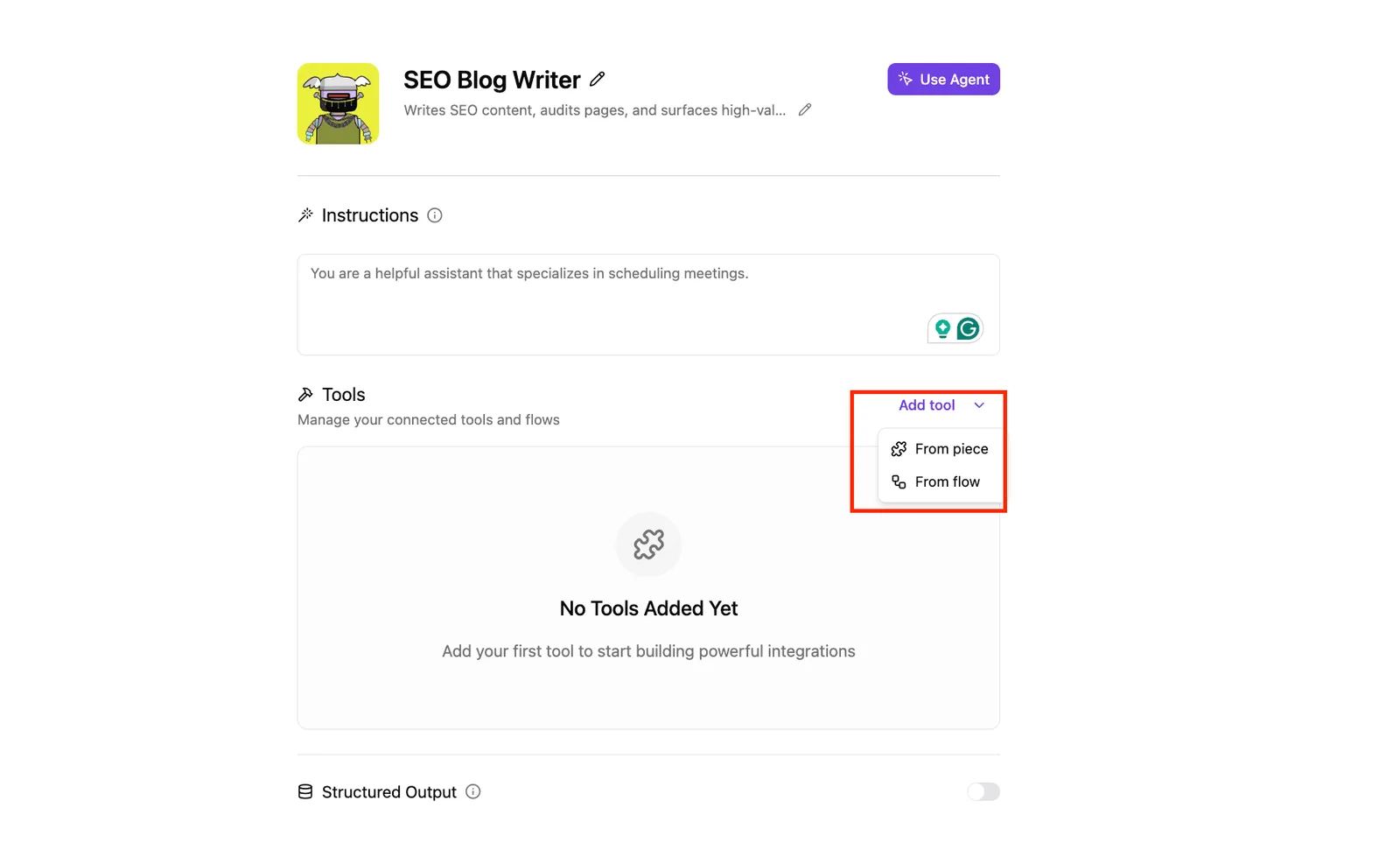
By treating Activepieces as the visual source of truth, you mitigate the competence trap described earlier in this article.
Instead of trusting a terminal output, you can inspect the run trace of each execution to verify that the AI hasn't introduced security vulnerabilities or dependency bloat.
This visibility is critical when managing the 738 integrations available in the platform, as it allows you to see exactly how the AI-generated logic interacts with external services like Salesforce or Slack before the code is ever committed to production, so developers can prevent complex system failures before they occur.
Ultimately, Activepieces acts as the safety rail for AI-native development in Cursor. It transforms the abstract suggestions of an LLM into a deterministic, visual workflow that can be audited by both technical and non-technical stakeholders.
This ensures that the speed gains provided by Cursor's native indexing do not come at the expense of system integrity or long-term maintainability, providing a structured environment where automated logic is always subject to human oversight.
Frequently asked questions about Cursor AI
Can i use my own OpenAI or Anthropic API keys in Cursor?
By inputting personal API keys, Cursor allows you to bypass its internal subscription. This gives you granular control over your per-request expenditure.
By using a personal key for Claude Opus 5.5, you can manage long-running agentic coding tasks without hitting the standard usage caps found in the Pro tier.
If your workflow requires the complex reasoning of GPT-6 Astra, Eastondev notes that adding an OpenAI key ensures you have access to flagship intelligence even if the native Cursor backend is experiencing high demand.
Privacy-conscious organizations can enable Privacy Mode to ensure their proprietary logic isn't ever used to improve future iterations of the underlying models.
The local codebase is prevented from being indexed for global model training when you activate this toggle.
Is Cursor better than GitHub Copilot for large teams?
Because its native architecture solves the context window problem by indexing the entire local codebase rather than just the active file, Cursor is a superior development environment.
This deep integration allows a new engineer to ask questions about a massive microservices architecture and receive answers that reflect the actual state of the code, reducing the time spent on manual onboarding.
The following comparison highlights how these architectural choices impact the depth of AI assistance available to you:
| Feature | Cursor | GitHub Copilot |
|---|---|---|
| Context Awareness | Full-repository semantic indexing | Primarily open-tab context |
| Model Choice | Anthropic, OpenAI, and Google models | Locked to OpenAI |
| Capabilities | Native multi-file edits and terminal control | Limited to chat and inline suggestions |
Does Cursor work offline without an internet connection?
To communicate with the large language models that power its core intelligence features, Cursor requires an active internet connection.
Because a model like Gemini 3.8 Flash resides on remote servers, you'll lose access to the predictive logic and automated refactoring tools that define the environment if you're offline.
Standard text editing and local git operations remain functional, but the AI-driven competitive advantage is neutralized until the connection is restored.
Related reading
References
Build it
Set this up in minutes.
No code required. Connect your accounts, and Activepieces runs it from there.
Start free Talk to sales