
Why a workflow can run successfully and still be wrong

Oct 22, 202614 min read
Semantic validation is the practice of evaluating automated outputs based on their factual accuracy and business logic rather than the mere technical completion of a workflow.
Logical success is not operational accuracy
The definition of a silent logical failure
When an automation completes its entire run without triggering an error code, yet produces an output that is factually wrong or business-damaging, a silent logical failure has occurred.
In these scenarios, the workflow engine reports a "success" because every API call returned a 200 OK. The infrastructure did exactly what it was told, even if what it was told to do resulted in garbage data.

A lack of semantic validation is often the root of this discrepancy. A tool might successfully move a lead from a webform to a CRM, but if a phone number populates the email field, the technical success hides a functional collapse.
Why status codes fail to reveal data errors
Catastrophic financial errors go undetected for entire reporting cycles because status codes only measure the health of the connection, not the health of the payload.
A post-mortem by Nova Data Analytics illustrates this through a retail automation that failed to account for returns, leading to a Reported Revenue of 7,129,011.
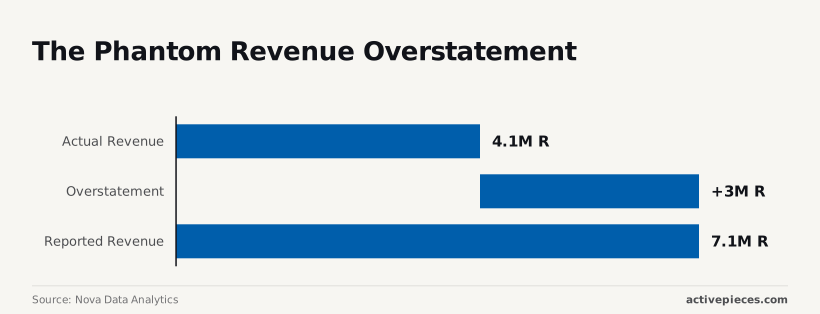
Leadership was making inventory decisions based on a 72% margin of error because the system lacked a validation layer to subtract credits.
Consequently, it produced an Overstatement of 2,985,788. The Actual Revenue was only 4,143,223, proving that a "successful" sync can still result in a multi-million dollar deficit in situational awareness.
The gap between technical uptime and data integrity
Technical uptime measures whether the lights are on, but data integrity measures whether the right information occupies the room. High availability is useless if the automation is merely a high-speed pipe for corrupted logic.
Technical uptime measures whether the lights are on, but data integrity measures whether the right information occupies the room.
| Metric | Value | Operational Consequence |
|---|---|---|
| Reported Revenue | 7,129,011 | Stakeholders authorized spending based on non-existent cash flow. |
| Overstatement | 2,985,788 | The "phantom revenue" masked a critical failure in the return-processing logic. |
| Actual Revenue | 4,143,223 | The true liquidity available for operations was 42% lower than reported. |
Monitoring "uptime" is a superficial safety net. To achieve true reliability, teams must move beyond checking if the script finished and start checking if the numbers it generated are physically possible.
Everything below works on Activepieces' free plan. Start without code or a credit card.
Data integrity fails when schemas ignore business context
Standard validation fails because it confirms a payload’s structure without verifying if the values are logically sound for the business.
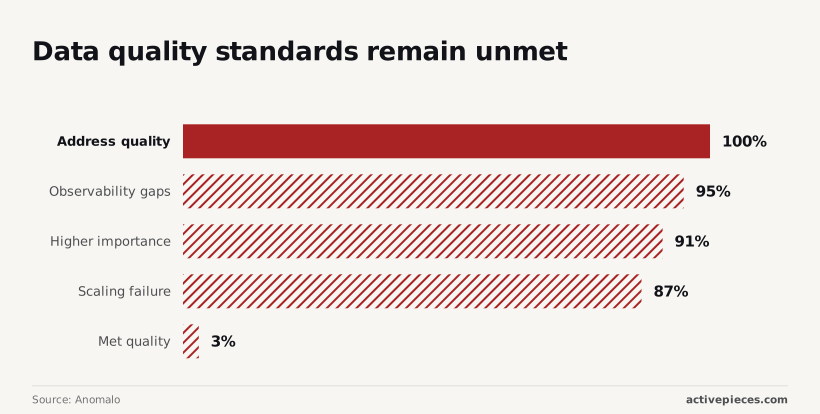
While 91% of teams surveyed by Anomalo rank data quality as a high priority, only 3% actually meet their own quality standards, leaving a vast majority of organizations operating with unreliable information.
Almost every automated pipeline is currently delivering flawed information. The following table illustrates how a workflow can technically succeed while failing to provide usable business data.
| Data Point | Schema Check (Passes) | Semantic Check (Fails) |
|---|---|---|
| Order Quantity | Is Integer? | Is within historical range? |
| Customer Email | Matches Regex? | Does domain have a valid MX record? |
| Discount Code | Is String? | Is the current date before expiry? |
Automated triggers become liability engines when this gap exists between technical success and factual accuracy.
The 'empty string' success trap
When a workflow treats a non-null empty string as a valid input, it will complete its run while corrupting downstream databases.
In the Anomalo report, 100% of respondents identified address quality issues as a primary pain point, indicating that poor data hygiene is a universal struggle across the industry, which means no organization is currently immune to the operational risks of bad records.
Systems are accepting "Success" signals for records that lack street names or zip codes, which dooms downstream logistics and delivery operations.
Activepieces addresses this by allowing an Agent step to sit directly alongside deterministic automation steps in a single flow, rather than forcing a fragile bridge between two separate products.
By running judgment and fixed rules on the same engine, a builder can inspect one unified run trace to see exactly how an LLM's decision interacted with a database write, which is why MoneyGram and FundingSocieties run it in production.

Unit and currency errors in pipelines
Automations often break when they ingest a raw number without verifying the unit of measure. This leads to massive financial discrepancies.
95% of organizations report significant observability gaps, which means most teams are effectively blind to the health and reliability of their data pipelines. These unit mismatches often go undetected until a manual audit reveals that a "successful" sync billed a customer in the wrong currency.
Fetching data from a stale cache results in a 200 OK status code, but provides a value that no longer reflects reality.
This inability to validate freshness contributes to why 87% of companies fail to scale their data operations, as the lack of trust prevents the widespread adoption of automated workflows, so leadership remains hesitant to commit resources to further integration.
Prioritizing workflow throughput over total validation
Why teams accept 'good enough' data quality
To avoid the catastrophic bottlenecks that occur when a single malformed field halts an entire revenue chain, teams often trade minor data discrepancies for speed.
In high-volume environments, a record that is mostly correct allows downstream teams to continue their work, whereas a hard failure stops the clock entirely.
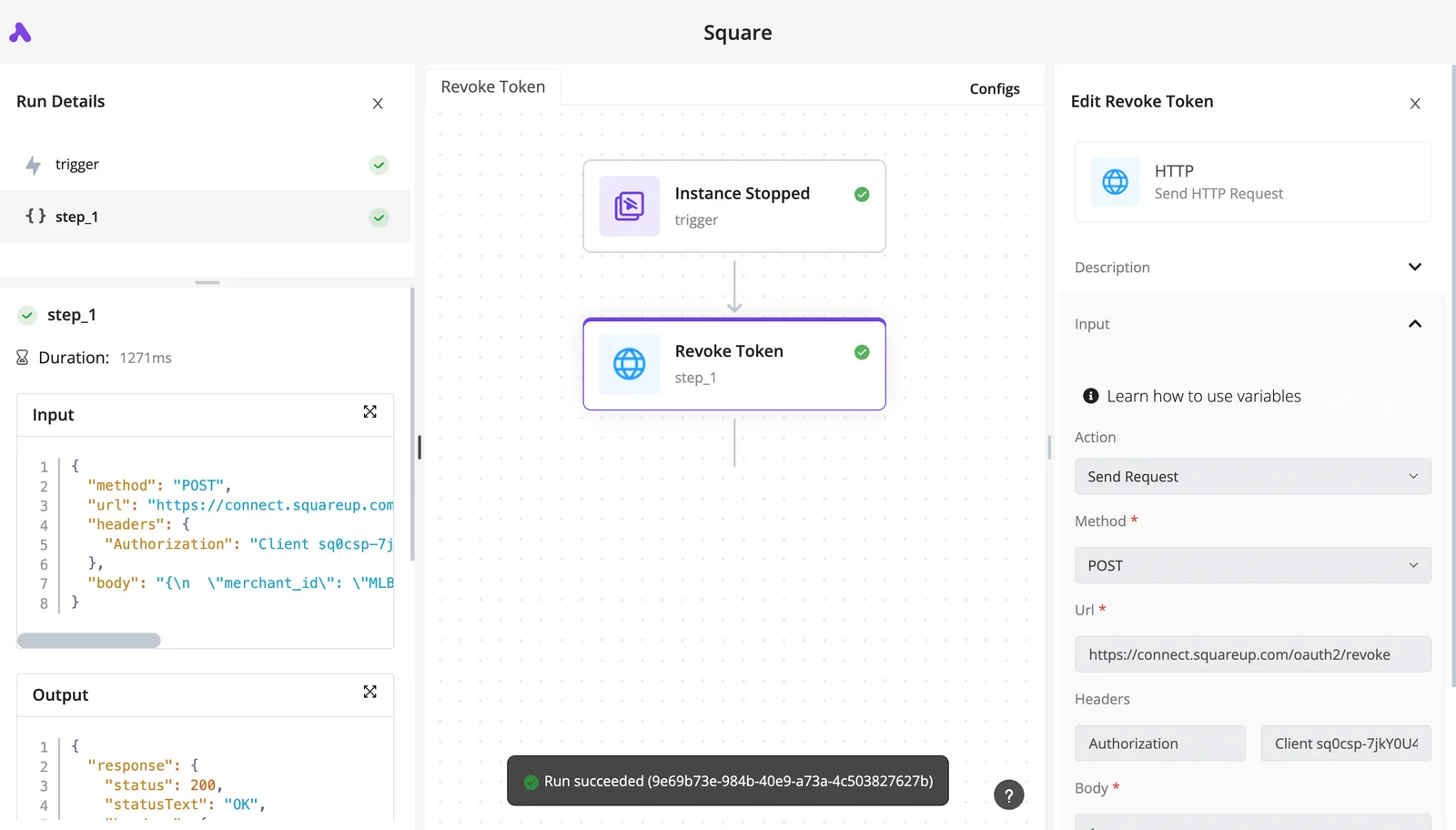
The "Green Banner Paradox" best illustrates this tension. The visual of a successful workflow execution sitting next to a database entry with a zeroed-out total price field shows that a system can technically succeed while failing its business purpose.
The hidden cost of over-engineering error paths
Building exhaustive validation for every possible edge case creates a maintenance burden that eventually outweighs the value of the automation itself.
Each custom validation script or conditional branch is a new point of failure that requires updated documentation for every schema change. Senior engineering hours are needed to debug why a safety check blocked a legitimate high-value transaction.
Why workflow speed often outweighs data accuracy
Growth-stage companies often use velocity as a primary metric because being first to respond to a lead or update a price is more valuable than being perfectly precise.
If a CRM takes ten minutes to validate every field before syncing, the sales representative loses the window of opportunity to call a hot lead.
A "fire and forget" approach ensures the data lands where it needs to be in these scenarios. This allows the organization to iterate on quality later without sacrificing the immediate momentum that drives revenue.
Easier to see it running than to read about it: set it up free, no card.
Why silent failures cost more than loud breaks
Silent failures represent a lethal trade-off where organizations purchase immediate momentum with the high-interest debt of corrupted data.
While a "loud" break, such as a 500 error in an API, stops the line and forces a fix, a silent failure allows the process to complete with incorrect information.
Silent failures represent a lethal trade-off where organizations purchase immediate momentum with the high-interest debt of corrupted data.
The compounding debt of automated misinformation
Automation without semantic validation creates a "Silent Failure Gap" where the vast majority of errors bypass standard monitoring.
According to research by OpenAdapt, out of seven transactional fault classes, the system detects only 2. Five out of seven faults silently pass through the workflow.
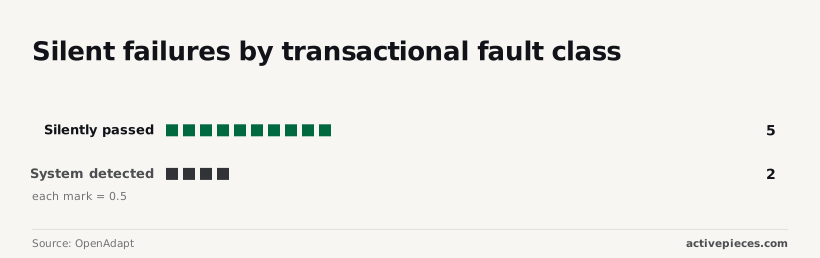
For every bug your logs catch, more than two others are actively writing "hallucinated" or misplaced data into your database of record.
The consequence is a loss of trust in the entire technical stack. Once a manager finds five wrong entries in a dashboard, they stop believing the other five thousand, rendering the automation investment worthless.
Reputational risk in customer-facing automations
When a workflow successfully sends an incorrect invoice or a tone-deaf automated email, the "success" metric becomes a liability.
A single incorrect billing run can trigger a 15% increase in churn for that cohort, as customers interpret technical sloppiness as a lack of security or care, effectively turning a minor database error into a significant loss of revenue, which means the financial impact of a single glitch is far greater than the cost of the error itself.

The manual labor required to 'unwind' a successful wrong run
The cost of repair for a silent failure is exponentially higher than the cost of prevention because it requires forensic reconstruction.
Cisogenie notes that if a workflow incorrectly updates 1,000 leads in a CRM like Salesforce, an engineer must spend hours comparing audit logs and backups to "unwind" the changes.
This process costs significantly more in billable hours than the thirty minutes it would have taken to write a validation check.
Because 5 out of 7 fault classes bypass detection, the labor required to clean up after these "successful" runs often exceeds the time saved by automating the task in the first place.
Building semantic guardrails within Activepieces workflows
Activepieces allows engineers to move beyond linear execution by embedding logical gates that intercept corrupted data before it reaches the production database. While standard automation platforms prioritize the "happy path," this environment treats every step as a potential point of failure that requires explicit validation.

Using branch steps for multi-point validation
Activepieces provides a per-step agent decision trace that exports to SIEMs, allowing teams to divert data into quarantine paths whenever it fails to meet predefined semantic criteria.
In the following interface view, the workflow designer uses a scheduled trigger to initiate a sync, but the subsequent steps determine whether that data is fit for consumption.
The integration selector displays the available destinations, such as the Google Sheets or Microsoft Excel integrations, which represent the final landing zones for the data.
By inserting a Branch integration before these actions, a developer can verify that a "Price" field is a number within an expected range, preventing a decimal error from triggering a mass pricing update.
Adding human-in-the-loop review to automated workflows
High-stakes automation requires a pause mechanism where the system presents its "reasoning" to a human operator before finalizing a transaction. Within Activepieces, the approval link feature or an internal notification step sends the processed data to a communication tool like Slack.
If the logic produces an improbable output, such as a discount code that reduces a cart total to zero, the flow halts until a user clicks a confirmation URL. This ensures that the speed of the machine does not outpace the oversight of the operator.
Automating the 'revert' when data fails sanity checks
Reliability is defined by the ability to undo a failure. Sophisticated flows include a "revert" path that fires when a downstream validation check returns a false value.
If a row is inserted into a CRM but a subsequent check finds the contact email is malformed, the flow follows a branch to a "Delete Row" or "Update Status" action.

The Google Sheets "Delete Row" action removes the erroneous entry. The Microsoft Excel "Update Row" action flags the record for manual review.
The AITable "Find Rows" action locates the source of the duplicate to prevent re-entry. This self-healing loop ensures that the cost of a mistake is limited to a single log entry.
How to audit workflows for logical accuracy
Logical accuracy is verified by comparing the final state of your data against the original intent of the business process.
Relying on the green checkmarks in your execution history is insufficient. While a workflow engine confirms the code didn't crash, it cannot know if a discount was applied twice or if a lead was routed to a deactivated user.
Identify your 'high-blast-radius' automations
Prioritize auditing workflows that interact with customer-facing communication tools or financial ledgers, as these systems have the highest cost of reversal when logic fails.
Focus your energy on the following categories:
- Transactional systems that trigger payments or credit adjustments.
- Customer Relationship Management (CRM) platforms where data corruption affects the entire sales pipeline.
- External communication gateways that send emails or SMS messages to your user base.
Validating data fields to catch silent failures
Prevent "silent failures" by inserting validation steps that halt the workflow if the data falls outside of expected parameters.
If a price field returns a negative number or a mandatory email field is empty, the automation should trigger an error state immediately.
This allows a human to intervene before the corrupted data is committed to your database.
A recurring audit reveals the gap between technical execution and factual correctness by forcing a side-by-side comparison of the input and the result.
- Identify the 'Golden Record' (the source of truth).
- Sample 10 successful runs from the last 7 days, so you are only evaluating a tiny, recent window of your system's performance.
- Manually compare the workflow output against the source.
This manual verification serves as the final filter for errors that bypass automated checks. Once these discrepancies are identified, the next step is hardening the infrastructure against the most common failure modes.
Frequently asked questions about workflow accuracy
Can an API return a 200 OK but still be wrong?
A successful HTTP status code only confirms the transport layer succeeded, meaning the server received the request and sent a technically valid response.
In a production incident for a logistics firm, the shipping API returned a 200 OK status while delivering an empty JSON object because the authentication token lacked specific permissions.
Because the workflow engine only checked for a successful connection, it proceeded to "successfully" update five hundred records with null values, wiping out the day's tracking data.
A 200 OK is merely a handshake. Without a schema check to ensure the payload contains the expected keys, the system is essentially accepting a blank check as payment.
How do I monitor for logical errors if the system says 'Success'?
Logical monitoring requires implementing semantic assertions that compare the output against known business constraints rather than just execution logs.
If a workflow calculates a discount, a successful execution could still result in a negative total price, which is a logical failure.
To catch these, you must insert validation steps that act as circuit breakers. Use schema validation steps to ensure the data structure matches the downstream requirements.
Apply range checks to flag values that fall outside of realistic historical parameters. Implement consistency checks that compare the new output against the previous state to detect impossible jumps in data.
Should I validate data at the source or inside the workflow?
Data should be validated at the earliest possible point of entry to prevent "garbage in, garbage out" from cascading through the stack.
However, since you rarely control the third-party platforms providing the data, the workflow must act as a secondary gatekeeper.
Validating at the source reduces the processing load on your automation. Validating inside the workflow protects your internal databases from external API regressions or unexpected format changes.
Relying on one or the other creates a single point of failure. Using both creates a layered defense that isolates bad data before it reaches your system of record.