
Neon Alternatives in 2026: Pricing and Features

Nov 15, 202614 min read
A Neon alternative is a hosted Postgres service that removes the one limit pushing you off Neon, whether that's storage, wake-up delay, billing shape, extensions or quotas.
Most people who leave aren't leaving Postgres; they're often just trying to keep a workflow running, such as a Activepieces automation that writes to the database on a schedule and shouldn't stall on a cold start.
By the end of a half day you'll have a chosen host, a restored copy of your data on it, and a passing connection test from your application.
Managed Postgres alternatives to Neon
What counts as a Neon alternative
The test is narrow. It speaks standard Postgres, so your existing drivers, schema and queries move over unchanged, and it's managed, so you aren't taking on backups and patching yourself.
That covers other serverless Postgres providers, conventional managed Postgres from the large cloud vendors, and a plain Postgres instance on a small server you run. It doesn't cover a different database engine, because that turns a one-afternoon move into a rewrite.
Why people leave Neon
The first team to hit one is usually the one running scheduled jobs or automations.
Activepieces puts no cap on the number of flows on any plan, free included, and every run leaves a trace you can read, so a database that has to wake up before it answers shows up in the run that hit it.

Find the one that matches your own complaint; that match is your selection criterion later. Here are the five limits that come up most, each tied to the Neon page where it's documented.
- The free plan's per-project storage cap, described on Neon's pricing page, which a growing prototype outgrows before it earns revenue.
- Cold-start wake-up after idle periods, covered in Neon's compute autosuspend documentation, which shows up as a slow first request.
- Usage-based billing, explained on the pricing page, which makes the monthly bill harder to forecast for a steering committee.
- Extension support, listed in Neon's extensions documentation, where a needed extension may simply be absent.
- Plan quotas on projects, compute and connections, set out on the plans page, which cap how far one account can scale.
If none of those five limits is blocking you, stay. A database that works is worth more than a migration that's merely tidy. Staying also makes sense when your complaint can be fixed by a settings change, such as adjusting autosuspend, before you change hosts.

If you are running this arithmetic for your own team, see what the same workload costs on Activepieces.
Comparing Neon alternatives on price
If a settings change won't fix it, compare hosts by the load you actually run, because the cheapest option flips between a light workload and a steady one.
Neon alternatives pricing table (November 2026)
Read each monthly range as "what you pay as usage grows." The figures come from kubeden's cost comparison, listed from lightest workload to heaviest. The table below sets Neon against seven alternatives, and hosts without a published figure show their billing model instead.
| Host | Price per month | Core strength | Main limit | Suits |
|---|---|---|---|---|
| Neon baseline | $0 / $27 / $95 | Scale-to-zero, branching | Cost climbs under constant load | Spiky or dev workloads |
| Supabase | $25 / $75 / $82 | Auth, storage and Postgres together | Flat floor of $25 | Teams wanting a full backend |
| RDS / Aurora | RDS $18 / $53 / $57; Aurora $7 / $54 / $180 | Mature, predictable operations | More setup, less branching | Steady 24/7 production |
| Cloud SQL | Billed by instance and storage | Fits Google Cloud estates | Instance-based, no scale-to-zero | Teams already on Google Cloud |
| Crunchy Bridge | Billed by cluster size | Postgres-specialist operations | Fewer app-platform extras | Teams wanting Postgres expertise |
| Railway | Usage-based | Fast deploys beside your app | Less database tuning depth | Small apps, prototypes |
| Render | Billed by instance plus storage | App and database in one place | Instance-based pricing | Teams hosting apps there |
| Xata | Published on its pricing page | Branching-style workflows | Smaller ecosystem | Teams who miss Neon branching |
Prices and plan limits checked against neon.com on November 15, 2026.
Choosing a Neon alternative by price
$0 is where Neon starts, with 100 free projects, so prototypes cost nothing. At the middle workload it's $27, against $53 on RDS and $75 on Supabase.
At the heaviest it reaches $95, while RDS stays at $57 and Supabase at $82, so a database that never idles pays more on Neon than on either.
At the same point Aurora comes to $180, which shows that "AWS" isn't automatically the cheap answer. PlanetScale, outside the table, runs $5, $28 and $33, the gentlest curve of the group, which means cost growth tracks load linearly.
So if your complaint is the bill under constant load, test RDS or Supabase first. If it's missing auth or storage, Supabase. If it's operations discipline, Crunchy Bridge.
Neon wins on light and uneven load. Its $0 at the low end and $27 in the middle are among the lowest figures here, so projects with bursty traffic should try it first.
Migrating from Neon to Postgres
Once you know the new host fits your load, the move is five stages, and Neon keeps serving traffic until the last one.
Stage 1 is to create the target and test a connection. Create an empty database on the new host and copy its connection string. Then confirm you can reach it:
psql "$TARGET_URL" -c "select 1;"If this fails, the cause is a firewall rule or an SSL setting. Nothing else has changed yet, so it costs you nothing to fix.
Stage 2 is to match version and extensions. Ask Neon what it runs, using the direct connection string:
psql "$NEON_DIRECT_URL" -c "show server_version;"
psql "$NEON_DIRECT_URL" -c "select extname, extversion from pg_extension;"
Provision the target on the same major version or newer, then create each extension there, for example create extension if not exists vector;. A missing extension on the new host shows up now, while it can only delay you.
Stage 3 is the dump and restore. Use the direct string, not the pooled one. The pooled host name contains -pooler and is built for application traffic, not long dump sessions.

pg_dump -Fc --no-owner --no-acl -d "$NEON_DIRECT_URL" -f neon.dump
pg_restore --no-owner --no-acl -d "$TARGET_URL" neon.dump
Neon is still live, so the app sees no change. Save these commands as a script; you'll run them again at cutover.
Stage 4 is to verify row counts. Run an exact count on your most important tables against both databases and compare the output:
psql "$NEON_DIRECT_URL" -At -c "select count(*) from orders;"
psql "$TARGET_URL" -At -c "select count(*) from orders;"
Don't rely on n_live_tup from pg_stat_user_tables. It's an estimate, so a match proves little. Matching exact counts is your evidence that the copy is complete.
Stage 5: cut over with a rollback window
Pause writes, rerun the dump and restore from Stage 3 to catch recent changes, and switch the app's connection string to the target.
Whatever tool records your configuration changes should log who edited the connection settings and when.
The audit log below shows that pattern, with each create, update and delete tied to a named user, a project and a timestamp, so if something breaks mid-cutover you can see who last touched the connection.
With that record in place, leave Neon untouched for a defined window.
Rolling back means pointing the app at the old string, and you can only do that while the old database still exists. Decommission it once the new host has carried real traffic without incident.

Worth checking against a plan that does not meter every step: one credit covers a whole run on Activepieces.
Automating post-migration Postgres checks with Activepieces
So that the old database doesn't stay up on someone's memory alone, Activepieces, a workflow automation tool, can run the Stage 4 row-count query on a daily schedule.
It posts to Slack or sends an email when the numbers drift. The check is narrow, and it's useful for the stretch between cutover and decommissioning.
Open Activepieces' built-in chat and describe that check in a sentence or two, and what appears is a live flow in your account, made of the same steps you'd drag in by hand and governed by the same RBAC and audit logs as any other flow.

Each run of it leaves a run trace you can open and read step by step. A run costs 1 credit however many steps it has, so a daily check uses about 30 of the free plan's 1,000 monthly credits.
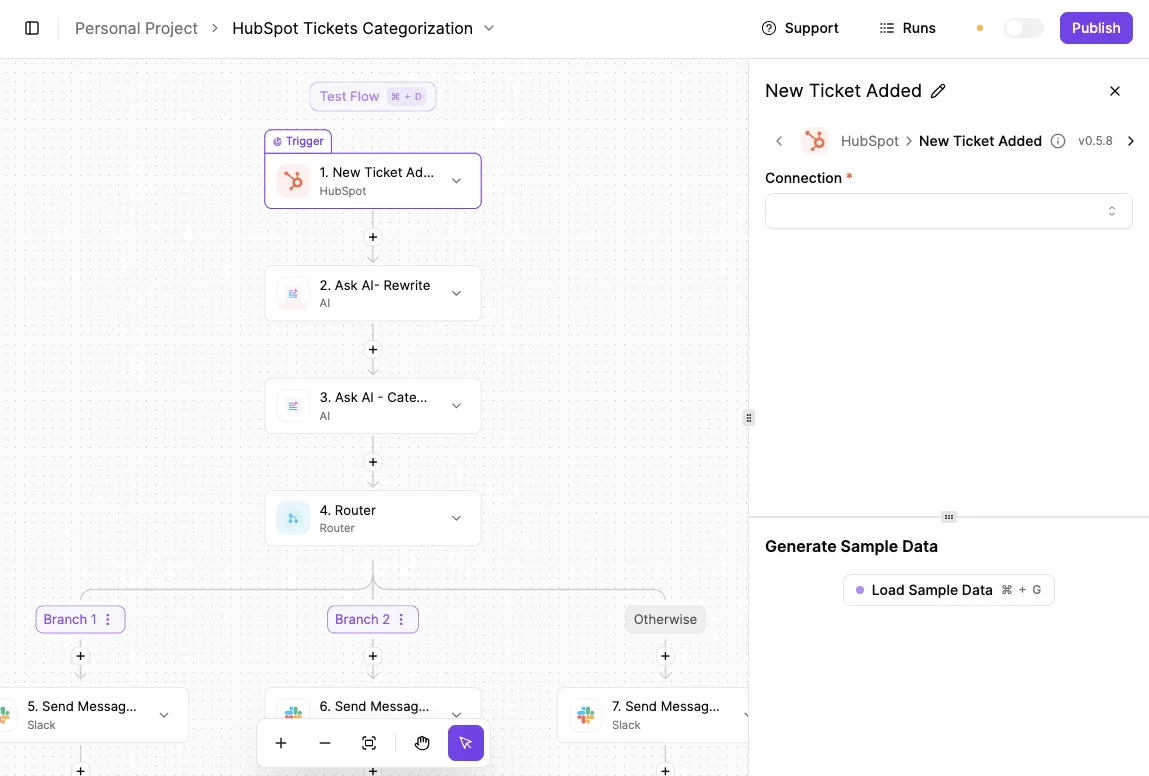
Although the example below is a different flow, a HubSpot ticket categorizer, it shows the builder canvas this check would use. A trigger step sits at the top and is selected, with its configuration panel open on the right.
Below it come processing steps, a Router that splits into branches plus an Otherwise path, and Slack "Send Message" steps at the bottom.
The drift check has the same shape: a schedule at the top, a query in the middle, and a branch that only reaches Slack or email when something is wrong.
- Add a schedule trigger set to run once a day, at a time when write traffic is low.
- Add the PostgreSQL integration and run your Stage 4 row-count query against the old database. Name the connection after the host it points to, so nobody confuses the two later.
- Add a second PostgreSQL step running the same query against the new host.
- Add a Router that compares the two results. One branch handles "counts match" and does nothing. The other handles "counts differ".
- On the differing branch, add a Slack "Send Message" step or an email step. Include both counts and the table name, so whoever reads the alert can act without opening the workflow.
Once it runs cleanly, copy the flow for each additional database you migrate. The first one takes setup time. Later ones should only need new connections and table names.
What this doesn't do
Activepieces doesn't host Postgres, and it doesn't perform the migration. It doesn't replace the dump-and-restore or replication stages earlier in this guide, and it doesn't fix drift when it finds it. It only tells you.
Its MIT-licensed core runs the same way self-hosted as on cloud, so the check can sit beside the new database or outside it, whichever your network allows.
Rows can be changed without being added or removed, so a matching row count proves less than it seems to: a count won't catch an update that went missing.
Treat the alert as a prompt to investigate, and keep your own spot checks for the tables that matter most.
When the alerts have been quiet for the whole period you set for real traffic, you have the evidence to decommission the old host.
Action plan for leaving Neon for Postgres
Before lunch you can finish the first two of five actions that turn a vague complaint about Neon into a dated cutover.
Before lunch
The first two actions are decisions, not work. They cost you an hour.
First, name the one Neon limit that bothers you. Ask which team hit it first, whether that was the one waiting on a branch, the one watching a cold start, or the one reading a bill.
Write the limit in one sentence with that team's name beside it. If you can't finish the sentence, you're leaving over a mood rather than a limit, and no host will fix that.
Second, shortlist two hosts. Pick the two whose pages say plainly that they remove your limit. Two is enough to make the price comparison honest; a third host makes the next step slower without making the answer better.

By Friday you should have a cost you can defend and a rehearsal you can repeat, and the remaining three actions produce that evidence.
- Price your real storage and compute on their pages. Use the size of your database today and the compute your busiest hour needs, not the sample workload on a pricing calculator. Then read the page for what the plan excludes, since a low headline price that leaves out your limit has moved your problem, not solved it.
- Rehearse Stages 1 to 4 on staging. Run every stage against a copy, in order, and note how long each took and what you had to fix by hand. Those notes become your template for production, and a template you've already run is what keeps the real move to an afternoon.
- Set a cutover date. Pick a day, tell the people who depend on the database, and put the quiet-alerts period from the last stage on the calendar next to it. A date with an owner is the difference between a migration and a plan to migrate.
Frequently asked questions
After a rehearsal, what's left to ask is mostly about cost, downtime and what doesn't carry across.
Is there a free alternative to Neon?
Yes, but "free" means a limit you'll meet later. Several hosted Postgres providers have free tiers, and these usually cap storage or pause idle projects, so a side project survives but a production app with steady traffic may not.
Running Postgres yourself on a machine you already pay for costs nothing extra in licensing, but you then own backups and upgrades. Pick by which limit you're escaping, not by the price of zero.
Can I move from Neon without downtime?
You can get close to it, and the write freeze at the end can be short. Set up the new database, copy the data across, and keep it in sync with logical replication while the app still reads and writes to Neon.
Once the two match, pause writes briefly, let the last changes land, and switch the connection string.
Because each stage leaves the old database running, you can step back at any point before the switch. Check extensions first: list what's installed on Neon and confirm every one is available on the target, because a missing one breaks the restore partway through.
Does Neon's Databricks ownership change my pricing?
Your plan and its published limits change your bill; ownership by itself doesn't. I have no confirmed pricing changes to report, so read the current pricing page and any notices sent to your account.
If a change pushes you over the limit you care about, that's the same trigger as any other reason to leave, and the staged move above applies unchanged.
Can I use Neon's branching on another host? Not in the same form. Neon's branches are instant copies made possible by how it stores data, and that's part of its own architecture rather than a Postgres feature. Elsewhere you approximate it:
- Restore a recent backup into a scratch database for each test run.
- Use a template database for fast local copies of a small schema.
- Use a platform's own branching, where one exists, knowing it works on that platform's terms.
If branching per pull request is the reason you use Neon, that's a limit worth weighing before you leave.
Is Supabase just Postgres?
Its core is a standard Postgres database, and you can dump it and take the data elsewhere. Around it sit authentication, file storage and an API layer, and those integrations are what you'd have to replace.
If you only need the database, you can use it as one and ignore the rest; if your app calls the extras, plan to move those as separate steps.
Related reading
References
Running the numbers
See what the same workload costs here.
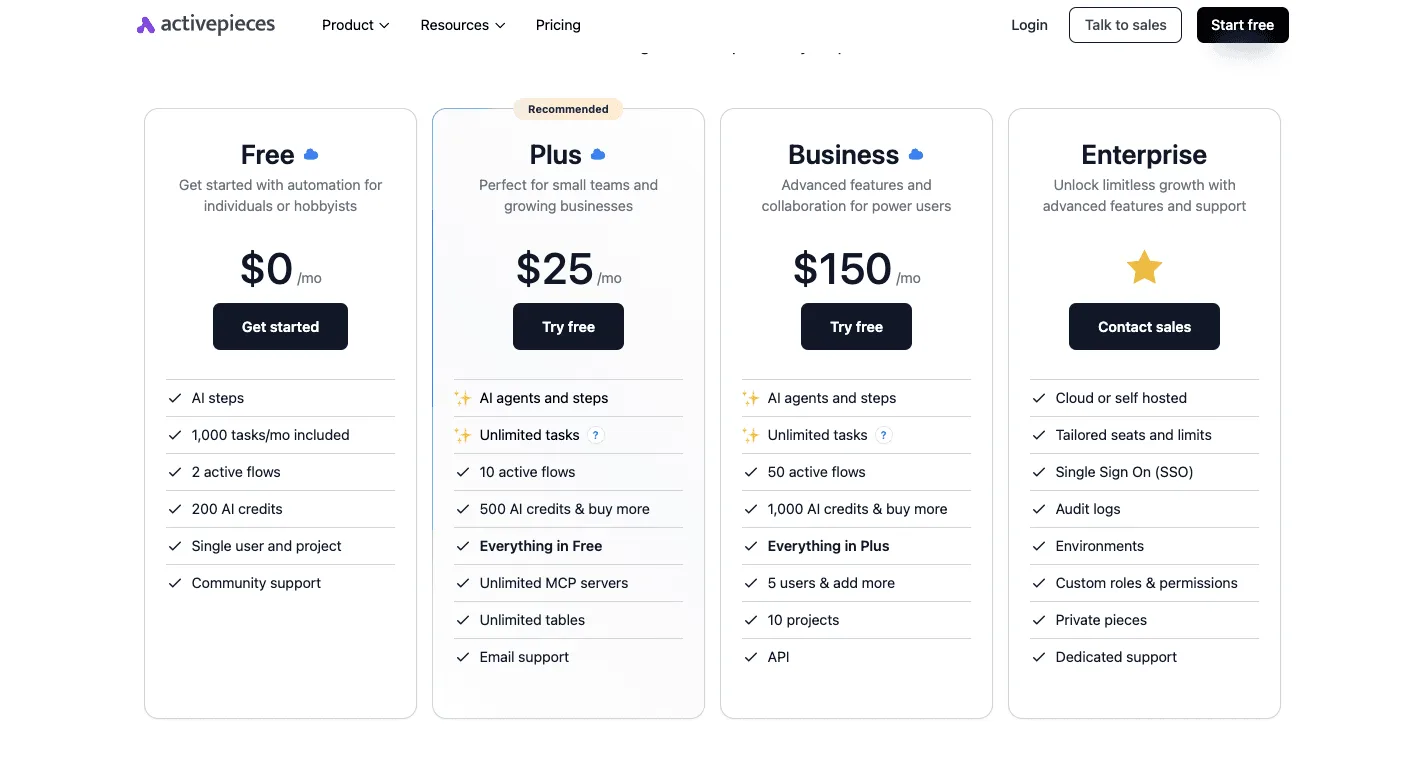
Free forever plan, and every paid plan self-hosts at no extra cost.
See pricing Talk to sales