
Postgres Pricing: What Managed Hosting Costs in 2026

Oct 31, 202617 min read
PostgreSQL is free, open-source software, so "Postgres pricing" means what a hosting provider charges to run it for you, whether you're wiring it into a Activepieces workflow or a plain web app.
That ranges from nothing on a free tier to hundreds of dollars a month in production.
Postgres pricing is the total amount a hosting provider charges to run a managed PostgreSQL database, combining the base plan with usage-based costs such as storage, egress, backups, high availability and connection limits.
The sticker price of a plan covers only part of that bill.
What Postgres pricing means for a buyer
The software is free, the hosting isn't
Anyone may download, modify and run the database without paying a fee, because the PostgreSQL licence permits it.
What you buy from a host is everything around it: the machine it runs on, the disks it writes to, the network it answers over, and the people who patch it at 3 a.m.
That's why two providers offering the identical database engine can quote prices that can't be compared line by line. You're comparing operating models, not software.
What you buy from a host is everything around it: the machine it runs on, the disks it writes to, the network it answers over, and the people who patch it at 3 a.m.
If you handle personal data, this matters most. Where a database physically runs decides which jurisdiction's rules apply to it, and under GDPR Chapter V a transfer outside the EEA needs a lawful mechanism.
A region that costs more per month may be the only one your architecture can legally use, so the cheapest plan on a pricing page may not be an option at all.
The four things every host charges for
Read a hosted Postgres bill and you find four components, though a plan's headline price usually names only the first:
- Compute: metered by the size of the instance, billed per hour or per month, or in some serverless designs by capacity actually used.
- Storage: metered by gigabytes provisioned or consumed, sometimes with a separate charge for throughput.
- Egress: metered by data leaving the provider's network, so it grows with how often and how far your application reads from the database.
- Backups and high availability: metered by retained backup volume and by the standby replicas kept ready to take over, which are billed as additional instances.
Small alone, each can dominate in combination, so a quote that lists only compute tells you the floor, not the total. The sections below take them one at a time, because the surprises sit in different places for different workloads.
How we verified Postgres pricing and limits
Check the date first: figures that could be verified come from the vendor's own pricing and documentation pages, read on 31 October 2026. Providers change plans without notice, so treat any figure as a snapshot and confirm it against the live page before committing.
Where a vendor doesn't publish a number, the article says so instead of estimating one.
If you are running this arithmetic for your own team, see what the same workload costs on Activepieces.
Current managed Postgres plans and prices compared
Those meters are why no single price line can compare these eight vendors, and the table below shows how much remains unconfirmed once you try.
Where we couldn't verify a figure against the vendor's pricing page, it reads "not verified" rather than a guess. Treat every such cell as a question to put to the vendor before you commit.
| Vendor | Starting price | Compute/memory | Storage | Connections | Backup retention | Free tier |
|---|---|---|---|---|---|---|
| Supabase | not verified | not verified | not verified | not verified | not verified | Yes |
| Neon | not verified | not verified | not verified | not verified | not verified | Yes |
| RDS | not verified | not verified | not verified | not verified | not verified | not verified |
| Cloud SQL | not verified | not verified | not verified | not verified | not verified | not verified |
| Azure | not verified | not verified | not verified | not verified | not verified | not verified |
| DigitalOcean | not verified | not verified | not verified | not verified | not verified | not verified |
| Render | not verified | not verified | not verified | not verified | not verified | Yes, time-limited |
| Heroku | not verified | not verified | not verified | not verified | not verified | No |
Two columns go missing from a pricing page's headline more than any others: connection limits and backup retention. A gap there means you must read the documentation, not the plan card. What follows sorts the vendors by how they bill.
Supabase and Neon offer free tiers, and Render's free database is time-limited. A free tier is a test environment, not a production one: don't put personal data of real users in it until you know where it is hosted and how long backups persist.
For a monthly figure closer to a bill, look at the fixed plans Heroku and DigitalOcean sell. Even so, compare connection limits and retention before price, since those decide whether the plan survives a busy day or a restore request.
With RDS, Cloud SQL and Azure, instance, storage, backups and traffic are each billed by the hour, separately. Region choice matters here: it determines both the rate and where data resides, so the cheapest region may not be a lawful one for your users.
What Postgres hosting costs at realistic usage
Inside the one region you can lawfully use, a monthly bill is five line items added together, and which one dominates changes as the workload grows.
I have quoted a few vendor prices here, but rates differ by provider and region, so the table shows how each total is built from your provider's own rate card.
| Workload | Compute | Storage | HA/replica | Backups | Egress | Total per month |
|---|---|---|---|---|---|---|
| Side project (1 GB) | One smallest instance | 1 × storage rate | None | Usually within the plan | Usually within the allowance | Compute + 1 × storage rate |
| Small SaaS (50 GB, failover) | One mid instance | 50 × storage rate | A standby, billed like a second instance | Retention beyond the default | Within the allowance, if modest | 2 × compute + 50 × storage rate + extra backup retention |
| Growing product (500 GB, heavy reads) | Large primary | 500 × storage rate | Standby plus one or more read replicas, each billed as an instance | Scales with data size | Often past the allowance | Replicas × compute + 500 × storage rate + backups + overage |
Read across the rows and the compute multiplier is what moves first, then storage and egress. The sections below explain why.
At 1 GB the bill is essentially compute. Storage rounds to almost nothing, so the instance you pick is the cost, and the cheapest plan that stays awake is the sensible choice.
Paying for a standby that mostly sits idle is what failover means, so compute is multiplied before storage matters.
Backup retention is the next surprise: a longer window than the default is charged separately, so decide the window your recovery obligations require before you price the plan.
Once you reach 500 GB with heavy reads, each read replica is billed as a full instance, and egress can pass the plan's allowance. The sticker price now says little, because the multipliers decide the total.
Hidden Postgres costs and limits people hit
Seven items do most of the damage: egress, IOPS, storage that never shrinks, HA and replicas, backup retention, connection limits and free-tier pausing. The table shows who each one hits and what to do about it.
viz type=stackrank title="What 1 TB of storage costs across AWS services" unit="$ a month" source="HostItWorks - https://hostitworks.com/cloud-tools/aws-cost-calculator/"17.76 a month, about five times the $23.55 for the same data in S3." S3 Standard: 23.55 EBS gp3: 81.92 RDS storage: 117.76
| Item | Who is hit | How the bill moves | Fix | Vendor doc |
|---|---|---|---|---|
| Egress | Cross-region or analytics traffic | Per-GB transfer fees | Keep readers in-region | Provider data-transfer pricing page |
| IOPS | Write-heavy apps | Provisioned IOPS add-on | Right-size, cache | Provider storage docs |
| Storage that does not shrink | Teams that bulk-delete | Pay for the high-water mark | Dump and restore | Provider storage docs |
| HA and replicas | Production databases | Roughly doubles compute | Add only where needed | Provider HA docs |
| Backup retention | Compliance-bound teams | Snapshots beyond free quota | Set retention deliberately | Provider backup docs |
| Connection limits | Serverless and many-worker apps | Forces a bigger tier | Pool connections | Postgres max_connections docs |
| Free-tier pausing | Prototypes | Pause, then paid upgrade | Plan the upgrade | Provider plan docs |
Each fix is cheaper than the surprise it prevents.
When traffic leaves a region, it is billed per gigabyte, so a reporting tool in another region quietly adds a line item. Under GDPR, Chapter V (Articles 44–50) restricts transfers outside the EEA, so the cheaper region isn't always a legal option.

On S3 Standard, HostItWorks prices 1 TB at $23.55 a month, which suits backups and exports. EBS gp3 costs $81.92, so block storage runs about 3.5 times as much.
RDS storage costs $117.76, about five times S3, so every terabyte of old data kept inside the live database is the most expensive place to keep it.
Because every connection costs Postgres memory, a small plan with a low ceiling pushes serverless functions into errors, and the usual remedy is a pooler rather than a larger tier.
Scheduled automation is one of the quieter sources of those connections, and the usual instinct is to cram a polling job into as few steps as possible to keep the automation bill down.

Activepieces, which has a Postgres integration among its 746 integrations, bills the run and not the steps inside it: 1 credit per flow run, so a ten-step flow that queries, checks, branches and writes costs the same as the two-step shortcut it replaced.
Zapier's per-task and Make's per-module pricing pages show the opposite arrangement, where every extra step is a charge. MoneyGram, Moneypenny, Alan and FundingSocieties run it in production. Each such flow still holds a connection against the ceiling above.
Add a standby replica and compute roughly doubles. Retention beyond the included window bills as snapshot storage, so set it to your actual recovery and audit obligations.
If a free database sits idle, it may pause, so the first request after a quiet week can fail or stall. Expect an upgrade before launch, not after.
Worth checking against a plan that does not meter every step: one credit covers a whole run on Activepieces.
Self-hosting and the closest alternatives compared
Cheapest on the invoice, self-hosting is also the most expensive in hours, while MySQL, Atlas and Aurora each swap Postgres's portability for a different dependence.
The table shows where each option starts and who carries the operational load; take from it that the cheaper the row, the more of the work you own.
| Option | Starting price | Free tier | What you operate | Scaling model | Lock-in | When it wins |
|---|---|---|---|---|---|---|
| Self-hosted VM | A VPS rental, from $6.49 a month | None; you pay for the VM | Everything: patching, backups, failover | Resize the VM or add replicas by hand | Lowest | Predictable load and in-house database skills |
| Managed Postgres | Per-instance plan rate | Offered by some providers | Schema and queries | Plan tiers, plus read replicas | Low; standard Postgres | Teams that want no on-call |
| Managed MySQL | Per-instance plan rate | Offered by some providers | Schema and queries | Plan tiers, plus read replicas | Low to moderate | Existing MySQL applications |
| MongoDB Atlas | Per-cluster tier rate | Yes, a shared free cluster | Data model and indexes | Cluster tiers and sharding | High; document model | Document-shaped data |
| Aurora | Per-instance plus I/O charges | No standing free tier | Schema and queries | Storage grows automatically; compute resizes | Moderate to high | Heavy AWS shops needing fast failover |
Each row is a different bargain, and the sections below cover the ones that need more than a cell.
Self-hosting on a VM
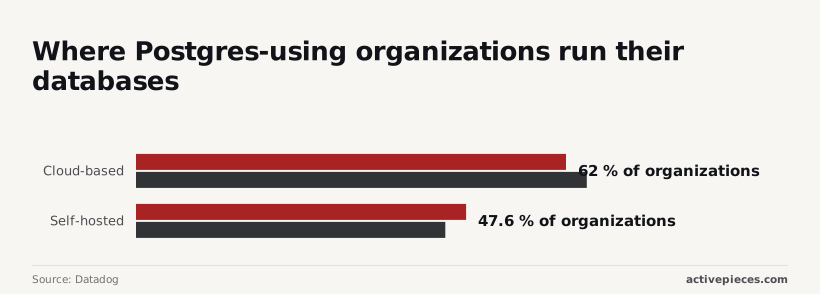
By the numbers, most teams have already chosen to stop running the server: Datadog's State of Postgres puts cloud-based deployments at 62–65% of organizations. Self-hosted use sits at 47.6–44.6%, so a large minority still does, and the figures overlap because some run both.
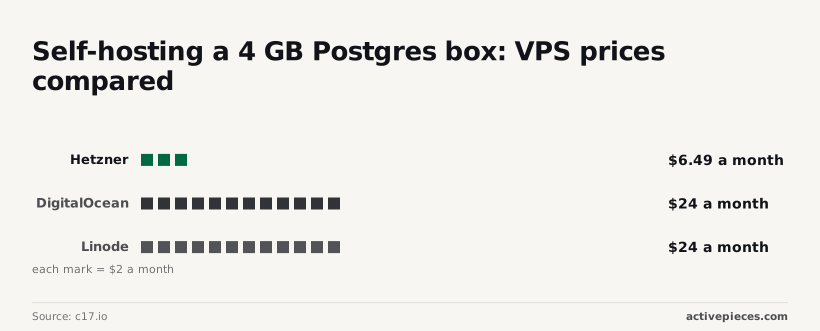
The rental is cheap: c17.io's comparison lists a 4 GB box at $6.49 a month on Hetzner against $24 on DigitalOcean and $24 on Linode. That's a gap of nearly four times, so the provider matters more than the plan.
Hosting it yourself also makes you the party responsible for backups and data location.
Unless your application already speaks MySQL, skip it: managed MySQL costs about what managed Postgres does, and otherwise you take on a migration for no saving.
Only when your data is genuinely documents does Atlas win, because its query model isn't portable. Aurora keeps familiar SQL but ties you to AWS pricing and I/O charges.
Using an existing Postgres database with Activepieces
Do not expect Activepieces to lower a Postgres hosting bill. It's a way to work with a database you already run, without writing custom code, and if you host it yourself, its MIT-licensed core brings an infrastructure bill of its own.
That distinction matters, because a workflow tool changes how you use the database, not what the provider charges for storage, egress or connections.
Running queries and writing rows from a workflow
If your data already sits in Postgres, Activepieces lets you build flows that read and write it through a visual builder, using the Postgres integration that is one of its 746.
You start with a trigger, such as a schedule that fires every hour, then add steps that run a query, insert a row or hand results to another service.
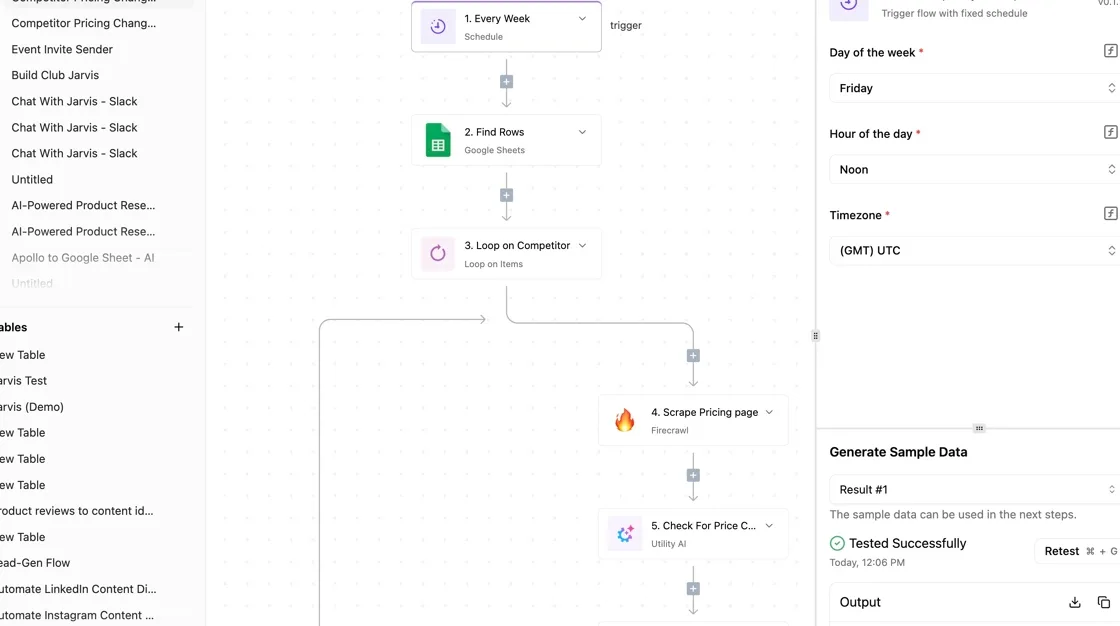
In the screenshot's builder, a Schedule trigger is selected, and an integration selector offers spreadsheet apps with actions like Insert Row and Find Rows. The settings panel shows a successful sample-data test.

A Postgres integration is picked the same way, so a spreadsheet-sync flow and a database flow differ only in the integration you choose.
The consequence is a cost one. Every scheduled run opens a connection and moves data, so an hourly flow against a managed database counts toward the connection limits and outbound transfer described earlier. Test a flow before you schedule it, and keep the query narrow.
Self-hosting requires managing infrastructure costs
If you self-host Activepieces on Docker, Compose or Kubernetes, you pay for the infrastructure it runs on. The Community Edition is free to run, so that infrastructure is the line item you add: one more thing to provision, back up and keep available.
You can rent that infrastructure or run it on your own servers.
Either way, the hosting bill is separate from Activepieces, which costs $0 self-hosted in the Community Edition and $0 on the cloud free plan with 1,000 credits a month, meaning you'll pay if you exceed that, and it belongs in your estimate before you commit to the tool, since the free price of software can obscure the cost of running it.
Picking and pricing Postgres hosts
Measure your own storage, connections and egress, price two providers against them, and test a restore in the first week. Do this before you commit, because the hosting bill is the number you'll actually pay. The order matters, since each step feeds the next:
- Measure storage, connections and egress.
- Shortlist two providers.
- Rerun the costed scenario with your numbers.
- Recheck the pricing pages.
- Set a billing alert.
- Test a backup restore in week one.
The first three produce the estimate, and the last three keep it honest once you are live.
Estimating storage, connections and egress for Postgres
Pull storage from the database itself, not from a guess about future growth. Read peak connections from your current monitoring, because connection limits are the cap that forces a plan upgrade.
Estimate egress from what leaves the database, including exports and replicas in other regions. Under GDPR Article 44, a cross-border copy is also a transfer you must justify, so the same measurement serves your compliance file.
To expose the difference between a cheap sticker price and a cheap bill, two providers are enough. Put your three measurements into each provider's calculator, then add high availability and backups as separate lines.
Rerun the earlier costed scenario with these inputs, and recheck each pricing page on the day you decide, since plans change without notice.
Setting billing alerts and testing Postgres restores
Before the first real workload arrives, set a billing alert, so a runaway egress or storage charge reaches you as a warning rather than an invoice.
Then restore a backup into a clean instance during week one. Article 32(1)(c) expects you to be able to restore access to personal data in a timely manner, and only a completed restore shows whether your backups meet that standard.
Frequently asked questions
Is Postgres really free? Yes: the software is open source and licensed for commercial use at no charge.
What you pay for is everything around it, meaning the servers, storage, backups, failover and the people or provider who keep it running and restorable, so budget for the hosting rather than the database.
What is the cheapest way to host Postgres in production? Running it yourself on a rented virtual machine usually has the lowest invoice, but it moves backups, patching, failover and restore testing onto your staff.
A managed plan costs more and removes that work. Count the cost of an untested restore before you call the self-hosted route cheap, particularly if you hold personal data under GDPR.
Can I move between Postgres hosts without downtime?
Often, but not by default. Logical replication lets a new host catch up while the old one keeps serving, and you then switch the application over in a short window.
It needs matching major versions or careful planning, and some managed providers restrict the extensions or replication permissions you need.
Before you sign, check those limits, and rehearse the move on a copy first. If the new host sits in another country, confirm the transfer basis too, because the data crosses a legal boundary the moment replication starts.
Does Postgres cost more than MySQL? Not as software, since both are free to use.
The difference shows up in hosting, where providers price each engine according to their own tiers, and some charge more for Postgres features like replicas or extensions. Compare the same workload on both bills instead of assuming one engine is cheaper.
How often do Postgres hosting prices change? Irregularly, and providers can alter a plan's included storage, egress allowance or connection limits without changing its headline price.
Read the current pricing page before each renewal, and set a calendar reminder to compare your actual invoice against what you expected.
Related reading
References
Running the numbers
See what the same workload costs here.
Free forever plan, and every paid plan self-hosts at no extra cost.
See pricing Talk to sales