
NetSuite API: Limits and Permissions (2026 Guide)

Nov 23, 202614 min read
According to Technologyblog, the NetSuite API is SuiteTalk REST web services with OAuth 2.0.
It has no per-call price, but it's capped by concurrency limits and gated by the role the integration signs in as, which matters whether you write the client yourself or connect it through a workflow tool such as Activepieces.
The NetSuite API is the set of SuiteTalk REST web services that lets external systems read and write NetSuite records over HTTPS, authenticating with OAuth 2.0 as a specific role whose permissions and concurrency limits govern what each integration can do.
You'll meet two errors, CONCURRENCY_LIMIT_EXCEEDED and INSUFFICIENT_PERMISSION, so you'll be fixing configuration, not volume. This was checked on 2026-11-23 against Oracle's NetSuite Help Center.
Before you write code against the wrong one, know that "API" here means three interfaces into the same account. The table shows how they differ on authentication, querying and lifecycle, so you can pick one first.

| Interface | Auth method | Query ability | Lifecycle |
|---|---|---|---|
| REST web services | OAuth 2.0 | Record CRUD and SuiteQL | Current direction |
| SOAP web services | Token-based authentication | Record CRUD and saved searches | 2025.2 is the last endpoint |
| RESTlets | OAuth 2.0 or token-based authentication | Custom logic you write | Maintained by you |
Start with REST unless you have a reason not to.
How each interface works
Over HTTPS and JSON, the REST record service gives you create, read, update and delete on standard and custom records. Every call runs as the role on the integration record, so a missing permission surfaces as a failed call, not a silent skip.
When you need joins or filtered reads that record-by-record fetching makes slow, use SuiteQL, which is SQL-style querying sent through the REST interface. The role still limits which records come back.
Anything new shouldn't start on SOAP. It is the older interface, 2025.2 is its last endpoint, and existing integrations keep working on that version, so plan the migration to REST now, before you're forced.
When the logic you need isn't exposed natively, you write a RESTlet, a SuiteScript endpoint that can run it. It still consumes concurrency, and a flow calls it like any other HTTP endpoint. You own its bugs and its upkeep.
Getting NetSuite API access, credentials and authentication
Before the first call you need five things in place:
- The Web Services feature enabled
- A role that can use it
- An integration record
- Your account ID
- The account-specific base URL
Enable features and set up a role
First, an administrator turns on the REST Web Services feature under the account's SuiteCloud settings. Then create a dedicated role and give it the REST Web Services permission plus only the record permissions the flow touches. Don't reuse an admin role.

Create the integration record
To NetSuite, your application is its integration record. Creating it produces the consumer key and secret for token-based auth, or the client credentials for OAuth 2.0.
Copy the secrets when they are shown. NetSuite won't display them again, and regenerating means updating every flow that uses them.
If you pick token-based authentication, you use the integration's consumer key and secret with an access token issued for a specific user and role.
OAuth 2.0 uses the integration record to obtain short-lived access tokens, through an authorization code flow or a certificate-based machine-to-machine flow. Whichever you pick, the token inherits the role, so the role's permissions decide what succeeds.
Finding your NetSuite account ID and base URL
You'll find the account ID on the company information page. The REST base URL is built from it, in the form https://<account-id>.suitetalk.api.netsuite.com/services/rest/record/v1/.
Sandbox IDs carry a suffix, and in the URL the underscore becomes a hyphen in lowercase, so copy the host from your own account instead of typing it by hand.
This takes minutes, not a project: automate it in Activepieces free.
A minimal working NetSuite REST request
Once the host is right, a working request is one authenticated GET against the record endpoint, then one POST to the SuiteQL endpoint, both carrying the same bearer token.
GET a record, then run SuiteQL
GET https://<account-host>/services/rest/record/v1/customer/<internalId>
Authorization: Bearer <access_token>
Accept: application/json
Back comes a JSON object of the customer's fields, plus a links array pointing at the record itself and its sublists. Related data such as addresses comes back as links, not inline values, so a follow-up GET is the cost of reading them.

If you get INSUFFICIENT_PERMISSION here, the integration role lacks view access on customers, not that your token is bad. Fix the role.
POST https://<account-host>/services/rest/query/v1/suiteql
Authorization: Bearer <access_token>
Content-Type: application/json
Prefer: transient

{"q": "SELECT id, companyname FROM customer"}
On this endpoint, Prefer: transient is required. Leave it off and the call is rejected, and the error doesn't point at the header.
The reply carries an items array of rows, a count for that page, hasMore, offset, and totalResults. Treat hasMore as the only signal that more rows exist.
Paginating NetSuite SuiteQL query results
Put pagination in the query string of the same POST, not in the body: add limit and offset to the URL. Request the first page, then repeat with the offset advanced by the rows you received, and stop when hasMore is false.

Run the pages one after another, not in parallel. Parallel page fetches are how a simple loop hits the account's concurrency limit, and a retry that ignores that limit only makes it worse.
NetSuite API rate limits and concurrency
You won't find a per-call price for API requests in NetSuite's docs. The cap is how many requests run at once, so a retry loop that ignores it fails long before any bill matters.
Concurrency limits by service tier
Go over the limit and you get CONCURRENCY_LIMIT_EXCEEDED, not a slow response. Oracle NetSuite Help lists the legacy tiers: Shared Tier 3 allows 5 concurrent requests, so a five-worker fan-out leaves no room for a user's own integration.
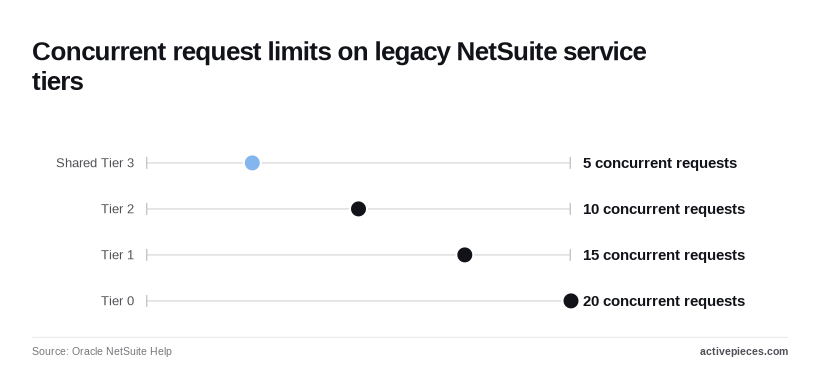
At Tier 2 the limit is 10, which still fails if two flows each open six. Tier 1 allows 15 and Tier 0 allows 20. The limit is per account, not per integration, so every flow you run draws from the same pool.
Raising NetSuite API concurrency with SuiteCloud Plus
To raise the ceiling, you add SuiteCloud Plus licenses. The chart shows base versus maximum concurrent requests for each current service tier, and the gap is large: Standard goes from 5 to 15, Premium from 15 to 45, Enterprise from 20 to 80.

Design the flow for the base number, not the maximum.
That gap means the same flow can run clean on an Enterprise account and fail on a Standard one. Make the worker count a setting, not a constant.
Other limits: page size, payloads, SuiteQL rows
None of page size, payload size or SuiteQL row caps is the same thing as concurrency, and I haven't confirmed their exact values here. Treat each as a hard stop: paginate every list call and every SuiteQL query rather than assuming one response returns everything.
Nothing in the run trace flags a query that silently returns a truncated set. Read the current values from the Oracle docs before sizing a batch.
You can follow the rest of this with the builder open. Start free, no card.
Common NetSuite API errors and fixes
When production fails, it arrives as one of five responses. Each one points at a specific limit or permission, so the fix is a role change or a retry rule, not a bigger plan.
| Error | Meaning | Fix |
|---|---|---|
| 401 invalid token | The credential was rejected | Check the token, its account ID and the integration record |
| 403 insufficient permissions | Auth worked, the role cannot do this | Add the one missing permission to the role |
| 429 CONCURRENCY_LIMIT_EXCEEDED | Too many requests in flight | Cap workers, retry with backoff |
| 400 invalid field | The payload names a field the record rejects | Check field IDs and record type |
| SuiteQL timeout | The query ran too long | Narrow filters, page the results |
What common NetSuite API errors mean
When you see Invalid login attempt, it almost always means a mismatched account ID, a revoked token, or an integration record that was disabled. Rotate the token before you debug anything else.
When a 403 comes back, the login is fine and the role isn't. Rather than handing the integration an administrator role to make it go away, add the single missing permission to a scoped role and rerun.
CONCURRENCY_LIMIT_EXCEEDED is the one volume-looking error that isn't about volume, because parallel workers shared one limit and you went past it. Cap the worker count below that limit and retry with exponential backoff and jitter. A fixed-interval retry just re-collides.
CONCURRENCY_LIMIT_EXCEEDEDis the one volume-looking error that isn't about volume, because parallel workers shared one limit and you went past it.
A 400 names the field it disliked. Custom fields differ between sandbox and production, so a flow that works in one fails in the other. Read the error body, not just the status. SuiteQL timeouts belong here too: filter earlier and page.
Calling the NetSuite API without code in Activepieces
Once the NetSuite side is finished, the flow doesn't need a specialist to build it.
Describe the process in the built-in chat in Activepieces, say which records to read and which SuiteQL to run, and it builds and publishes a real flow you can read, version and approve.
It sits under the same RBAC and audit logs as any flow someone built by hand, and every run leaves a trace anyone can read, so a CONCURRENCY_LIMIT_EXCEEDED or a missing role permission shows up on the failed step without NetSuite certification.
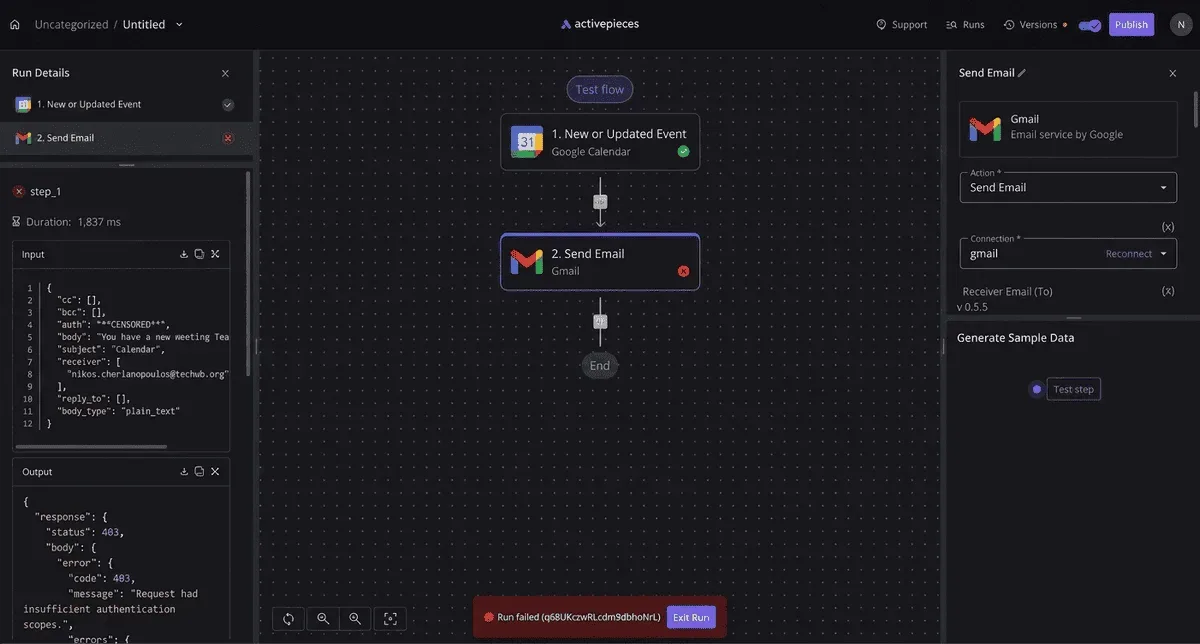
It won't fix a SuiteQL query that scans too much, so filter and page first, then automate it.
What the connector covers
Open the NetSuite integration in the flow editor and read the list of actions it offers. That list is the coverage, and you should trust it over any assumption.
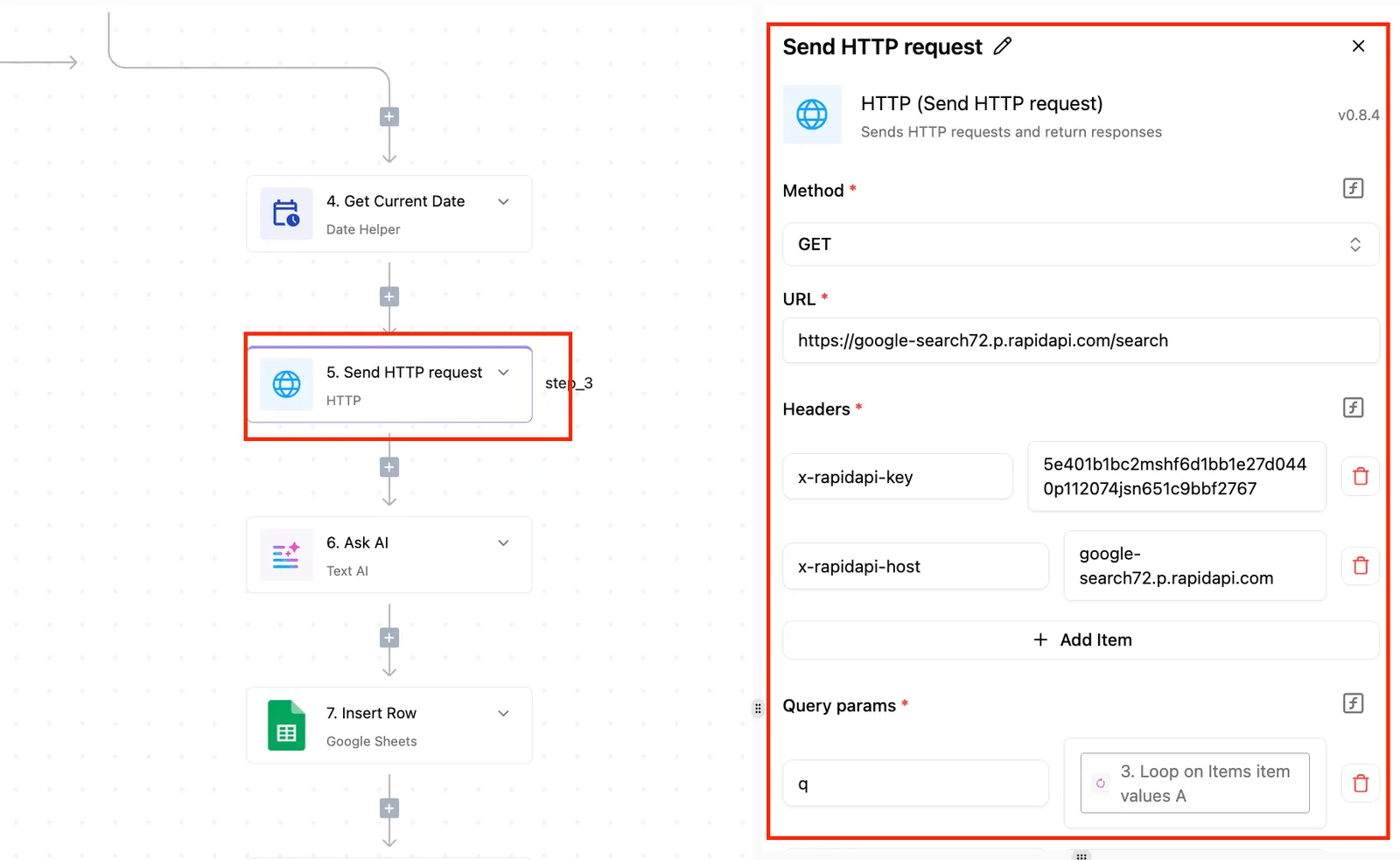
Anything not listed goes through the HTTP step, which sends a raw request to the same REST or SuiteQL endpoint with the same credentials.
The difference matters at 1am. A connector action hides the request, so a permission failure shows up as a step error you have to interpret. A raw HTTP step shows the exact URL, body and response.
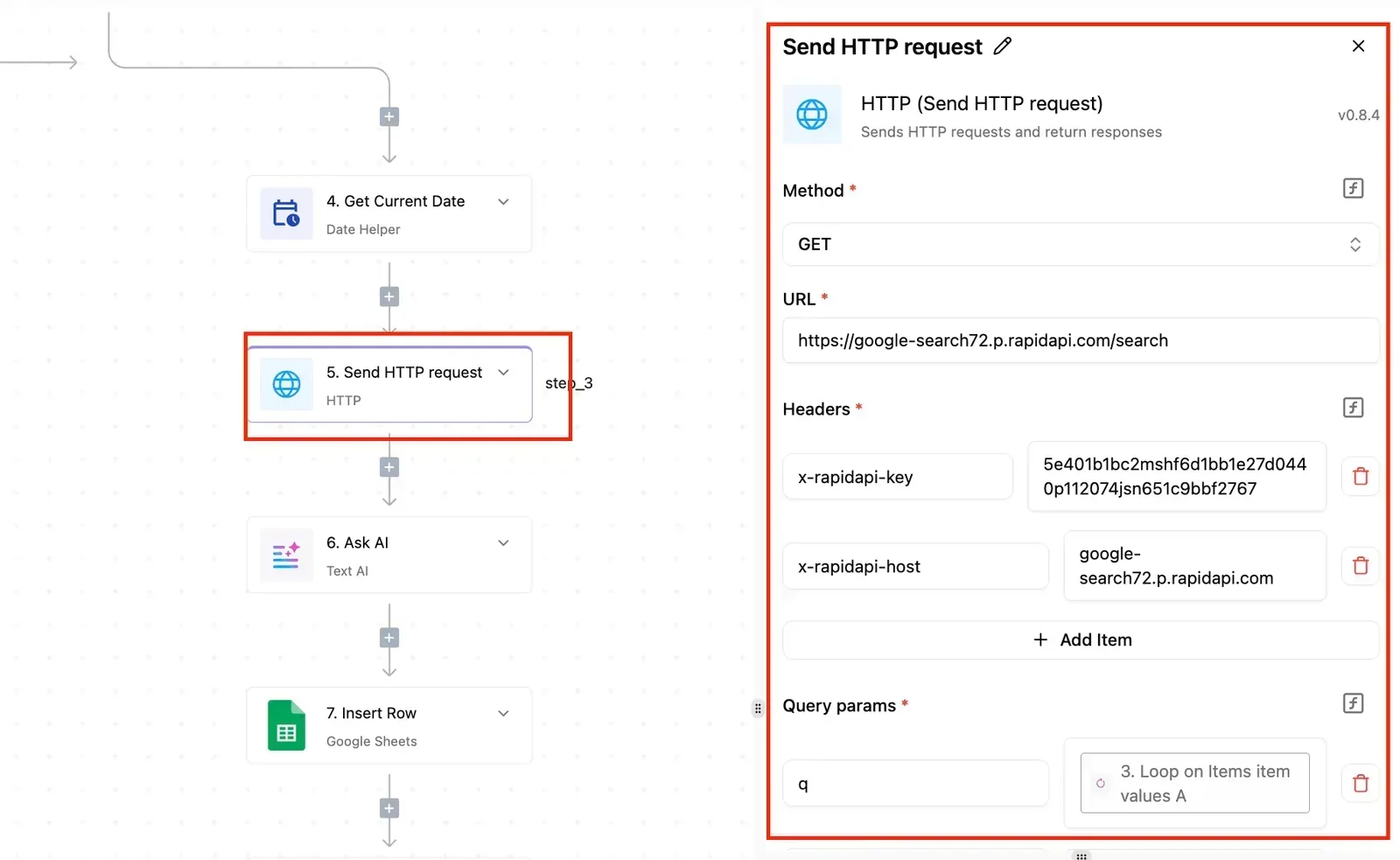
When a role is missing a permission, you read it straight off the failed step in the run trace instead of guessing which field the connector dropped.
Staying under the concurrency cap
You're avoiding CONCURRENCY_LIMIT_EXCEEDED, which means too many requests are in flight at once. A schedule that fires while the last run is still going, or a loop that fans out in parallel, will cause it.
In the drawing, a schedule trigger feeds a gate with five slots, then a connector step and an HTTP step sit side by side, both pointing at NetSuite.
Take from it that the gate sits before every NetSuite call, and that its width should match your account's actual limit, not the drawing's.
In practice, that means:
- process records one at a time in a loop rather than in parallel
- keep schedules far enough apart that runs can't overlap
- send every NetSuite call, connector or HTTP, through the same gated path
Retries come next, because a throttled call that retries immediately only adds to the pile.
A first-week checklist for a NetSuite API integration
Do these seven things in this order, because each one removes a failure that would otherwise show up as 429 or INSUFFICIENT_PERMISSION in your logs in week two.
- Confirm your tier's concurrency limit. Find the number for your account's service tier and any extra capacity you've bought, and write it down. Every later step is sized against it, so a guess here means a wrong cap everywhere else.
- Create a least-privilege integration role. Grant only the record types and permissions the flow touches, nothing inherited from an administrator role. A broad role hides permission errors in testing and then breaks the first time someone tightens it.
- Set up OAuth 2.0. Register the integration, assign it that role, and keep the credentials in your secrets store. Token failures then point to one identifiable client rather than a shared login.
- Test in the sandbox. Run the full flow there, with the production role copied over exactly. A role that works in the sandbox only because it's more permissive teaches you nothing.
- Cap workers below the ceiling. Set parallel workers under the limit from step one, leaving room for other integrations and users on the same account. Otherwise your flow starves them, or they starve you.
- Add backoff on 429. Wait, then retry with increasing delay and some randomness, so parallel workers don't all return at the same instant.
- Recheck the SOAP deprecation dates. Read NetSuite's current release notes for the retirement schedule rather than trusting memory or an old blog post. If any call still uses SOAP, that date is your deadline.
Frequently asked questions
Is the NetSuite API free to use? I have no per-call price to quote, and the failures in this article never came from one. The usual error is CONCURRENCY_LIMIT_EXCEEDED, which is a limit on parallel requests.
Whether API access is included in your contract is a question for your NetSuite account manager, so don't assume it from a pricing page.
Should I use REST or SOAP for a new NetSuite integration?
Use REST. SOAP is the older interface, and starting new work on it means migrating later. Where REST can't express your logic, a RESTlet (a custom server-side script exposed as an endpoint) is the escape hatch.
When a RESTlet loops over records, it will stop partway through, because every run is capped by the governance units a script can spend. Keep the loop in your flow and the RESTlet small.
Does NetSuite have a sandbox for API testing?
Yes, and you should test there first. Don't assume it behaves like production, though. Sandbox data is a copy from the time of the last refresh, so you may be testing against stale records.
Don't assume the concurrency limits and the SuiteCloud Plus licence that raises them match production either. A retry policy that passes in the sandbox can still fail on the first busy day in production, so check the limits on both accounts directly.
Can I use the NetSuite API without writing code?
Yes. A described flow can call the same REST endpoints, as long as it's built around the real constraints: a role scoped to the records it touches, retries that back off on a concurrency error, and a trace that shows which call failed.
Without code, you still need the role and the retry policy. The no-code builder doesn't remove them.
How do I raise my NetSuite API concurrency limit?
You can't toggle concurrency in a setting, because it's tied to your account's licensing. Extra capacity generally comes from adding the SuiteCloud Plus licence through your account manager. Before you buy, check whether your flow is wasting what you already have.
On any plan, parallel branches that all hit NetSuite at once will trip the limit, so serialise them or queue them first.
Related reading
References
Build it
Set this up in minutes.
No code required. Connect your accounts, and Activepieces runs it from there.
Start free Talk to sales