
Otter AI vs Fireflies Pricing: Plans Compared (2026)

Oct 30, 202615 min read
According to the Kim Salmi tracker, Otter Pro at $8.33 and Fireflies Pro at $10 per seat per month are only $1.67 apart. The sticker price won't decide this; the limits on each plan will. That's true whether you only read transcripts or, like teams who pipe meeting notes into Activepieces and other tools, you do something with them afterward.
Otter vs Fireflies pricing is a plan-by-plan comparison of the two AI meeting-assistant tools, weighing each tier's per-seat price against its caps on transcription minutes, storage, AI summaries and seats.
Across ten seats, that gap comes to about $200 a year, so the difference becomes negligible on a per-person basis. Against the wider market, it's small. In the Kim Salmi tracker:
- Granola starts at $14
- Read.ai Pro at $15
- Fathom Business at $25
- tl;dv Business at $59
That last one's about seven times Otter's entry price.
What Otter and Fireflies AI notetakers do
Fireflies and Otter are subscriptions for an AI notetaker: software that joins your video calls, records them, turns speech into text, and writes a summary afterwards. You pay per person, and each plan caps how much it'll do.

Both can pass notes on to other tools, whether through built-in integrations or a separate automation tool. Either way, the notes only travel as far as the plan lets them be created.
Pricing sources and date checked
Confirm the figure on the page before you buy, because vendors change plans without notice. Prices were checked on 30 October 2026 and come from the vendors' pricing pages, as collected by the tracker.
Four criteria that decide what a notetaker costs
What you pay in the end depends on how soon your team runs into a plan's limits; the monthly price on the pricing page is only the starting number.
Each of the four criteria below gets one test, and both Fireflies and Otter are held to the same four:
- Price per seat: multiply by the seats you'll really fill, once on annual billing and once on monthly.
- Transcription and storage: compare the caps against your actual meeting hours.
- AI summaries and credits: count how many summaries your team requests in a busy week.
- Gated features: list what you can't work without, then check which tier unlocks each.
Annual billing usually lowers the per-seat rate, but it commits you for the year. If your headcount might shrink, price both ways and note which one you could live with.
When a plan caps transcription or storage, meetings go unrecorded or old recordings get deleted, and you find out when someone needs a call from last month.
Light users never notice a summary allowance, but a team that summarizes every call can empty it early and then pay for more or go without. Check whether the allowance is per person or shared across the team.

Check which tier carries integrations, admin controls and conversation analytics, because they often sit on higher tiers. If your workflow depends on one, the real price is the tier that includes it, not the entry plan.
If you are running this arithmetic for your own team, see what the same workload costs on Activepieces.
All Fireflies plans and pricing limits
Fireflies has two paid tiers: Pro at $10 to $18 per seat per month and Business at $19 to $29.
To get the low end of each range you have to commit annually, which means month-to-month users forfeit access to the advertised minimums.
Fireflies prices, checked from its own page
Pro costs $10 per seat per month on annual billing and $18 on monthly, an extra $96 per seat per year for staying month to month.
Business costs $19 on annual billing and $29 on monthly, an extra $120 per seat per year.
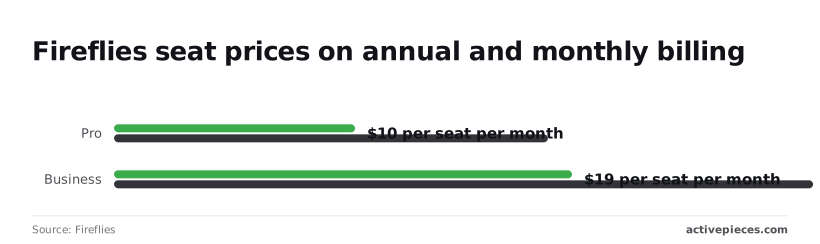
Those figures come from Fireflies' billing terms page. A limit that's changed since this was checked will cost you more than the price difference, so confirm the caps below on the pricing page the day you buy.
Caps and features at Pro and Business
Both paid tiers offer unlimited transcription, so on Fireflies the first wall is rarely minutes. Pro stores 8,000 minutes of recordings per seat, which is roughly 133 hours, while Business removes the storage cap, so indefinite retention requires a Business plan.

AI summaries are included on both tiers. Anything beyond the plan's allowance, such as extra AI tools, draws on credits bought as add-on packs, covered under hidden costs below.
Pro brings the core set: transcripts, summaries, search and the standard integrations. Business is where conversation analytics, team-level admin controls and fuller video features sit, so a team that needs those pays the Business rate no matter how few minutes it records.
Fireflies Pro to Business price difference
Moving from Pro to Business adds $9 per seat on annual billing and $11 on monthly. For a ten-person team that's $90 or $110 more every month.
You're paying for the tier's added limits and controls, not for a different product, so first find out whether your team will reach the Pro ceiling.
Choosing monthly over annual moves the bill almost as much as the tier does. On Pro, month-to-month costs 80% more than annual, so the penalty for avoiding annual commitment's steep. On Business it costs about 53% more.
Choosing monthly over annual moves the bill almost as much as the tier does.
Otter AI plans by the same four criteria
Look past price and Otter's four plans read like Fireflies': each is defined by what it caps in transcription, storage, AI summaries and seats, so price alone won't help you choose.
Otter plan table with check date
The table below shows Otter's published limits as of 30 October 2026. Where Otter sets no separate cap, the cell says so, and that is not the same as a promise of unlimited use.
| Plan | Transcription | Storage | AI summaries | Seats |
|---|---|---|---|---|
| Otter Basic (free) | 300 minutes a month, 30 minutes per conversation | No separate cap listed | Limited AI chat and summaries | One user |
| Otter Pro | 1,200 minutes a month, 90 minutes per conversation | No separate cap listed | Full AI summaries, larger chat allowance | One user per paid seat |
| Otter Business | Unlimited meetings and in-app recordings, 4 hours per conversation | No separate cap listed | Full AI summaries, shared across the team | Per seat, with admin controls |
| Otter Enterprise | Custom | Custom | Custom | Quote only |
On price, Basic is free. Pro costs $8.33 per seat per month on annual billing and $16.99 on monthly. Business costs $19.99 on annual billing and $30 on monthly, and Enterprise has no list price, so you have to ask for a quote.

Notice that Otter's cap is per month and per conversation, not total storage. A team of long-call talkers will hit the conversation length before it ever fills a drive.
Fireflies vs Otter side by side on each criterion
Take the four criteria in turn, and ask the same question of both vendors: what happens when we reach the limit?
Find out whether a transcription cap stops new meetings from being recorded or just slows them down.
Find out whether old recordings are deleted, archived or locked behind an upgrade when storage runs out.
Find out whether AI summaries are metered separately from transcripts. A team can keep its transcripts and still lose the summaries it relies on. Find out who counts as a seat. If guests or occasional users count, the bill grows faster than your headcount.
Whichever vendor leaves a limit unstated gives you the weaker footing for planning. Get the answer in writing before you pay.
Worth checking against a plan that does not meter every step: one credit covers a whole run on Activepieces.
What each plan costs at realistic team usage
Once you have the vendor's answer in writing, your real cost is the per-seat price times your seats, plus whatever upgrade the first limit you hit forces on you.
The table shows how that plays out for each team size on both vendors at the Pro tier, and the lesson's that the cap column, not the price columns, decides which row changes.
| Team | Vendor | Seats | Billing term | Cap hit | Annual total | Monthly-billed total |
|---|---|---|---|---|---|---|
| Solo consultant | Fireflies | 1 | Annual or monthly | Storage or AI credits | $120 | $216 |
| Solo consultant | Otter | 1 | Annual or monthly | Transcription or AI summaries | $99.96 | $203.88 |
| Five-person sales team | Fireflies | 5 | Annual or monthly | AI summaries on heavy call days | $600 | $1,080 |
| Five-person sales team | Otter | 5 | Annual or monthly | AI summaries on heavy call days | $499.80 | $1,019.40 |
| 25-person company | Fireflies | 25 | Annual or monthly | Seats and storage | $3,000 | $5,400 |
| 25-person company | Otter | 25 | Annual or monthly | Seats and storage | $2,499 | $5,097 |
For a solo user, one seat makes the price gap about $20 a year on annual billing. The risk is a busy month of client calls running past the monthly transcription or summary allowance, which leaves you with meetings that have no notes.
With five seats, any price difference is multiplied by five. They also share the load: one rep with a full calendar can use up the summary allowance faster than the other four, so test with your busiest person, not an average one.
In a twenty-five-person company, annual billing saves real money, about $2,400 on Fireflies Pro and $2,600 on Otter Pro, but it also locks in a seat count you may outgrow.
Storage and seat minimums matter more than the headline rate, so ask what happens when the 26th person joins.
Hidden costs and limits beyond pricing
Beyond the monthly price, three things can cost you later: AI credits bought separately, billing terms you can't easily leave, and what happens to your recordings when you stop paying.
Fireflies AI credit packs and usage caps
On Fireflies, summaries and other AI tools beyond your plan draw on credits you buy as add-on packs. The price per 100 credits falls as the pack size grows, so the cheapest credit goes to the team that buys the most at once.
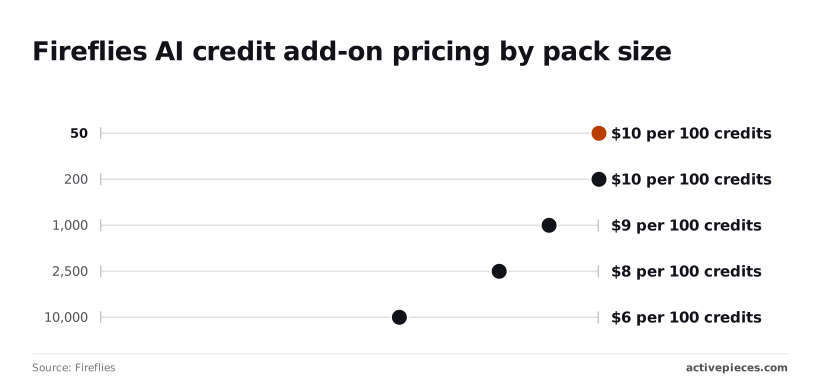
At $10 per 100 credits, the 50-credit pack ($5) and the 200-credit pack ($20) cost the same, according to Fireflies' credit guide, meaning you don't get savings by choosing the larger pack.
The rate drops to $9 at 1,000 credits, $8 at 2,500, $7.50 at 5,000 and $6 at 10,000, making bulk prepayment substantially cheaper per credit.
A team that tops up in small packs every month pays about two-thirds more per credit than one that buys 10,000 up front.
Otter's help pages describe its own transcription-minute and import caps, and the same test applies there: find the number your busiest month will reach.
Billing terms and leaving a plan
Check whether the price you saw is the monthly rate or an annual rate billed up front.
A plan that renews for a full year commits you to that year even if the team shrinks, so find the renewal date and the cancellation window before you enter a card.
Before you cancel or downgrade, export the recordings and transcripts you need. Lower plans can carry smaller storage or retention limits, so you should confirm in each vendor's help docs what stays accessible afterward.
What Activepieces does about this
The limits in this article sit inside the recorder, and Activepieces can't raise them. It can't lift a Fireflies credit pool or an Otter transcription cap.
What it handles is the step after the recording, where the notes have to reach a CRM, a task tracker or a team channel, and where a second meter can open up if the tool you use charges per step.
Activepieces counts one credit per run however many steps the flow has. Splitting "summary lands in the CRM" into ten small, testable steps costs the same as doing it in two.

The free plan carries 1,000 credits a month and unlimited flows, so for a solo consultant or a small sales team the recorder's own caps and that credit limit are what you plan around.
It also stays out of the buying decision. You can leave the flow until after you've run both free tiers for a week and found which limit you hit first.
Then you pick the plan that raises that limit and connect whichever recorder you chose, with nothing to rebuild if you change vendors later.
You can find it at activepieces.com. Check the current credit allowance on the pricing page on the day you sign up, for the same reason you check Fireflies and Otter: vendors change plans, and we're one of them.

Activepieces is the better fit for solo consultants and small sales teams who need meeting notes to reach a CRM, task tracker or team channel, judged on how predictably the automation is billed.
It charges one credit per flow run however many steps the flow contains, so a ten-step flow costs the same as a two-step one, whereas Zapier bills per task and Make per module, and each added step opens a second meter alongside the recorder's own caps.
It does nothing about the limits inside Fireflies or Otter, and those remain the constraints to plan around, but for the step after the recording, the run is the only thing you count.
Frequently asked questions
Price, free plans and billing
Is Fireflies cheaper than Otter AI? It depends on the tier you compare, and the list-price gap is smaller than the gap in what each plan lets you do.
A cheaper plan that runs out of transcription time or AI summaries midway through the month costs you more than the dearer plan that doesn't.
Does Fireflies have a free plan and what are its limits? Yes, Fireflies has a free plan, and so does Otter.
Free tiers cap transcription, storage and AI summaries, so treat them as a trial of the workflow. Read the current limits on the pricing page and run a normal week of meetings through it before deciding.
Can I pay monthly instead of annually? Both vendors have offered monthly and annual billing, with annual priced lower per month.
Monthly costs more, but it lets you leave if you hit a limit early. If you're still unsure which limit you'll hit first, pay monthly for a quarter, then switch.
Seats and alternatives
Do both tools charge for people who only attend a meeting? Generally, seats are for people with accounts in your workspace, not for guests who simply sit in the call.
Anyone on your team who needs to record, search or edit transcripts usually takes a seat. Confirm how each vendor counts members before you add the whole sales floor.
What cheaper or closer alternatives to Fireflies and Otter exist? Other meeting recorders, such as Fathom, Read AI and tl;dv, sell the same basic service, and Zoom, Microsoft Teams and Google Meet offer built-in summaries on some paid plans.

Judge any of them on the same four limits: transcription, storage, AI summaries and seats.
How to pick between Otter and Fireflies
Count what your team used last month, then let both free tiers show you which of the four limits runs out first, revealing which resource is your actual bottleneck.
- Count last month's meetings, their total hours, and everyone who needs access.
- Trial both free tiers.
- Note the first limit you hit.
- Pick the plan that raises that limit.
- Recheck pricing on purchase day.
- Optionally, route the finished notes onward.
Pull your calendar and tally meetings, rough hours, and who actually attends or reviews notes.
Run both free tiers for one week
Use both on real meetings, not test calls. Write down whichever limit shows up first: transcription allowance, storage, AI summaries, or seats.
That's your answer, because a plan that fixes your first wall is worth more than a cheaper one that leaves it standing.
Once you've chosen, decide where the notes and action items should land, such as a customer database or a task tracker. A workflow tool can carry them there so nobody copies them by hand.
It sits beside either product and doesn't replace it, and you can add it after the purchase.
Related reading
References
Running the numbers
See what the same workload costs here.
Free forever plan, and every paid plan self-hosts at no extra cost.
See pricing Talk to sales