
Perplexity Decider Pricing 2026: Plans and API Costs

Nov 22, 202614 min read
Perplexity's seat prices run from $20 a month for Pro to $325 for Enterprise Max, and I found no plan called Decider anywhere in that range.
Perplexity Decider Pricing as of 22 November 2026
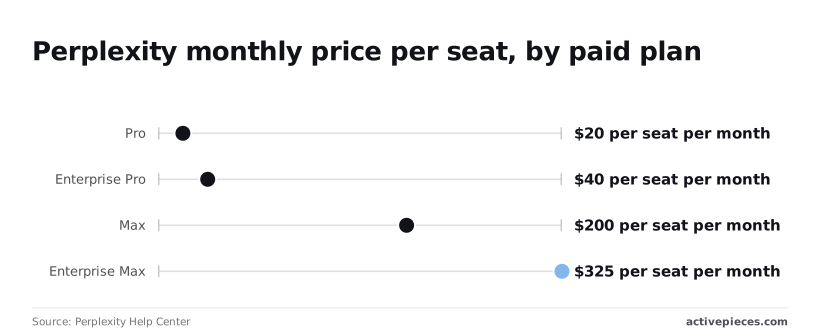
"Perplexity Decider" isn't a name in the pricing documentation, so this section prices the plans Perplexity does list, much as you would when Activepieces or any other tool gets named in a request but isn't in the vendor's own catalog.
The spread is the first thing to budget around. Per Perplexity Help Center, Pro is $20 per seat per month, which is the figure a client will accept without a conversation.
Enterprise Pro is $40, so moving a team to the enterprise tier doubles every seat before anyone runs a query. Max is $200, ten times Pro, which is hard to justify to a client unless one person is clearly doing the heavy work.
Every current plan in one table
The table carries only the figures I could confirm, so usage limits aren't in it and need their own written rule.
| Plan | Monthly price per seat | Check date |
|---|---|---|
| Free | $0 | 22 November 2026 |
| Pro | $20 | 22 November 2026 |
| Enterprise Pro | $40 | 22 November 2026 |
| Max | $200 | 22 November 2026 |
| Enterprise Max | $325 | 22 November 2026 |

The step from Pro to Max is $180 a seat. Enterprise Max sits another $125 above Max, so moving to Max from Pro costs more than moving to Enterprise Max from Max. Those two jumps are where an unreviewed upgrade does the most damage.
How We Verified Perplexity Pricing Figures
Every paid figure above comes from the same help-center page. I read it on 22 November 2026. Perplexity can change seat prices without notice, so re-read that page before you quote a client.
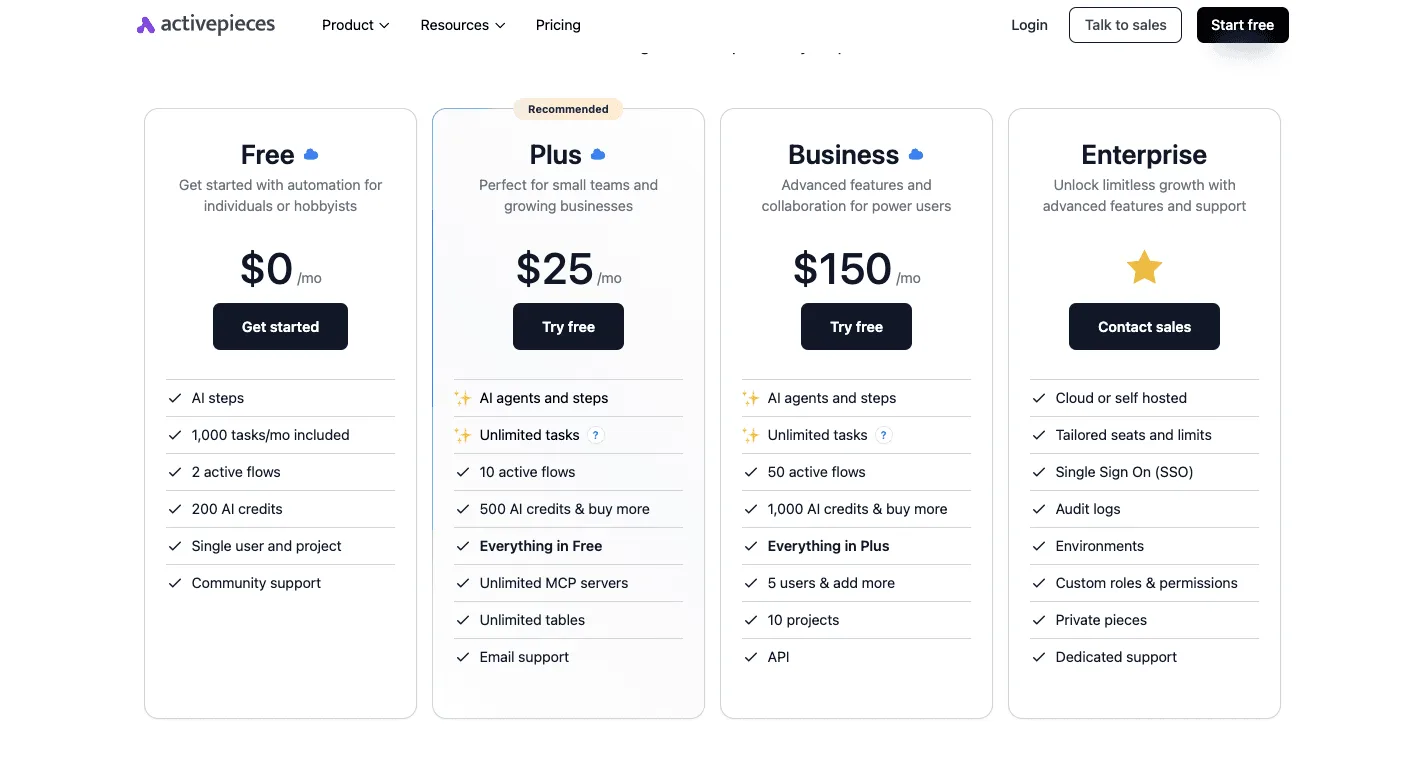
The seat price isn't the whole bill. Activepieces allows unlimited flows on every plan, including free, so a Perplexity automation built there adds no flow-count charge, and the metered API charges are what remain, absent from any per-seat table.
That gap is what the rest of this article is about.
If you are running this arithmetic for your own team, see what the same workload costs on Activepieces.
Tuesday usage limits and invisible costs
When an illustrative five-person team hits its usage cap at 10:40 on a Tuesday, it loses more in blocked work than the plan costs to hold.
None of that loss appears on the vendor invoice.
Perplexity Usage Cap Timeline During the Incident
The timeline below shows how one cap turns a subscription line into a stalled morning. The expensive steps come after the block, not at it.
At 10:40 the shared account reaches its usage limit mid-research, and it starts refusing queries from all five people. Everyone stops at once, because a shared account has no per-person reserve. One heavy user has spent the allowance everyone else was counting on.
The team then either waits for the limit to reset or someone with card access upgrades the plan or turns on metered API spend, usually with no sign-off.
Once the block lifts, half-finished research gets rerun, and the team must check anything gathered elsewhere in the meantime against the earlier answers. The total is the hours lost per person, multiplied by that person's billable rate, plus any list-price upgrade charge.
Billable Hours and Dollars Lost to the Limit
Start from what a client would accept on an invoice. Each blocked person's hours are billable time that the agency either writes off or absorbs.
If the account is shared across clients, the client whose work stopped rarely pays for the delay, and the client whose heavy queries caused it never sees the cost. That's a cross-subsidy hiding inside one login.

The upgrade charge, taken at vendor list price, is usually the smallest line in the total.
Monthly Perplexity Cost at Realistic Usage
Hit a cap once and you will hit it again, so the month's cost is the plan fee plus a recurring stall plus whatever metered spend someone switched on in a hurry. The plan fee is the only part you chose on purpose.
To fix the rest, write a rule: one named owner for upgrades, a ceiling on metered charges, and usage tracked per client so the heavy user pays for the heavy use.
Hidden Perplexity Costs and Limits Behind the Incident
Three limits nobody had written down caused the incident. They were plan quotas that drain quietly, API charges that grow with every request, and rate limits that rise only as cumulative spend does.
Perplexity Plan Quotas and API Rate Limits
A paid plan feels unlimited because the interface never shows a counter until it stops you. Perplexity counts plan quotas and file limits in units of work, not in logins.
When one client's research-heavy week uses up the headroom the whole team assumed they shared, that's cross-subsidy: the quiet clients carry the loud one, and the invoice shows none of it.
API per-request and per-token charges
Metered API billing has two parts: a charge per request and a charge per token processed. Cost also moves with the effort level you choose, so a deep multi-step query costs far more than a quick lookup. A seat price can't reflect that spread.
Leave a script on the highest effort setting and a flat-looking subscription turns into a variable bill. Each client's jobs need an effort level and a ceiling assigned in advance.
Rate-limit tiers and seat minimums
What you've already spent decides your throughput. According to Perplexity's rate-limit documentation, a new account at Tier 0 gets 1 query per second. A batch of client jobs therefore runs one at a time, and a deadline can slip before any money has been wasted.
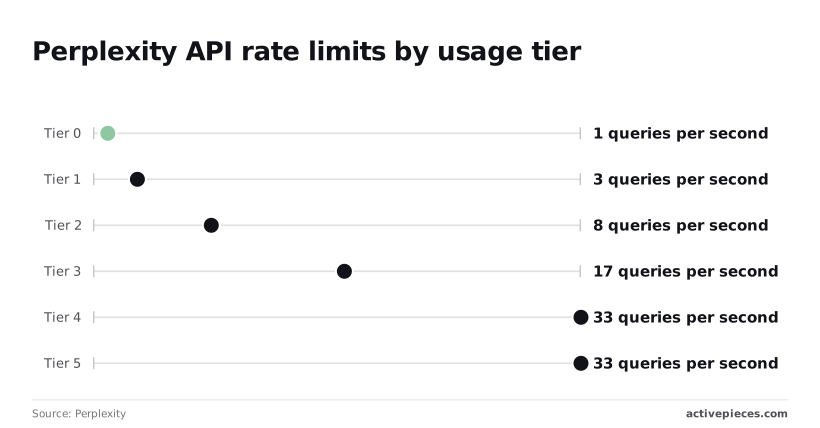
Tier 1 allows 3 per second, Tier 2 allows 8, and Tier 3 allows 17. Each step is a multiple you only reach by spending. You can't buy capacity in advance of a launch.
Tier 4 allows 33 queries per second, and Tier 5 allows the same 33. Spending past Tier 4 buys no extra speed. Budget to reach Tier 4 and stop there unless a client's volume says otherwise.
Per-seat pricing adds its own floor. You pay for every seat on the plan, used or not, so a seat held for a contractor who logs in twice a month is a fixed cost that someone should own.
Worth checking against a plan that does not meter every step: one credit covers a whole run on Activepieces.
Perplexity Compared With ChatGPT, Claude and Gemini Pricing
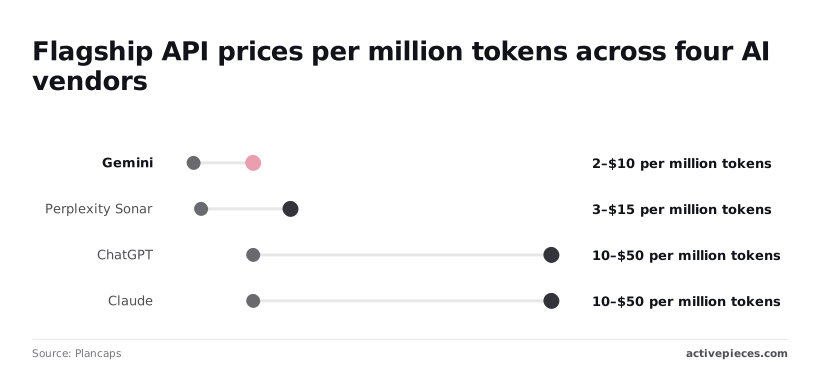
Sitting in the middle of the four is Perplexity's Sonar Pro API. It costs $3 per million input tokens and $15 per million output, above Gemini and well below ChatGPT and Claude, so the seats you already pay for aren't the whole comparison.
Individual and team plan prices
Seat count matters more than seat price, because every vendor here bills per seat whether or not anyone logs in. Before comparing sticker prices, list who holds a seat and who owns its cost.
Ten idle seats on a cheaper plan still lose to six active users on a dearer one. The idle four are a client or department quietly subsidized by everyone else, so the lower price conceals a higher cost per active user.
Ten idle seats on a cheaper plan still lose to six active users on a dearer one.
Nobody invoiced the research cap, yet it is a spending limit. When a heavy user hits it, they either stop or move to metered API calls, and the second path is where an unplanned bill starts.
Write down, per person, what happens at the cap and who approves the switch.
API cost for search-grounded calls
The table below shows flagship API pricing per million tokens from Plancaps. Every vendor charges five times as much for output as for input, so a workflow that generates long answers costs far more than one that reads long documents.
| Vendor | Input, $ per 1M tokens | Output, $ per 1M tokens |
|---|---|---|
| Gemini | 2 | 10 |
| Perplexity Sonar Pro | 3 | 15 |
| ChatGPT | 10 | 50 |
| Claude | 10 | 50 |
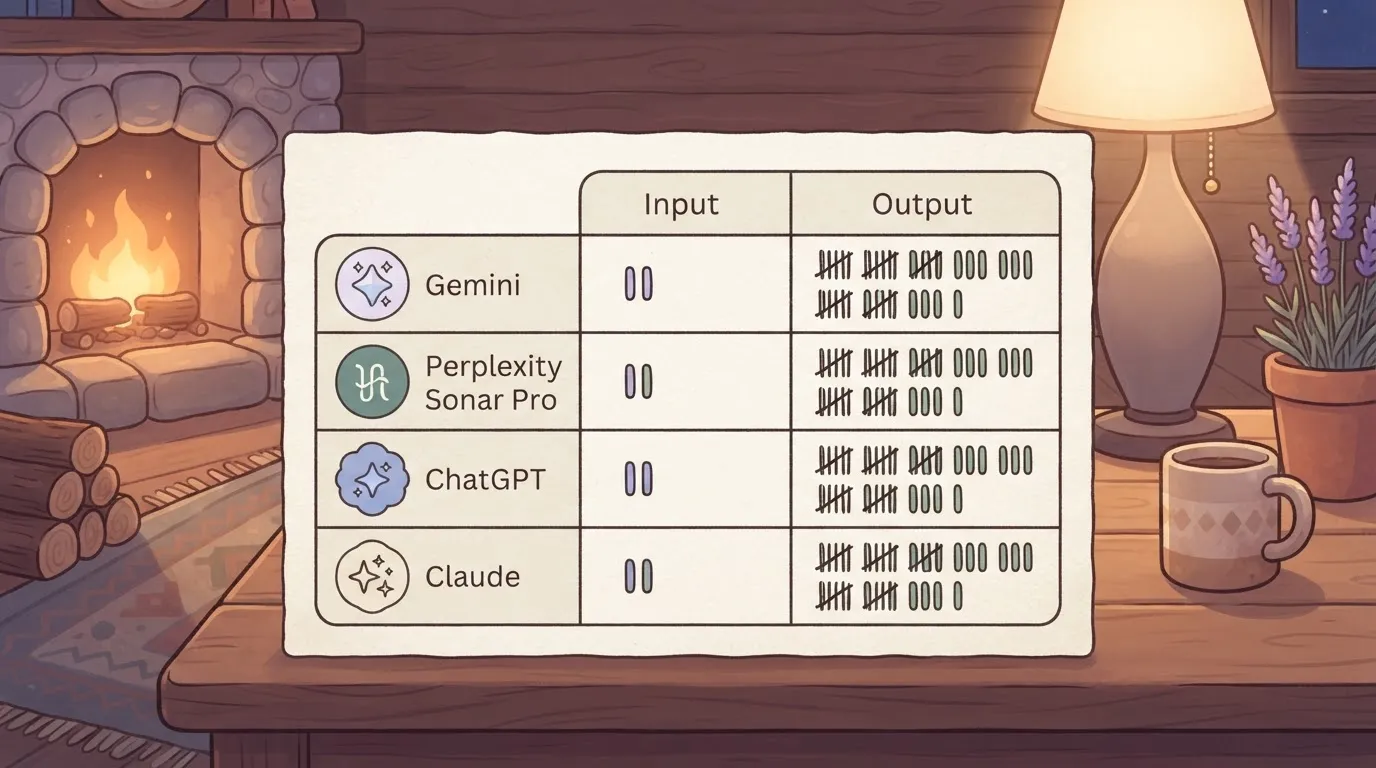
Gemini's $2 to $10 is the cheapest line, which means a high-volume job costs the least there.
Perplexity's $3 to $15 costs 50% more than Gemini but a third of what ChatGPT and Claude charge, so for search-grounded work it's a mid-priced choice, not an expensive one.
Five times Gemini's price is what ChatGPT and Claude charge, at $10 to $50, so Gemini has a significant cost advantage. A script that loops over hundreds of documents on either can outspend the whole seat bill in a month.
That gap is why a per-project token budget does more than a plan downgrade. Set the budget before the job runs, and the client who requested it sees the cost on their own invoice.
Fix Perplexity API Spend With Activepieces
In Activepieces a run is 1 credit, so the ten-step guarded flow (counter, stop condition, 80% warning and the rest) costs the same as the two-step version with no guardrails.
Zapier bills per task and Make per module, so on their pricing pages each added check is a charge, and the careful builder pays more than the careless one.
That matters because a scheduled research job is the easiest place for a shared account to quietly bill one client's curiosity to another. The loop below puts the budget in the workflow itself, so the job can't spend past what the client agreed to pay.
The diagram shows the whole run. A schedule trigger starts the day, a counter is read, and a branch checks it against the cap. Only then does the Perplexity call go out, with a Slack alert and a fallback path on the other side.
Take the order from it: the check comes before the call, never after. The two parts are laid out below.
Set a Daily Perplexity API Call Budget
Start with the schedule trigger, then read a counter that holds how many calls this client's job has made today.
Run once a day, that costs about 30 of the Free plan's 1,000 monthly credits.
A branch compares it with the daily cap you set from the client's approved budget.
If the counter is under the cap, the workflow makes the Perplexity API call through an HTTP step and adds one to the counter. If it's at the cap, the run stops.
Because the stop sits ahead of the call, a runaway loop or a retried failure ends at the limit instead of landing on next month's invoice. Keep one counter per client, so a busy account never spends another client's allowance.
Perplexity Usage Cap Alerts and Fallback
At 80% of the cap, a second branch posts to Slack, the team chat where the account owner will actually see it, ensuring the owner can respond before the account hits its limit, which provides room for corrective action, leaving 20% of quota as a response window.
That gives a person time to approve more budget or let the run end, rather than finding out from the invoice.
When the stop condition fires, the fallback path decides what happens to the remaining work.
It can queue the requests for tomorrow or send a short message saying the day's allowance is used. Either way the client sees a cap they agreed to, not a surprise.
Spending Rules the Team Wrote After the Outage
Rules on the plan
Pick the plan from what people actually ran, not from what they expect to run. Count each person's queries across a normal working week, then buy the tier that covers the heavy users without paying seat-for-seat for light ones.
If one researcher burns through the allowance while four others barely touch it, the shared account is quietly subsidizing that researcher's client work. Either move that person to their own seat or bill the client who benefits.
Re-check the pricing page every quarter. Limits and tier boundaries are the parts that shift, and a plan that fit in spring may be the wrong one by autumn without anyone having changed their habits.
Rules on the API
Set a monthly ceiling in the dashboard before any key goes into a workflow. A ceiling turns a runaway automation into a paused one, which is an annoyance you can fix on Tuesday rather than a line item you explain on invoice day.
Give each client or project its own key where the dashboard allows it, so overspend lands on the right account instead of dissolving into the shared one.
Whoever is blocked at that moment will raise a cap nobody owns, so every ceiling and every key needs a named owner. That person gets the alert, decides whether to raise the cap, and answers for the number.
The list below is the whole policy in the order you can put it in place, and it fits on one line of a team wiki.
- Set the plan by measured weekly queries
- Set the monthly API ceiling in the dashboard
- Name one owner for the plan and the ceiling
- Review usage every week
- Re-check the pricing page every quarter
Frequently asked questions
Each of these questions is where a surprise charge tends to hide, so settle the answer before the first invoice rather than after it.
Is there a free Perplexity plan, and what is capped on it?
Yes, there's a free tier. What it caps is the heavier work: advanced searches, the more capable models and file analysis are limited, while basic searching isn't the constraint.
Read the exact allowances in the account before assigning anyone a workflow, because they change often and are unverified here. If a client deliverable depends on a free-tier allowance, it will stall mid-project, and someone will upgrade on a personal card to get past it.
Does Perplexity offer discounts for annual billing or education?
Perplexity has run annual-billing pricing and student or education promotions, but the terms are unverified and promotions come and go. Confirm them on the current pricing page before budgeting around a discount.
If you do prepay annually, put the renewal date on the calendar. A prepaid seat for someone who left is a cost the rest of the team is quietly carrying.
Can I cancel and get a refund on Perplexity?
You can cancel from the account's billing settings, and cancelling stops the next renewal. Whether a refund is available is unverified and depends on how you were billed, since purchases made through an app store follow that store's rules instead.
Treat any charge as non-refundable in your budget. Cancel before the renewal date, not after, and assign one person to do it.
Is the Perplexity API billed separately from a subscription?
Yes. API usage is metered on its own and isn't covered by a Pro or team subscription, so a workflow that calls the API can run up charges while every seat shows as paid.
Give each project its own key and a spending limit where the dashboard allows one. When a client's automation drives the usage, bill that usage to the client, because otherwise the shared account absorbs it.
Related reading
References
Running the numbers
See what the same workload costs here.
Free forever plan, and every paid plan self-hosts at no extra cost.
See pricing Talk to sales