
Pipedream Free Plan: Limits and Alternatives (2026)

Nov 23, 202619 min read
Pipedream's free plan costs nothing and runs real workflows, but it's metered, much like the free tiers at Activepieces and other automation tools. You get an allowance of usage, and when it's spent your workflows stop until it resets or you pay.
The first limit most people hit is that allowance, not a missing feature. Below is the night it caught one team out. The team is an illustrative composite, not a named customer.
Pipedream free tier limits
What the free plan includes, per Pipedream's pricing page
Check the pricing pages before you commit, because the numbers change. Pipedream lists the free plan as a way to build and run workflows with its app connections and code steps, with the usage allowance as the cap.

What matters is that the allowance is the row everything else depends on. A plan with generous features and a small allowance is still a small plan.
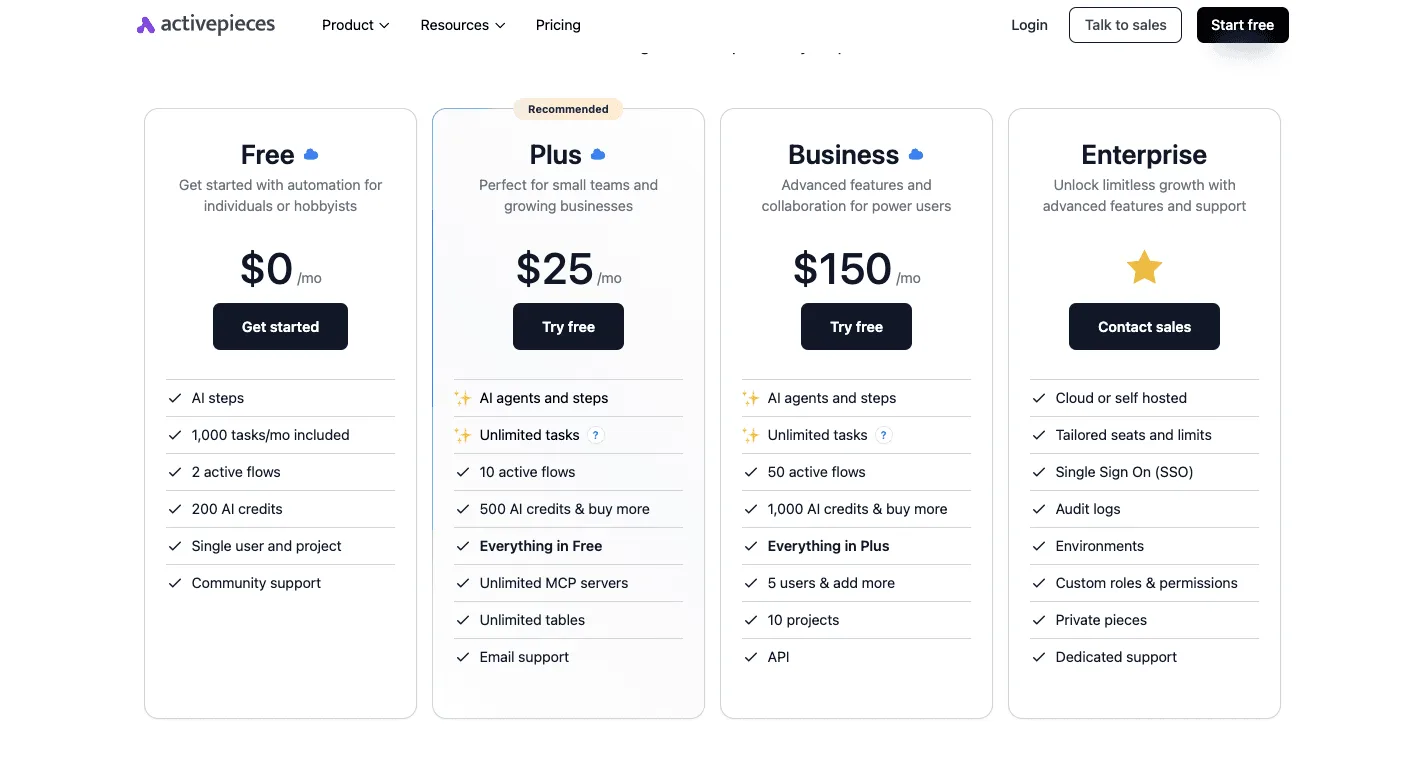
To see the same point visually, look at the comparison below, from Activepieces, which sets the tiers side by side and shows that its Free tier counts 1,000 credits a month and up to 5 users, with unlimited flows, meaning you can build as many workflows as you want but will be limited by monthly credit consumption.
A plan with generous features and a small allowance is still a small plan.
Read down the cards for the rows that carry a count, such as flows, credits and users, and skip the checkmarks. Those counted rows are where a free plan ends, and the next section looks at which one that usually is.
The limit most people hit first
On a metered plan, the first wall is almost always the allowance on runs, not the feature list. Every trigger event spends some of it, including the ones you never look at:
- a form spammed by bots
- a webhook that retries
- a polling step that fires on a schedule
So the allowance drains faster than your real work would suggest, and it drains whether or not anyone is watching. If the cap is monthly, the bill for a noisy week arrives at the end of the month, usually while nobody is awake.
How a free plan limit stopped our workflow
The composite team ran one lead-routing workflow. A form submission came in, the workflow enriched it, then assigned it to a salesperson and posted to chat. It worked for weeks.
At 02:10 one night the allowance ran out, and the workflow simply stopped. No error reached anyone, because a stopped workflow has nothing left to send one.
By morning, the leads that arrived after that moment still sat unrouted, and they stayed that way until someone noticed. The lesson is not that Pipedream is bad. The lesson is that nobody had asked what happens at the limit.
The fastest way to settle a shortlist is to try one. Activepieces is free to try, no credit card.
What stopped workflows cost teams
Nobody knew for hours, and that set the cost: every other loss in this case grows with the gap between the limit being hit and someone noticing.
The figures below describe this one team's scenario, not an industry average, so use them as a template and swap in your own volumes.
Detection delays after a workflow stops
When the workflow stopped overnight, the team found out only when someone asked why the pipeline looked quiet.
According to Dev, detection delays in a case like this run anywhere from 6 to 72 hours, depending on whether the stop lands on a weeknight or ahead of a weekend.
That range matters because the plan gives no warning of its own, so the delay depends entirely on who happens to look.
To see how each loss is counted, read the table as a set of multiplications: once you know the hours, the rest follows from your own lead volume and deal size.
| Row | Scenario figure | How counted | Illustrative label |
|---|---|---|---|
| Hours unnoticed | Anywhere from 6 to 72 hours | Time from the limit being hit to a person seeing the failure | Scenario scale, not an industry average |
| Leads unrouted | Every lead that arrived in that window | Hours unnoticed multiplied by your average leads per hour | Scenario scale, not an industry average |
| Re-entry hours | Leads unrouted times the minutes to fix each one | Staff time spent copying records into the CRM, the customer database, by hand | Scenario scale, not an industry average |
| Revenue at risk | Leads unrouted times deal value, discounted for slow reply | Share of those leads likely lost because no one answered promptly | Scenario scale, not an industry average |
Of the four, hours is the only input you can't estimate from your sales numbers, which is why it's the one to shrink first.
Recovering missed leads after a limit
Someone must find, copy and assign each unrouted lead after the fact. That's dull work, and it lands on the day the team is already behind on replies.
The bootstrap version is a shared spreadsheet where the form tool also logs every submission. It costs nothing extra, and it turns recovery from reconstruction into a paste job.
Treat the revenue figure as an upper bound, not a forecast, because it's the softest of the four and depends on how quickly your buyers expect a response. What remains is deciding how to catch the next stall before the hours pile up.
Why free allowances run out
Usually it runs out because a failing step gets retried while nobody is watching. The sequence below shows how one error becomes an empty allowance by morning.
The point to take from it is that the final link, a missing alert, is the only one you fully control.
Metering and the retry loop
- A polling trigger fires on its schedule, whether or not there's anything new to process.
- A step errors, often because an outside service is slow or returns bad data.
- The retry loop re-runs the failed step, and each attempt is metered like a normal run.
- Credits drain overnight, because nothing in the loop stops it while you sleep.
- The allowance hits zero.
- The workflow pauses, and everything that depended on it stops with it.
- No alert was set, so the first notice is a customer or colleague asking where something went.
If you're bootstrapped, judge a plan by what a failure costs, not by what a clean run costs. A polling trigger spends credits even on quiet days, and a retry multiplies that spend on bad ones.
You can fix this for free with a tighter schedule, a cap on retries, and a notification to your email or phone when usage crosses a threshold you choose. Check Pipedream's docs for how its retry and error settings work today, because they change.

That chain explains one bad night. The next two reasons explain why teams stay gone.
Code-first tool, non-developer owners
Pipedream is built around code. Its steps can run Node.js or Python, and its strength is that a developer can drop into code whenever a prebuilt action falls short.
For a developer, that's flexibility. For a founder, an operations lead, or a part-timer who inherited the workflow, it means a failing step is often a stack trace rather than a plain message.

If the person who wrote the code leaves, the workflow becomes something nobody can safely fix at 2 a.m. That is the ownership problem.
Visual tools such as Zapier or Make are easier for non-developers to read and repair, though they meter usage differently and carry their own limits. Pick for the person who will actually maintain it.
The price of the next plan up
Upgrading removes the immediate stall, but it doesn't remove the cause. A paid plan raises the ceiling; a runaway retry loop still burns through a higher ceiling, only later and at a bigger bill.
So read the list price on Pipedream's pricing page next to the overage terms, and ask what happens at the new limit: does it pause, or does it keep running and charge you?
The bootstrap version is to stay on the free plan, cap retries, and set the alert first. Pay only when a real, stable workload justifies it.
The premium version is to pay and still set the alert, since the alert is what lets you find out before your customers do.
Free automation plans compared
Read the "main limit" and "past the limit" columns before the feature column, because that's where a workflow stops at night. Every free plan in this table is a metered allowance with a catch.
Use the table to shortlist two tools: it sets each tool's free unit, its ceiling, whether you can host it yourself, and what happens once you outgrow it.
Then check each vendor's own pricing page for current numbers, which are left out here because they weren't confirmed for this integration.
| Tool | Free allowance (vendor unit) | Main limit | Self-hostable | Past the limit | Strength | Suits |
|---|---|---|---|---|---|---|
| Pipedream | Credits | Credit cap on runs | No | Paid tier, priced by usage | Code steps inside workflows | Developers wiring APIs |
| Zapier | Tasks | Task cap, simple multi-step flows restricted | No | Paid tier, priced by task volume | Largest app catalogue | Non-technical owners |
| Make | Credits | Credit cap, short scheduling interval restricted | No | Paid tier, priced by credits | Visual branching logic | Complex flows on a budget |
| n8n | Executions on its cloud plan | Execution cap in the cloud | Yes, community edition | Cloud paid tier, or your own server costs | No metered cap when self-hosted | Technical users with a server |
| Power Automate | Flows bundled with a Microsoft account (unverified, terms vary by licence) | Premium connectors restricted | No | Per-user or per-flow licence | Microsoft 365 integration | Teams already on Microsoft |
| IFTTT | Applets | Applet count cap | No | Paid tier, flat subscription | Simple consumer triggers | Personal and smart-home use |
| Activepieces | Credits (1,000 credits a month on the free plan) | Credit cap; when credits run out, flows stay on and runs wait until credits refresh | Yes, Community Edition under the MIT licence | Paid tier: Plus at $20 a month flat (10,000 credits a month), then $0.007 a credit over the allowance | Unlimited flows on every plan, including free | — |
Read the table for the limit's shape, not its size. A task cap punishes busy flows, a credit cap punishes heavy steps, and an applet cap punishes having many small automations.
Whether to stay, upgrade or switch
Stay on a free plan if your volume is steady and well under its ceiling, and set the usage alert so a spike doesn't surprise you.
Pay for the next plan when a stopped workflow costs you more than the subscription, such as missed orders or unanswered leads. Move when the ceiling keeps arriving early.
For the bootstrap version, self-host n8n on a small server you already pay for: you swap a metered cap for your own upkeep and backups.
The premium version keeps the hosted tool and pays for headroom. Either way, the alert goes on first.
Reading a table only gets you so far. Build the same workflow in Activepieces and compare it yourself.
Rebuilding the workflow in Activepieces and where its free tier falls short
If you want an open-source tool you can self-host for nothing, with a paid cloud plan as the fallback, Activepieces covers both: its core is MIT-licensed and runs on your own server with no licence fee, and the same flows run on its managed cloud when you'd rather not watch a server.
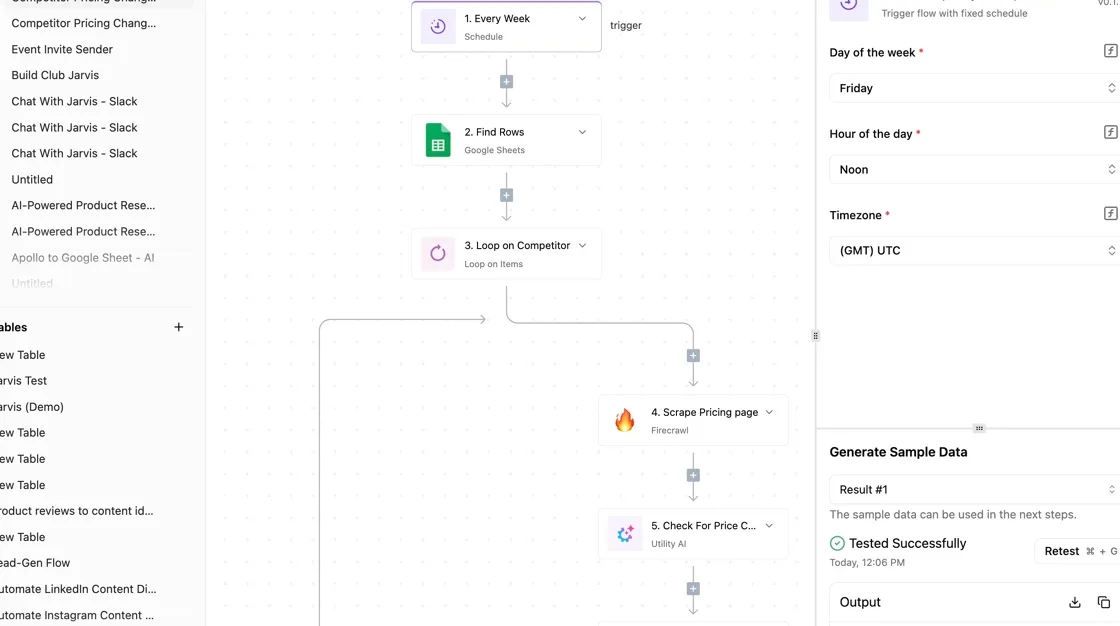
Its free cloud tier is metered in credits, so the same night-time cliff applies. The alert still goes on first.
What the rebuild looked like
I rebuilt a support-ticket flow: a HubSpot trigger, one of the 750 integrations counted in the open source monorepo, fires when a ticket is created, two AI steps rewrite and categorize it, a Router (Activepieces' name for a branching step) splits it by category, so each category of ticket now gets its own processing path.
Each branch posts to Slack.
In the screenshot below, the finished canvas shows the "New Ticket Added" trigger on the right with its Connection field, three branches (Branch 1, Branch 2, Otherwise), and Test Flow active before Publish.
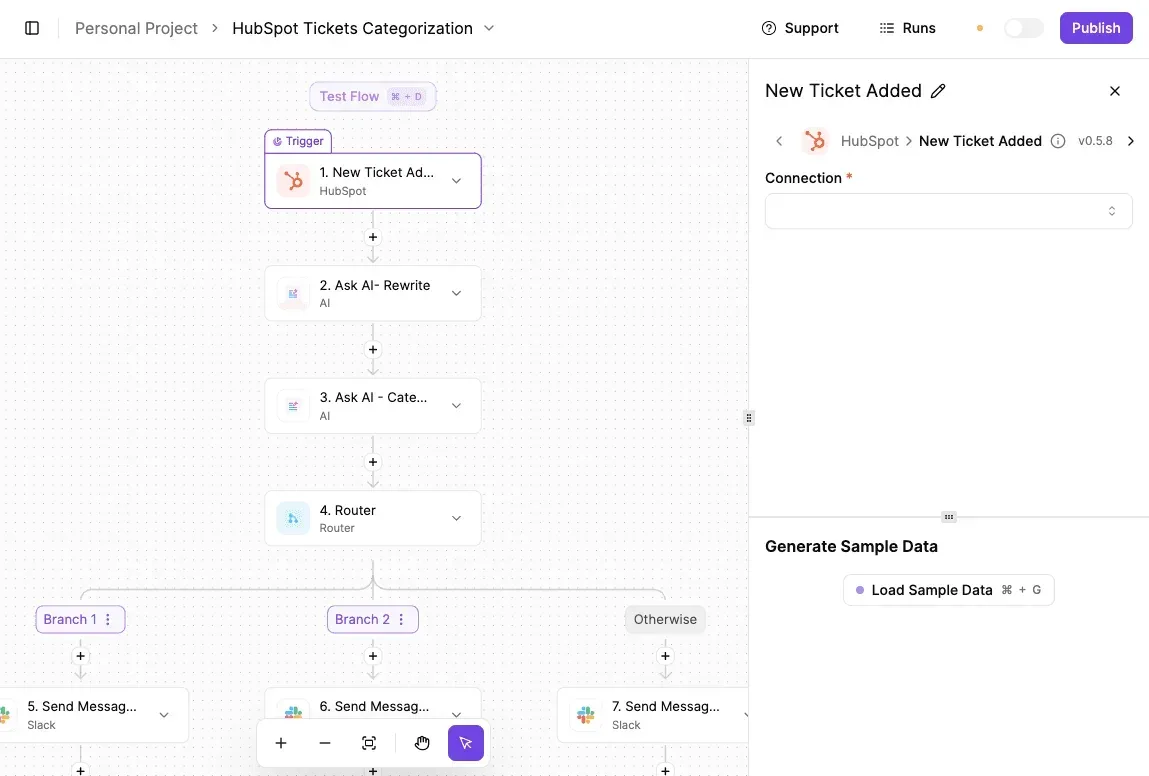
Take from it that the Otherwise branch is the one that catches everything unexpected, so a ticket never vanishes silently. It took one sitting, not a weekend.
The Activepieces pricing page states 1 credit per flow run, whatever the number of steps, where Zapier's pricing page bills per task and Make's per module. So this ticket flow with its router and Slack branches costs the same per run as a two-step version.
The two AI steps are the exception, at 2 credits each for a fast model. Test runs count too, which means building and debugging spends part of the month's allowance before a real ticket arrives.
Where the free tier falls short
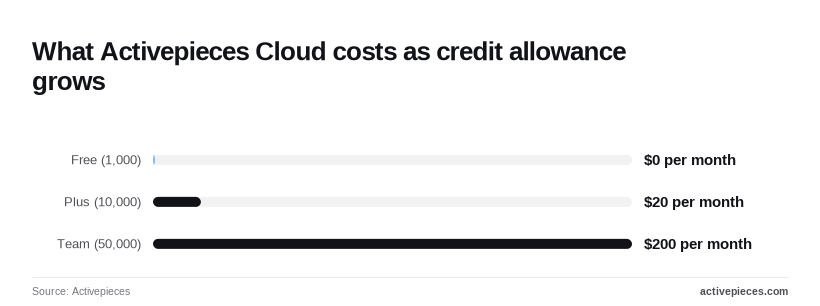
The Activepieces pricing page lists three cloud tiers by credit allowance, so users choose based on expected volume.
Activepieces says Free is $0 per month for 1,000 credits, which suits a prototype or a quiet inbox, so you won't outgrow this tier for these use cases.
It doesn't suit a team that sees a few hundred tickets a week once each run uses several credits.
Plus is $20 per month for 10,000 credits, ten times the allowance for $20, so this is the sensible first upgrade.
Activepieces' Team plan is $200 per month for 50,000 credits, which is five times the Plus allowance at ten times the price, meaning each credit costs roughly twice as much at this tier.

It only makes sense if you need what else that plan adds, not just volume.
Is the free cloud tier safe for critical workflows?
Credit caps are only part of it. I wouldn't call the free cloud tier a safe home for a business-critical flow, because the metered limit is exactly where an unwatched flow stops.
The free tier also leaves out what sits behind paid plans: SSO arrives with Team, while SCIM, custom RBAC, audit logs, secret managers and releases with Git Sync belong to Ultimate.
To go the bootstrap route, self-host the open-source edition, which removes the credit meter but moves the risk to you. You own upgrades, backups and uptime, so a server that falls over at 2 a.m. is your problem, not a vendor's.

Choose it only if someone on your team will actually watch the server. If nobody will, stay on cloud, set the alert, and pay the $20 when the alert fires.
Rules for monitoring free plan usage
These days the team treats the allowance as something to watch, not a ceiling to discover. Each rule below exists so the next limit announces itself during working hours instead of stopping a workflow overnight.
Usage alerts and caps on free plans
At 75% of the monthly allowance, the alert fires, giving you a 25% grace period before exhaustion, so by the time you're warned, you've already spent three-quarters of your budget.
That leaves the last quarter of the allowance to decide whether to pay, trim, or move a workflow, and the decision gets made on a weekday instead of in the middle of a stoppage.
If your plan has no built-in usage alert, the bootstrap version is a recurring calendar reminder to read the usage page, plus a spreadsheet row for the count. It's clumsy, but it costs nothing and still beats finding out from a customer.
When a failure notice goes out, it goes to a channel somebody actually watches, not to the inbox of whoever built the workflow and left. A notice nobody reads is the same as no notice.
Retries get a hard cap. An unbounded retry loop against a failing service can burn through an allowance in one night, so a broken workflow now stops itself after a few attempts and reports instead of quietly spending the month.
Workflow owners and pricing review dates
Every workflow has one named owner. When the alert fires or a failure notice lands, there's a person to ask, not a group to wonder about.
Pricing gets a dated review each month. Someone opens the vendor's pricing page, notes the check date next to what they read, and compares it with last month's note.
Limits and prices change quietly, and a dated record shows what you were relying on when something broke.
Finally, no revenue workflow runs on a plan that pauses silently.
If an order, invoice, or lead handoff depends on it, it moves to a plan that warns you or keeps running at the limit, or it moves to something you host yourself.
Paying to avoid a silent pause is cheaper than the sale you never see.
For Monday:
- Set the usage alert at 75% of the allowance, or schedule the manual check if no alert exists, preventing silent budget overruns; you'll catch the problem before you're completely out of credits.
- Write a named owner against every workflow.
- Point failure notices at a watched channel.
- Put a retry cap on every workflow that calls an outside service.
- Book the monthly pricing review and record the check date.
- Move any revenue workflow off a plan that pauses silently.
Frequently asked questions
Five questions come up most, and the table gives the short answer to each before the detail below.
| Question | Short answer | Section that covers it |
|---|---|---|
| Is Pipedream really free to use? | Yes, on a metered free tier | Is Pipedream really free to use? |
| What happens when Pipedream's free credits run out? | Runs stop until the allowance renews or you upgrade | What happens when Pipedream's free credits run out? |
| Can I self-host Pipedream for free? | Not as a supported free option | Can I self-host Pipedream for free? |
| Which free Pipedream alternative has the I don't see a sentence to rewrite. All that came through was "The text you sent, "There's no sentence to rewrite. The only text I received is the fragment "highest limits?", which has no figures, product names, or competitor compliment. Please paste the full sentence and I'll return just the rewritten version. It looks like the actual sentence got cut off. Could you paste the full sentence? Could you paste the full sentence? | A self-hosted n8n, where your server is the limit | Which free Pipedream alternative has the highest limits? |
| Is Activepieces free for commercial use? | MIT-licensed core, and a Free cloud tier of 1,000 credits a month | Is Activepieces free for commercial use? |
The detailed answers
Read the short answers as a first filter. The detail below is what decides whether you stay, pay or move.
Is Pipedream really free to use? Yes, Pipedream has a free tier, but it's metered by credits, not unlimited.
You can build and run real workflows at no cost, so it suits a side project. A business process with steady volume will reach the ceiling, so read the current allowance on its pricing page before you depend on it.
What happens when Pipedream's free credits run out? Your workflows stop being processed until the allowance renews or you move to a paid plan.
The cost is the runs you miss, not a surprise invoice, and a night-time trigger is the one most likely to fail unseen. Set a usage alert so you hear about it before your customers do.
Can I self-host Pipedream for free? Not as a supported free option.
Pipedream is built as a hosted service, so removing the credit ceiling by running it on your own machine is not the route it offers. If self-hosting is your goal, pick a tool designed for it from the start.
Which free Pipedream alternative has the highest limits? Self-hosted n8n, in its community edition, has no vendor-imposed execution cap, so the limit becomes your server.
The bootstrap version is a small rented virtual server, which costs a modest monthly fee and your own time for updates and backups. Hosted free plans from other vendors all keep a metered cap, so compare what each does at that cap.
Is Activepieces free for commercial use? The core is MIT-licensed, which permits commercial use, and the Free cloud tier gives 1,000 credits a month with unlimited flows, so the credit meter is the limit to check before you commit a paying client's workflow to it.
Related reading
References
Still comparing
The fastest way to settle it is to build something.
Open source under MIT, so you can self-host the same thing later.
Start free Talk to sales