
Is IFTTT Free? Plan Limits and Alternatives (2026)

Nov 23, 202614 min read
Yes, IFTTT has a free plan, but it covers only a few simple automations, and when you outgrow it, as people often do when they move to tools like Activepieces, the automations stop without much warning.
IFTTT is a consumer automation service: an "applet" (a trigger and an action) connects one app or device to another. Prices below are as listed on ifttt.com/plans in November 2026.
IFTTT free plan limits and coverage
What the Free plan includes
On Free, you can build and run applets with a small monthly credit allowance and the slowest checking schedule. It suits a smart-home routine or a personal reminder, where being an hour late doesn't matter. It doesn't suit anything a customer is waiting on.
IFTTT Pro and Pro+ pricing and features
Each paid tier raises the credit allowance, and Starter and Pro shorten how often IFTTT checks for a new trigger. Both matter more than the headline price.
| Plan | Monthly credits | Polling interval |
|---|---|---|
| Free | 1,000 | Hourly |
| Starter | 5,000 | 15 minutes |
| Pro | 20,000 | 5 minutes |
| Pro+ | 100,000 | 5 minutes |
On Free, hourly polling means a new form entry can sit for up to an hour before anything happens. A "notify the team" applet is often stale by the time anyone sees it.

Pro and Pro+ share the same five-minute interval, so the extra cost of Pro+ buys credits, not speed.
The limit most people hit first
It's the credits, not the applet count. Take an illustrative five-person team running a small shop, where each person wants two or three automations for orders, stock alerts and invoices. They fill the Free plan in an afternoon.

The next applet fails to save or stops running, and nobody gets an error email.
The fastest way to settle a shortlist is to try one. Activepieces is free to try, no credit card.
The applet limit surfaced
Nobody on this team had written down an applet count. The first sign of the cap was a toggle that refused to stay on, and the fix they chose quietly broke something else.
Third applet blocked by free plan limit
On the free plan, the team had two applets running: one copying new form submissions into a spreadsheet, one pinging a chat channel. On Monday morning someone built a third, to send each new lead a confirmation email, and tried to switch it on.

IFTTT showed the upgrade prompt instead. The applet saved, looked finished, and did nothing. No email went out, and nothing in the workflow told anyone that.
09:30: the workaround that switched off another applet
Nobody on a small team has a spare subscription budget before lunch on a Monday, so they did what most of us would.
They disabled the chat-ping applet, which felt like the least important one, to make room for the confirmation email. The email applet came on. Everyone moved to the next task.
What they'd switched off was how the sales lead found out a form had come in.
With it off, leads still landed in the spreadsheet, but no one was told to look. The cap didn't announce itself again, because nothing had failed loudly. One notification path had been swapped for another.
How the IFTTT applet failure was discovered
It surfaced on Thursday, when a prospect wrote back asking why nobody had answered a request sent days earlier. The sales lead opened the spreadsheet and found several leads sitting there, untouched since Monday morning.

The spreadsheet row was fine. The missing integration was the ping that used to say "go look."
Don't read this as IFTTT misbehaving. The free plan did what it said, and the team had never decided which applets mattered most, so the one they sacrificed was chosen in a hurry, by feel.
Cost of missed leads on IFTTT
Choosing by feel meant the leads that applet would have routed went nowhere. One of them, at $47 for a small-business lead, is worth more than a full month of IFTTT Pro at $7.99.
Lost leads and hours from applet failure
Because most businesses are already slow, silence is expensive. According to Harvard Business Review via Callatta, only 37% of inbound web leads get a first response within an hour, so two-thirds of prospects are left waiting over sixty minutes to hear back.
Another 16% wait between 1 and 24 hours, by which time most will have moved on. A further 24% wait more than a day, and 23% are never answered at all, per Harvard Business Review via Callatta, which means nearly half your leads are lost.
So 47% of leads get nothing for a full day or ever, and a stopped applet pushes your leads toward that group without anyone deciding it, which means you silently become a non-responder.
Then there are the hours, the second bill. When the applet stops, someone copies each lead by hand into the tracker or the inbox.
At $35 an hour, according to Limesdigital, every hour of copying costs $35, and that hour comes out of a person who was supposed to be doing something else. Nobody logs it, so it never shows up as a line item.

IFTTT Pro cost versus lost leads
Run the arithmetic. Pro at $7.99 divided by $47 per lead is 0.17, so one saved lead pays for about six months of Pro.
Per Limesdigital, Pro divided by $35 per hour is 0.23 of an hour, so roughly 14 minutes of manual copying costs the same as a month of the plan.
The chart sets the outage cost, hours at $35 plus leads at $47, against Pro at $7.99 month-to-month, so a single incident can cost more than the Pro fee you'd save by skipping it for months.
The outage side climbs with every lead and every hour, and the Pro side stays flat.
The upgrade decision is rarely close once you count what the stop costs. The harder question is which limit you'll hit first, and that's what you should write down before you build.
Reasons teams outgrow IFTTT
When the first limit a team hits is one the free plan wasn't going to stretch past, they leave IFTTT:
- A short applet cap
- Slow checking
- Little room for multi-step logic
Four reasons people outgrow the free plan
First comes the cap on applets, which stops work silently. The second is speed: IFTTT's free plan checks for new triggers every 60 minutes, according to Workflow Math, so a form submission can sit for an hour before anything happens.
Zapier and Make both check every 15 minutes, which is four times as often, so problems are caught while they're still small. The third is single-step logic, and the fourth is a ceiling on premium connections.
To match the limit you'll hit first to a tool, use the table below, which shows what each free tier gives you and where it runs out.
| Tool | Free allowance | Main limit | Self-hostable | Past the limit | Core strength | Suits |
|---|---|---|---|---|---|---|
| IFTTT | Unlimited applets | Monthly credits, 60-minute checks | No | Paid plan | Simple consumer and device triggers | Home and personal use |
| Zapier | Monthly task quota | Tasks, 15-minute checks | No | Paid plan | Largest app catalogue | Small teams, quick wins |
| Make | Monthly credits | Credits, 15-minute checks | No | Paid plan | Visual branching | Multi-step workflows |
| n8n | Community edition, self-run | Your own server upkeep | Yes | Paid cloud or enterprise | Control and custom code | Technical teams |
| Power Automate | Bundled with some Microsoft accounts | Premium connectors | No | Per-user licence | Microsoft 365 integration | Offices already on Microsoft |
| Pipedream | Free daily usage | Usage credits | No | Paid plan | Code-first steps | Developers |
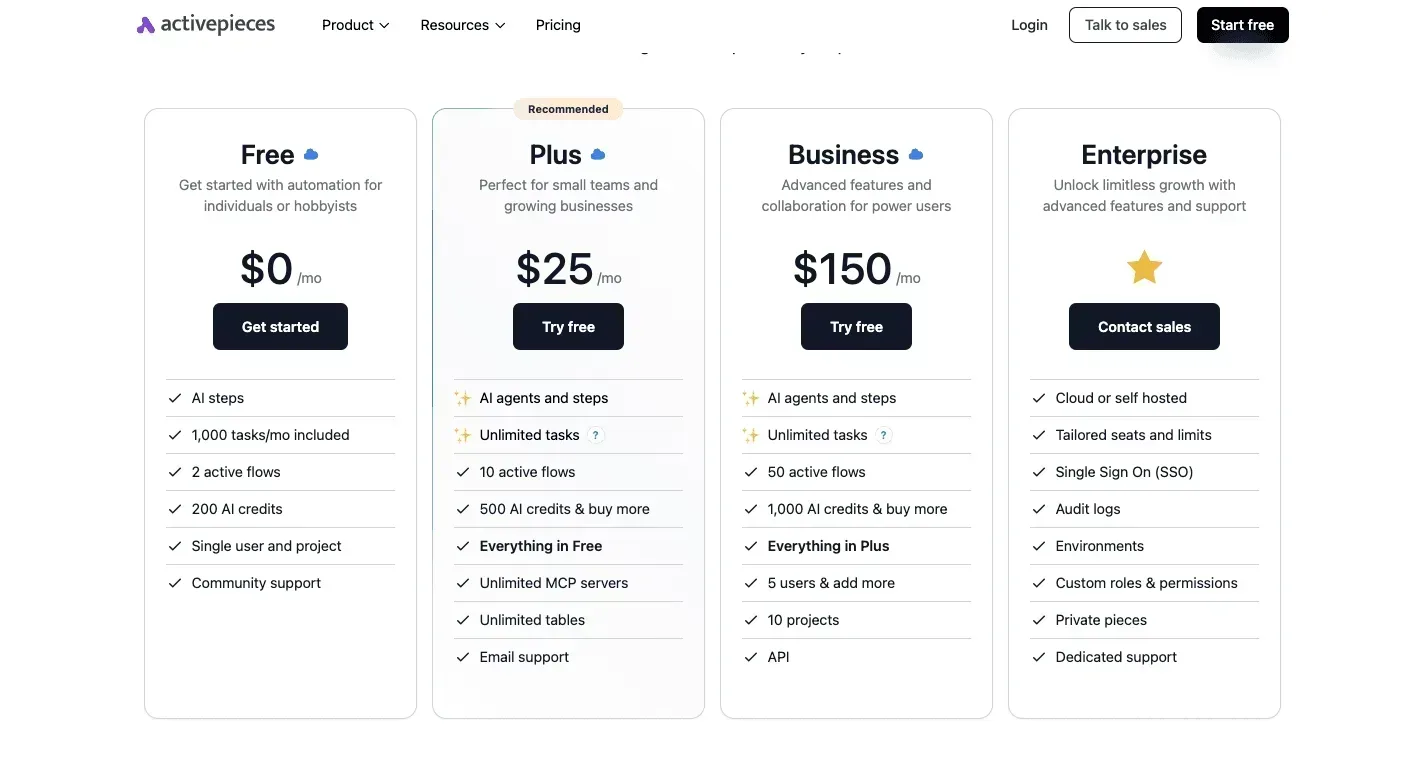
| Activepieces | 1,000 credits a month, unlimited flows, up to 5 users | Credits; when they run out, flows stay on and runs wait until the credits refresh | Yes | Plus at $20 a month flat for 10,000 credits a month, then $0.007 a credit over | MIT-licensed core with 750 integrations | Single teams up to every department |

Stay if your automations are few, personal, and tolerate an hour's delay. Pay if the tool works but the cap blocks you.
Move if you need faster checks or branching, or if running your own server is cheaper for you than a monthly bill. Write down which of those three applies before you build.
Branching is also where the meter matters: Activepieces counts a run as 1 credit however many steps it holds, so a ten-step lead-routing flow costs what the two-step workaround did, where Zapier's pricing page bills per task.
Splitting a job into smaller, more reliable steps can raise the bill on per-task plans.
Reading a table only gets you so far. Build the same workflow in Activepieces and compare it yourself.
Rules for avoiding IFTTT plan limit outages
Four rules came out of it. Write the plan limit down before building, give every workflow one owner, alert when a run goes silent, and read the vendor's pricing page every month.
Check IFTTT plan limits before building
Your lead-alert applet stopped on a Tuesday and nobody noticed until Friday, when sales asked why the inbox was quiet. The cap had been reached, and the tool stopped without a warning anyone saw.
So before building, open the vendor's plan page, copy the limit you'll hit first into the workflow's description, and note how many workflows already count against it.
If you can't say how close you are, you're guessing, and a team paying in a foreign currency on a tight budget can't afford to find out by outage.
Alert on silence, not only on errors
When a workflow fails, error alerts catch it. A workflow that's blocked by a plan limit may not fail at all; it just does nothing.
Check for the absence of an expected result, because that's the only signal. Have a separate scheduled check that messages a human when a workflow that normally fires daily has produced nothing by a set time.
**A workflow that's blocked by a plan limit may not fail at all; it just does nothing.
Run through the list below once at the start of the week.
- Before you build any new workflow, write the plan limit and your current usage in its description.
- When a workflow goes live, put one named person's name on it, not a team or a shared inbox.
- When a workflow should produce output on a schedule, add a check that alerts if it does not.
- On the first working day of each month, reread the vendor's pricing page and compare it with what you wrote down.
Do those four things and the next outage becomes a message on Monday morning instead of a surprise on Friday.
Where Activepieces fits for multi-step business workflows
Activepieces suits multi-step, branching work like routing team leads, and it's a poor match for simple smart-home applets. Its free cloud tier is small, but flows are unlimited on every plan, and the MIT-licensed core can be self-hosted if you'll run the server.
What the free tier covers
On the cloud free plan you get 1,000 credits a month, according to Activepieces' pricing page. Checked in November 2026. That's enough to prove a lead-routing flow works, not to run a busy inbox on it.
Plus raises the allowance to 10,000 credits a month, and Team to 50,000, so each step up buys ten times, then five times, the room before a flow stops.
In the flow below, a form submission branches on lead source into a spreadsheet row and a chat message, with an error branch that alerts the owner. The box beside it marks the part you carry yourself if you self-host.
Branching and an error path are the point. A flow that tells you when it failed avoids the silent stop this article started with.
Where the free tier falls short
Everything depends on 1,000 credits. A sales team that sends every form lead through three actions will watch that allowance shrink faster than a single smart-home applet ever would.
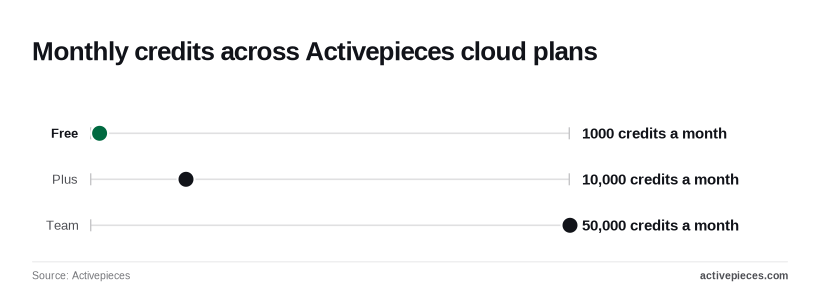
The next plan, at 10,000 credits, is a real cost to weigh, not a rounding error.
Self-hosting is free, but "free" means you run it. Someone has to keep the server up, apply updates and notice when it's down. If nobody on your team owns that job, you've swapped a visible cap for an invisible outage.
If your automation is one trigger and one action, IFTTT's applets fit better. Turning on a light when you arrive home or posting a saved article to a note are the typical cases. You need no branching, no error path and no server.
Activepieces earns its place when the workflow has several steps and someone must be told when it breaks; MoneyGram, Moneypenny, Alan and FundingSocieties run it.
Frequently asked questions
Whichever tool you pick, the questions left over are about the plan, not the workflow, and the answers sit on the vendor's own pages, which change.
The table gives the short answer for each, the page to confirm it on, and when I last looked, so you can re-check before you build.
| Question | Short answer | Vendor page | Date checked |
|---|---|---|---|
| Free forever? | A free plan exists today, but no page promises it stays as it is | IFTTT pricing page | November 2026 |
| Price changes? | Vendors can change limits and prices, so re-read before you commit | IFTTT pricing page | November 2026 |
| Self-hosting? | IFTTT is hosted only; n8n offers a self-hosted edition | IFTTT help centre, n8n documentation | November 2026 |
| Credits? | IFTTT's limit is on credits, not applets; check how any alternative counts usage | IFTTT pricing page | November 2026 |
| Activepieces? | Cloud free plan is $0 with 1,000 credits a month, unlimited flows and up to 5 users; the core is MIT-licensed and can be self-hosted | Activepieces pricing page (https://www.activepieces.com/pricing) | October 2026 |
How to read the date column
Read the last column as an expiry date. If it's old by the time you build, the answer may be too.
Is Pro worth it for one person?
Is IFTTT Pro worth it for one person? It's worth it once you hit the applet cap and the automations you want are ones you'd miss if they stopped. If you're under the cap and nothing is breaking, you're paying for headroom you aren't using.
Trials and cancelling Pro
Does IFTTT have a free trial of Pro? Trial offers come and go, and I won't state one from memory.
Look at the pricing page when you sign in. If a trial is offered, write down the day it ends, because that's when a cap you had lifted quietly returns.
Can I keep my applets if I cancel Pro? Assume the free cap applies again the moment you cancel.
Applets above it are the ones at risk of stopping without a loud warning. Before you cancel, list every applet you use, decide which few matter most, and keep those within the free allowance.
A free alternative with no task limit
Is there a free IFTTT alternative with no task limit? Self-hosted n8n is the Its limit becomes your server rather than a plan.
Scope that carefully: you take on hosting, updates, backups, and what happens when the power or the connection drops. For one person with a spare machine that's fair. For someone with no time to maintain it, it's a different cost.
Related reading
Still comparing
The fastest way to settle it is to build something.
Open source under MIT, so you can self-host the same thing later.
Start free Talk to sales