
Microsoft SQL Server Alternatives: 7 Top Picks (2026)

Nov 17, 202614 min read
You're leaving because of cost, control, a deadline or a cloud mandate, and you should name which one before you evaluate a single replacement, whether that's another hosted platform or an open-source option like Activepieces.

Stage 1: Name why you're leaving SQL Server
What counts as a SQL Server alternative
If an engine can run your schemas, queries and stored logic at a rewrite cost you can price, it counts as an alternative.
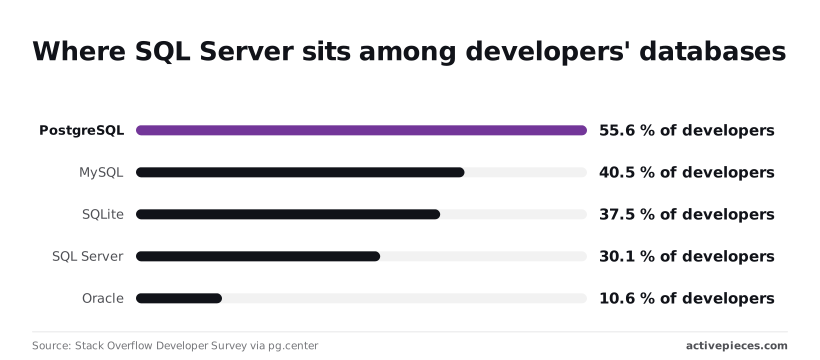
Per Stack Overflow Developer Survey, PostgreSQL is used by 55.6% of developers, MySQL by 40.5%, SQLite by 37.5% and SQL Server by 30.1%.
Because SQL Server ranks fourth, 25.5 points behind PostgreSQL, the hiring pool and tooling for the leading alternative are larger than for what you're running now.
Reasons that justify leaving SQL Server
Start with cost, the most common trigger. Pull your last renewal and divide it by the cores you license, then compare that with the cores you use.
A gap between the two is money you pay for capacity nobody touches. Edition caps on memory or features can also force an upgrade you didn't plan.
You won't find lock-in as a line item; it shows up as dependencies. Count the stored procedures using T-SQL-specific syntax, the SQL Agent jobs and the linked servers. Each one is a rewrite you pay for on exit, and the total is your switching cost.
You won't find lock-in as a line item; it shows up as dependencies.
If your cloud strategy says managed services, ask what your licences cost when moved. The database rarely dictates the surrounding stack: Activepieces has Microsoft SQL Server and PostgreSQL connectors among its 750 integrations, so the engine choice stays yours.
Reasons that aren't worth leaving for
When the argument for leaving is a missing feature, it rarely holds up. You probably use a fraction of what the engine offers, so a feature checklist usually argues for staying.
Four reasons survive scrutiny, each with a test that proves it:
- Licence cost at renewal: your renewal quote exceeds what the same workload costs on a managed PostgreSQL instance of equal size.
- Platform lock-in: you can count the T-SQL-only objects and put a rewrite estimate on them.
- End of support date: your version's support end date falls inside your next planning cycle.
- Cloud strategy: a written mandate exists, and moving your licences costs more than the target service.
Circle one or two, then write them on a single page. Every trial migration that follows gets judged against that page.
The fastest way to settle a shortlist is to try one. Activepieces is free to try, no credit card.
Stage 2: Compare the Real Alternatives in One Table
Seven options are worth a trial, and the shortlist is probably two: PostgreSQL, run by you or as a managed service, plus whichever cloud-native variant matches where you already host.
SQL Server alternatives compared by price and limits
Before you spend any migration hours, use the table to see what each engine charges for and where it gives way, so you can strike the ones that fail your constraint.
| Option | Price model | Core strength | Main limit | Suits | Source |
|---|---|---|---|---|---|
| PostgreSQL | Free, open source | T-SQL-adjacent depth, extensions | You run it | Cost-driven exits | postgresql.org |
| MySQL | Free community edition; paid commercial tiers | Web-workload simplicity | Thinner analytics SQL | Simple app backends | mysql.com |
| MariaDB | Free; paid support | MySQL-compatible, open | Smaller ecosystem | MySQL shops | mariadb.org |
| Oracle Database | Per-processor or per-user licence | Enterprise features | Swaps one licence bill for another | Oracle-committed firms | oracle.com |
| Aurora | Pay per instance and storage | Managed PostgreSQL/MySQL | AWS only | AWS teams | aws.amazon.com |
| Cloud SQL / AlloyDB | Pay per vCPU, memory, storage | Managed PostgreSQL | Google Cloud only | Google Cloud teams | cloud.google.com |
| Azure SQL Database | Pay per vCore or DTU | Closest to SQL Server | Keeps Microsoft lock-in | Minimal-change moves | azure.microsoft.com |
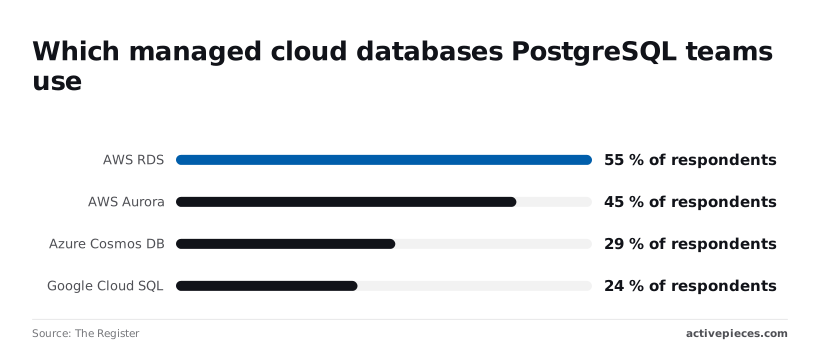
In practice, managed PostgreSQL dominates. A Register report on PostgreSQL teams found 55% on AWS RDS (Amazon's standard managed database service) and 45% on Aurora.

Weaknesses of each SQL Server alternative
In the same survey, Azure Cosmos DB, Microsoft's distributed database service, sat at 29%, and Google Cloud SQL at 24%, which means neither service hadn't won clear market leadership.
Oracle is the clearest misfit: it exits one licensing relationship by entering another. MySQL and MariaDB fit simple application schemas, but a database full of stored procedures and heavy reporting queries will need more rewriting there than on PostgreSQL.
Staying with Microsoft: Azure SQL and edition changes
Because Azure SQL Database keeps T-SQL, it carries the least conversion risk. It also keeps the lock-in, which is the very thing you may be leaving.
Treat it as your control case: if a PostgreSQL trial costs far more effort than Azure SQL would, you have a measured reason to stay. If it doesn't, you have your two finalists.
Stage 3: Run a Trial Migration on One Database
Take both finalists and put one real database through the same four steps, because only your own T-SQL, your own data and your own slowest queries show what a feature comparison hides.
Inventory what depends on T-SQL
Start by counting what is written in Microsoft's dialect, since each item is a line on the bill for leaving. Search your stored procedures, views, functions and triggers for TOP, CROSS APPLY, MERGE, temp tables, OPENQUERY, linked servers, and SQL Server Agent jobs.
Add anything outside the database that calls it, such as SSIS packages, SSRS reports and application code with inline SQL. Each hit is a rewrite, and the total tells you whether the migration is a weekend or a project.

Convert the SQL Server schema and load data
Use the vendor's documented tooling instead of hand-translating. For PostgreSQL targets, that means the assessment and conversion tools each cloud provider publishes for SQL Server sources, plus the open-source pgloader for data movement.
Run the schema conversion first and read its report of objects it couldn't convert. Then load a copy, never production, and check row counts table by table. A table that loads with different counts is a defect you want to find now.
Test your ten slowest SQL Server queries
Pull the ten slowest queries from your own query history, not from a benchmark. Run them on the copy with realistic parameters and compare both results and timing. Matching rows matter more than matching speed, because a fast wrong answer is the worse failure.
Treat the trial as a repeatable test flow: one defined input, a lookup against each source, a reply, and an explicit end.
Decide: switch, stay or split
Score each finalist on three questions: how many objects converted without rewriting, how many of the ten queries returned identical results, and how many ran acceptably without tuning.
A finalist that passes all three is your switch. One that fails on a few rewritable objects is a switch with a known cost.
One that fails on core logic means you stay. If different databases fail differently, split: move the ones that passed and leave the rest where they are.
Reading a table only gets you so far. Build the same workflow in Activepieces and compare it yourself.
Stage 4: Automate the Jobs Around the New Database
When you move the database, SQL Agent jobs and SSIS-style tasks stay behind, so each one needs a new home: cron, pg_cron, a cloud scheduler, or a workflow tool. Audit them the way you audited the tables, because a missed nightly job fails silently.
What replaces SQL Agent jobs
Sort every job by what it does. A job that runs one SQL statement on a schedule moves to pg_cron, an extension that runs SQL inside PostgreSQL on a cron schedule. A job that calls a script moves to cron or your cloud's scheduler.
When a job queries, decides, notifies and logs across several systems, a workflow tool earns its keep.
Activepieces has PostgreSQL, MySQL and Microsoft SQL Server connectors among its 750 integrations, all in an MIT-licensed core on GitHub, and it self-hosts through Docker, Compose or Kubernetes, running the same codebase as its managed cloud.
Git Sync and Releases, a documented feature in the Activepieces docs, lets you promote a flow from one side to the other, so a job built on cloud during the trial can move onto your own servers later and self-hosting doesn't limit your access to features or integrations.
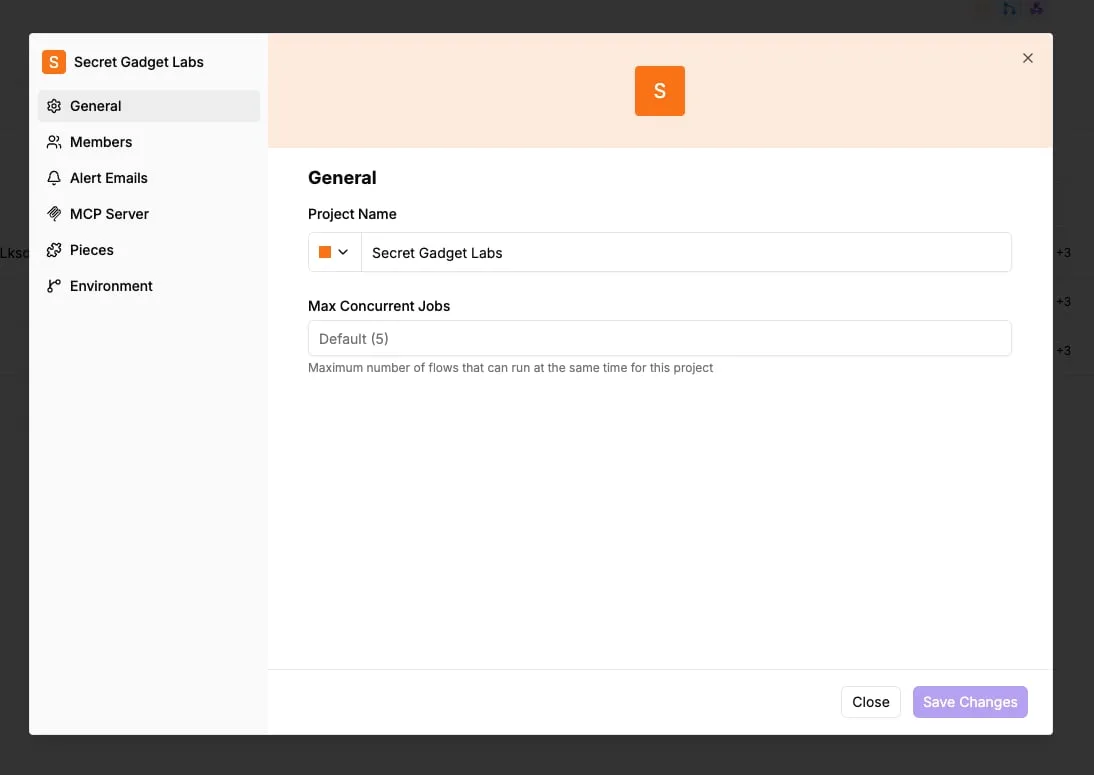
It's not a database alternative. It takes over the scheduling, branching and alerting that SQL Agent used to supply.
| Replacement | Runs where | Fits |
|---|---|---|
| cron | A server you maintain | Scripts and shell tasks |
| pg_cron | Inside PostgreSQL | Pure SQL maintenance |
| Cloud scheduler | Your cloud provider | Triggering functions or containers |
| Activepieces | Its own service | Query, branch, alert, log |
Build a scheduled query workflow in Activepieces
This flow is a nightly data-quality check. Read the order as the job's logic: the query produces evidence, the condition decides whether anyone needs to hear about it, and the final write leaves a record you can audit later.
- Add a Schedule trigger and enter your timing in the cron field.
- Add a PostgreSQL Run Query action. Select the connection and paste the SQL that counts the rows you care about.
- Add a condition on the returned row count, so the flow continues only when the count signals a problem.
- On the true branch, send a Slack or email alert naming the check and the count.
- Write a result row to a log table, so every run leaves a record, including the quiet ones.
Without step five, you can't tell 'ran and found nothing' from 'never ran.' It replaces the job history SQL Agent kept for you.
When cron or the cloud scheduler is enough
If a job is one statement or one script with no branching, a workflow tool adds a service to monitor for no gain. Use pg_cron for in-database SQL and cron or the cloud scheduler for scripts.
Reach for a workflow tool when a job needs a condition, a notification or a sync across systems.
Stage 5: Plan Your First Monday After the Trial
Sign off on the trial against criteria you wrote down before it started, then let each instance's support end date decide whether you renew SQL Server or move off it.
Checks before cancelling your SQL Server license
Record which queries, stored procedures and scheduled jobs passed on the migrated copy, which needed rewrites, and which you left behind on purpose.
Name one person who accepts the remaining gaps in writing. If nobody will put their name to the gaps, the trial isn't finished.
Then check the calendar. The table shows when Microsoft's extended support ends for each version you're likely to be running, and what that forces.
| Version | Extended support ends | Action | Owner |
|---|---|---|---|
| SQL Server 2016 | 15 July 2026 | Already lapsed. Migrate first, or confirm whether Microsoft will sell you paid security updates as a bridge | Head of infrastructure |
| SQL Server 2017 | 13 October 2027 | Migrate if the trial passed; renew only if it exposed a blocker you can't fix in time | Database lead |
| SQL Server 2019 | 9 January 2030 | Lowest urgency. Use the runway to renegotiate, or to migrate in stages | Finance and database lead together |
Because the 2016 row has already passed, any instance still on it is running without routine security fixes today.
That instance goes to the front of the queue. The later dates give you leverage: a team that can credibly walk away on 2019 negotiates its renewal from a stronger position than one with no trial behind it.
Renew or renegotiate when the trial found a blocker you can't engineer around, such as a dependency on a Microsoft-only feature your vendor software requires. That's a legitimate result, and a cheaper renewal beats a failed cut-over.
Run SQL Server and PostgreSQL in parallel
Run the old and new databases side by side before cut-over, with writes still going to SQL Server and replicated to PostgreSQL. Compare row counts and checksums on the tables that matter most, and replay real production queries against both.
Agree the rollback path before cut-over, not during it. Keep SQL Server licensed and untouched until the new system has survived a full business cycle, including month-end jobs. Cancel only after that, and only with the sign-off document in hand.
Frequently asked questions
Is PostgreSQL really a drop-in replacement for SQL Server? No. It's a replacement, not a drop-in.
Tables, indexes, and most queries move with modest changes. Procedural code, data type quirks, and application-side assumptions don't.
Treat any vendor who says "drop-in" as having skipped the audit. Your trial migration is where the real gaps show up.
Is there a free version of SQL Server I can keep using?
Yes, but each free edition is fenced. Express is permitted in production, with hard caps on database size and compute. Developer carries full features, but its license forbids production use.
If your workload fits inside the Express caps, it's a legitimate stopgap. If it doesn't, you're paying for an upgrade or running a license violation, and only the first is cheap to fix.
Can I move SQL Server to the cloud without leaving Microsoft?
Yes, through Azure SQL Database, Azure SQL Managed Instance, or SQL Server on an Azure virtual machine. Managed Instance has the highest compatibility with on-premises SQL Server, so it's the lowest-effort move.
Check what that buys you, though. The engine is still Microsoft's, and so is the pricing model.
You've changed where the bill is generated, not who generates it. For a team whose complaint is lock-in, that's a relocation, not an exit.
How long does a SQL Server migration usually take?
It depends on four things you can measure: database size, volume of procedural code, how tightly the application is bound to T-SQL, and how much testing your sign-off requires.
Size matters least. Code volume and testing matter most. A small database with heavy stored procedure logic can take longer than a large database that is mostly tables.
Run the trial on your own schema and time it. That figure beats any published range.
Do I need to rewrite stored procedures?
Usually, yes, at least in part. PostgreSQL uses its own procedural language, PL/pgSQL, and T-SQL doesn't translate one-to-one.
Conversion tools handle a large share of the schema automatically. Procedural code is where they leave work behind: error handling, temporary tables, and cursor logic tend to need manual review.
Budget for reading every converted procedure, then testing it against production-shaped data. A procedure that compiles isn't a procedure that returns the same rows.
Related reading
Still comparing
The fastest way to settle it is to build something.
Open source under MIT, so you can self-host the same thing later.
Start free Talk to sales