
Pipedream SSO: Which Plans Include It (2026 Guide)

Oct 27, 202613 min read
On 27 October 2026, Pipedream sells single sign-on through a company identity provider only on a higher, custom-priced plan.
There's no toggle to flip in a workspace on a standard paid tier, which is worth knowing if you're comparing automation tools such as Activepieces before committing. This reflects Pipedream's pricing page and docs as checked that day.
SSO sits on the enterprise-level plan, which Pipedream quotes on request. That means you can't add it to a self-serve subscription with a card, and a rollout plan has to wait for a sales conversation and a written quote.

How Pipedream gates SSO by plan
Price and terms as published
Pipedream's older published ladder shows what self-serve once cost: Free was $0 per month, Basic was $29, Advanced was $49 and Connect was $99.
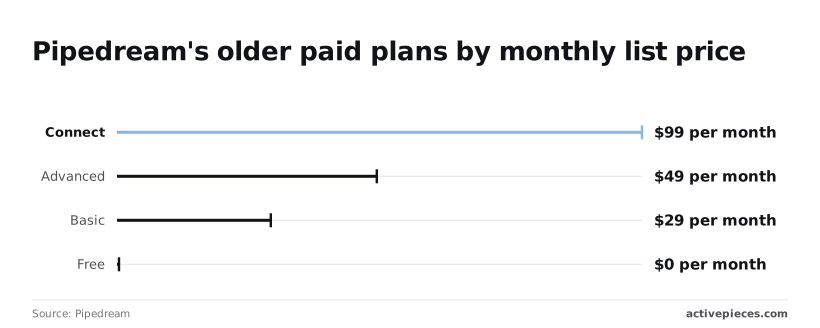
Even the One of these is a fixed price with no SSO line attached, so it's a floor for budgeting, not a quote for your identity setup. Treat the enterprise figure as unknown until Pipedream states it in writing.
The comparison below, from Activepieces, shows how a rival lays out its own tiers: Free at $0, Plus at $20 and Team at $200 a month are priced on the page, and only the Ultimate tier sits behind a sales contact.

Read it as a model for what to ask any vendor: which tier carries SSO, and which prices the vendor quotes instead of listing.

The pricing page and docs don't confirm several things that matter to a buyer:
- the enterprise price or minimum contract length
- which identity protocols Pipedream supports, such as SAML or OIDC
- whether SSO covers every workspace member or only some of them
- any uptime commitment if the identity provider or Pipedream's cloud is unavailable
Until Pipedream confirms each in writing, treat them as unconfirmed.
This takes minutes, not a project: automate it in Activepieces free.
What SSO is and how it works
Single sign-on lets a person authenticate once at a company-controlled identity provider (IdP) and then reach connected applications without a separate password for each. The company governs access in one place.
The application the user enters is the service provider; here, that's the Pipedream workspace.
The sequence below shows that the service provider never sees the password, only the IdP's signed statement that authentication succeeded. That's why a misconfigured trust between the two is the usual point of failure.
- The user opens the workspace, which acts as the service provider.
- The workspace redirects the browser to the IdP, such as Okta, Entra ID or Google Workspace.
- The user authenticates there, with whatever password and second-factor rules the company has set.
- The IdP returns a SAML assertion or an OpenID Connect token.
- The workspace validates it and grants a session.

Step four is where the two protocols differ.
SAML carries identity in a signed XML assertion and is the older standard in enterprise suites. OpenID Connect carries it in a signed token built on OAuth and is common in newer applications.
Neither is better; what matters is which one your IdP and the vendor both support.
SSO decides who may enter. SCIM, a standard for syncing user accounts, decides who exists. Without it, someone removed from your IdP may keep an account until an administrator deletes it by hand. Buyers often assume one implies the other. It doesn't.
Only Pipedream's documentation can settle what it supports. Check four things there: whether it names SAML, OpenID Connect or both; which identity providers it lists; whether SCIM appears at all; and which plan each depends on. Treat anything the pages don't state as unconfirmed.
Vendor SSO gating by tier
Why the feature sits in the top tier
Gating SSO behind the most expensive plan is an industry habit, not a Pipedream quirk.
Vendors know that the teams who need central identity control are usually larger, have compliance duties and have budget, so SSO becomes the line between a self-serve product and a negotiated contract.

The cost to the vendor is also real: each enterprise customer brings protocol edge cases, identity provider quirks and support load.
The consequence for a buyer is that the entitlement is rarely a technical limit. It is a commercial term, which means scope, price and limits are things you can ask about and, on a negotiated plan, write down.
Alternatives to Pipedream SSO for central control
Teams that can't or won't pay the enterprise rate have several partial options. Restricting sign-in to a single company domain on a Google or Microsoft login gives one place to suspend a leaver, though it doesn't give audit trails or enforced second factors.
Putting the tool behind an authenticating reverse proxy or a zero-trust access gateway moves the login check in front of the application, which works best for software you host yourself.
Self-hosted, open-source tools sometimes ship OIDC support in their community editions, and some vendors offer SSO as a paid add-on instead of a whole tier. Each route trades something away: coverage, logging, provisioning or support.
Compare what you give up against the control you actually need before treating any of them as equivalent to the real thing.
Teams that don't need SSO
If everyone on a small team signs in through a Google or GitHub account, declining SSO is reasonable, because the identity provider already gives central control over who can log in.
The argument runs as follows: when a handful of people share one workspace, the person who runs the company's Google account can suspend a leaver in one place, and that suspension ends their access wherever sign-in runs through it.
Paying for an enterprise tier to repeat that control looks like cost without gain.
The argument holds only while its premises hold. It assumes every person with access signs in through that one account system, that someone checks the suspension actually reached the workflow tool, and that nobody's asking you to prove either.
Each premise fails in a specific, observable way. The triggers below are the ones that justify paying, and a reader can test each against their own setup:
- A departed employee's login is still active somewhere, because offboarding relied on someone remembering a separate account.
- An auditor wants central access logs, and per-person sign-ins scattered across tools can't supply them.
- Workflows hold production API credentials, so a stale or shared login exposes systems well beyond the workflow tool itself.
- Contractors work in the account but sit outside HR records, so no leaver process ever removes them.
If none of these describes you today, the case against paying is sound, and you shouldn't build a rollout around a feature you can't yet justify.
If any one does, the question becomes whether Pipedream's own pages confirm that SSO covers it. The decision turns on two facts: how many people hold access, and which compliance requirements bind you.
You can follow the rest of this with the builder open. Start free, no card.
Mistakes teams make when rolling out workspace SSO
Four mistakes recur. Each treats SSO as a toggle rather than a contract term, when you must confirm it on Pipedream's own pages before acting on the headcount and compliance answers above.
Assuming SSO comes with any paid plan
A paid plan isn't the same as an SSO entitlement. Read the plan comparison and the terms for the exact tier that lists SSO, and ask sales in writing whether your workspace size and identity provider are covered.
A paid plan isn't the same as an SSO entitlement.
If the answer comes only in a call, you have no control to point to when an auditor asks what the arrangement guarantees.
Leaving API keys and connected accounts outside SSO
Signing in through your identity provider governs how people reach the workspace. It doesn't, by default, govern the credentials workflows hold: API keys, and the third-party accounts a workflow connects to.
Those can keep working after a person's SSO session ends. Check the documentation for what SSO covers and what it leaves unstated, then inventory every key and connection by owner.
Admin lockout risk when enforcing SSO
If your identity provider goes down or you misconfigure it, SSO-only enforcement can lock out everyone, including the people who could fix it. Pipedream's documentation should say whether a non-SSO owner login survives enforcement.
If it doesn't say, treat that as an open question for the vendor. Where a fallback exists, store its credentials under dual control and test it before enforcing.
Offboarding users without SCIM provisioning
Disabling a user in the identity provider removes one path in. Whether Pipedream removes the workspace membership itself depends on automated provisioning, such as SCIM, and on whether the plan includes it.
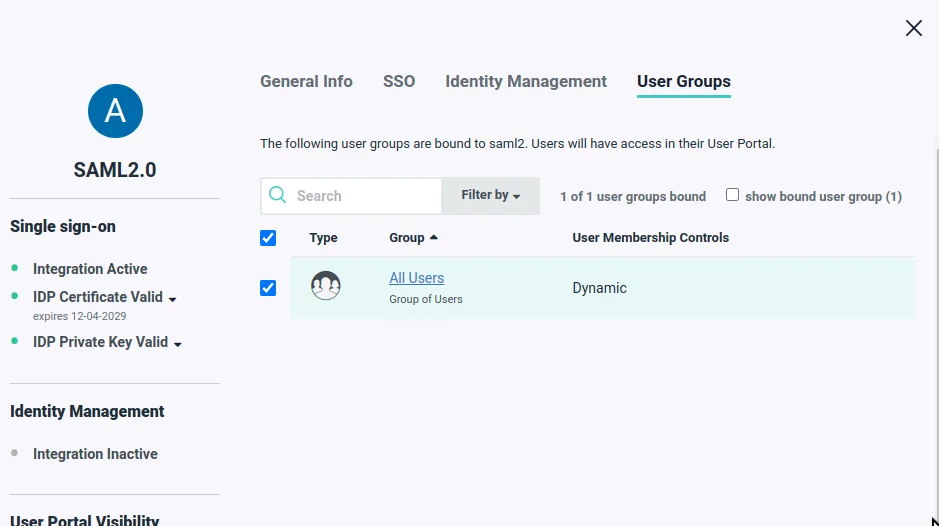
Without it, someone must remove members by hand. Until you have confirmed which applies, rotate any key or connection the departing person created and record that you did.
Pipedream and Activepieces SSO requirements side by side
You can budget for Activepieces SSO but not for Pipedream's. Activepieces puts SSO on its Team plan at $200 a month, per its pricing page, while Pipedream places it in an enterprise tier whose terms you must confirm with Pipedream directly.

Which plan unlocks SSO, and on what terms, is the requirement that matters first. Treat any blank in your own research as a question for the vendor, not as a yes.
As checked on 27 Oct 2026, Pipedream unlocks SSO on an enterprise tier whose price and terms are set by Pipedream, so confirm them before planning; its own pricing and plan pages are the source.
Activepieces unlocks it on Team at $200 per month, per Activepieces pricing.
Activepieces' published ladder, from $0 to $200 a month, plan by plan:
| Plan | Price per month | SSO |
|---|---|---|
| Free | $0 | Not included |
| Plus | $20 | Not included |
| Team | $200 | Included |
SSO appears only at the top price. The $20 plan buys you no single sign-on, and the jump to SSO is a tenfold increase.
Which SSO plan and price fits your team
If you're on Activepieces' Free or Plus plan, budget for the $200 Team price before promising anyone SSO. That's the figure to put in front of whoever approves spend.
Activepieces doesn't hand self-hosting buyers a cut-down build: the enterprise edition on your own servers, fully air-gapped if you need it, carries SSO, SCIM, custom RBAC, audit logs, release management and secret managers, the same list as the managed cloud.
Regulated and public-sector teams run the air-gapped edition in production, and MoneyGram, Moneypenny, Alan and FundingSocieties run Activepieces too. I haven't verified its protocols or any stated limits, so confirm those on its pricing page; the same applies to Pipedream's.
Pipedream fits better if your workflows already run there and your organisation negotiates enterprise contracts anyway. Staying avoids rebuilding workflows, and a quoted enterprise agreement is where you can put SSO scope and limits in writing.
Activepieces fits better if you want a price you can read before talking to anyone: SSO is on Team at $200 a month, published on its pricing page.
SSO pricing for self-hosted teams
Of the three plans charted below, only Team, at $200 a month, includes SSO on the platform in question. The price is published, so you can cost it without a sales call.
The chart shows the monthly price of Free ($0), Plus ($20) and Team ($200), with each bar marked for whether SSO is included.
The two cheaper plans carry no SSO, so the step from Plus to Team is the real price of single sign-on. Team also bundles standard roles, so a buyer who wants only SSO is paying for both.
The chart can't settle what happens on infrastructure you control. The pricing page tells you which plan lists SSO, and a buyer who needs self-hosting shouldn't assume the cloud entitlement carries over to a self-hosted install.
Before building a rollout, get answers to these from the vendor's own pricing page and documentation:
- Does the plan that lists SSO apply to a self-hosted deployment, or does self-hosting fall under a separate licence?
- Which protocols does the SSO support, and which identity providers are documented?
- Is SSO the only access control the plan provides, or does it also cover provisioning and role mapping?
The third question matters because "SSO" on a pricing page is a feature label, not a control. It doesn't tell you whether a departed employee's access is removed automatically, which is the control an access review looks for.
Availability is the second-order question. On a self-hosted install, ask whether login depends on any call back to the vendor's cloud. If it does, your outage becomes theirs. If it doesn't, confirm that in the docs and not from a sales call.
Frequently asked questions
Which identity providers does Pipedream support?
If you run Okta or Microsoft Entra ID, name the identity provider to Pipedream in writing and check its SSO documentation for that provider before you commit.
A generic claim of SAML support doesn't tell you that your provider's attribute mapping and login flow are covered. Get the supported protocol and provider list from the docs, not from a salesperson's summary.
Does the free plan include SSO?
Don't assume the free plan includes SSO. This article's argument is that SSO sits in an enterprise tier, so the free plan is the wrong place to look for it.
Confirm the plan name and its terms on Pipedream's pricing page, and treat anything the page doesn't state as not included.
Can SSO be enforced for every user?
Offering SSO and enforcing it are different controls, and that matters if you want every user in a workspace on it. Enforcement means password and social logins are refused, so no user can bypass your identity provider.
If the docs describe only an optional SSO login, a departed employee's old credentials may still work. Look for the word "enforce", or its equivalent, in Pipedream's own text before relying on it.
Does SSO include SCIM provisioning?
SCIM user provisioning is a separate question from SSO. SSO controls how people sign in, while SCIM controls whether accounts are created and removed automatically.
Without SCIM, offboarding is a manual step, and any lag leaves an account that still exists after the person has gone. Verify SCIM in the docs on its own terms.
Is SSO available if I self-host?
If you are self-hosting, treat SSO as a feature of Pipedream's hosted service unless its pages describe a self-hosted edition that includes it.
The practical consequence is that your login path depends on the vendor's cloud being up, so ask what happens to access if their service is unavailable while your identity provider isn't.
Related reading
References
Build it
Set this up in minutes.
No code required. Connect your accounts, and Activepieces runs it from there.
Start free Talk to sales