Xero API: Setup, Authentication and Limits (2026)

Oct 19, 202616 min read
The Xero API is an OAuth 2.0 REST API, the kind of thing you can wire up by hand or through a workflow tool like Activepieces.
You register an app, receive a client ID and secret, a user authorises it, and every call then carries a bearer token plus a tenant ID.
Xero API setup and limits refers to the rules that govern a Xero integration in production, including rate limits, short-lived access tokens that must be refreshed, and tier restrictions on app connections, all of which an invoice sync must handle to keep running.
When it fails at 2am, whoever built that sync also owns it, so the setup is worth understanding properly. Checked against developer.xero.com on 19 October 2026.
Xero API access for builders
What the Xero API is and which APIs it includes
Xero publishes several APIs under one developer account. The Accounting API covers invoices, contacts, bank transactions and the chart of accounts, and most syncs start there.
If you only need invoices, you request only that, because access to one API doesn't grant access to the others. The separate APIs, which cover areas such as payroll, files and assets, each have their own scopes.
Creating an app and choosing a grant type
You create the app in the Xero developer portal, which issues the client ID and secret. Treat the secret as a credential with an owner, because anyone holding it can impersonate your integration.

Pick the wrong grant type and you rebuild the auth layer later. The right one follows from who is connecting.
A web app uses the authorization code flow, a native app uses the same flow with PKCE, and a single-organisation integration can use client credentials instead.
Xero API scopes and finding the tenant ID
If the sync must keep running unattended, request offline access. Scopes are the permissions the user approves on the consent screen, and without offline access the refresh token never arrives and a person must re-authorise.
After authorisation, call the connections endpoint. It returns the tenant ID for each organisation the user granted, and the API expects that ID in a header on every request. Skip this step and the calls won't reach the right organisation.

A minimal working request: listing invoices
Wait too long between consent and exchange and the whole sequence fails, because the code exchange is time-limited. The numbered list below is the full day-one path, from registration to the first returned invoice.
- Create the app in the developer portal.
- Copy the client ID and secret into secure storage.
- Send the user to the consent screen to authorise.
- Exchange the returned code for tokens promptly, before it expires.
- Call the connections endpoint to get the tenant ID.
- Request the invoices endpoint with the bearer token and the
xero-tenant-idheader.
Getting a response here proves the plumbing works. Token refresh, rate handling and ownership of all of it come next, and those decide whether it keeps working.
Everything below works on Activepieces' free plan. Start without code or a credit card.
The 02:10 failure that stopped an invoice sync
At 02:10 the person who owns the nightly job gets paged, because Xero rejected the connection and the retries made it worse. The case below is illustrative, but the sequence is a common one.
What the log showed first
Xero refused the request for a new access token. That was the first entry, an invalid refresh token error, most plausibly because a second process had already used and replaced the stored token. Nothing downstream could authenticate, so the run produced no invoices at all.

Nothing more than "sync failed" came through on the page. Whoever answered it still had to work out whether the fault was credentials, a Xero outage or bad data, and that took time the night didn't have.
Invoices, hours and customers affected
In this illustrative case, the invoices raised that day never reached the accounting ledger. Someone in finance had to find them, re-key them and check each against the source system the next morning, which is work the automation was meant to remove.
Customers saw the effect first. Statements were wrong, payment reminders went out for invoices already settled, and a few people got chased for money they had paid. Those mistakes cost trust, not just staff hours.
How retries triggered Xero API rate limiting
Because the retry logic treated the auth failure as temporary, the job tried again immediately, across many invoices at once. Each retry was another call to Xero, and the volume soon passed the per-minute limit.

Xero began answering with 429 (too many requests) responses, so the log now showed a second error stacked on the first.
Read the illustrative chart below as requests per minute from 02:00 to 03:00, with successful calls against 429 responses and the 60-calls-per-minute limit as a horizontal line. Successful calls stop at 02:10, while the rejected ones climb well past the limit.
Because the token was already invalid, the retries could never have succeeded. They only used up the limit, so even a repaired token would have met a throttled connection and the job couldn't restart cleanly.
None of the three fixes is exotic: a backoff, a stop on auth errors and an alert naming one owner would each have contained the failure.
Xero API limits, token rules, and tiers
Trace the failure back and you reach three Xero rules that a first call never touches.
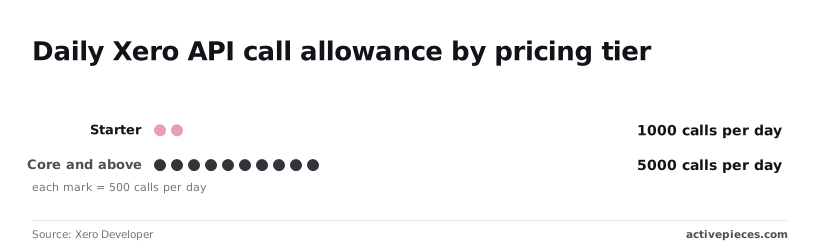
They are refresh tokens that rotate, limits counted per tenant, and a Starter tier capped at 1,000 calls a day against 5,000 on Core and above, which means Starter users work within a fifth of Core's quota.
Xero token lifetimes and refresh token rotation
If a sync keeps the old refresh token, or two workers refresh at once, the loser holds a dead credential and every call fails with an auth error. Xero issues short-lived access tokens and refresh tokens that it replaces each time you use one.
One process must therefore own the refresh, and someone must be named for when it breaks. I didn't re-confirm the exact lifetimes on 19 October 2026, so check them in the docs before setting a schedule.
Rate limits per tenant and per app
Pace a bulk backfill, because the per-minute limit is 60 calls, which averages one call a second, and limits are counted per connected organisation, called a tenant.
There's also a concurrency limit and an app-wide limit across all tenants. I haven't re-confirmed those two figures. A 429 response carries a Retry-After header, and retrying sooner only spends calls you don't have.
Xero API pricing tiers and connection caps
Read the table this way: more tenants, not more calls per tenant, is what the top tier buys. Price and connection cap climb steeply from Starter to Plus while the daily limit moves only once.
| Tier | Monthly price | Connection cap | Daily limit | Per-minute limit |
|---|---|---|---|---|
| Starter | USD 0 | 5 | 1,000 | 60 |
| Core | AUD 35 | 50 | 5,000 | 60 |
| Plus | AUD 245 | 1,000 | 5,000 | 60 |
On Starter you get 1,000 calls a day. Core and above allow 5,000, per Xero Developer. A polling loop that runs comfortably on Core can exhaust Starter in a fifth of the time. The page goes to whoever owns the app.
Other common Xero API errors and paging
A 401 means the token's expired or invalid, so refresh once and then stop. A 403 means the connection lacks permission for that tenant or scope, and retrying won't grant it.
A 400 means the request itself is malformed, so fix the payload instead of resending it. A 412 means a precondition on the organisation wasn't met, which needs a human decision.
Paging fails quietly: a sync that reads only the first page reports success while missing every later record.
Easier to see it running than to read about it: set it up free, no card.
The rules the sync follows after the incident
Paging was the quiet failure, and the sync now follows four rules that make the others loud, with a named owner for each when the 2am page arrives.
Token handling
Because Xero rotates the refresh token on every use, two workers refreshing at once leave one holding a dead token and the connection broken until someone reauthorises by hand. One refresher now owns the exchange.
What to take from it: no worker other than the refresher ever calls the token endpoint.
If a crash hits mid-write, the store still can't be left empty or half-updated, because the newest refresh token is written atomically. Workers read from that store and on a 429 wait the Retry-After interval, with capped backoff.
That order leaves the second concern, how many calls the workers make at all.
Without a cap, a long outage stretches retries until nobody can say when the sync will next run, so the cap on backoff matters as much as the wait.
A daily call budget with an alert threshold means the owner hears about a runaway loop while there's still headroom, not after the limit's hit.
Incremental sync with If-Modified-Since
On a quiet day the sync costs a handful of calls, because it asks only for records changed since the last successful run, using the If-Modified-Since header.
Where it does read in volume, it requests the maximum page. The default read page is 100 records, while the maximum is 1,000, so the same data needs a tenth of the requests.
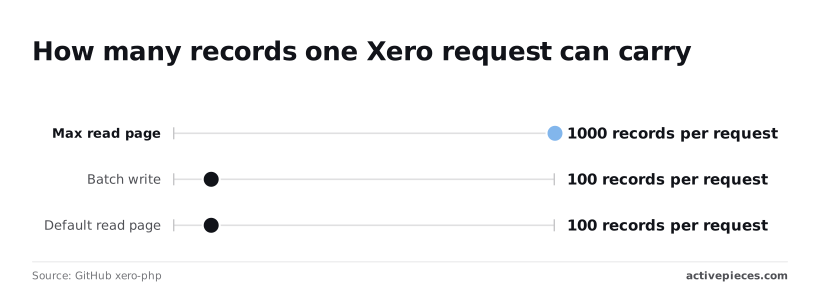
Writes are batched too: 100 records per request in general, and 200 for batch payments, so payments take half as many calls as any other write.
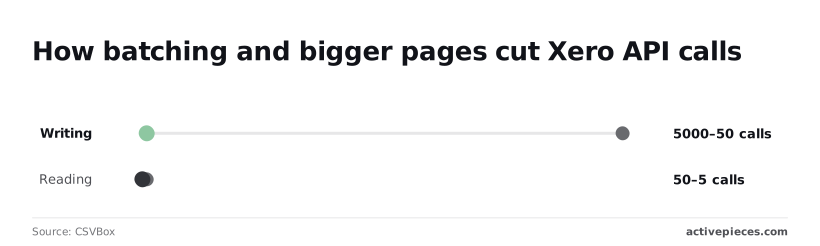
On a 5,000-record run the effect's plain. Writing drops from 5,000 calls to 50, and reading from 50 to 5. The 50 saved reads are minor, but the 4,950 saved writes decide whether the budget survives a bulk load.
When a sync stops running, it throws no error, so error alerts never fire. The sync now emits a heartbeat on each successful run, and an alert goes to the owner within minutes of the heartbeat missing.
Running a Xero sync with Activepieces
Activepieces, an open-source automation platform, can host the heartbeat and the alert as one scheduled flow with a managed Xero connection. The person paged at 2am then inherits a visible run history instead of a script nobody remembers writing.
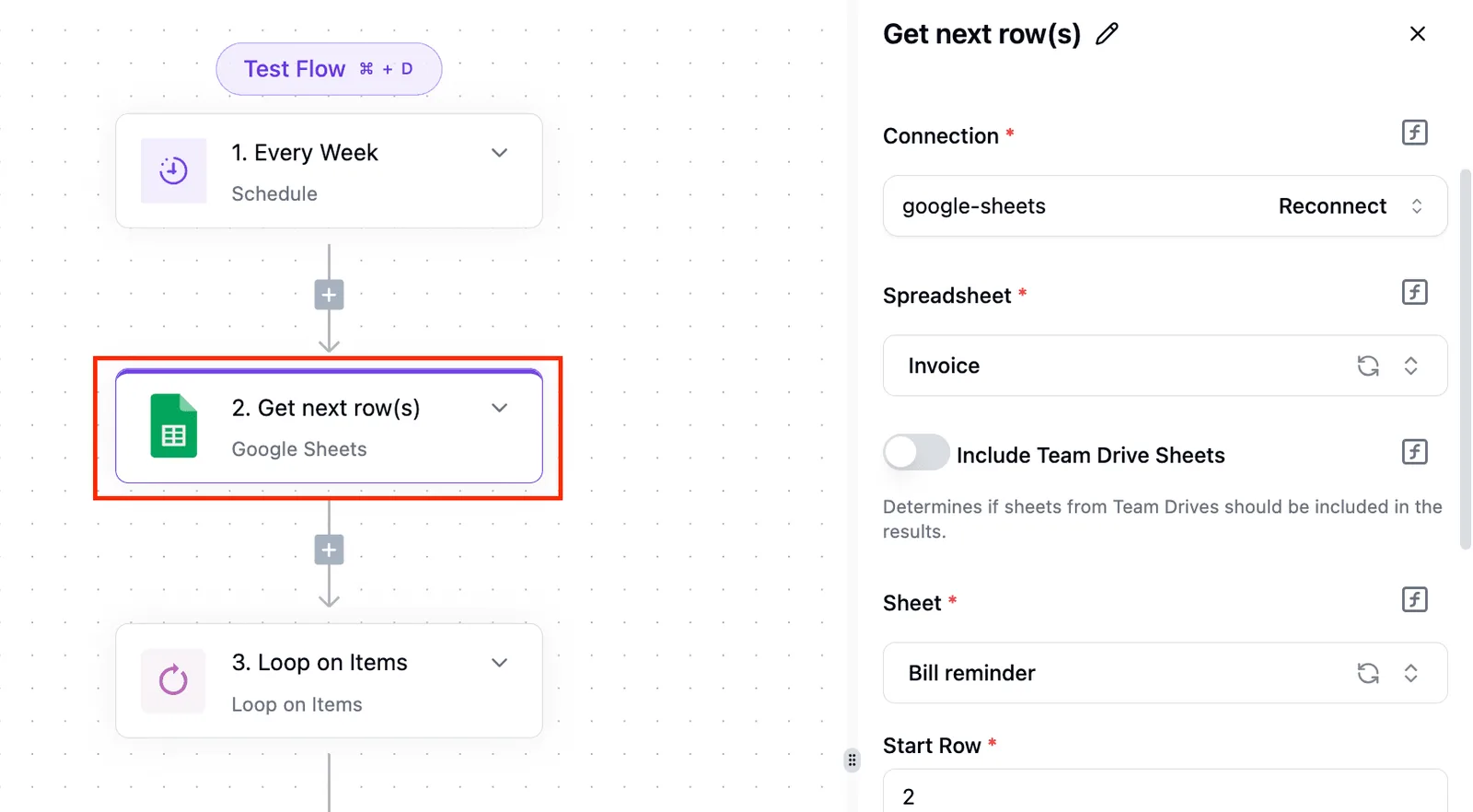
Describe that heartbeat and alert in the built-in chat and Activepieces builds and publishes the flow, the same artifact a builder would have wired up by hand.
Because it runs under the platform's RBAC, audit logs and run traces like any human-built flow, the person paged at 2am can open the run and read what happened, with no certification needed to follow it. You don't hire for this, you describe it.
What the Xero integration covers
Xero has its own integration, one of the 742 in the Activepieces open source monorepo, because each service is packaged separately. You authorise it once, and the platform stores the connection and handles the OAuth token refresh that otherwise lives in your own code.
What changes is ownership: the expiry that silently kills a hand-built sync becomes the platform's job, and the connection's a named object an owner can inspect, reconnect or revoke.
Not the whole API, though: the integration exposes a set of Xero actions and triggers. Check the current integration against your needed endpoints before committing, because anything outside it's your problem.
Retries, schedules and failure alerts
A schedule trigger starts the flow, the Xero integration does the work, and a failed step can route to a branch that notifies a person. Per-step retry behaviour and the run log are what make this auditable.

You can open a failed run and see which step broke and with what input, rather than reconstructing it from a log line.
What to take from it is that the failure path is part of the flow, not an afterthought bolted on after the first outage.
Rate-limit and tier rules still apply to you. The platform doesn't change what Xero allows, so design the schedule and batch sizes around those limits and confirm in the run trace that a throttled call's retried rather than dropped.
The alert branch should name an owner, not a channel nobody reads. That's the same ownership question the heartbeat answered, now answered inside the flow.
When to call the API directly instead
Write code when the endpoint you need isn't in the integration, or when volume makes a step-by-step flow the wrong tool.
When Xero has no integration for an endpoint you need, Activepieces lets you generate one with AI and add it privately to your own instance.
That's the dashed box in the diagram, and you then own that integration's error handling and its respect for Xero's limits. Flows are unlimited on every plan, including free, so the ceiling you design around is Xero's quota, not a count of flows.

If most of your sync lives in that box, the platform's adding a layer rather than removing work. A purpose-built service with its own monitoring is the more honest choice.
Confirm the Xero actions available today against the integration's source in the open monorepo, where all 742 integrations are listed, before relying on it, so individual integrations may have diverged from current practice.
A Monday checklist for a Xero API integration
By Monday afternoon, five checks, done in this order, tell you whether your Xero sync will survive production, and who gets paged when it doesn't.
- Confirm your tier and connection count on Xero's pricing page.
- Audit where refresh tokens are stored.
- Compute daily calls per tenant against the limit.
- Add alerts on rate-limit responses and authorisation failures.
- Force a 429 and an expired token against Xero's demo company.
Name one person next to each step. An unowned checklist is the one that fails at 2am on a Tuesday, when nobody knows whose job it is to reconnect a tenant.
Check your Xero API tier and limits
Start with the pricing page, not your code. Your tier decides how many organisations you may connect, and a sync built on one connection can quietly break the day a second client's added.
Read the current terms yourself rather than relying on what was true when the project began.
Then look at storage. A refresh token's the only thing keeping the connection alive without a human logging in again. If it sits in a config file, an environment variable on one laptop, or a spreadsheet, then one departed contractor can end the integration.
Put the token in a secrets store with a named owner. The refresh step must write the new token back before it uses it, since an old token may stop working once a new one's issued.
Finally, do the arithmetic. For each tenant, estimate calls per run, multiply by runs per day, and compare the result with the daily limit published in Xero's documentation.
Do it per tenant, because the limit applies to each connected organisation separately. If you're near the ceiling, change the design now, not after the first month-end.
Test the two failures on purpose
Alerts are only real if you've seen them fire. Using Xero's demo company, force a 429 by sending requests faster than the limit allows, and confirm the sync pauses, waits as long as the response asks, and resumes without duplicating records.
Then invalidate a stored token and confirm the failure reaches a human with the tenant's name in the message.
If either test ends in a silent retry loop or a blank log, you've found your 2am page before it happened.
Frequently asked questions
Confirm current terms in Xero's developer documentation before you build on any answer below, because tier rules and limits are the parts that change.
Is the Xero API free to use?
Starting's free: you can register an app in Xero's developer portal and make calls without paying. What you pay for later is scale, because the app's tier decides its limits and how many organisations it can connect to.
Treat the tier as a production dependency, and name the person who owns the app registration and its billing before launch.
Can I use the Xero API without OAuth?
No. Xero's accounting API accepts only OAuth 2.0 access tokens, with no API keys or basic authentication.
Even its single-organisation "custom connection" option uses OAuth, with a client credentials grant in place of the interactive consent screen. So token handling's unavoidable, and whoever owns the sync owns refresh and re-authorisation as well.
Does Xero have a sandbox for testing?
Yes, in the form of a Demo Company, a Xero-provided organisation filled with sample data that you can connect your app to.
It's not a copy of your client's books, so a passing test against it says little about real data volumes, odd account structures or tax setups.
Plan a staged run against a real organisation, with someone who has authority over that organisation's data.
How do I get a Xero tenant ID?
Call the connections endpoint with a valid access token after the user has authorised your app. The response lists each connected organisation with its tenant ID, and you send the chosen one in the xero-tenant-id header on every accounting request.
Store the mapping from client to tenant ID deliberately. If a client disconnects the app, that ID stops working, and someone needs to be told.
What happens if I exceed the Xero API rate limit?
Past the limit, Xero rejects the request with an HTTP 429 response, and the response headers tell you how long to wait before retrying. A well-built sync honours that wait, backs off and queues the remaining work rather than hammering the endpoint.
Ignoring it risks a stalled job at 2am, and repeated abuse can get an app restricted.
Check that your tooling logs every 429 and the retry behaviour that followed.