PlanetScale Pricing in 2026 by Usage, Not Plan

Nov 3, 202614 min read
Explore PlanetScale pricing plans
How much PlanetScale costs per month
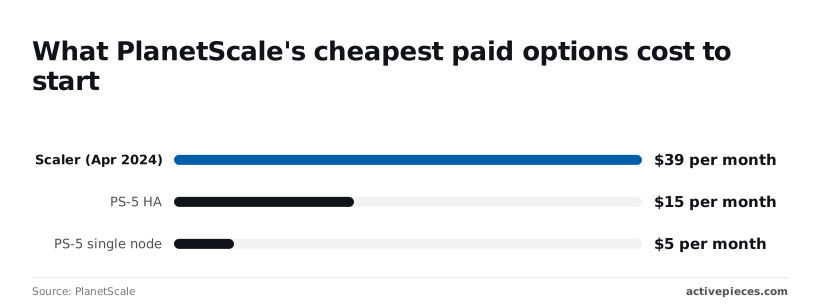
$5 a month is where PlanetScale, a managed database platform that teams often wire into automations built with tools like Activepieces, starts, for a single-node Postgres PS-5, according to its own announcement.

Usage-based pricing is a model in which what you pay is set by the quantity of a metered unit you consume, such as cluster size, storage, replicas and traffic on PlanetScale, rather than by the plan tier you choose.
Past that entry point, the bill follows cluster size, storage, replicas and traffic, so you compare on those four units, not on a plan label.
A $5 PS-5 costs about an eighth of the old Scaler plan, which, per Fewertools, opened at $39 a month in April 2024, so production databases became accessible to indie teams.
The three-node PS-5 HA at $15 costs less than half of Scaler, which means redundancy is no longer reserved for well-funded projects.
Plan table with prices, inclusions and limits
As of the 2026-11-03 check, the table lists each current plan. Where a figure was not confirmed, the cell says so, because an empty guess would be worse than a gap you can go and fill from the pricing page.
| Plan | Monthly price | Included storage | Usage limits |
|---|---|---|---|
| Postgres PS-5, single node | $5 | Not confirmed | Not confirmed |
| Postgres PS-5 HA, 3-node | $15 | Not confirmed | Not confirmed |
| Larger NAS sizes | Not confirmed | Not confirmed | Not confirmed |
| Metal | Not confirmed | Not confirmed | Not confirmed |
| Vitess | Not confirmed | Not confirmed | 1,440 development branch hours |
Prices and plan limits checked against planetscale.com on November 3, 2026.
According to Inetgeek, the 1,440 hours on Vitess databases, per the cluster sizing docs, equal one branch running continuously for 60 days, allowing teams two months of branch uptime without quota concerns.
A team keeping several branches open at once will burn through that faster than the number suggests.
What the pricing page does not state
Two things matter before you budget. The entry prices above don't tell you what a production workload will cost, because that depends on the size you land on.
Upsize when CPU usage is consistently at or close to 100%: that is the rule of thumb in Planetscale's sizing docs, meaning you're deferring scaling until your system has zero headroom for traffic spikes.
So treat $5 or $15 as the cost of starting; the real figure moves with your traffic.
If you are running this arithmetic for your own team, see what the same workload costs on Activepieces.
Realistic PlanetScale costs and hidden fees
Expect roughly $5 to $83 a month for a small app on published cluster rates, meaning costs depend directly on traffic rather than forcing a premium tier.
Storage, replicas, egress and support add to that, and the traffic growth above is what pushes you up the cluster ladder.
Decide early whether you need high availability (HA), because the table shows it costs about three times the single-node price at every size.
| Scenario | Assumed size | Node type | Storage over 10 GB | Egress | Monthly total | Assumptions |
|---|---|---|---|---|---|---|
| Side project | PS-5 | Single node | None; stays under 10 GB | Not charged | $5 | Cluster price only |
| Small production app | PS-40 | arm64, HA | None; stays under 10 GB | Not charged | $83 | HA, cluster price only |
| Growing product with replicas | PS-2560 | HA, as the ceiling | Not included | Not included | $4,529 | Upper bound for the cluster alone |
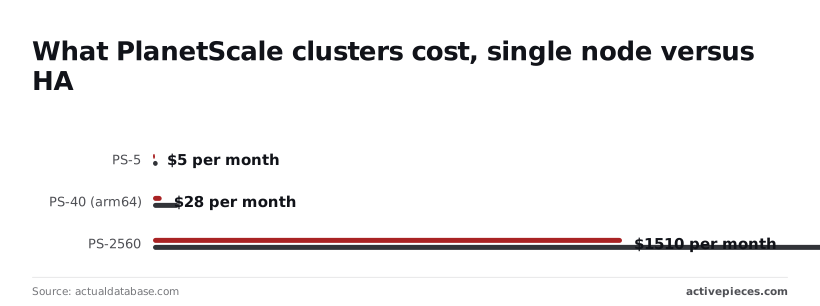
For a side project, the PS-5 runs $5 a month single-node and $15 with HA. Pay $5 if downtime on a hobby app costs you nothing, since the extra $10 buys failover you probably don't need yet.
For a small production app, the PS-40 on arm64 costs $28 single-node and $83 with HA. A paying customer will notice an outage, so the $55 difference is cheap insurance, and the HA figure is the one to budget.

For a growing product with replicas, the PS-2560 costs $1,510 single-node and $4,529 with HA. That's a $3,019 gap for the same compute, so at this size HA is a deliberate line item.
Read-only replicas are billed on top of these totals, so the table understates a replicated setup.
If you read the cluster price as the whole bill, you will miss the rest: compute is all it covers, and everything else is metered separately:
- Storage beyond the included 10 GB, which grows with your data rather than your cluster size.
- Replicas, each of which adds to the monthly figure.
- Backups kept beyond the defaults.
- Egress, which rises with traffic leaving the database.
- Overages once you pass plan limits.
- Support, priced separately from the cluster.
Price each as its own line before you sign off, because together they can outweigh the cluster itself.
PlanetScale pricing strengths and gaps
Start with the strongest defence: PlanetScale sells a managed database, not raw capacity, so its entry price is fair for what it covers. But that price is only a fraction of the bill once size, replicas and traffic are counted.
What the price buys
The obvious objection is that a team can run its own MySQL on a rented server for less.
There's no free tier, so the vendor isn't funding hobby workloads and has every reason to keep paying customers' clusters healthy.
Scaling is managed, so nobody on your team resizes disks or plans a migration when load grows.
Branching lets engineers change a schema on a copy, review it and merge it, so a risky change is inspected before it touches production. Support comes with the plan, so an incident has someone to call.
That's a real tradeoff in the vendor's favour, and it should be priced as one.
Why PlanetScale bills exceed the listed price
For what the entry price covers, the defence holds, and the entry price covers little.
Compare on the metered units instead, because each one moves independently:
- Cluster size sets the base, and it rises when your workload outgrows it.
- Storage grows with your data whether or not anyone queries it.
- Replicas multiply the cluster, since each one is capacity you pay for to get resilience and read throughput.
- Traffic ties spend to product success, so a launch week raises the bill without anyone approving it.
Ask the vendor, therefore, not which plan you are on, but what your forecast of those four looks like.
Traffic ties spend to product success, so a launch week raises the bill without anyone approving it.
A sound rollout sets a budget alert on each line and reviews monthly which is growing fastest, so the first surprise arrives as a dashboard warning rather than an invoice.
Worth checking against a plan that does not meter every step: one credit covers a whole run on Activepieces.
PlanetScale Compared With Neon, Supabase and Other Alternatives
Where PlanetScale prices the cluster you provision, Neon, Supabase and Turso lean harder on metered usage, so the budget alerts above end up watching different dials on each.
The table below, checked in November 2026, sets the four side by side.
| Engine | Free tier | Entry paid price | Storage and compute billing | Branching | |
|---|---|---|---|---|---|
| PlanetScale | MySQL (Vitess) and Postgres | None | Set by the smallest cluster | Cluster size, storage, replicas | Yes |
| Neon | Postgres | Capped storage and compute hours | Grows from usage | $0.35/GB-month storage, compute metered by use | Yes |
| Supabase | Postgres | Limited project that pauses when idle | Fixed plan fee plus add-ons | 8 GB included, then $0.125/GB; compute by instance size | Yes |
| Turso | SQLite (libSQL) | Capped databases and rows | Fixed plan tier | Plan-based, with rows read and written metered | Yes |
Storage is where the gap shows first. Neon's $0.35/GB-month means a 100 GB database carries $35 a month in storage alone.
Supabase gives the first 8 GB, then charges $0.125/GB, so the same 100 GB adds about $11.50 beyond the allowance, roughly a third of Neon's per-GB rate. Its compute is billed separately by instance size.
With a storage-heavy workload and modest queries, Supabase comes out ahead, while a spiky one that sits idle most of the day favors Neon's metering.
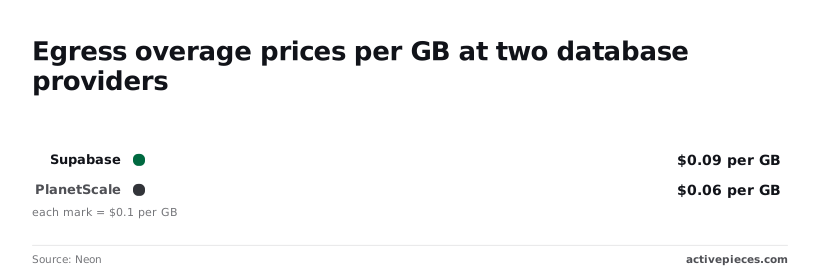
Teams get surprised by egress, the data you send out of the database. Past the included quota, Supabase charges $0.09 per GB and PlanetScale charges $0.06, making PlanetScale the more economical choice for high-volume overages.
Moving 1 TB beyond quota therefore costs about $90 on Supabase and $60 on PlanetScale.
If your application streams large result sets to analytics tools or other regions, that $30 difference recurs every month.
The meter can also punish good design. Zapier bills per task and Make per module, so a ten-step process costs more to run than the two-step workaround it replaced, which taxes the builder for splitting work into smaller, more reliable steps.
Activepieces charges 1 credit per flow run however many steps sit inside it, and MoneyGram and Moneypenny run it in production.
With the engine and billing model compared, the remaining question is which of these meters your own traffic will push hardest. A one-week load test against each candidate can answer that.
Fix Billing Surprises With Activepieces Alerts
Understand what to expect
Do not expect Activepieces to replace your database or lower its meters; its free plan is $0 with 1,000 credits a month and unlimited flows, so trying the alert costs nothing.

It sits around the database and tells you, in Slack or email, when usage or an invoice is heading past a threshold you set, so the load test's findings don't expire the week after.
On Monday someone opens the billing dashboard, or pastes numbers into a spreadsheet when they remember. That is the manual version, and it works until the month a traffic spike lands on a Friday.
Build a PlanetScale billing alert workflow
Be aware that the flow below is a support-ticket example, not a billing one. It has the shape you would reuse: a trigger, a couple of processing steps, a Router that splits into branches with an Otherwise path, and Slack messages at the end.
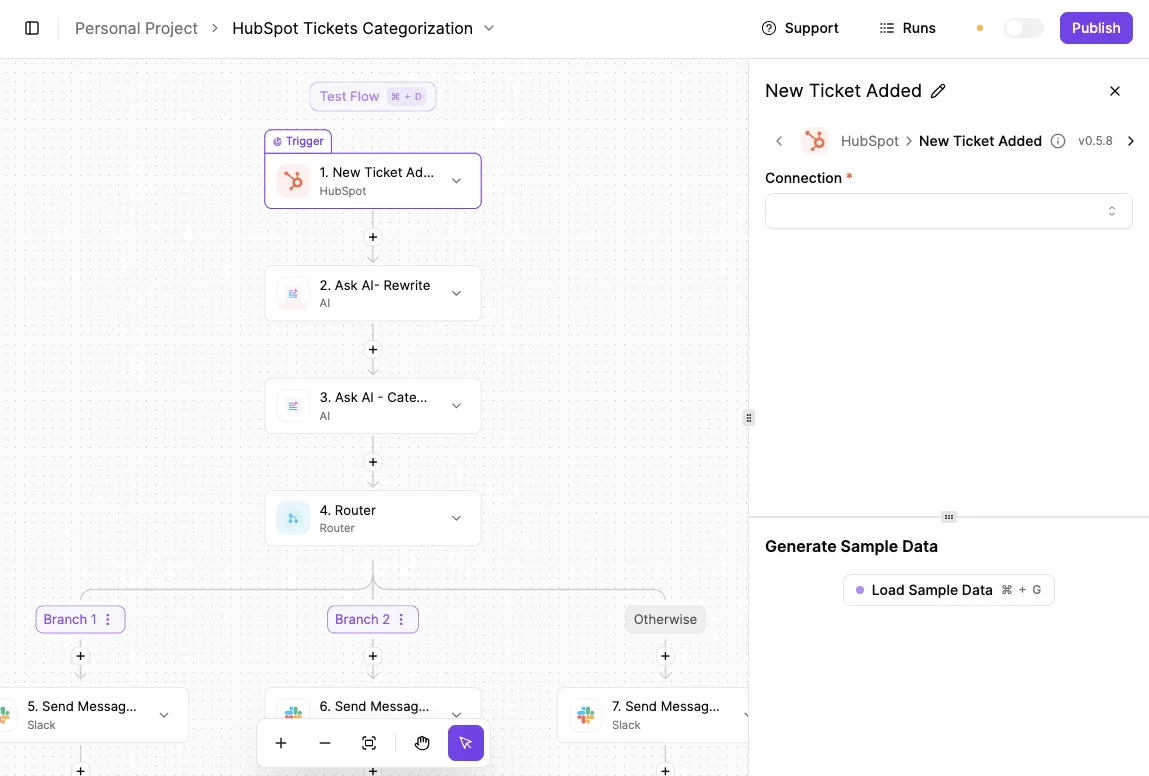
For billing, swap the trigger for a schedule. Add a step that pulls usage from your database provider's API or reads its invoice email, and compare the result to your limit.
Then let the Router decide who hears about it. Under the threshold, nothing happens. Past a warning line, a message goes to the channel the platform team watches. Past a hard line, it goes to whoever can approve spend.
The same branching can sync usage records into a sheet or table for finance, so the history exists without anyone copying numbers.
Cost and alternatives
This is where the billing model matters.
Activepieces meters flow runs at 1 credit each, so a check with a dozen steps costs the same as one with three, and a daily check uses about 30 of the 1,000 free monthly credits however thorough you make it (AI steps are the exception and cost more).

Confirm the current terms on the pricing page before you commit, because the argument holds only while a run remains the billable unit; when checked on 2026-10-23, Plus was $20 a month for 10,000 credits, then $0.007 a credit over.
You may not need it at all. If your database vendor offers native usage alerts or spending caps that reach your channel, use those and skip the extra system to maintain.
Add Activepieces when the alert has to combine sources, route by severity, or write somewhere the vendor can't; its MIT-licensed core has 746 integrations, roughly 60% of them community-contributed, so the second source is usually already there.
Measure before choosing your plan
Measure usage before picking a PlanetScale plan
Pick the plan last. Measure your database's size, read traffic and replica needs first, then match those against the plan table, because PlanetScale bills on what you consume rather than the tier name.
Do the measurements against production, not a staging copy, since staging understates traffic and the bill follows traffic.
First, measure database size, including indexes, so you know how much storage you'll pay for and how much headroom growth will eat.
Second, measure reads over a representative week, then decide how many replicas that load needs. Replicas are a cost multiplier, so the count should come from observed read pressure, not from a general sense of safety.
Price and compare
Third, price size, reads and replicas against the plan table line by line, using the metered units rather than the headline tier. A plan that looks cheaper often loses once replicas are counted.
Fourth, shortlist one free-tier alternative and test it with a copy of your real queries. One serious comparison does more than a long list, and it tells you whether PlanetScale's price buys something you would miss.
Monitor PlanetScale spend after you choose
Fifth, set a spend alert below the figure that would force an uncomfortable conversation, so you hear about drift while it's still cheap to fix.
Sixth, set a review date on the calendar. Traffic grows, schemas change, and a plan that fit at launch can stop fitting without anyone deciding it should.
Frequently asked questions
Does PlanetScale still have a free plan?
Not as a standing offer: PlanetScale retired its free Hobby tier in 2024, so the entry point is now a paid cluster. The cheapest paid option is the $5 single-node Postgres PS-5.
If you need a zero-cost database for a side project, that's the tradeoff. You should check the current pricing page before assuming otherwise, since vendors change entry tiers more often than their architecture.
Can I move from PlanetScale to another database without downtime?
Yes, if you run the move as replication followed by a cutover rather than a dump and restore. Copy the data to the new database, keep it in sync with live writes, then switch the application's connection once the lag is effectively gone.
For a short period you run two databases, and you pay for both until you cut over. Test the cutover on a staging copy first, because the risk sits in the switch itself.
Does PlanetScale charge for storage and reads separately?
Yes, because the bill follows the metered dimensions: cluster size, storage, replicas and traffic. The cluster price covers compute, while storage beyond the included 10 GB, replicas and egress are metered on top.
A read-heavy app with a small dataset and a write-heavy app with a large one can land on very different invoices from the same plan name. Estimate each dimension from your own workload rather than from the headline price.
Is PlanetScale cheaper than Neon or Supabase for a small app?
Usually not for a small or idle app, but the answer depends on what each vendor meters.
If a platform scales compute down when nothing is happening, it rewards bursty, low-traffic apps. Where a platform charges for a provisioned cluster, steady, predictable load is what gets rewarded.
Compare on the unit being metered, using your real query volume and data size, not on the monthly figure each pricing page leads with.
What happens to my database if I stop paying?
Expect service to be restricted and the data eventually removed, with the timing set by PlanetScale's terms rather than by anything in this article. I won't state a grace period I can't source.
Export a full backup before you change or cancel a plan, and keep that export somewhere you control; that is the practical advice. A backup you made yourself is the only one whose retention you decide.
Related reading
References
Running the numbers
See what the same workload costs here.
Free forever plan, and every paid plan self-hosts at no extra cost.
See pricing Talk to sales