
Prefect Self Hosted: Server Setup, Costs and Limits

Oct 27, 202613 min read
Self-hosted Prefect is the open-source Prefect server running on infrastructure you control, at no licence cost, with you responsible for the database, upgrades and access control, much as you would be with any self-hosted automation tool such as Activepieces.
Prefect Cloud is the hosted alternative, where Prefect Technologies operates those layers for you.
This section was checked on 27 October 2026 against docs.prefect.io and prefect.io/pricing. Those two pages are the sources for every claim about what each option includes.
The licence costs nothing; the operating cost doesn't.
Self-hosted Prefect server essentials
What the server, API, UI and workers each do
The server is the central process. It exposes the API, which flows and workers call to record runs, states and schedules, and it serves the UI, the web interface where you inspect runs and logs.
The licence costs nothing; the operating cost doesn't.
If the database is lost or corrupted, so is your run history. Behind both the API and the UI sits PostgreSQL, which holds that history, so backups are your job.
A worker failure doesn't take down the control plane, because workers are separate processes that poll the server for scheduled work and execute your Python flows. They can run on different machines from the server.

The reverse matters more: when the server or database is down, workers have nothing to pick up.
Self-hosted server versus Prefect Cloud
Both run the same flow code, and workers connect to either through an API URL. What differs is who carries the operational duties. With self-hosting, you provision and back up PostgreSQL, apply server upgrades, and decide how users authenticate and reach the UI.
With Prefect Cloud, those responsibilities sit with the vendor, and the plan you choose determines which access and enterprise features you get. Check prefect.io/pricing for current plan terms, since boundaries change.
Who actually runs it and why
Ask a team why they self-host and the answer is usually a concrete constraint:
- data that must stay inside their own network
- an existing platform group already running PostgreSQL
- a wish to control upgrade timing
Prefect's open-source server ships without SSO, which is the usual bargain: self-hosting hands you a cut-down build and keeps the access controls for the paid tier.
Activepieces doesn't split it that way, because its air-gapped edition has SSO, SCIM, custom RBAC and audit logs identical to its managed cloud, and MoneyGram and Moneypenny run Activepieces in production.
If nobody on your team owns the database and the upgrade calendar, the free licence is cheaper on paper than in practice.
Everything below works on Activepieces' free plan. Start without code or a credit card.
Prefect Cloud plans against self-hosting, side by side
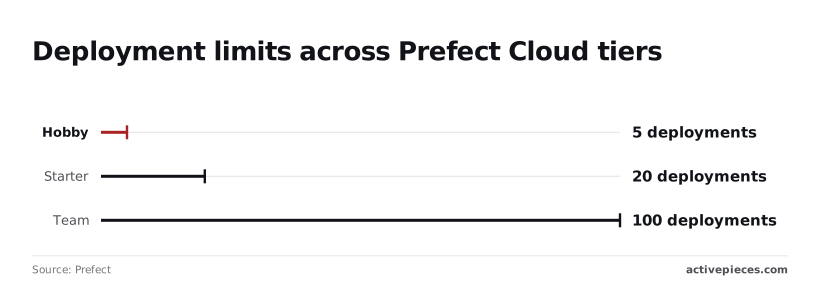
Deployment caps of 5, 20 and 100 are what Prefect Cloud limits you by, tier by tier. Self-hosted open-source Prefect has no such caps but leaves the database, upgrades and security with you.
What Prefect's pricing page lists for each tier
Hobby is capped at 5 deployments on Prefect's pricing page, so a single team with a handful of scheduled flows hits the ceiling quickly.
Per Prefect, Starter allows 20 deployments, which covers a small data team but not several teams sharing one workspace.
100 deployments on Team is room for a shared platform, though still a ceiling. The chart of these caps follows, and the pattern to take from it is that each step up multiplies headroom, not capability.
There is no deployment limit at all on open-source Prefect. What you give up is the managed service: you run the API server, the database behind it, and every upgrade.
Where SSO and access control sit
When someone has to justify a paid tier or an enterprise contract, the reason is most often single sign-on and fine-grained access control. I couldn't confirm from Prefect's pages which Cloud tier first includes SSO, so check the pricing page before assuming Team covers it.
If you need SSO on open-source Prefect, you build it yourself, because it ships without a managed identity layer. A reverse proxy in front of the server is one way, and you own that configuration and its security.

Self-hosted Prefect versus Prefect Cloud comparison table
The table compares the options on the five points that decide a self-hosting question. Cells marked "unconfirmed" weren't verifiable from the sources used here, so treat them as questions to put to the vendor.
| Option | Licence | SSO | Price | Where it runs | Who maintains it |
|---|---|---|---|---|---|
| Prefect OSS | Apache 2.0 | None built in | Free | Your infrastructure | You, with the community |
| Prefect Cloud Hobby | Commercial | Unconfirmed | Unconfirmed | Prefect-hosted | Prefect |
| Prefect Cloud Starter | Commercial | Unconfirmed | Unconfirmed | Prefect-hosted | Prefect |
| Prefect Cloud Team | Commercial | Unconfirmed | Unconfirmed | Prefect-hosted | Prefect |
| Prefect Cloud Enterprise | Commercial | Unconfirmed | Contact sales (unconfirmed) | Prefect-hosted | Prefect |
| Activepieces Community Edition | MIT (unconfirmed) | Unconfirmed | Free | Your infrastructure | You, with the vendor's community |
Prefect server and first worker setup
Expect about an hour across five stages, each leaving something running, and the operational costs of self-hosting appear at stage 3, not stage 1.
Stage 1: start the server and open the UI. Run prefect server start. The API and UI come up on port 4200, so http://127.0.0.1:4200 should show an empty dashboard.
Stage 2: point a flow at your server. Set PREFECT_API_URL to http://127.0.0.1:4200/api, using prefect config set or an environment variable.
Without it, a flow run talks to a temporary local API and never appears in your UI.
Stage 3: switch to PostgreSQL
Set PREFECT_API_DATABASE_CONNECTION_URL to a postgresql+asyncpg:// URL and restart the server. Prefect creates its tables on startup.
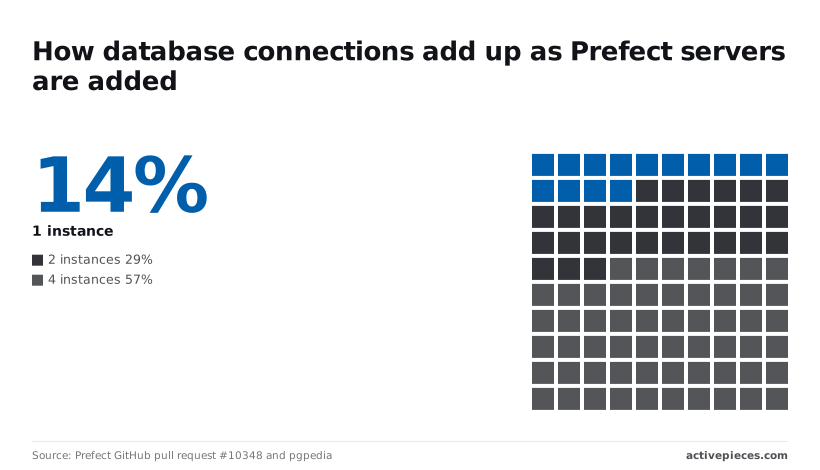
What you size here is the connection pool. According to Prefect pull request 10348, one server holds 5 to 10 database connections.
At two instances that is 10 to 20, at four 20 to 40. PostgreSQL's stock max_connections is 100, so four instances consume most of it before your workers, migrations or monitoring connect. Plan the database limit or add a pooler before you scale the API horizontally.

Stage 4: add a work pool and worker. Create a pool with prefect work-pool create my-pool --type process, then start a worker with prefect worker start --pool my-pool. The worker polls the pool for runs and executes them as local subprocesses.
You now own that process: if it dies, scheduled runs queue silently until you restart it, so put it under a supervisor such as systemd.
Schedule a Prefect deployment for your workflow
Take a visual builder's weekly flow. It has a schedule trigger, a step that fetches rows from a Google Sheets spreadsheet starting at row 2, and a loop over the results.
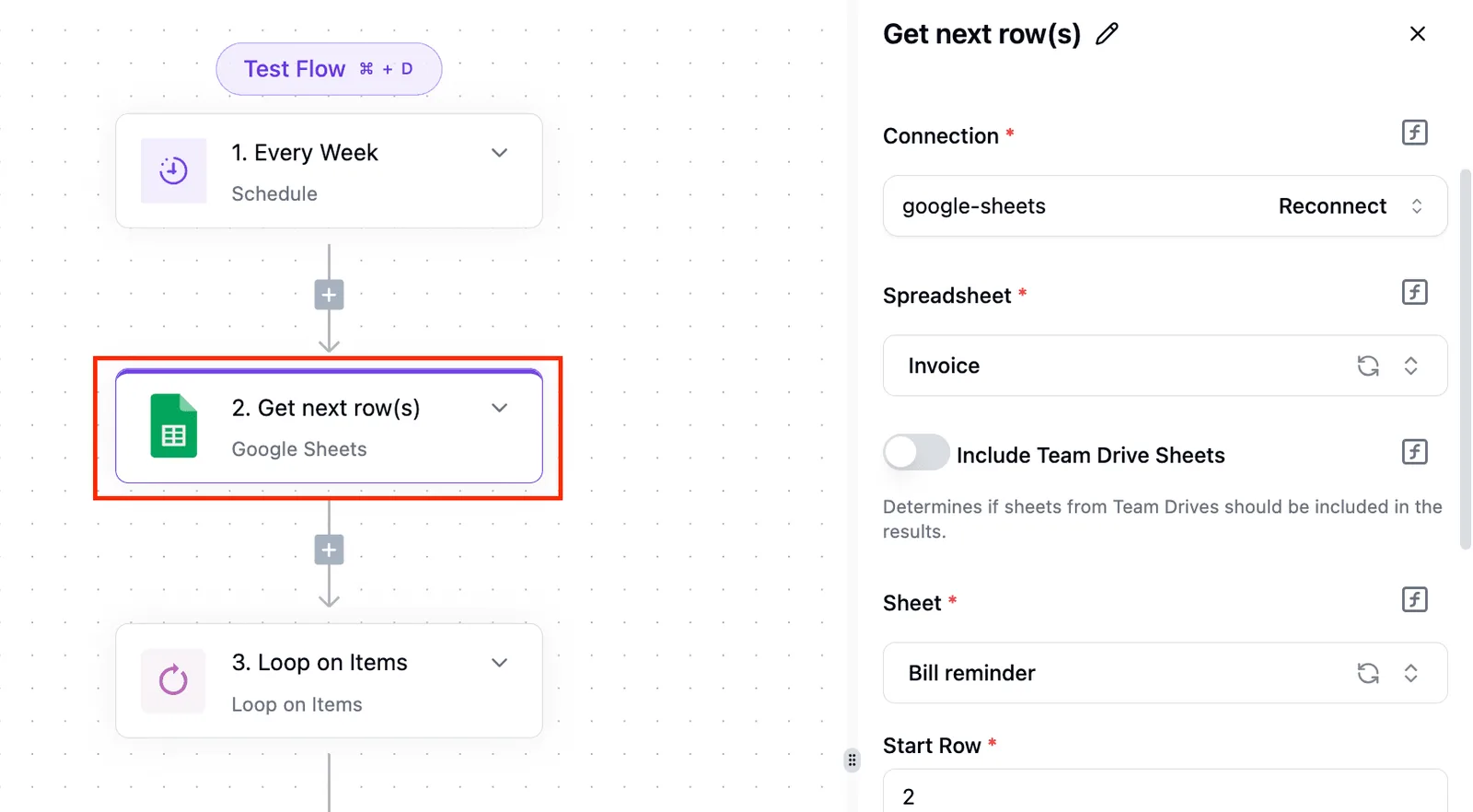
Prefect splits the same shape differently. The trigger lives in the deployment's schedule, and the fetch and loop live in your flow code.
Create the deployment from your repository with flow.from_source(...).deploy(name="weekly", work_pool_name="my-pool", cron="0 9 * * 1"). The cron string runs it Mondays at 09:00 server time, so anything consuming that output stays stale for six days.
Easier to see it running than to read about it: set it up free, no card.
Mistakes that break self-hosted Prefect servers in production
When a self-hosted server breaks in production, it is usually a quick-start default that was never replaced: a SQLite file, an open API port, a loose version tag, and no one watching workers. Each has a fix.
Moving self-hosted Prefect from SQLite to PostgreSQL
Once several workers write at once, Prefect's SQLite default turns fragile, though it's fine for one person testing a flow. Move to PostgreSQL before real schedules depend on it, or you'll see locked-database errors under concurrent load.
Then budget connections. According to Prefect pull request 10348, one server holds 5 to 10 database connections. Two servers hold 10 to 20, and four hold 20 to 40, which means most of your capacity is in the four larger machines.
Exposing the API without authentication
Anyone can create, read or delete your runs if the server is bound to a public address with no credentials. Keep it on a private network, put a reverse proxy with TLS and authentication in front of it, or enable Prefect's built-in basic authentication setting.
Point workers at the wrong host, or at a URL missing the /api path, and they fail to poll and look idle rather than broken. Set the URL explicitly on every worker and confirm with prefect config view.
A third mistake is upgrading without pinning versions or backing up. When the image tag is unpinned, a routine redeploy can pull a new release and apply database migrations you didn't plan.
Pin the exact version in your container or package spec. Before each upgrade, take a PostgreSQL dump, because migrations don't offer a guaranteed route back.
Forgetting to monitor workers and prune history
When a worker crashes, you get no error, only runs that stay in Late. Alert on late runs and keep workers under a supervisor.
Left alone, run history grows without limit. Delete old flow runs on a schedule, using an automation or a script against the API, so the database doesn't slowly fill and slow your UI.
When Activepieces fits better than Prefect, and Monday's checklist
Housekeeping like that follows you to any self-hosted tool, but if your work is wiring business apps together rather than writing Python, Activepieces fits better than Prefect, and it carries no cap on flows: unlimited flows on every plan, including free, where Prefect Cloud's tiers stop at 5, 20 and 100 deployments.
Prefect orchestrates code you write: tasks, retries, schedules and state in Python.
Activepieces is an open-source AI automation platform: you build flows from triggers, branches and app integrations, with agents and deterministic steps in one workflow.
Someone assembles a flow from prebuilt app connectors (it calls them pieces, and roughly 60% of them are community-contributed), such as "when a form is submitted, create a ticket and post to chat," which means most of your pieces are community-maintained.
It is the same choice this article has argued throughout. Activepieces can run on its hosted cloud or on your own servers, and the self-hosted route brings the same duties: a database to back up, upgrades to schedule and an exposed endpoint to protect.
What you get for that effort is checkable: the core is MIT-licensed with 744 integrations in the open source monorepo, and the enterprise feature list of SSO, SCIM, custom RBAC, audit logs, release management and secret managers is the same in the air-gapped self-hosted docs as on the managed cloud, so self-hosted deployments aren't feature-limited.
So it doesn't escape the trade-off. It moves it to a different kind of work.
| Prefect | Activepieces | |
|---|---|---|
| Built for | Python data and workflow orchestration | AI automation across business apps |
| Self-hosted | Open-source server, you run the database | Open-source edition, you run the database |
| Hosted | Prefect Cloud | Activepieces Cloud |
| Price | Check Prefect's pricing page | Free plan at $0 with unlimited flows; check Activepieces' pricing page for paid plans |
Prefect's plans and prices change, so read its pricing page on the day you decide.
Activepieces lists a free plan at $0 with 1,000 credits a month and unlimited flows on every plan; confirm on Activepieces' own page which features, such as single sign-on, sit outside the free self-hosted edition, so you're bounded by both monthly credits and excluded features.

If your requirement is SSO or isolation, that line decides the question.
If you stay with Prefect, this is the work for Monday:
- Decide between Prefect Cloud and self-hosting, and write down the specific control you need that justifies the second option.
- Pin the Prefect version in your image or requirements file, so an upgrade happens when you choose and not when a rebuild pulls the newest release.
- Set up PostgreSQL as the server's database, on a managed service if you can, rather than leaving the default SQLite file in place.
- Schedule backups of that database, then restore one into a scratch instance and confirm the server starts against it. A backup you haven't restored is only a hope.
- Restrict access to the API with a private network, a reverse proxy with authentication, or both, so the server isn't reachable from the open internet.
Frequently asked questions
Is self-hosted Prefect free for commercial use?
Yes. The open-source server is released under the Apache 2.0 licence, which permits commercial use without a fee. The cost shows up elsewhere: the Postgres database, the hosts, the on-call time and the upgrade work are yours.
Before you commit, check the licence file in Prefect's repository and the current terms on its pricing page, because Cloud plans and their terms change independently of the open-source licence.
Does the open-source Prefect server include SSO?
No. The self-hosted server doesn't ship with single sign-on, and its built-in authentication is limited to basic credentials. If you need SSO, you either put the server behind your own authenticating reverse proxy or use Prefect Cloud, where SSO is offered on higher plans.
Confirm which plan includes it in Prefect's own pricing and documentation, since plan boundaries move. A proxy gives you login control but not per-user roles inside Prefect.
How much server capacity does Prefect need?
It depends mainly on how many runs and tasks you record, not on how heavy your flows are. Your flows execute on workers, so the server and its Postgres database handle only orchestration state and the event stream. A small host is enough to start.
As run history grows, the database is the first thing to feel pressure, which is why the pruning and monitoring covered earlier matter. Prefect's documentation doesn't offer a universal sizing formula, so measure your own load and resize from there.
Can I move from self-hosted Prefect to Prefect Cloud later?
Yes, because your flows are ordinary Python code and the work is repointing it. You authenticate against a Cloud workspace, recreate your deployments and work pools there, and start workers against it.
Don't assume your existing run history, schedules or configuration come across automatically. Treat the move as a redeploy and verify what Prefect's current documentation says about migrating state before you rely on any of it.
Do I need Kubernetes to self-host Prefect?
No. The server is a Python process that needs a Postgres database, and you can run it with Docker, with Docker Compose or directly on a virtual machine.
If your team already operates a cluster, Kubernetes is a reasonable choice. Prefect supports it both for hosting the server and for running flow workloads through a Kubernetes work pool.
Those are separate decisions. Adopting Kubernetes only to host Prefect adds an operational layer you'd then own.