
Product Hunt MCP: Model Context Protocol Server Guide

Nov 9, 202611 min read
Checked on 2026-11-09, the day the maker's pages were reviewed, the product is new: Product Hunt released Product Hunt MCP, a connector that lets AI assistants, including those used in automation tools like Activepieces, reach Product Hunt.
You will find only first-party material below. It comes from Product Hunt and the product page, not from third-party write-ups.
The listing names it "Product Hunt MCP" and gives the tagline "The community you trust in the assistant you use." It files the product under Productivity, Developer Tools and Artificial Intelligence.
Read the tagline literally: the pitch is Product Hunt showing up inside the assistant you already work in, not a new app to open.
For a non-developer, MCP is one agreed plug shape instead of a drawer of adapters. It stands for Model Context Protocol, a shared standard that lets an AI tool talk to an outside service without a custom integration for each pairing.

Discover what Product Hunt released and when
You can't promise a client anything yet. The date matters because a launch this fresh has no track record. The pages say what the product is. They don't tell you which AI tools support it today, so check that before you promise a client anything.
If your tool doesn't speak that connector natively, teams bridge the gap with general building blocks such as Activepieces, and the sections that follow cover how.
This takes minutes, not a project: automate it in Activepieces free.
Why Product Hunt MCP helps teams automate
Instead of writing a custom bridge for every tool it uses, a team can let an AI tool ask Product Hunt for launch data in one agreed way through a standard connection.
Product Hunt MCP is new as of 2026-11-09, and that's the whole point of it.
What an MCP server changes for an AI step
Without a shared protocol, every AI tool needs its own adapter before it can touch Product Hunt. With one, the adapter work moves to the standard. A team no longer has to build:
- a separate connector for each AI tool that needs Product Hunt
- its own description of what Product Hunt offers, so the model knows what it can ask for
- fresh glue code each time it swaps one AI tool for another
Write any of these once and the team carries the maintenance forever. Until a tool ships a native integration, though, the connection still has to be assembled, and that's where the general building blocks come in.
Where Product Hunt launch data fits in workflows
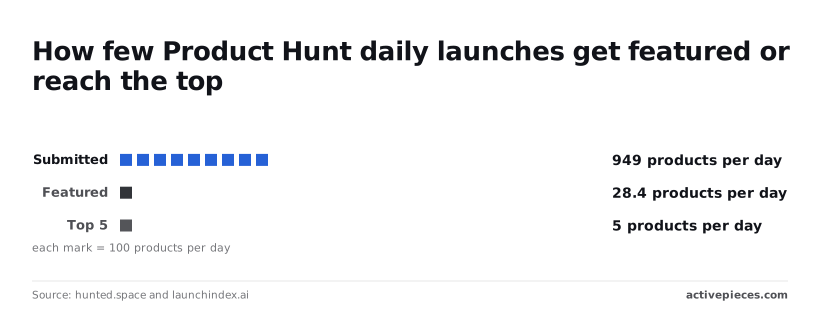
Product Hunt receives about 949 submissions a day, according to hunted.space and launchindex.ai. Only 28.4 a day get featured, roughly 3 percent, so a person scanning the full list is reading 97 percent noise.
Track only the top 5 a day, about half a percent of submissions, and you miss nearly every launch.
949 items a day have to be sorted down to the few that match a team's market. That is a filtering job, and a filtering job is what an AI step does well.
A trigger can pull the day's launches, the AI step scores them against a brief, and only matches reach a Slack channel or CRM.
The standard connection supplies the clean feed. Your field mappings and scoring rules still decide whether the output is useful.
What Product Hunt's pages reveal
You get little to map against from the maker's pages, as checked on 2026-11-09: they name the maker and an install route, but no price that I could tie to a page.
The table records what each page states and where, so a blank cell means the pages are silent, not that I skipped it.
Treat the date as a snapshot; if the pages change, so does this table.
| Item | Stated fact | Maker page URL | Date checked |
|---|---|---|---|
| What it is | Lets an AI assistant explore Product Hunt launches, compare alternatives, see community opinions, and draft launches | https://www.producthunt.com/products/producthunt | 2026-11-09 |
| Who made it | Product Hunt (launch posted by Mike Ciesielka, listed as Maker) | https://www.producthunt.com/products/producthunt | 2026-11-09 |
| How to get it | Sign in with Product Hunt to connect; no API key needed; install instructions at https://www.producthunt.com/mcp/install | https://www.producthunt.com/products/producthunt | 2026-11-09 |
| What it costs | not stated | not stated | 2026-11-09 |
Prices and plan limits checked against producthunt.com and producthunt.com on November 9, 2026.
You can't yet quote a timeline or a budget from the maker's own words, because the cost row is blank. Anything beyond them is secondhand, and this article doesn't count it.
The maker page states what the product is and who made it, so I make no claim about its scope or ownership beyond the table.
Before you promise a client a trigger or action, find the maker's own description of what the MCP exposes. Until then, you're quoting a job from a spec with the pages missing.
Don't plan a rollout around an install step you haven't seen written down by the maker. The maker page says you sign in with Product Hunt to connect, with no API key needed, and gives install instructions at producthunt.com/mcp/install. Confirm the route first, then decide which general building block carries the connection.
If your quote carries a cost line, it is a guess, because the pages state no price. Leave it open in any budget until the maker publishes one, and flag it as unconfirmed so nobody downstream treats it as free.
You can follow the rest of this with the builder open. Start free, no card.
Connect Product Hunt MCP in an Activepieces workflow today
You build the connection yourself from three generic routes, and we haven't run any of them ourselves.
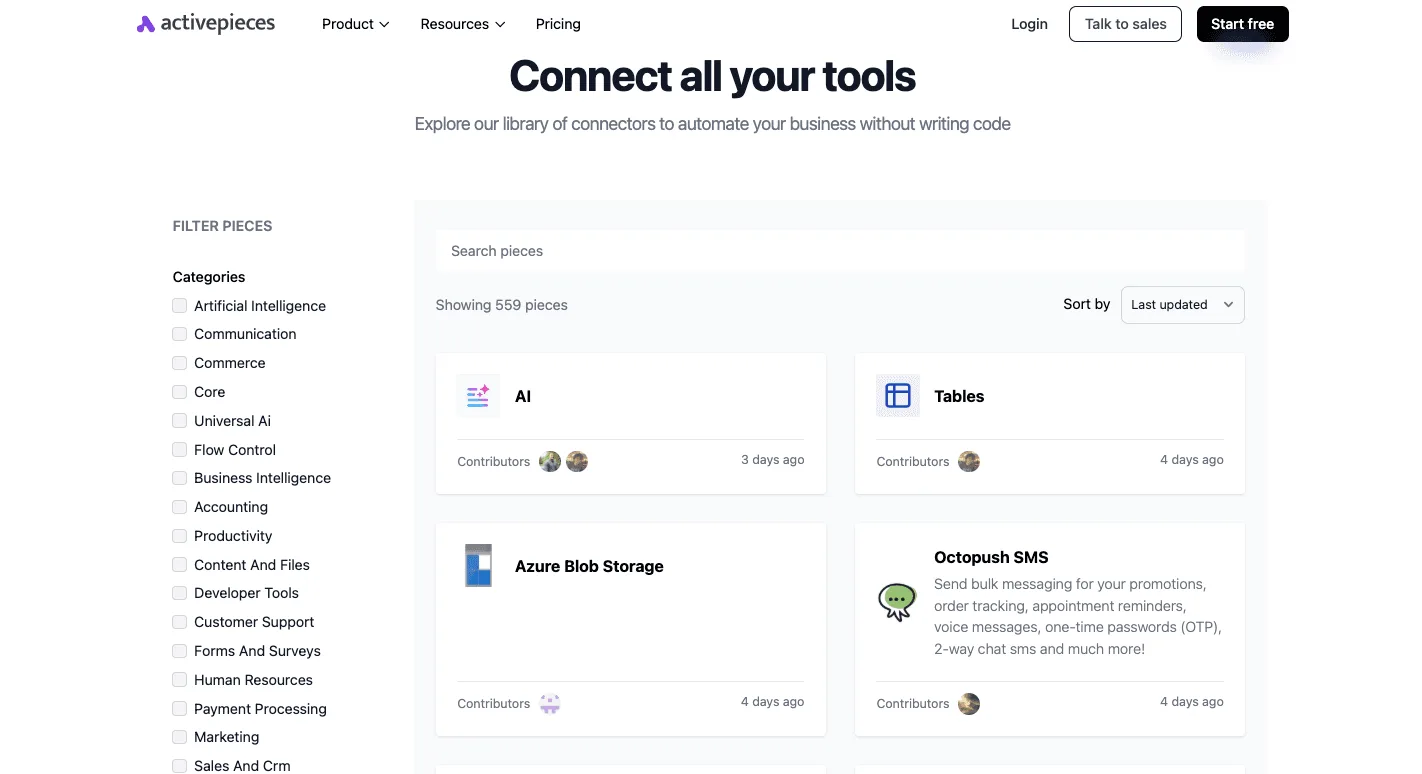
Its library lists 559 integrations, but a count that size says nothing about whether one of them covers your use case; this one is missing the integration you need, so you cannot ship with it.
Don't expect the newest entries to help, since the catalogue is sorted by last updated. Search it for Product Hunt and expect to fall back on the routes below.
Before building, note what Product Hunt MCP is meant to do: let an assistant explore launches, compare alternatives and see what the community thinks. Each route is a different way to get that into a flow.
Route 1: an HTTP request step
This is the least setup: one plain step that calls an endpoint. It needs the maker to publish the endpoint address and the authentication method, and we haven't seen neither confirmed. It fits when you want one fixed lookup on a schedule.
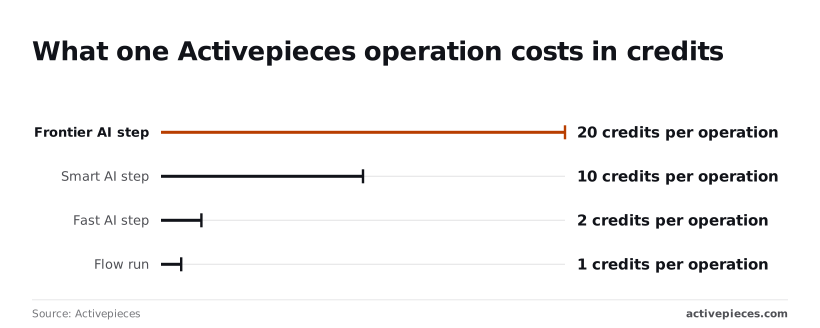
At 1 credit per operation for a plain flow run, per Activepieces pricing, a fixed lookup stays the cheapest option here.
Connect Product Hunt MCP with an AI step
This takes more setup, because you configure a provider and write the prompt that decides what to fetch. It needs the maker's connection details and a clear statement of which tools the server exposes. It fits when the question changes each run.
It gets expensive fast.
Activepieces' pricing shows a Fast AI step is 2 credits per operation, a Smart step is 10, and a Frontier step is 20. So a Frontier step costs twenty times a plain run, and a nightly flow with several of them adds up quickly.
If the agent should explore rather than repeat one call, Route 3 is the fit: an MCP server, the closest match to what Product Hunt MCP is, and the most setup.
You register the server and let the agent choose tools. It needs the maker's server address and an auth method we can't yet confirm, and it carries the AI-step costs above.
Compare Product Hunt MCP with current options
Of the four options, only the general connector route can be priced, because Product Hunt MCP has no stated cost, setup time or maintenance figure, and neither do manual checking or raw API calls.
Product Hunt MCP cost compared with current options
Read "no figure found" as unknown, not as free. The table shows what stated facts support: one priced row and a lot of gaps.
| Option | Cost | Setup time | Maintenance |
|---|---|---|---|
| Product Hunt MCP | no figure found | no figure found | no figure found |
| Manual checking | no figure found | no figure found | no figure found |
| HTTP calls to the public API | no figure found | no figure found | no figure found |
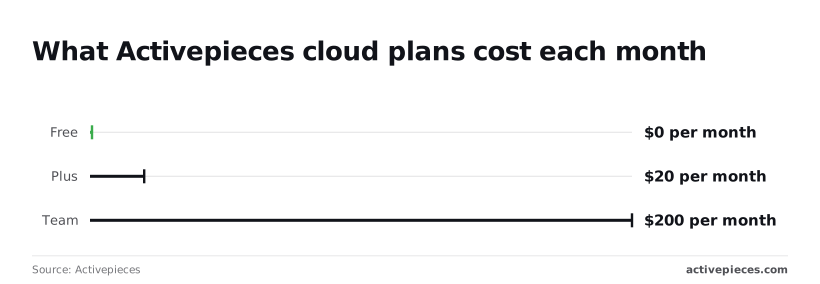
| General connector | 0 $ to 200 $ per month on cloud plans | no figure found | no figure found |
At 0 $ per month on Free, a team can wire up a test flow without a budget conversation.

The Integrations Framework and MCP Server documentation describe the mechanism, and packages/integrations in the open source repo holds the same integration action behind both.
20 $ per month gets you Plus, a small line item, but it buys nothing you can judge until you know which limit you hit.
Move up a tier only when a specific missing capability is named, not because the tier sounds safer.
Product Hunt MCP speed and setup effort
If anyone tells you it connects in minutes, ask for the measurement: none exists for setup time or response speed on any of the four options, so the claim is unsupported.
Manual checking costs only someone's attention, but that cost scales with every product you track. Raw HTTP calls and the connector route both mean someone builds and owns the mapping.
Instead of custom plumbing, Product Hunt MCP promises a standard entry point. Until a tool ships a native integration, run a one-week pilot on a single workflow and record the hours yourself.
What to watch next for Product Hunt MCP
Watch three things each Monday: the Product Hunt MCP page for access changes, the pricing statement, and the automation platform's repository and integration catalog for a native Product Hunt integration. Your pilot hours only mean something while those conditions hold.
If access rules or pricing shift mid-pilot, your recorded hours describe a setup that no longer exists. If a native integration appears, the glue work you timed may be obsolete.
The list below is short enough to finish before the first meeting of the week, and each step leaves a dated record you can point to later.
- Reread the Product Hunt MCP page. Look for changes to who can connect, what authentication is required, and which actions are exposed. A narrowed scope changes what your pilot workflow can do.
- Reread the pricing statement. Check only what the maker says about cost and limits. If the wording changed, note the change. If the page is silent, write down that it's silent, and don't fill the gap with a guess.
- Search the platform's repository for "Product Hunt". Then search its integration catalog for the same term. A repository hit may be an open request or a half-built draft. Only a listed integration in the catalog counts as a shipped integration, and even then, open its trigger and action list before you swap anything.
- Log the date of each check, and write "no change" when nothing moved. A log of unchanged Mondays shows you looked, which is what you need when someone asks why you're still on the general building blocks.
Whatever the log shows, decide from what the maker has published, not from what you expect it to publish.
Related reading
References
Build it
Set this up in minutes.
No code required. Connect your accounts, and Activepieces runs it from there.
Start free Talk to sales