
QuickBooks API: Setup, Pricing and Errors (2026 Guide)

Nov 19, 202618 min read
The QuickBooks API is Intuit's REST interface for reading and writing a QuickBooks Online company's accounting data, and it is the same interface that no-code tools such as Activepieces call behind the scenes.
Access needs a free Intuit developer account and an app, and each customer's company authorizes that app. Checked 19 Nov 2026 against Intuit's developer docs.
You can create and query invoices, bills, customers, vendors, payments and journal entries, and pull reports. Every call runs under one company's authorization, so settle first who owns that connection and who can revoke it.
Get QuickBooks API access working
Which QuickBooks products it covers
Whichever plan you select, API access is available: the main API targets QuickBooks Online, and an app can connect to all three plans below, so plan selection can prioritize factors other than API access.
$2,849m is what Intuit's 10-K filing puts QuickBooks Online Accounting revenue at in FY2023. It was $3,379m in FY2024 and $4,120m in FY2025, so the product line's revenue has grown every year shown.
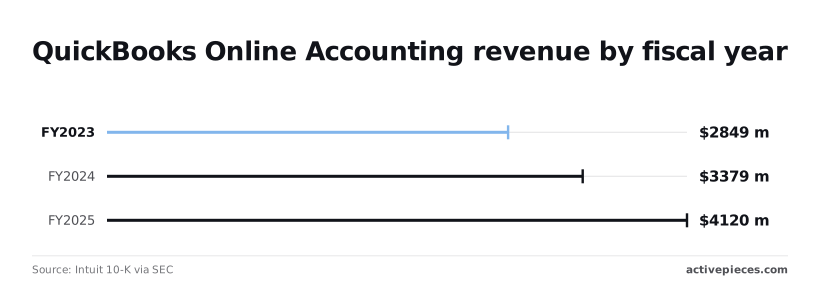
That's growth of roughly 19% and then 22%, which means each year demonstrates stronger growth than the last.
Before you read the table, know what its columns mean. Users included is the number of seats. API access is whether an app can connect, as checked on 19 Nov 2026. Take from it that the plan sets seats, not whether a connection is possible.
| Plan | Price per month | Users included | API access (checked 19 Nov 2026) |
|---|---|---|---|
| Simple Start | $38 | 1 | App can connect |
| Essentials | $85 | 3 | App can connect |
| Plus | $140 | 5 | App can connect |
Confirm the current prices and seat counts on Intuit's pricing page before you commit. Next comes the setup you do yourself.
Developer account, app and keys
Create the developer account, then an app with the accounting scope, and Intuit issues a client ID and client secret per environment, sandbox and production. Treat the secret as a credential with a named owner.

If you are running this arithmetic for your own team, see what the same workload costs on Activepieces.
Getting QuickBooks API keys and OAuth 2.0 working
You register an app in Intuit's developer portal, take its sandbox keys, run the authorization code flow once per company, and keep only the newest refresh token. The sequence below is the whole path, checked against Intuit's docs on 19 November 2026.
- Create the app in the Intuit developer portal.
- Copy the sandbox Client ID and Client Secret.
- Register your redirect URIs.
- Send the user to Intuit's authorize URL.
- Exchange the returned code for tokens and capture the realmId.
- Store the refresh token and replace it after every refresh.
When home-built integrations eventually fail, it is most often at step 6, so the subsections below take the steps in groups.
Decide first who owns the app, because that account owns the credentials. The sandbox Client ID and Client Secret work only against sandbox companies, so nothing you test touches real books. Treat the secret as a password and keep it out of source control.
Run the QuickBooks OAuth 2.0 authorization code workflow
If a redirect URI you send doesn't match one registered on the app exactly, Intuit rejects the request. Request only the accounting scope you need.
When the company admin approves, the callback returns a code and a realmId. The realmId identifies the company in every later API call, so store it beside the tokens. The admin who clicked Authorize owns that connection.

Refresh QuickBooks API access tokens and rotation
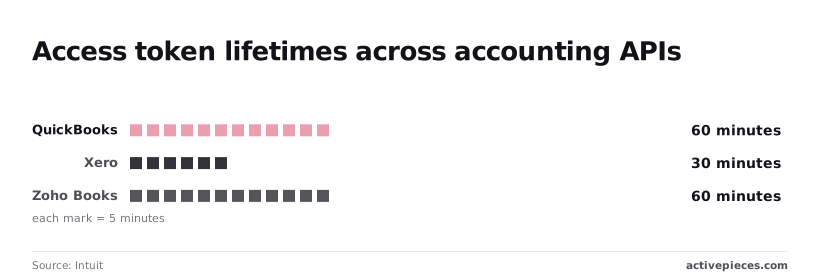
Run a job past an hour and it fails unless it refreshes, because a QuickBooks access token lasts 60 minutes, per Intuit. Xero's is 30 minutes, so the same code must refresh twice as often there. Zoho Books matches QuickBooks at 60 minutes.
Keep the old refresh token and the connection breaks, because each refresh returns a new one. Overwrite it every time.
Until Intuit reviews the app, you can't connect a live company, because it issues production keys separately from sandbox keys, after that review. Start the review before your launch date. Check the portal for the current requirements.

Explore QuickBooks API endpoints and entities
Authorise the connection under the accounting scope, com.intuit.quickbooks.accounting, and the API exposes accounting entities for create, read, update and delete, a query endpoint, reports, batch, change data capture and webhooks. All of it runs as the company that granted access.
Core QuickBooks API accounting entities
You can't delete most entities outright, so removal usually means setting them inactive or voiding them, and your process must handle that. The table below shows, per Intuit's entity reference, which operations each entity family supports.
| Entity | Read | Create | Update | Delete or void | Webhook support |
|---|---|---|---|---|---|
| Customer | Yes | Yes | Yes | No, mark inactive | Yes |
| Invoice | Yes | Yes | Yes | Delete and void | Yes |
| Bill | Yes | Yes | Yes | Delete only | Yes |
| Payment | Yes | Yes | Yes | Delete and void | Yes |
| Item | Yes | Yes | Yes | No, mark inactive | Yes |
| Account | Yes | Yes | Yes | No, mark inactive | Yes |
| Reports | Yes | No | No | No | No |
Because reports are read-only and send no webhooks, you must poll them. Confirm each row against Intuit's current reference before you build on it.
To filter an entity instead of fetching everything, use the query endpoint, which accepts SQL-like statements. Batch groups several operations into one request, which cuts calls and therefore exposure to throttling.
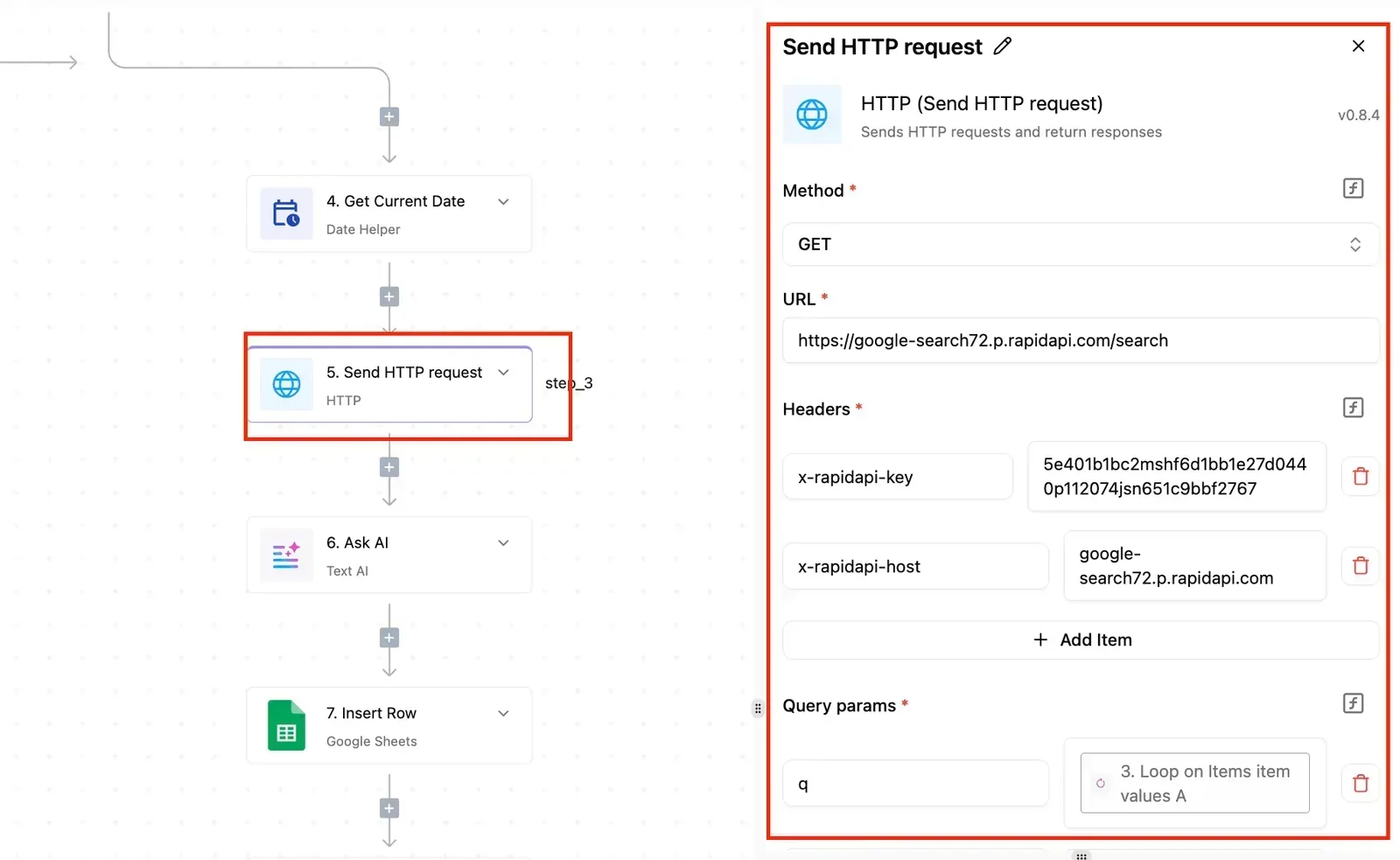
To ask what moved rather than re-read the ledger, a sync job can use change data capture, which returns entities changed since a timestamp you supply.
Ask for a report such as profit and loss or balance sheet and it runs on request, with parameters for date range and accounting method.
Webhooks notify your endpoint that an entity changed, but they carry identifiers rather than full records, so you still fetch the record. Verify the signature on every notification, and record who owns the endpoint that receives them.
Before writing code, you can send requests against a sandbox company from the API Explorer in Intuit's developer portal. Use it to confirm the scope and the shape of a response, then compare your code's output with it.
A minimal working QuickBooks API request
Start with one authenticated GET against a sandbox company, with the company's realmId in the path and a minorversion parameter on the query string. A second request, a POST that creates an invoice, shows the same pattern with a body.
Check every path and parameter against Intuit's current developer documentation before you copy it, because the version and endpoint details change.
QuickBooks API base URLs and request headers
Point a sandbox token at production and it fails, because sandbox and production use different hosts and the access token you hold is tied to one environment. Confirm which environment the connection belongs to, and who owns it, before you debug anything else.
The company path takes the form /v3/company/{realmId}/. The realmId identifies the QuickBooks company file, and it's returned when the user authorizes your app. Store it with the connection record, because without it you can't address the right company.
Send three headers:
Authorization: Bearer {access_token}, using the OAuth 2.0 access token, not the refresh token.Accept: application/json, since responses default to XML otherwise.Content-Type: application/jsonon any request with a body.
Add minorversion as a query parameter and pin it deliberately. Leaving it off means you get the base behavior of the API, and that can differ from what the current docs describe.
A QuickBooks API query request
To query, send a SQL-like statement in the query parameter to the query endpoint, for example selecting customers from the Customer entity. Run this first. It needs only a read scope, and success tells you the token, the realmId and the host all agree.
In the response, results are wrapped in a QueryResponse object. Customer records sit in an array inside it, each with an Id and a SyncToken. Keep both: the SyncToken is what Intuit uses to reject updates made against a stale copy of a record.
Creating an invoice with the QuickBooks API
To create an invoice, POST to the invoice endpoint. The body needs a CustomerRef whose value is a customer Id from your query, and at least one Line with an amount, a detail type and a sales item reference.
This needs the accounting scope, which is broader than reading, so confirm the connection was granted it.
Once the call succeeds, the response returns the created Invoice with its new Id and a SyncToken. Compare that output with what your code sent. A validation failure returns a Fault object instead, and its detail names the offending field.
You don't have to hand-build that request, or hire someone who can.
Describe the process to the built-in chat in Activepieces, say a paid order becoming a QuickBooks invoice, and it publishes the automation itself, the same artifact a builder would have wired step by step.
It runs under the same RBAC and audit logs as every flow a person built, and each run leaves a trace anyone can open to see what was sent and what QuickBooks returned, so a Fault is readable without a certification.
MoneyGram, Moneypenny, Alan and FundingSocieties run Activepieces in production.
Worth checking against a plan that does not meter every step: one credit covers a whole run on Activepieces.
Understand QuickBooks API rate limits
At 500 requests per minute per realm, meaning per connected company, QuickBooks throttles, so a rejected call at that ceiling is a rate problem rather than a malformed request. The limit follows the company file, not your app.
QuickBooks API per-realm rate limit throttling
Before you size anything, record who owns each connection, because the person who authorized it controls whether the budget exists at all. Each customer who authorizes your app is a separate realm with its own budget.
Beside QuickBooks, the chart sets Xero (an accounting package with a similar API) at 60 requests per minute, making bulk operations time-consuming. It notes NetSuite (Oracle's ERP), which limits concurrent requests, 15 at a time, instead of counting per minute.
The three therefore require different rate-limiting logic.
Read it as a design constraint:
- A sync job built for Xero's pace will underuse QuickBooks
- One built for QuickBooks will be throttled on Xero
- NetSuite needs a queue, not a timer
Neither figure is confirmed here: Intuit documents caps on operations per batch request and on rows returned per query, and the pages describing them have changed over time, so read the current batch and query pages before you set page sizes.
Guessing a limit that's too high produces failures; too low wastes your per-realm budget.
QuickBooks API pricing tiers and metered calls
Intuit meters API calls by tier, and the cost doesn't scale in a straight line. Tierguard puts the Silver-tier bill at $300 a month for 1M calls, which is a modest line item.
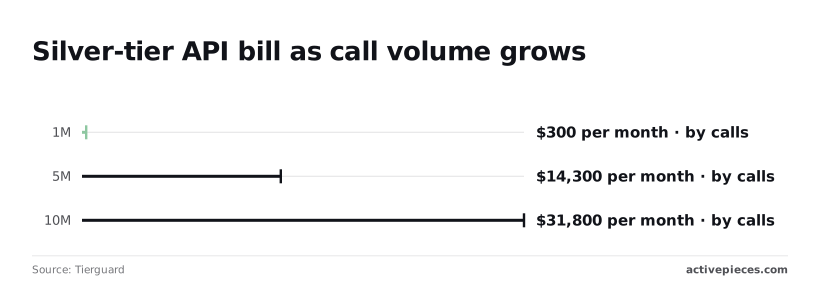
At 5M calls it reaches $14,300 a month, so a fivefold increase in volume multiplies the bill nearly 48 times. At 10M calls it's $31,800 a month, so doubling again more than doubles the cost.
Reduce retry loops and polling before you pay for them, because they count toward volume. Confirm the current tier terms on Intuit's pricing page, since Tierguard is a third-party calculation.
Troubleshoot QuickBooks API errors in production
Seven groups cover most production failures from the QuickBooks Online API, and each has a documented fix and a clear answer on whether to retry.
Whoever owns the connection should keep this table beside the runbook. The fixes differ by who can act on them: some belong to the developer, some to the company admin who authorized the app.
In the table below, each error carries its cause, the fix Intuit documents, and whether a retry is safe. Only some of these errors ever resolve by trying again.
| Error | Cause | Documented fix | Retry? |
|---|---|---|---|
| 401 | Expired or invalid access token | Refresh with the stored refresh token, then repeat the call | Once, after refreshing |
| 429 | Request rate exceeded | Slow down and resend with backoff | Yes, with backoff |
| 400 validation | Malformed or incomplete request body | Correct the payload against the entity's schema | No |
| Stale SyncToken | Update sent with an outdated version token | Read the record again, take the current SyncToken, resend | After re-reading |
| Duplicate name | Name already used by another list entity | Use a unique name or query for the existing record | No |
| 403 scope | App lacks the permission scope for the call | Request the scope and have the admin reauthorize | No |
| 5xx | Fault on Intuit's side | Wait and retry | Yes, with caution |
Check each row against Intuit's current developer documentation, since error codes and limits change.
QuickBooks API authentication errors (401, 403)
When a 401 comes back, the access token is expired or invalid, so refresh it with the refresh token and repeat the call once. If the refresh itself fails, stop and have the connection owner reauthorize; looping only hides a revoked grant.
Then there is the 403: the token is valid but the app lacks the scope for that endpoint, and no retry will change that. Request the correct scope and have an admin reauthorize.
Send requests faster than Intuit allows and you get a 429, and retrying immediately makes it worse. Wait, then resend with exponential backoff and some randomness, so parallel workers do not all return at the same moment.
Batch where the API supports it, and read the current limits in Intuit's docs rather than relying on remembered figures.
Validation and SyncToken errors
Send the same payload again and a 400 validation error will come back every time. Read the error detail, fix the field, and do not retry.
Update a record that changed since you last read it and you get a stale SyncToken. Fetch the record again, use its current SyncToken, and resend. A duplicate-name error works the same way: query for the existing record, or choose a unique name.
When a 5xx comes back, it is Intuit's fault, so retry with backoff, but cap the attempts.
The risk is a create call that succeeded while the response was lost: a blind retry then produces a duplicate invoice. Use a request ID where the endpoint supports one, or query for the record before resending. Intuit's current docs list which operations support this.
Call the QuickBooks API without code using Activepieces
When you want invoice creation, customer sync or report pulls without assembling each request yourself, Activepieces has a QuickBooks integration, and its 750 integrations are counted from an open source monorepo whose core is MIT-licensed.

You describe the process as a flow, and the platform holds the QuickBooks connection and shows what each run did.
What the integration covers
You make the QuickBooks connection once and it is held centrally, so every flow that uses it points at that one connection, and updating it updates them all. That is one place to change, rather than one per script.
The free plan includes unlimited flows and 1,000 credits a month, so you can set the connection up and try it without paying anything.
Ask first who owns that connection. It's tied to the person who authorised it, so if they leave or lose access to the company, flows using it will fail until someone re-authorises.
Creating an invoice, finding or creating a customer, and pulling a report each become a step you configure rather than a request you assemble, because the integration exposes QuickBooks entities as steps.
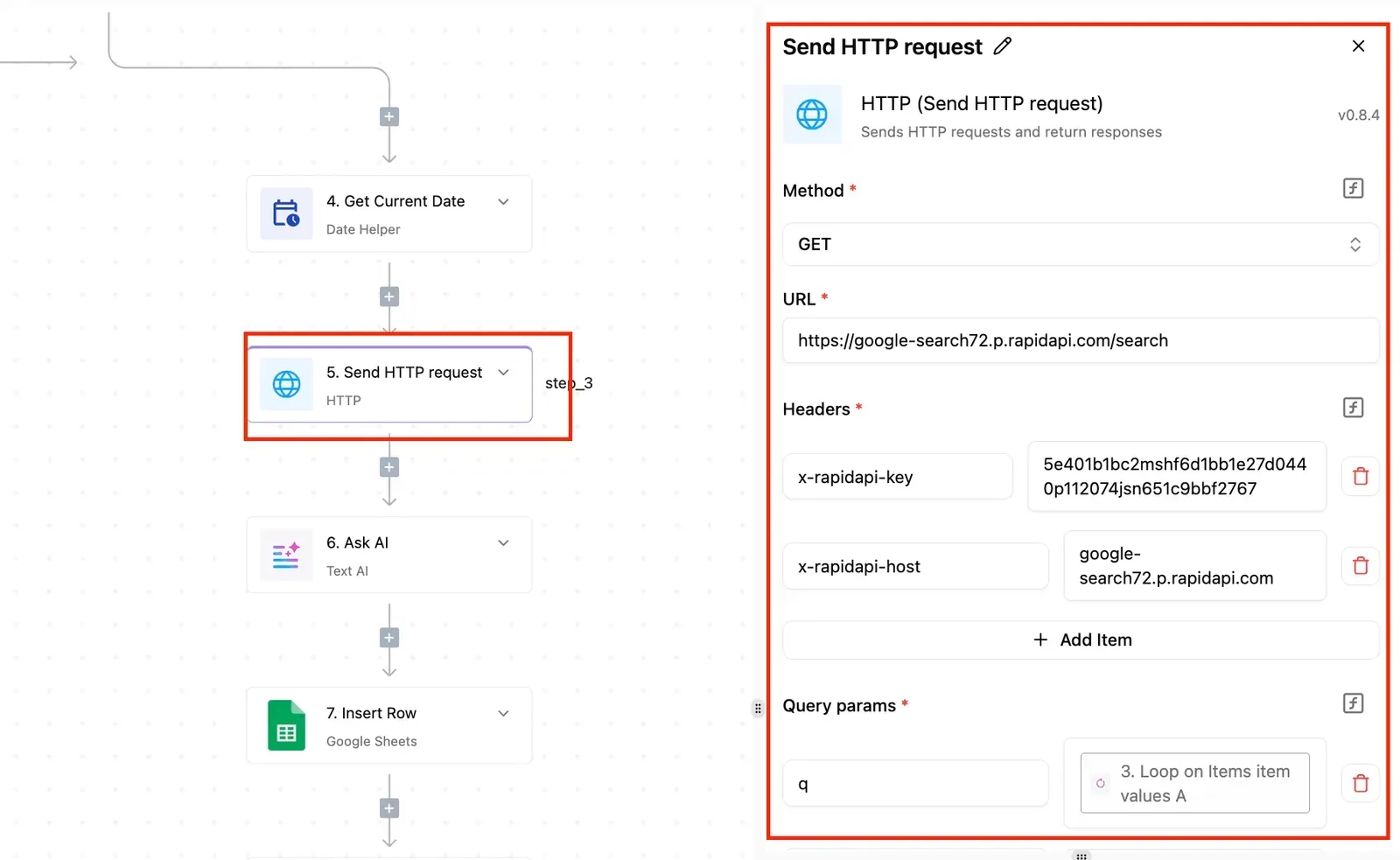
Open a failed run and you can see which step stopped it and what came back, because each run keeps a trace. A run costs 1 credit however many steps it has, so a long flow is no dearer to run than a short one.
Check the integration's own step list in Activepieces before you plan around a specific operation.
When to use a custom API call step
Where the integration has no step for what you need, a custom API call step lets you send a request to a QuickBooks endpoint yourself, using the same connection. You still get the managed authorisation and the run trace.

You take on the request details: the endpoint, the body and the response shape, as Intuit's developer docs define them. Use this for the occasional operation the built-in steps skip, not as a way to rebuild the whole API inside a flow.
When to stay in code
Call the API from code or from a flow, and Intuit's 500 requests per minute per realm applies either way, so the limit cannot be bypassed by switching methods. Activepieces doesn't raise that ceiling.

For heavy batch work, such as loading a large historical set of transactions, code is usually the better fit, because you can then control batching, pacing and retries yourself.
A flow that runs one step per record makes that control harder. Keep the flow for routine, event-sized work, and write code for bulk.
Frequently asked questions
Is the QuickBooks API free to use?
Creating an Intuit developer account and a sandbox company hasn't required payment. Intuit has changed how it prices API access, so confirm the current terms on Intuit's developer pricing page before you build.
Then ask who pays: the connection belongs to a specific QuickBooks company, and the cost should sit with whoever owns it.
Does the QuickBooks API work with QuickBooks Desktop?
No. The API this article covers is the QuickBooks Online Accounting API. Desktop editions are integrated through a separate route, and Intuit's docs describe it. If your client runs Desktop, the OAuth and throttling guidance here doesn't carry over.
How long do QuickBooks API access tokens last?
Your code must refresh access tokens routinely, because they are short-lived. The refresh token lasts far longer but still expires, and each refresh can return a new one.
Always store the newest refresh token. If you keep the old one, the connection will eventually stop working, and the failure looks like a sudden authorization error. Check Intuit's current OAuth documentation for the exact lifetimes.
Can I use the QuickBooks API for my own company only?
Yes. Create an app in the Intuit developer portal, then authorize it against your own company through the same OAuth flow any customer would use.
Because the flow is identical, you still need to record which person authorized the connection. If that person leaves or loses access, the integration breaks with them.
Where do I check current QuickBooks API changes?
Start with Intuit's developer documentation, specifically its release notes and its pages on rate limits and error codes. Check them before each production release, not only when something fails.
Limits, token rules and endpoint versions are Intuit's to change, and any figure in a blog post, this one included, can be out of date.
Related reading
References
Running the numbers
See what the same workload costs here.
Free forever plan, and every paid plan self-hosts at no extra cost.
See pricing Talk to sales