
Rebuilding Automation Anywhere Screen-Scraping Bots

Sep 21, 202611 min read
When a software provider pushes a minor cosmetic update on a Tuesday morning, a legacy screen-scraping bot immediately fails because it treats the interface as a static image.
Treat screen-scraping bots as technical debt
These fragile macro-recorders, which lack the modern flexibility found in tools like Activepieces, simulate human clicks based on specific button coordinates and pixel colors.
API-based workflow migration is the process of replacing fragile, interface-dependent screen-scraping bots with direct application programming interface integrations to ensure operational stability and data integrity.
The fragility of UI-based automation
Relying on the visual layer for automation means your business logic is at the mercy of every minor cosmetic update pushed by a software provider.
When a tool like the Salesforce CRM platform updates its navigation bar, a bot programmed to click at specific coordinates will fail. This failure causes lead processing to halt until a developer manually re-maps the script.
Relying on the visual layer for automation means your business logic is at the mercy of every minor cosmetic update pushed by a software provider.
Why pixel-perfect recording fails in the cloud
Cloud-based applications rotate elements and update layouts dynamically, which renders the static "recording" method of legacy RPA tools obsolete. According to data from FetchSmith, running a Headless Chromium instance costs 7.04 units of compute.


This means your infrastructure bill is thirty times higher than it needs to be just to render pixels you aren't even looking at.
In contrast, an HTTP-only API call costs only 0.23 units. Migrating to code-based requests allows you to scale your operations by orders of magnitude on the same budget.
The hidden cost of 'bot maintenance' cycles
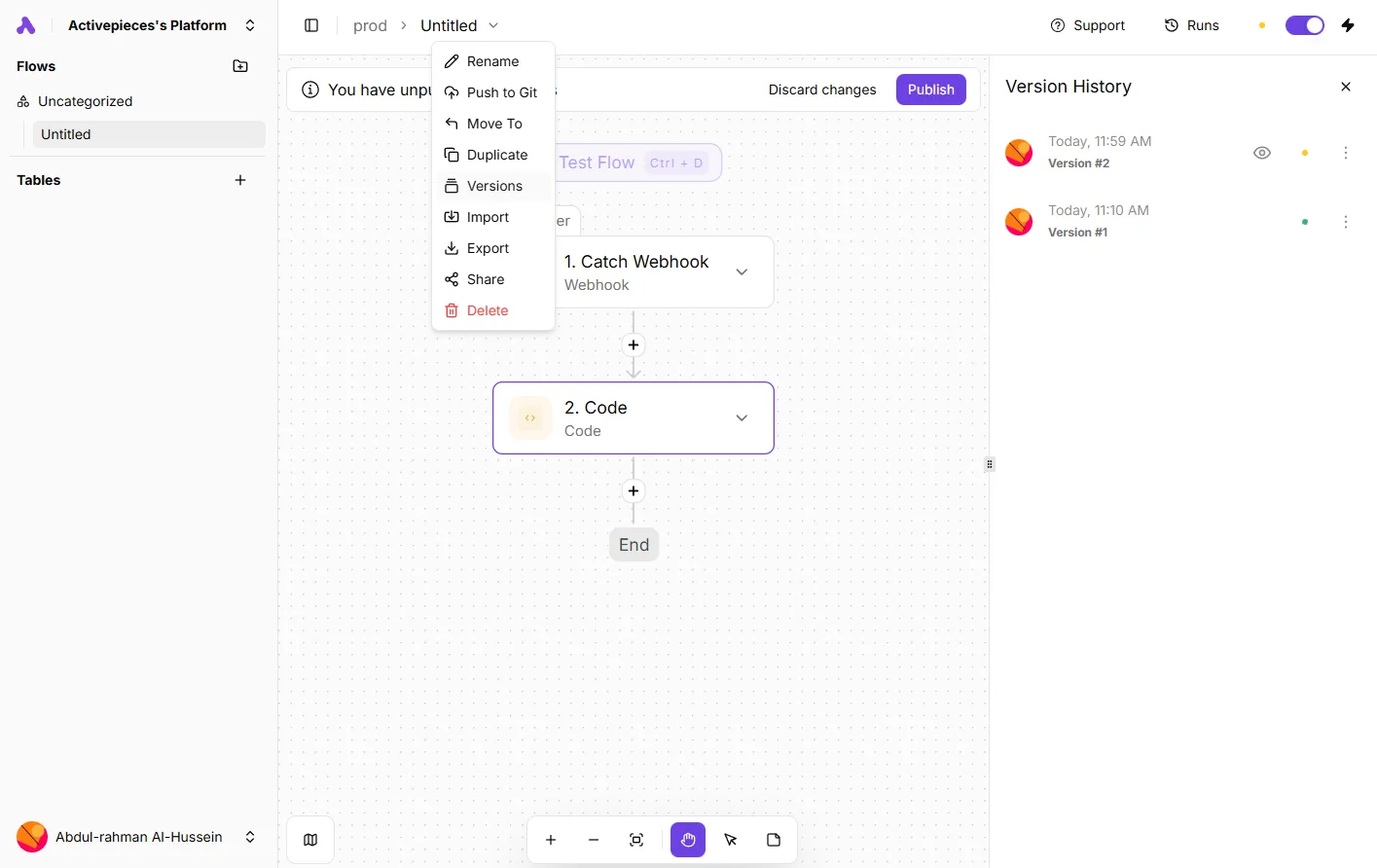
The initial build isn't the true expense, but rather the endless maintenance cycles required to keep bots from breaking. Activepieces manages these changes through version control rather than frantic hotfixes, allowing teams to treat automation as software.
Activepieces runs the same codebase whether you choose the managed cloud or self-host via Docker, Compose, or Kubernetes, ensuring that where a flow is deployed never dictates your ability to migrate it.
This flexibility allows teams to move workflows between environments without losing access to enterprise features like RBAC, SSO, SCIM, and audit logs, which ship identically on both deployment models.
Everything below works on Activepieces' free plan. Start without code or a credit card.
Why API workflows outperform screen-scraping in every metric
API-based workflows eliminate the fragility of screen-scraping because they communicate directly with the underlying data structure. They don't guess the location of a button on a shifting interface.
Execution speed and resource consumption
Direct data exchanges bypass the heavy lifting of rendering a browser, which saves the overhead of loading images, scripts, and stylesheets. These elements serve no purpose for a machine.
By targeting the specific command in the code, the system processes the instruction instantly rather than mimicking human movement. This efficiency allows a single server to handle thousands of concurrent requests that would otherwise crash under the weight of opening a thousand browser windows.
Data integrity and error handling capabilities
APIs provide explicit status codes that tell you exactly why a process failed. A scraper can only report that it "couldn't find the element."
If an authentication token expires, the API returns a specific "401 Unauthorized" code, allowing your system to trigger a re-login script automatically.
Security risks of keeping active UI sessions open
Relying on UI automation requires keeping active, logged-in browser sessions open. This creates an unnecessary surface area for session hijacking.
In an API workflow, you use scoped credentials like OAuth tokens that grant access only to specific data.
The business case for aggressive RPA decommissioning
Interacting with systems that have no API
Enterprise teams rely on Robotic Process Automation (RPA) as a survival tactic when they're trapped by software that offers no modern way to talk to other tools. This "brute force" integration mimics human clicks to move data.
- Legacy "Closed" Systems: exist where the vendor provides no direct database access, meaning the only way to extract information is to scrape it off the screen.
- Third-party portals: often lack public API documentation, forcing teams to build bots that navigate external websites like a manual user would.
- Rapid prototyping for temporary projects: occurs where the cost of building a custom integration outweighs the short-term need, leading to "quick fixes" that often become permanent technical debt.

The 'if it ain't broke' mentality in enterprise IT
IT departments often mistake a functioning bot for a healthy system. They ignore the reality that UI-based workflows are "broken" by design because they lack error handling for interface changes.
Quantifying the failure rate of UI-dependent workflows
The failure rate of UI-dependent workflows is tied directly to the frequency of updates in the underlying software. This makes them the most volatile assets in a company's tech stack.
Unlike an API, which uses a versioned contract to ensure data arrives in a specific format, a UI bot breaks whenever a button moves or a pop-up advertisement appears.
Easier to see it running than to read about it: set it up free, no card.
Framework for rebuilding RPA as API workflows
Auditing your Automation Anywhere bot inventory
Determining which bots to migrate first requires a catalog of every task that currently relies on "surface automation," where a script clicks a specific pixel coordinate on the screen.
You should prioritize the migration of bots that interact with high-frequency systems like SAP, an enterprise resource planning tool, or legacy banking portals.
Identifying hidden APIs in web applications
Most modern web applications communicate with their servers through undocumented internal APIs that are far more stable than the visual interface you see on the screen. By intercepting these requests, you can bypass the fragile layer of HTML buttons and text boxes entirely.
- Open Browser DevTools to the Network tab
- Perform the manual action in the UI
- Identify the XHR/Fetch request
- Copy the request as cURL
- Import into the API client of your choice
Replicating session state for external requests
A common pitfall when moving from the browser to a standalone client is forgetting that the server expects a valid session. If you simply copy the URL, the server will reject the request with a 401 Unauthorized error because it does not recognize the caller.

To fix this, you must include the authentication headers and cookies that were present in the original browser request.
Most DevTools allow you to "Copy as cURL," which automatically bundles these session tokens into the command so the API client can successfully impersonate your logged-in state.
Mapping UI fields to JSON keys and methods
Translating a visual form into a structured data object ensures that your automation sends exactly what the database requires without the overhead of rendering a webpage.
A "Last Name" text box in a web form might correspond to a sur_name key in a JSON payload, which is the standard format for transferring data between web servers.
Testing for edge cases in headless execution
Running a workflow via API removes the visual feedback of a browser, making it necessary to programmatically handle errors that a human would normally spot on the screen.
Your script must instead interpret the HTTP 429 status code, which indicates the server is blocking requests due to high volume.
Migrating legacy Automation Anywhere logic to Activepieces
Activepieces provides a modern execution environment that replaces the fragile, centralized Control Room with modular flows that can be self-hosted on your own infrastructure or run in the cloud.
Activepieces syncs flows to git and promotes them through Release Management, ensuring that promotion from test to production is a deliberate, versioned step.
Check the Activepieces documentation for Git Sync and Release Management to see how this works across both self-hosted and cloud environments for teams like MoneyGram and Alan.
Switching from recorders to stable connectors
Activepieces replaces brittle UI recordings with pre-built connectors for services like Google Sheets or Slack. Your workflows target stable data endpoints rather than shifting pixel coordinates.
When a web application updates its CSS, a legacy recorder will fail because the button moved.
Handling authentication without virtual desktops
You can manage credentials through the Activepieces platform's built-in connection manager. This removes the requirement for a dedicated virtual desktop to stay logged in to a session.
Activepieces uses OAuth and API keys to refresh access automatically. Your scheduled tasks run overnight without a "Keep Alive" script or an active RDP session.
Scaling execution without per-bot licensing fees
Activepieces allows you to run concurrent flows based on your actual server capacity. This bypasses the restrictive "per-bot" licensing model that forces teams to queue critical tasks behind low-priority ones.
The Version History panel shows how different iterations of a flow (such as a webhook trigger connected to a code step) can be tracked and reverted.
The Monday morning plan for RPA decommissioning
Decommissioning starts with a total freeze on the creation of any automation that relies on clicking buttons or reading screen pixels to move data.
Identifying the three most fragile bots
The first step is auditing your execution logs to find the processes with the highest failure-to-success ratio.
A "No-Scrape" policy mandates that every new automation request must first seek a documented API endpoint before any UI-based recording is considered.
Training the team on REST basics and JSON structure
Transitioning away from screen-scraping requires moving the team's focus from visual workflows to the structured data formats that modern web services use to communicate.
- Understanding how GET and POST requests differ: ensures the team can retrieve or send data without needing a browser window open.
- Mastering the key-value pairs of JSON: allows your staff to map data fields directly between systems, so information stays accurate even if the visual layout of the source software changes.
- Learning to use API keys and Bearer tokens: provides a secure way to maintain connections, which removes the need to store and rotate sensitive UI login credentials within the automation tool.
Frequently asked questions about RPA migration
Can I use an API if the vendor doesn't provide one?
You can often bypass a missing official vendor API by accessing the hidden internal endpoints that power the web interface itself.
When you open the developer tools in a browser like Google Chrome, you can see the specific data requests the site makes to its own servers.
This allows you to mimic those calls directly rather than simulating mouse calls directly rather than simulating mouse clicks on the buttons those calls are attached to.
This approach eliminates the risk of a UI redesign breaking your workflow, as the underlying data structure usually remains stable even when the CSS layout changes.
Do API workflows require more coding knowledge than RPA?
API workflows shift the technical burden from managing visual selectors to understanding data structures. This requires a different type of logic rather than necessarily more lines of code.
While a "low-code" tool like Automation Anywhere hides the complexity behind a drag-and-drop interface, it often forces you to write complex workarounds for simple timing issues.
In contrast, an API call provides a clear success or error message, meaning you spend less time guessing why a process failed and more time mapping data fields.
How do I handle legacy desktop apps that truly have no API?
For isolated legacy software, the most stable path is to use a database connector to talk directly to the application’s back-end storage.
Because most desktop tools save their records to a SQL Server or a local SQLite file, you can extract or insert information without ever opening the application's window.
This prevents the automation from crashing if a Windows update changes the font or resolution of the desktop environment.
What happens to my Automation Anywhere licenses during the move?
You should maintain a minimal set of licenses to run your existing bots in maintenance mode while you build out the new API-based replacements.
Cutting the cord immediately creates a period where your business processes are dark.
Keeping a few Bot Runner seats active allows you to verify that the data coming out of your new system matches the legacy output before you stop paying for the old subscription.