Redis Cloud Pricing: Plans Compared (2026 Guide)

Nov 8, 202614 min read
Your bill follows dataset memory, throughput and replication, not the plan name. Redis Cloud has a free tier, fixed-price Essentials plans, usage-billed Pro, and contract-priced Enterprise.
A small app, or even a lightweight automation built with Activepieces that touches the cache now and then, can fit the cheap tiers only while all three stay under that tier's ceiling.
Redis Cloud pricing is the set of charges for Redis's managed database service, where the monthly cost comes from the memory your dataset needs, the throughput you run, replication, and network fees, spread across free, Essentials, Pro, and Enterprise plans.
Redis Cloud pricing by plan, checked November 2026
The plan table with price, memory and limits
The table shows how Redis prices each plan and what constrains it.
| Plan | Price | Memory | Ops/sec | Connection limit | Availability and limits |
|---|---|---|---|---|---|
| Free | No charge | Smallest dataset cap Redis offers | Throughput capped by the plan | Fixed cap | Intended for evaluation; no headroom for production growth |
| Essentials | Fixed monthly price per tier | Set by the tier you choose | Set by the tier | Set by the tier | Moving up means changing tier, so a growing dataset forces a jump |
| Pro | Usage-based, from provisioned memory, throughput and shards, plus network transfer | You provision it | You provision it | Scales with the deployment | Replication and extra shards each add to the bill |
| Enterprise | Custom contract | Negotiated | Negotiated | Negotiated | Priced by agreement, so there's no public number to compare |
How we verified Redis Cloud pricing
As of 8 November 2026, the plan structure above matches Redis's published pricing. Redis changes tiers without notice, so the table is accurate as of that date.
You will not find dollar amounts or exact limits here, on purpose. Confirm them on Redis's live pricing page before you commit.
If you are running this arithmetic for your own team, see what the same workload costs on Activepieces.
Criteria determining your Redis bill
Seven criteria set a Redis Cloud bill, and a plan that looks cheap on one can be expensive on another.
- Memory size is the dataset limit of the plan or database you provision.
- The ops/sec cap is the throughput ceiling, tied to the plan tier or to the shards you provision.
- Replication is a second copy of the data, which counts against the memory you pay for.
- Persistence is an option you enable per database, and it depends on the plan tier.
- Region and network transfer covers where the database runs and what leaves it, and the plan type decides whether Redis bills that traffic.
- The support tier is a separate level of service attached to your subscription.
- Exit cost is the effort and bandwidth needed to export your data and re-point clients elsewhere.
Memory and dataset size
Redis meters memory as the dataset size you provision, not the bytes your keys happen to occupy today. You therefore pay for headroom.
Size against a measured dataset, not a spreadsheet guess, because key overhead and fragmentation make the raw payload you estimate smaller than what Redis actually holds. When you outgrow a tier, you move to the next one, not up by a small increment.
Check connection limits alongside the cap. A serverless or autoscaled app that opens many short-lived connections can hit that limit well before it hits the throughput cap.
If Redis is your system of record rather than a cache, persistence matters. Treat it as a requirement to confirm per plan, because the cheapest tier may not offer the durability you assumed.
Redis Cloud network transfer and support costs
Where the database runs and which way the traffic flows both set the transfer fee. Keep the app and database in the same region, and check whether your plan bills egress at all.
Decide whether you need a response-time commitment before you pay for support, which is a priced tier. Exit cost is mostly an export of your data, which makes a plan's export options worth reading before you commit.
What a small production app pays a month
Until throughput, not memory, sets the size, a small production app pays the fixed price of the smallest plan that holds its dataset with replication. Only then does a usage-based plan win.
| Workload | Fixed-tier plan (Essentials) | Usage-based plan (Pro) | Cheapest | Assumptions |
|---|---|---|---|---|
| 100 MB session cache | Smallest tier that fits | Unpublished until sized per subscription | Fixed-tier plan | No replication, low ops rate, same region as the app |
| 1 GB replicated cache | Tier with replication | Unpublished until sized per subscription | Fixed-tier plan | Replication on, moderate ops rate, no cross-region traffic |
| 10 GB high-throughput | Largest tier may not cover the ops rate | Unpublished until sized per subscription | Usage-based plan | Sustained ops rate, replication on, network egress billed |
Redis Cloud cost for a small session cache
At 100 MB, memory is almost irrelevant, so the smallest fixed tier that holds the data is the cheapest option.
A session store hit on every request can outgrow a small tier's throughput before it outgrows its memory, which forces an upgrade earlier than the dataset suggests.
1 GB cache with replication
You pay for the memory twice, because replication turns one copy of your data into two. A plan that bills replication as a tier feature can come in below one that bills it as extra provisioned memory.

If your app and cache sit in different regions or clouds, network transfer charges apply on top and can outweigh the memory savings.
10 GB with sustained throughput
Sustained operations per second, not stored bytes, decide whether a tier is sufficient.
A usage-based plan that matches the actual rate is then the cheaper choice, and its bill grows with throughput and egress rather than jumping at tier boundaries.
Hidden costs and limits raising your bill
Above the plan price, five items lift a Redis Cloud bill, and each is charged differently:
- Throughput caps are set per plan, so the remedy is a larger plan rather than a metered overage.
- Replication keeps a full second copy of the data, so you pay for memory twice.
- Persistence adds storage and disk writes on top of the memory you size.
- Egress is billed by the volume of data leaving the region.
- Private networking and support are separate line items outside the subscription.
Catching that early means watching memory and the bill against a threshold.
Activepieces can run a scheduled workflow that checks usage and posts to Slack or email, and the run is the meter, not the steps inside it: a ten-step check costs the same 1 credit as a two-step one.
An hourly check is about 720 runs a month, inside the 1,000 credits on the free plan.
Replication, persistence and backups
Turn on high availability and a replica sits beside the primary. A 5 GB dataset therefore needs roughly 10 GB of provisioned memory, and the plan you price from the dataset size alone is one tier too small, leaving you under-provisioned.

If a cache serves large values to clients in another region, it pays on every read, since data leaving the cloud region is charged by volume. Peering or private links add provider-side transfer charges beyond the Redis subscription.
The point where the next plan is cheaper
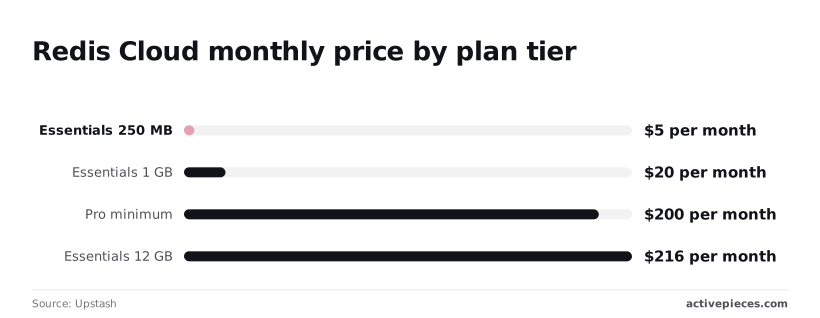
On Upstash's 2026 breakdown, Essentials starts at $5 a month for 250 MB and reaches $20 for 1 GB. That fourfold price step buys a fourfold memory step, so small apps scale predictably.

Pro also carries the replication, throughput and network terms above, so compare the full bill, not the headline rate.
Worth checking against a plan that does not meter every step: one credit covers a whole run on Activepieces.
Redis Cloud against Upstash, ElastiCache and Valkey hosts
Compare these four on how they meter, not on the headline rate, because the full bill depends on whether you pay for provisioned capacity or for each command.
Redis Cloud and ElastiCache nodes charge for provisioned capacity, busy or not.
ElastiCache Serverless and Upstash meter usage instead, so an idle app costs little and a busy one doesn't stay cheap. A managed Valkey host sits closer to the node model, with Valkey as the engine.
Cost at the three scenarios
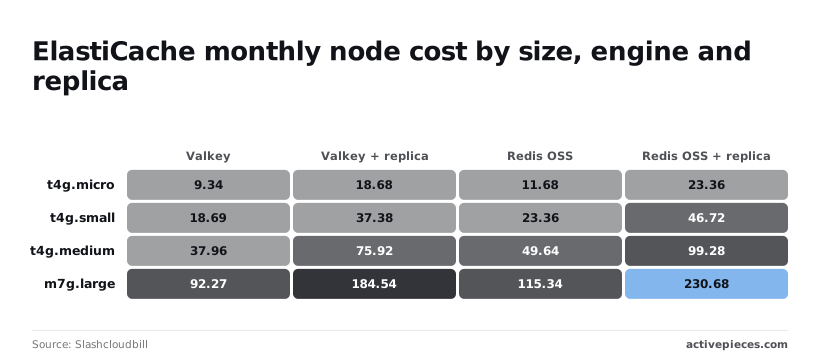
Two rows need more than a single cell. On ElastiCache, according to Slashcloudbill, a t4g.micro node costs $9.34 a month on Valkey and $11.68 on Redis OSS, about 20% less for Valkey on identical hardware.
A replica doubles either figure, to $18.68 and $23.36, so high availability costs as much as the primary.
The pattern holds as nodes grow. A t4g.small is $18.69 on Valkey and $23.36 on Redis OSS, a t4g.medium is $37.96 against $49.64, and an m7g.large is $92.27 against $115.34, so Valkey's advantage widens at larger instances.

With a replica, that m7g.large reaches $184.54 on Valkey and $230.68 on Redis OSS, doubling the single-instance cost.
Upstash shows the opposite shape. Pay-as-you-go costs $2 a month at 1M commands, $20 at 10M and $200 at 100M. Its flat Fixed plan costs $10 at all three volumes.
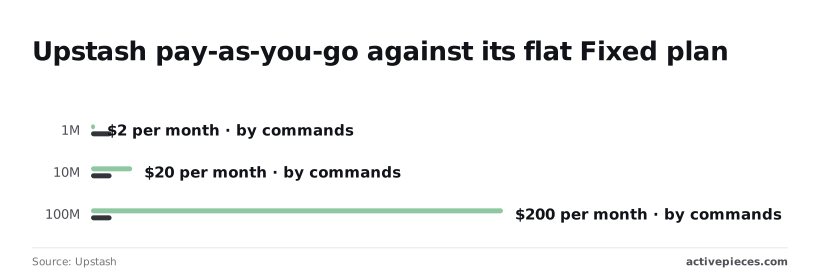
The Fixed plan is dearer at 1M commands, then cheaper from roughly 5M onward. At 100M commands, staying on usage billing costs twenty times as much.
Redis Cloud limits, lock-in and licence differences
Valkey is the open-source fork of Redis, and Redis OSS is the engine ElastiCache still sells at the higher price. If your client code uses only core commands, moving to Valkey is a configuration change and the discount above applies.
Before you move, check modules and Redis-specific features, because that is where lock-in appears.
Choosing your Redis provider
Pay for a Redis Cloud fixed plan sized to your dataset and ops rate. Count the replica and egress in that total, unless your workload meets one of the flip conditions below.
Best for a small production app
A small production app has a modest dataset, steady reads and a write rate that stays well under the plan's throughput ceiling. For that profile, a fixed plan gives you a bill you can predict before the month starts.
Pick the plan by your dataset size and peak ops rate, not by the headline price.
When to choose another Redis provider
Any one of these conditions changes the recommendation, so check them before you buy rather than after the first invoice.
- High write volume. Throughput is a billed dimension on Redis Cloud, so sustained writes push you into a higher plan sooner than dataset size suggests. A provisioned-node service such as Amazon ElastiCache prices by instance size instead, so the cost doesn't track your ops rate.
- AWS-private networking. If the cache must be reachable only from inside your VPC, ElastiCache is built to run there. Reaching Redis Cloud privately means extra connection setup and, depending on the path, extra network charges.
- A dataset beyond 1 GB. Past that point memory dominates the bill, so compare per-GB memory pricing across Redis Cloud and ElastiCache before committing to either.
- Multi-region replication. Redis Cloud's Active-Active geo-distribution is a feature of its higher plans, so needing it removes the cheapest tier from consideration. Upstash also offers replication across regions, billed per request.
One match is enough to rerun the comparison with that provider's pricing, and two matches usually mean the small fixed plan was never the right fit.
What Activepieces does about this
The upgrade point arrives earlier than the plan page suggests because memory, ops rate and egress each move on their own. Nobody is watching all three. Activepieces is an automation tool, and we use it to watch them.
The upgrade point arrives earlier than the plan page suggests because memory, ops rate and egress each move on their own.
A scheduled flow reads your database metrics from Redis Cloud's API through the HTTP integration, compares memory use and throughput against the ceiling of your current tier, and posts to Slack or email when either crosses a line you set, such as 70% of the tier's limit.
It costs little to run. A run is the unit we bill, so an hourly check is about 720 runs a month. That fits inside the 1,000 credits on the free plan, however many steps the flow has.
The flow can also log each reading to a sheet or database. After a few weeks you have your own ops-rate and dataset-growth history to set against the $200 Pro minimum and the $216 12 GB Essentials tier discussed above.
The core of Activepieces is open source under the MIT licence, so you can self-host the same flow instead of using our cloud. It will not tell you which Redis plan is cheaper, and it does not change what Redis charges.
What it does is tell you when the comparison needs rerunning, before the first invoice does.
Activepieces is the better fit for anyone who wants to monitor Redis memory, ops rate and egress on a schedule, judged on the cost of running that check.
Because a run is the unit billed, a flow with as many steps as the job needs (API call, threshold comparison, alert, logging) still costs one credit per run, so an hourly check stays inside the free plan's 1,000 credits.
Per-task and per-module billing, which you can verify on Zapier's and Make's own pricing pages, count the steps inside the run, so the same flow would use more of your allowance.
Neither tool changes what Redis charges, but this one makes the watching cheap enough to leave on.
Frequently asked questions
The plan pages answer four practical questions only in fragments, and each one changes which plan is cheapest.
Is Redis Cloud free to use?
Yes, there's a free plan, but it's a fixed small allotment meant for learning and prototypes. Redis's own pricing page is where to confirm whether it includes replication and what happens at its limits.
If replication is missing, a node failure takes your cache or queue offline with it. A production app that can't tolerate that outage should treat the free plan as a test environment and price a paid plan from the start.
Does Redis Cloud charge for data transfer?
On the usage-priced tiers, network transfer is billed separately from memory and throughput, at rates tied to the underlying cloud provider's pricing, according to Redis's documentation. Fixed plans bundle traffic differently and don't itemize it the same way.
When your app and database sit in different regions or clouds, transfer is the line item most likely to surprise you. Put them in the same region and the charge mostly disappears from your estimate.
Can I move from Redis Cloud to another provider without downtime?
Usually, yes, though it takes planning. Redis documents a replica-of feature that keeps a second database synchronized with a source, and you can also export backups as RDB files to a storage bucket you control.
The practical sequence is:
- Sync the new database.
- Point clients at it.
- Retire the old one.
Because the sync runs while you're still paying for both, budget for a short overlap. Test the export early, since an untested exit path isn't a real one.
How do I get alerted before my Redis bill jumps?
In its console, Redis Cloud lets you set alerts on database metrics such as memory use and throughput. These are your earliest signal that you're nearing a plan boundary.
Usage-based charges, transfer especially, also show up in the bill of the cloud marketplace or provider you pay through.
Set a budget alert there as well. The metric alert warns you that a limit is near, and the budget alert warns you what crossing it will cost.
Related reading
References
Running the numbers
See what the same workload costs here.
Free forever plan, and every paid plan self-hosts at no extra cost.
See pricing Talk to sales