Upstash Pricing 2026: Redis, Vector and QStash Costs

Nov 3, 202614 min read
Across Redis, Vector and QStash, Upstash pricing is per request, with flat fixed Redis plans as the alternative.
The headline price is rarely what you pay, because usage sets the bill, whether that usage comes from application traffic or from background automations such as Activepieces flows that read and write on a schedule.
Upstash pricing is the usage-based billing model for its serverless Redis, Vector and QStash products, in which you pay for each request or message processed, plus storage where it applies, rather than for provisioned servers, with fixed-price Redis plans as an alternative.
The table below shows each plan as of 2026-11-03; read the "Unverified" cells as gaps I won't fill with guesses.
All Upstash pricing plans
| Plan | Price | Inclusions | Limits |
|---|---|---|---|
| Redis free | No charge | Unverified | Capped usage; exact caps unverified |
| Redis pay-as-you-go | Billed per request | Usage-based commands | Unverified |
| Redis fixed 250MB / 1GB / 5GB | Flat monthly; amounts unverified | Fixed storage ceiling per tier | Storage ceiling is the tier name; other limits unverified |
| Vector | Unverified | Unverified | Unverified |
| QStash plans | Unverified | Unverified | Unverified |
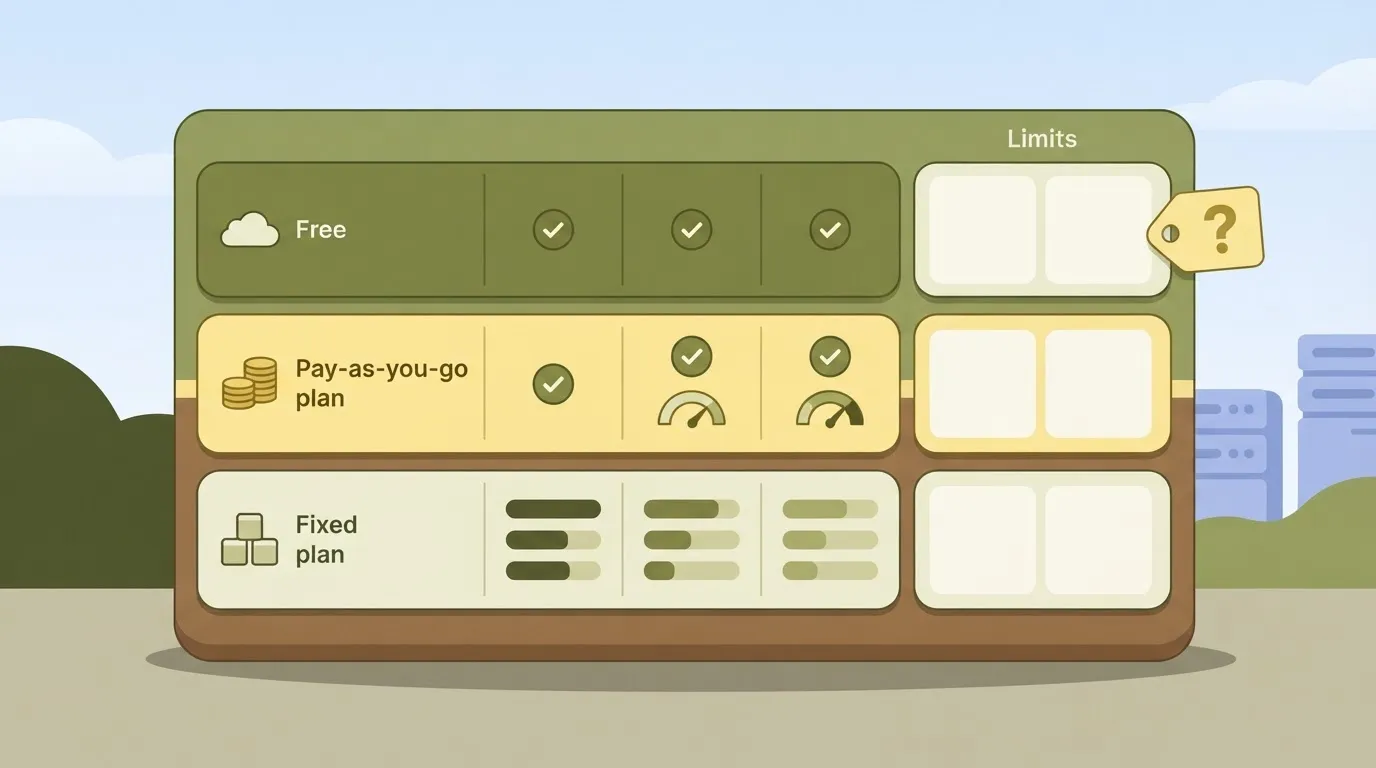
Though every row has a price model, only some have a price I can stand behind. Each subsection covers one family.
Redis plans: free, pay-as-you-go, fixed
Under pay-as-you-go, the bill moves with traffic rather than with a plan label, because every command is charged.
According to Upstash, the fixed tiers (250MB, 1GB, 5GB) trade that variability for a storage ceiling, so choose by dataset size and expect to pay the same each month.

Because QStash bills by message, a retried delivery can count again, and someone has to watch for it.
You don't hire for this, you describe it: tell the built-in chat in Activepieces to check Upstash usage and flag a jump in retries, and it publishes a live flow, the same artifact a builder would have assembled by hand.
That flow sits under the same RBAC and audit logs as every other flow, each run leaves a trace anyone on the team can read, and MoneyGram, Moneypenny, Alan and FundingSocieties all run Activepieces in production.
I compared upstash.com/pricing with the product docs on 2026-11-03. Where the two didn't give a clear answer, the cell says "Unverified." The same goes for any figure I couldn't read directly.
If you are running this arithmetic for your own team, see what the same workload costs on Activepieces.
One runaway Redis bill
Nobody read the one alert that fired until Monday, and by then a bug had turned every failed call into a burst of billable commands. This is a constructed Saturday, not a real customer.
Picture a small team running a job queue on Upstash Redis (serverless Redis billed per command), with no spend cap set and one alert address that goes to a shared inbox.
How a Redis retry loop starts
When a downstream API times out, the worker now retries immediately, with no backoff and no retry limit, because a deploy the night before changed its error handling. Each retry reads a lock key, writes a status key and pushes a log entry.

Because Upstash counts each of those as a command, one failing job costs several per pass, and the loop runs as fast as the network allows. The API stays down, so the loop never stops on its own.
Upstash free tier used up overnight
By early morning the loop has used up the free monthly allowance. Nothing breaks right away, because on a pay-as-you-go plan without a budget Upstash keeps your database running and bills the overage, though it may rate limit in some cases.
When the first usage alert arrives, it is an email to the shared inbox. It's marked automated, it lands on a weekend, and nobody owns reading it.
The Upstash invoice arrives
On Monday someone opens the inbox, finds the stack of alerts and sees the usage graph climbing since Saturday's small hours. They stop the loop by reverting the deploy.
By then the commands have already been counted and can't be undone, so the bill covers the whole weekend. A hard cap would have ended the loop on Saturday morning, and an alert routed to a person's phone would have ended it within the hour.
Upstash Redis Spike Cost at Realistic Usage
At $0.20 per 100,000 commands, every million commands costs $2. A runaway loop is billed at exactly the rate of normal traffic, and only its volume makes it expensive.
Normal Upstash monthly cost at three usage levels
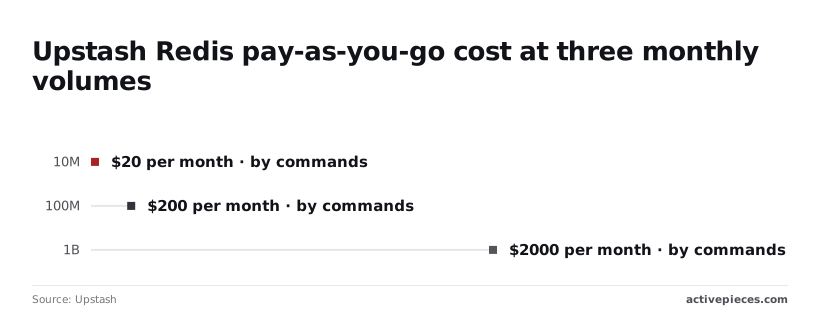
At 10 million commands, Upstash pay-as-you-go comes to $20 a month, which is double the flat $10 for the Fixed 250MB plan. The chart shows that gap widening as volume grows, so read it as the price of not knowing your volume in advance.

At 100 million commands the bill is $200. At 1 billion it's $2,000. Each tenfold jump in traffic is a tenfold jump in the invoice, with no discount to cushion it.
Run the same arithmetic on a spike. A loop that issues 50 million commands overnight adds $100 to the month, which is ten times the price of the fixed plan.
Where fixed pricing beats pay-as-you-go
Divide $10 by $0.20 per 100,000 and you get 5 million commands, the volume where a $10 budget is exhausted. Below that, pay-as-you-go is cheaper. Above it, the flat plan wins, and at 10 million it's already half the price.
If you want a bill that can't surprise you, the flat plan is what gives you one. Choose it when traffic is steady and above 5 million commands.
Choose pay-as-you-go when traffic is small or unpredictable, and add the spend cap and alert, because pay-as-you-go has no ceiling of its own.
Hidden Upstash Limits and Charges Behind the Surprise
With no ceiling, the surprises came from five places, in the order they bit. The five were command counting, the replica write multiplier, bandwidth and request-size caps, Vector limits, and QStash callbacks and dead-letter-queue replays.
At $0.20 per 100K units, a million Redis commands is $2. That looks trivial until a polling loop issues ten commands per page view.
Each command is one unit, and a write to a database replicated across regions counts once per replica, so three regions triple the write bill.
Upstash fixed plan size and bandwidth caps
Fixed plans trade that metering for a flat price. TechBloat lists 250 MB at $10 a month and 1 GB at $20, which is $40 and $20 per GB.
At 5 GB the price is $100, still $20 per GB, so you gain no discount until the larger tiers.
10 GB costs $200, 50 GB costs $400 and 100 GB costs $800, so the 50 GB plan costs $8 per GB, less than half the 1 GB rate.
If a payload exceeds a plan's request-size cap it fails, but bandwidth beyond a plan's allowance can add to the invoice, so check both before you rely on it.
QStash retries and Vector query counts
Twice Redis, Vector is $0.40 per 100K units. QStash and Workflow are each $1 per 100K, five times Redis. Treat Vector, QStash and Workflow as separate budgets.
When a delivery is retried, or a callback or replayed dead-letter message goes out, each is another billed message, so a failing endpoint multiplies its own cost. Vector's own limits apply per index, so one busy index can hit them while the rest sit idle.
Set alerts per product, not per account, because a single threshold hides which meter is running.
Worth checking against a plan that does not meter every step: one credit covers a whole run on Activepieces.
Upstash Versus Redis Cloud, Pinecone and SQS Costs
Upstash is the cheapest option here when traffic is bursty and mostly idle. Each rival beats it once load turns constant, volume turns heavy, or the job narrows to one task.
The table shows how each service charges and what happens when traffic jumps. The column to read twice is spike behaviour, because that's where a per-request meter and a flat fee diverge.
| Service | Pricing model | Free tier | Cost at scenario usage | Spike behaviour | Where it wins |
|---|---|---|---|---|---|
| Upstash | Per request, plus storage | Yes, capped monthly | Lowest when traffic is intermittent | Bill rises with every extra request unless a cap is set | Idle-heavy, bursty workloads |
| Redis Cloud | Provisioned plan, flat fee | Small free database | Steady and predictable | Throttles at plan limits; invoice stays flat | Constant high throughput |
| ElastiCache Serverless | Data stored plus compute consumed, with a baseline | Only through AWS account promotions | Higher floor, even when quiet | Scales automatically; cost follows | Teams already inside AWS networking |
| Pinecone | Usage-based reads, writes, storage | Starter tier | Rises with query volume | Query costs climb with traffic | Managed vector search at scale |
| Qdrant Cloud | Provisioned cluster by resources | Small free cluster | Fixed per cluster | Latency degrades before cost moves | Heavy vector load on a fixed budget |
| SQS | Per request | Monthly request allowance | Very low for plain queues | Cost scales linearly, no surprises | Simple, high-volume queuing |
| Inngest | Per function execution and step | Hobby tier | Depends on steps per workflow | Each retry and step adds to the bill | Durable multi-step workflows |
The pattern is that flat-fee services trade a higher floor for a ceiling, while per-request services trade a low floor for no ceiling. Redis Cloud and Qdrant Cloud give you the ceiling by default.
The pattern is that flat-fee services trade a higher floor for a ceiling, while per-request services trade a low floor for no ceiling.
Upstash gives it to you only if you configure the spend cap, which is why the alerts above matter more here than the plan price.
Alert on Upstash Spend with Activepieces
To know when spend crosses a threshold you set, schedule an Activepieces workflow that asks Upstash for your usage through an HTTP step and messages Slack or email. It warns you before the budget limit stops anything.
Run once a day, it uses about 30 credits a month, against the 1,000 on the Free plan, because a run is 1 credit however many steps it has.
It watches Upstash and doesn't replace its controls. The cap stays where it is, and this workflow tells you the cap is getting close.
What the workflow checks
Nothing here is event-driven: the trigger is a schedule. Each run goes in this order:
- The schedule starts the run.
- An HTTP step calls Upstash's API with your credentials and pulls current usage.
- A comparison step checks that against the thresholds you chose.
- A final step posts to a Slack channel or sends an email only when one is crossed.
On a quiet day no message goes out, which keeps the alert worth reading.
Below, the screenshot shows a different workflow: a Stripe "Payment Failed" trigger feeding a Slack "Send Message To A Channel" action. The build is the same: one trigger, one Slack action with a channel and a message template.
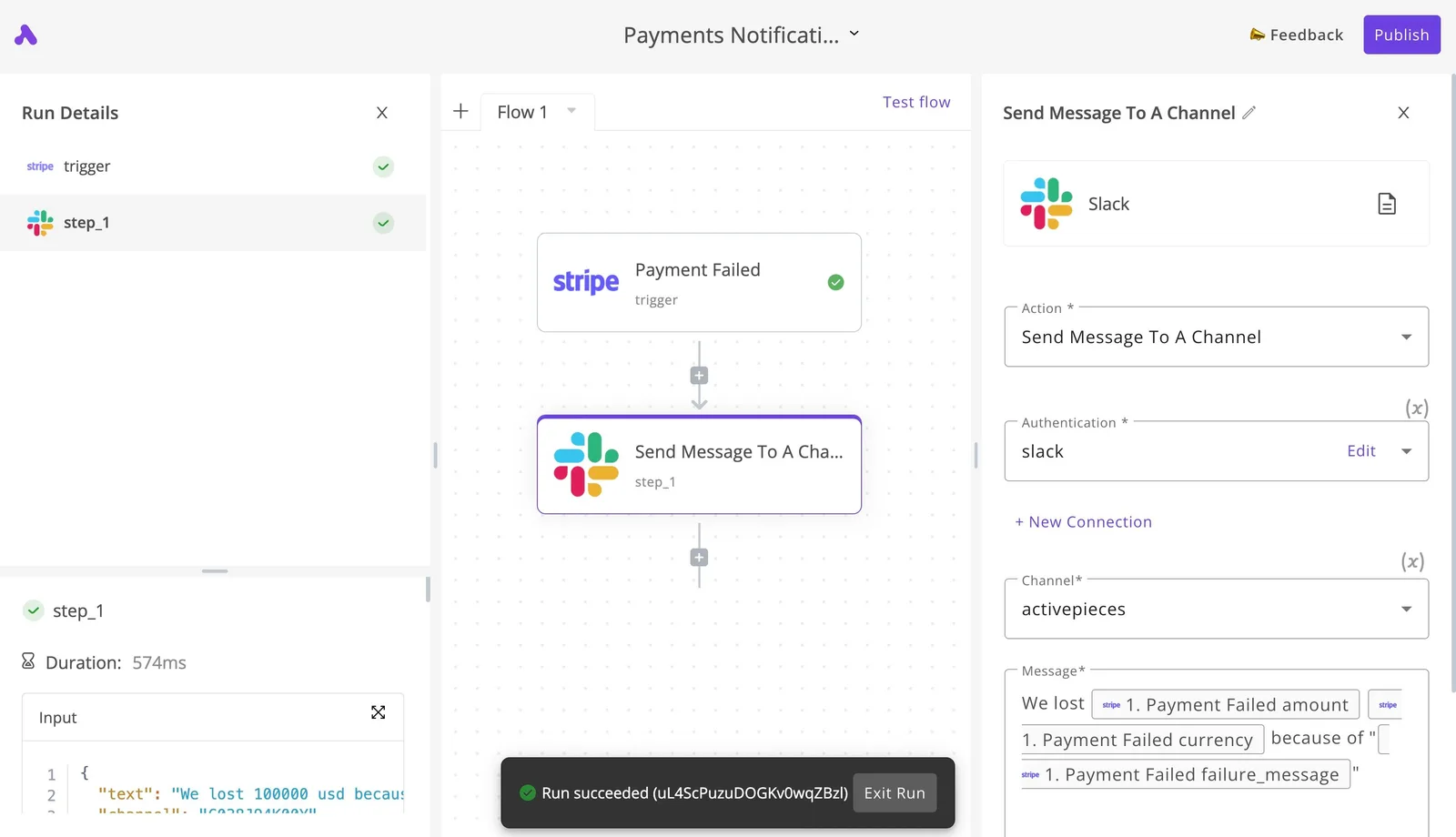
To confirm a test run reached Slack before you trust it, read the run details, which list each step as completed and end on "Run succeeded".
For Upstash, you swap the trigger for a schedule and put the usage fields in the message template.
What it can't do
It can't stop spending. A schedule polls, so a burst between two checks goes unseen until the next one. Only Upstash's own limit acts in real time.
It also depends on the usage data Upstash exposes, so a number the API doesn't report can't appear in your alert.
You also take on a second system to maintain. If the workflow fails silently, you lose the warning and may not notice. Treat a failed run as an alert condition too, and keep the cap on as the backstop.
Settings to Prevent Runaway Upstash Bills
Stop the next runaway bill with five settings: a budget cap on every database, capped retries, separate dev and prod databases, a daily usage alert, and a quarterly plan review. Each takes minutes to set and costs nothing until the day it saves you.
Upstash budget limits to set today
Put limits in place before the bad loop starts, or they help no one. Three belong on your list:
- A maximum budget on each database, so a runaway job hits a wall instead of your card.
- A retry ceiling in your client code and in QStash, because unbounded retries multiply every failure into more billable commands.
- Separate databases for development and production, so a test script with a bug can't spend production money.
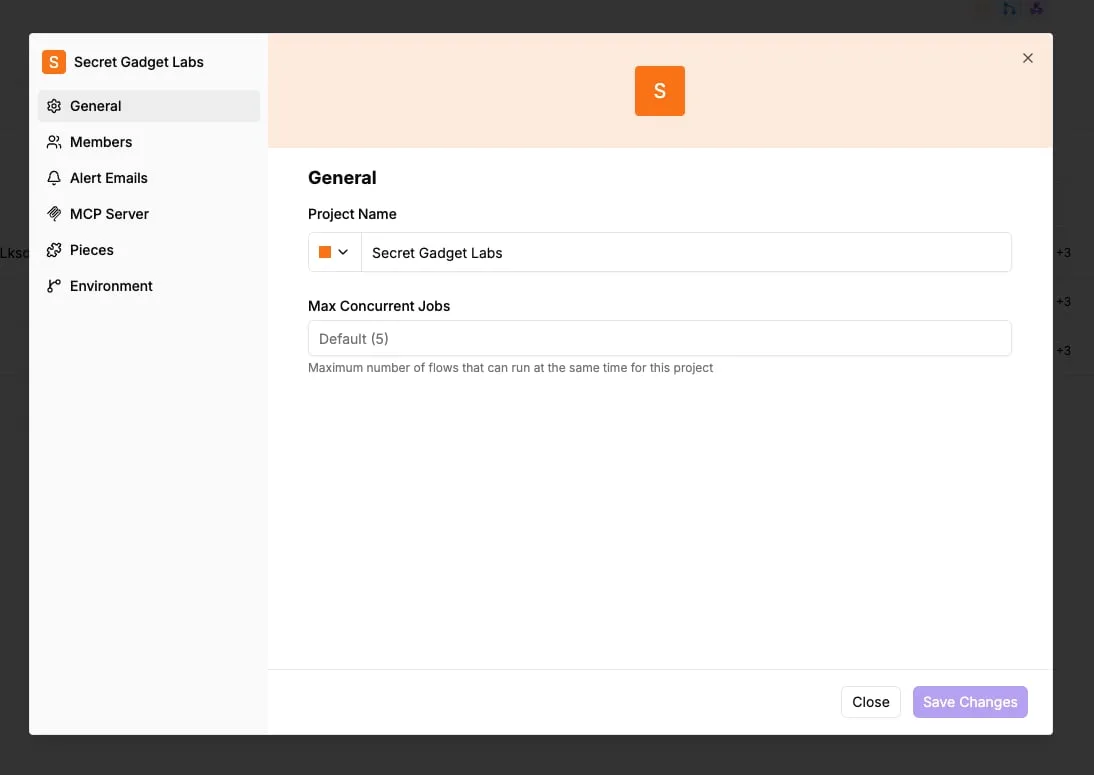
Concurrency limits follow the same logic. The project settings dialog for Secret Gadget Labs, in a workflow tool, shows a Max Concurrent Jobs field left at its default of five.
That caps how many flows run at once, which also caps how fast a misbehaving flow can pile up requests.
Upstash has no identical field, but you can build the same ceiling with budgets and retry limits.
Scheduled Upstash usage checks to run
A daily usage alert is the cheapest early warning you can buy. Set it to fire when a day's command count looks unlike the days before it, and send it somewhere a person reads on the morning it arrives.
Caught after one day, a spike is a rounding error. Caught after a month, it's the invoice you came here to avoid.
Review your plan every quarter against the commands you actually ran, not the ones you forecast.
If real usage has drifted well above or below what your tier assumes, the plan price in the table has stopped describing your bill, and the tier should change with it.

Frequently asked questions
Is Upstash free to use? Yes, up to a point: Upstash has a free tier with usage limits, so a prototype or a low-traffic app can cost nothing.
Past those limits you either get throttled or start paying, so read what the free tier counts before you rely on it. Every command counts, including the ones your client library sends on your behalf.
Does Upstash charge for bandwidth?
With per-request pricing, the command count is the main meter, and bandwidth is secondary. Large payloads are where a bandwidth line could matter, so check the pricing page for your specific plan. Don't assume the headline per-command rate is the whole bill.
Retries are the same kind of trap: QStash retries of a failing endpoint are extra deliveries, and you should confirm on Upstash's QStash pricing page how they are metered.
Hard spending limits
Can I set a hard spending limit on Upstash? Yes. Upstash lets you set a budget on pay-as-you-go databases, and that cap is the control that turns an unpredictable bill into a bounded one.
Pair it with usage alerts, so you hear about a runaway loop before the cap cuts off your traffic. A cap with no alert means the first sign of trouble is an outage.
Upstash versus Redis Cloud on cost
Is Upstash cheaper than Redis Cloud? It depends on your load shape. Per-request pricing wins when traffic is spiky or low, because you pay for what you use.
At steady, heavy traffic, a fixed-price plan can come out cheaper, because the per-command meter never stops running. Work out your monthly command count first, then price both options against it.
Moving to a fixed plan
How do I move from pay-as-you-go to a fixed plan? Change the plan on the database from the Upstash console. Before you do, pull your recent command usage and compare it with the fixed tier's limits.
If you also use replicas, remember that each write is propagated to every replica, so count those writes when you size the tier.
Related reading
Running the numbers
See what the same workload costs here.
Free forever plan, and every paid plan self-hosts at no extra cost.
See pricing Talk to sales