
What Is Email Automation? A Simple Guide for Marketers
What is email automation and how does it work? Learn how you can automate emails and discover how Activepieces can help you with email automation.

November 18, 202515 min read @ashrafsam
A long list can drain your time, especially when every new wave of email work lands on your plate at once. Most marketers reach a point where they need help from email automation tools.
It gives you a way to send the right message to the right person at the right time without having to hit send every day. That simple change makes it easier to grow your email campaigns and keep your timing steady.
In this guide, you’ll learn what email automation is and see email automation FAQs that clear up the questions many marketers run into.
What Is Email Automation?
Email automation lets your marketing team send messages based on rules. Many brands use automated email campaigns to welcome new subscribers or help existing customers after a purchase.
The process begins with a trigger. After that, you map each step so the system knows when to move forward.
A flow may check behavior, such as “if the user didn’t open the email within two days, send a follow-up with a different subject line.” That pattern keeps the timing steady and helps you reach the right person with personalized communication.
Your team writes each message, adds any needed details like past purchases, and loads the emails into the workflow. Once you turn it on, the system sends everything on time. You can monitor conversion rates and adjust each step to improve the results.
This takes minutes, not a project: automate it in Activepieces free.
Email Automation Triggers
Email automation triggers control how each workflow starts and moves forward. These triggers guide the system based on user actions, timing, system changes, or AI signals:
Behavioral Triggers
Behavioral triggers start when someone takes an action or ignores one. These triggers help you send relevant messages that match real interests.
Aside from that, these automated campaigns feel natural and often perform better, since the flow reacts to what someone is doing in the moment. It typically begins with a rule inside your email platform.
When it finds a match, the next message goes out. Someone may view a product page or add items to a cart without paying. Each action shows what they care about right now, and you can shape the response around that action.
You can use simple checks like “opened the first message” or “ignored several messages.” A different step may follow each case. These triggers help you speak at the right moment and with the right tone.
Time-Based Triggers
Time-based triggers start when a date or timer arrives. These triggers help you stay on schedule without checking a calendar each day.
A system can send a message on a birthday, a renewal date, or a set number of days after someone signs up. Many teams use these triggers for reminders, monthly reports, and re-engagement flows for contacts who have been quiet for a long time.
Each trigger needs a date stored in the profile, such as a sign-up date or a purchase date. You set the rule, and the system checks when the moment arrives. Once that time comes, the system sends the next message.
AI Logic Triggers
AI logic triggers use machine learning to study patterns and choose the best time to send a message. It continuously collects and analyzes vast amounts of customer data to guide the next step with more accuracy.
In addition, the system may choose the best hour to send a message. Some flows use AI to pick the content for each person based on what they viewed or bought before.
The trigger fires when the AI finds a pattern that matches its predictions. It may send a reminder at a moment when someone is most likely to respond. As results come in, the system learns from each step and adjusts future timing without extra work from your team.
Benefits of Email Automation
The system supports your email strategy, keeps your timing consistent, and helps you speak to each person with more clarity. Other benefits include:
- Sending personalized emails that match each person’s actions, which helps the message feel direct and useful.
- Saving time as the system removes daily tasks and gives your team space to plan stronger ideas.
- Hitting key moments through behavior and time triggers, which raise conversions by matching the user’s current interest.
- Supporting better customer retention by staying in touch with people before they drift away.
- Managing the entire customer lifecycle with paths that guide sign-ups, buyers, and long-term users.
- Raising performance as automation increases engagement metrics like open and click-through rates.
- Bringing in more sales with timely follow-ups that reach people while the interest is still fresh.
- Reactivating inactive contacts with re-engagement campaigns that remind them of what they liked before.
- Staying aligned with the email marketing regulations you need to follow.
- Lowering the risk of landing in spam folders by keeping your sending habits steady and clean.
Common Email Automation Examples
Different types of automated email marketing help you stay connected with people at moments that matter, and each one follows a purpose of its own.
Welcome Email Automation Series

A welcome series steps in right after someone joins your list. Those first minutes count because new subscribers usually check their inbox more often, and a quick reply makes your brand feel organized.
Usually, a welcome series may include:
- Short greeting with a clear next step
- A message that explains your brand in simple terms
- Highlight of your best resource or product
- Reminder about a first-time offer
- Final note that invites the user to stay connected
The workflow begins right after the sign-up form collects the address. Then, the first message lands almost instantly to catch the reader while interest is fresh.
Some paths split early if the user clicks or buys, which helps the system send more useful messages. Automated welcome emails give your marketing emails structure from day one and help your email automation campaigns feel steady as the list grows.
Abandoned Cart Email Automations
Cart reminders focus on people who showed strong intent but left before paying. Many stores send two or three messages in this flow to recover the order without overwhelming the shopper. Each step pulls the cart details so the user sees the exact items they left behind.
An abandoned cart setup usually includes:
- Short wait of 30–60 minutes
- Gentle reminder with a direct link to the cart
- Second email after a day that adds reviews or product details
- Final message two or three days later with a small perk
The first follow-up email messages show up after a brief delay. When the shopper buys, the system stops the rest of the sequence. If nothing happens, the next email arrives with extra context that can help the person decide.
Once the sequence finishes, the user moves out of the flow, so you can continue reaching them through other marketing channels that fit their behavior and interests.
Lead-Nurturing Drip Sequences
Drip sequences support people who need more time before they act. These flows usually start when someone downloads a guide, joins a general newsletter, or requests basic info.
A simple drip structure may look like:
- Email 1: Delivers the resource the user requested
- Email 2: Shares helpful content tied to the same topic
- Email 3: Offers a deeper look at a feature or case study
- Email 4: Invites the user to explore a demo or a trial
Each message arrives after a short wait. The timing can be two days, four days, or a week.
These drip campaigns make it easier to nurture leads from the top of the sales funnel without forcing a sale too soon.
Post-Purchase Email Automation
A post-purchase flow steps in once someone pays for something. The first sale is done, but the work after that matters even more since it shapes how the person feels about the brand.
Many brands use targeted email campaigns here, since past purchases give you clear signals about what the buyer might need next.
Most post-purchase setups include:
- Short thank-you with the order details
- Shipping updates
- Simple tips that help the buyer get value from the product
- Request for a quick rating
- Suggestion for a related item
- Reminder about loyalty perks
The first message fires right after checkout, so the buyer knows everything went through. The second message usually comes after the product arrives. That timing gives the person space to try it.
Later steps guide the user toward small actions, such as reviews or cross-sells. The full series moves at a steady pace, so nothing feels rushed.
Strong post-purchase follow-ups enhance the customer experience without needing a sales pitch in every email.
Newsletter Delivery Automations
Teams that publish often rely on automation since email marketing automation software helps send newsletters without the usual manual work.
The setup is simple: your site feed connects to your platform, and the system pulls new content into a pre-designed email template when the send time arrives.
A basic setup may involve a:
- Schedule such as every Monday or the first business day of each month
- Feed that pulls new posts
- Layout that fits both new subscribers and long-time readers
- Direct link to the full post
The platform checks the feed at the time you set, drops the new items into place, and sends the message to your list. That rhythm helps keep each existing customer in the loop without asking your team to rebuild the same layout over and over.
Customer Review and Feedback Automations
A review flow collects honest thoughts from your customers based on real use. Many teams treat this flow as part of their larger marketing strategy since strong ratings support sales pages and help people trust the product.
The automation waits a short period after delivery so the user has time to try the item. Once that window passes, the first message asks for a quick score.
Customer review and feedback flows often include a:
- Short request
- Link to leave a rating
- Reminder for people who missed the first email
- Routing step for different outcomes
People who leave a high rating move to a message with links to public review pages. A low rating takes the person to a private form so support can reply directly. That split helps the brand protect the buyer’s trust.
What Tools Do You Need for Email Automation?
Several tools work together when you want to run smooth automated workflows, and each one covers a different part of your email marketing efforts.
AI-Powered Workflow Automation Platform
An AI platform handles the decision-making that used to fall on your marketer’s shoulders. You give it access to your data, and it studies how people act over time. That insight helps it forecast customer behavior with far more accuracy than manual rules.
Every new piece of information updates the user’s profile. The platform then picks the next action, such as adjusting a delay or choosing a message with a higher value for that specific person. Once the system sends the next step, it studies the result and fine-tunes the model.
Over time, the platform guides your email automation platforms toward stronger outcomes across email, SMS, and other touchpoints.
Why Activepieces Is the Best Platform for AI-Powered Email Automation Strategy

Many automation platforms only follow fixed rules, but Activepieces reads context, reacts to patterns, and builds smarter paths for each person in your automated email workflow. It runs on an open-source foundation, and its design gives you full control over every part of your automation.
The system follows a pattern each time a flow runs:
- Perceive: A trigger fires when a form submission arrives, a support request appears, or a lead drops into a sheet.
- Think: AI steps study the incoming data and decide what should happen next.
- Act: The automated workflow updates the CRM, sends a message, stores data, or prepares a draft for review.
Check out the features that strengthen email automation:
No-Code Workflow Builder
The builder gives you a simple space to create flows without waiting for engineering help. You can map each path, adjust the timing, and test new ideas in minutes. The visual layout makes it easy to follow the logic, so even complex flows stay clear and easy to manage.
Branching and Decision Logic
Branching steps let you route a user based on real context instead of guessing. When AI marks a lead as high-intent, that person moves straight to a quick outreach path. A low-intent user enters a slower nurture sequence.
Each branch follows rules shaped by AI decisions rather than rigid, one-size-fits-all conditions.
Extensive Library of Pieces
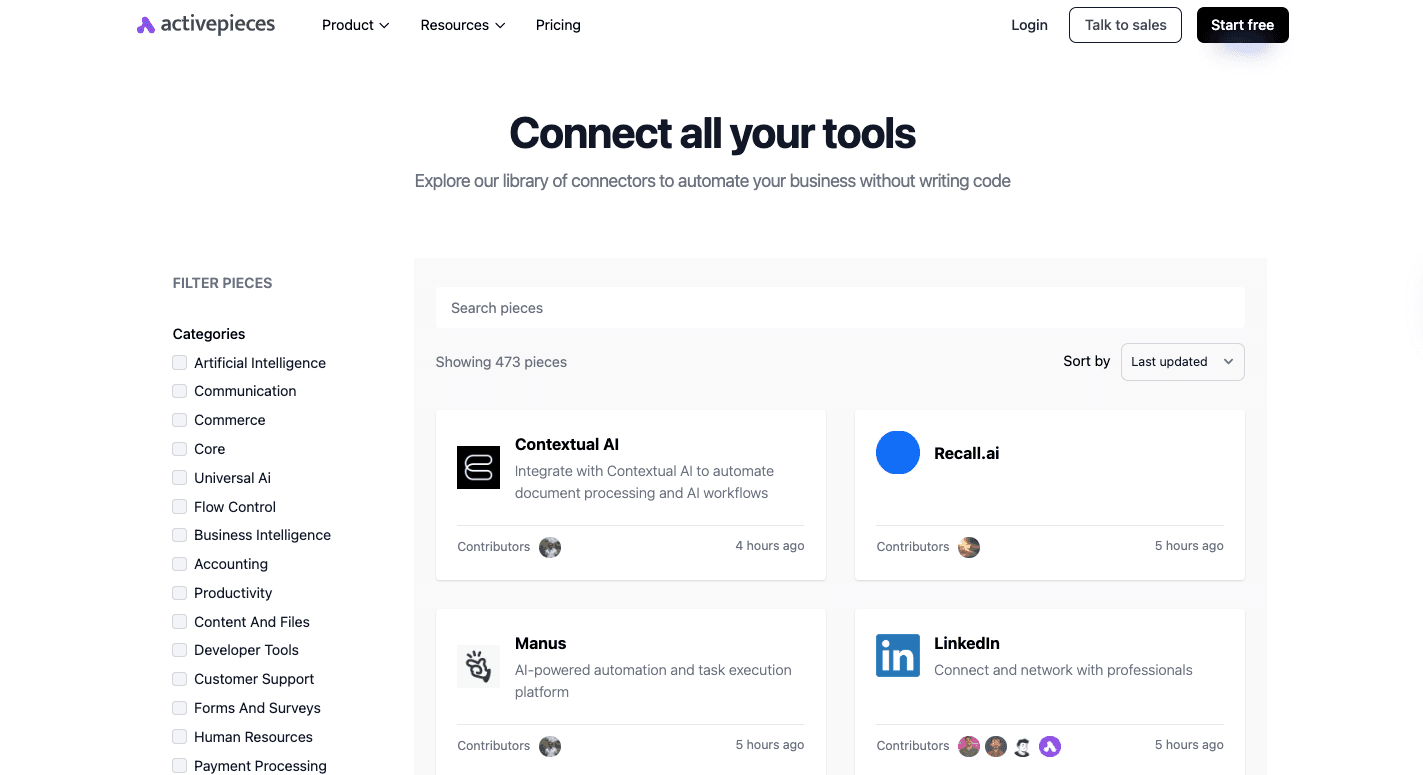
Currently, Activepieces connects with 473 pre-built pieces, and the list keeps growing. The library covers AI tools, CRMs, support desks, forms, stores, and productivity apps.
A large part of the library comes from community contributions, so the platform grows faster than closed tools that depend on internal development only.
Open-Source Flexibility and Self-Hosting
Open-source access gives you a level of control that other tools don’t match. You can run the platform on your own servers, adjust it to your internal rules, build new pieces, or keep sensitive data in your own environment.
Human-in-the-Loop Options
Some flows need real review before moving forward. Activepieces supports this with built-in approval steps. You can pause a run, collect input from a teammate, and continue once the review is done.
The setup keeps your team in control when a live decision matters.
Email Service Provider
An email service provider (ESP) serves as the central workspace for everything related to your list, designs, and sends. Without an ESP, you can’t run real automation since your regular inbox can’t handle timed steps or structured flows.
It further gives you space to build your email marketing campaigns without worrying about layout issues or unreliable delivery. Other than that, it helps make sure your messages aren’t marked by the spam filter.
Most ESPs include:
- A contact database
- A drag-and-drop editor
- A workflow builder
- Reporting dashboards
- Tools for segmenting your list
Your ESP receives data from your site as people join your list or fill out forms. That information shapes each profile so your messages stay accurate. Once a flow starts, the ESP checks each rule, sends the next message, and tracks replies.
Marketing Automation Platform
Many teams use a marketing automation platform (MAP) to track every interaction a potential customer has with your brand, such as website visits, content downloads, or form fills. That level of detail makes it easier to read someone’s intent and take the right step at the right moment.
You get a unified view of customer interactions since the MAP connects to your customer relationship management tool and keeps the data in sync. Once the platform connects to your site, it builds a running record of each user’s actions.
The workflow responds to those actions and shifts the person into a sequence that fits their level of interest. When the lead reaches a higher score, the MAP notifies sales and includes the full context so the handoff feels natural.
Take Full Control of Your Email Marketing Automation Today With Activepieces

Activepieces gives you a direct way to run email automation without the limits you see in older tools. It blends no-code steps with deeper options for teams that want custom logic, which makes it a valuable tool for anyone building a long-term automation strategy.
Currently, it connects to 473 data integrations called pieces. Each piece fits into your flow, so you can track behavior, shape each message, and keep your email paths grounded in accurate data.
AI steps can score leads, sort requests, or draft messages on the spot, and the builder keeps everything easy to follow.
Teams that need more control can self-host, brand the workspace, or set strict access rules. Smaller teams can keep things simple and still run advanced automations without writing code.
Activepieces is the perfect fit for any email automation setup, from simple welcome paths to complex, multi-step customer journeys.
FAQs About What Is Email Automation
What is the meaning of email automation?
Email automation means using an automated system to send messages based on triggers such as purchases, site activity, or form submissions. The goal is to reach the right person at the right moment with personalized content that matches where they are in the customer journey.
Many teams use it to reduce lost sales, keep follow-ups steady, and stay consistent across different steps of the process.
How to use email automation?
You set a trigger, choose the message, map the timing, and let the workflow run in the background. A business owner can guide leads, support buyers, and keep updates flowing without sending each one by hand.
The setup works across email clients and mobile devices, and you can connect it to your larger stack to support cross-channel automation.
What is the difference between email marketing and email automation?
Email marketing covers every message you plan, design, and send to an audience. Meanwhile, email automation focuses on actions that happen automatically when a user’s behavior signals interest or need.
Which tool is commonly used for email automation?
Many people use platforms like Activepieces, Salesforce Marketing Cloud, HubSpot, or Constant Contact. Each one works as email marketing software that supports workflows, timing rules, and data syncing so your messages stay accurate and timely.
Build it
Set this up in minutes.
No code required. Connect your accounts, and Activepieces runs it from there.
Start free