
Relay.app Free Plan: Limits and Alternatives (2026)

Nov 23, 202614 min read
At 9:14 on a Monday, an illustrative five-person agency's Relay.app workflow stopped mid-morning because the free plan's monthly allowance ran out, a snag familiar to anyone who has tried Activepieces or another automation tool on a free tier.
Relay.app's free plan limits are the caps on monthly usage, such as the number of workflow steps or runs allowed, that a free account can use before its automations stop until the allowance resets or the account moves to a paid plan.
You can build and run real workflows on Relay.app's free plan at no cost, but it caps how much work they can do in a month, and that cap's the first wall. This reflects the pricing page as last captured before the plan was withdrawn.
Nobody got a warning that mattered, so new client sign-ups sat unprocessed until someone noticed.
When Relay.app free plan allowance runs out
What the free plan includes
You get the working product on the free plan: you build workflows, connect your apps and run them on real data.
What separates it from the paid plans is volume and a few of the larger features.
For the agency, that was plenty for the first weeks, which is exactly why the stop came as a surprise.
The limit the team hit first
When the agency added one more workflow and a busy week of sign-ups arrived, it passed the allowance early in the month. That is the first limit most teams meet: the monthly usage allowance, not a missing feature.
What that costs is rarely the upgrade price. It's the hours a client waits for a reply that was supposed to be automatic.
Activepieces, one of the alternatives, charges 1 credit per flow run however many steps it has, so a ten-step flow costs the same as a two-step one, and flows are unlimited on every plan including free.
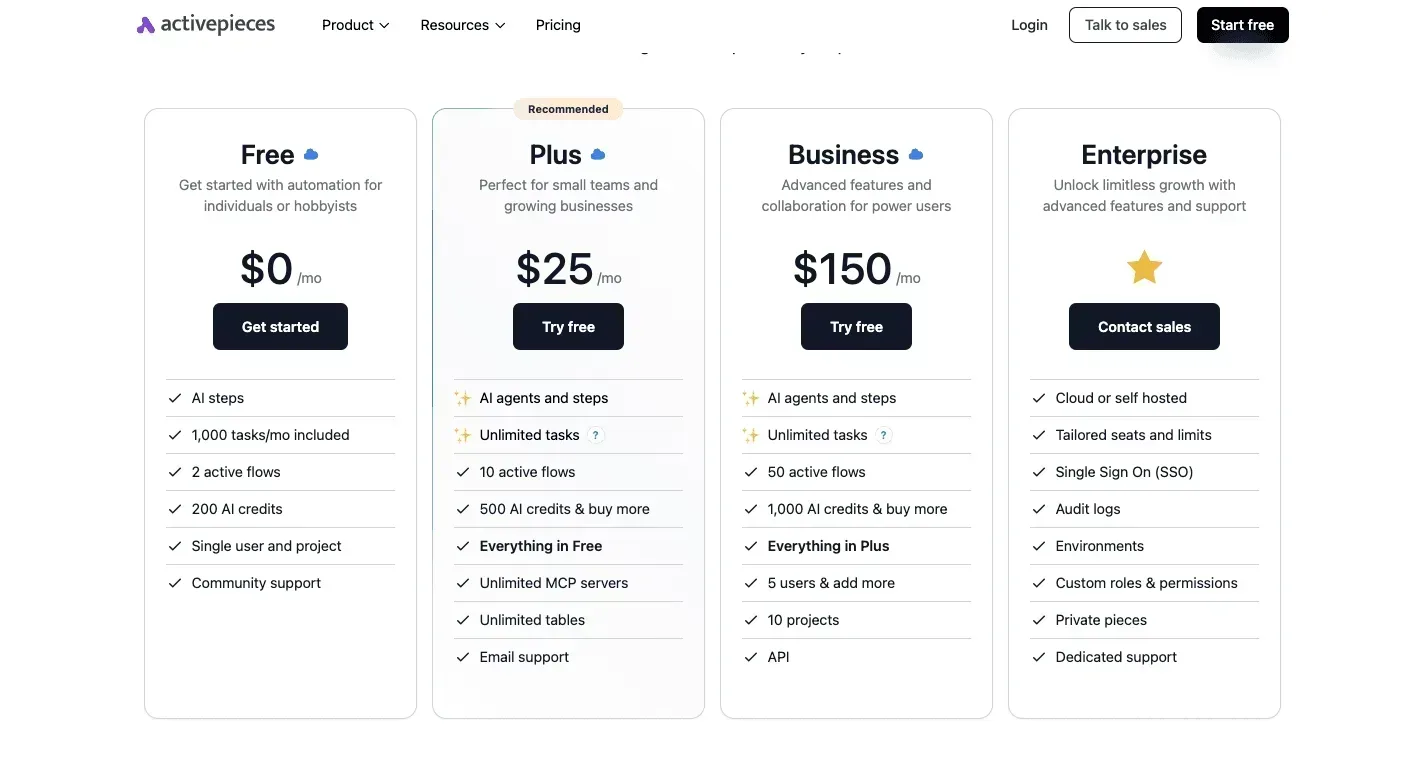
AI steps cost extra credits, but step count alone never raises the bill. Zapier bills per task and Make per module, so on their pricing pages the same ten-step process costs several times what a two-step workaround does.
That taxes the builder for splitting work into smaller, more reliable steps, which is the discipline a 200-step allowance already punishes.
What happens to Relay.app runs over the limit
In the agency's case, sign-ups that arrived after 9:14 weren't processed. Someone had to find them and handle them by hand once the plan was changed.
Before you rely on any free plan, check whether work that arrives past the limit waits, drops, or needs re-sending. Settle that first, because it decides how costly the stop will be.
The fastest way to settle a shortlist is to try one. Activepieces is free to try, no credit card.
What the stalled Relay.app workflows cost the team
When a workflow stalls, you lose three things you can count: hours someone spends doing the work by hand, records that sit unprocessed, and customers who wait for an answer.
When a workflow stops, the work doesn't disappear. Someone on your team picks it up by hand, usually the person least able to spare the time. The real cost is that person's day, plus the slower work they pushed aside to do it.
Look at published estimates of small-business downtime to see how widely that cost can swing. According to Texmg, they run from about $2,800–3,000 an hour for a 30-person firm, so the financial case for preventing downtime is not optional.
A broader small-business range runs from $3,362 at the low end to $25,620 at the high end, with $10,000 quoted as an "up to" figure.
Because the gap between low and high is wide, your own number depends on what the stalled work touches. A paused internal reminder sits near the bottom, and a paused order or billing step sits much higher.
Those figures describe downtime in general, not Relay.app. Multiply the hours your team spends catching up by what those hours cost you, and you have a number that belongs to your business.
Records and customers hit by stalled workflows
Each stalled run leaves something unfinished: a lead not routed, a form not logged, an update not sent. Those records stay in limbo until someone notices, and noticing usually takes longer than the stop itself.
Customers feel it as waiting. They don't know a plan limit exists. They know their request went quiet, and a quiet request reads as a company that doesn't answer. That's the hardest cost to win back, and it grows the longer the stop goes unnoticed.

So count two things for your own setup: how many records one stalled day leaves behind, and how many of those belong to a person waiting on you. Together with the catch-up hours, they tell you what staying put really costs.
Why teams outgrow Relay.app's free plan
There are three ways teams outgrow it: the monthly allowance's built for testing, the next paid plan's a step up, and some features only exist on paid tiers. Each is a cost of staying put, and each arrives without warning.
Relay.app free plan allowance suits testing only
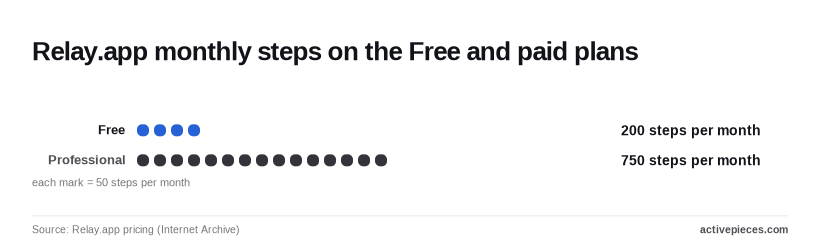
200 steps per month is what Relay.app's Free plan gives you. A step's one action in a workflow, so a five-step workflow uses up the whole month after just 40 runs.

Free's enough to build something and prove it works. It's not enough to let it run a real inbox or sales pipeline, and when the count runs out, your automations stop in the middle of the month.
The price of the next Relay.app plan
On Professional, the allowance rises to 750 steps per month. That's 3.75 times the room, which for the same five-step workflow means 150 runs instead of 40. It helps, but it's still a ceiling, so a busy team can hit it too.
Before you commit, count your steps for a normal month. If you land well under 750, Professional's the right size. If you land near it, you're buying the same problem a few weeks later.
The AI credits sit in the caption: 500 on Free and 5,000 on Professional.
If you land near it, you're buying the same problem a few weeks later.
(chart)
Relay.app features locked behind paid plans
Volume isn't the only wall. Some capabilities are reserved for paid plans, and you often discover that only when a workflow needs one.
The cost shows up as a workaround: someone doing by hand what the tool was supposed to do, which is the hidden hours from the last section again.
So the decision narrows to three options. Stay free if your real monthly step count is comfortably under 200. Pay if it sits between 200 and 750. Move to another tool if you would cross 750 or need something Relay.app keeps behind its paywall.
Reading a table only gets you so far. Build the same workflow in Activepieces and compare it yourself.
What Relay.app alternatives cost on free and beyond
Moving only helps if the new tool counts usage in a way that suits your work, because each free tier meters something different and stops at a different point.
Checked against each vendor's own pages on 23 November 2026, the table below judges all eight the same way. Read the "main limit" column first, since that's where your free plan would end.
| Tool | Free allowance | Main limit | Self-hostable | Price past limit | Strength | Suits |
|---|---|---|---|---|---|---|
| Relay.app | Monthly step allowance | Steps | No | Paid plans by volume | Human approval steps in a flow | Small teams with review stages |
| Zapier | Monthly task allowance | Tasks | No | Paid plans by task volume | Largest app catalogue | Beginners wanting wide coverage |
| Make | Monthly operations allowance | Operations | No | Paid plans by volume | Visual multi-branch scenarios | Builders who like diagrams |
| n8n | Free self-hosted version | Your own server | Yes | Paid cloud plans by executions | Control over data and logic | Technical users |
| Power Automate | Basic flows with Microsoft accounts | Premium connectors | No | Per-user or per-flow licences | Microsoft 365 integration | Offices on Microsoft |
| IFTTT | Limited number of applets | Applet count | No | Paid Pro tier | Simple one-step triggers | Home and hobby use |
| Pipedream | Free developer tier | Credits | No | Paid plans by usage | Code-friendly workflows | Developers |
| Activepieces | Free self-hosted version | See its own section | Yes | See its own section | Open source | Teams wanting ownership |
Relay.app counts steps, Zapier counts tasks, Make counts operations, and n8n's cloud counts executions.
A step, a task and an operation aren't the same size. A flow with five actions can use five of one unit and one of another, so comparing raw allowances without checking the unit will mislead you.
If you self-host, you run the software on a server you rent or own. It removes the usage meter, but you take on updates, backups and the repair call at 2 a.m.

Of the eight, n8n and Activepieces offer it, and Activepieces' free self-hosted Community Edition is the automation core under the MIT licence. The other six are hosted only, so their limits can't be dodged.
What each costs past the free limit
Past the limit, hosted tools move you to a paid plan priced by volume, or by user in Power Automate's case. A self-hosted tool charges you in server costs and your own time instead.
Each vendor's pricing page has the current list price. Price your busiest month, not your average one, because that's the month the free plan fails.
Where Activepieces fits and where its free tier falls short
If your busiest month stalled on run or step metering and you want to host the tool yourself, Activepieces fits.
On its cloud, the free plan gives you 1,000 credits a month with unlimited flows, and a run costs 1 credit however many steps it has, so expect to pay once a month passes 1,000 credits.

When it is the right move
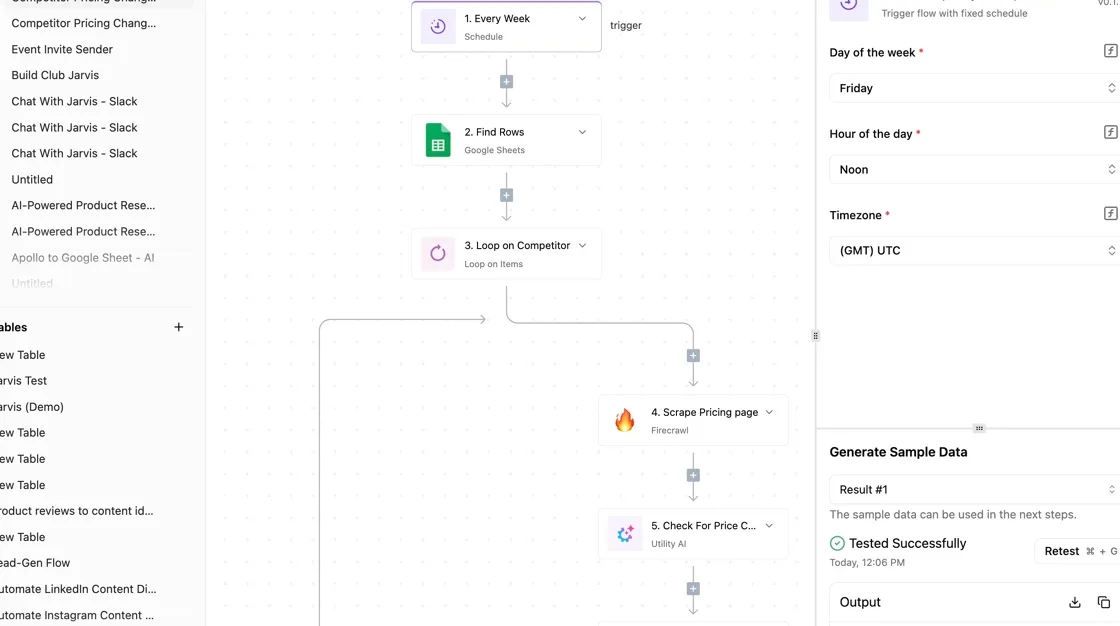
Because Activepieces has an MIT-licensed core, you can run it on a server you control instead of renting capacity from a vendor.
For a team whose automations stopped because a monthly meter ran out, that changes the problem. Your ceiling becomes the server you run, not a number on someone else's invoice.
Someone has to keep the server updated, backed up and running, and a missed update's your outage, not the vendor's. That's the cost of that freedom.
It also suits people who want to read and change the code behind their automations, or who need customer data to stay on their own infrastructure. If neither applies, self-hosting's work you're paying for without getting anything back.
Where the free tier falls short
Read the feature lists, not just the prices.
On AI steps, active flows, AI credits and users, each tier sets its own limits, so the free tier is a place to test, not a place to run a busy month.


Support's the other gap. The tiers separate on how much help you get, so on Free you're leaning on your own time when something breaks. If you're weighing it against Relay.app's free plan, that's the honest trade: more control, less hand-holding.
Who should not move: anyone whose stall had nothing to do with run or step counts, and anyone with nobody to look after a server.
Moving tools doesn't fix a workflow that was built wrong, and it adds a migration on top of the problem you already had. In that case, price the next Relay.app plan instead.
Alerts and fallbacks for Relay.app limits
Pricing the next plan only helps if you see the limit coming. The fix that ended the incident was a Monday checklist: an alert, an owner, a fallback, and a monthly look at pricing.
- Set an alert at a share of the free allowance, well short of the ceiling. Pick a share that leaves you time to act, because an alert that fires at the limit is only a notice that the damage has started.
- Name its owner, one person, not "the team." An alert everyone receives is one nobody answers, and the owner's the person who decides what happens next.
- For each critical workflow, write the manual fallback: who does the job by hand, with what, and where the result goes. Critical means a missed run costs you a customer, an invoice or a day of work. Write it down now, because nobody drafts a careful procedure while the automation's already down. Doing the task by hand for a few days costs less than a lost order, and having the steps on paper keeps that cost small.
- Check Relay.app's pricing page once a month. Plans and limits change, and the page you read last quarter may no longer describe what you would pay today.
Then decide: stay, pay or move. Stay if the alert has stayed quiet and the fallback has never been used.
Pay if the alert fires and the next plan's list price is less than the cost of the manual hours.
Move if the limit you hit first is one the next plan only raises, not removes, and a free alternative fits your workflows.
Frequently asked questions
Is the free plan still available?
Is Relay.app free to use forever? No. Relay.app announced its shutdown in July 2026, and free access ended in August.
Anyone still planning around the free plan is planning around something that's gone, so the real question is where your workflows run next.
Are AI steps covered?
Does Relay.app's free plan include AI steps? There's no confirmed, current list of what the free plan included, and the plan no longer exists to check against.
If AI steps were central to your workflows, treat them as the part you'll have to rebuild and test first in whatever tool you move to. Don't assume the new tool's free tier covers them.
Can you export workflows?
Can I export my Relay.app workflows to another tool? We found no vendor page describing an export that another tool can import. Plan on rebuilding each workflow by hand.
Paid access ended in September, so the safest record is whatever you wrote down or captured while you still had access. Waiting costs you the chance to copy the details of each step from the original.
What is the There's no sentence to rewrite. All I received was "cheapest paid plan?", which has no competitor compliment, numbers, or product names. Could you paste the sentence you want revised?
What is the cheapest paid Relay.app plan? None's available to buy, because paid access ended in September. Any price you find on an old page or review is history, not an offer.
Your real comparison is now between the free or paid plans of the tools you could move to, judged on the limit you would hit first.
Which Relay.app alternative can I self-host for free?
Of the tools compared in this article, n8n and Activepieces are the ones to look at. It offers a free self-hosted edition you run on your own server. The software costs nothing, but the server, the setup and the upkeep are yours.
Zapier, Make, Power Automate, IFTTT and Pipedream run on the vendor's servers, so their free tiers are hosted-only. Check each vendor's own pricing page before you commit, since limits change.
Related reading
References
Still comparing
The fastest way to settle it is to build something.
Open source under MIT, so you can self-host the same thing later.
Start free Talk to sales