
Replit Missions: Agent Swarms and Pricing Status

Nov 23, 202613 min read
If you want details on Replit Missions, Replit's own pages are the only place they currently come from. It is a new product that Replit itself announced, much as teams building on Activepieces first learn about its updates from its own announcements.
Replit Missions is a new release from Replit
Who released Replit Missions and when
Replit, the company behind the browser-based coding and app-building platform, released it. The announcement is the post "Introducing Replit Missions" at replit.com/blog/introducing-replit-missions, with a product page at replit.com/missions. I read both on 2026-11-23.
I found only one third-party write-up, from Mokaair, alongside them, so nearly every claim about the release traces to one author.
That makes the date on Replit's own post the only date available, and it can't be checked against anything else. If you plan around a launch timeline, treat it as the vendor's word.
What Replit says it is
Here I use only the maker's framing: Replit presents Missions as a distinct product with its own page, not as a footnote to an existing feature.
An "agent swarm" is many AI agents working in parallel on one goal, instead of a single agent working through it step by step. In Replit's wording they plan, build, test and iterate toward the result.
A single Mission, as the pages frame it, is one such goal handed to a swarm, with a budget and boundaries you set.
I could not find a stated size, duration or unit of work for one Mission, so what counts as "one" is still open.
Beyond that, I can't report from the pages alone how it behaves under load or what it does when a step fails. Those are the questions to answer by running it.
Before trusting any automation tool, check whether it leaves a record of who changed what. Activepieces keeps audit logs across projects, plus run history and a step-by-step trace of what an agent decided, and can stream logs into the tools a security team already watches.
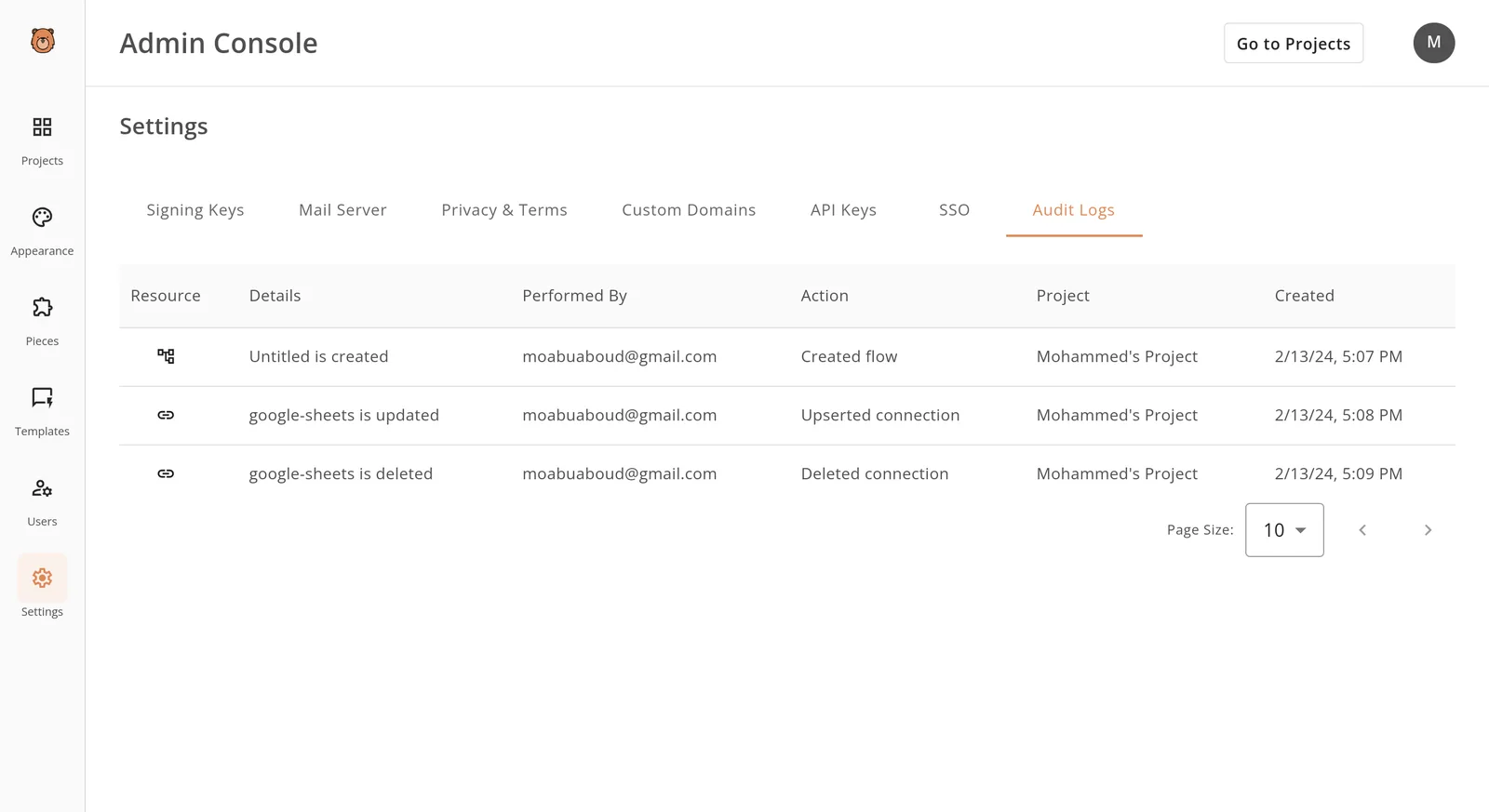
In the example below, a named user creates a flow, updates a connection and then deletes it.
With that kind of record as the yardstick, the next step is to read what Replit's pages claim and mark which statements you can test yourself.
If you are running this arithmetic for your own team, see what the same workload costs on Activepieces.
Why Replit Missions matters to teams automating work
It matters because Replit's own integrations page lists connections into the systems where automated work actually lands, and every count on it is a claim you can test.
Where it touches an automation stack
Start with the developer-tools integrations on Replit's integrations page, so the code-and-deploy side needs the least bridging.
CRM (customer records) integrations mean customer data is reachable by name, but a listing says nothing about which fields can be written. Communication integrations cover alerts and handoffs to people.
Ticketing integrations matter because tickets are where automated work usually gets assigned and closed.
Commerce and HRIS (employee records) hold some of the most sensitive data. A gap there is yours to bridge with general connectors, and a listing is a claim to test, not proof that it works.
What to check before relying on Replit Missions
Run one narrow task per category and log three things: the input, the expected output, and the actual output. Then read what Replit says about permissions.
In the agreement sheet below, look for a spending cap field, filled in here with a $1,000 example, and a list of actions marked "needs permission" that wait on a person pressing approve.

The point is that a cap and an approval list only protect you if you can trip them on purpose.
Set the cap low, attempt one action from the permission list, and record whether it stopped. Anything you can't make fail in a test, treat as unverified.
What Replit claims is new
Treat every Replit claim here as unverified until you've run it, because the only sources are Replit's own launch post and Missions page. The table below records what those pages state, and every empty cell is a test you still owe.
| Item | What Replit states | Source | Checked |
|---|---|---|---|
| What it is | Missions, a new Replit feature | Launch post, Missions page | 2026-11-23 |
| Release date | Not published | Not published | 2026-11-23 |
| Access | Not published | Not published | 2026-11-23 |
| Price | Not published | Not published | 2026-11-23 |
| Spending limit and approvals | Not published | Not published | 2026-11-23 |
Two of those rows need a caveat, because later sections quote the post. "Stated figures" means no price, allowance or usage figures.
The post does state speedups, which I cover below, but gives them without a baseline, so they are claims rather than figures you can plan from.
Likewise, "Spending limit and approvals" means no amount and no described mechanism. The phrase "within the budget and boundaries you set" tells you a budget exists as a concept.
It doesn't say what the cap is, where you set it, or what happens when a run reaches it.
You can't plan a budget or a rollout from these pages yet. The first row carries a statement, and the speedup rows are covered below.
You will find no rollout detail I can cite in the pages: no plan requirement or waitlist. Before you design around Missions, find out whether your own account can start one. If it can't, nothing else in your plan matters.
Look for a price and you find nothing: the sources checked publish none. That means no per-run cost, no included allowance, and no overage rule. Run a small, bounded job and read your own bill before you extrapolate.

Nothing in the pages states a spending cap or an approval step before an agent acts. They also don't say what happens when a run fails midway.
Those are the questions to attack first: give a mission a task that should be refused, and watch what stops it.
Connecting Replit Missions to a workflow today
Use a general building block your automation tool already has: an HTTP request step first, then an AI step with a custom provider or an MCP server. That order is simplicity, not endorsement, and it gives you something to run the refusal test through.
I found no statement of native support in any automation tool, and Replit describes Missions as agent swarms that turn ambitious goals into outcomes. I haven't run any of these routes against Missions, so confirm each endpoint exists before you build on it.
If Replit documents a callable endpoint, a plain HTTP request step is the least machinery: one URL, one credential, one payload. The consequence is that you see exactly what was sent and returned, which is what a refusal test needs.

If Replit exposes something that speaks the OpenAI-compatible request format, the AI step works. If it doesn't, the step fails on the first call, and that failure tells you the route is closed.
MCP (Model Context Protocol) is a standard for exposing tools to an AI client. It suits cases where the mission should be one tool among several, but it adds a server to maintain, so take it last.
Whichever you choose, the same steps apply:
- Pick the route from the three above.
- Add the endpoint and credential, scoped to the narrowest access Replit allows.
- Run one test task, the one that should be refused.
- Read the run log and record what was sent, what came back, and what stopped it.
- Set a spend cap before any second run.
Only after the cap is in place is it safe to repeat the test with real inputs and compare the results.
Activepieces has shipped nothing specific to Missions, but it works with any major model or your own provider key, and with MCP.
The refusal test's step 4 then lands in a product whose docs list a single set of controls for self-hosted and cloud alike: audit logs, log and event streaming, SSO, SCIM, custom RBAC, environments and git sync, with no cut-down edition on either side.
MoneyGram, Moneypenny, Alan and FundingSocieties run it in production, so the record of who ran what is not something you assemble from separate vendors.
Worth checking against a plan that does not meter every step: one credit covers a whole run on Activepieces.
Measure Missions cost and speed
Because Replit publishes speed claims for Missions but no cost figures, any comparison with other approaches has to rest on what you measure yourself. Capping spend first, as the previous test did, is what makes that measurement safe to run.
Comparing published Replit Missions facts and speedups
Replit describes Missions as agent swarms that "plan, build, test, and iterate toward the results you want, within the budget and boundaries you set."
The same post reports speedups that grow with swarm size: 2–4× for one agent, 7–17× for a 16-agent swarm, and 9–19× for a 32-agent swarm. These are Replit's own claims, so treat them as a hypothesis to check, not a result.
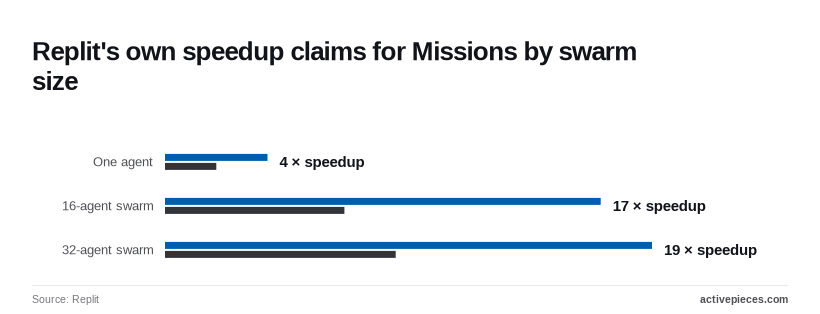
A speedup is only meaningful against something. It could be measured against one agent doing the same job, against a person, or against a team's earlier workflow, and those give very different numbers. In the pages I read, Replit does not say which it is.
A speedup is only meaningful against something.
Until it does, the figures can't be read as "faster than what you do today."
The ranges are wide. At 32 agents the low end is 9×, so you could see less than half the headline gain.
According to Mokaair, going from 16 to 32 agents adds only a couple of points at the top of the range, so doubling the swarm may not double the benefit.
The table shows what each option publishes and what you must fill in yourself. Take from it that only one cell in the cost column holds a number from anyone, and it's not a number we can supply.
| Option | Published cost | Published speed | What to measure |
|---|---|---|---|
| Replit Missions | Not published | 2–4× (one agent), 7–17× (16 agents), 9–19× (32 agents), vendor claims | Tasks completed, wall-clock time, cost per task |
| General AI workflow step | Not published here | Not published here | Tasks completed, time per task, cost per task |
| Hand-built app | Not published here | Not published here | Tasks completed, build plus run time, cost per task including upkeep |
| Manual work | Not published here | Not published here | Tasks completed, staff time, cost per task |
Every row ends in the same three measures, so the rows can be compared once you've filled them in.
To run your own small test:
- Pick one task you already do, with an input that has broken things before.
- Run it through each option with the same input and the same spending cap.
- Count the tasks finished correctly, and record the elapsed time and the total cost of the run.
- Divide cost by correct tasks to get cost per task.
Compare that figure against Replit's speedup claims. If your result falls below the low end of its range, you have a finding worth filing.
Because the baseline is unstated, make your own the one you actually use today. Divide the time your current method took by the time Missions took on the same input.
That ratio is the number to hold against the range, and if Replit later names its baseline, you will know whether the two are comparable.
What to watch next with Replit Missions
Watch the four pages where Replit's own statements change, and compare each against your last measured result rather than against memory. A figure that moved is a reason to rerun your test, not to assume it still holds.
Replit Missions pages to recheck
These are the items as of 2026-11-23. A stated limit or price can change on any of them without announcement, and so can a connector.
- Replit pricing page, for what each plan includes and what usage costs
- Replit docs, for how Missions is meant to behave
- Replit changelog, where the latest post was updated Nov 19
- The integration catalog and repository for the open-source automation tool you'd use to connect Missions to other systems
If the pricing page shifts, your cost-per-task estimate is stale. If the docs or changelog shift, a behavior you tested may no longer be the behavior you run. A catalog change tells you whether a connector you rely on still exists.
- Open the four pages above and save a dated copy of each, so next week's differences are visible instead of remembered.
- Reread the changelog post updated Nov 19 and list every claim that touches a test you already ran.
- Rerun the one test that failed or came closest to its range, using the same input as before.
- Record whether the result moved, and note which page change, if any, could explain it.
- File anything that disagrees with Replit's stated behavior, with the exact input attached.
What Activepieces does about this
Activepieces is the general building block this article keeps pointing at. It has shipped nothing specific to Missions, and I can't point to a native Missions integration.
What it offers is the plain route: an HTTP request step, an AI step that takes any major model or your own provider key, and MCP support.
If Replit documents a callable endpoint, you can wire it in and run the refusal test through a flow whose every step you can read.
The part that serves the measuring, rather than the connecting, is the record. Activepieces keeps audit logs, run history and a step-by-step trace of what an agent decided. It can stream logs and events into the tools a security team already watches.

When you run one narrow task and need to log the input, the expected output and the actual output, that trace is where the log comes from. You don't have to assemble it by hand.
The licence and the deployment story are also checkable. Activepieces is open source, so you can read the repository and the integration catalog, two of the pages this article says to recheck.
Its docs list one set of controls for self-hosted and cloud alike: audit logs, log and event streaming, SSO, SCIM, custom RBAC, environments and git sync. There is no cut-down edition on either side.
MoneyGram, Moneypenny, Alan and FundingSocieties run it in production, which says something about the controls, though nothing about how Missions will behave.
What it can't do is settle the questions Replit hasn't answered, such as price and what each plan includes. Those stay yours to test.
Put a low cap on the flow, send the task that should be refused, and read the run log to see what stopped it. If Replit's pages change, rerun the same test.
Related reading
Running the numbers
See what the same workload costs here.
Free forever plan, and every paid plan self-hosts at no extra cost.
See pricing Talk to sales