AI Agent Cost Control: How to Set Budgets and Limits

Nov 22, 202616 min read
Put a budget on every API key at a gateway, add caching and model routing, watch spend in an observability tool, and enforce step limits inside the workflow, whether that workflow runs in code or in a builder like Activepieces. Neither layer replaces the other.
AI agent cost control is the practice of capping what autonomous AI agents can spend by limiting per-key budgets at a gateway, reducing repeated calls and oversized model use through caching and routing, and restricting loops and steps inside the workflow.
Top picks for AI agent cost control
What AI agent cost control means
What stops an agent from spending more than a task is worth is a set of caps:
- budgets per key
- cached repeat calls
- cheaper models for easy steps
- hard limits on loops
Once a key hits its budget, a gateway, the proxy every model call passes through, can refuse the call. It can't tell an agent to stop retrying.
That gap matters because agents multiply usage. CloudZero puts a single agent at 4x the tokens of a plain chat and a multi-agent system at 15x, against a 1x chat baseline, so cost management becomes critical before deploying multi-agent systems.
Price a workflow for chat and it is underbudgeted by a factor of four before anything misbehaves, and by fifteen once agents hand work to each other.
Read the 15x bar as the figure a runaway loop starts from, not where it ends, meaning unchecked loops could incur exponentially more tokens.
Price a workflow for chat and it is underbudgeted by a factor of four before anything misbehaves, and by fifteen once agents hand work to each other.
Those multipliers are why the postmortem usually reads the same way: the loop ran overnight, the alert fired on the invoice, and nobody had set a cap. Not knowing was the failure.
A per-key budget would've stopped the spend, and Activepieces would've bounded the loop by fixing the steps around the agent in the flow. On the free plan's 1,000 credits a month, runs simply wait for the refresh once the credits are spent.
Top picks and who each is for
Pick one per layer, not one for everything. The picks below are split by the thing each one can stop.
- LiteLLM, for gateway budgets: teams that need a spend cap per API key and per team before calls reach the model provider.
- Helicone, for observability: teams that need to see which key, prompt or model drove a spike and set alerts on it.
- Langfuse, for observability: teams that want per-run traces to find the step where an agent looped.
- n8n, for workflow limits: teams that want to cap what an agent may call, with approval steps and bounded retries in the flow.
Because gateways and observability tools see cost but not intent, the workflow limit is the pick that stops the loop itself. All four were checked on 2026-11-22.
Confirm the plan you would buy on the day you buy it, because plan names and limits change often. Tool descriptions here were checked against the vendors' own pages on 2026-11-22, but list prices and limits are left unconfirmed.
This takes minutes, not a project: automate it in Activepieces free.
Comparison table of AI agent cost control tools
Because prices move, the table below leaves list prices unconfirmed and compares the seven tools on what each can stop: a runaway loop, an oversized model, or a repeated call.
Read the cost feature and main limit columns first, since they decide whether a tool caps spend or only reports it. All entries are dated 2026-11-22.
| Tool | List price | Cost feature | Main limit | Self-hosting | Best for |
|---|---|---|---|---|---|
| LiteLLM | Unconfirmed | Budgets per virtual key and per team | You run and secure the proxy yourself | Yes, open source | Engineering teams that need hard per-key caps |
| Portkey | Unconfirmed | Budget and rate limits per key | Self-hosting terms unconfirmed | Unconfirmed | Teams wanting caps plus routing in one service |
| Helicone | Unconfirmed | Per-request cost logging and response caching | Stronger at showing spend than stopping it | Yes, open source | Cutting repeated calls |
| Cloudflare AI Gateway | Unconfirmed | Caching and rate limiting | Runs only on Cloudflare's network | No | Teams already on Cloudflare |
| OpenRouter | Unconfirmed | Credit limits per key across many models | Hosted router only; no control over agent behavior | No | Trying many models behind one key |
| Langfuse | Unconfirmed | Cost attributed to each trace and step | Observes spend; it doesn't block it | Yes, open source | Finding which step burned the budget |
| n8n | Unconfirmed | Fixed workflow limits what the agent can call | No per-key spend cap on model calls | Yes, under its own license terms | Non-engineers bounding what an agent may do |
Because several of the first six rows sit in front of the model call, they can watch spend and, where they enforce budgets, stop it. n8n sits around the agent, so it limits actions. That split is the reason neither group replaces the other.
How each tool was judged
For each tool the test was the same: when the loop starts, what stops it?
A budget that rejects requests once a key hits its limit counts as a cap. A dashboard that shows the overrun the next morning counts as an alert, and an alert after the money is gone is a postmortem, not a control.
Only where the vendor's own materials say the code can be run on your infrastructure was self-hosting recorded as yes.
Pricing gaps in the cost control comparison
I couldn't confirm a current list price for any of these tools on the date above, so the table leaves price out. Check the vendor's pricing page for the plan you intend to buy, and note which cost feature sits behind a paid tier.
Nor does the table say anything about how well a tool performs under load, or how much work its setup takes. A tool that can cap spend but is left on default settings caps nothing, so the next section covers what to configure first.
Gateways that enforce budgets, caching and routing
Before a runaway loop hits an invoice, it hits a budget counter, because a gateway sits between the agent and the model.
Look at the layout below: three agents, each with its own key and monthly dollar cap, feeding one gateway that checks the cache, counts spend and routes to a small or large model.

Take from it that the cap lives on the key, not in the agent's code.
Unless requests repeat, caching doesn't help, and the hit rates are the vendors' claims. The AWS ElastiCache benchmarks show how much the similarity threshold matters.
At 0.99 the hit ratio is 23.5%, so most near-duplicate calls still go to the model. At 0.95 it's 56%. At 0.90 it's 74.5%.
At 0.80 it's 87.6%, but a loose threshold means a different question can return a stale answer. Tune the threshold against your own traffic before trusting any quoted hit rate.

The five gateways
I haven't verified prices or limits for these five. Check each vendor's pricing page on the day you buy.
Gateways built around budgets
If you want per-key budgets, LiteLLM is an open-source proxy that issues virtual keys with them and can fall back to another model on failure. You host it yourself, so you own its uptime. Skip it if nobody on the team can run a service.
If you want these controls without running infrastructure, Portkey has budget limits, caching, fallbacks and routing as a hosted gateway. Skip it if requests must never leave your network.
Gateways built around visibility and limits
When you need to know which agent spent what, Helicone is built around logging and cost visibility, with caching available.
That's the "we didn't know" gap closed. Skip it if you need hard per-key enforcement as the main control, and confirm what it enforces before relying on it.
A rate limit bounds a loop's speed but isn't a dollar cap. Cloudflare AI Gateway adds caching and rate limiting in front of model calls, so pair it with a spend limit.
Skip it if your stack has no other tie to Cloudflare and you want one dashboard elsewhere.
A gateway for routing across models
Routing a small model for easy calls is simple with OpenRouter, which gives one key and one endpoint across many models. Skip it if you need to keep a single provider contract or self-host the gateway.
Whichever you choose, the cap stops spend but not behavior, which is where a workflow tool comes in.
Activepieces covers that half and is not a gateway, a cache or a router.
Put an Agent step next to an approval step in its flow builder and the run trace shows one execution from trigger to last step, with the agent's model calls and the approval in the same record, not a webhook handing off between two systems.
That puts an approval and a run log around the agent's model calls, while the per-key cap stays at the gateway. MoneyGram, Moneypenny, Alan and FundingSocieties run it in production.
You can follow the rest of this with the builder open. Start free, no card.
Observability tools that show where agent spend goes
When a runaway loop or an oversized model burns money, it shows up as a line item instead of a surprise on the invoice, because observability tools record each model call as a trace with its token count and cost.
Spend stopped: that is all a cap tells you. Only a trace tells you why it started, and "we didn't know" is the failure this layer exists to remove.
Langfuse for tracing AI agent token costs
Every run becomes a trace of nested steps in Langfuse, an open-source tracing platform for LLM applications: model calls, tool calls and retrieval.
For each model call it stores token usage and calculates cost from the model's price, so a single run's bill can be read off its trace. It groups traces into sessions, which matters for agents because one task often spans many calls.
You can run it on your own infrastructure or use the vendor's hosted service. Self-hosting keeps prompts and outputs inside your network, which is the deciding factor if traces contain customer data.
Hosting it yourself also makes you responsible for operating it. Plans, prices and usage limits for the hosted service change, so read them on the vendor's pricing page before you commit.
A trace that shows a loop on its four-hundredth iteration is a record of the loop, not an interruption. Langfuse reports cost; it doesn't stop it.
Pair it with a cap at the gateway, and with a workflow tool that limits what the agent can do.
What to trace first: cost per run and per step
Start with two views: cost per run shows which tasks are expensive, and cost per step shows why.
When a run's cost is concentrated in one step, that usually means an oversized model doing work a smaller one could handle. A run with the same step repeated many times is a loop, and it'll show as a long, flat staircase of identical calls.

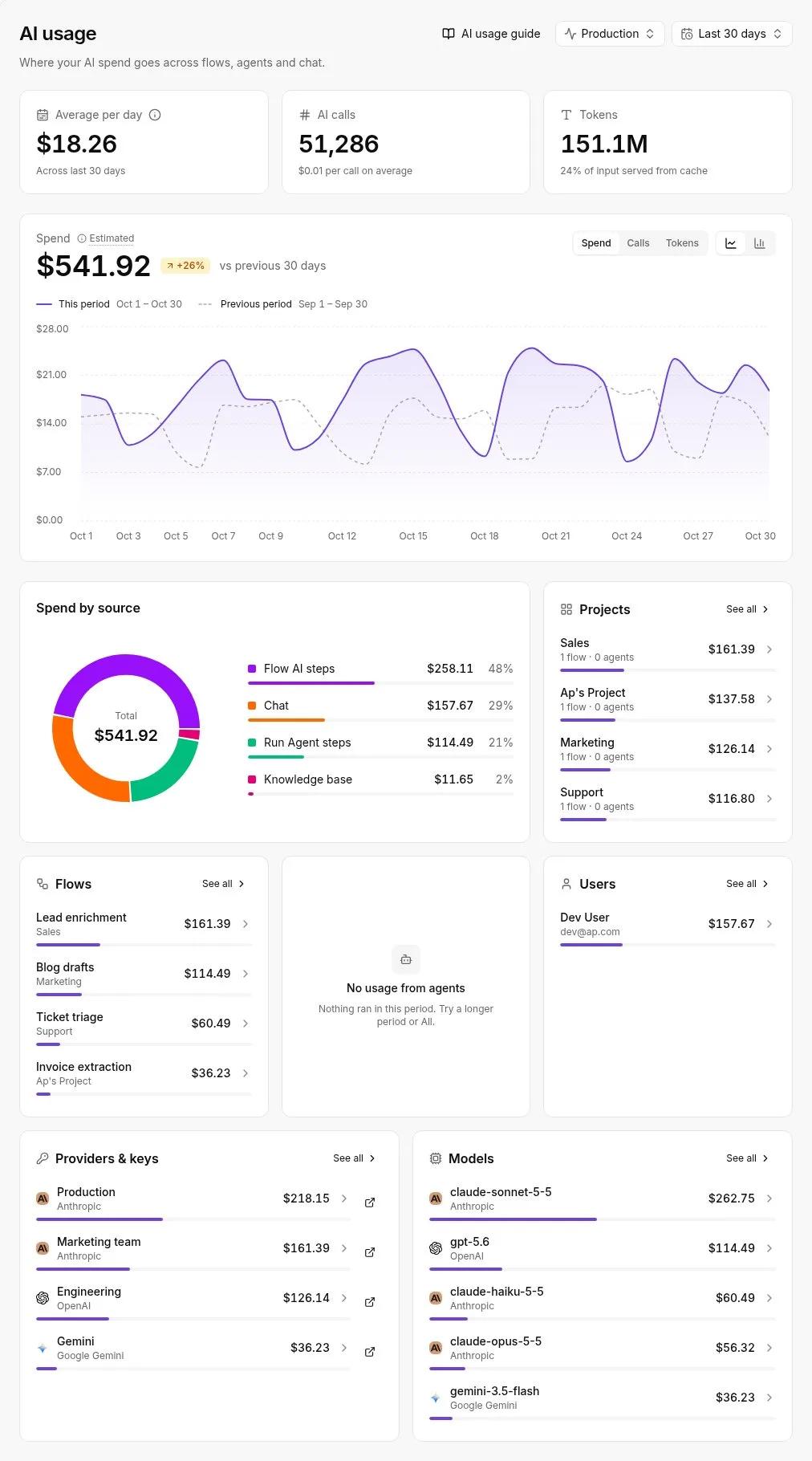
At the account level, the useful breakdown splits a month's spend by source, project, provider key and model, set against the previous period.
A usage dashboard of that shape tells you which of those four moved before you open a single trace, and that's what to look for in whatever you adopt.
Once one dimension stands out, drill into the runs behind it. Look for repeated identical calls, which a cache could absorb, and for premium-model calls on routine steps.
Each finding maps to a control: a loop gets a step limit, an oversized model gets routed down, and a repeated call gets cached.
Where Activepieces fits in agent cost control
Spend controls have to come from something else, because Activepieces limits what an agent can do, not what it costs, so it covers the loop and repeated-call problems only by structure.
Its credits meter its own runs, 10,000 a month on Plus, and with your own AI keys the model cost goes to your provider bill.
What the workflow layer can cap
In Activepieces, an agent is a workflow, and the workflow is the boundary, and because the core is MIT-licensed, the engine enforcing that boundary is open to read.
The homepage example shows it: a seven-step lead process where a HubSpot trigger (the CRM that supplies new leads) feeds one purple-bordered AI Agent step that qualifies the lead.
Then come a condition, a Salesforce write, a Slack notification, a loop over leads to nurture, and a Gmail send. The model makes one decision, and every step around it is fixed by whoever built the canvas.
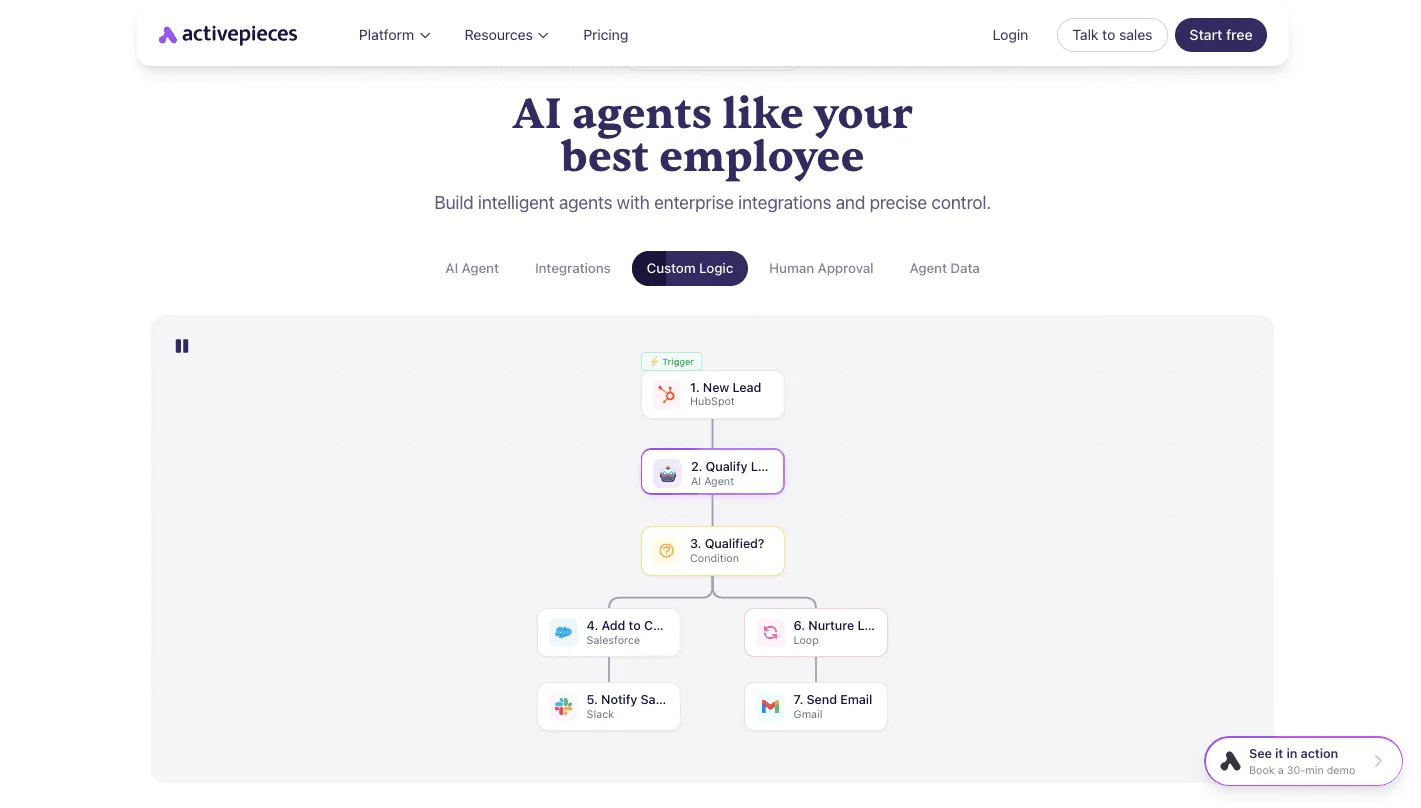

That fixed shape is the cap. The agent touches only the apps you wired in, and a human approval step can hold a risky action until a person releases it. The run history gives you a record of what each run did.
Because the agent calls the model with your own API key, spend lands on an account you control and can inspect. You can also self-host, which keeps the runs and the data on your infrastructure.
What it doesn't do
Don't plan around token budgets per key or per run, semantic caching, or routing a request to a smaller model, since none of them is confirmed in Activepieces' own materials.
What is stated is credit pricing: a run is 1 credit however many steps it has, and an AI step costs 2, 10 or 20 credits for a fast, smart or frontier model.

A workflow can still call a model many times through a loop you built, and nothing I can point to stops it at a dollar limit.
If an incident review would ask "what stopped it at the threshold," the answer here isn't established.
Read the current pricing page on the day you buy, because plan limits change and I'm not quoting a plan from memory. Check what it says about task or run allowances, since those count workflow executions, not model tokens.
Pairing it with a gateway
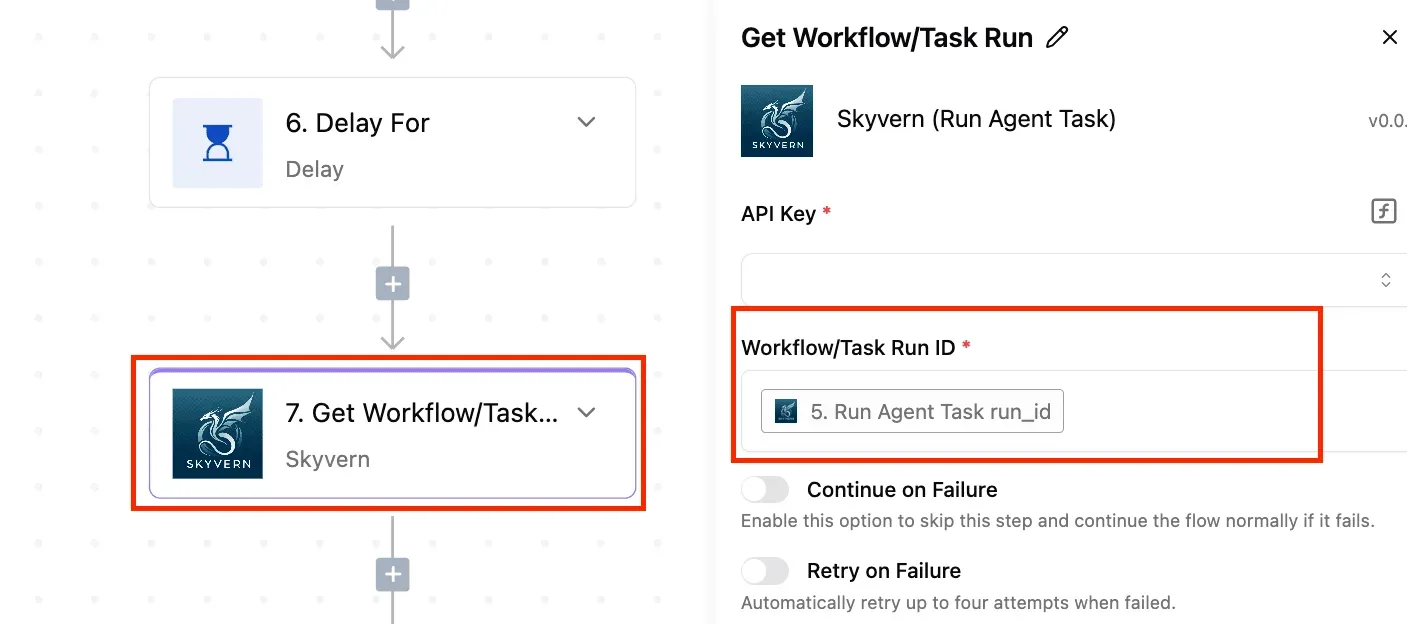
Pair it with a gateway when the agent calls a paid model and a runaway would be expensive. Point the workflow's model calls at the gateway's endpoint, using a key issued for that workflow.
The gateway then enforces the per-key cap and any caching or routing it offers, and Activepieces limits the apps and actions.
A gateway can't stop an agent from emailing the wrong list, and a workflow can't stop a key from burning through its budget; neither covers the other's failure.
If the agent runs on a private model with no per-call cost, the workflow layer alone may be enough.
Frequently asked questions
Is caching safe for agents that act on live data?
Only for the parts of a call that don't change. Cache a stable system prompt, tool definitions, or a lookup that is the same every time.
Never cache a response that depends on a record that may have changed since the last call, such as an order status or an account balance.
When a cached answer is stale, it is a wrong action taken with confidence, and the cost of that dwarfs the saving.
Set a short expiry on anything tied to live data, and let the workflow layer fetch fresh values before the model reasons over them.
Should a team without engineers start with a gateway or workflow?
Start with the workflow tool. It's where a business team builds the agent, and it limits what the agent can touch: which apps, which actions, and where a person must approve.
To run a gateway, someone has to issue keys, set caps and read the logs, which usually means an engineer.
Add one once the agent calls a paid model often enough that a runaway loop would show up on the invoice. Until then, a provider-side spending limit is the minimum floor.
How much can model routing realistically save?
It depends on how much of the agent's traffic is easy. Routing sends simple steps, such as classifying a message or extracting a field, to a small model like Claude Haiku 5.5 or GPT-6 Luna, and keeps the expensive model for the hard reasoning.
If most steps are easy, the saving is large. If most are hard, it's small.
Measure your own mix of steps before promising anyone a number, and check that quality holds on the cheap path. A cheap model that fails and triggers retries costs more than it saves.
Who owns the API key when a vendor hosts the agent?
It depends on whether you bring your own key or use the vendor's bundled model access. With your own key, the charges land on your provider account, and you can cap and revoke it.
With bundled access, the vendor holds the key, and you're limited to whatever caps and usage reporting the vendor exposes.
Ask before building: whose key is it, can you set a limit on it, and can you see usage per agent? If the answer to the last two is no, treat the setup as uncapped.
Does a self-hosted gateway still need a provider spending cap?
Yes, because a self-hosted gateway enforces limits only while it's running, configured correctly, and on the path of every call. A misconfigured route, a key copied into a script, or a gateway outage that fails open all bypass it.

The provider-side cap is the control that doesn't depend on your own setup, so keep it as the backstop and treat the gateway's per-key limits as the first line.
Related reading
References
Build it
Set this up in minutes.
No code required. Connect your accounts, and Activepieces runs it from there.
Start free Talk to sales