Ripple 65B Preview: Pricing, Speed, and Test Results

Nov 8, 202613 min read
When Ripple 65B Preview misbehaves, the person paged is whoever wired it into a workflow, whether that was a hand-coded script or a flow built in a tool like Activepieces.
It is a new, preview-stage model from ricursiveAI, and "Preview" means the maker hasn't promised stability, so behavior can change under you.
Treat it as something you own, not something you subscribe to.
RicursiveAI released Ripple 65B Preview
Ripple 65B Preview release details and date
On its own Hugging Face pages, ricursiveAI published the model under the repository name ricursiveai/ripple-65b-preview-nvfp4. The NVFP4 suffix names a compressed weight format, so what you download is a quantized build, not necessarily the full-precision original.

Output quality and hardware needs may differ from what a model card for another build implies. I'm not putting a release date on it beyond the date I read the pages, 2026-11-08, because I have no dated release notice to cite.
Ripple 65B Preview sources and check date
If you're reading this later, recheck the page, because ricursiveAI can revise a preview after 2026-11-08, the day I read the files. Every claim about the model traces to ricursiveAI's inference files on Hugging Face.
If you are running this arithmetic for your own team, see what the same workload costs on Activepieces.
Model replacement and automation team impact
The first time it fails, someone on your team will own it. That is why a new model matters.
The only thing that keeps that ownership cheap is how easily you can replace the model. The two subsections below cover why replacement is the right frame and what "Preview" does to it.
A model is a replaceable step in a workflow
Picture a workflow of four boxes in a row:
- A trigger
- A model step
- A route
- An action
Beside the model step, the illustration places three interchangeable model cards, labelled:
- Classify
- Extract
- Draft
Take from it that the model is one slot, and each card is a job that slot can do. Swap the card and the other three boxes stay as they are.

That's why you can try Ripple 65B Preview today through generic building blocks, without rebuilding anything around it. A model that misbehaves in the classify slot can be pulled out and replaced, and the trigger, the route and the action never notice.
Do not read the maker's stated training cost as a price. It says what ricursiveAI spent to build the model, which tells you nothing about what a call costs you or how quickly it answers.
If an output shifts and your route misfires at 2am, the vendor won't be the one awake. Preview means the maker hasn't committed to the model staying the same, so behavior can change under a workflow that nobody touched.
If an output shifts and your route misfires at 2am, the vendor won't be the one awake.
For production, that decides who gets paged. Keep:
- A named owner
- A fallback model in the same slot
- A human check on any action that can't be undone
Ripple 65B Preview specs and published benchmark
Whoever inherits this model inherits only what ricursiveAI has written down: a short list of size, format, licence and one self-reported benchmark.
Each item below can be checked at the source, because the Hugging Face model card states it:
- A 65B-parameter dense Transformer, so every parameter works on every token and memory needs scale with that size.
- BF16 weights, plus a separate NVFP4 repo, a 4-bit format meant to shrink the serving footprint.
- 12 trillion training tokens.
- A context of 1,048,576 tokens, enough for very long inputs.
- An Apache 2.0 licence, which permits commercial use.
Those are the specifications. Getting the model and paying for it is a separate question.
How to get it and what it costs
You download the weights from the card, and the licence charges nothing for the model itself. Hardware is the cost.
On Ricursive's page, the maker claims Ripple 65B Preview scores 80.52 on Terminal-Bench 2.1. That's ahead of Beam 501B at 80.1, Muse Spark Open 816B at 76.4, Inkling 975B at 63.8 and Nemotron 3 Ultra 550B at 56.4.
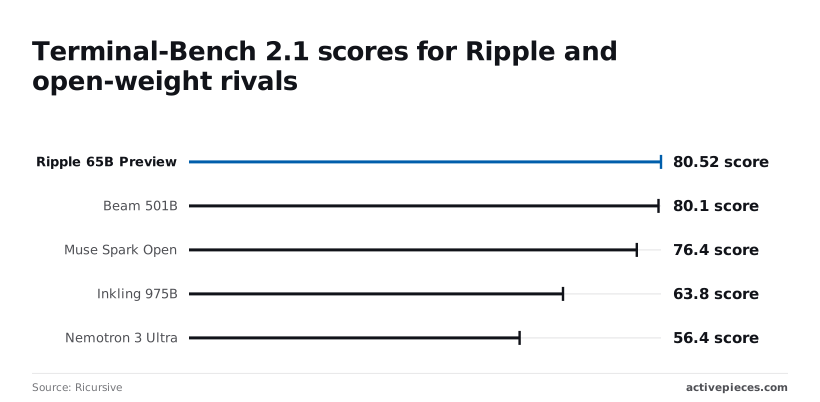
If that holds, a model up to fifteen times smaller matches larger open-weight ones on this one test. Nobody independent has confirmed it yet.
$32m is what JustSaid puts training at for Ripple, against $5.5m for DeepSeek-V3, $191m for Gemini Ultra and $200m for Claude Opus 4, placing Ripple between DeepSeek-V3's lean training and the full-scale investment of Claude and Gemini, indicating Ripple's developers chose not to scale to frontier-level investment.
That's the maker's spend, not yours.
The model card itself lists no price for hosted access, only the maker's own benchmark and speed claims; OpenRouter lists $0.20/M input and $0.60/M output. Cost per request and speed are therefore unknown until you measure them yourself.
Ripple 65B Preview integration in workflows
To measure cost and speed you need the model inside a workflow. No dedicated connector for it was found as of 2026-11-08, so the route is generic building blocks, simplest first, with a named owner for each.
From least to most moving parts, the order is:
- An HTTP request step that calls OpenRouter with the model
ricursiveai/ripple-65b-preview. - An AI step pointed at a custom, OpenAI-compatible provider.
- An MCP server, only if the model must call tools.
Stop at the first step that answers your test, because each one adds a component that someone must maintain.
Option 1: an HTTP request step
Send a chat request to OpenRouter, a gateway that exposes many models behind one API and one key, with the model ID above, and the response carries the text you need.

Because you build the request yourself, you see exactly what was sent and returned, which makes timing and spend easy to log.
The cost is that retries and error handling are yours to write, and whoever owns the workflow gets paged when the call fails.
Option 2: an AI step with a custom or OpenAI-compatible provider
If your workflow tool has a built-in AI step, point it at a custom provider using OpenRouter's OpenAI-compatible endpoint, your key, and the same model ID. Prompts then sit alongside your other AI steps, which is tidier.
The trade-off is that the step hides some of the raw request detail, so check that it exposes timing before you trust it for measurement.
When the model must act, such as querying a system, add Option 3, an MCP server. MCP, the Model Context Protocol, lets a model call external tools through a server. It brings a new service that someone has to host, secure and own.
Activepieces lets you put Ripple in that slot without the platform choosing a model for you: with your own provider key (Bring-Your-Own-Key, from the Plus plan up), model spend lands on your own provider bill at your own rates. Bring-your-own-key starts on the Plus plan at $20 a month, where every AI step counts as 1 credit whatever model sits behind it, so the model's price stays between you and OpenRouter. A platform that resells you its own model has made that decision and priced it before you open the product. Activepieces' MCP server reaches Claude, Cursor, Windsurf or any other MCP client, and the screenshot below shows its Client Setup Instructions:
- Tabs for Claude, Cursor, Windsurf and Server/Other
- A JSON block holding the endpoint
Take from it that the connection is a short configuration, and that the compatibility warning is the first thing to check before anyone commits time.
Worth checking against a plan that does not meter every step: one credit covers a whole run on Activepieces.
Ripple 65B Preview vs gpt-5.4-mini test
On three routine automation tasks, Ripple 65B Preview and openai/gpt-5.4-mini both got every answer right, so the difference left to weigh is cost and speed, and it's small.
Ripple 65B Preview test tasks and setup
On 2026-11-08 the test used ricursiveai/ripple-65b-preview on OpenRouter at default settings, alongside openai/gpt-5.4-mini.
Both models got the same three tasks: sort a support ticket, pull fields from an invoice, and summarise an email thread, which means any performance differences will reflect the models' actual capability rather than test design. That makes their results directly comparable.
Pass or fail, every output was checked against a known answer. That's not a judgment call, but three tasks is a spot check, not a benchmark, so you'd want more data before betting on these results.
Results, speed and cost per task
Since both scored 3 of 3, the bars in the chart compare price and delay on equal accuracy. The chart pairs each model's cost per task with its median response time.
About a fifth of the price: Ripple cost $0.000025 per task against $0.000139 for gpt-5.4-mini. At 100,000 tasks a month that's $2.50 versus $13.90, so the ratio is large but the absolute saving is small.

It won't cover the time of whoever runs the new service.
0.7 seconds against 0.8 was the median time, which means Ripple edges out gpt-5.4-mini on speed. A tenth of a second won't change whether a workflow feels responsive or whether anyone gets paged.
Ripple's cost and speed picture
A token price isn't a task cost. Ripple cost less per task in our test, but when a run fails at 2am the page goes to whoever owns the integration, not to the pricing page.
Comparison table: cost, speed, setup effort

Beside the maker's published prices, the table sets the dimensions only a test can fill. Take the price columns as a ceiling on the argument. Ripple's input and output rates are both lower, so any task that consumes similar tokens costs less on Ripple.
| Option | Price per 1M tokens in/out | Test cost per task | Test seconds | Connect effort | Unknown |
|---|---|---|---|---|---|
| Ripple 65B Preview | $0.20 / $0.60 | Your test sets it | Your test sets it | Generic building blocks | Stability beyond preview |
| openai/gpt-5.4-mini | $0.75 / $4.50 | Your test sets it | Your test sets it | Generic building blocks | Output-heavy cost |
| Self-hosted Ripple | No per-token price | Your hardware sets it | Your hardware sets it | Highest: you run it | Who patches and monitors it |
If your workflow writes long answers, it gains the most from Ripple's pricing, because the output rates matter most. Self-hosting trades the token bill for an operations burden you own.
On one narrow kind of work, the Plotly analytics exam is a third-party signal of quality. It doesn't show how the model handles your prompts, your data or your failure modes.
, and a preview label means the answer can change without notice.
What to watch next for Ripple 65B Preview
Recheck four things on a schedule, and name one person who owns it. A preview model changes without a ticket, and that person is the one paged when it does.
Ripple 65B Preview pages to recheck
Price is the least stable item. OpenRouter, a marketplace that routes requests to many vendors' models, shows 59% of tokens going to open-weight models, 32% to closed ones and 9% unmatched.
That means pricing for open-weight models is contested and can move, and the 9% gap means you should treat the shares as approximate.
- New commits to the model card and the NVFP4 inference folder (latest seen: c097cbf)
- Any maker announcement of leaving preview
- OpenRouter price changes
- A re-run on your own three tasks
Compare the commit hash on each visit. A new one means your earlier notes may describe a different build than the one you are running.
A one-hour test on your own workflow
Pick three real tasks from the workflow you would wire this into, and run each through Ripple 65B Preview once, and you'll know whether Ripple can handle your specific tasks, so you'll have the data needed to decide on integration.
Record wall-clock time per task and the tokens billed.
Multiply tokens by the listed price to get cost per task, which is the number the maker's page cannot give you.
Keep the three prompts and outputs in a folder. When a commit lands or the price changes, rerun the same three and compare. Without that baseline, nobody can say whether the model got worse or the inputs changed.
This week: assign the owner, run the first pass, and store the results where the next person will find them.
What Activepieces does about this
The article's advice comes down to this: put Ripple in one replaceable slot, measure it with a small test, and keep a fallback ready. Activepieces is built for that kind of slot.
It is open source under the MIT licence for the community edition, so the code that runs your workflow can be read, and you can self-host it if you want the whole pipeline under your own control.
That matters for a preview model, where the one thing you can't count on is the maker holding still.
On the model itself, Activepieces doesn't pick one for you. With Bring-Your-Own-Key, available from the Plus plan at $20 a month, you point an AI step at a provider you choose, such as OpenRouter with the model ID ricursiveai/ripple-65b-preview.
Every AI step counts as 1 credit whatever model sits behind it, so your spend on Ripple is the token bill from OpenRouter.
The test tokens-times-price arithmetic stays yours to do, and nothing sits between it and your provider invoice.
That also covers the fallback. Because the model is a setting on one step, you can build a second branch that calls openai/gpt-5.4-mini, or any other model, and route to it when the Ripple call fails.
Add an approval step ahead of any action that can't be undone, and the three safeguards the article asks for (a named owner, a fallback in the same slot, a human check) become parts of a flow you can open and read, not a convention in someone's head.
Here is what I can't point at. I found no dedicated Ripple connector as of 2026-11-08, so you'd use the HTTP request step or a custom OpenAI-compatible provider, just as the article describes, and you'd still write your own retry handling.
Activepieces gives you the slot and the plumbing. It does not make a preview model stable, and the person paged at 2am is still whoever owns the workflow.
Related reading
Running the numbers
See what the same workload costs here.
Free forever plan, and every paid plan self-hosts at no extra cost.
See pricing Talk to sales