
Salesforce API: Types, Access and Limits (2026 Guide)

Nov 19, 202616 min read
Salesforce's customer-data platform exposes its records through REST, SOAP, Bulk, Pub/Sub and GraphQL APIs, which is why teams building workflows in tools like Activepieces can reach the same records as everyone else.
Salesforce API access is the set of edition, permission and limit rules that decide whether a program may read and write an org's records through those APIs, including which editions include API access and how many calls the org may make in a rolling 24-hour period.
You reach any of them with an OAuth token from a Connected App or External Client App; whether your edition permits that's the first thing to check, ahead of any syntax.

Salesforce API access and edition eligibility
What the Salesforce API lets you do
It's the registered OAuth client inside your org that issues the token. REST and SOAP read and write individual records. Bulk moves large batches asynchronously, so a data load doesn't consume a call per row.
Pub/Sub streams change events out to your systems as they happen. GraphQL fetches related records in one request, which means fewer calls against the org's shared daily allowance.
It's predictable. The token's issued, the request's well formed, and the response's a refusal because the edition or the user's permissions don't allow API use. Syntax's rarely the cause.
As checked on 2026-11-19, Salesforce Help lists these editions:
The token's issued, the request's well formed, and the response's a refusal because the edition or the user's permissions don't allow API use. Syntax's rarely the cause.
- Enterprise: API access included
- Unlimited: API access included
- Developer: API access included
- Performance: API access included
- Professional: API access only as a paid add-on
- Essentials: no API access
If you're on Professional, a working integration needs that add-on bought first, so confirm it before you build anything. On Essentials there's nothing to configure. Inside an eligible edition, the user the token acts as still needs the API Enabled permission.

Recheck this list before you commit budget. It comes from Salesforce Help and was read on 2026-11-19, and Salesforce changes packaging. Later sections work through the call limits and run traces.
With Activepieces, the request-writing isn't a developer hire: tell its built-in chat what the process should do and it publishes a live flow, the same artifact a builder would assemble by hand, under the same RBAC and audit logs, and every run leaves a trace you can read without a Salesforce certification.
This takes minutes, not a project: automate it in Activepieces free.
Salesforce API types by use case
Use REST for single records and small sets, Bulk API 2.0 for large loads, Pub/Sub for event streams, and SOAP only where an older integration already depends on it.
The limit bucket matters more than the protocol, because that's where runs stop. The table below shows what each API suits, how much it carries per call, whether it waits for an answer, and which allowance it spends.
| API | Best use case | Data volume per call | Sync or async | Limit bucket |
|---|---|---|---|---|
| REST | Everyday record reads and writes | Single records or small sets | Sync | Org-wide daily API requests |
| SOAP | Legacy integrations, enterprise tooling | Small to moderate sets | Sync | Org-wide daily API requests |
| Bulk API 2.0 | Large loads, exports, migrations | Very large jobs | Async | Bulk-specific allowances, separate from the request count |
| Pub/Sub | Reacting to changes as they happen | One event per message | Async stream | Event publishing and delivery allocations |
| GraphQL | Fetching related records in one query | Shaped by the query | Sync | Org-wide daily API requests |
Look at the last column: three of the five rows share one daily request count, so you can't use a single rate-limit configuration across all five accounts. A loop that looks harmless can exhaust the allowance other integrations share.

For creating, reading, updating and deleting records, use REST, one request per action. Each call's counted against the org's daily total.
When a whole file goes in as a job, Bulk processes it in the background. The run trace shows the job status rather than a per-record response.
When something happens, Salesforce publishes a Platform Event message. Pub/Sub lets your process subscribe instead of polling, which spares the request count.
SOAP remains for older integrations. The Metadata API moves configuration, such as fields and objects, rather than records.
Salesforce API credentials and OAuth
You will not find a static API key in Salesforce: both the Metadata API and the record APIs accept only an OAuth access token issued to an app you register in the org.

The sequence below shows the whole path. The point to take from it's that the failures you'll see later come from steps 1 to 3, not from the request itself.
- Create a Connected App, or an External Client App where your org offers that newer registration type.
- Grant only the scopes the integration needs.
- Pick the OAuth flow that matches who is calling.
- Request the access token.
- Read the instance URL from the token response.
You'll hit the failure modes in step order, so the paragraphs below take them that way.
Register the app in Setup, then select scopes. Start with API access alone. Add refresh-token scope only if a user-context flow must renew sessions. Every extra scope widens what a leaked token can do, so trim before the first call, not after an audit.
For server-to-server jobs with no person present, use client credentials or JWT bearer. PKCE suits a user signing in, because it needs no stored client secret. Pick by asking whose permissions the call should run under. The answer decides which user's record access applies.
Send the credentials to the Salesforce token endpoint and read the JSON response. It carries the access token and an instance URL.
Send API calls to that instance URL, not to a hardcoded login domain. Salesforce's developer documentation for the chosen flow lists the exact parameters.
A minimal working Salesforce REST API request
Three requests are enough to prove your access setup works: a read, a write, and a check of what the org still allows you to spend, which means you can begin integration.
Each one uses the parameters from the documentation for the flow you chose, and each returns something you can read in the response.
Set two shell variables first. INSTANCE_URL's the address of your Salesforce org, returned alongside the access token when you authenticate. ACCESS_TOKEN's that token. Use the current API version shown in the developer documentation in place of vXX.X below.
Query Salesforce API records with SOQL
To run a SOQL query (Salesforce's SQL-like query language), send a GET request with the query URL-encoded in the q parameter.
curl -G "$INSTANCE_URL/services/data/vXX.X/query" \
 -H "Authorization: Bearer $ACCESS_TOKEN" \
 --data-urlencode "q=SELECT Id, Name FROM Account LIMIT 5"
If the call succeeds, the response's JSON with a records array. An empty array means the call worked and the org has no matching rows. An error array means the request failed, and its errorCode tells you which kind of failure it was.

Creating a record's a POST to the object's endpoint with a JSON body.
curl -X POST "$INSTANCE_URL/services/data/vXX.X/sobjects/Account" \
 -H "Authorization: Bearer $ACCESS_TOKEN" \
 -H "Content-Type: application/json" \
 -d '{"Name": "Test Account"}'
When the create succeeds, you get the new record's id and "success": true. Keep that id: it lets you confirm the record exists in the org and delete it afterwards.
Run this after the first two calls, because each of them drew on the org's daily allowance.
curl "$INSTANCE_URL/services/data/vXX.X/limits" \
 -H "Authorization: Bearer $ACCESS_TOKEN"
Read the response: each limit comes with a Max and a Remaining value. Compare Remaining before and after a batch of calls and you have the real cost of that batch, measured against the org-wide budget rather than estimated.
You can follow the rest of this with the builder open. Start free, no card.
Salesforce API metering and rate limits
You pay nothing per individual call, because Salesforce meters a rolling 24-hour allocation of requests per org; that allocation's the budget your Remaining reading's drawn from.
To see how much headroom your batch has before it competes with everything else in the org, read the base allowance for each org type in the table.
| Org type | Base API requests per 24 hours |
|---|---|
| Developer | 15,000 |
| Enterprise / Professional | 100,000 |
| Unlimited / Performance | 100,000 |
| Full Sandbox | 5,000,000 |
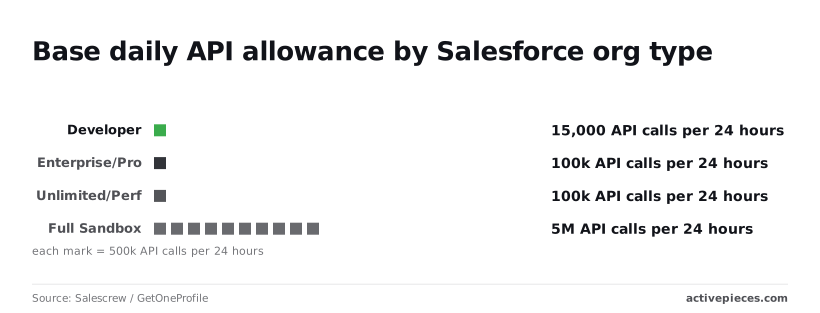
According to Salescrew / GetOneProfile, a Developer org gets 15,000 calls, so a sync that touches 20,000 records one call at a time fails before the day is out.
Enterprise/Pro and Unlimited/Performance both start at 100,000, which means moving up an edition doesn't by itself raise the base figure.
5,000,000 is what Full Sandbox allows, so a load test there says nothing about whether the same job fits in production.
Not every tier is in the table; the allowance is shared across every integration in the org, not per app.
Concurrent request and Bulk API limits
Past daily volume there's a second gate: Salesforce also caps how many long-running requests an org can have open at once, and Bulk API and Pub/Sub API carry their own allocations separate from the REST count.
A job can therefore stall with plenty of daily budget left. When it does, the run trace shows which limit was hit, and that decides whether you spread calls out or switch to Bulk.
You won't find a public rate for extra capacity: it's sold through Salesforce sales, so the cost's a quote you negotiate. Settle your call budget first, because that figure's what you bring to the conversation.
Salesforce API errors and fixes
That budget matters because the first error you meet's the one that says you spent it. Only some of the seven below are worth retrying.
The table shows what causes each error and whether a second attempt can succeed; take from it that retrying fixes locks and limits, never bad requests or dead credentials.
| Error | Cause | Fix | Retry? |
|---|---|---|---|
| REQUEST_LIMIT_EXCEEDED | Org daily or concurrent limit reached | Batch calls, cut volume | After the limit frees |
| INVALID_SESSION_ID | Expired or invalid access token | Refresh the token | Once, after refresh |
| MALFORMED_QUERY | Invalid SOQL | Correct the query | No |
| 403 insufficient access | Profile or permission set lacks access | Grant object or field access | No |
| NOT_FOUND | Wrong record ID, endpoint, or API version | Verify the path and ID | No |
| UNABLE_TO_LOCK_ROW | Concurrent updates on one record | Serialize writes | Yes, with backoff |
| invalid_grant | Revoked or expired refresh credentials | Reauthorize the connection | No |
Expect the errors in the order the three groups below follow.
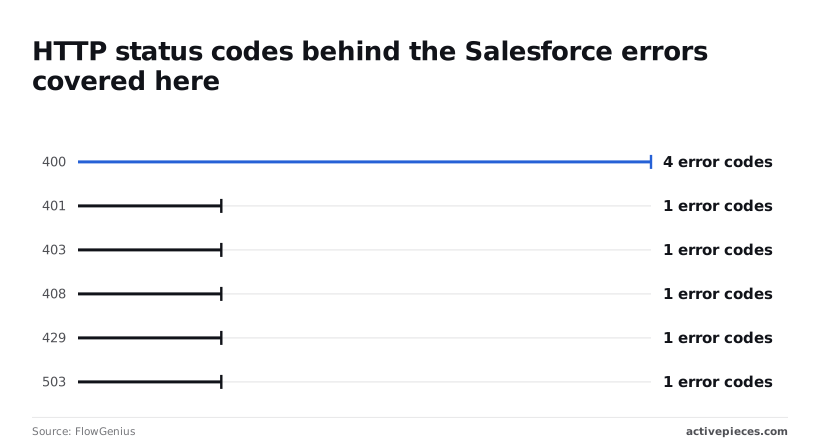
Only three of FlowGenius's nine codes are throttling or timeout signals: FlowGenius lists one code each at 429, 503, and 408. Those are the ones where waiting works, and your run trace shows which call hit the wall.
Where FlowGenius counts one code at 401 and one at 403, the two behave differently. Expired tokens recover with a refresh, but a 403 means your access setup is wrong, so no retry will help.
Four of FlowGenius's nine codes sit at HTTP 400, the largest cluster. Most failures are therefore request-side mistakes you correct once, not capacity problems you wait out.
Strategies for Salesforce API limits
10,000 record updates can cost anywhere from 50 to 10,000 API calls, depending on how you batch them, meaning your implementation choice could swing costs by a factor of 200. You spend the daily allocation by call count, not by record count.
Read the call counts in the chart that follows before you pick a pattern; it sets the three approaches side by side.
Updating one record per request through single REST takes 10,000 API calls, so one nightly sync can empty a day's allocation.
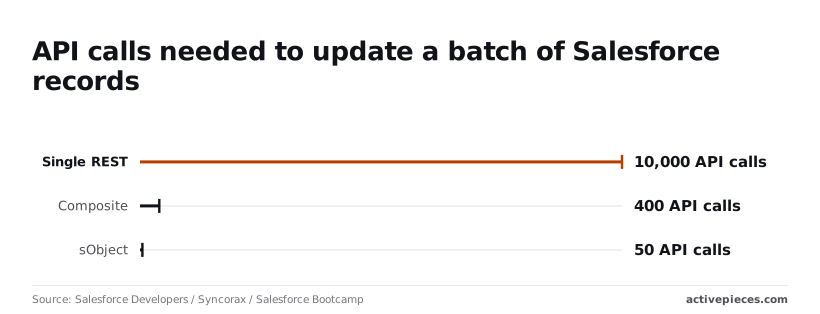
Composite requests bring that to 400 calls, and sObject Collections to 50. Collections are the cheapest of the three for this job, which leaves your budget for everything else.
Daily API request allocation by edition
Every integration draws from one pool, because Salesforce sets the daily allowance across the whole org, by edition and licence count. A runaway job therefore starves the others.
Run each integration under its own integration user, and check the /limits resource on a schedule. Its raw output shows remaining calls before a failure does.
Daily totals are one gate and concurrency is another. Long-running requests can be refused even when the daily pool's nearly full.
Bulk API suits large loads because it processes asynchronously in batches. The cost is that results arrive later, so it's a poor fit for anything a user is waiting on.
Add exponential backoff for refused calls. Prefer selective SOQL filters on indexed fields, and cache reference data that rarely changes.
Cost of extra Salesforce API capacity
Treat extra allocation as the last lever: it can be bought, but only after the cheaper fixes. Change data capture replaces polling, so you stop spending calls to learn that nothing changed.
Batching, caching and a dedicated integration user cost design time once. Bought capacity is a recurring cost that hides an inefficient request pattern.
Set the call budget first, then decide whether you need more.
Call the Salesforce API without code using Activepieces
Once the call budget is set, Activepieces, an MIT-licensed automation builder with 750 integrations, lets you spend it without writing the requests yourself.
You describe the process, it builds the flow, and every call it makes counts against the same org-wide allocation your edition already gives you.
Nothing about the limits changes because the caller's a builder instead of a script.
What the Salesforce integration covers
Activepieces ships a Salesforce integration, one of the 750 in its open source monorepo, a prebuilt connector that handles authentication and the request format for you.
You authorise it once against your org, then pick actions and triggers from a list instead of composing REST calls.
That removes the syntax work, which was never where these integrations failed.
What it doesn't remove is the gating. If your edition doesn't include API access, the connection will authorise and the first call will still be refused.
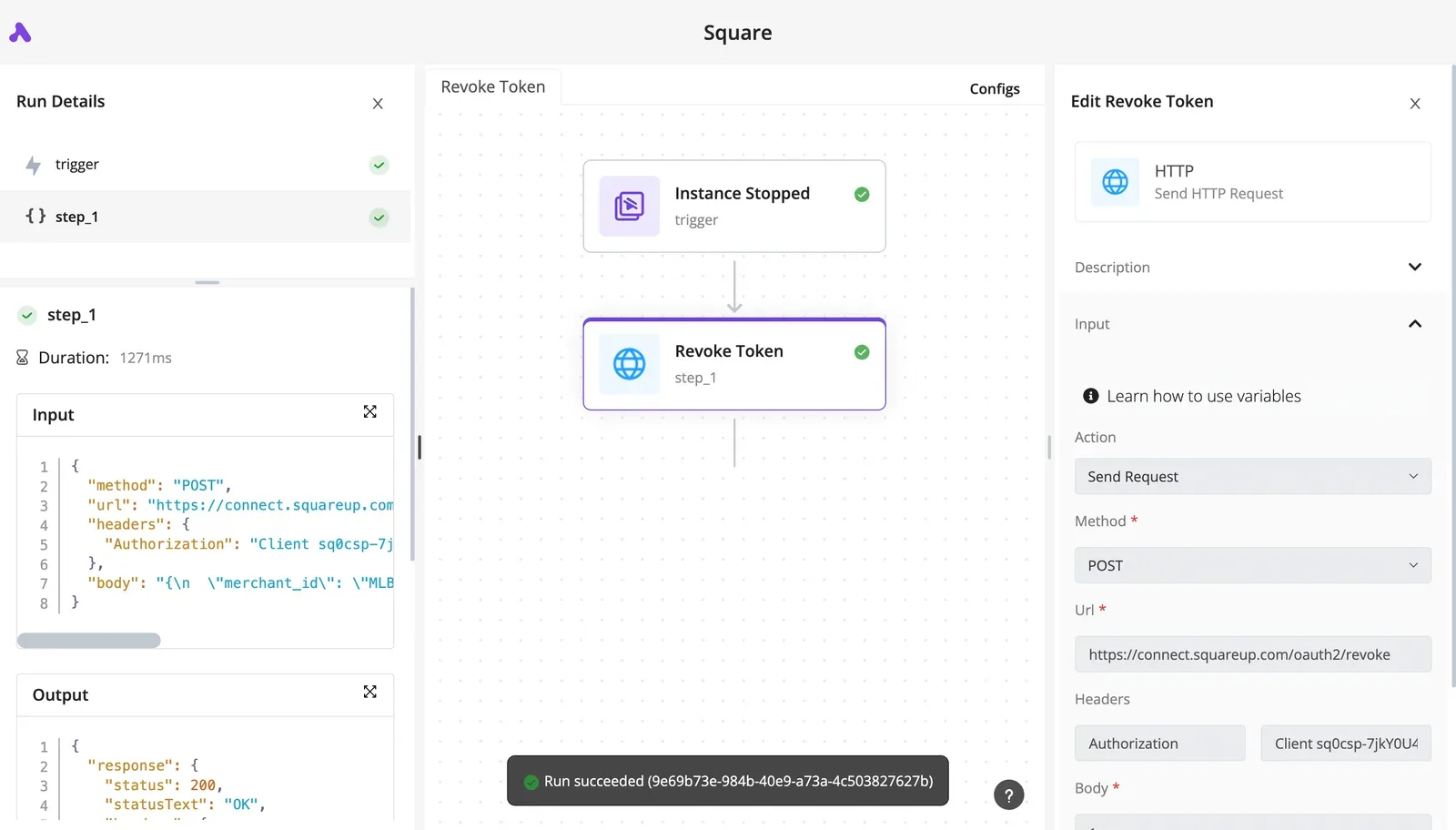
When a limit error or an access refusal happens, the run trace's where you see it: each step records the raw response Salesforce returned.
The error appears as the response body on the step that hit it, not as a vague failure on a dashboard.
When the integration has no action for an endpoint you need, the HTTP step sends a request to any Salesforce REST path, reusing the connection you already authorised.
It draws on the same org allocation, so a custom call costs exactly what it would from code.
Read the response in the trace before building on it.
You decide the access setup and the call budget. The tool carries out the rest.
- Confirm your edition includes API access and check your daily allocation.
- Create a dedicated integration user with only the permissions the flow needs.
- Authorise Salesforce in Activepieces with that user; flows are unlimited on every plan, including free, so the number of flows never competes with your call budget.
- Trigger on record change, not polling, so idle checks don't spend calls.
- Check
/limitsafter day one and compare it to your budget.
That last check tells you whether the budget held, and the trace tells you which step to change if it didn't.
Frequently asked questions
When one run goes wrong, the trace answers what happened; these four questions cover what it can't.
Is the Salesforce API free to use?
There's no separate charge per call, but access comes with the edition you already pay for, and every call draws on the org's daily allowance.
A failed call can still spend that allowance, so a looping step costs you capacity even when it returns nothing useful.
If you need more room, the route's a purchase through your Salesforce account team, not a setting you can toggle.
Does a Salesforce Developer Edition org include API access?
Yes. Developer Edition is a free test org that ships with API access enabled, so you can build and test the whole flow there at no cost.
Because its daily allowance's small, a load test in that org will hit the ceiling long before it tells you anything about production.
Before you plan around a paid edition, confirm API access: Professional, among others, treats it as an add-on.
Is there a Salesforce API key I can just paste in? No. Salesforce authenticates through OAuth, using a connected app you create in the org, and the call carries a short-lived access token instead of a permanent key.
The consequence is that you must decide which user the integration runs as and what that user can see, because the token inherits those permissions.
How often does Salesforce retire old API versions? Salesforce ships a new API version with each seasonal release and retires the oldest versions on a published schedule.
A flow pinned to an old version keeps working until its retirement date, then fails all at once. Check the retirement notes in the release documentation and keep your version current.
Related reading
Build it
Set this up in minutes.
No code required. Connect your accounts, and Activepieces runs it from there.
Start free Talk to sales