Twitch API: Access, Tokens and Rate Limits (2026)

Nov 1, 202616 min read
Once you register an app, both are free to use: Helix is Twitch's REST API, and EventSub is its real-time event system. Neither does everything on its own: Helix only answers when asked, and EventSub only tells you about things you subscribed to.
The Twitch API is the combination of Helix, a REST API you call to fetch or change Twitch data such as streams, users, and channels, and EventSub, an event system that pushes notifications to your app when subscribed events occur, both authorized with tokens tied to a registered Twitch app.
Here's the whole surface in one place, so you know which integration each later problem belongs to:
Twitch API features and capabilities
- Helix REST API: request/response endpoints for reading and changing Twitch data, such as channels, streams, users, and chat settings.
- EventSub: subscriptions that push events to you when something happens, instead of you polling for it.
- App registration: the step in the Twitch developer console that gives you a client ID and secret.
- OAuth tokens: the credentials every Helix call and most subscriptions carry, in app or user flavors.
- Cost: no charge for API access, per Twitch's developer docs at dev.twitch.tv.
Expect most production trouble to come from the last two items, and the subsections below take the integrations in order.
Helix REST endpoints
If you want to script something on Twitch, Helix probably covers it: looking up users and channels, checking whether a stream is live, reading and updating channel information, and moderation and chat actions. Every request needs your client ID plus a bearer token.

Which token type you hold decides what you can do. Public data may work with an app token, but anything acting on behalf of a streamer needs that streamer's authorization with the right scopes.
EventSub for real-time events
To keep from hammering Helix in a loop, you use EventSub. You subscribe to an event type, such as a channel going live or a follow, and Twitch delivers it over a webhook or a WebSocket.
It won't backfill what you missed while disconnected, and subscriptions have their own token and verification requirements. That's the trigger plumbing most hand-built integrations get wrong, and the reason Activepieces, with 746 integrations and an MIT-licensed core, is worth considering later, you won't hand-build those 746.

Don't assume Twitch ships a maintained client for your language. The developer docs link out to libraries, and many of those are community projects, so check each one's last release and which EventSub transports it supports before you depend on it.
Twitch's own CLI is useful for testing event delivery locally.
According to Twitch's developer documentation, registering an app and calling Helix or EventSub carries no fee. What you pay instead is limits: request quotas and subscription caps shape your design, and the docs on dev.twitch.tv are the authority for current terms.
Everything below works on Activepieces' free plan. Start without code or a credit card.
Register a Twitch app for API credentials
You register the app in the Twitch developer console. When you finish you hold two credentials: a Client ID that identifies your app and a Client Secret that proves it is yours.

Neither exists until you do this, so every call, token request and subscription depends on these steps.
Register your app in the Twitch developer console
Log in to the Twitch developer console with the Twitch account that should own the app. If the account does not yet have two-factor authentication, the console may ask you to enable it before it lets you register.
Do that first, because the registration form stays out of reach until it's done.
Open the Applications tab and choose Register Your Application. The form asks for four things:
- The name must be unique across Twitch, so a generic name may be rejected. Pick something specific to your project.
- The OAuth Redirect URL is where Twitch sends the user after they approve access, carrying the authorization code. It must match the redirect your code uses exactly, down to the trailing slash. A mismatch is the most common reason the first login attempt fails, so check it before debugging anything else. For local testing, a localhost address is the usual choice.
- For the category, choose the one closest to what you are building. It's descriptive and doesn't change what the API lets you do.
- For the client type, choose Confidential if your code runs on a server you control and can keep a secret. Choose Public only for apps that ship to a user's device, such as a browser-only tool, where a secret can't stay hidden. Public clients don't get a secret, so this choice decides which login flows are open to you. Confidential is the right pick for a backend integration.
Create the app, then open it from the list to manage it.
Copy your Twitch Client ID and secret
On the management page, the Client ID sits in plain view. Copy it. It's not sensitive on its own, since it appears in login URLs.
For a Confidential app, choose New Secret to generate the Client Secret. Twitch shows it once. Copy it immediately.
If you lose it, you can't read it back; you generate a new one, and that invalidates the old one. Anything still using the old secret will start failing, so update every place it lives at the same moment.

Store your Twitch Client Secret safely
Treat the Client Secret like a password. Keep it out of source control, front-end code and screenshots, and put it in an environment variable or a secrets manager instead.
If it ever leaks, generate a new one in the console right away and replace it everywhere.
Later, keeping the secret in a managed store helps too. A connection dialog that accepts a stored reference instead of a pasted value, as in the screenshot below, means the raw secret never has to sit in a config file.
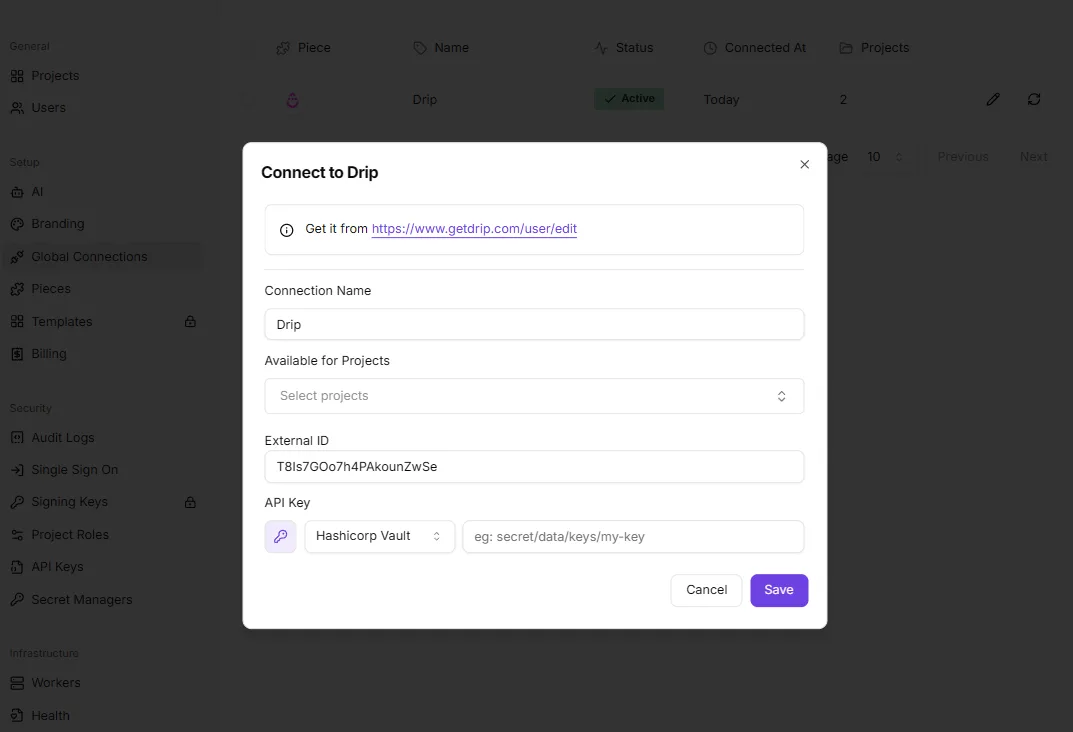
It shows a "Connect to Drip" dialog with a connection name, an External ID and an API key field that can point at a Hashicorp Vault path.
Credentials go in once, in one place; that is the pattern, not the app. With the Client ID and secret in hand, the next step is turning them into a token that Twitch will accept.
Token types for your first Helix request
Use an app access token for public data like Get Users or Get Streams, and a user access token when the call acts on a specific viewer or broadcaster's account.
The table below shows how the three token types differ, and the thing to take from it is that only the app token can be minted with nothing but your Client ID and secret.
| Acts for whom | Scopes | Expiry and refresh | Example endpoints | |
|---|---|---|---|---|
| App access token | Your application, no user | None | About 5,011,271 s (~58 days); no refresh token, request a new one | Get Users, Get Streams |
| User access token | One authorized user | Per-endpoint, granted at consent | About 14,124 s (under 4 hours); refresh token | Get Followed Streams, Modify Channel Information |
| Device flow | One user, authorized on another device | Same as user token | Device code about 14,820 s (~4 hours) to finish authorizing; then a user token with refresh | Same as user token, for apps with no browser |

Because those lifetimes decide how much code you write around auth, the next sections cover the request, the first call, and keeping a token alive.
Twitch app access token versus user token
According to the hellostream twitch_api auth module, an app token lives 5,011,271 seconds, roughly 58 days. That means a server-side job can run for weeks on one token, and your only duty is to fetch a fresh one before it lapses.
Because a user token lasts 14,124 seconds, under four hours, any integration acting for a person will hit expiry several times a day and must refresh without a human present.
The device code window is 14,820 seconds, about 4 hours and seven minutes. So a TV or CLI app has a generous but finite time for the user to approve it on another device.
Send a client-credentials POST to Twitch's token endpoint with your Client ID, secret, and grant type:
curl -X POST 'https://id.twitch.tv/oauth2/token' \
 -d 'client_id=YOUR_CLIENT_ID' \
 -d 'client_secret=YOUR_CLIENT_SECRET' \
 -d 'grant_type=client_credentials'
You get back access_token, expires_in and token_type set to bearer. Store expires_in alongside the token, because nothing will warn you before it stops working.
On every call, Helix wants two headers: the token as Authorization: Bearer, and your Client ID as Client-Id. Leave either out and you get a 401.
curl 'https://api.twitch.tv/helix/users?login=twitch' \
 -H 'Authorization: Bearer YOUR_ACCESS_TOKEN' \
 -H 'Client-Id: YOUR_CLIENT_ID'
When the call works, you get JSON with a data array holding the user's id, login, display_name and related fields. An empty data array means the login doesn't exist, not that auth failed.
Validate and refresh Twitch API tokens
Call the validate endpoint to check a token before you trust it:
curl 'https://id.twitch.tv/oauth2/validate' \
 -H 'Authorization: OAuth YOUR_ACCESS_TOKEN'
If the token is valid, you get back its client_id, scopes and expires_in. An invalid one returns 401.
For a user token, exchange the refresh token at the same token endpoint with grant_type=refresh_token, and save the new refresh token it returns. App tokens have no refresh step, so on expiry you repeat the client-credentials request.
Easier to see it running than to read about it: set it up free, no card.
Twitch API rate limits, quotas and EventSub limits
On every token, Helix, Twitch's REST API, meters a bucket of 800 points per minute, so a failed refresh is rarely your first problem; spending the bucket carelessly is.
Helix request bucket and headers
One point per ordinary call, and the bucket refills continuously. Every response carries Ratelimit-Limit, Ratelimit-Remaining and Ratelimit-Reset.
Read Ratelimit-Remaining before you loop, because an empty bucket returns HTTP 429 and your retry logic then competes with itself. List endpoints cap a page at 100 items, so you follow the cursor value and each extra page costs another point.

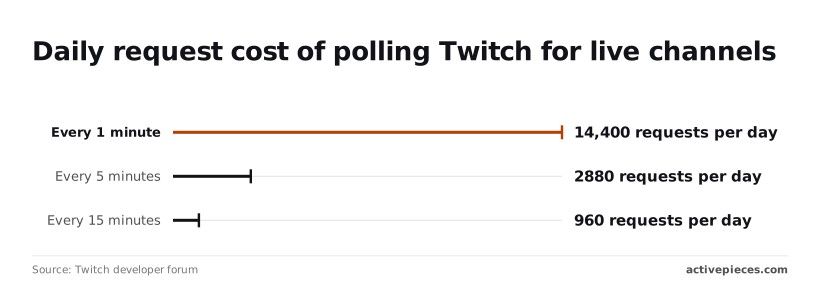
For live detection, polling barely dents the budget.
The Twitch developer forum states that every 5 minutes is 2,880 a day and every 15 minutes is 960, so the choice between intervals reflects a trade-off between data freshness and API quota consumption. Rate limits aren't what rules polling out.
What rules it out is that you learn about a stream going live up to a full interval late.
If you would rather not hand-write the polling loop, describe the stream-live alert in Activepieces' built-in chat and it publishes the flow itself: a live flow in your account, the same artefact a builder would have assembled by hand, running under the same RBAC and audit logs as every other flow.
Each execution leaves a run trace, so a 429 from an empty bucket appears as a failed step with Twitch's response attached, not as silence. MoneyGram, Moneypenny, Alan and FundingSocieties run Activepieces in production.
EventSub subscription cost limits
When you move to push, EventSub has its own ceiling: max_total_cost. It's 10,000 for an app token and only 10 for a user token. Each subscription has a cost, and some types cost 0 or 1 depending on authorization.
A user-token integration can therefore hold only a handful of subscriptions before Twitch refuses the next one. A single WebSocket connection also tops out at 300 subscriptions, so a larger deployment needs several connections.
Twitch EventSub polling, webhook and WebSocket transports
Look at the failure column first: the three transports differ most in what happens when your receiver is unavailable, not in speed. Pick based on that.
| Transport | Latency | Subscription limits | When the receiver is down |
|---|---|---|---|
| Polling | Up to one full interval | None beyond the request bucket | Nothing is lost if you read current state; short-lived events between polls are missed |
| Webhooks | Near real time | max_total_cost 10,000 on an app token |
Twitch retries failed deliveries, then revokes the subscription if the endpoint keeps failing |
| WebSocket | Near real time | 300 per connection; max_total_cost 10 on a user token |
Events during a dropped connection are not replayed, so you must reconnect and reconcile |
If you choose webhooks, you need a public HTTPS endpoint that answers quickly and verifies signatures. WebSockets need no public endpoint but need a process that stays connected.
For anything where a missed event costs you something, add a periodic poll to reconcile whichever push transport you choose.
Common Twitch API errors and solutions
When a Twitch API call fails, it usually traces back to one of three causes: the wrong token type, a missing scope, or a subscription Twitch has ended.
The table shows the cause and fix for each error, so you can tell a bug in your request from a state problem on Twitch's side.
| Error | Cause | Fix | Docs |
|---|---|---|---|
| 400 | Missing or malformed parameter, or a combination the endpoint rejects | Compare your query against the endpoint's required parameters | API reference |
| 401 | Expired, invalid or wrong-type token, or a Client-Id that doesn't match the token | Validate the token, refresh it, and confirm the Client-Id | Validating tokens |
| 403 | Token lacks the scope, or its user isn't allowed to act on that channel | Re-authorize with the scope the endpoint lists | Scopes |
| 404 | The user, clip or resource ID doesn't exist or was removed | Treat as a normal outcome and re-check the ID | API reference |
| 429 | You exceeded the rate limit | Wait until the reset time, then retry | Rate limits |
| EventSub verification failure | Your callback didn't answer the challenge correctly | Return the challenge string as plain text | Handling webhooks |
| Signature mismatch | HMAC computed over the wrong bytes or with the wrong secret | Sign the raw body with your subscription secret | Verifying messages |
| Revoked subscription | Twitch ended it: authorization revoked, user removed, or callback failing | Fix the cause, then create a new subscription | Revocation |
A retry changes nothing until you fix the cause, so that comes first.
Twitch API 401 and 403 token errors
When you get a 401, the token is usually the wrong kind. An app access token can't call an endpoint that acts for a user, so the call fails however fresh the token is. Validate first, then refresh.
A 403 means the token is valid but not permitted, so read the scope listed on that endpoint and re-authorize the user with it.
Sleep until Ratelimit-Reset instead of retrying on a fixed delay, which just burns the next window. Twitch returns rate-limit headers with responses, so the time is always there to read. Fan-out jobs that call per-user endpoints in a loop hit this first.
When the callback doesn't echo the challenge, verification fails. Signature checks fail when a framework parses the JSON before you hash it, so keep the raw body. Revocations arrive as a message, so handle them and resubscribe. Your reconciling poll covers the gap.
Pass Get Clips a filter such as a broadcaster or clip ID; an empty result isn't an error. Follow the cursor in the pagination field until it's absent, and expect clips you stored earlier to disappear.
Call Twitch endpoints without code using Activepieces
When you build by hand, app credentials, token handling and retries are what hurt, and Activepieces can absorb them. It leaves you the parts that are genuinely logic.
Build a stream-live alert workflow
Start with the simplest flow that earns its keep: a Discord message when a channel goes live. You store your Twitch client ID and secret as a connection once, so they never sit in a step's fields or in a repo.
The flow starts on a schedule or a webhook trigger, calls Helix for the stream status of your channel, and branches: if the response contains a stream, post to Discord; if the data array is empty, stop.
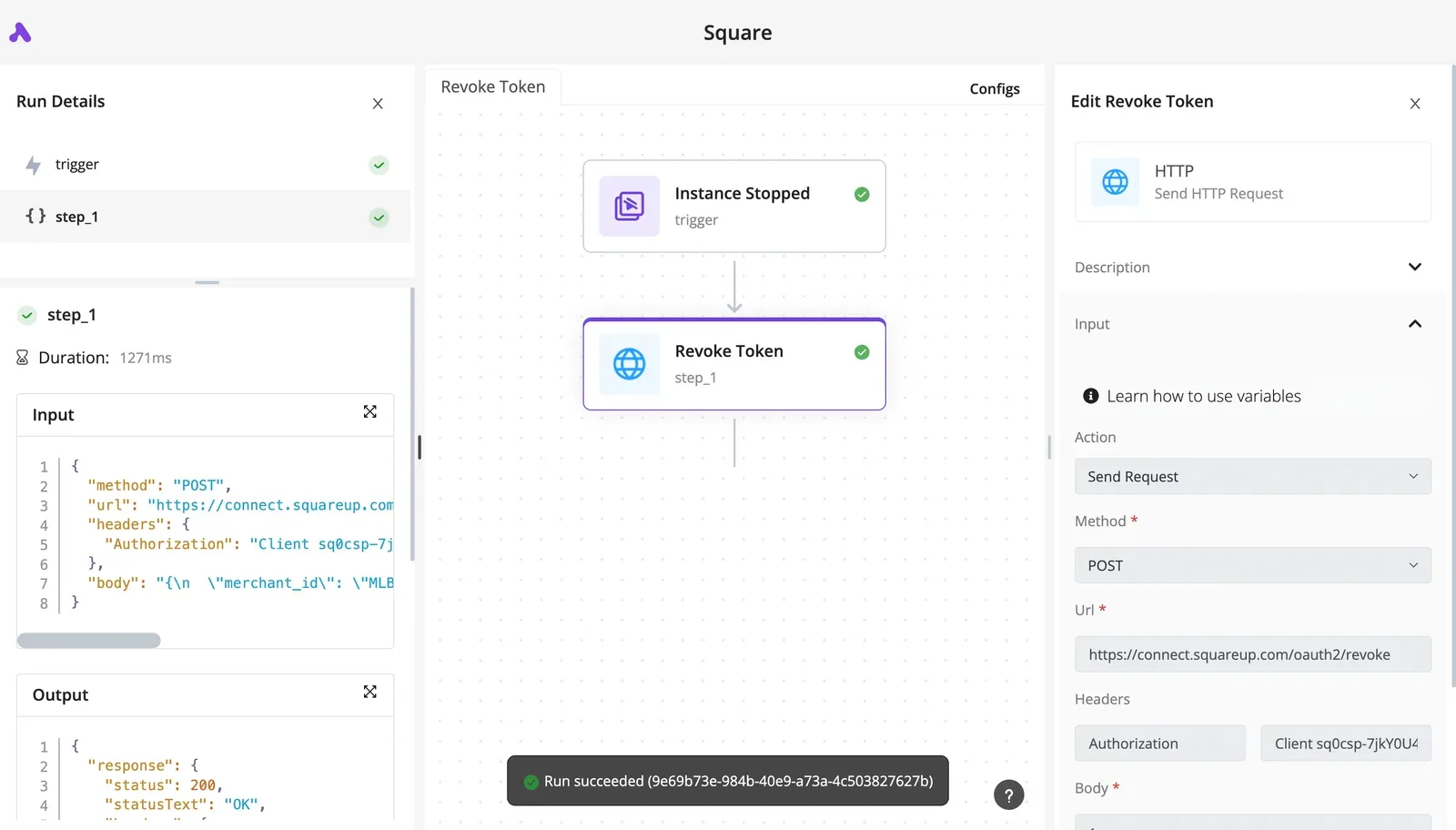
Same shape for logging new clips to a sheet. Call the clips endpoint, loop over the results, and append rows to a spreadsheet.
Because you can open each run and see the exact request and response for every step, a failed 401 or 429 shows up as a red step with the body Twitch returned, not as silence.
What the platform doesn't do is decide which token you need. App access tokens cover public data like stream status and clips.
Anything tied to a user's account needs a user token with the right scopes. That choice is yours, and you make it when you set up the connection.
Call other Twitch endpoints with the HTTP step
Where the built-in Twitch actions don't cover an endpoint, the HTTP step calls Helix directly. You send the request with the client ID header and a bearer token from your connection, and you get the same run trace.
Check the integration's current action list in the editor before assuming a gap, since coverage changes.
This is also where rate limits become your problem again. Add a retry on 429 responses, and let the flow wait before the next attempt instead of looping tightly.
When to use code for Twitch API
Stay in code when you need a long-lived EventSub subscription that must react in real time. Stay there too when you process high-volume chat, or when your logic needs tests and version control around it.
A polling flow checks on a schedule, so it can miss short streams and lags behind the event.
Monday checklist:
- Store the client ID and secret as a connection, not in step fields.
- Choose the token type: app token for public data, user token when scopes are involved.
- Test with a validate call before you build anything on top of the connection.
- Set a retry on 429 for every Helix step.
- Decide whether EventSub needs code, or whether polling is accurate enough for the alert.