
Segment API: Tracking, Public and Profile APIs (2026)

Oct 29, 202613 min read
"Segment API" isn't one API but three. The Tracking API sends events in, which is the part most teams wire up first, often alongside a workflow tool like Activepieces that fires those events from other systems. The Public API manages workspace resources.
The Profile API reads a user's data back.
Each takes a different credential, so choosing by job comes before choosing a key.
The table below shows each API's job, credential and a sample endpoint. All were checked against segment.com/docs on 2026-10-29.
Choose the right Segment API
| API | Job | Credential type | Example endpoint | Checked on |
|---|---|---|---|---|
| Tracking API | Send events | Source write key | api.segment.io/v1/track |
2026-10-29 |
| Public API | Manage workspace | Public API token | api.segmentapis.com/sources |
2026-10-29 |
| Profile API | Read profiles | Access token for the profile space | profiles.segment.com/v1/spaces/{space_id}/collections/users/profiles/{id}/traits |
2026-10-29 |
The Tracking API accepts track, identify and page calls from your servers or apps. It authenticates with a write key tied to a single source.
That means a leaked key lets someone add data to that source, not reconfigure your workspace.
Configuration belongs to the Public API: sources, destinations and other workspace resources. It uses a Public API token issued to the workspace, so it's the credential to guard most closely.
When you need what Segment already knows about a user, such as traits, the Profile API returns it from your profile space. It uses its own access token, separate from both keys above.
Ask what the request does to the data. If it adds events, use the Tracking API. If it changes how the workspace is set up, use the Public API. If it reads an existing profile, use the Profile API.
Everything below works on Activepieces' free plan. Start without code or a credit card.
Stage 1: Get access and the right key
You need two credentials, a source Write Key for sending events and a Public API token for managing the workspace, and you must pair both with your workspace's region.
Create a source and copy its Write Key
The Write Key belongs to one source, so it identifies where data comes from rather than who you are.
- Open Connections, then Sources, and add the source that matches the real producer, such as a website.
- Open that source's Settings, then API Keys.
- Copy the Write Key.

The consequence is blast radius. A Write Key can only write events into its own source, so a leaked key pollutes one stream and can't touch settings.
Create a Public API token
This token manages the workspace itself, including sources and destinations. It doesn't send events.
- Open Workspace Settings, then Access Management, then Tokens.
- Create a token, give it a name that states its owner and purpose, and choose the access level it needs.
- Copy it immediately, because Segment displays it only once.
Because a token acts with the permissions you grant, the access level is the guardrail. Start with the narrowest level that covers the job and widen only when a request fails for lack of permission.
Choose the US or EU Segment endpoint
A correct key sent to the wrong region fails as though the key were bad. Segment workspaces live in a region, and the base URL must match it.
A correct key sent to the wrong region fails as though the key were bad.
| API | Credential | US base URL | EU base URL |
|---|---|---|---|
| Tracking API | Write Key | https://api.segment.io/v1 |
https://events.eu1.segmentapis.com/v1 |
| Public API | Token | https://api.segmentapis.com |
https://eu1.api.segmentapis.com |
With the key and endpoint paired, run one request and look for a clean result.
A passing test shows a "Tested Successfully" status with a green checkmark, followed by an Output block holding a chatId, a message of "hello", and a files array with one download link.

Stage 2: Send a minimal working request
Before any limit matters, one request has to work. That means a single curl call to the Tracking API with your Write Key, confirmed in the Debugger, then one read-only call with a different credential.
This is the pilot stage of adoption, and the five steps below are the whole pilot. If a team can't finish them in one sitting, it isn't ready for the stages that follow.
- Export the Write Key as an environment variable.
- POST to
api.segment.io/v1/trackwith Basic auth, using the key as username and an empty password. - Send JSON with
userId,eventandproperties. - Check the source Debugger for the event.
- Make a Bearer-authenticated GET that lists sources.
Export the Write Key first so it never lands in your shell history or a shared script.
export SEGMENT_WRITE_KEY="your_write_key"

curl -X POST https://api.segment.io/v1/track \
 -u "$SEGMENT_WRITE_KEY:" \
 -H "Content-Type: application/json" \
 -d '{"userId":"user_123","event":"Signup Completed","properties":{"plan":"trial"}}'
Leave out the colon after the variable and curl prompts for a password, which means a scripted call hangs. That colon is the empty password.
Confirm the event in the Segment Debugger
Open the Debugger for the source that owns that Write Key. Look for "Signup Completed" under user_123.
A successful HTTP response only shows Segment accepted the request, so use the Debugger to check that the event arrived under the right name with the right properties. If it's missing, the usual cause is a key copied from a different source.

List sources with the Public API
Here a separate API takes a separate credential. It uses a Bearer token, not the Write Key, and it manages the workspace instead of sending events.
A GET that lists sources is read-only, so it's a safe first test of the token. If the call is rejected, the token is wrong or lacks access.
Easier to see it running than to read about it: set it up free, no card.
Stage 3: Segment API pricing by volume
Once every team copies the baseline, the bill grows with monthly tracked users (MTUs), not with how many calls each team makes, so volume is the lever to plan around.
How Segment counts and charges usage
Segment charges by MTU, meaning distinct users it sees in a month. The table shows the two published tiers and flags what Segment doesn't publish; figures were checked on 2026-10-29, meaning the rates are current as of today.
Only the price and volume columns can be budgeted today.
| Plan | Price unit | Volume | Request limit | Payload | Batch |
|---|---|---|---|---|---|
| Free | $0 | 1,000 MTUs | Set per endpoint, not per plan | Not confirmed | Not confirmed |
| Team | $120/month | 10,000 MTUs, then $0.012, $0.011, $0.010 per MTU | Set per endpoint, not per plan | Not confirmed | Not confirmed |
| Business | Unpublished | Unpublished | Set per endpoint, not per plan | Unpublished | Unpublished |
Business pricing is negotiated. The request limits don't change by plan, and they are throttles rather than charges.
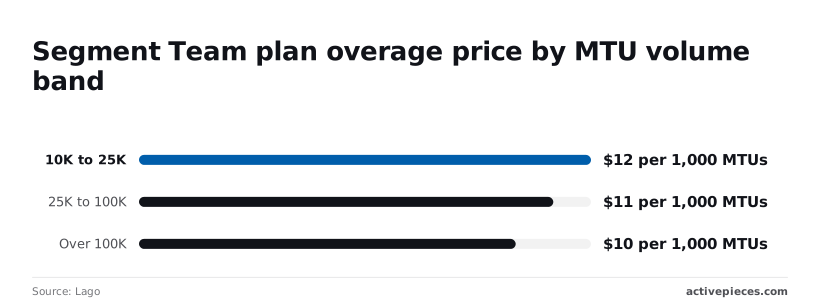
The Segment Public API docs show that User Management allows 600 requests per minute, Events 60, and Audiences 50, which means Audiences will be your constraint if syncing at volume. A team syncing audiences therefore hits its ceiling twelve times sooner than one managing users.
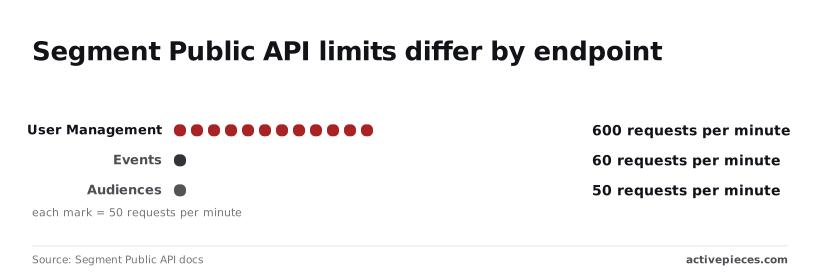
Segment Team plan overage by MTU band
Team overage falls in three bands, per Lago. From 10K to 25K MTUs it's $12 per 1,000 MTUs.
From 25K to 100K it drops to $11, and over 100K to $10, as your per-MTU cost improves when reaching higher tiers, so moving from the mid-tier to the highest tier saves you $1 per unit.
The discount is about 17% from the top band to the bottom.
Segment Connections cost as MTUs grow
Apply those bands and the Connections cost at three checkpoints comes out like this: - 10,000 MTUs costs $120 per month, the Team base price with no overage.
- 100,000 MTUs costs $1,125 per month, a bit over nine times the bill for ten times the users.
- 1,000,000 MTUs costs $10,125 per month, so the effective rate settles near $10 per 1,000 MTUs.
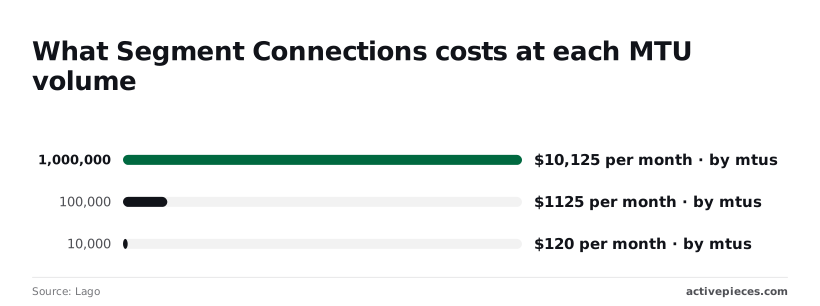
The cost that surprises teams is the jump from 10K to 100K, where a pilot becomes a line item that finance reviews.
A shared template that enforces one tracking plan keeps duplicate users out of the count, which is the cheapest way to flatten that curve.
Stage 4: Handle rate limits and common errors in production
Handle production failures by matching each status code to one cause, because a template that retries everything blindly turns a bad key into an outage.
Use the list below as the on-call triage order:
- A 401 means the wrong write key or region. Confirm the key belongs to that source and the endpoint matches the workspace region, then fix the configuration instead of retrying.
- A 429 means you exceeded the rate limit. Confirm it against a spike in call volume, then back off and batch.
- A 413 means a single event or a batch is over the size limit. Log payload size to confirm, then trim or split.
- A 400 means malformed JSON. Replay the body through a validator to confirm, then fix the serializer.
- A 200 with data missing downstream means the event was accepted but dropped by schema blocks or filters. Confirm in the debugger, then fix the tracking plan or filter.
Fixing Segment API 401 and 403 errors
Retrying these never helps, so fail fast and alert. The usual cause is a key copied from a different source, or a request sent to the wrong regional endpoint.
A 403 usually points to a token without the scope the call needs. Bake the region and key lookup into the shared template so the first team to hand-edit it can't break everyone else.
When a 429 arrives, retry with exponential backoff and random jitter, and honor any retry-after hint in the response. Backoff alone only delays the problem, so group events into batches to cut request count.

Neither a 413 nor a 400 is transient, so route those events to a dead-letter queue instead of retrying.
Split oversized batches before sending, and validate JSON at the producer. Stamp every event with a stable messageId so a replay after a fix doesn't create duplicates.
If an event is accepted but missing downstream, remember that acceptance only means Segment received the call. Check the debugger for blocked events, then review the destination's filters and mappings.
What Activepieces does about this
Most of the trouble above comes from credentials and routing living in scattered scripts, where one team's copied Write Key or hand-edited region URL breaks another's work. Activepieces moves that glue into one place.
A flow starts at a webhook trigger, which is the receiving end of Segment's Webhooks destination, and each later step that calls a Segment API uses a stored connection instead of a key pasted into code.
The Public API token sits in one connection owned by the platform team, and product teams build flows without ever seeing it. That keeps the separation this article argues for, with the Tracking, Public and Profile credentials kept apart.
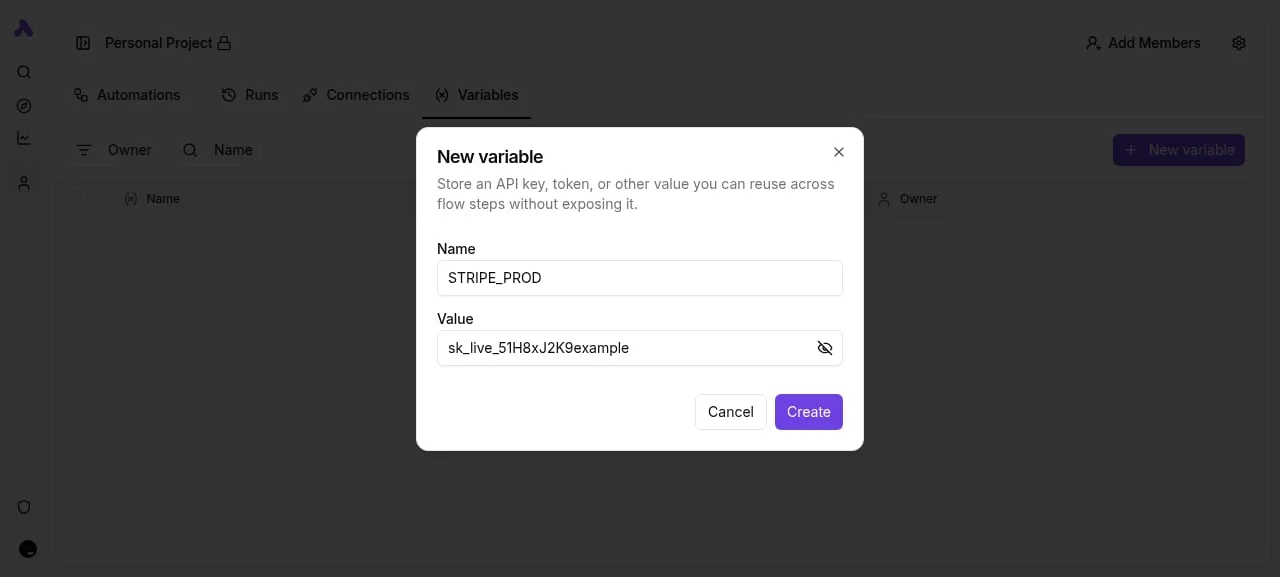
The flows also make the Stage 4 triage easier to follow. A 401 or 403 fails on the step that made the call, and you can open that run and see which connection and URL it used.
A 429 is handled where you can see it, because you can put a retry or a delay on the one step that hits the Events limit rather than on everything.
Dead-lettering a 400 or 413 becomes a branch in the flow instead of a convention you hope every team follows.
You don't need to hire anyone to build this. You describe the routing in the built-in chat and it publishes the live flow, the same one a builder would have assembled by hand.
That flow runs under the same RBAC and audit logs as every other flow, and each run leaves a trace anyone on the team can read.
MoneyGram, Moneypenny, Alan and FundingSocieties run it across 746 integrations, so the Segment hop is rarely the only system in the chain.
The community edition is open source under the MIT licence. If your data-governance team wants event payloads to stay inside your own infrastructure, you can self-host it, and the same flows run there.
Start with the one-sitting pilot from Stage 2: point a Webhooks destination at a test flow, confirm the event in both the Debugger and the run log, and only then let other teams copy it.
Frequently asked questions
Once replays are safe, the remaining questions are about cost, access and which API to call. Modern-datatools confirms that each answer below was checked against Segment's documentation in October 2026.
You aren't charged per request for calling the Tracking API, but the events you send count toward the usage your plan meters, so cost follows volume.
A large backfill can use up allowance as quickly as live traffic does, because a replay sends the same events again. Check your plan's metering before you resend a big batch.
Does Segment have an API for reading user profiles?
Yes, the Profile API, which belongs to Segment's identity product (Unify) and reads a single profile's traits and event history. It's a different API from the Tracking API and uses a separate access token, so your Write Key won't open it.
If your workspace doesn't include that product, there's nothing to read from, and the request fails however well it's formed.
Can I send events from the server instead of the browser?
Yes. Server-side libraries and the HTTP Tracking API accept the same call types as the browser library, authenticated with the source's Write Key.
Server-side sending keeps the key out of page code and isn't affected by ad blockers, which makes it the safer path for events that matter to billing or revenue.
Because the server can't infer browser-only context, such as page and campaign details, your code has to pass it in.
How do I receive Segment events in another tool without code?
Add the Webhooks destination to a source and point it at the URL of the receiving tool. Segment then forwards each event as an HTTP request, and you write no code on the Segment side.
The receiving tool must accept and parse Segment's payload shape. If it can't, you need a transformation step in between, and that step is code.
Is the Segment Public API the same as the Config API?
No. The Public API is the current management API for workspaces, sources, destinations and related settings. The Config API is its older predecessor, and Segment points new work at the Public API.
Starting on the Public API avoids a later migration and keeps you on the API Segment is actively developing.
Neither is the Tracking API, which only receives events and is the one that uses a Write Key.