
Shopify GitHub Integration for Themes (2026 Guide)

Nov 22, 202616 min read
Shopify GitHub Integration Means Two Different Jobs
How to connect Shopify to GitHub fastest
Theme code goes through Shopify's own GitHub connection. Anything a store does, such as an order, a product change or a customer, goes through a workflow whose trigger is a Shopify event and whose action writes to GitHub. Checked 22 November 2026.

A Shopify GitHub integration for themes is a connection between a Shopify store and a GitHub repository that syncs theme files through Shopify's own GitHub connection, while store events such as orders, products and customers reach GitHub through no-code workflows built in tools like Activepieces.
Pick by what you're moving, because the two jobs don't overlap. Files that make up the storefront (Liquid templates, CSS, JavaScript) are code, and Shopify handles them natively.
A line like "when a new order arrives, open a GitHub issue" is an event, and the native connection never sees it.
In the workflow route, a Shopify trigger fires, and a GitHub step creates the issue, commit or comment. No code is involved, and the workflow tool is Activepieces.
If a step you need isn't offered as a ready-made action, a plain HTTP request step calls the GitHub API directly.
It shows both routes from the store to the repository.
For everything the theme connection never touches, the workflow route covers these:
- Opening a GitHub issue when a customer reports a defect or a refund spikes.
- Committing a nightly export of product or inventory data to a repo, so changes have a history.
- Posting a comment or label on a pull request when a store event relates to a release.
Look at where each one starts: not from a file that changed but from something that happened in the store, which is why they belong in a workflow.
What Shopify's own theme connection already does
39.5% of stores use a free theme, according to StoreInspect, so a large share start from a stock codebase that updates and customizations will eventually collide on. Version control matters because most stores run code someone has edited.
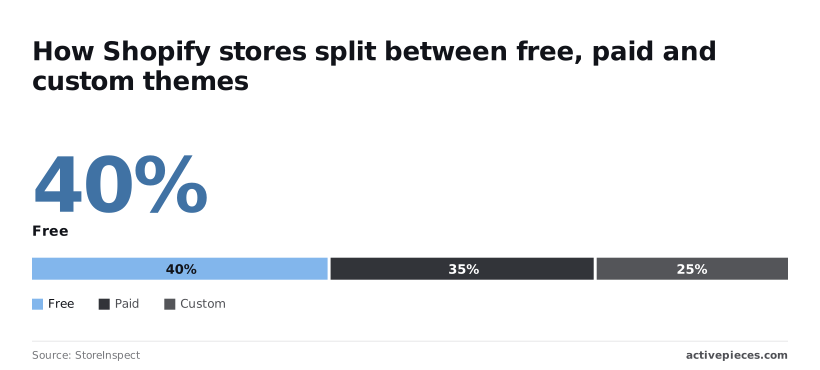
Another 35.2% use a paid theme, which means a vendor-supplied codebase you tweak and then have to reconcile with every upstream release.
The remaining 25.3% run a custom theme, where the code is entirely yours and a bad edit with no history means rebuilding from memory, so they're one error away from hours of manual recovery.
Add those up and every store has either inherited code to protect or its own code to protect. Shopify's connection handles that by linking a theme to a branch in your repository, so edits are tracked as commits rather than overwritten.

It stops at theme files. Orders, products and customers never pass through it, so for those you move to the workflow route, which the next section sets up step by step.
This takes minutes, not a project: automate it in Activepieces free.
Five Shopify and GitHub Workflows Worth Building
Pick a trigger name from the connector listing and every workflow here starts the same way: you choose an event, then a write, and skip the code.
The table shows the five, with HTTP marking any step the connectors don't list, so you can see at a glance which ones need a raw request.
| Shopify trigger | GitHub action | Job done |
|---|---|---|
| "New Order" | "Create Issue" | Opens a fulfilment issue for orders needing manual handling |
| "Updated Product" | HTTP | Writes the changed product to a file in a repo as a record |
| None; starts on GitHub "New Release" | Shopify "Add Product to Collection" | Moves products into a collection when a release ships |
| None; starts on GitHub "New Push" | HTTP | Posts a team alert when theme code changes |
| "New Cancelled Order" | "Add Labels to Issue" | Labels the matching issue as cancelled |
Prices and plan limits checked against activepieces.com and activepieces.com on November 22, 2026.
Count the rows with a listed step on both sides and you get three. The other two show how soon you'll reach for a plain request.
Start with "New Order" and finish with "Create Issue". Filter first, because an issue per order will bury your tracker. Route only orders with a note, a flagged tag or a shipping method your warehouse handles by hand.

There is no matching GitHub step for writing a file from "Updated Product", so use an HTTP request to GitHub's repository contents endpoint. Updating an existing file requires that file's current version identifier, so the workflow must fetch it first or the write fails.
Write one file per product, not one shared log, so two near-simultaneous edits don't collide.
Here GitHub is the trigger: "New Release" fires, and "Add Product to Collection" files the product. Pass the product ID in the release text and read it from there. If the ID is missing, the step fails quietly, so add a check before it.
Don't rebuild theme file sync, which belongs to Shopify's own GitHub connection. Let a "New Push" trigger watch the theme repo and post a message to your team's chat through an HTTP request. It reports the change but never moves a file.
When the step you want is not listed
Although "Cancel Order" and "Close Order" exist on the Shopify side, labelling an issue doesn't appear in the steps I can confirm. Use an HTTP request to GitHub's REST API with a token, and check the connector listing before you build, since it changes.
Whichever route you take, keep the token's permissions narrow so one stray request can't touch more than the repo it needs.
Shopify to GitHub workflow stages
Connect both accounts, add a Shopify trigger, map its fields into a GitHub action, then test and publish: that is the whole workflow, in four stages. A narrow token is already in hand, so the first stage is mostly pasting it in the right place.

In Activepieces, a Shopify trigger starts the flow and a GitHub action writes the result, which suits event-driven jobs like these well and theme file sync weakly.
The catalogue behind those two steps holds 750 integrations, counted directly from the packages/pieces/community directory of the MIT-licensed open source monorepo on GitHub, and roughly 60% of them were contributed by the community, so each one is a directory of source you can open and read rather than a line on a vendor's list.
When the GitHub action you want isn't listed, the HTTP request step covers it today, and a missing connector is something you can generate with AI and add privately to your own instance rather than wait on a vendor release for.
MoneyGram, Moneypenny, Alan and FundingSocieties run it in production.
Stage 1: Connect Shopify and GitHub
Create one connection per app inside your automation tool, and name each so you can tell them apart later, such as "shopify-store-prod" and "github-orders-repo".
For Shopify, the connection needs your store's address and an access token from a custom app you create in the store admin. Give that app read access only to the data the trigger needs, such as orders.
For GitHub, paste the fine-grained token scoped to the one repository, with write access to issues or contents, whichever your action uses. If a connection dialog accepts the token but later steps fail with a permissions error, the scope is the first thing to check.
A connection can save successfully and still be too narrow for the action you pick.
Stage 2: Add the Shopify trigger and load a test event
Add a new workflow, choose Shopify as the trigger, and pick the event that matches your goal, for example a new order or a new product. Select the Shopify connection from Stage 1. Then load sample data.
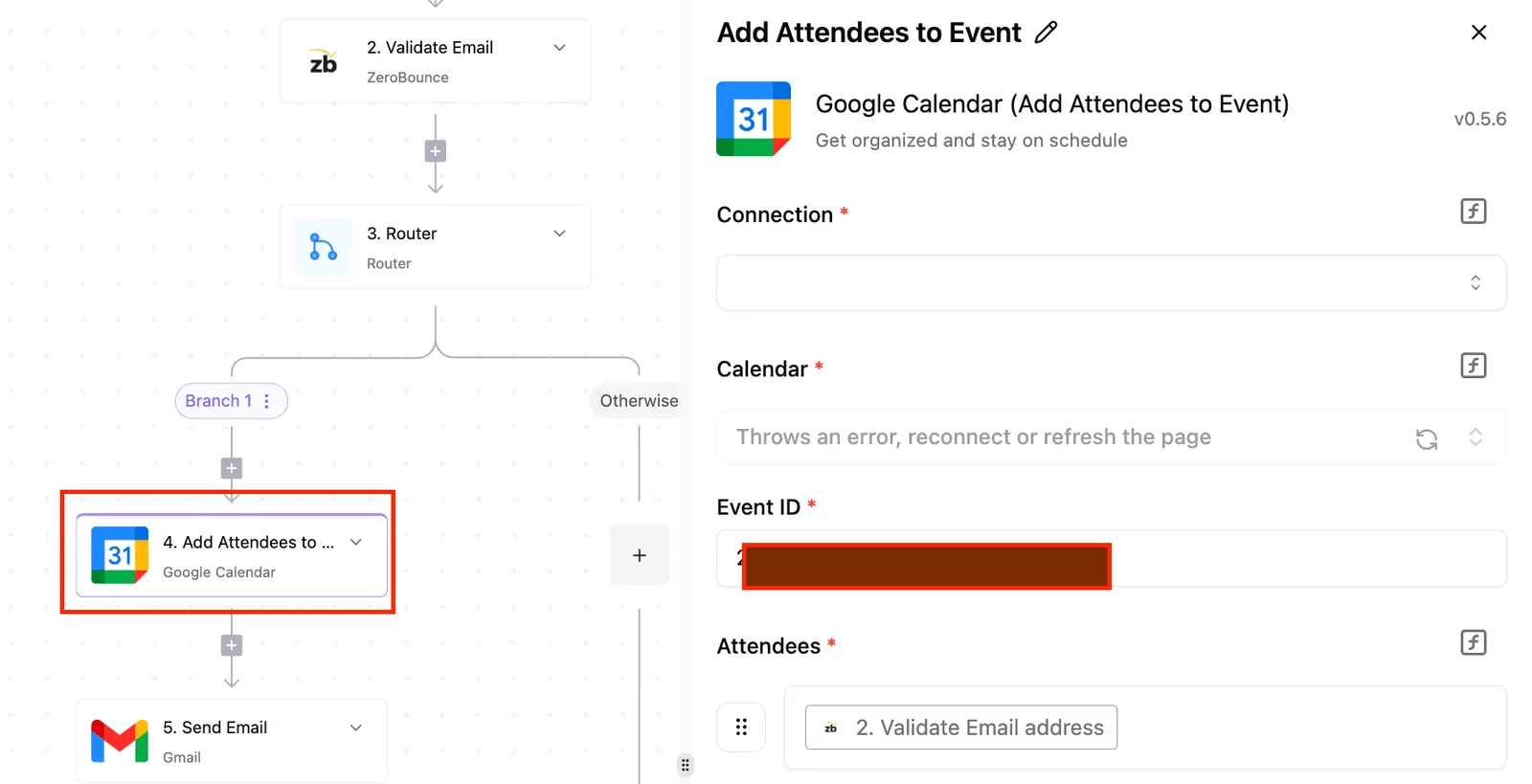
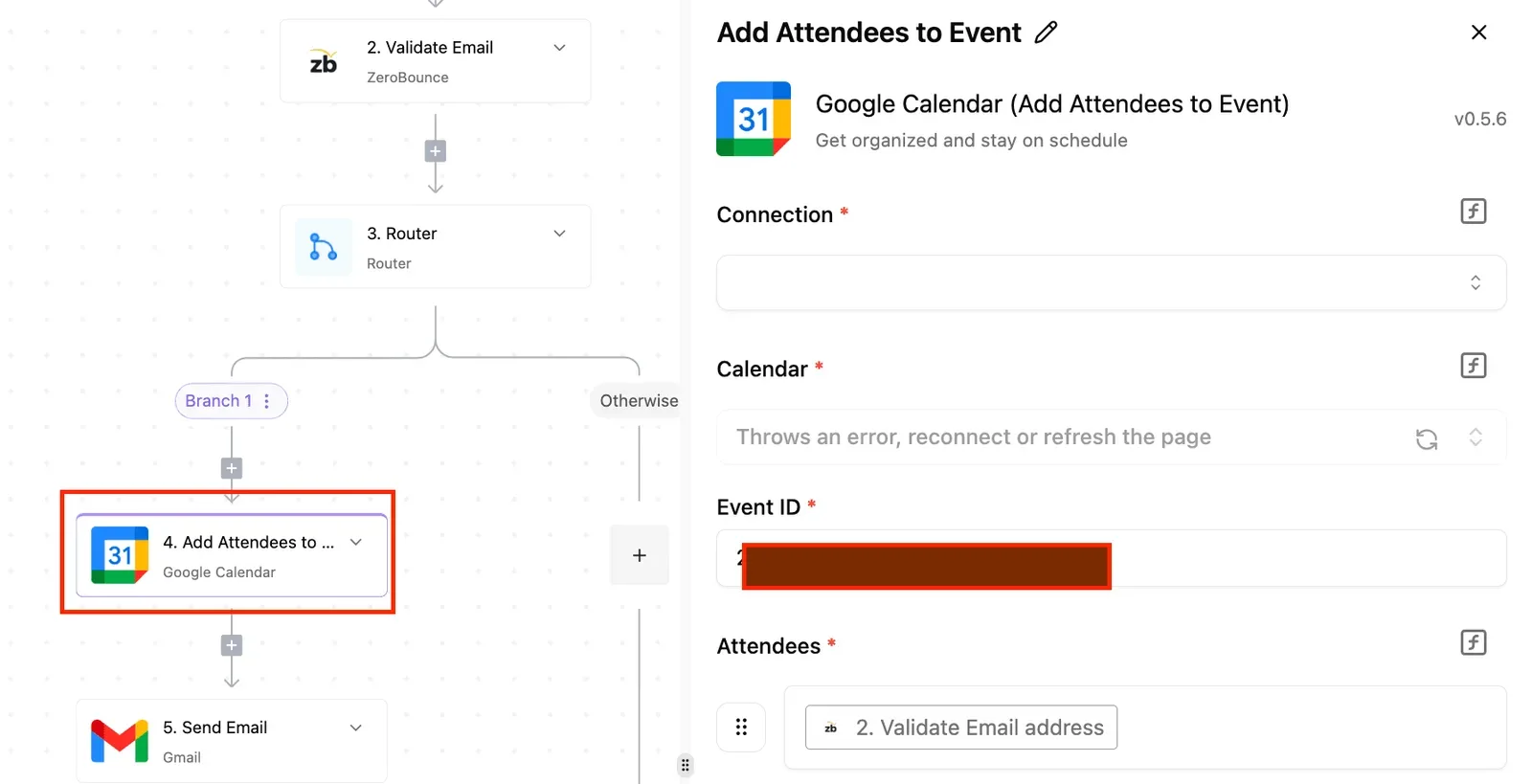
In the screenshot below, a trigger step is configured this way: the trigger event selected, the connection attached, and a sample-data section reporting that data loaded successfully.
Take from the screenshot that the trigger is only usable once it has a real sample, because the next stage's field picker is built from that sample.
If the sample is empty, create a test order or product in the store first and load again, otherwise you'll have nothing to map.
Stage 3: Add the GitHub action and map fields
Add a GitHub step after the trigger, select your GitHub connection, and choose the action. Creating an issue is the safest first choice because it's easy to inspect and easy to delete.
Pick the repository, then map fields by inserting values from the trigger sample: order number into the title, customer-facing details and line items into the body.
Leave out anything personal that the repository doesn't need, since repo contents are often visible to more people than the store admin is.
If the action you want isn't in the connector's list, add a plain HTTP request step instead and send the call to GitHub's API with the same token in an authorization header.
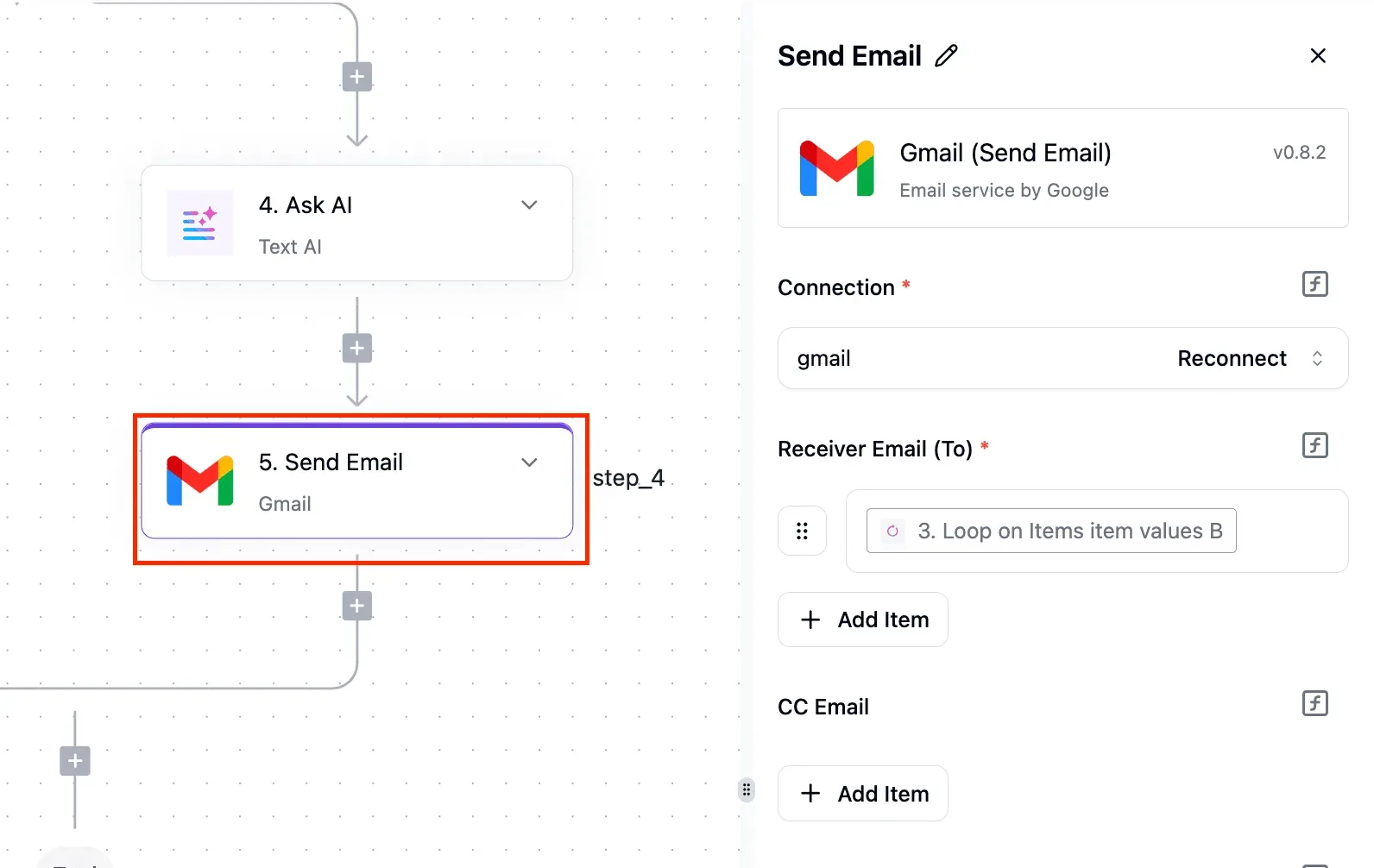
Stage 4: Test, publish and check the result
Run the test on the GitHub step, then open the repository and confirm the issue or file appeared with the right values in the right places. Fix mapping mistakes now, while only a test record exists.
Once it looks right, publish the workflow, then place one real order or product edit in the store and watch the repository again. That second check proves the live trigger fires, not just the sample.
If nothing arrives, look at the workflow's run history before changing anything, because it shows whether the trigger never fired or the GitHub step rejected the request.
You can follow the rest of this with the builder open. Start free, no card.
Limits and Errors When Connecting Shopify to GitHub
Once run history shows which side failed, the cause is almost always one of six, and this table pairs each with the symptom you'll see and the fix.
| Failure | Cause | Symptom | Fix |
|---|---|---|---|
| Scopes | Token lacks write permission on repository contents | GitHub step returns 403 | Reissue the token with contents write access |
| Repo access | Token or app isn't installed on that repository | 404 on a repo that exists | Grant the token or app access to that repo |
| Rate limits | Too many GitHub calls in an hour | 403 or 429 mid-batch | Authenticate, batch writes, slow the workflow |
| Trigger not firing | Workflow unpublished or Shopify connection lapsed | Empty run history | Publish, then reconnect Shopify |
| Duplicate runs | Shopify resends an event it thinks was missed | Same commit or issue twice | Skip events whose ID you already processed |
| Theme files out of scope | Workflow steps aren't a theme sync | Theme edits never reach the repo | Use Shopify's own GitHub connection |
For the four that need more than one line, the sections below go further.
When you see a 403, the token is valid but not allowed to write; a 404 usually means it can't see the repository at all.
GitHub hides private repos from unauthorised callers, so a missing repo is a permissions problem, not a typo. Fix access first, then scopes.
GitHub hides private repos from unauthorised callers, so a missing repo is a permissions problem, not a typo.
Rate limits on Shopify and GitHub
Checked 22 November 2026, GitHub's REST API allows unauthenticated callers 60 requests per hour, so a workflow that forgot its credentials stalls within the first minute of a busy sale.
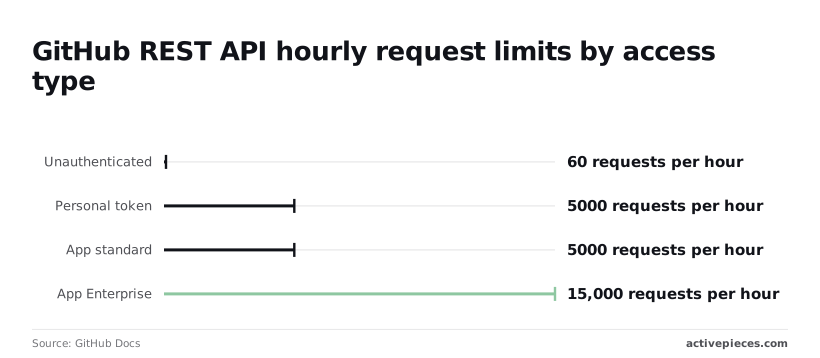
5,000 per hour is what a personal token and a standard app each get, which covers most stores. An app on Enterprise gets 15,000, worth it only if one order burst writes several files per order.
Shopify also throttles its own calls, so spread bulk work out.
If run history is empty, the trigger never fired: republish and reconnect. Two identical runs mean a retry, so store the event ID and skip repeats. Late runs are normally queueing behind a rate limit.
What to do when theme files are the goal
Use Shopify's own GitHub connection. Shopify's file size checks cap assets at 20,480 KB per file, so images and scripts rarely hit it.
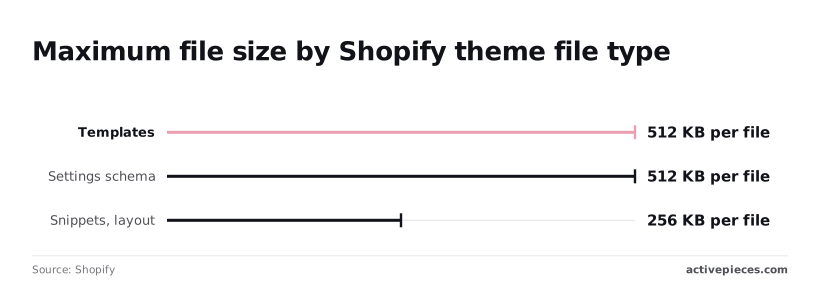
1,536 KB is the cap on locales and settings data, enough unless you carry many translations, meaning language support becomes a strategic choice. Templates and settings schema are capped at 512 KB, and snippets and layout at 256 KB.
Those small caps mean a bloated snippet fails first, so split it before blaming the sync.
When Activepieces Fits and When Another Tool Does
If you want to own the workflow that reacts to Shopify events and writes to GitHub, Activepieces fits, and it isn't the right tool for theme files, which Shopify's own GitHub connection already syncs.
Zapier and Make for Shopify GitHub integration
Check whether your current tool does the job first, because other automation tools connect these two apps as well.
Zapier and Make both offer Shopify and GitHub connectors, so if your team already pays for one of them and the trigger and action you need are in its list, build it there. Moving a working setup gains you nothing.
If all you need is a theme in version control, Shopify's native GitHub connection is enough on its own. It syncs theme files and does nothing else, so don't add a workflow tool for that job.
Before you commit to any hosted tool, check how it counts steps and what it caps. A workflow that looks up an order, formats a file, checks for an existing one and then commits will hit a step limit sooner than a two-step demo suggests.
Choosing when automation makes sense
When one or more of these apply, Activepieces runs the Shopify-to-GitHub workflow for you:
- You want to read how a step behaves instead of guessing from documentation: Activepieces ships an MIT-licensed core, and its 750 integrations sit in the open source monorepo as directories of source you can open.
- You need to self-host, so order data passes through infrastructure you control rather than a vendor's cloud.
- Your workflows run long, and you want unlimited steps on its plans so a lookup-and-check chain doesn't force you to cut logic.
- A connector lacks the action you need, and you want the HTTP request step to call the Shopify or GitHub API directly without leaving the same workflow.
For this setup, that last point matters. Where a connector doesn't list the step you need, the HTTP request step covers it. You supply the endpoint and the authentication, and the rest of the workflow stays as it is.
If none of them describes your situation, one of the tools above will serve you just as well, because these reasons are about control and room to grow.
Build and test your first workflow
Start small and prove the path before adding logic:
- Create a new flow, choose Shopify as the trigger, and pick the event you care about, such as a new order.
- Add a GitHub step as the action, point it at a test repository, and run it against a test order.
- Check that the commit or issue appears where you expect it.
Only after that works should you add conditions, lookups or an HTTP request step for anything the connector doesn't list. A flow that fails at the first GitHub write is far easier to debug when it has only two steps, so root causes surface immediately.
Frequently asked questions
Start with two steps, and these are the questions that come up once they run, revealing what actually constrains you versus what seemed important in theory, which means you cannot know the real constraints until you've begun the work.
Yes, Shopify can sync a theme with GitHub without an automation tool. Theme file sync belongs to Shopify's own GitHub connection, which links a theme to a repository and branch from the admin.
Use that for theme code. Keep the workflow for events such as new orders or product changes that you want recorded in a repository, because a workflow isn't a replacement for theme sync.
Does a Shopify GitHub workflow need any code?
No. When the flow runs, a Shopify trigger starts it and a GitHub step writes the result. You fill in fields and map values from the trigger into them.
You type something code-shaped in only one place, the plain HTTP request step, where you paste a URL, a header and a short JSON body. That's data you copy from documentation, not a program you write.
Can I use a private repository?
Yes, provided the token you give the workflow can see that repository.
The usual failure is a token that works on your public repositories and returns "not found" on the private one, which looks like a typo in the repo name but is a permissions gap.
Scope the token to the single repository the flow writes to, and give it only the permission to change contents. If the first write fails, check the token before you check the flow.
Does self-hosting affect workflow execution?
Self-hosting changes nothing about how the flow is built, but the Shopify trigger has to be able to reach your server.
Shopify sends its event notifications to a public HTTPS address, so an instance sitting behind a firewall or on a private network will never receive them.
The flow will look healthy while nothing starts.
Check that the connector you need is present in your installed version before you design around it.
How do I do something the connector doesn't list?
Add an HTTP request step and call the service's own API directly. Look up the endpoint in the Shopify or GitHub API documentation, set the method and URL, add an Authorization header carrying your token, and send the body the endpoint expects.
Build the call as a single step first and test it alone. Once it returns a success response, wire it into the flow, so any failure afterwards isn't a mystery about the request itself.
Related reading
References
Build it
Set this up in minutes.
No code required. Connect your accounts, and Activepieces runs it from there.
Start free Talk to sales