Stripe Shopify Integration: How to Set It Up (2026)

Nov 16, 202614 min read
A Stripe Shopify integration is an automation where an event in one app, such as a paid order, triggers an action in the other. The fastest build connects both accounts in a no-code automation platform such as Activepieces and starts with one workflow.
This was checked on 16 November 2026.
A no-code Stripe Shopify integration is a set of event-driven workflows, built in an automation platform, that use triggers and actions from each app, such as a new Stripe payment or a new Shopify order, to pass data between them without custom code.
The diagram shows Shopify holding orders, inventory and customers, Stripe holding payments, invoices, refunds and disputes, and the automation between them passing events both ways.
People automate the re-keying:
- matching a paid order to its payment
- logging refunds against the original sale
- flagging disputes beside the order they belong to
Stripe Shopify integration: what it is and the fastest path
It falls unevenly. Avalara and Webgility put owners at 31.7 hours a month of data entry and CFOs at 33.4, so the person closest to the decisions already loses most of a working week to typing.
41.5 hours is what outside accountants log, about 31% more than owners. In-house accountants log 99.18 hours, roughly 3.1 times the owner's figure, or close to five hours of every working day, so accounting consumes most of their workweek.

You need:
- admin access to the Shopify store
- permission to create API keys or webhooks in Stripe
- one written sentence naming the event and the outcome, for example "when an order is paid, record the payment"
In-house accountants log 99.18 hours, roughly 3.1 times the owner's figure, or close to five hours of every working day, so accounting consumes most of their workweek.
Because a platform's Shopify step list includes triggers such as New Order, New Paid Order and New Cancelled Order, the Shopify side rarely needs custom work. For Stripe steps with no listed action, a plain HTTP request fills the gap.
To get there fastest, make four moves:
- Connect your Shopify and Stripe accounts.
- Choose New Paid Order as the trigger, since it fires only once money has actually cleared.
- Add one action, either a listed Shopify step or an HTTP request to Stripe, and map the order ID into it.
- Run it against a single test order and compare the result with your books before turning it on.
This takes minutes, not a project: automate it in Activepieces free.
Five Stripe and Shopify workflows worth building first
Build these five in order, starting with the payment-success sync, because each closes a gap between what Stripe recorded and what Shopify shows. The table lists each trigger, its actions, the job done and where a plain webhook or Custom API Call is still needed.

| Workflow | Trigger and app | Actions and app | Job done | Webhook or Custom API Call needed |
|---|---|---|---|---|
| 1 | Shopify "New Paid Order" | Stripe "Create Customer" | Matches each paid order to a Stripe record | No |
| 2 | Stripe "Payment Failed" | Gmail "Send Email" | Tells the customer the payment failed | No |
| 3 | Stripe "Payment Failed" | Slack "Send Message To A Channel" | Alerts finance | No |
| 4 | Catch Webhook (Stripe refund or dispute event) | Slack "Send Message To A Channel" | Alerts the team | Yes, webhook |
| 5 | Catch Webhook (Stripe payment event) | Shopify Custom API Call | Updates the order in Shopify | Yes, Custom API Call |
Prices and plan limits checked against activepieces.com and activepieces.com on November 16, 2026.
A webhook is a message Stripe sends to a web address when an event happens, such as a refund or a dispute.
The Catch Webhook step supplies that address: copy its URL, paste it in the Stripe Dashboard under Developers > Webhooks, and pick the event types to send, for example charge.refunded and charge.dispute.created.
An HTTP request, or Custom API Call, runs the other way: your workflow calls the app's API directly when no listed step does the job.
Start the workflow from the Shopify "New Paid Order" trigger and follow it with the Stripe "Create Customer" action. Every paid order now carries a Stripe customer, so revenue per customer stops depending on matching emails by hand.

Some platforms' Stripe step lists carry no refund or dispute trigger, so this one starts from a Catch Webhook step pointed at a Stripe event. Where your platform does list New Refund or New Dispute, use that trigger instead and skip the webhook.
Add a Slack "Send Message To A Channel" action. A dispute nobody sees for a week's a deadline you may already have missed.
Failed payment, notify the customer and the finance channel
Use the Stripe "Payment Failed" trigger, then Gmail "Send Email" for the customer and Slack "Send Message To A Channel" for finance.
Take an illustrative funnel from Omno: 20,000 checkout sessions started, and of those, per RockGymPro support, 2,400 left before choosing a payment method, so Stripe never saw them. Another 1,100 dropped at authentication, 1,500 were declined and 15,000 paid.
5,000 lost sessions make a quarter of the traffic. Only the 1,500 declines give you a customer and a reason to write to, which's why this workflow comes before any attempt to chase the rest.
Other tools that connect Stripe and Shopify, and when each fits
When a listed-step workflow isn't the right fit, five alternatives connect the two, and each fits a different constraint: Shopify's own automation for store-only logic, hosted builders for speed, n8n or an open-source builder with an MIT-licensed core for self-hosting, and custom code for full control.
Read the step-limits column first, because that's where cost per run changes as volume grows. The table below sorts the options by who runs the infrastructure and how each one meters your work.
| Option | No-code setup | Hosting | Open source | Step limits | Best fit |
|---|---|---|---|---|---|
| Shopify built-in (Flow) | Yes | Shopify | No | Bounded by Flow's own run rules | Logic that stays inside the store |
| Stripe built-in (dashboard webhooks) | Partly; needs a receiving endpoint | Stripe sends, you receive | No | None on the Stripe side | Feeding events to something you already run |
| Zapier | Yes | Zapier cloud | No | Metered in tasks per plan | Fastest start, low volume |
| Make | Yes | Make cloud | No | Metered in operations per plan | Branching scenarios with visual mapping |
| n8n | Yes | Cloud or self-hosted | Source-available, not OSI open source | Cloud metered per execution; self-hosted bounded by your server | Teams that want to own the host |
| Activepieces | Yes | Cloud or self-hosted | Yes, MIT-licensed core | Unlimited flows on every plan, including free; self-hosted bounded by your server | Open source and self-hosting |
| Custom webhook code | No | Wherever you deploy | Your choice | None, beyond your own limits | Gaps no listed step covers |
Choose Activepieces when the Stripe or Shopify step you need isn't listed, such as the refund or dispute trigger above.
A closed catalogue grows on its vendor's schedule, so you wait; here a missing connector can be built with AI and kept private to your own instance, with no vendor release in the way.
Roughly 60% of the 750 integrations, counted directly from the open source monorepo, were built by community contributors, which means integration development is primarily community-driven.
When another Stripe Shopify integration tool fits better
Use Shopify's built-in automation when every step lives inside the store. Use Zapier or Make when you want a working flow today and your volume is small enough that metered pricing stays trivial.
Use n8n if you want to self-host and accept its license terms. Write custom code only for the one step no listed trigger or action covers.
You can follow the rest of this with the builder open. Start free, no card.
Build the Stripe Shopify workflow in Activepieces step by step
Connect both accounts, start from one trigger, map the fields into a single record, test against Stripe's test mode, then publish. Every run is one event, so the cost of a run is the cost of one payment you no longer reconcile by hand.

Step 1: connect both accounts. Add the Stripe piece and the Shopify piece as connections, each authorized once. Use Stripe's test-mode key now. A test key means the first runs can't touch a real charge, which makes mistakes in your mapping free.
Step 2: add the Stripe or Shopify trigger
Pick the side where the event you care about starts. The Stripe integration lists triggers such as "New Payment", "Payment Failed", "New Refund" and "New Dispute".
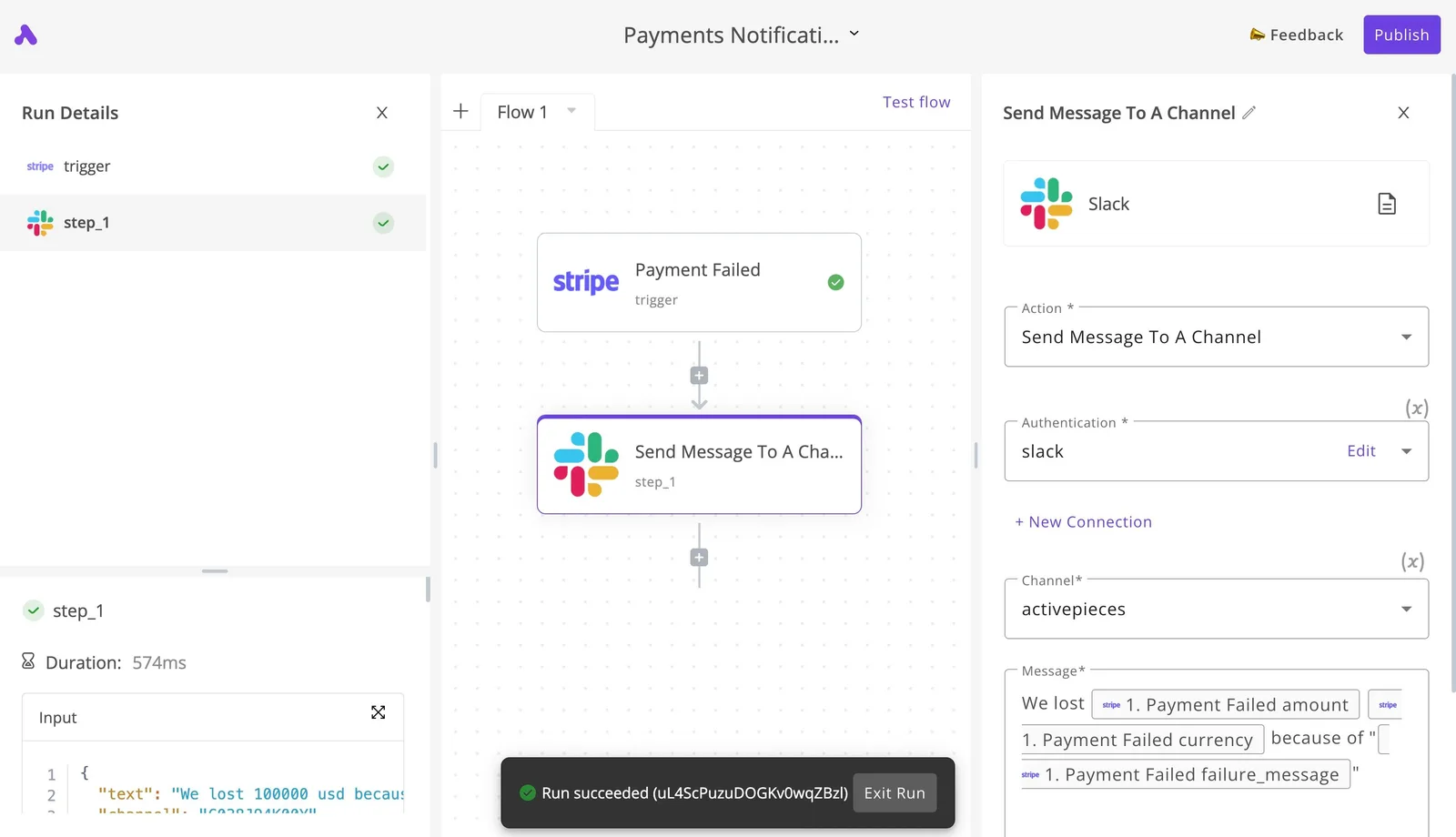
Though the canvas below shows a different flow, an invoice collection system opening on a Google Sheets trigger, the layout is the one you'll use.
The trigger is the first step, selected, with its connection fields on the right and a "Load Sample Data" button beneath them.
Load sample data before adding anything else, because every later field you map comes from that sample.
Step 3: add the actions and map the fields
Add steps in order, and map each field from the trigger's sample rather than typing values. Carry the same identifier through every step, normally the order number or customer email, since it's what lets a Stripe payment and a Shopify order be matched later.
Use a listed Shopify step where one exists. Where none fits, add a plain HTTP request to Shopify's API, and keep it to that single gap so the rest stays inspectable.

Step 4: test the workflow, then publish it
Run the trigger against test-mode data and check each step's output in the run, not just the final result. Then publish.
Once the workflow's live, swap in the live Stripe connection and watch the first real runs on the Runs tab.
Limits and errors in Stripe Shopify workflows and their fixes
When a first live run fails, it's almost always one of six causes, and the error text on the Runs tab usually points to it. The table pairs each message with its cause and fix, so match what you see before you edit any step.
| Problem | Error seen | Cause | Fix |
|---|---|---|---|
| Scope error | 403 or "access denied" on a Shopify step | Connection lacks the order read scope | Reauthorize with the scope granted |
| Duplicate events | One order logged twice | Stripe resends an event it thinks went unacknowledged | Store the event ID, skip repeats |
| Rate limit | 429 on Shopify | 2 requests/second on standard plans, 4 on Advanced, 20 on Plus | Add a delay or batch the calls |
| Test vs live mode | Run never fires | Test connection watching live data, or the reverse | Match modes on both apps |
| Currency amounts | Totals off by 100x | Stripe reports the smallest currency unit | Divide by 100, except zero-decimal currencies |
| Missing event | Run never starts | Event type not subscribed | Add it, or use a webhook if no trigger is listed |
Duplicate events and rate limits
One retried event books revenue twice, and your books drift by the order value each time. Duplicates are the costly error. Keep the event ID and check it first.
On rate limits, 2 requests per second means a 100-order backfill needs about 50 seconds on a standard plan, so a loop without a delay fails partway. Plus at 20 per second finishes the same job in about 5.

Stripe Shopify amount, currency and test-mode errors
4500 means 45.00, because Stripe amounts arrive in cents.
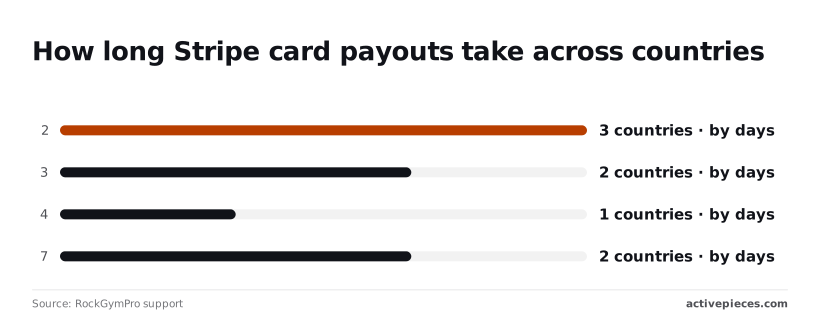
Of eight countries on one RockGymPro support schedule list, three pay out in 2 days and two in 3, so five land inside the usual window. One takes 4 days and two take 7.
If your country's on the 7-day schedule, a sale with no deposit on day five is normal, so don't rebuild a workflow that is behaving correctly.
What to do on Monday morning to get one workflow live
Automate the one manual task that costs you the most time, and nothing else. Once you know a late deposit is just the payout schedule, the work worth automating is whatever you still retype by hand after every sale.
- Pick the task you do by hand most often and resent most, such as copying a paid Shopify order into a spreadsheet next to its Stripe charge. Write it as one sentence: when this happens, do that.
- Build only that workflow, in test mode, using the real trigger and action names from the app's step list. Use a plain webhook or HTTP request only where no listed step does the job. Test mode keeps a wrong mapping from touching a customer or a real balance.
- Run one real order through it: place an order yourself and follow it from checkout to the final record. A single live order shows whether the amount, the fee and the order number land where you expect, which a test order can't confirm.
- Add a failure alert that messages you when a run fails. Without one, a broken workflow looks exactly like a quiet day, and you find the gap at month end when the books won't close.
- Once the live order matches and the alert fires when you break something on purpose, turn the workflow on and leave it alone for a few days before touching another task.
Frequently asked questions
Does Stripe have a native Shopify integration? Not one that gives you a combined money picture.
Shopify can take payments through Stripe-backed checkout in some setups, but the payout, fee and refund records stay in Stripe while orders stay in Shopify. Someone still has to join them, and that someone's your workflow.
Can I connect Stripe and Shopify without code?
Yes. Build it from the real triggers and actions each app offers, such as a new order on one side and a payment or refund event on the other. Use a plain webhook or HTTP request only where no listed step exists.
When an endpoint isn't exposed by the app's own steps, the Custom API Call action covers it, so you're filling a gap rather than rebuilding the workflow around it.
Can I self-host the Stripe and Shopify workflow?
Yes, if the automation tool you pick can be self-hosted. The workflow is only triggers and actions, so it doesn't care where it runs.
What changes is who pays for the server and who gets paged when it stops. Hosted tools charge per run or per task, and self-hosting swaps that metered bill for a fixed one, so do the arithmetic at your real volume before choosing.
Will the workflow break if Stripe or Shopify changes its API?
It can, and you should assume it eventually will. Steps built from a listed trigger or action are maintained by whoever publishes that step, so most changes reach you as an update.
Anything you wired by hand through a webhook or Custom API Call is yours to fix, which is the cost of choosing it. Failure alerts on every run are what turn a silent gap in your books into a message you see the same day.
Is it safe to put my Stripe keys in an automation tool?
It's safe enough if you limit what the key can do. Create a restricted Stripe key with read access to only the objects the workflow touches, and give Shopify a custom app with only the scopes it needs.
If the key leaks, the damage is bounded by those permissions.
Related reading
References
Build it
Set this up in minutes.
No code required. Connect your accounts, and Activepieces runs it from there.
Start free Talk to sales