
Activepieces vs Windmill: Pricing and Features (2026)
Oct 30, 202614 min read
Activepieces vs Windmill in two minutes
The short answer
Choose Activepieces, which has 746 integrations and an MIT-licensed core, if the people who build and maintain your automations aren't engineers; choose Windmill if they are. Both can be self-hosted, so hosting doesn't separate them.
The question that does is whether the unit of work is a visual workflow or a script.
Activepieces and Windmill are both self-hostable automation platforms, but Activepieces is a no-code tool for building visual workflows from prebuilt integrations, while Windmill is a developer platform that treats scripts as the unit of work.
Who each tool is for
When the people building your workflows aren't engineers, Activepieces lets them build and change flows themselves, with 746 integrations to assemble from and an MIT-licensed core.
An operations or marketing person assembles a flow from prebuilt steps, and the same person can open it later and change it.
Windmill is for engineers who want scripts as the unit of work. You write code, and Windmill supplies the scheduling, triggers, permissions and interface around it.
At-a-glance table (checked 30 October 2026)
| Activepieces | Windmill | |
|---|---|---|
| Built for | Teams building workflows without code | Engineers who treat scripts as the unit of work |
| Hosting | not stated on vendor page | not stated on vendor page |
| Pricing and entry price | not stated on vendor page | from $0/mo self-hosted; Enterprise from $120/mo |
| SSO and admin | not stated on vendor page | not stated on vendor page |
| AI agents | not stated on vendor page | not stated on vendor page |
| Integrations | 746 | 200+ |
| Embedding | not stated on vendor page | not stated on vendor page |
Activepieces is the better fit for teams whose automation builders aren't engineers, judged on how little it takes to go from a described process to something running.
You open the built-in chat, describe a process that touches your connected apps, and get a live flow in your account with a run trace showing exactly what happened, so nobody has to be hired or write a script first.
Windmill remains the stronger choice where the people maintaining the work are developers who want scripts as the unit of work, but for non-engineers who want to describe it and check the result, Activepieces gets there more directly.
If you are running this arithmetic for your own team, see what the same workload costs on Activepieces.
The criteria this comparison judges both tools on
How the criteria work
This comparison judges each deciding question against the same criteria.
For who builds and maintains, the measure is the skill a person needs to change a live automation, and who in the organisation holds that skill.
Hosting, cost, security, agents and embedding
For hosting and licence, the measure is where the software can run, whether it runs with the outbound network closed, and what the source licence permits you to do with it.
For cost as usage grows, the measure is what the vendor's pricing page says it charges for, and which unit grows as workload grows.
For admin and security controls, the measure is whether single sign-on, roles, audit records and secrets handling are documented, and on which plan they sit.
For AI agents, it's whether the product documents agents as a feature, and what an agent can call. For embedding, it's whether the product documents a way to put automation inside your own product, and under what terms.
Why the same measurements for both
Where a vendor doesn't answer a question publicly, this comparison states the gap and doesn't infer an answer.
Where each fact came from
Nothing here comes from anywhere but the vendor's own pricing page, documentation or changelog. Windmill's claims come from Windmill's published material, and the other tool's from its own.
Who builds workflows in your team
Activepieces suits teams where operations and business staff build and maintain automations, with 746 integrations to build from. Windmill suits teams where engineers do, because the unit of work differs: a visual workflow with connectors in one, a script in the other.

Activepieces: visual builder and integrations
In Activepieces, you build a flow on a canvas.
A trigger starts it, and each step after it is an integration, one of 746 and roughly 60% of them community-contributed: a packaged connector for an app or a built-in utility, with its actions exposed as forms to fill in, which means the connector you need probably already exists.
Nobody has to read an API reference to add a row to a spreadsheet.
In the screenshot's test flow, a Schedule trigger labelled "Every Hour" is selected, and an integration selector lists spreadsheet integrations (Google Sheets, Microsoft Excel 365, AITable, Retable) with actions such as Insert Row, Update Row and Find Rows.
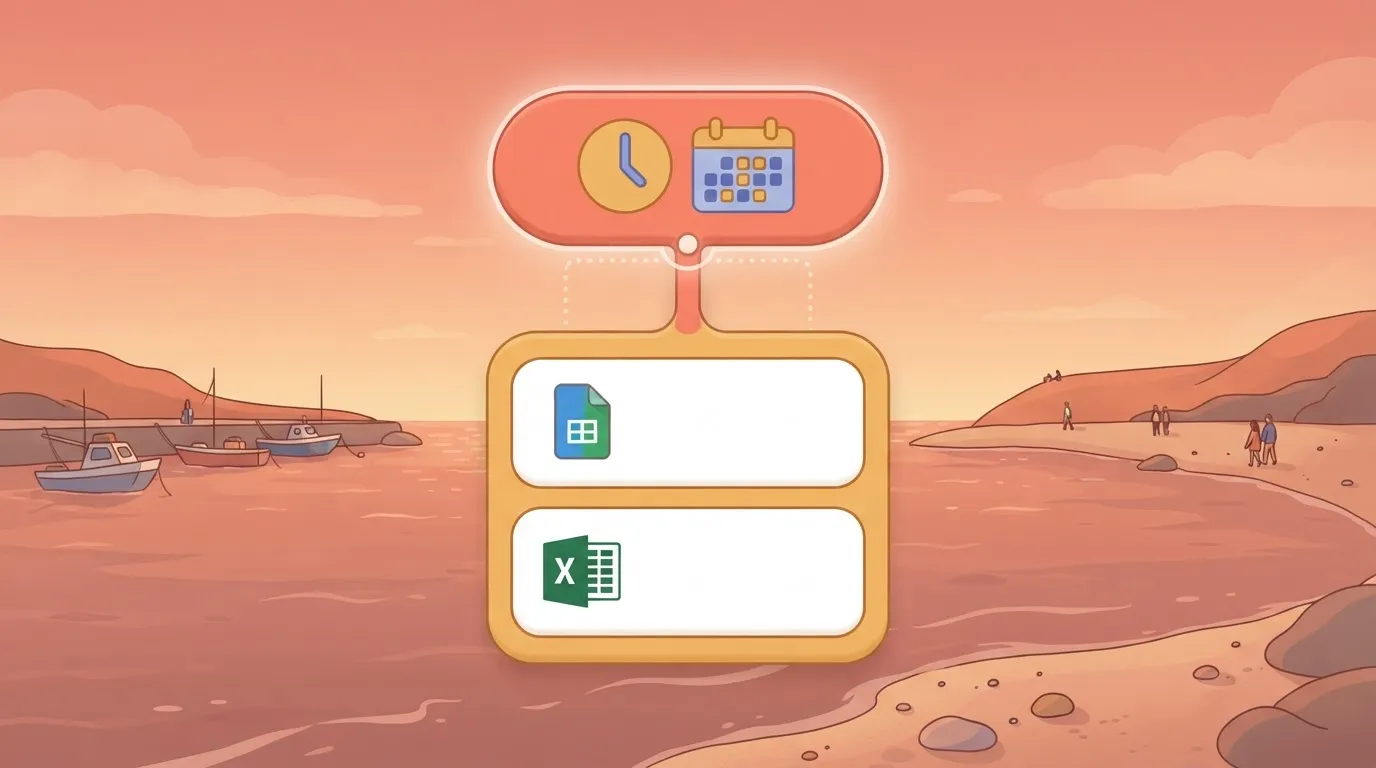
The settings panel carries a "Run on weekends" toggle and a sample-data test that returned successfully. Take from it that scheduling, app choice and testing all happen in one screen, with no code written.
You don't hire for this, you describe it: type the process into the built-in chat and Activepieces builds and publishes the flow, the same artifact someone would have assembled on the canvas, with no engineer in the loop.
The published flow sits under the same RBAC and audit logs as every hand-built one, and each run leaves a trace that someone in finance or operations can read without any certification.
Describe a process that touches your connected apps and the result is a live flow in your account, with a run trace showing what happened. MoneyGram, Moneypenny, Alan and FundingSocieties run Activepieces in production.
Windmill: scripts, workflows and apps
Windmill starts from the script. You write a function in a supported language, and Windmill supplies the surrounding machinery: a generated input form, a schedule, a permissions model and a run history. Flows chain scripts together, and apps put a user interface over them.

Because every step is code, you can version, review and test it like any other. An engineer gets that rigour, and a non-engineer gets a wall.
Verdict on who should build
Choose by who will own the automation after the first version ships. If operations or business staff own it, the visual builder keeps changes in their hands.
An engineer gets that rigour, and a non-engineer gets a wall.
If engineers own it and want scripts reviewed like the rest of the codebase, Windmill matches how they already work.
Hosting, licence and self-hosting requirements compared
Both tools have a hosted cloud and a self-hosted build. The bottleneck moves to whoever must run the self-hosted one, and the licence differs: MIT for one core, AGPLv3 for the other.
Cloud versus self-hosted
Start from the constraint: if the network is restricted or an audit requires data to stay inside your boundary, the cloud option is closed and only the self-host column matters.
| Activepieces | Windmill | |
|---|---|---|
| Cloud option | Hosted cloud | Hosted cloud |
| Self-host option | Docker-based, from the public repository | Docker-based, from the public repository |
| Licence | MIT core | AGPLv3 |
| Free vs paid when self-hosted | Core is free; enterprise features need a commercial licence | Community edition is free; enterprise features need a paid licence key |
| Minimum infrastructure | Application container plus a database | Server and worker containers plus PostgreSQL |
Licence terms and what is paid
MIT places almost no conditions on use or modification. AGPLv3 is a copyleft licence: if you modify the software and let users interact with it over a network, you must offer them your modified source.
Running it unmodified for internal automation raises little concern. Embedding a modified build in a product you sell is a question for your legal team before procurement, not after.
On both tools the free self-hosted build covers the core, and paid licences cover enterprise additions.
Before approving a self-hosted deployment, confirm these in order:
- A container runtime on a host you control.
- A PostgreSQL database with a backup and restore routine you have tested.
- A way to pull images and updates.
- A named owner for upgrades.
Windmill separates server and workers, so you scale execution by adding worker containers. That's useful for heavy script loads, but it's more parts to patch.
Worth checking against a plan that does not meter every step: one credit covers a whole run on Activepieces.
What each costs and how they scale
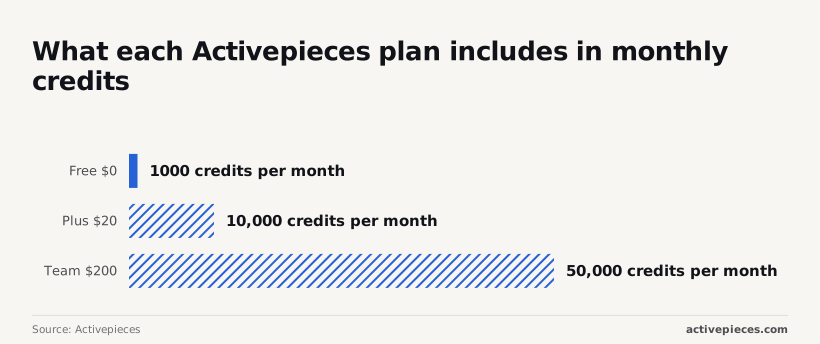
Once the install is rehearsed, cost is the next constraint to fix: Activepieces bills flat monthly plans with a credit allowance, from $0 for 1,000 credits to $20 for 10,000, while Windmill bills by seats and workers.
Billing units side by side
A credit is the unit Activepieces meters, so cost follows how many tasks your flows run. Windmill meters who and what is running.
Seats cover the people building, and workers are the processes executing your scripts. A worker costs the same whether it handles ten jobs or ten thousand, so the cost per job drops sharply as volume climbs.
Entry plans and free tiers
On Free you pay $0 and get 1,000 credits per month, enough to prove a workflow works but not to run one at volume.
Plus costs $20 for 10,000 credits, ten times the allowance for $20, which means small teams can sustain production workflows at a predictable monthly cost.
Pay $200 for 50,000 credits and you are on Team. That's five times the credits of Plus for ten times the price, so the per-credit rate rises at Team. You are paying for what else Team includes, not for volume.

Windmill's self-hosted Community edition has no licence fee, but you pay for the servers it runs on. Its Enterprise plan is published from $120/mo, so there is a figure to compare.
Mistake: comparing prices without modelling volume
Putting a per-task price next to a per-seat or per-worker price tells you nothing until you have a volume. Model it in this order:
- Count the runs per month for each workflow, including retries.
- Count the steps in each run, because credits follow tasks, not runs.
- Count the people who will build and maintain, since seats scale with them.
- Estimate peak concurrency, since that sets how many workers you need.
- Price each tool against all four numbers, then repeat at three times the volume.
Put a team of two running 8,000 light tasks a month beside a team of twelve running 400,000 and they will rank the tools in opposite order, which means scale inverts which tool actually works.

SSO, admin controls, AI agents and embedding compared
Neither tool is cheaper once governance is counted. On Activepieces, SSO, audit logs and Git sync sit behind paid or sales-quoted tiers, while Windmill's free edition includes SSO for up to 10 users., so price the plan that includes the controls your auditor will ask for.
The table shows where each control sits and what to take from it: read the lowest plan that carries every row you need, not the entry price.
| Activepieces by plan | Windmill by plan | |
|---|---|---|
| SSO | Team and above; self-hosted enterprise through sales | Basic OAuth logins in the open-source edition; SAML and SCIM in Enterprise |
| RBAC | Higher plans | Groups and folder permissions in the open-source edition; finer controls in Enterprise |
| Audit logs | Higher plans | Enterprise |
| Git sync | Higher plans | Enterprise |
| AI agents | Built into the builder | Agent steps inside flows |
| Integration count | 746 | 200+ |
| Embedding | Through sales | Enterprise |
| SOC 2 status | In progress, not certified | Confirm on Windmill's own trust documentation |
Windmill's open-source edition gives a small team more login and permission control without a licence conversation. Activepieces puts SSO on a lower paid tier.
For audit logs and Git sync, both vendors expect an enterprise conversation. Activepieces isn't SOC 2 certified; the programme is in progress, so don't cite it in a security questionnaire.
Both document agent support, built differently. Activepieces agents are configured in the same builder as the rest of the workflow, so a non-engineer can own them.
Windmill runs agents as steps inside flows whose other steps are scripts, so an engineer controls the code around the model. Decide by who will debug a bad agent run.
746 integrations for Activepieces, 200+ for Windmill, so integrations are less likely to block your workflows in Activepieces. The difference matters when a prebuilt connector saves a non-coder from an API.
Ask each vendor for the licence terms for your use case in writing, because embedding rights are decided by the contract, not by what the demo shows. Both vendors treat embedding as a higher-tier or sales-led feature.
Where Windmill is the stronger choice
For a team of engineers, Windmill is the better tool, and the reasons are concrete. Its unit of work is code, so every step can be versioned, reviewed and tested like the rest of the codebase.
It also scales differently. A worker costs the same whether it handles ten jobs or ten thousand, so a small engineering team running heavy, high-volume scripts isn't charged for each task the way a credit model charges.
On control, the open-source edition ships OAuth logins plus groups and folder permissions, and AGPLv3 is little obstacle for unmodified internal use.
The smaller catalogue of 200+ integrations is a modest cost when the missing call is ten lines of script, and agent steps sit inside flows where the engineer owns the surrounding code.
Activepieces remains the safer pick if non-engineers must keep changing the automation. But an engineering team that picks it for its connector count is trading review and cost control for convenience it may not need.
Engineering teams with heavy workloads gain the most
Judged on the same criteria, Windmill wins several outright for the right team. On who maintains, a reviewed script in version control is easier to audit than a canvas, and the generated input form lets colleagues run it without touching the code.
On cost, a fixed pool of workers is a predictable line item when volume is high and each run has many steps.
On hosting and control, the Community edition has no licence fee and still brings OAuth logins, groups and folder permissions, so a platform team can self-host with sensible access rules before any sales conversation. Activepieces asks for Team or above for SSO.
Pick it when you already run PostgreSQL and containers, and when the work is data movement, internal tools or scheduled jobs that engineers would write anyway.
Its weak points are the non-coder who can't maintain it and the smaller connector catalogue, and neither matters if the builders are engineers.
Choose by builder and pilot
The verdict and the condition it holds under
Activepieces fits when the people who build and maintain the automation aren't all engineers. If they are engineers who want a script as the unit of work, Windmill is the tool designed around that.
Mistakes buyers make
They also name a builder who won't be the maintainer: if an engineer builds it and an operations team inherits it, you have chosen for the wrong person.
When buyers test a convenient workflow instead of a real one, the trial never meets your authentication, error handling or data shapes. And buyers leave SSO and audit requirements until after the trial, when they are cheapest to check and costliest to discover late.
Run the pilot in this order:
- Name who builds and who maintains. Write down both, even if they are the same person.
- Pick one real workflow, already running somewhere, with a known owner.
- Run it on each free tier, self-hosted if self-hosting is a requirement.
- Record usage at real volume: runs, failures, and the time someone spent fixing them.
- Check SSO and audit needs against the plan you would actually buy, not the one you trialled.
- Decide, and file the record with the licence terms.
For self-serve plans, use the pricing page. For self-hosted enterprise, SSO beyond the Team plan, or embedding, use the sales form.
Related reading
References
Running the numbers
See what the same workload costs here.
Free forever plan, and every paid plan self-hosts at no extra cost.
See pricing Talk to sales