
Windmill Enterprise Edition Pricing in 2026, Plan by Plan

Oct 27, 202613 min read
Before you read anything else, read windmill.dev/pricing. Windmill Enterprise Edition costs whatever the gated feature you need makes it cost.
You pay a base fee plus seats, and the feature you need decides whether you pay at all, a pattern that looks different from open-source-first tools like Activepieces.
Windmill Enterprise Edition Pricing in Short
What the Enterprise Edition is
The free version and the paid one run the same core engine. Windmill Enterprise Edition is the paid tier of Windmill, the open-source platform for turning scripts into workflows, internal apps and scheduled jobs.
The difference is a set of gated capabilities, such as single sign-on, audit logs, dedicated support and options for running at larger scale.
Your bill follows your team's shape, not your job volume. Windmill meters the seat, and seats come in two kinds: people who build and people who only use what others build.
Your bill follows your team's shape, not your job volume.
This article calls them builder seats and non-builder seats. A builder writes or edits scripts, flows and apps, and a non-builder only runs or views them.
Community Edition versus Enterprise Edition
If you need none of the gated features, Community may be enough and the Enterprise price never applies to you. Community is the free, self-hosted edition, and Enterprise is Community plus the gated features.

If one of them is a hard requirement, say your security team insists on SSO, you're buying Enterprise. At that point the question is how many builders and non-builders you have, not which flat tier looks closest.
Windmill Enterprise pricing sources and date checked
Re-check before you quote anything to your finance team, because vendors change both pages. These figures were checked on 27 October 2026. Pricing and feature gating come from windmill.dev/pricing, and the details of what each gated feature does come from Windmill's documentation.

If you are running this arithmetic for your own team, see what the same workload costs on Activepieces.
What Each Windmill Plan Costs
Any older quote you hold is probably double today's list price. Windmill meters Enterprise by builder seat, non-builder seat and compute unit, and all three halved between 2024 and 2026.
Plan table: price, unit and limits
The table lists the per-unit prices, because those are the only ones published. The seat and compute prices exist, but the base fee and limits mostly don't.

| Plan | Base price/mo | Builder seat | Non-builder seat | Compute unit | Limits |
|---|---|---|---|---|---|
| Free and Open-source | $0 | unpublished | unpublished | unpublished | unpublished |
| Enterprise Cloud | unpublished | $20/mo | $10/mo | $50/mo | unpublished |
| Enterprise self-hosted | unpublished | $20/mo | $10/mo | $50/mo | unpublished |
Don't read the table as a cloud-versus-self-hosted split: the per-unit figures come from Automation Atlas, which reports them as Enterprise prices without separating the two.
Worker capacity and how to size it
A compute unit is a block of worker capacity, meaning the CPU and memory that the workers running your jobs can draw on. Seats count people; compute units count how much work can run at once.

To estimate yours, find how many jobs run at the same time in your busiest hour and how much CPU and memory the heaviest of them need.
Divide that by the capacity of one unit, which you should ask sales to state in writing, and round up.
What is published and what needs a sales quote
$200 a month now covers ten builders, down from $400, because a builder seat fell from $40 to $20. A non-builder seat, for people who only run workflows, fell from $20 to $10, so fifty non-builders cost $500 rather than $1,000.
According to Automationatlas, a compute unit fell from $100 to $50 a month, so a workload needing eight units of worker capacity drops from $800 to $400.
Those unit prices aren't a bill. Windmill hasn't published the base fee or limits, so the total depends on figures only a quote will give you.
Cloud versus self-hosted pricing
If you expected a price gap between cloud and self-hosted, the source shows none: it lists one set of Enterprise unit prices.
What differs is who carries the infrastructure: on self-hosted you run the servers and pay for them yourself. Ask sales whether the same unit prices apply to both before you compare them.
Features Windmill Gates Behind Enterprise
Because SAML SSO, SCIM, audit logs, worker groups, S3 storage and priority support all sit behind Enterprise, each feature you need becomes a line item on your quote. The table shows where each feature sits; tick your own requirements first.

| Feature | Community status | Enterprise status | Docs page |
|---|---|---|---|
| SSO/SAML | SSO up to 10 users; SAML not included | Uncapped SSO and SAML included | Windmill plans details |
| SCIM | Not included | Included | Windmill plans details |
| Audit logs | Not included | Included | Windmill plans details |
| Worker groups | Not included | Included | Windmill plans details |
| S3 storage | Not included | Included | Windmill plans details |
| Priority support | Community channels | Included | Windmill plans details |
SSO, SAML and SCIM
Gating SSO is the industry norm, and the uplift is large. SSO Pricing shows:
Even the smallest of those more than triples the base price, so treat SSO as a cost driver, not a checkbox.
SCIM sits beside it and automatically creates and removes user accounts from your identity provider. Teams with many staff and strict offboarding rules need it.
Windmill Enterprise audit logs and observability
If a compliance review requires a record of who ran or changed what, audit logs alone put you on the paid edition. They are Enterprise-only.
Scaling features and support SLAs
Teams running heavy or isolated workloads hit worker groups and S3 storage; teams with uptime obligations hit priority support. All three are Enterprise-only.
Worker groups split your workers into separately configured pools, so heavy or sensitive jobs run apart from everything else. S3 storage connects object storage for large files and datasets, and teams passing big payloads between steps need it.
Windmill Enterprise licence terms and key requirements
A licence key unlocks Enterprise features. Before signing, confirm on Windmill's pricing page what the key covers and how Windmill meters it.
Windmill Enterprise licensing when self-hosted
To make a self-hosted Windmill instance Enterprise, you run the Enterprise build and apply a licence key. The key you hold decides the edition, not a separate product you migrate to.
Think of the Enterprise Edition as the same platform with additional gated features, such as SSO, audit logs and support commitments. You apply the key in your instance's settings, and the instance checks it.
What the key counts is a question for the pricing page: Windmill meters by some mix of builders, non-builders and worker capacity, and that unit sets your bill. Count your own people and workers in those terms before you ask for a quote.
If you need none of the gated features, you have no licensing cost to estimate, because the Community Edition is the open-source core and stays free to self-host.
The Enterprise Edition is that core plus the gated features. If you need one, such as SSO for a compliance review, that single requirement moves you to a paid key for the whole instance.
Check the pricing page for any free-use carve-outs, such as non-production or evaluation use, and for what happens at expiry or overage. Don't assume either behaviour. Ask sales to put both in writing.
Worth checking against a plan that does not meter every step: one credit covers a whole run on Activepieces.
Common Mistakes When Budgeting for Windmill Enterprise
Budgets go wrong when you price the wrong thing: the wrong feature, the wrong unit, the wrong deployment, or a number that has since moved. Each one is fixed by reading Windmill's own pricing page and docs, not a summary of them.
Assuming SSO is free
Sources disagree here. Community includes SSO up to a cap of 10 users, and the pricing table lists SAML support and uncapped SSO under Enterprise. This article follows the latter: plan on Community having no SAML SSO.
Check the pricing page for any login allowance, then compare your headcount against it, including contractors who need to log in.
Counting the wrong unit
If you count only builders, you'll undercount. Windmill's plans distinguish the people who build from the people who only run or view.
Operators, analysts and anyone who triggers scripts through an app may be metered as non-builder seats. List every person who touches a workspace, label each as builder or non-builder, and price each group against the unit the page names.
Leaving out hosting and operations cost
Once an engineer's time is added, the licence line that looks cheaper can be the more expensive option. Self-hosted and cloud are different purchases.
Cloud folds infrastructure into the bill. Self-hosting leaves you paying separately for servers, database, upgrades, backups and the engineering hours to keep them running. Put both columns in your spreadsheet before comparing.

Trusting cached or third-party prices
You will find old figures in blog posts, comparison sites and AI-generated summaries, including base prices from earlier years that no longer match the current page.
Use the live page as the source, record the date you read it, and ask sales to confirm in writing any number that differs from what's published.
Windmill and Activepieces Side by Side on SSO and Self-Hosting
If you need SSO, Windmill puts it and other enterprise features behind its Enterprise Edition, which you self-host under a commercial licence.
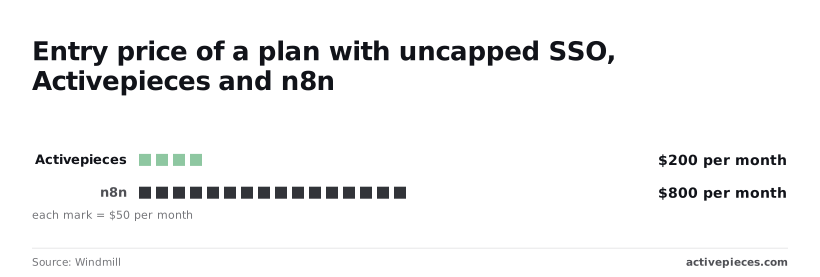
Activepieces doesn't hand self-hosting buyers a cut-down build: its air-gapped edition carries the same SSO, SCIM and audit logs as its managed cloud, whose Team plan at $200 a month is the entry point in the table below, so the cost differences in what follows come from infrastructure choices, not capability tiers.
The table records what each plan unlocks as read on 2026-10-27; treat it as a snapshot and re-check it against Windmill's pricing page.
| Plan | SSO plan | Self-hosting | Licence | Price | Unit | Check date |
|---|---|---|---|---|---|---|
| Windmill Community | Yes, up to 10 users | Yes | Open source (AGPLv3) | Free | Per deployment | 2026-10-27 |
| Windmill Enterprise | Yes | Yes | Commercial | Quoted by sales | Set by the features you need | 2026-10-27 |
| Activepieces Team | Yes | Cloud plan | Subscription terms | $200 | Flat per month | 2026-10-27 |
The unit is where the maths differs. Activepieces Team costs $200 a month flat with 25 users included and SSO, so a ten-person team and a twenty-five-person team pay the same, and usage above the 50,000 monthly credits is billed per credit.

On the same page, n8n's entry plan with SSO is $800 a month, four times as much and $600 more every month, or $7,200 more over a year.
Windmill gives no flat figure to set against either, which is why your gated-feature list has to come before the sales call.
If your SSO requirement arrives with a self-hosting requirement, the usual trade is a trimmed build, with the controls kept in the cloud plan and less on your own servers.
Activepieces doesn't make that trade: SSO, SCIM, custom RBAC, audit logs, release management and secret managers sit on the same list in its air-gapped docs as in its managed cloud, and MoneyGram and Moneypenny run Activepieces in production.
Which way you go depends on who builds the workflows. Windmill fits teams that write scripts in code and want orchestration around them. Activepieces fits teams that want a no-code builder and a predictable monthly bill for SSO.
Windmill Enterprise pricing by features
Unlike a flat monthly bill, Windmill Enterprise is priced by the gated feature you need. Name that feature first, then check it against windmill.dev/pricing before anyone books a sales call.
Run the steps below in order, because each one narrows the quote you'll be negotiating:
- Write down the one gated feature you need, such as SSO, audit logs, support or scale.
- Find the plan that lists it on windmill.dev/pricing.
- Confirm the unit the page meters and whether the plan is cloud or self-hosted, because the same feature can cost differently under each.
- Get a written quote for anything the page doesn't publish.
- Re-check the page before you sign, so the contract matches what you saw.
It's Windmill's paid tier, layered on the open-source core. It adds the features organisations tend to require: single sign-on, audit trails, vendor support and larger-scale operation. Because those are separate gates, your cost follows the gate you hit, not the company size you report.
Compare them on your one feature, not on the full list. If the Community Edition covers your requirement, the Enterprise question disappears.
If it does not, the feature you wrote down in step one is the exact thing you're paying to unlock, and the quote should say so.
Frequently asked questions
Confirm each answer below on Windmill's pricing page, and mark anything a salesperson adds as unwritten until it's in a quote.
Is Windmill Enterprise Edition open source?
No. The core Community Edition is open source, but Enterprise features ship under a separate commercial licence. The code may be readable, but you need a licence to run those features in production, so "open source" shouldn't be read as "free to use everything."
Does Windmill offer a free trial of Enterprise?
Check the pricing page, because trial terms are the kind of detail that changes. If the page doesn't state one, ask sales for a trial key in writing, with the features it unlocks and the date it ends.
A verbal "you can try it" binds nobody.
Can I self-host Windmill Enterprise Edition on Kubernetes?
Yes, self-hosting is the model Windmill is built around, and Kubernetes is a supported deployment target. Enterprise is typically enabled by applying a licence to your deployment rather than installing a different product.
Confirm the licence terms for your cluster setup before you commit, since how the licence is counted determines your bill.
How often does Windmill change its pricing?
Treat the figures as current only on the day you read them, because the page makes no commitment on how often prices change.
Save a dated copy of the page you based your budget on, and get the renewal terms in the written quote so a later change doesn't reprice you.
Is Windmill Community Edition enough for production?
It can be, if none of your requirements sit behind the Enterprise gate. List the features you need, such as SSO, audit logs, support and scale, and check each against the page. One gated item is enough to move you off Community.
Related reading
References
Running the numbers
See what the same workload costs here.
Free forever plan, and every paid plan self-hosts at no extra cost.
See pricing Talk to sales