
Should You Self-Host MiniMax M3.1 Flash or Use the API?

Oct 28, 202614 min read
Self-hosting means running the model's weights on GPUs you rent or own instead of calling MiniMax's hosted API, whether you wire the output into a workflow tool like Activepieces or serve it directly to your own application.
It's only an option if MiniMax has published those weights under a licence that covers your use. Read the model card before you price anything else.
What self-hosting MiniMax M3.1 Flash actually means
What the model is, per MiniMax's own pages
You will find M3.1 Flash described on MiniMax's model card, in its docs and in its changelog. Those three pages are the only sources this article leans on, checked on 2026-10-28.
Treat any third-party summary, including a forum post that says "it's open", as a lead to verify rather than a fact.
MiniMax M3.1 Flash open weights and licence terms
When a model is called 'open weights', that means the trained model files can be downloaded. A licence's a separate matter: it says who may use those files, and for what.
Earlier MiniMax releases (M2, M2.5, M3) may each carry different terms, so a licence you accepted for one doesn't automatically cover the next. Check three things on the M3.1 Flash card:
- whether weights are published at all
- what the licence is called
- whether commercial use carries a condition such as a revenue or user threshold or an attribution requirement
When a model is called 'open weights', that means the trained model files can be downloaded. A licence's a separate matter: it says who may use those files, and for what.
If the weights aren't published, self-hosting is off the table, and the hosted API is the only route.
How a self-hosted deployment serves requests
You load the weights into an inference server, which's software that turns incoming text into model output. It runs on GPUs that you keep powered whether or not anyone is asking questions.

In front of it sits a gateway that handles access keys, queuing and logging, and your applications call that gateway instead of MiniMax.
Where teams use it
When prompts contain data that can't leave their own network, or steady traffic keeps the GPUs busy, teams self-host. They connect the model to internal tools, document processing and automated workflows, either in custom code or through a workflow builder.
Everything below works on Activepieces' free plan. Start without code or a credit card.
Hardware, software and steps to self-host the model
Before any working room is counted, the cheapest way to hold this model yourself is three 80GB GPUs for the FP8 weights, so start by costing that hardware.
Published GPU, memory and storage requirements
On HowToSpark's numbers, the weights alone need three 80GB GPUs in FP8 and two in 4-bit. That's 240GB of memory against roughly 233GB of weights, so the model loads but leaves almost nothing for the memory that live conversations consume.

Plan on more cards than the minimum. The 4-bit figure saves one card, but compressing the weights can cost some answer quality, so test it on your own work first.
In the order you'll need them, here are the published specs:
- 428B total parameters, with 23B active per token (MiniMax-M3)
- Weights-only GPU count: three 80GB cards in FP8, two in 4-bit
- GPU count for serving real traffic: unpublished
- Supported inference engines: not confirmed in the pages used here
Only 23B parameters work on each token, which helps speed, but all 428B must still sit in memory.

Inference engines that run MiniMax M3.1 Flash
I couldn't confirm a list of supported engines or versions from the sources above, so treat both as unpublished. An inference engine is the server software that loads the weights and answers requests.
Check the model card before you buy anything, and pin the exact engine version you test.
Steps to self-host MiniMax M3.1 Flash endpoint
Download the roughly 233 GB of weights to storage with room to spare, and install a supported inference engine on the GPU machine, a process requiring dedicated disk space and several hours for the initial download, so you should start this process tonight if you want to run experiments tomorrow.
Point the engine at the weights and set it to use every card, then start the server and expose it on a private network address.
Send a handful of ordinary requests first, then many at once. Watch for memory errors under load, because that's where a three-card setup fails.
Self-hosting cost versus API pricing
Only when your monthly volume is large enough that a fixed GPU bill undercuts MiniMax's per-token rate does self-hosting win on cost alone. Believers argue that the GPU bill keeps shrinking.
Per-token pricing against fixed GPU cost
At $0.15 per million input tokens, MiniMax's API bill rises with every request and drops to zero when you stop, meaning costs scale directly with your usage. A rented GPU node bills the same whether it's busy or idle.

On rental prices, the believer has the market behind them. SemiAnalysis tracked H100 rental prices at $5.78 per GPU-hour in the first quarter of 2024, $4.77 in the second, $4.44 in the third and $3.90 in the fourth.
By year's end the same hardware cost a third less, because the price fell 33% in a year, and anyone who waited paid less than anyone who committed early.
Privacy and version control when self-hosting MiniMax
For a clinic or a law firm, the question can be settled before any arithmetic starts, because running the model inside your own network means customer records never leave it.
You also get no provider-imposed rate limits, but a busy afternoon can still saturate your own hardware. You choose when to upgrade, so the model that answers today answers the same way next quarter.
Break-even point for self-hosting versus the API
The API's a rising line, and an 8-GPU node rented around the clock at $8.00 to $36.00 per hour's a horizontal one, so which one is cheaper depends on your usage volume.

Here is the arithmetic. A month has about 730 hours, so the node costs $5,840 at the cheap end and $26,280 at the expensive end.
| 8-GPU node rental | Hourly rate | Monthly cost | Break-even vs API |
|---|---|---|---|
| Cheap end | $8.00 per hour | $5,840 | roughly 39 billion input tokens a month |
| Expensive end | $36.00 per hour | $26,280 | about 175 billion input tokens a month |
Dividing by $0.15 per million tokens, the cheap node breaks even at roughly 39 billion input tokens a month and the expensive one at about 175 billion, thresholds above which self-hosting costs less than the API, so for most organizations, the API keeps its cost advantage.

At 10 billion tokens, the API bill's $1,500, enough to make cost control a strategic priority, meaning every wasted token is real money. The believer's case therefore holds only for sustained volume far beyond the chart's edge.
The next sections test what happens to it once idle hours and engineering time are counted.
Easier to see it running than to read about it: set it up free, no card.
Why idle GPUs and engineering favor the API
Once idle hours and engineering time are counted, the hosted API stays cheaper for most business volumes. Break-even sums assume a GPU that's busy all week and leave out the work of keeping it running.

GPU utilisation and idle cost when self-hosting
Nobody has to be asking for the bill to run: a rented GPU bills by the hour whether or not anyone is sending it questions.
Averaged out, the week's 27.6% utilised, which means you pay for more than two idle hours for every working one.
Missing from break-even tables are a second machine for redundancy, someone on call when it fails, and the time spent on upgrades and security patches.
If you want an honest reason to self-host, it is control: your data never leaves hardware you run. The answer turns on one condition, whether your rules or your customers forbid sending that data to a hosted service at all.
Common mistakes when self-hosting MiniMax M3.1 Flash
What you download is the model's weights, and they're only part of what the GPU must hold. Every conversation also occupies memory in proportion to its length, so long documents and many simultaneous users can exhaust a card that fit the weights comfortably.
Size for your longest realistic request, or the first big contract will crash the service.
To cut memory and cost, you can use quantisation, which shrinks the model by storing its numbers at lower precision. It can also quietly degrade answers on your own tasks.
Run a few hundred of your real requests through both versions and compare before launch.
Without monitoring, you learn the service's down from an angry email. Without a fallback, such as the hosted API as a backup route, one failed GPU stops your product.
Without pinned versions, an automatic update can change behaviour overnight.
Connecting a self-hosted model to workflows with Activepieces
If you already run a model, Activepieces links your business workflows to it; it doesn't host or serve that model.
Its 746 integrations, counted from the open source monorepo, are the apps that can feed it, so the server isn't left idle while staff paste tickets into it by hand, and you pay for the hardware either way.
Where orchestration ends and operations begin
When an email arrives or a form is filled in, Activepieces runs a series of steps. It doesn't load MiniMax M3.1 Flash, manage GPUs or keep the server up. That stays with whoever runs the model, so the engineering time from earlier sections isn't removed.
What it adds is the plumbing. If your model endpoint accepts API-style requests, a workflow can call it through a generic HTTP step or an AI step.
The jobs that fit are the plain ones: sorting incoming support requests, summarising long threads, pulling names and amounts out of documents.
A workflow that calls your own endpoint
Because Activepieces has an MIT-licensed core that you can self-host, the workflow tool and the model server can sit inside the same private network.
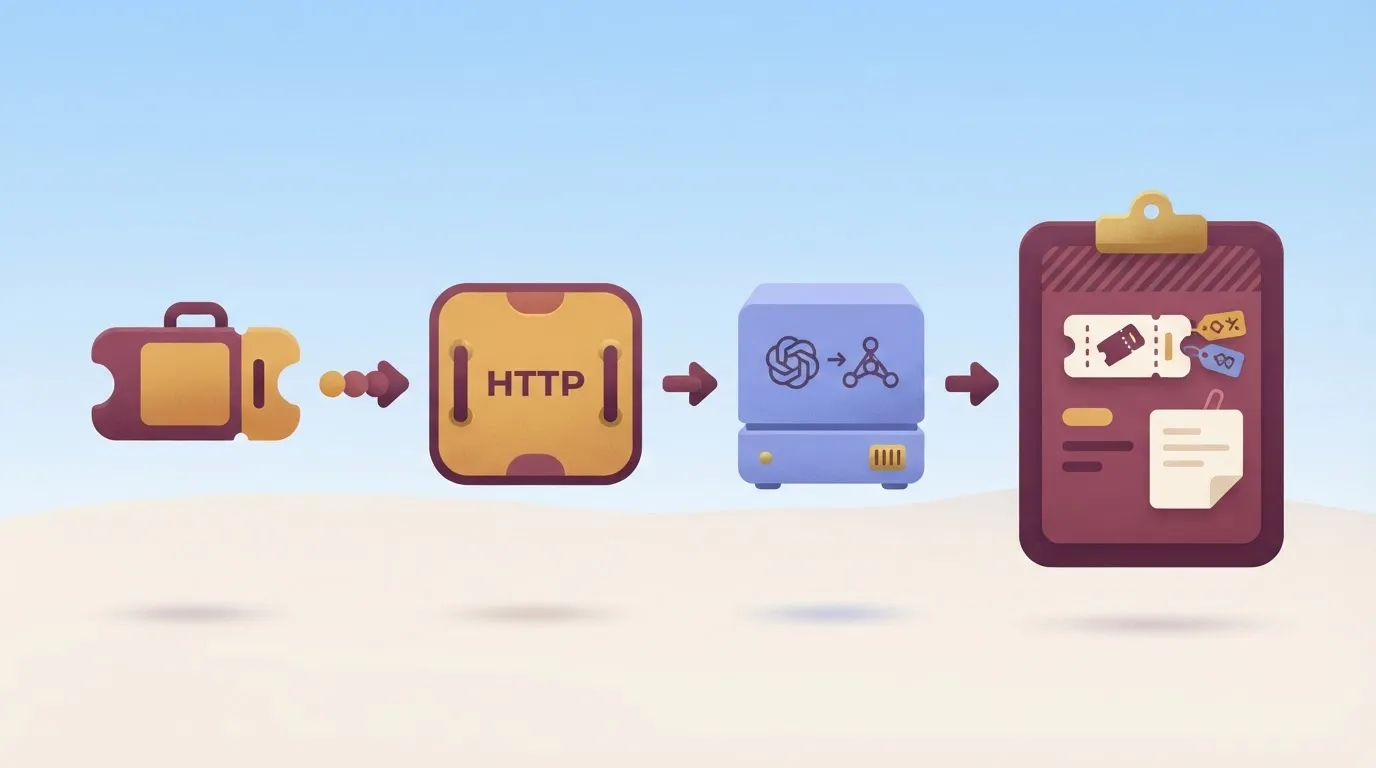
The layout below shows that arrangement: one plain request passes between the two boxes, and the person at the laptop outside the border reaches the model only through the workflow.
Your documents never travel over the public internet to reach the model, and that is the practical gain: the data-control case this article treats as the main reason to self-host.
Nor does Activepieces hand you a cut-down build for keeping data in-house: the air-gapped edition carries the same enterprise access and governance features as the managed cloud, from single sign-on to audit logs and secret managers, and MoneyGram, Moneypenny, Alan and FundingSocieties run Activepieces in production.
Once the request is in place, the workflow looks like this:
- A trigger fires, such as a new ticket.
- An HTTP step sends the ticket text to your model's address.
- The reply feeds the next step, which tags the ticket or posts a summary.
Keeping a hosted-API fallback in the same workflow
Because a single server's a single point of failure, a stalled workflow quietly stops work. Build a branch so that if the call to your endpoint fails, the same request goes to MiniMax's hosted API instead. Work then continues during an outage or a restart.
There is a catch: data sent down the fallback leaves your network, so use it only for material you're comfortable sending out, and say so in the workflow's notes.
What to confirm before your GPU purchase
Settle the data question first. If a rule forces your data to stay in-house, price no longer decides anything, and if none does, price probably favors the hosted API. Work through these five steps in order:
- Confirm the licence on MiniMax's model page permits your use, and write down the specific contract, regulation or customer promise that stops data leaving your network.
- Measure your monthly token volume.
- Price the hosted API for that volume.
- Run a one-week pilot.
- Decide.
If step 1 turns up no real rule, only a preference, say so plainly. A preference's the most expensive reason to own hardware.
Measure your token usage before deciding
Whichever route you take, billing or sizing happens by the token, a small chunk of text, roughly a word fragment. Pull a month of real usage from your logs or your current provider's dashboard, input and output counted separately, since they're usually priced differently.
Note your busiest hour, not just the monthly total. Self-hosting has to be built for the peak, and you pay for that capacity through the quiet hours too.
Compare self-hosting and API costs side by side
Take the hosted rates from MiniMax's pricing page and record the date you read them, as prices move. Multiply by your measured volume.
Then, on the same sheet, cost the self-hosted route: the GPU rental or purchase, the hours it sits idle, and the engineer time to set up, patch and watch it.
Run a one-week pilot of both options
Send a slice of real traffic through the hosted API for a week, and, if self-hosting's still in contention, through a rented GPU as well.
Compare answer quality, speed and the hours your team spent keeping it running.
Decision rule: self-host only if a data rule requires it or your steady usage keeps the GPUs busy; otherwise use the hosted API.
Frequently asked questions
Can I self host MiniMax M3.1 Flash on a single consumer GPU?
Probably not at full quality, and you should confirm before buying anything. Large language models need enough graphics memory to hold their weights, and consumer cards are the first thing to run short. Compressed versions can shrink that need, but they cost accuracy.
Read the memory requirement on MiniMax's model page, then compare it with the card you own. Buying hardware first and checking second's the expensive order.
Is MiniMax M3.1 Flash free for commercial use?
That depends on the licence text, so read it before you build a product on the model. Downloadable weights aren't automatically free for business use.
Licences can limit how large your company or user base may be, or require attribution. If the licence is unclear, ask MiniMax in writing. A wrong guess here costs far more than the email.
How is it different from using the MiniMax API?
With the API, MiniMax runs the hardware and bills you per use. Self-hosting means you rent or buy the GPUs, keep them running, patch them and fix them when they fail.
On the upside, self-hosting keeps your data inside your own systems. The downside is that idle GPUs still bill you, and so does the engineer's time. If no data rule forces your hand, the API's the cheaper default.
Does it work with vLLM or SGLang?
Check the model card for the list of supported serving software. vLLM and SGLang are two common open-source programs that load a model and answer requests, and support for a new model often arrives in stages.
Until the software catches up, a model may load but run slowly, or lack some features. Don't plan a deployment around support you haven't confirmed in the current release notes.
How often should I re-check the requirements?
Re-check before every purchase or contract renewal, and again whenever MiniMax announces a new model version.
Prices, licence terms and hardware needs all change, and an old note on a spreadsheet can quietly put your cost comparison off. Write down the date you checked each figure, so the next person knows how stale it's.