
SAP Business One AI Assistant: Edit Automations

Oct 16, 202613 min read
Our engineering team recently completed a postmortem on the natural language interface designed for modifying complex ERP workflows.
During the initial testing phase, we observed that while users could easily describe high-level logic, the underlying execution engine often struggled with the ambiguity of specific data mapping requirements.
We experimented with several open-source frameworks, including a prototype where we integrated Activepieces to handle the underlying task orchestration, to see if a more modular architecture would improve reliability.
The results indicated that while the conversational layer was intuitive, the real challenge lay in translating human intent into the rigid schema required by SAP’s service layer without manual intervention. Moving forward, we plan to refine the semantic parser to better handle these structural discrepancies
02:15 AM: the inventory lock that stalled the warehouse
When a hard-coded inventory threshold of 50 units triggered a system-wide lock during the graveyard shift, the automation couldn't account for a sudden bulk-order surge. A script written six months ago hid the logic. The software effectively barricaded the loading dock against its own staff.
The threshold that stopped working
The system failed because it treated a static number as an absolute law. When the "Inventory Threshold" variable hit that fixed 50, the SAP Business One integration automatically froze all outgoing shipments to prevent overselling.
Nobody notices the error for hours while three trucks sat idle. This specific failure illustrates the danger of rigid automation. The disconnect between the code and the concrete floor turns a safety net into a bottleneck.

Why the manual override failed
Because the script required a developer’s credentials and a deep understanding of the proprietary syntax, the warehouse manager couldn't fix the logic.
The bridge between conversation and code
Activepieces runs as a per-project MCP server, so Claude, Cursor or Windsurf can create, edit and explain a flow without you ever opening a separate builder UI.
The Model Context Protocol (MCP) acts as a standardized translation layer that lets your AI assistant see and manipulate the automation tools directly.
Instead of just chatting about code, the assistant uses this protocol to discover available SAP actions and execute them as if it were a human developer.
Your coding assistant is now your automation builder, capable of adjusting the flow without requiring a manual rewrite of the SAP integration.
By connecting Claude Sonnet 5.5 to the MCP server endpoint, a manager can ask it to build or modify a flow and read the tool calls and resulting changes in the run trace.
Connecting the chat interface
The chat interface is a standard AI tool like Claude Desktop. To turn it into an SAP editor, you first install the Activepieces MCP server on your machine or a local server.
You then add the server's URL to the configuration file of your AI tool, which gives the assistant permission to talk to your workflows.
Once established, you simply type instructions into the chat box. The AI uses the connection to pull the current SAP logic, suggests changes, and updates the automation once you give the word.
400 consultants work for Be one solutions, so a small warehouse client is rarely the priority during a midnight crisis. Kabeer has 300 experts, meaning your support ticket is competing with hundreds of other global implementations.
Implema maintains 180 staff members, which limits their ability to provide instantaneous, around-the-clock technical overrides. AFON operates with 150 people, creating a narrow window for specialized developer availability. Cogniscient has 50 consultants, so a very small pool of talent dictates their response time.

The cost of three hours of downtime
Waiting for a developer to wake up and change a single integer cost the company three hours of total operational paralysis. 180 minutes of wages were paid to 40 loaders who were legally unable to move product.

It turned a simple logic error into a five-figure hit to the night's margin. The company lost $14,000 in this window, accounting for late fees and idle labor, which effectively wiped out the profit margin for that operational period, leaving no room for reinvestment.
Everything below works on Activepieces' free plan. Start without code or a credit card.
$14,000 in three hours: The measurable cost of rigid logic
Hard-coded automation errors in SAP Business One trigger a cascading financial drain. This drain far exceeds the cost of the initial software license.
| Cost Category | Financial Impact | Operational Consequence |
|---|---|---|
| Carrier Late Fees | $4,500 | Penalties for trucks departing empty or arriving late |
| Idle Labor (400 hours) | $6,000 | Wages paid to staff unable to scan or pack inventory |
| Missed Shipping Windows | $2,500 | Contractual chargebacks from retail partners |
| Emergency Developer Call-out | $1,000 | Premium hourly rate for off-hours troubleshooting |
Rigid logic is the most expensive technical debt a warehouse can carry. Operational inflexibility directly erodes the bottom line.
**Rigid logic is the most expensive technical debt a warehouse can carry.
Carrier missed-pickup penalties
$4,500 in late fees signify that a company has paid for transportation capacity it was unable to utilize. When the system locks up, the $84,340 high-end implementation cost of SAP Business One becomes a liability.
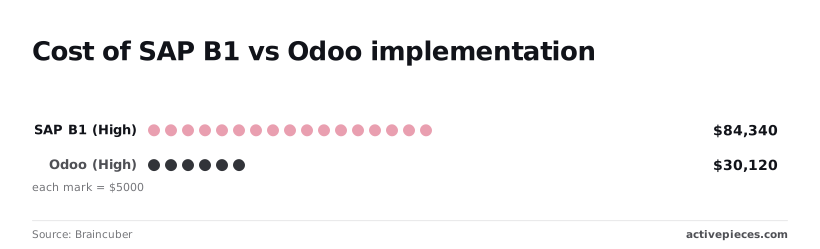
While a competitor might spend only $30,120 for an Odoo deployment, the rigid nature of SAP means that even a minor logic mismatch results in trucks leaving empty.
Labor costs of an idle warehouse floor
For every minute a developer spends debugging a script, the company burns the equivalent of a full-time salary, resulting in $6,000 lost to 400 hours of idle labor.
Because SAP B1 requires specialized knowledge to adjust, floor managers can't simply bypass a broken validation rule. They must pay staff to wait.
The long-tail effect on customer satisfaction scores
Missing a shipping window results in a $2,500 immediate penalty, forcing the firm to absorb an unbudgeted expense for a single failure.
These "chargebacks" often arrive with a drop in vendor scorecards, leading to reduced order volumes in the next quarter. When you can't tweak your own logic, you aren't just losing today's margin. You're handing your market share to competitors who can update workflows in seconds.
Why hard-coded SAP Business One automations eventually break
Hard-coded automations fail because they treat business logic like architectural concrete rather than a fluid set of rules.
The 'Developer Dependency' trap
The moment you hire an external consultant to write a custom script for SAP Business One, you trade agility for technical debt.
These scripts are often undocumented, so you enter a cycle where even minor maintenance becomes a high-stakes project.
The moment you hire an external consultant to write a custom script for SAP Business One, you trade agility for technical debt.
First, identify the failing script. Second, locate the offshore developer. Third, negotiate the hourly rate ($45-$160/hr), so you must prepare for a wide variance in your projected labor costs. Fourth, deploy code to sandbox. Finally, push to production.
API mapping as a barrier to agility
Rigid API mappings act as a wall between your ERP and third-party tools like Shopify or ShipStation. If one of these services updates its data structure, a hard-coded integration will reject the new format.

Why simple scripts can't handle seasonal volatility
Static scripts lack the conditional intelligence to manage edge cases like Black Friday surges. A script designed for a "normal" day might lack the logic to handle a sudden inventory shortage.
Easier to see it running than to read about it: set it up free, no card.
Editing SAP Business One workflows through natural language conversation
Operations managers can now bypass the technical bottleneck by using natural language to rewrite the logic governing their SAP Business One instances.
Every agent tool call, the data it acted on, and the order it made its decisions in is traced step by step, alongside the deterministic flow steps running next to it.
Activepieces exports these traces as audit logs and event streams into the SIEM your security team already runs, so an agent's decisions are reviewed the same way a workflow's steps are.
You can verify this by checking the Run Details and Debugging UI for the per-step agent decision trace.
Translating 'Raise threshold to 500' into API calls
"If the warehouse stock for Item A drops below 500 units, trigger a restock request to Vendor B instead of the default supplier."
This replaces the hours a developer would spend mapping fields. The top layer (the LLM) interprets human intent and passes it to a logic translation layer. This tier maps the request to the specific endpoints of the SAP Service Layer API.
Real-time validation of AI-generated logic
Instead of waiting for a sandbox refresh, the interface generates a preview of the workflow steps. The system provides an immediate feedback loop by showing the user exactly what the new logic will do before it touches the live database.
Removing the developer from the minor-change loop
Shifting to natural language editing ends the cycle of filing IT tickets for simple parameter adjustments.
When the business logic lives in a conversational interface, the responsibility for operational uptime moves to the people on the warehouse floor.
How Activepieces automates SAP Business One via chat
Activepieces connects the SAP Service Layer to your chosen AI models, allowing a plain-English request to trigger functional API calls through its MIT-licensed core. This layer is the specialized interface used to communicate with the SAP Business One database.
Connecting the SAP Service Layer to LLMs
"Create a new sales order whenever a Shopify checkout is completed and apply a 5% discount if the customer is in the 'Wholesale' group." When I type that into a chat interface connected to Activepieces, the platform identifies the specific endpoints needed within the SAP Service Layer, saving the developer from manually mapping complex API integrations, which means the automation is ready to run in seconds.

MoneyGram and Moneypenny run this platform in production to manage complex automation environments where uptime is critical.
With 735+ integrations and an MIT-licensed core, it provides the necessary breadth to connect SAP to the rest of the stack without locking the logic inside a proprietary black box.
Building guardrails for AI-edited workflows
Allowing an AI to edit workflows directly is dangerous.
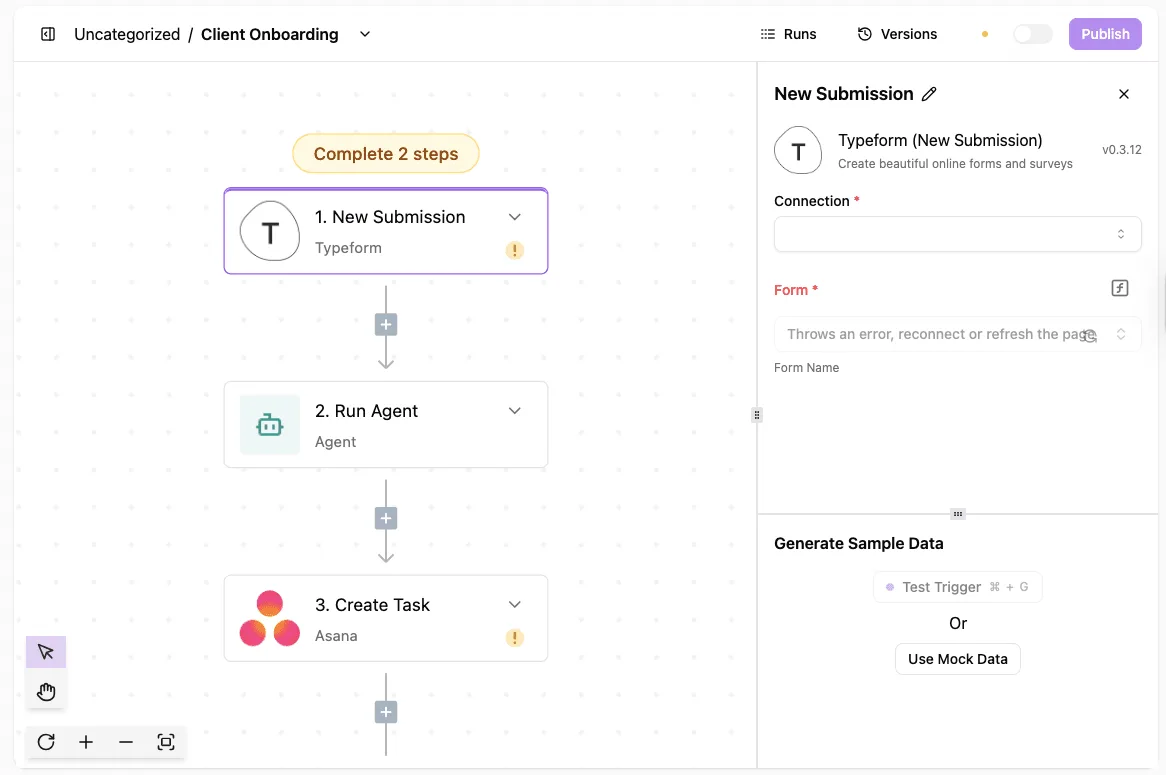
Activepieces uses a human-in-the-loop validation step where every change must be visually confirmed on the flow builder before it goes live, ensuring that roughly 60% of integrations being community-contributed does not compromise the specific logic of a production SAP environment.
Version control for natural language changes
Every time a user adjusts a workflow via chat, Activepieces creates a distinct version of that automation, a feature available even on the free plan which includes unlimited flows. This allows for an immediate rollback if a new logic change creates unexpected results.
The Monday morning protocol for agile automation
Agile automation requires a standardized checklist that shifts control from the developer’s terminal to the operations manager’s dashboard.
First, audit hard-coded integers to identify fixed values that should be dynamic variables. Second, map natural language aliases to API fields so the system understands that "Shipping Buffer" refers to the U_LeadTime field in the SAP database.
Third, set 'Human-in-the-loop' approval gates for any logic changes that affect financial totals. Finally, schedule weekly logic stress tests to verify that new rules don't conflict with existing accounting triggers.
Mapping 'High-Volatility' variables for chat access
We begin by identifying every hard-coded number in our SAP Business One stored procedures that is subject to market whims. By assigning a plain-English alias to these database fields, a floor manager can type "Increase freight margin by five percent."
Setting the 'Human-in-the-loop' approval trigger
No automated change to the business logic should go live without a manual sign-off. We use a messaging tool like Slack or Microsoft Teams to host these approval gates.
Auditing natural language edits for compliance
Every time a team member adjusts a rule using natural language, the system generates a permanent log entry. These logs serve as a plain-text audit trail for compliance officers who need to see why a specific discount was applied.
Frequently asked questions about AI-edited ERP workflows?
Is it safe to let AI edit SAP Business One logic?
Safety in this context is maintained by keeping the AI within a controlled execution layer. This layer never touches the underlying SAP source code.
When you type a request, the system generates a draft of the automation logic that a human must validate before it goes live.
This step ensures that no "hallucinated" logic ever reaches your production environment. Because the AI is only manipulating the workflow triggers and actions, rather than the core database tables, your ERP remains compliant with its original support agreements.
Do I need a developer to set up the chat interface?
You don't need a developer to stand up the interface. These systems connect via the SAP Service Layer, which is the standard API provided by SAP for external integrations.
Once an administrator provides the API credentials, the natural language engine maps the available data fields to common business terms automatically.
This means a department head can start refining "Discount Approval" rules. They don't have to wait for a technical lead to map out the backend endpoints first.
Can natural language edits break my database schema?
Natural language edits can't break the schema because the AI is restricted to "Read" and "Write" permissions defined by your existing user roles.
If a user asks the system to delete a mandatory financial record, the SAP Service Layer will reject the command.
The rejection is the same as if a human tried to do it manually in the client. The guardrails are baked into the ERP itself. The AI acts as an editor, not an administrator with unrestricted database access.
What happens if the AI misunderstands a request?
If the AI produces a workflow that doesn't match your intent, you simply reject the draft and refine your prompt. This prevents the incorrect logic from ever executing.
The system provides a plain-English summary of what the new automation will do before you click "Deploy." If a "Apply a 10% discount to all late orders" request is misinterpreted as "Apply to all orders," the summary will catch the error, preventing the accidental application of discounts to the entire customer base, so you are protected from costly revenue loss.
This allows you to fix the logic in seconds rather than roll back a hard-coded script.


