
Slack API Guide: Access, Rate Limits, Errors (2026)

Nov 19, 202617 min read
The Slack API is four entry points into one workspace, and tools like Activepieces sit on top of the same ones.
Those are the Web API for calling methods, the Events API for HTTP pushes, Socket Mode for events over a websocket, and incoming webhooks for posting.
Slack API access, rate limits and errors refer to the permissions an app must be granted through scopes, the per-method rate tiers and app-type limits that cap how often it can call, and the error responses Slack returns when a call is denied or throttled.
The figures here match docs.slack.dev as of 2026-11-19, per Github. Each fails differently, so pick by who gets paged when it breaks.
Slack API Capabilities and the Short Answer
How each entry point works
With the Web API you call methods over HTTPS to read and write workspace data.
In the Events API, Slack pushes event payloads to a public HTTP endpoint you host. Socket Mode delivers the same events over a websocket, so you don't need a public URL.

Only the Web API both reads and writes, because an incoming webhook is a URL tied to one channel that accepts posts and nothing else.
Combine two of these, as most real integrations do, and you have two things to own.
Slack Web API methods and Events API
To post messages, read channel history, list users or manage channels, you call Web API methods. Each needs a token carrying the matching scope, so the scope list is your permission audit.
When a message or a reaction happens, the Events API and Socket Mode are how your code finds out. The Events API needs an endpoint that stays reachable. Socket Mode trades that for a long-lived connection you must keep alive.
Slack Webhooks and Block Kit Messages
If all you need is an alert in a channel, a webhook is the cheapest way to get it there.
Block Kit is the JSON layout format for message formatting, with buttons and sections, so a post can ask for a response instead of just announcing.
You cannot read anything through a webhook. An app sees only channels it has joined or has scopes for. Whatever calls the API, whether your code or a no-code builder, someone must still own the token and its renewal.

This takes minutes, not a project: automate it in Activepieces free.
Getting Access to the Slack API
Start with a Slack app created at api.slack.com/apps in a workspace you choose. The person who creates it is the first owner of every token that app will ever hold.
You will not be billed per call. Slack's documentation, as checked on 2026-11-19, states no per-call fee for the API, so the cost you plan for is scopes, rate limits and upkeep, not metered billing.
Creating a Slack API App
Sign in at api.slack.com/apps, choose to create a new app, and pick the workspace to install it in. You can build from scratch or from a manifest, which is a file that records the app's name, scopes and settings in one place.
Prefer the manifest: you can review and version it, so the next person to inherit the app can see what it holds without clicking through every settings page.
After you add scopes and install the app, Slack issues the token your calls will use. Note who in your team holds it, because the app takes its creator's workspace permissions until someone reassigns it.
Which plan you need
You might expect the plan to change the API's price. It changes the workspace instead.
Paid plans change workspace features such as retention, administration and some admin-level controls. That matters to you only if your automation needs one of those features or if your workspace admin must approve the install.
You might expect the plan to change the API's price. It changes the workspace instead.
Before you build, ask the admin whether app installs need approval. If they do, the approval step will decide your schedule more than any technical limit will.
Internal vs Marketplace Slack API Apps
Choose the distribution type deliberately, because it decides which rate limits apply to the app. An internal app is built for one workspace and is the simplest path for your own automation.
To reach workspaces outside the one that created it, you install a directly distributed app, without a Marketplace listing. Slack's reviewed a Marketplace app and lists it for any workspace to install.
Read it as a question of reach: the wider you distribute an app, the more workspaces share its limits, and the more its owner must plan for. The next section covers those per-method rate tiers and what happens when you exceed them.
Slack API Authentication and a Minimal Request
Whenever Slack authenticates a call, the token type decides who the call acts as, what it can reach, and who gets paged when it stops working.
Rate tiers only matter once Slack accepts a request, and Slack accepts one only if the token, the scopes and the workspace install line up.
Choosing a Slack API Token Type
Slack issues three token types, and each one acts as a different identity. The table shows where each comes from and what it's for.
The takeaway is that a token tied to a person fails when that person leaves, while a bot token belongs to the app.
| Token | Acts as | How obtained | Typical use |
|---|---|---|---|
Bot token (xoxb) |
The app's bot user | Issued when the app's installed to a workspace | Posting messages, reading channels the bot has joined |
User token (xoxp) |
The person who authorized the app | Issued through OAuth when that person approves user scopes | Actions that must appear as the user, or reach what the user can see |
App-level token (xapp) |
The app itself, not a workspace member | Generated in the app's settings with connection scopes | Opening a Socket Mode connection |
When an app is distributed to other workspaces, each installing workspace approves the scopes and receives its own token through the OAuth v2 flow. Decide early who owns that token and where it lives, because a leaked or revoked one takes the automation down.

Slack API Scopes to Request
Call a method without the right scope and Slack refuses it, because scopes are granted at install time. Request the narrowest set the job needs: for posting, that means chat:write, and nothing else until a method demands it.
Adding a scope later means reinstalling the app, so every addition is a change someone has to approve. The bot also can't post to a public channel it hasn't been invited to unless it holds a scope that allows it.

Your First Slack chat.postMessage API Call
Install the app to a workspace, copy the bot token, and send a request:
curl -X POST https://slack.com/api/chat.postMessage \
 -H "Authorization: Bearer xoxb-your-token" \
 -H "Content-type: application/json; charset=utf-8" \
 -d '{"channel": "C0123456789", "text": "Deploy finished"}'
On success, Slack returns JSON with "ok": true, along with the channel and a message timestamp that identifies the post for later edits or replies.
Failures are subtler. Slack commonly returns HTTP 200 even when the call failed, with "ok": false and an error string such as not_in_channel or invalid_auth.
A monitor that watches only HTTP status will report green while nothing is delivered, so check the ok field in every response.
Slack API Rate Limits by Tier
1, 20, 50 and 100 requests per minute are the minimums across the four tiers Slack sorts Web API methods into. Whoever's paged at 2am should first find out which tier the failing method sits in.
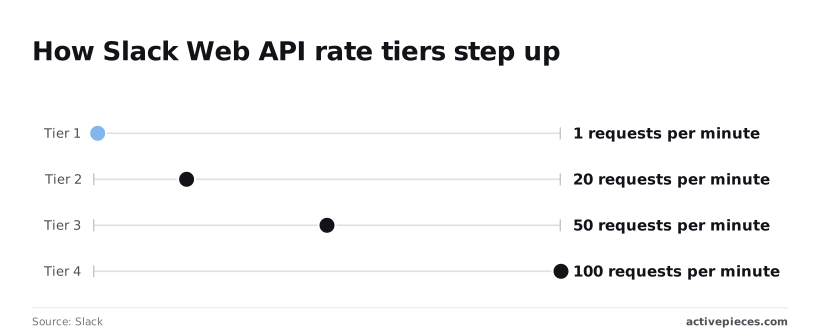
Figures are as Slack's rate limit docs state them, checked 2026-11-19.
Slack API Rate Limit Tier Table
| Tier | Minimum requests per minute | What it means for you |
|---|---|---|
| Tier 1 | 1 | One call a minute, so a loop over many items stalls almost at once |
| Tier 2 | 20 | Fine for occasional lookups, too tight for bulk syncs |
| Tier 3 | 50 | Room for steady, moderate traffic |
| Tier 4 | 100 | The most headroom, but still a ceiling |
Compare the Tier 1 to Tier 3 minimums with the non-Marketplace conversations.history limit in the chart below.
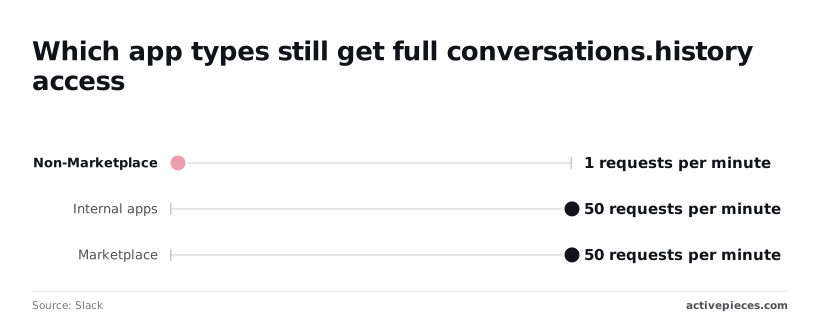
Per Slack, the chart shows that the jump from Tier 1 to Tier 2 is twentyfold, and that the restricted method sits at the very bottom, so users considering tier upgrades should prepare for large capacity jumps.
Exceed a limit and Slack rejects the call and tells you how long to wait. Code that ignores that wait just fails again.
Not every method falls into the four tiers, so tier selection doesn't affect those. chat.postMessage is the one most teams hit, and it has its own limit on the same docs page.
A notification flow can therefore be throttled by a rule that the tier table doesn't describe. Read the method's own page rather than assuming its tier.
Slack API Limits for Non-Marketplace Apps
Since Slack's 29 May 2025 changelog, non-Marketplace apps get 1 request per minute on conversations.history, so bulk operations on history become impractical.
Internal apps keep 50+ requests per minute, and Marketplace apps see no rate limit change, permitting real-time polling and batch operations, so a task running every second remains compliant.
Read channel history from an app distributed outside the Marketplace and you can fetch at most one batch a minute. Backfilling a busy channel takes hours rather than seconds.
An internal app for your own workspace avoids that restriction, which makes the app type a design decision you must settle before you write any code.
You can follow the rest of this with the builder open. Start free, no card.
Common Slack API Errors and Their Fixes
Once the app type's settled, the errors that page you are few, and each has a known cause and a fix you can assign to an owner before launch.
| Error | Cause | Fix |
|---|---|---|
| ratelimited | Too many calls to one method in its tier window; Slack answers HTTP 429 | Wait the seconds in the Retry-After header, then retry; queue outbound calls |
| not_in_channel | The app's bot isn't a member of the target channel | Invite the app to the channel |
| channel_not_found | Wrong channel ID, or a private channel the app can't see | Check the ID, then invite the app |
| missing_scope | The token lacks a scope the method requires | Add the scope, reinstall the app, use the new token |
| invalid_auth | Token's wrong, malformed, or from a different workspace | Check the stored token against the workspace it was issued for |
| token_revoked | A user or admin uninstalled the app or revoked the token | Reinstall and store the new token |
| Events API retry and 3-second ack | Your endpoint didn't return HTTP 200 within 3 seconds, so Slack resends the event | Acknowledge first, process afterward, and deduplicate on event ID |
Read the groups below by who has to act, because the fix is rarely the same person's job as the alert.
When you get a 429, you outran a method's tier, so the fix belongs in your code, not in Slack's settings. Honour Retry-After exactly, and put outbound calls behind a queue so a burst never reaches the API at once.
If you see missing_scope, not_in_channel or channel_not_found, you are looking at a configuration failure, and whoever administers the workspace usually has to resolve it.
A missing_scope fix only takes effect after reinstalling, so an old token keeps failing until someone swaps it. Membership errors recur whenever someone creates a channel and forgets the app.
When invalid_auth or token_revoked appears, the app's lost its credential, and every call fails until a person restores it. Decide who owns that credential before launch, because nobody else will notice it's gone.
If your endpoint fails to acknowledge an event within 3 seconds, Slack resends it, so slow processing produces duplicate work. Return 200 at once, do the work in the background, and record event IDs so a retry is ignored.
Calling Slack Endpoints Without Code in Activepieces
Slack is one of the 750 integrations Activepieces counts from its MIT-licensed open source monorepo, every connected integration is available to the AI as a tool with its credentials held centrally, and a Slack method the integration doesn't cover can be generated with AI and added privately to your own instance.

That means you can start with a running flow and read Slack's responses in the run trace, rather than writing the retry and queueing code the previous section described before anything runs.
You don't hire for this, you describe it: tell the built-in chat what should reach which channel, and what it publishes is a live flow in your account, open to read step by step, the same artifact a builder would have assembled by hand.
The flow then runs under the platform's RBAC and audit logs like any other, and its run trace shows exactly what happened on each run, naming the failing step and Slack's response, whether that's a ratelimited 429 or a missing_scope, so whoever's paged at 2am can read it without knowing Slack's internals.
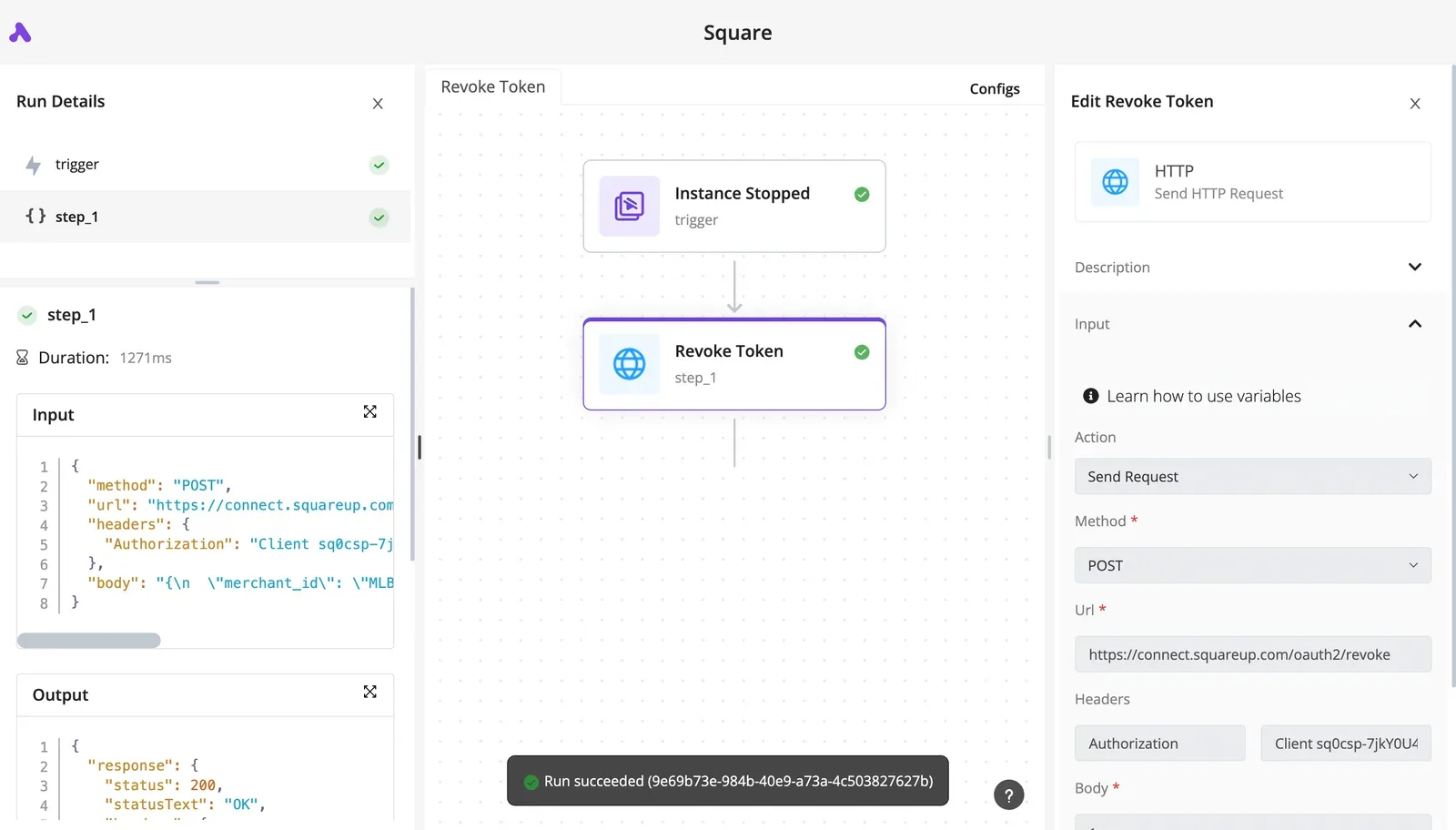
Using the Slack connector
The connector wraps common actions such as sending a message to a channel, and it has triggers for new messages and similar events. You authenticate once, pick the action, and fill in the fields.
In the flow below, a Stripe "Payment Failed" trigger is paired with a "Send Message To A Channel" action. The right panel shows the action's authentication, channel and message template, and the left sidebar shows step_1 completed in 574ms under a "Run succeeded" banner.
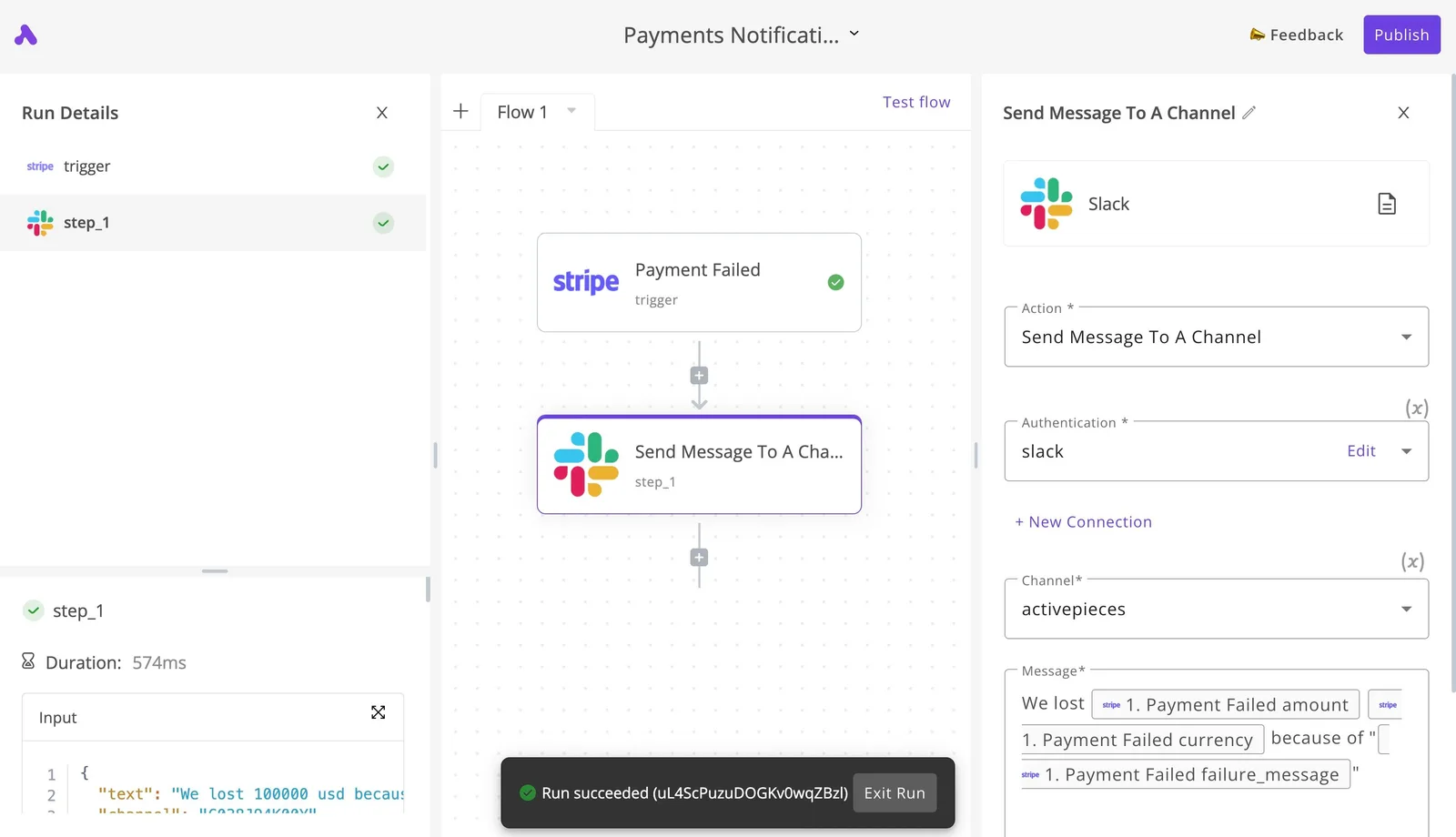
What to take from it: the whole process is two steps. The run details record the outcome of each step, so a failed delivery or a rejected call appears there when it happens rather than after a user reports it.
The connector exposes a chosen set of methods, not the whole Slack API, and because the 750 integrations are counted from the open source monorepo, you can read the Slack integration's source to see exactly which actions and triggers it offers before you rely on them.
Calling Other Slack API Methods via HTTP
When the connector lacks a method you need, the HTTP step sends a request to the Slack Web API endpoint directly, using your app's token in the authorization header.
You must then confirm that token carries the scopes that method requires, since Slack enforces them regardless of the tool calling it.
When a scope is missing or Slack rate-limits a call, the response comes back in the run trace, which tells you what to fix.
Some work stays in code. A custom app built on Socket Mode needs a persistent connection that a flow doesn't hold open.
Large history exports mean paging through many pages of results under Slack's per-method limits, and that's better served by a purpose-built script you control and can schedule.
A Monday Checklist for a Production Slack Integration
Because a script you control is a script you get paged for, name an owner first, then work through these six steps before it goes live.
The list below is the minimum an auditor would ask to see, and each step answers a failure that tends to surface at 2am on a Tuesday, not during testing.
- Request the narrowest scopes that work. Every scope you add widens what a leaked token can do, and scope changes can force workspace admins to re-approve the app. Write down why each one's there.
- Move tokens into a secrets manager. A token in a repository, a chat message or a laptop's environment file has no clear owner and no rotation path. Store it centrally, restrict who can read it, and record who rotates it.
- Queue outgoing calls and back off on 429. When Slack returns a 429, it includes a Retry-After header telling you how long to wait. Honour it, pause only the affected method, and let the queue drain afterwards instead of retrying in a tight loop.
- Acknowledge events first, process later. Respond to each incoming event immediately, then hand the work to a background worker. Slow processing inside the request handler looks like a failed delivery, and Slack will send the event again.
- Record the date you checked the limits. Put it in the runbook next to the limits you relied on. A limit with no check date's an assumption, and the next person can't tell how old it is.
- Re-verify against docs.slack.dev and the changelog. Rate tiers and app-type rules change, so schedule a recurring review and update the runbook when the documentation says something different.
Frequently asked questions
Pricing and channel access
Is the Slack API free to use? Slack doesn't charge per call. The cost is indirect: the plan your workspace is on, the scopes you must request, and the engineering time spent handling limits. Check Slack's current pricing page for plan terms.
Can a bot read message history in any channel? No. A bot reads only conversations it belongs to, and it needs the history scope matching the channel type, one for public channels and another for private ones.
If a call fails, check membership before you suspect a bug. Someone has to invite the bot, and that someone's the owner of the access.
Keys and rate limits
How do I get a Slack API key? There's no single key. You create an app in Slack's developer portal, choose the scopes it needs, and install it to a workspace.
The install produces a bot token, and a workspace admin may have to approve it. If you later add a scope, the app must be reinstalled before the token carries it.
Do Slack API rate limits apply per app or per workspace? Both. Limits are set per method and counted for each app within each workspace, so one noisy app doesn't drain another's budget.
A throttled call returns HTTP 429 with a retry delay, which you must honour.
Confirm which category your app is in, because apps distributed through the Marketplace can face different limits than internal apps on some methods.
The free plan
Is Slack's API available on the free plan? Yes, you can create apps and call the API from a free workspace.
The catch is that what you can read is bounded by what the plan retains, so a history call can succeed and still return less than you expected.
Also remember that Slack often returns HTTP 200 with ok set to false, so read the error field, not just the status code.
Related reading
Build it
Set this up in minutes.
No code required. Connect your accounts, and Activepieces runs it from there.
Start free Talk to sales