
Slack Mailchimp Integration: How to Set It Up (2026)

Nov 19, 202614 min read
A Slack Mailchimp integration's a no-code automation in which an event in one app triggers an action in the other, whether you build it in a tool like Activepieces or elsewhere.
The fastest path's one trigger, one action, and a plain HTTP request or webhook wherever the connector has no step for what you need.
A Slack Mailchimp integration refers to a connection between the two apps, built with an automation platform or Mailchimp's own tools, that lets a Slack event, such as a new message, start a Mailchimp action, such as adding a subscriber, or the reverse, without writing code.
Build your first Slack Mailchimp integration
What people automate between Slack and Mailchimp
Five jobs cover most requests, and each depends on a specific trigger or action existing.
- New subscriber alerts posted to a Slack channel
- Unsubscribe alerts, so someone sees who left
- Campaign-sent notices, confirming a send went out
- Link-click pings when a subscriber clicks a tracked link
- Slack-triggered list adds, where a message or reaction adds a contact to an audience
Slack Mailchimp integration requirements and accounts needed
You need admin rights in both places: permission to add an app to your Slack workspace and access to the Mailchimp account that owns the audience.
You also need an automation platform. Activepieces is one option; any tool that offers Slack and Mailchimp connectors plus a generic webhook and HTTP step will do the job.
Confirm the trigger you need's still listed before you build around it. This section was checked against what's live on 2026-11-19.
The fastest path in three steps
Pick one of the five jobs and look in your tool's Mailchimp and Slack connectors for a trigger that matches your event.
If no trigger matches, switch to a webhook. Mailchimp can post audience events to a URL you supply, and your automation tool can provide that URL as its trigger.
Where the connector lacks a send or add action, use an HTTP request to the app's API.
Map the fields deliberately. For a subscriber alert, that means choosing which Mailchimp fields, such as email and name, land in the Slack message. Then run a test with a real contact before you switch the automation on.
This takes minutes, not a project: automate it in Activepieces free.
Move data with polling, webhooks and API calls
Every no-code integration of these two apps reduces to three mechanisms. A trigger either polls, asking the source app every few minutes whether anything is new, or it receives a webhook, where the source app pushes an event to a URL the moment it happens.
An action is then an API call into the destination app.
Webhooks are faster and lighter, but they exist only for events the sender chooses to publish.
Mailchimp's audience webhooks cover subscribes, unsubscribes, profile updates, cleaned addresses, email changes and campaign sends, and they post form-encoded data rather than JSON, so the receiving step has to expect that.

Slack works the other way round: an incoming webhook accepts a JSON payload and posts it to the one channel it was created for, while the Web API's chat.postMessage method lets you choose the channel.
Choose between polling, webhooks and API calls
Start with the connector's trigger list. If your event is there, use it and accept the polling delay. If it isn't, check whether Mailchimp publishes it as an audience webhook.
If neither exists, schedule a flow that calls the API and compares the result with what it saw last time.
That last pattern is the honest fallback. It's slower than a push, but it doesn't pretend the connector watches something it doesn't.
Matching people across the two apps
Slack and Mailchimp share no identifier except an email address. Mailchimp addresses a member by the MD5 hash of the lowercased email, so an HTTP step must lowercase the address before hashing it.
Slack's users.lookupByEmail method goes the other way and turns an address into a Slack user, provided the app holds the scope for reading email addresses.
Ways to build it without writing an app
A hosted automation tool is the quickest route and handles retries for you. A self-hosted one keeps the data on your own hardware.
Slack's Workflow Builder can start from a webhook and post messages with no third-party tool, though it's aimed at Slack-side steps rather than Mailchimp audience work.
Where the connector stops and an HTTP request begins
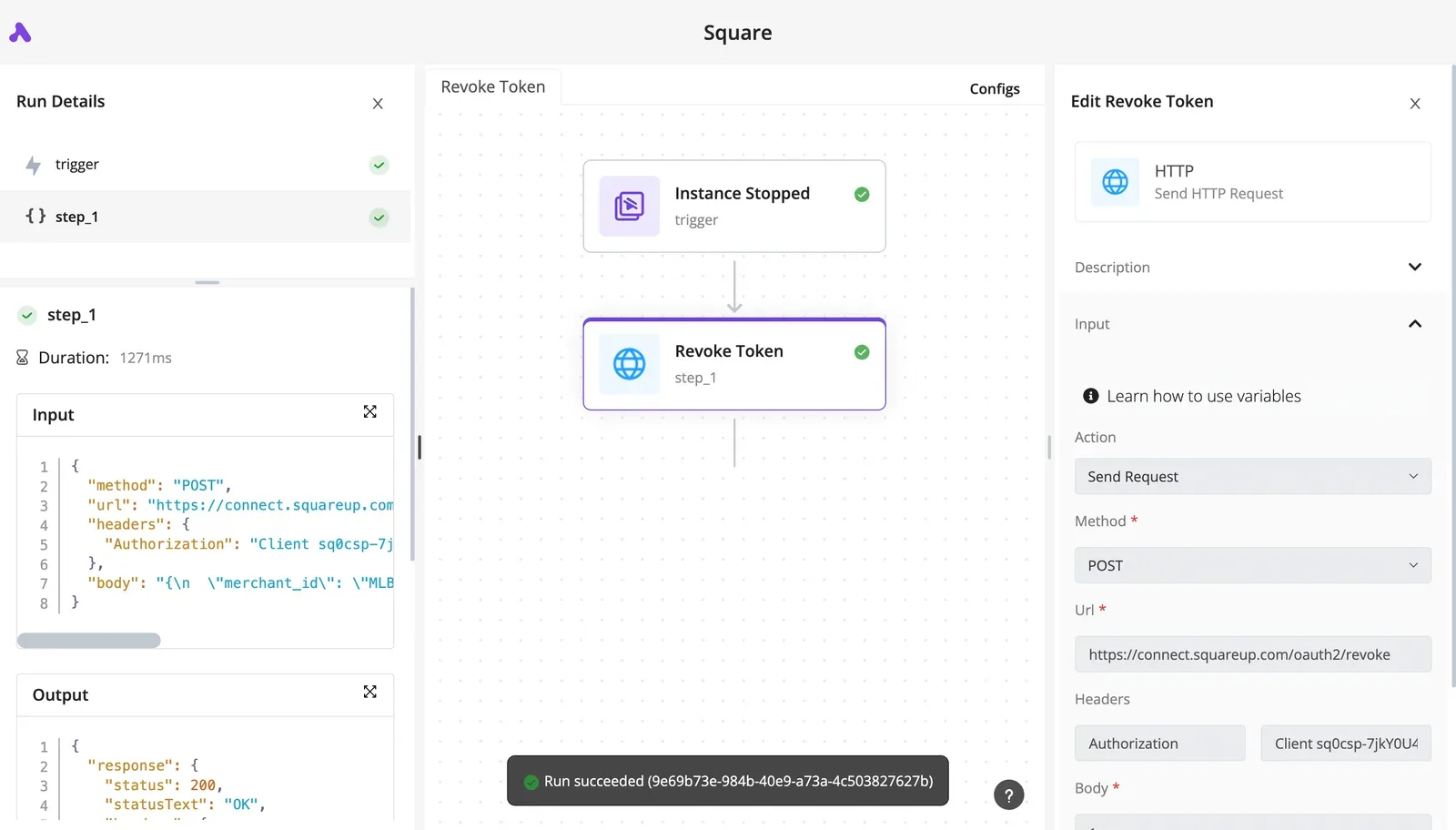
A connector is a curated subset of an API. Anything Mailchimp's Marketing API can do that the connector doesn't list is still reachable with an HTTP request, authenticated with your API key or an OAuth token and addressed to your account's data-center prefix.
Five Slack and Mailchimp workflows worth building
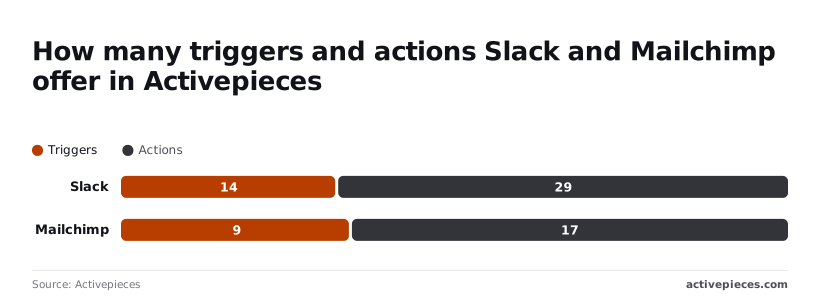
On the Mailchimp side, a step's most likely to be missing. Slack exposes 14 to 29 triggers and actions against Mailchimp's 9 to 17, according to the public piece listing.
| Workflow | Trigger (app) | Actions (app) | Missing step? |
|---|---|---|---|
| Mailchimp event to Slack alert | Mailchimp webhook (catch webhook) | Post message to channel (Slack) | Yes: webhook for any event the Mailchimp trigger list omits |
| Slack message to Mailchimp contact | "New Message Posted to Channel" (Slack) | Add or update subscriber (Mailchimp) | No, though the email must be parsed from the text |
| Reaction to audience tag | "New Reaction" (Slack) | Tag subscriber (Mailchimp) | Possibly: HTTP request if the tag action is absent |
| Scheduled campaign report | Schedule | HTTP request (Mailchimp), post message (Slack) | Yes: HTTP request to the reports endpoint |
| Mention to subscriber lookup | "New Mention in Channel" (Slack) | Find subscriber (Mailchimp), reply (Slack) | Check the lookup action first |
Mailchimp event to Slack alert
Start from a Mailchimp event, such as a new subscriber or an unsubscribe, and post a message to a channel.
If the event you need isn't a listed trigger, register a Mailchimp webhook against the audience and point it at a catch-webhook URL.
Use "New Message Posted to Channel" on a dedicated leads channel, then add or update the subscriber. The trigger hands you raw message text, so extract the email address before the Mailchimp step. Otherwise the contact field receives a whole sentence.
Post Mailchimp campaign reports to a Slack channel
This is the workflow most likely to need an HTTP request, because report numbers rarely have a dedicated action.
40.04% is the open rate Mailchimp's benchmarks give non-profits, so a non-profit sending at 33% is underperforming its peers. Education sits at 35.64%, so a school list below that has a subject-line problem.
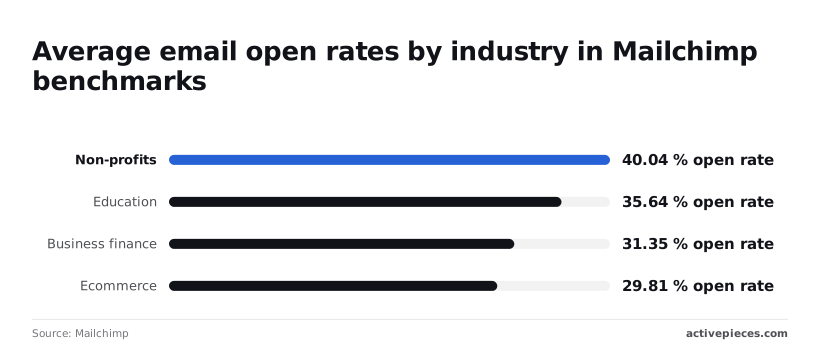
For a shop, 30% is simply normal and shouldn't trigger an alert, since business finance averages 31.35% and ecommerce 29.81%, so by the time a real anomaly occurs, the shop owner will have learned to ignore them.

You can follow the rest of this with the builder open. Start free, no card.
Building one Slack Mailchimp workflow step by step in Activepieces
Without writing any code, you can build and publish the gap-filling steps inside one short workflow in Activepieces: a single Mailchimp trigger feeding a single Slack action.
Activepieces has an MIT-licensed core, with its enterprise directories under a separate commercial licence in the same repository, and it can be self-hosted, so the same build runs on your own server if the subscriber data shouldn't pass through a hosted service.
If the Slack or Mailchimp step you need isn't in the catalogue, you don't wait on a vendor release: you can have AI generate the missing integration and keep it private to your own instance.
The catalogue stands at 750 integrations, a count taken straight from the packages/integrations/community directory of the public GitHub monorepo rather than a figure published for marketing, and roughly 60% of them were contributed by the community rather than the vendor, which means you're unlikely to need custom integration code.
Eight steps make up the whole build, in order, and each stage after the list explains the step that most often goes wrong, by the time you're stuck you already know the most likely culprit.
- Create a new flow.
- Pick the Mailchimp trigger Member Subscribed to Audience.
- Connect your Mailchimp account.
- Add the Slack action Send Message To A Channel.
- Connect your Slack workspace.
- Map the trigger's fields into the message.
- Test the flow.
- Publish it.
Start a blank flow and choose Mailchimp as the trigger. The Activepieces Mailchimp piece lists nine triggers, including Member Subscribed to Audience, Member Unsubscribed from Audience, Link Clicked and Email Opened.
Pick Member Subscribed to Audience, then choose which audience it watches. If you have several audiences, this choice decides which signups ever reach Slack.
Stage 2: connect Slack and Mailchimp
You will see two authorisation prompts: Mailchimp's in the trigger and Slack's in the action. Authorise Slack for the workspace where the channel lives.
If the message later fails to post, check that the app has access to that channel; private channels are the usual culprit.
Stage 3: map the fields in the action
Add Slack's Send Message To A Channel, select the channel, and write the message text. Insert the subscriber's email address and name from the trigger's output instead of typing placeholders.
This is where the workflow earns its keep: a bare "new subscriber" ping tells the team nothing, while one carrying the address lets them act on it. Map only what the trigger returns, and open the sample data to see what that is.
Stage 4: test, then publish
Run the trigger test first so Activepieces loads a real sample from your audience. Then test the Slack step and confirm the message lands in the right channel with the fields filled in, not blank.

A blank field here means the mapping points at data the trigger didn't return.
Once the message reads correctly, publish. An unpublished flow only runs when you test it, so subscribers will arrive and nobody will be told.
Troubleshoot Slack Mailchimp limits and errors
When a Slack and Mailchimp flow fails silently, one of five causes is usually behind it, and each has a documented fix.
**An unpublished flow only runs when you test it, so subscribers will arrive and nobody will be told.
| Row | Cause | Fix | Source | Check date |
|---|---|---|---|---|
| Permissions | The Slack app lacks the scope for the action, or the Mailchimp account lacks audience access | Reauthorise the connection with the needed scope | Slack API docs | 2026-11-19 |
| Bot not invited | The bot is not a member of the channel it posts to | Invite the bot to the channel | Slack API error reference | 2026-11-19 |
| Rate limits | Slack method tiers throttle calls; Mailchimp allows 10 simultaneous connections and a 120-second timeout | Queue calls, add delays, split large pulls | Slack rate limits; Mailchimp Marketing API docs | 2026-11-19 |
| Duplicate contacts | Adding an email already in the audience returns a "member exists" error | Use an upsert, or search before adding | Mailchimp Marketing API docs | 2026-11-19 |
| Merge field mismatch | The flow sends a field the audience does not define, or the wrong type | Match field tags and types to the audience settings | Mailchimp Marketing API docs | 2026-11-19 |
The bot-not-invited case is the more common one: a Slack bot can hold every permission and still be refused a channel it hasn't joined.
Slack and Mailchimp rate limits and plan limits
On Slack's side, methods are grouped into tiers, and the Slack rate limits page sets the ceilings. Tier 1 allows 1 request a minute, so a flow calling a Tier 1 method per new subscriber stalls on the second signup.
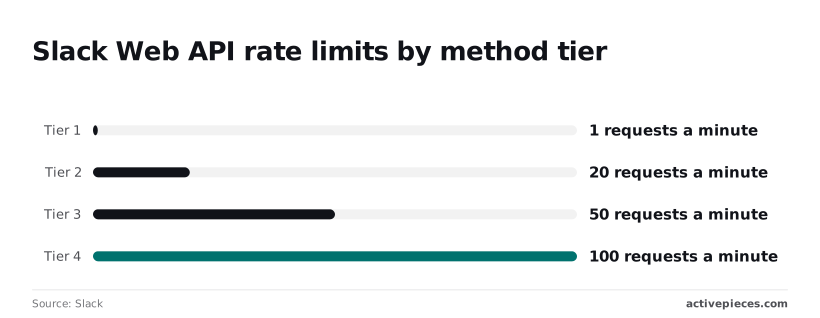
Tier 2 allows 20 a minute, Tier 3 allows 50, and Tier 4 allows 100 and rarely binds.
An eleventh parallel branch gets refused, because Mailchimp limits you on a different axis: it accepts 10 simultaneous connections, so the flow needs fewer branches running at once.
A request that runs past 120 seconds times out, so pull big audiences in pages instead of one call.
Data errors: duplicates, missing fields, merge fields
When an email's already in the audience, a plain "add subscriber" action fails. Switch to an update-or-add step, or search first and branch.
When a tag in the flow, such as a first-name field, differs from the tag in the audience settings, merge fields fail quietly.
Copy the tag from Mailchimp rather than typing it, and map empty values explicitly so a blank Slack profile field doesn't send a malformed request.
Other Slack Mailchimp connectors and when Activepieces fits
If you'd rather not use Activepieces, the same Slack-to-Mailchimp flow, with the same tag copied from Mailchimp and the same empty values mapped, can be built in Zapier, Make or n8n.
Other tools that connect the two apps
All three have Slack and Mailchimp apps, and each ships its own list of triggers and actions.
Where the action you need is missing, each of them can send a plain HTTP request to the Mailchimp API instead.
| Tool | Open source | Self-hostable | Pricing |
|---|---|---|---|
| Activepieces | Yes | Yes | Free and paid tiers |
| Zapier | No | No | $0 to $103.50 |
| Make | No | No | Free and paid tiers |
| n8n | Source-available, not OSI open source | Yes | Free self-hosted, paid cloud |
At Zapier's $0 end, you can prove the Slack trigger works before paying anything, so you won't waste budget on a failed experiment.
When Activepieces is the better fit
Choose it when subscriber data should stay on infrastructure you control, or when you want a licence that lets you read and modify the source.
Of the four tools, Activepieces and n8n can be self-hosted, and Activepieces runs on your own servers with an MIT-licensed core, so you can read and modify the code that handles those subscriber records.
If neither applies and you only want the flow running this afternoon, a hosted tool is the simpler route.
Frequently asked questions
Is there an official Slack Mailchimp integration?
Not one that covers the whole job. Each vendor exposes a limited set of triggers and actions, and a workflow tool joins them.
Where a step is missing, an HTTP request to the Mailchimp API, or a Slack incoming webhook, fills that one gap without replacing the connector.
Can I connect Slack and Mailchimp for free?
Yes for a small setup, because both Slack and Mailchimp offer free plans, and many workflow tools do too.
Read the limits on all three before you build, and look at which one you'll hit first.
Can I run this on my own servers?
It depends on the workflow tool, not on Slack or Mailchimp. Both are hosted services, so only the middle layer can move onto your hardware. Some automation tools are open source and can be self-hosted; hosted-only ones can't.
Why is my Slack message not posting from Mailchimp data?
Work through four causes, in this order. The trigger may never have fired: open the run history and confirm the Mailchimp event arrived, bearing in mind that some triggers poll on a schedule, so a delay isn't a failure.
A field mapping may be empty, because if the subscriber's name or tag is blank in the trigger output, the message step may fail or post an empty line.
The Slack app may not be in the channel, since a bot that hasn't been invited to a private channel can't post there.
Last, the HTTP request step may be returning an error, so read the response status and body, because Slack and Mailchimp both say what they rejected.
Related reading
References
Build it
Set this up in minutes.
No code required. Connect your accounts, and Activepieces runs it from there.
Start free Talk to sales