Smartlead Pricing: Plans, Add-Ons and Costs (2026)

Nov 24, 202613 min read
According to MarketingShot, Smartlead's four plans run from $32 a month (Base, billed yearly) to $379 a month (Unlimited Prime, billed monthly).
The headline price can therefore differ from your bill by about a fifth before any limits or add-ons count. Smartlead is a cold email platform that sends outreach campaigns from several connected mailboxes.

The figures below follow the MarketingShot listing as of 24 November 2026.
The plan table: price, leads, emails, features
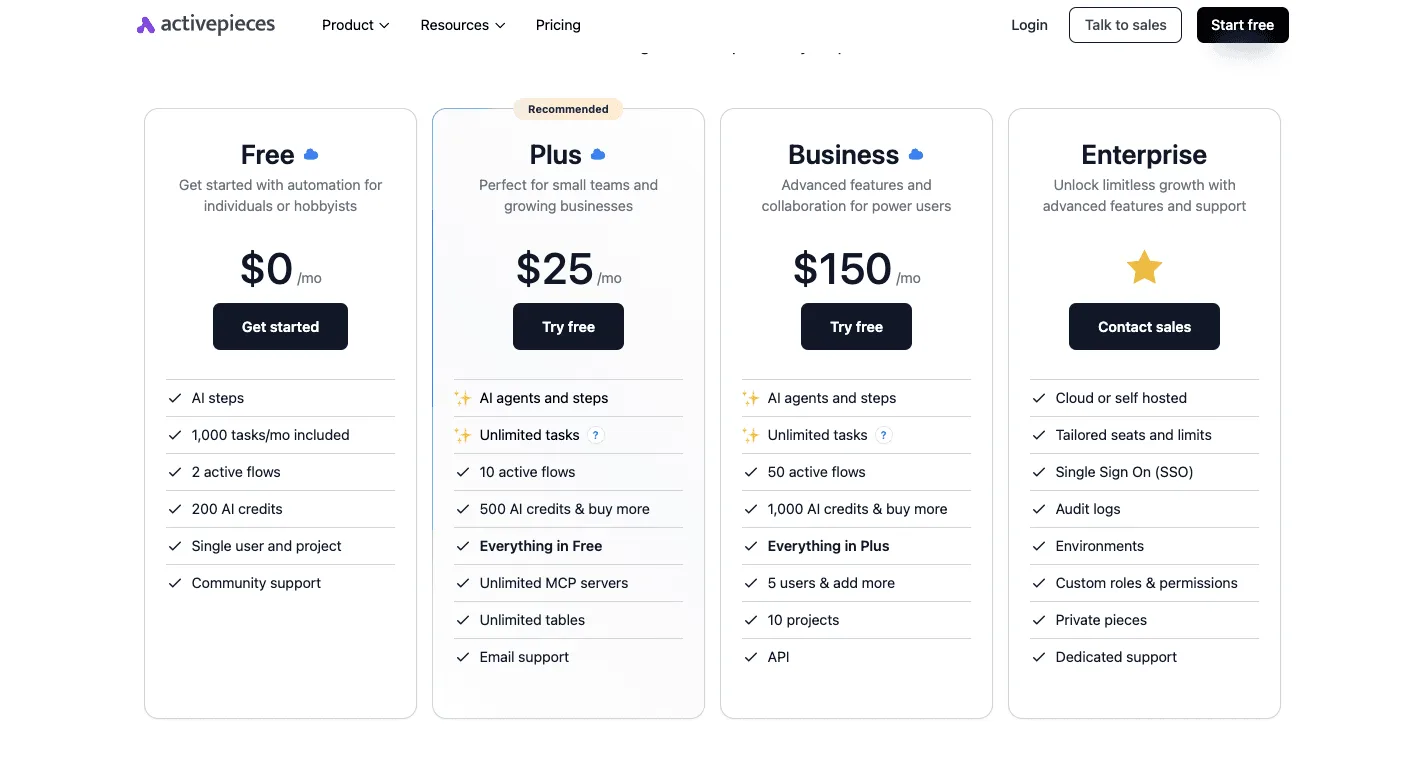
Activepieces prices by credits, and its Free plan is $0 for 1,000 credits a month, with Plus at $20 for 10,000. That's the right way to read any pricing page: the metered unit first, price second. For Smartlead, the price side looks like this:
| Plan | Billed yearly (per month) | Billed monthly (per month) |
|---|---|---|
| Base | $32 | $39 |
| Pro | $78 | $94 |
| Unlimited Smart | $144 | $174 |
| Unlimited Prime | $315 | $379 |
The source gives prices, not each tier's active-lead and monthly-email caps. Those caps are the metered units that set your real bill. Pull them from Smartlead's own page for the tier you're weighing, and compare them with your planned sending volume.
Monthly versus yearly billing
Billing monthly costs about a fifth more on every tier, and the dollar gap widens as you climb.
On MarketingShot's numbers, Base costs $7 more a month ($39 against $32), so a year of monthly billing adds $84. Pro costs $16 more ($94 against $78), which is $192 a year.
MarketingShot indicates Unlimited Smart costs $30 more ($174 against $144), or $360 a year. Unlimited Prime costs $64 more ($379 against $315), or $768 a year, as per MarketingShot.
The percentage premium barely moves, at roughly 20 to 22 percent. The penalty for staying flexible is therefore biggest in absolute terms on the top tier.
If you're sure, yearly billing on Prime saves $768.
Free trial or free plan: what the page offers
You won't find a free plan to budget around: the listing shows four paid plans and no $0 tier. Base at $32 a month on yearly billing is the lowest recurring price in these figures, per MarketingShot.
The source doesn't describe a trial, so confirm on Smartlead's own page whether one exists, how long it runs and what it caps. Until you've checked, plan on paying from day one.
Real Monthly Cost at Three Usage Levels
Solo sender, small agency, high-volume team
A solo sender on Base pays about $52.50 a month with three mailboxes from Zapmail at $4.50 each. The plan is most of the bill only at the smallest scale. Past that, mailboxes and servers set the total.

The table shows the add-on bill for three assumed setups, built from the $4.50 mailbox and $39 SmartServer rates. Swap in your own counts, then add the plan fee for the tier whose limits cover your emails and active leads.
| Setup | Mailboxes at $4.50 | SmartServers at $39 | Add-ons per month |
|---|---|---|---|
| Solo sender | 3 = $13.50 | 0 | $13.50 |
| Small agency | 15 = $67.50 | 1 = $39 | $106.50 |
| High-volume team | 50 = $225 | 2 = $78 | $303 |
The solo sender's $13.50 plus the $39 Base fee gives $52.50. The agency's add-ons already cost more than two and a half Base plans, and the high-volume team's cost nearly eight. Shopping on plan price alone means comparing the smallest part of the bill.

Add-ons that sit outside the plan fee
Each add-on is metered per unit, so its cost scales with your setup rather than with your tier.
**Shopping on plan price alone means comparing the smallest part of the bill.
- SmartDelivery is $49 a month, more than the $39 Base plan, so adding it to a solo setup more than doubles the bill.
- A SmartServer is $39 a month. Each one you add costs as much as a Base plan.
- A pre-warmed mailbox is $9 a month, twice the Zapmail rate. Fifteen of them cost $135 against $67.50, so skipping warm-up adds $67.50.
- An SMTP mailbox is $3.99 a month, the cheapest per mailbox of the three. Fifty cost $199.50, which is $25.50 less than the same fifty on Zapmail.
Smartlead plan limits that force an upgrade
The plan fee moves only when you hit a cap on active leads or monthly emails. Mailboxes can grow without touching either cap, but sending volume cannot.
Work through these inputs in order:
- Count the mailboxes you'll run, and multiply by the cost per mailbox for your chosen type.
- Count the SmartServers you need, and multiply by $39.
- Estimate monthly emails: mailboxes × emails per mailbox per day × sending days.
- Count the leads you keep active at once, not the leads you own.
- Choose the cheapest tier whose limits cover steps 3 and 4, then add the totals.

Step 3 is where teams get caught. When you add mailboxes, monthly emails rise, so a cheap mailbox expansion can push you past your tier's cap and into a larger plan fee.
If you are running this arithmetic for your own team, see what the same workload costs on Activepieces.
Smartlead Against Its Closest Alternatives
At $39 a month, Smartlead has the lowest entry price of the four tools. That headline only tells you where the cheapest tier starts, not what your volume will cost you on it.
Side-by-side pricing table
Treat the table below as a starting line. It shows the entry monthly price for each tool, and Apollo's figure is per seat, so a team of three pays three times the listed amount before any limits or add-ons.
| Tool | Entry monthly price |
|---|---|
| Smartlead | $39 |
| Instantly | $47 |
| Lemlist | $69 |
| Apollo | $65 per seat |
I've left annual prices, lead and email limits, mailbox policy, gated features and check dates out of the table. I haven't confirmed them for this integration, and a half-filled cell would mislead you more than an absent column.
Pull those six items from each vendor's pricing page on the day you decide.
When Smartlead is cheaper
If your volume fits inside its entry tier's active-lead and monthly-email caps and you can run your sending without paying for extras, Smartlead is cheaper.
In that case the $39 base is close to your real bill, and the $8 gap to Instantly is real money kept every month, which means $96 per year.
When an alternative costs less than Smartlead
Replacing something you would otherwise buy separately is the main way another tool comes out cheaper.
If you would pay a data provider on top of Smartlead, Apollo's per-seat price may beat the combined total, because Apollo is a contact database with sequencing built in.
That holds mainly for a solo user or a small team, because every added seat adds the full fee.
Instantly can come out ahead when its mailbox policy, which you need to read on its page, saves you from buying extra mailboxes or domains elsewhere.
At $69 Lemlist costs the most to enter, so it only wins if you need a feature gated on the other tools' cheaper tiers and would otherwise upgrade them. Price each option on your own volume, with data and mailboxes included, then compare the totals.
Connect Smartlead to Your CRM with Activepieces
Activepieces sits beside Smartlead and carries each reply into your CRM and Slack without a manual export, and since a run is 1 credit however many steps it has, the Free plan's 1,000 credits a month cover 1,000 replies.

It doesn't replace Smartlead's sending or inbox, so the Smartlead bill stays where your volume put it. What changes is how many human steps follow a reply.
Check your plan exposes webhooks
Before building anything, confirm that your Smartlead plan includes webhooks and API access. Open Smartlead's API and webhook documentation and your plan page side by side, and look for webhook settings in your own account.
If the option is missing, the flow below can't trigger, and the cost of the tier that unlocks it belongs in your total from the previous section. Don't assume a lower tier has it because a higher one does.
Build the Smartlead reply-to-CRM workflow
The flow has a trigger, a CRM update and a Slack message. Each reply is one run, so your reply volume, not your send volume, sets how much automation you use.
If your CRM or a Smartlead endpoint isn't among Activepieces' 750 integrations, you don't wait for a vendor release: you can generate the missing integration with AI and add it privately to your own instance.
Roughly 60% of that catalogue was contributed by the community, and you can count the integrations yourself in the open source monorepo.
The screenshot shows a HubSpot ticket flow built the same way. It has a trigger on the right-hand configuration panel, a Router splitting the path into branches, and Send Message actions delivering to Slack.
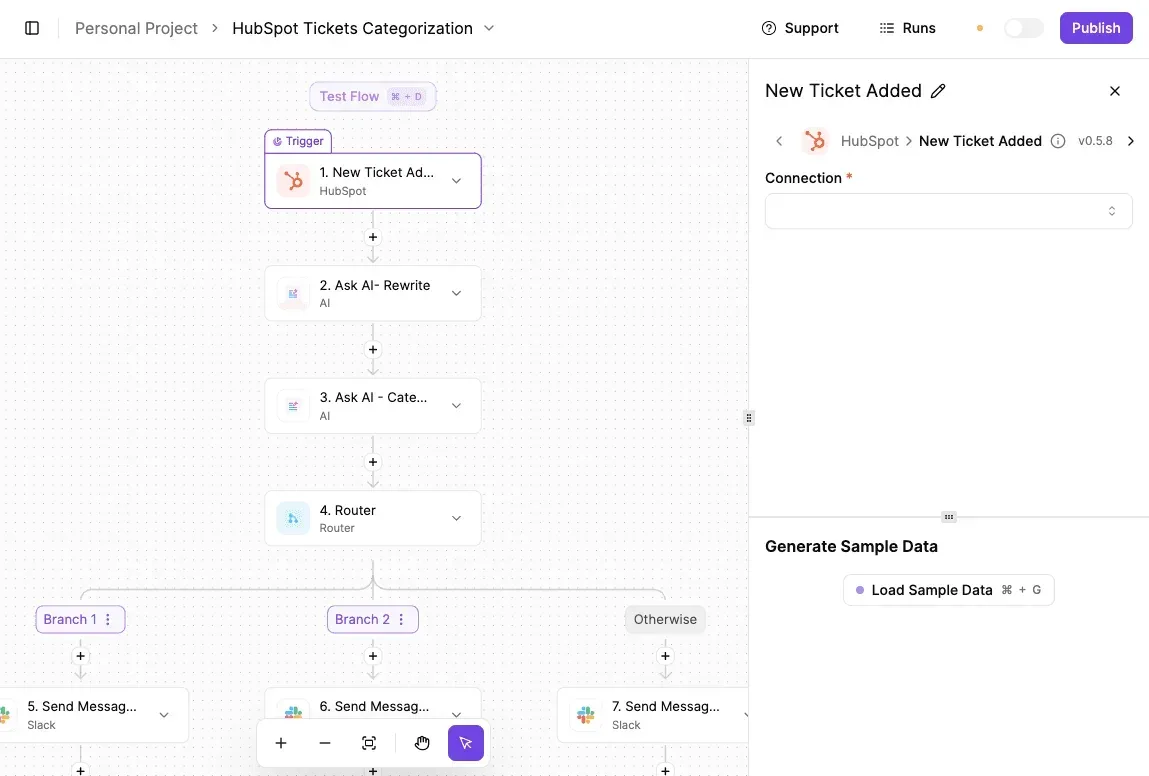
Take from it the shape of the build, one trigger feeding branches that each end in an alert, rather than the ticket content.
- Add a webhook trigger in Activepieces and paste its URL into Smartlead's reply webhook setting.
- Send a reply once so the trigger captures a sample payload. Build from that sample, not from memory.
- Add your CRM's update-contact action. Match the contact on the lead's email address, then write the reply text, campaign name and reply status into fields you've created for them.
- Add a Router if you want categories, for example interested versus out-of-office, with an Otherwise branch so nothing falls through unlogged.
- Add a Slack Send Message action that includes the lead's email, the campaign and the reply text, so the person reading it can act without opening Smartlead.
Test the Smartlead workflow with a real reply
Use Test Flow with a real reply from a mailbox you control, not a hand-edited sample. Confirm the CRM contact changed in the fields you mapped and that the Slack message arrived with the right values.
When a field comes through blank, the mapping usually points at a payload name that differs from what Smartlead sent, and the captured sample shows the correct name. Once all three outputs are right, publish the flow. Until you do, replies won't trigger it.
Steps to take before buying Smartlead
Before you pay, run your own volume through the product, write the bill down, and buy the shortest commitment available, in that order, because each step feeds the next.
Start a Smartlead trial with real data
If the vendor offers a trial on the day you look, start it. Load a real slice of your list, not a demo sample.
The limits are metered in active leads and monthly emails, and a sample too small to touch either one tells you nothing about where you'll hit a ceiling.
If there's no trial, skip to the cost worksheet and treat the first-week usage check as your trial.
Fill in the Smartlead cost worksheet
Enter your own count of active leads, emails per month, mailboxes, domains, data and SmartServers, then price each line against the current pricing page.
The plan price is only one row. The rows around it are what move the total.
Pay monthly before annually
Pay monthly before you pay annually. Monthly costs more per month, and that premium is the price of finding out whether your worksheet was right.
If the worksheet is off, you adjust the tier next month. An annual payment locks the mistake in for the year.
Move to annual only after the numbers have held for a full cycle, and only if the saving still beats the flexibility you're giving up.
Check Smartlead usage after the first week
After the first week, check usage. Open the usage view and compare the active leads and emails actually consumed against what you projected. Multiply the week out to a month.
If you're running close to a limit, you'll meet the next tier's price, or an overage, before the month ends. If you're far below it, you're paying for headroom you don't use.
Recheck the pricing page
Set a calendar date to recheck the pricing page. Limits, add-on prices and what each tier includes can change, and your own volume will change too.
Frequently asked questions
Can you cancel Smartlead anytime or get a refund?
Cancelling a subscription is a billing-settings action. Whether you get money back for the unused part of a paid period is set by Smartlead's terms, and I haven't confirmed those terms here. Treat any paid period as spent once it starts.
If you pay monthly, the most a bad month can cost is that month's plan plus add-ons; the billing cycle is the unit that matters. If you prepay for longer, a refund you assumed was available could be the whole exposure.
Read the refund wording on the terms page before entering a card, and note the date you read it, since billing policies change.
What happens when you hit the monthly email limit?
The metered unit is emails sent per month, and the cap is a ceiling on that count.
What Smartlead does at the ceiling (pause sending, block new campaigns, or charge for the excess) is the detail to confirm on its pricing and help pages before you rely on it.
Either way, a cap hit mid-cycle means stalled sequences or an unplanned upgrade, so size the tier to your busiest month, not your average one. Follow-ups count as sends too, so a multi-step sequence uses the allowance faster than the lead count suggests.
Can you change Smartlead plans mid-month?
You don't have to wait for the cycle to end to change plans; the change is made from the account's billing settings.
How the switch is charged (a prorated difference, a credit for unused time, or a new cycle starting immediately) is a billing-terms question I haven't verified.
The safe habit is to upgrade as close to the start of a cycle as you can, so you're not paying a higher rate for days you barely use.
If you're close to a limit, compare the cost of upgrading now against the cost of stalled sends until the reset.
Are warmup and unlimited mailboxes really included?
Warmup and unlimited mailbox connections are features of the plan, but "unlimited" describes how many mailboxes you can connect to Smartlead, not what those mailboxes cost to create.
The mailbox seats from your email provider and the sending domains are separate purchases, and they scale with your volume.
Two things are worth checking on the pricing page. First, whether warmup emails count against your monthly email allowance. Second, whether any warmup feature is limited to certain tiers.
Then add provider seats and domain registration to the plan price, because that total is your real bill.
Related reading
References
Running the numbers
See what the same workload costs here.
Free forever plan, and every paid plan self-hosts at no extra cost.
See pricing Talk to sales