
Calendly Zendesk Integration Without Code (2026 Guide)

Nov 23, 202614 min read
A Calendly-Zendesk integration is a flow that watches for a Calendly event, usually a new booking, and performs one Zendesk action, usually creating a ticket. The fastest route is one trigger and one action, built without code in Activepieces and tested on a real booking.

Anything the connector doesn't list, you cover with a webhook or an HTTP request. This was checked on 2026-11-23.
The two sides are Zendesk, the support desk where tickets live, and Calendly, the scheduling tool where customers book time. The integration is only the handoff between them.
Calendly Zendesk integration and setup
What people automate between Zendesk and Calendly
In most flows the traffic runs one way, and it starts in Calendly. A booking creates a Zendesk ticket so the agent sees the appointment next to the customer's history. A cancellation adds a note to the existing ticket. A reschedule updates it.
Calendly Zendesk integration requirements before you start
You need a Calendly account on a plan that allows webhooks or API access, which you confirm in your own account settings. You also need a Zendesk account where you can create tickets, plus the credentials to authorize the connection.
An account on your automation platform with permission to create a flow and add connections comes third. Last, make one real test booking yourself, because sample data hides field-mapping mistakes.
Connect Calendly to Zendesk in four steps
- Add the Calendly trigger for a newly created booking, and connect your Calendly account.
- Add the Zendesk action that creates a ticket, and connect your Zendesk account.
- Map the invitee's name, email, event name and start time into the ticket fields.
- Book a real test slot, open the run, and compare the ticket against the booking.
This takes minutes, not a project: automate it in Activepieces free.
Five Zendesk and Calendly Workflows Worth Building
Five workflows cover the Zendesk and Calendly pairing. Two start from a booking, one starts from a ticket, one starts from a cancellation, and one looks up a customer's bookings when a ticket arrives.
| Trigger and app | Action and app | What it does for you | Native or Custom API Call |
|---|---|---|---|
| Event Scheduled, Calendly | Create Ticket, Zendesk | Every booking opens a ticket with invitee and time | Native |
| Event Scheduled, Calendly | Add Comment to Ticket, Zendesk | Attaches the booking to the customer's open ticket | Native |
| Tag Added to Ticket, Zendesk | Create One-Off Meeting Link, Calendly | Produces a booking link when an agent tags a ticket | Native |
| Event Canceled, Calendly | Update Ticket, Zendesk | Records the cancellation on the existing ticket | Native |
| New Ticket, Zendesk | Find Events by Invitee Email, Calendly | Looks up the requester's bookings for the agent | Native |
Prices and plan limits checked against activepieces.com and activepieces.com on November 23, 2026.
Which workflows need a raw request
Three of the five run on listed steps only, so the other two support capabilities beyond those listed steps. The other two stop at a Zendesk step that isn't in the list, which the paragraph on missing steps below covers.
Booking to ticket
Start with Event Scheduled to Create Ticket, the simplest build. If the invitee already has an open ticket, a duplicate is noise, so the second row writes the booking into that ticket as a note instead.

Zendesk ticket tag to Calendly meeting link
Tag a ticket "needs-call" and the flow calls Create One-Off Meeting Link. That gives agents a deliberate switch.
The link comes back as data you can post to the ticket or send to the customer. Tags avoid firing on every New Ticket, which would generate links nobody asked for.
Handling Calendly reschedules and cancellations in Zendesk
When a customer reschedules, the flow may see a cancellation followed by a new Event Scheduled, and Event Canceled is the only cancellation trigger the Calendly side lists.
Run one real reschedule through the flow before trusting it. Otherwise your Event Scheduled flow may open a second ticket.
When a Zendesk or Calendly step is missing
When a step you need isn't listed, don't guess a field name. Use the Custom API Call action with the vendor's documented endpoint, or a webhook trigger if the event isn't listed.
Your Calendly Zendesk workflow setup
Run a real booking through each of the four stages before you move on.
Stage 1: Connect Calendly and Zendesk accounts
Create a new flow and name it something you'll recognize in a run log, such as "Calendly booking to Zendesk ticket". Then authorize both accounts when each step first asks for a connection.
A connection with the wrong permissions looks fine until the last step, where it fails with an authorization error and no ticket. Use a Zendesk login that is allowed to create tickets, not a read-only agent.
A connection with the wrong permissions looks fine until the last step, where it fails with an authorization error and no ticket.
Stage 2: Add the Calendly trigger and load a test booking
- Add a trigger and choose Calendly's "Event Scheduled" (the label may read "Invitee Created" in some builds; pick the one that fires when someone books).
- Select your Calendly connection.
- Book a real slot on your own scheduling page, using an email address you can recognize later.
- Return to the flow and load the test data. Open the sample result and read it.
Look for the invitee's name, the invitee's email, the event name and the start time. If one of those is missing or sits under an unexpected key, you've found it now, not after mapping it into a ticket.
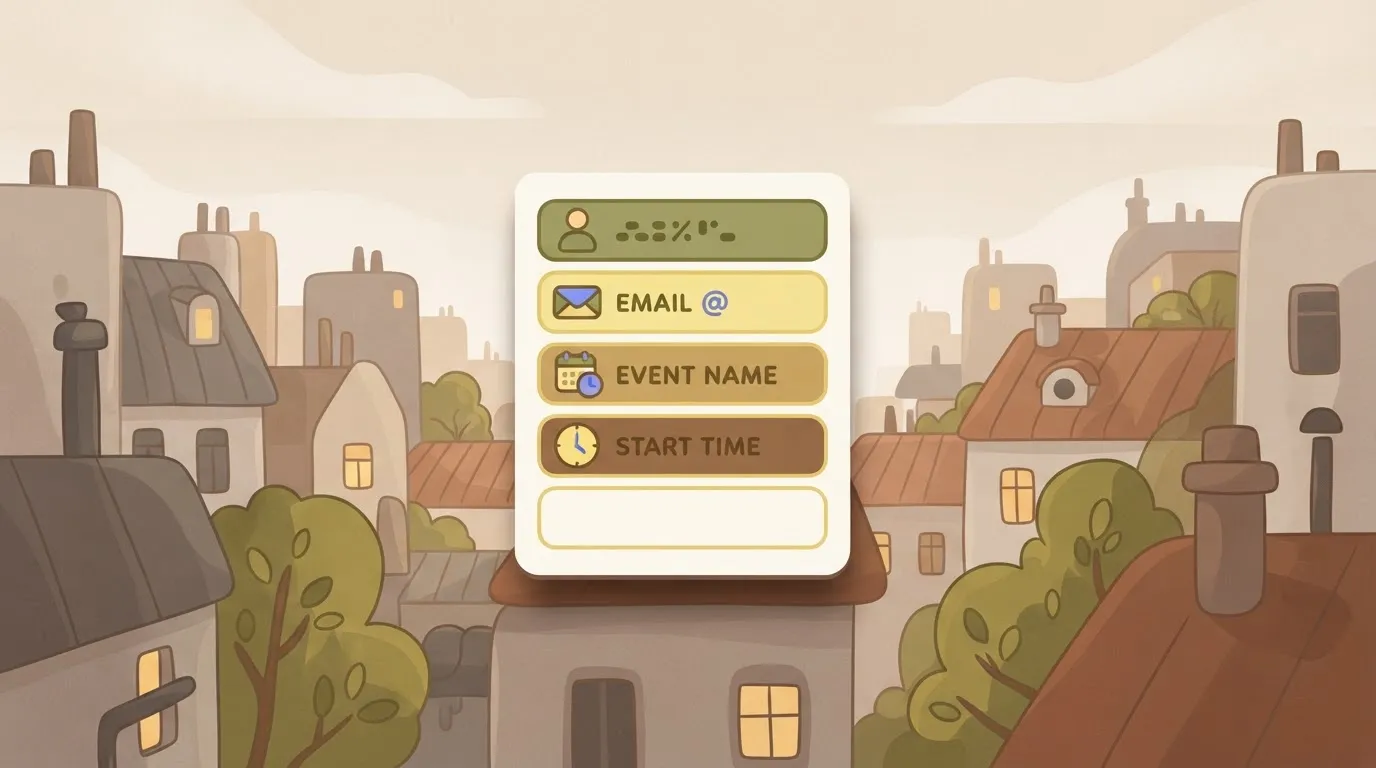
In Stage 3 you add the Zendesk action and map the fields.
- Add an action and choose Zendesk's "Create Ticket".
- Select your Zendesk connection.
- Map the subject to the event name plus the invitee's name, so the ticket reads as a booking at a glance.
- Map the requester email to the invitee's email from the trigger. Insert it from the trigger's data rather than typing it.
- Map the description to the start time and any answers the invitee gave on the booking form.
If the action refuses to continue, a required field is empty, and the message will name it. Required fields come first.
In Stage 4 you test, publish and confirm the result.
- Run the test on the Zendesk step using the booking from Stage 2.
- Open Zendesk and find the ticket. Check the subject, the requester and the description against the booking you made.
- Publish the flow.
- Make one more booking, this time with the flow live, and confirm a second ticket appears.
Only the second booking counts, because the first only proved the test path. Only a booking made while the flow is live proves the trigger's firing on its own.
Once that ticket arrives intact, you've got a working base, and any further step, such as a tag or an assignment, can be added and tested the same way.
You can also skip the clicking: describe the handoff in a builder's built-in chat, say a new Calendly booking opening a Zendesk ticket with the invitee's name, email and start time, and it builds and publishes the flow itself.
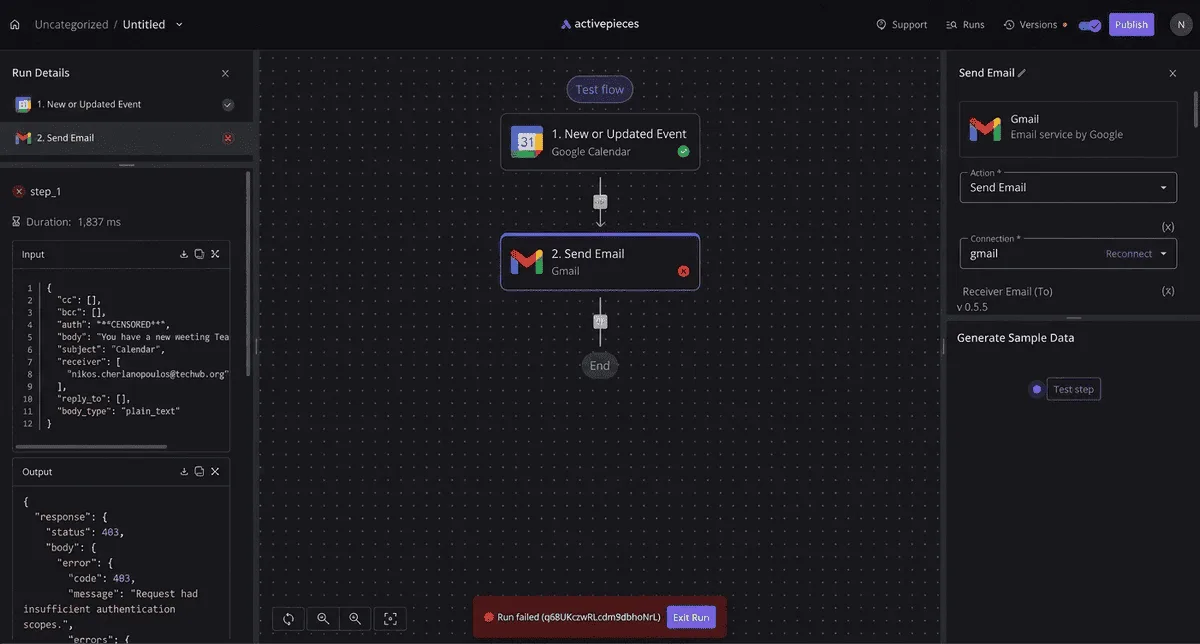
What lands in your account is the same flow you would have assembled by hand across these four stages. It runs under the same RBAC and audit logs as every flow a person built, and each run leaves a trace you can open and read.
MoneyGram, Moneypenny, Alan and FundingSocieties run flows on platforms like this, and nobody needs a certification to read that trace.
You can follow the rest of this with the builder open. Start free, no card.
Calendly Zendesk limits and errors
Most failed runs come down to six limits, and every step you add brings one with it. The table shows each one with its fix and whether I could confirm it against a document.
| Limit | Source doc | Fix | Status | Checked |
|---|---|---|---|---|
| Plan requirement | Macha Suite pricing page | Connect with a paid agent seat | Prices verified; feature gating unverified | 2026-11-23 |
| 401 auth | None located | Reconnect with a fresh token | Unverified | 2026-11-23 |
| 429 rate limit | None located | Add a delay and retry after a wait | Unverified | 2026-11-23 |
| Unmatched requester | None located | Map the invitee email to the requester | Unverified | 2026-11-23 |
| Timezone | None located | Pass the ISO timestamp, convert in the ticket text | Unverified | 2026-11-23 |
| Trigger not firing | None located | Check the subscription, then rerun with a real booking | Unverified | 2026-11-23 |
Zendesk plan, permission and authentication errors
By Macha's listing, Suite Team is $55 per agent a month, Growth $89 and Professional $115. Professional therefore costs $60 more per seat than Team, so ten agents is $1,150 a month instead of $550.
viz type=step title="What Zendesk Suite costs per agent by tier" unit="$ per agent a month" source="Macha - https://www.getmacha.com/blog/zendesk-suite-pricing-which-plan" xaxis="Plan tier" yaxis="$ per agent a month"15 per agent a month, billed annually, depending on tier." Suite Team: 55 Suite Growth: 89 Suite Professional: 115
When you see a 401, the credential was rejected; it does not mean the action is unsupported. Reconnect the account, then rerun the same step. If it still fails, the user behind the token lacks rights to create tickets.
When requests go out faster than the service accepts, you get a 429. I found no published figure for either service, so I won't give you one.
Add a short delay before the Zendesk step and retry once after a wait. If a burst of bookings triggers it, that confirms volume is the cause.
Wrong or missing data in the ticket
Two failures show up here. A ticket with the wrong requester means the invitee's email didn't match an existing Zendesk user, so check the exact field you mapped.
When a meeting appears at the wrong hour, the timestamp was converted somewhere you didn't choose. Pass the raw ISO value and format it in the ticket body, where you can see the result.
Trigger didn't fire: how to debug a run
Book a real test slot, then open the run history. No run at all means the Calendly subscription isn't active, so recreate the trigger. A run that stops partway shows the failing step and its error message, which is the evidence to fix from.
When Activepieces Fits This Integration and When Another Tool Does
If you want the HTTP-request fallback inside a no-code builder you can also self-host, Activepieces fits. Zapier, n8n and Make also connect Zendesk and Calendly, and each is the better choice in some situations.
Other Calendly Zendesk integration tools compared
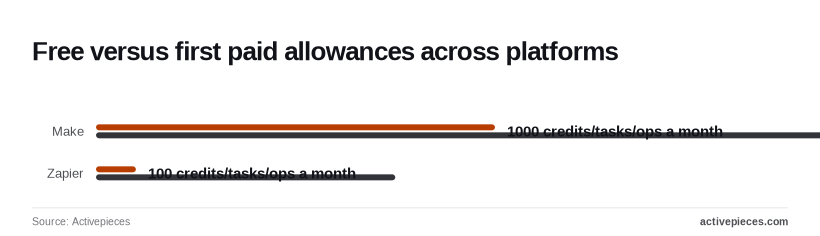
The tools differ on billing and hosting. Take from the table that the free allowances are counted in different units, so "1,000" and "100" aren't the same size of thing, and that I couldn't verify several cells.
| Tool | Cost model | Free allowance | Hosting | Step limits |
|---|---|---|---|---|
| Activepieces | Credits | 1,000 credits | Cloud or self-hosted | Unverified |
| Zapier | Tasks | 100 tasks | Cloud | Unverified |
| n8n | Unverified | Unverified | Cloud or self-hosted | Unverified |
The first paid tier shows the same gap. According to Activepieces' own comparison, Make includes 10,000 credits, ops, tasks or runs a month. n8n Cloud includes 2,500 and Zapier 750.
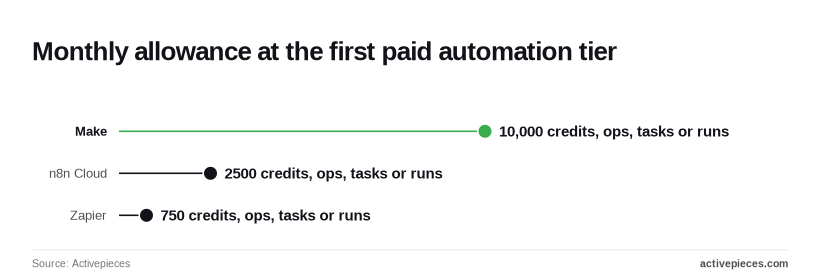
From free to first paid, the pricing page gives the ranges. Make runs from 1,000 to 10,000 a month and Zapier from 100 to 750.
Moving up a tier multiplies Make's allowance tenfold but Zapier's only 7.5 times. That's a vendor's comparison of its competitors, so check each tool's current page before you commit.
Build custom workarounds for missing actions
If you expect to hit a missing Calendly or Zendesk action, Activepieces lets you build around it: the HTTP request step from the previous section sits in the same builder as the listed steps, and it does so on an MIT-licensed core with 750 integrations counted from the open source monorepo, roughly 60% of them community-contributed.
Choose Activepieces, too, if the free allowance matters: 1,000 credits against Zapier's 100 tasks leaves room to test with real tickets before you pay anything, so you won't exhaust it validating just your first workflow.
Look elsewhere in three cases. If you need a step limit I couldn't verify, read each vendor's documentation first.
If you need the larger first-tier allowance, Make's 10,000 is the I don't see a sentence to rewrite. Your message only says "biggest figure above," and nothing came through before it. Could you paste the sentence, with the numbers and product names you want kept?
If your team already runs n8n, adding a Zendesk-to-Calendly flow there costs less than learning a second tool.
Open a new flow, set the Zendesk trigger to a new ticket, add one Calendly action, and run it against a real ticket. Add steps only when that test shows the job needs them.
Frequently asked questions
Once the first trigger and action pass a real test, the questions left are mostly about the edges.
Do I need to write code to connect Zendesk and Calendly?
No. A trigger such as a new Calendly booking and an action such as creating a Zendesk ticket are both picked from menus. You map fields by clicking values from the test data into the form.
If you touch anything code-like, it will be a custom HTTP request, and that's a URL, a method and a JSON body, not a program.
Does the Calendly Zendesk integration work on free plans?
It depends on the two accounts, not on the automation tool. Calendly's webhook-based triggers used to be gated to paid Calendly plans, but webhooks are now available on the Free plan, so a free Calendly account can create the subscription that fires your trigger.
Check the plan first by running the trigger test with a real booking. If it errors, the plan is the cause, and you'll see it before building anything else. Check the current plan limits on each vendor's pricing page.
Can I self-host the workflow instead of using the cloud?
Yes, if the automation tool you are using offers a self-hosted edition. The workflow itself, one trigger and one action, doesn't change.
What changes is that Calendly must be able to reach your server to deliver booking events, so a self-hosted instance needs a public HTTPS address. A server on a private network will build the flow fine and then never receive a single booking.
What if the step I need isn't listed for Zendesk or Calendly?
Use an HTTP request step against the vendor's API, or a webhook trigger, instead of guessing at a similar-looking built-in step.
Say you want to add a tag to an existing ticket and no listed action does it. Open Zendesk's API reference, find the ticket update endpoint, and send that call yourself.
Then run the step and read the response. A real response, or a real error message, tells you more than a menu item that only looks right.
How do I stop duplicate Zendesk tickets from repeat bookings?
Look up before you create. Calendly reschedules and cancellations can fire more events for the same invitee, so each run should search Zendesk for an existing ticket carrying that booking's unique identifier, for example in a custom field or the ticket's external ID.
Add a branch: if one is found, update it, and if none is found, create one. Test it by rescheduling a booking and confirming the ticket count stays at one.
Related reading
References
Build it
Set this up in minutes.
No code required. Connect your accounts, and Activepieces runs it from there.
Start free Talk to sales