
Deepgram API Free Credit? Pricing, Limits and Errors

Nov 23, 202613 min read
The Deepgram API is a speech-to-text service you call over HTTP for recorded audio or over a WebSocket for live audio.
You get a key by signing up in the Console, which starts you with a $200 credit, meaning you can explore the service without paying anything initially.
Deepgram API and authentication
Deepgram batch and streaming transcription features
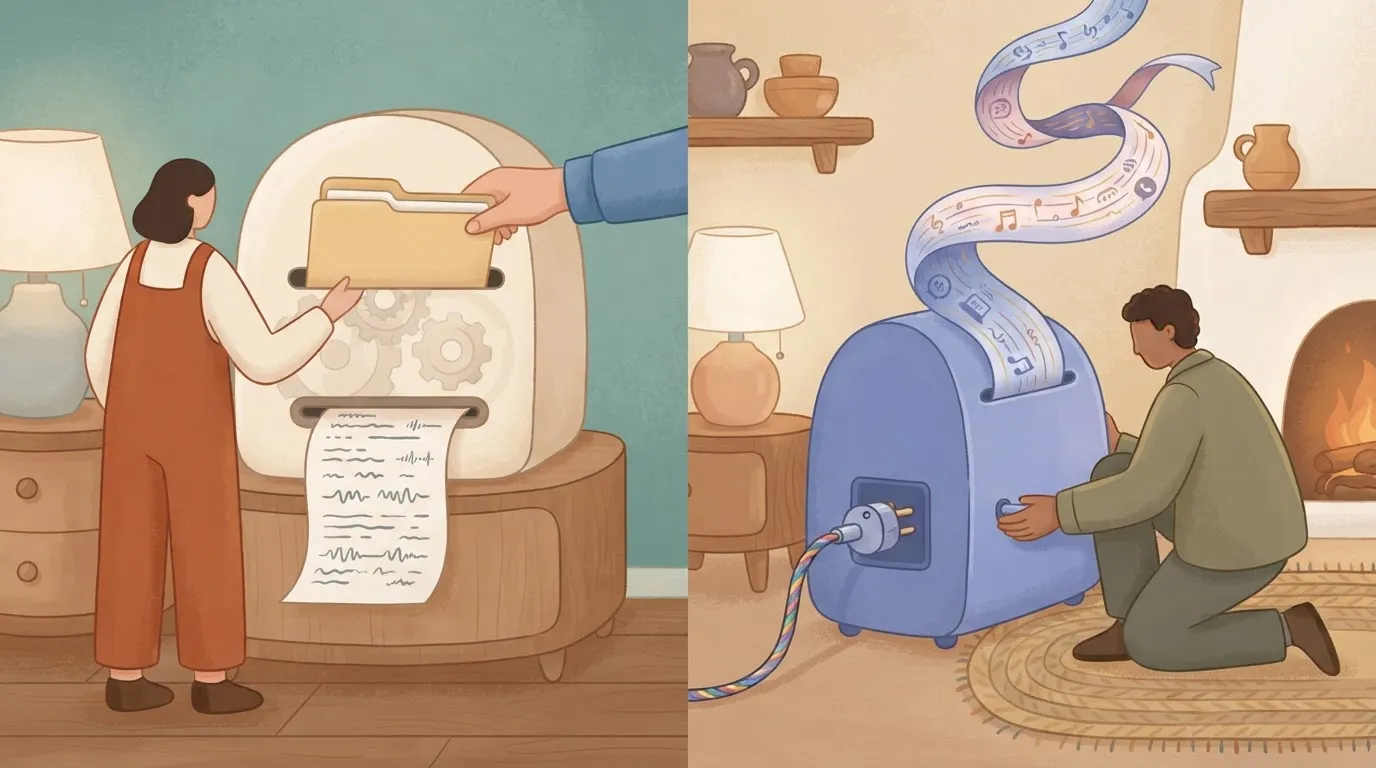
Send a file and you get a transcript back (batch). Hold a socket open and you get words as people speak (streaming). Add-ons such as keyterm prompting and diarization, which labels who said what, change both the output and the bill.
Creating an account and an API key
Sign up at Deepgram, open the Console, and create a key under your project's API keys. Copy it when it appears, because you won't be shown it again.
If you'd rather call Deepgram without writing code, Activepieces can run the same call from a flow, and its free plan gives you 1,000 credits a month with unlimited flows, so you still need this key first.
What the free credit covers and where it ends
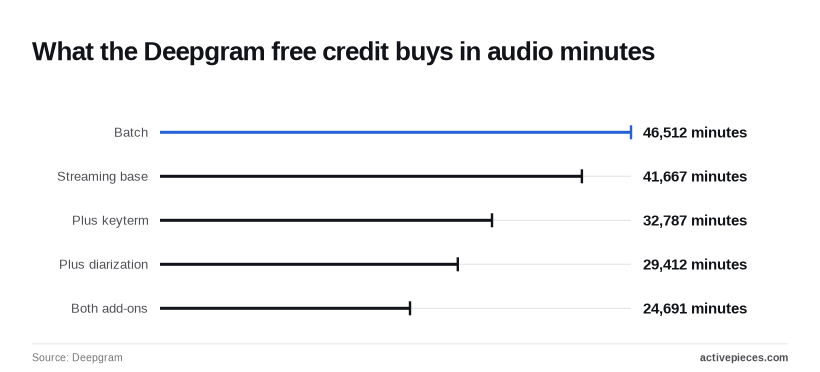
You are given dollars, not minutes, so the minutes depend on what you switch on. According to Deepgram's pricing page, checked 2026-11-23, $200 buys roughly 43,000 minutes of Nova-3 transcription, over 700 hours.
You are given dollars, not minutes, so the minutes depend on what you switch on.
Streaming base drops that to 41,667 minutes, so live audio costs more per minute from the first request.
Switch on add-ons and the number falls again. Keyterm brings it to 32,787 minutes, and diarization to 29,412, which means you get weeks of testing at no cost.
With both, you get 24,691 minutes, about 411 hours. That's roughly half the batch figure, so a prototype that turns everything on exhausts the credit in half the time you planned for.
Budget against the add-on rate you'll actually ship with, not the base one.
If you are running this arithmetic for your own team, see what the same workload costs on Activepieces.
Deepgram endpoints and models compared
Before you estimate cost, know that your add-on rate attaches to one of five paths, and each path bills a different unit: audio duration for speech-to-text, characters for text-to-speech and connected time for the Voice Agent API.

| Path | Input type | Batch or live | Billing unit | When to choose |
|---|---|---|---|---|
Pre-recorded STT (/v1/listen, Nova models) |
Audio file or URL | Batch | Audio duration | Call archives, uploads, anything already recorded |
Streaming STT (/v1/listen over WebSocket, Nova models) |
Audio stream | Live | Audio duration streamed | Captions, live call transcripts |
TTS (/v1/speak, Aura voices) |
Text | Batch or streamed output | Characters | Spoken replies you script yourself |
| Audio intelligence | Query parameters on a transcription request | Follows the request it rides on | Audio duration, added to the transcription rate | Summaries, topics, sentiment, intents |
| Voice Agent API | Live audio in and out | Live | Time connected | A full conversational agent in one connection |
Choose pre-recorded when the audio exists before you ask.
Choose streaming only when a person is waiting on the words, since a held-open socket is a concurrency slot you have to account for.
Trim the text before you synthesize it, because Aura voices bill by characters sent and a verbose reply costs more than a short one.
Leave a session open and idle and it still bills. The Voice Agent API bundles listening, reasoning and speaking behind one connection, and you pay for time connected.
Switch on an audio intelligence add-on and it adds to the transcription rate for the same audio. These are parameters, not separate endpoints, so enable only the ones you read.
Deepgram pricing and monthly costs
$0.0043 to $0.0092 per audio minute is the range, from Nova-3 batch to multilingual streaming, so model selection determines your rate. Rates checked 23 November 2026.
Deepgram per-minute rates by product
At $0.0043 per minute, Nova-3 batch is the floor, so pre-recorded files are your cheapest path. Whisper Cloud is $0.0048, about 12% more for a model you would choose only if you specifically want Whisper's output.
At $0.0065, Flux English is roughly 50% above Nova-3 batch, meaning you pay premium pricing for this model. Flux multilingual is $0.0078. Nova-3 multilingual streaming is $0.0092, so a live multi-language feature costs about 2.1 times what the same minutes cost as a batch job.
Read these as pay-as-you-go figures: every rate above sits on the tier with no commitment. Growth and Enterprise are priced on the same pricing page, but I haven't reproduced their rates here.
A worked monthly example
To estimate your likely monthly bill, match your expected volume and feature needs to the second chart, which shows a month of Nova-3 transcription at 100, 1,000 and 10,000 hours, from the cheapest setup up to one with streaming and add-ons.
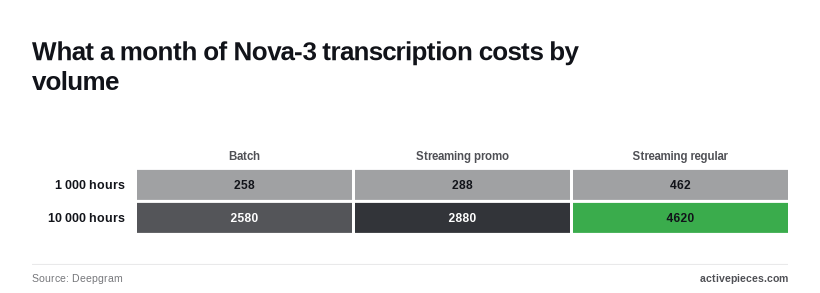
At 100 hours the bill runs $25.80 to $46.20, small enough to ignore.
At 1,000 hours it's $258 to $462. At 10,000 hours it's $2,580 to $4,620, so the choice of mode and add-ons is a $2,040 difference every month.
Authenticate and send a minimal Deepgram request
Because every request, including each of those concurrent ones, authenticates with an Authorization: Token <key> header, the key you choose decides how much damage a leak can do.
Deepgram API key scopes and temporary keys
Create keys in the Console with the narrowest scope the job needs. A key that can only transcribe can't manage projects or mint other keys, so a leaked one costs you usage, not your account.
For anything that reaches a browser or mobile app, don't ship the long-lived key. Have your server request a temporary key and hand that to the client. When it expires, the exposure expires with it.
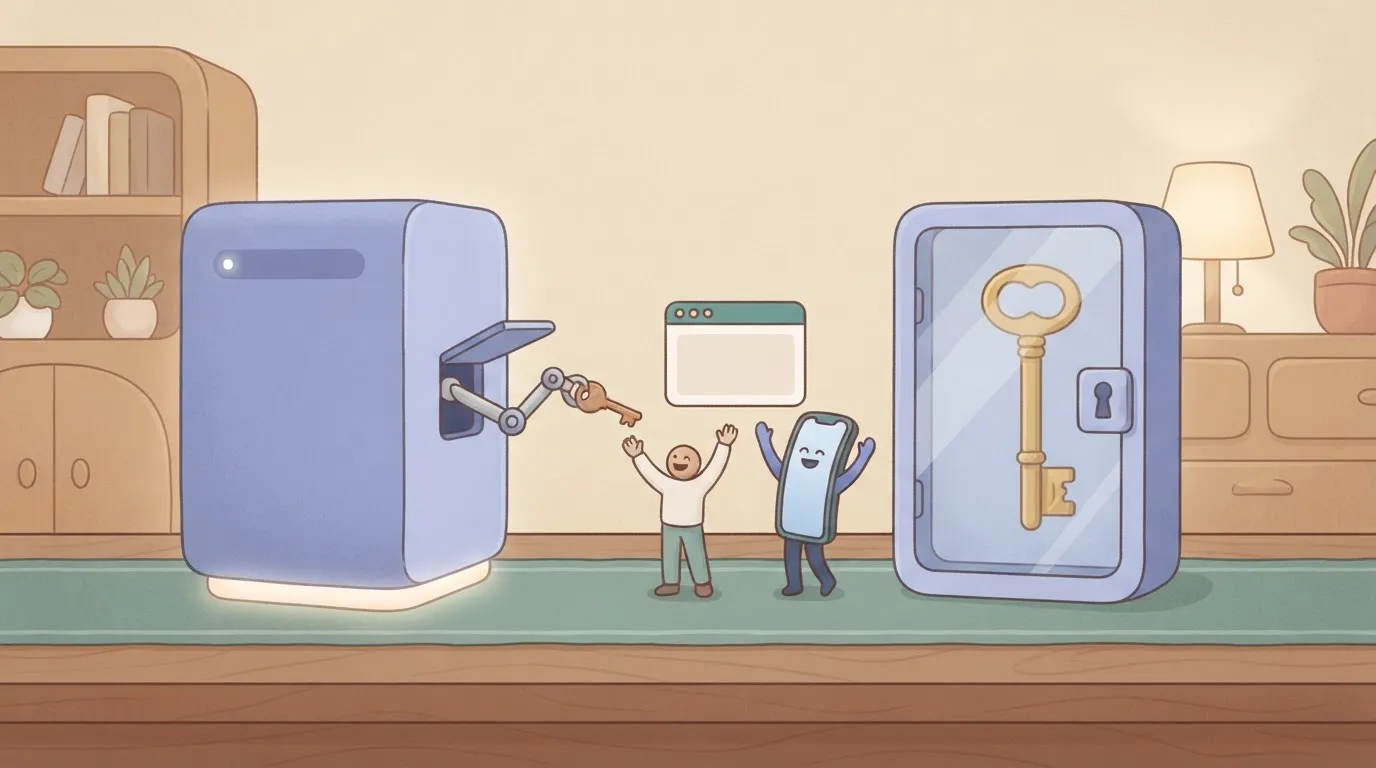
Follow the steps below to produce one transcript from one audio URL. That's enough to show where the key, the model and the response sit.
- Create a scoped key in the Console.
- Store it in a server-side environment variable, for example
DEEPGRAM_API_KEY, never in client code or a repository. - Send a POST to
https://api.deepgram.com/v1/listen?model=nova-3with the headerAuthorization: Token $DEEPGRAM_API_KEY, aContent-Type: application/jsonheader, and a body of{"url": "https://example.com/audio.wav"}. - Read the transcript from the JSON response, under the channel's first alternative in
results.
Open a Deepgram live streaming WebSocket
When the audio is live, you open a WebSocket to the same /v1/listen path on the wss:// scheme, with the same query parameters, including model=nova-3, and the same token.
When a browser opens a WebSocket, it can't set custom headers, which is the reason temporary keys exist. Pass the key through the WebSocket subprotocol instead, using the temporary one.
Each open connection is one of the concurrent streams your plan limits, so close sockets you're done with.
Worth checking against a plan that does not meter every step: one credit covers a whole run on Activepieces.
Deepgram rate limits and concurrency by plan
Requests past the cap are queued or rejected, and Deepgram sets that cap, by plan, on how many concurrent streams you can have open at once.
Limits by plan and product
Moving from Pay As You Go to Growth buys only 75 more simultaneous streams, and the table shows the streaming connection limits I can state, side by side.
A product expecting more than 150 concurrent callers needs the Growth plan or a custom agreement before launch, not after the first rejected call.
| Plan | Streaming connections | When exceeded | How to ask for more |
|---|---|---|---|
| Pay As You Go | 150 | New requests get a 429 | Contact Deepgram |
| Growth | 225 | New requests get a 429 | Contact Deepgram |
| Enterprise | Set by agreement | Set by agreement | Through your account contact |
For pre-recorded audio, the limits are counted separately from streaming ones. Read that page of the rate-limit docs for your plan's current figure, because a number copied from a blog post can be out of date.
Which Deepgram requests count toward concurrency
For as long as it's in flight, a request counts. A pre-recorded transcription counts until the response returns, and a streaming connection counts until the socket closes.
Two things follow. A client that retries immediately on a 429 adds load without freeing a slot, so back off. A WebSocket that stays open after the speaker has gone silent still uses a slot, so close it.
Requesting a higher limit
Ask before you need it. Contact Deepgram's support or your account representative with your plan, the product (pre-recorded or streaming), the peak concurrency you expect and the date you launch.
Common Deepgram errors and fixes
Only a few of the eight cases that cover most Deepgram failures deserve a retry: rate limiting, server errors, balance errors after topping up, and WebSocket drops. The rest fail the same way every time you resend them. The table below pairs each case with its fix and its retry rule.
| Case | Docs status and message | Cause | Fix | Retry? |
|---|---|---|---|---|
| 400 invalid JSON | 400, body couldn't be parsed | Malformed JSON in a URL-based request | Validate the payload before sending | No |
| 400 unknown body format | 400, audio couldn't be processed | Corrupt or unsupported audio, or a wrong content type | Re-encode, check the header | No |
| Auth | 401, invalid credentials | Missing or revoked key | Issue a new key | No |
| Permissions | 403, insufficient permissions | Key scope lacks the feature | Use a key with the right role | No |
| Balance | 402, insufficient credits | Account is out of funds | Add funds | After topping up |
| 429 | 429, too many requests | Concurrency limit reached | Queue and cap parallel calls | Yes, with backoff |
| 5xx | 5xx, server error | Fault on Deepgram's side | Log the request ID | Yes, limited |
| WebSocket close | Close frame with an error | Bad data or idle stream | Send audio or keep-alives | Reconnect |
None of the 401, 402 and 403 errors heal on their own. A retry loop on a 402 just burns requests while transcription is down, so alert a person instead.
For 429s, back off with jitter, and cap parallel requests below your limit rather than discovering it through errors.
Go quiet on a stream and it gets closed. Send keep-alive messages during pauses, and reconnect only after a clean teardown.
Call Deepgram without code using Activepieces
When the job is transcribing files that arrive one at a time, a no-code workflow suits Deepgram. Activepieces can send each file to Deepgram's pre-recorded endpoint and retry when Deepgram answers 429, which is the limit this article keeps returning to. Streaming stays outside it.
Open the Activepieces connectors library and you get 750 integrations, roughly 60% of them community-contributed, with Webhook, Google Sheets, Gmail and HTTP among them, and every one available to an AI as a tool.
Two of those matter here: Webhook starts a flow when a file arrives, and HTTP sends a request to any endpoint and returns the response.
Search the library for a dedicated Deepgram integration first. If it exposes the options you need, use it. If not, the HTTP integration calls the same endpoints you read in Deepgram's docs, so the limits and error codes you checked earlier apply unchanged.
- Add a Webhook trigger and point your upload system at its unique URL, so each new file starts one run.
- Add an HTTP step that posts the file, or its URL, to Deepgram's pre-recorded transcription endpoint. Put the API key in a connection or secret, never in the step body.
- Branch on the response status. On 429, wait and run the step again rather than failing the flow. Leave the wait length and attempt count to what Deepgram's docs say about its limits.
- On any other 4xx, stop and notify someone. Retrying a bad request or a rejected key repeats the same failure.
- Write the transcript to Google Sheets or send it by Gmail, whichever your team reads.
Keep live audio in code. A flow runs once per trigger and can't hold a socket open, send keep-alive messages or tear down cleanly, which is what the earlier section required.
Keep it in code too if you must cap concurrent requests yourself, since parallel flow runs each fire their own request.
Monday checklist:
- Read Deepgram's concurrency limits and error codes first.
- Confirm the integration covers your options, or use HTTP.
- Add the 429 retry and a stop on other errors.
- Keep streaming out of the flow.
Frequently asked questions
Does the Deepgram API need a credit card to start? No, you can create an account and get an API key without entering a card, and Deepgram gives new accounts free credit to test with.
Check the console for your balance and whether it expires before you rely on it for a demo. Production traffic needs a paid arrangement, so settle billing before launch rather than during an outage.
Which languages does Deepgram support?
What you get depends on the model you pick, not on the API as a whole. Not every language is available on every model, and some features, such as diarization or smart formatting, may cover fewer languages than plain transcription.
Read the language table in Deepgram's docs for your chosen model before you commit, because a request for an unsupported pairing fails or degrades quietly.
Can I send audio from a URL instead of uploading a file? Yes. For prerecorded audio, you send a JSON body containing the URL instead of the file bytes, and Deepgram fetches it.
The URL must be reachable from the public internet, so a link behind a login, a private bucket or an expired signed link will fail. Give signed links a lifetime longer than your queue delay.
Is my audio stored or used for training? Deepgram's docs describe a Model Improvement Program, and your data handling depends on how your account and requests are set up.
Read the current data-privacy and opt-out pages before sending anything sensitive, and ask Deepgram in writing if your contract requires a specific retention or training commitment. Don't assume the default matches your compliance requirements.
How do I stop a leaked Deepgram key?
Delete or revoke the key in the Deepgram console, then create a replacement and deploy it. Revocation ends access immediately, so expect failures anywhere the old key is still in use.
Afterward, review your usage for requests you didn't make, since billing is per unit and a leaked key spends your money. Use scoped keys with short lifetimes for anything running in a browser.
Related reading
References
Running the numbers
See what the same workload costs here.
Free forever plan, and every paid plan self-hosts at no extra cost.
See pricing Talk to sales