
Speechmatics Pricing 2026: Plans, Rates and Limits

Nov 10, 202614 min read
Speechmatics, a speech-to-text vendor, lists real-time rates from $0.30 to $0.80 per hour depending on model, a spread that matters to anyone wiring transcription into an automated workflow built with a tool like Activepieces.
Speechmatics Pricing as Listed on 10 November 2026
Depending on the model you pick, the bill can nearly triple before any usage quirk appears. Beyond the self-serve rates, Enterprise is arranged through a sales call.
Speechmatics pricing is the set of per-hour rates, plan limits and add-on feature charges that determine what a team pays to use Speechmatics's speech-to-text service, so the final bill depends on the model chosen, the features switched on and how much audio is processed.
The plan table, with check date
As of 10 November 2026, the table below reflects the pricing page. It shows what each tier costs and what decides it. Take from it that only four rows carry a public number, so most tier pricing remains undisclosed.

| Plan or model | Price per hour | Inclusions | Deciding limit |
|---|---|---|---|
| Linden 1 | $0.15 | Real-time transcription | Lowest listed rate |
| Melia 1 | $0.40 | Real-time transcription | Model choice |
| Oak 1 | $0.23 | Real-time transcription | Model choice |
| Enhanced | $0.80 | Real-time transcription | Highest listed rate |
| Prepaid pack | Contact sales | Contact sales | Contact sales |
| Enterprise | Contact sales | Contact sales | Contact sales |
Speechmatics Batch and Real-Time Rates per Hour
At $0.15 per hour, Linden 1 is the lowest-priced listed model. Melia 1 at $0.40 makes the same 100 hours $40. Oak 1 is listed at $0.23 per hour.
Enhanced at $0.80 brings it to $80, so a team that defaults to the top model pays more than double Linden 1 for identical minutes.
These are real-time list rates. No published batch figure is available to compare them against, so don't assume batch is cheaper until you see a quote.
Plan around the $100 free credit grant, because the plans page publishes it. Prepaid packs and enterprise terms both say contact sales.
If you are running this arithmetic for your own team, see what the same workload costs on Activepieces.
The 02:10 Alert on a Five-Person team's Transcription Bill
At 02:10, a five-person support team's usage alert fired in this illustrative scenario. The cause was a nightly batch of call recordings that kept retrying against a concurrency limit. Every retry was billed work that nobody was watching.
The workload and the plan they picked
Agents want searchable text waiting each morning, so the team records customer calls and has them transcribed overnight. Nobody on the team is an infrastructure person. One support lead wrote the upload script, and whoever is on call that week inherits it.
They picked the plan that looked cheapest per audio hour in the pricing table. They also switched on speaker labels because agents wanted to see who said what.
Every recording from the day goes in at once, and any job that gets rejected is retried. This is how the night went:
- 22:00: the batch queue starts and submits every recording from the day, so the load arrives when no one is awake to see it.
- Soon after, the retries begin once submissions hit the plan's concurrency limit. The script treats "too many at once" as a failure and tries again.
- 02:10: the usage alert fires, and the on-call person's phone is the only thing that notices.
- The on-call person opens the vendor dashboard and sees usage climbing far faster than the day's call volume explains.
- They pause the queue, which stops new submissions but can't undo work already accepted.
- In the morning, the team reconciles the usage report against the recordings actually uploaded, to see how much was real work and how much was retries.

Overrun costs in time and dollars
With the jobs paused, the team could count the damage. It had processed far more audio than planned, and the invoice landed well above budget, with staff time lost on top.
In this illustrative scenario, the invoice had three kinds of line, and only the first matches the rate on the pricing page:
- Transcription minutes, billed at the listed per-hour rate
- Add-on features switched on for some jobs, each billed on top of the base rate
- Usage past any included free-tier or plan allowance, billed as overage
Budget from the listed rate alone and you leave out the lines that grow fastest when volume surprises you.
Forecast Versus Actual Speechmatics Bill
Budgeted from the minutes it expected to receive, the forecast never counted retried jobs, duplicate uploads and long recordings that nobody had sized. All of them added billable audio.
Read the two pairs together: the dollar gap is wider than the minute gap, because add-ons and overage multiply each extra minute rather than simply adding to it.
Once free allowances run out, they stop absorbing usage, and Speechmatics bills every minute after that point. Annual or committed billing can change the effective rate, but it doesn't cap a surprise. Committed volume only helps if the commitment matches what the team actually runs.
Staff Hours Spent Reconciling the Speechmatics Invoice
Nobody could answer "which jobs produced this line?" from the invoice alone. Someone had to match billed minutes against the team's own job logs, and then check which add-ons were on for which jobs.
On a small team, that work falls to whoever built the pipeline, so the hours came out of build time.
Factors behind the bill overrun
Because four things sit between the listed hourly rate and the total, the invoice didn't reconcile, and the docs confirm only some of them.
Each cause below is marked "confirmed in docs" or "not stated", so you know which to budget for and which to ask support about.
Speechmatics Accuracy Tiers and Add-On Feature Costs
Confirmed in docs. The pricing page separates accuracy levels and optional features such as speaker labelling and translation. The headline rate covers only the base tier.
Switching on the higher accuracy setting "just for the noisy calls" meant paying a different rate on every hour of audio, not only the noisy ones. Check each job's configuration before multiplying hours by one rate.

Speechmatics Billing Rounding and Retried Jobs
Not stated. The docs give no clear statement of how short files are rounded, or whether Speechmatics still bills the audio a job processed before it failed partway.
Send many short clips and you could pay for far more than the raw duration, and a retry may mean paying twice for the same minutes. Ask support in writing, and keep your own per-job duration log to compare against the invoice.
Concurrency and rate limits
Confirmed that limits exist, not stated how they affect the bill. When a batch hits the cap, jobs get rejected or queued, and most automation tools respond by retrying. Whether a rejected request costs anything is the unclear part.
The practical fix is on your side: cap how many jobs your workflow submits at once, so the limit never triggers retries.
Throttling logic tempts you to add steps: a counter, a wait, a check before each submit.
Activepieces charges 1 credit per flow run however many steps the flow holds, so a ten-step throttle costs the same as the two-step workaround it replaces, unlike Zapier's per-task billing, which counts each step.

Free-tier and plan boundaries
Partly confirmed. Speechmatics publishes the free allowance and plan boundaries, but the docs say little about what happens at the edge, such as whether it bills overage automatically or the service stops. Assume automatic billing until support tells you otherwise.
Treat reprocessed audio, the fourth cause, as charged. It shows up in the same place as the retries above: the docs are silent on whether Speechmatics charges a re-submitted file as new audio.
Worth checking against a plan that does not meter every step: one credit covers a whole run on Activepieces.
Speechmatics Compared With Deepgram, AssemblyAI and OpenAI
Price every vendor for the same workload on the same date before a rate comparison means anything, because list rates move faster than articles about them.
Pricing Comparison Table for the Same Workload
Dated 10 Nov 2026, the table below shows what each vendor's page has to be checked for. Only the Speechmatics figure is confirmed here, so treat the other rows as work for your own calculator, not as a verdict.
| Vendor | Batch $/hr | Real-time $/hr | Separately billed add-ons | Free credit or tier limit | Monthly cost, same workload |
|---|---|---|---|---|---|
| Speechmatics | 0.129 entry rate (Jun 2026) | Not verified | Not verified | Not verified | Not verified |
| Deepgram | Not verified | Not verified | Not verified | Not verified | Not verified |
| AssemblyAI | Not verified | Not verified | Not verified | Not verified | Not verified |
| OpenAI | Not verified | Not verified | Not verified | Not verified | Not verified |
If you can't fill in the add-on column, you can't predict the invoice. A blank row is a warning.
How Speechmatics's entry price has moved
In Apr 2025 the entry rate was $0.80 per hour. By Jul 2025 it was $0.24, so a quote saved in the spring overstated the cost by more than three times. By Jun 2026 it was $0.129, roughly a sixth of the April figure.
Without a date next to it, any list rate in a budget will be wrong within a quarter.
When your audio is the kind that cheaper rates handle badly, a falling entry price makes Speechmatics easier to justify: many languages, accented speech, or noisy calls. Test it on a sample of your own recordings before you decide.
Without a date next to it, any list rate in a budget will be wrong within a quarter.
Even at a lower per-hour rate, the bill can come out higher. Diarization, translation and extra languages may be billed separately, and a free tier may cap hours or concurrent streams. Price the whole feature set you need, not the headline rate.
Usage Caps and Alerts Built After the Incident, With Activepieces
After the invoice landed, the team built a cap, two alerts, deduplicated audio and a pause switch, and none of them needs a new vendor to work.
- A monthly minute cap, set below what the budget can absorb, so the ceiling is a number someone chose rather than whatever the month produced.
- Spend alerts at 50 and 80 percent of that cap, so the first warning arrives while there's still time to change behaviour, not after the damage is done.
- Deduplicate audio before submission. Re-uploaded recordings and repeat exports were billed as new minutes, so a checksum check now runs first.
- Batch jobs pause at the cap. A backlog waiting a day costs nothing; a backlog that keeps running costs the whole overage.
Spend Alerts Using a Script or Speechmatics Dashboard
Start with the vendor's own usage page, which is the cheapest option. Check whether your account lets you set a spend limit or notification there, and turn on whatever it has.
If the dashboard only reports usage, a small script on a schedule fills the gap: pull the month's usage and compare it to your cap. Send an email or chat message when it crosses a threshold.
Where it breaks is ownership. That script lives on one person's laptop or one forgotten server, and when they leave, the alerts leave with them.
Doing it with an Activepieces workflow
On a visual canvas you chain steps in Activepieces, an automation builder, so the same logic sits where the whole team can read it.
Starting with a schedule trigger, the flow below reads your records in Google Sheets, loops through them, and calls the usage endpoint with an HTTP request. It then hands the numbers to two AI steps. Two separate AI models therefore evaluate the data.
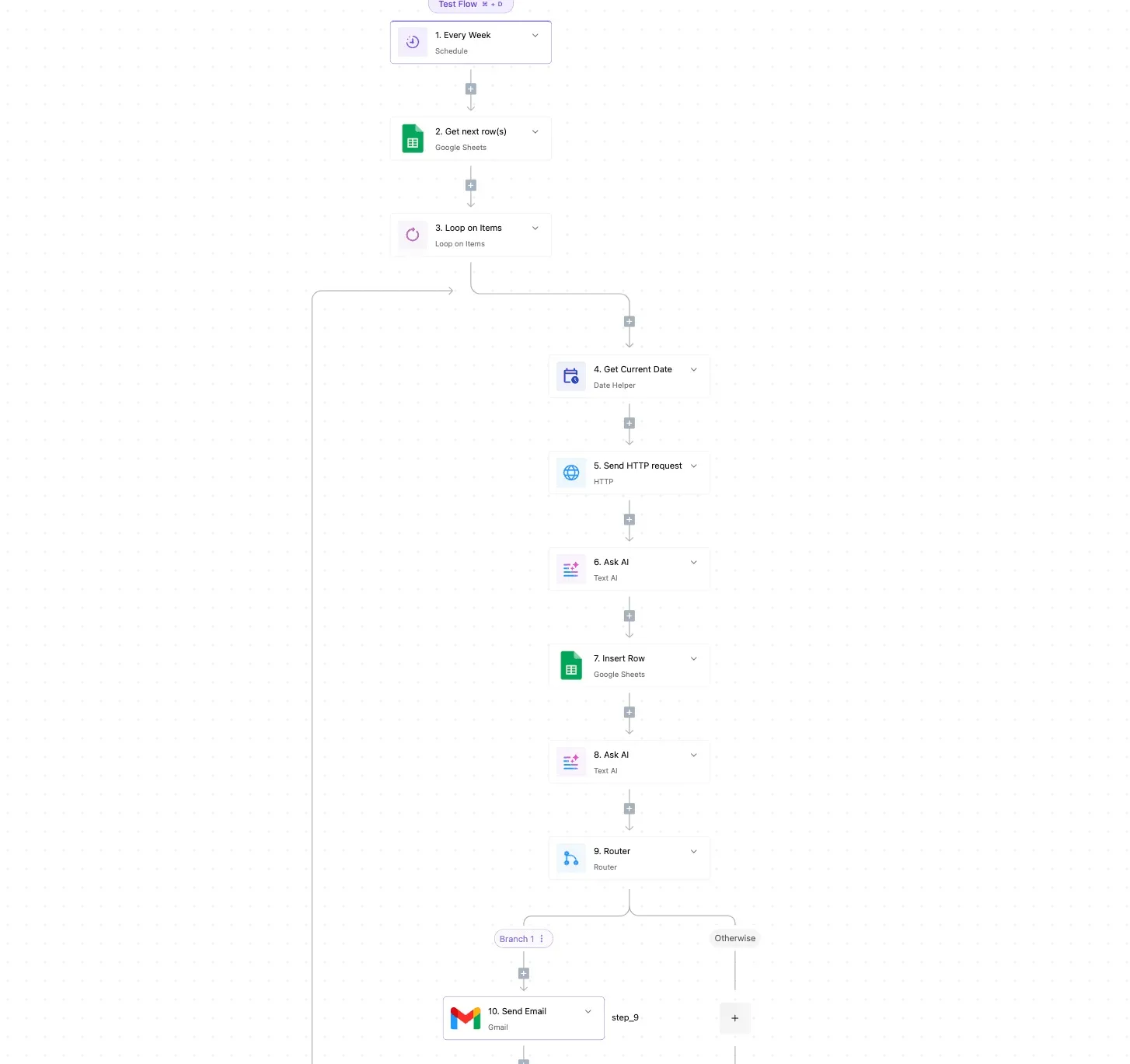
Then a router branches on the result, and a Gmail step sends the notice.
Look at the screenshot: ten connected steps, with the router's Branch 1 and Otherwise paths carrying the decision. Take from it that the threshold check is one visible fork, not logic buried in code.
For our case, swap the Gmail step or add a Slack step on the alert branch. Point the other branch at whatever holds your queue, so crossing the cap pauses submissions.
Because each step shows its integration, a non-developer can see why the queue stopped.
- Write down the monthly minute cap and who approved it.
- Turn on any spend limit or alert your vendor dashboard has.
- Add the 50 and 80 percent alerts, and name who receives them.
- Add the duplicate check before any audio is submitted.
- Test the pause by lowering the cap temporarily and confirming the queue stops.
Frequently asked questions
Having seen why the queue stopped, that same non-developer will next ask five billing questions, and each answer below starts with the short version.
Does Speechmatics have a free tier? Yes: the Free plan comes with a $100 credit grant and needs no payment card.
Use it to measure your own audio, then price from that, because a trial allowance running out mid-project is how the surprise starts.
Is Speechmatics billed per minute or per hour? The listed rate is per hour of audio. Check whether short files are rounded up, because a team sending many brief clips can be billed for more audio than it actually recorded.
Does Speechmatics have discounts for committed volume? Committed-volume pricing is the kind of thing vendors usually arrange through a sales conversation, so ask for it in writing once your monthly hours stop swinging. A discount on a number you can't forecast just moves the surprise.
Can I get a Speechmatics price without talking to sales? For standard usage, yes: the pricing page lists rates you can read without an account manager. Custom or enterprise terms are a different route, so take your page-rate estimate into that call as the baseline.
How do I check my Speechmatics usage before the invoice?
Look in your account portal's usage view each week, not at month end. Compare it with the hours your own automation logged, and a gap between the two is your early warning.
Here those answers sit in one table, only as good as its dates: none of these rows carries a verification date, so stamp each one yourself the day you check the page.
| Question | Answer | Source vendor page | Date checked |
|---|---|---|---|
| Free tier? | Trial allowance only; confirm current terms | Speechmatics pricing page | Not dated; check before buying |
| Per minute or hour? | Rate listed per hour; confirm rounding | Speechmatics pricing page | Not dated; check before buying |
| Committed-volume discount? | Ask sales, get it in writing | Speechmatics pricing page | Not dated; check before buying |
| Price without sales? | Standard rates public; custom quoted | Speechmatics pricing page | Not dated; check before buying |
| Usage before invoice? | Account portal usage view | Speechmatics account portal | Not dated; check before buying |
Related reading
References
Running the numbers
See what the same workload costs here.
Free forever plan, and every paid plan self-hosts at no extra cost.
See pricing Talk to sales