
Spotify Alternatives: Free and Paid Options (2026)

Nov 15, 202614 min read
When you leave Spotify over price, sound quality, artist pay or ecosystem fit, the replacement worth choosing is whichever of Apple Music, YouTube Music, Tidal or Qobuz fixes your reason.
Spotify departures and ranked alternatives
The four reasons people actually leave
According to the Alt-Subs Streaming Price Index, the monthly costs of major streaming services are:
- Spotify costs $12.99 per month, or $155.88 per year.
- Paramount+ costs $13.99 per month
- Apple TV+ costs $14.99 per month
- HBO Max costs $18.49 per month
- Netflix costs $19.99 per month
- Disney+ costs $21.49 per month


To see why ecosystem fit matters, look at scale. Spotify has 300 million subscribers, per Chartlex, against 127.4 million for Tencent Music, 125 million for YouTube Music, 100 million for Apple Music and 78 million for Amazon Music.

Nobody else comes close: Spotify holds more than double the next rival's audience.
Friends' shared playlists mostly live there, so leaving means rebuilding them, by hand or with Activepieces, whose record you can audit before you trust it with a library: its code is open source on GitHub in the activepieces/activepieces repository, beside the merged pull requests and the open issues.
How we ranked Spotify alternatives
We scored each service on four things:
- Monthly cost against what you get
- Audio quality
- How much of your money reaches artists
- How well it fits the phone, speaker or browser you already use
No service wins all four. The bootstrap version: if you already pay for a video or phone bundle, start with the music service that comes inside it.
Comparison table, prices checked 15 November 2026
Read the "main limit" column first, because that's the trade you're accepting.
On 15 November 2026 the Alt-Subs Streaming Price Index checked all four. - Spotify costs $12.99 per month, or $155.88 per year.
| Service | Core strength | Main limit | Who it suits |
|---|---|---|---|
| Apple Music | Tight integration with iPhone, Mac and HomePod | Weaker experience on non-Apple devices | Apple households |
| YouTube Music | Huge library of live cuts, remixes and uploads | Less polished audio and library tools | Video-first listeners |
| Tidal | High-fidelity audio | Fewer discovery features | Listeners with good headphones |
| Qobuz | Hi-res downloads and streaming, album credits | Smaller social and playlist culture | Album collectors |
Pick the row whose limit you can live with, then read that service's section below.
The fastest way to settle a shortlist is to try one. Activepieces is free to try, no credit card.
Apple Music lossless audio
If you own an iPhone, iPad or Mac, Apple Music is the right Spotify replacement. It makes sense if you want lossless and spatial audio included in the subscription, though it has no free tier and works less well off Apple hardware.
Price and plans
Don't expect a free option: Apple Music sells an individual plan, a family plan and a student plan, and there's no ad-supported tier.
That matters for your budget: you can't keep a free account as a fallback the way you can with Spotify, so every listener in your household needs a paid seat or a bundle.
Before you pay for anything, check whether you already pay for Apple One, Apple's bundle of its subscriptions. If you do, Apple Music may already be covered and switching costs you nothing extra.

If you don't, the student and family plans are the cheapest ways in, provided you actually qualify or share with people who'll use it.
Where it beats Spotify
There is no premium tier to climb into: lossless audio and spatial audio come with the standard subscription. If sound quality is your reason for leaving, you get better sound without a bigger bill.
Without decent headphones or speakers, lossless won't be audible, and your devices must support it too, so a cheap pair of earbuds won't show you much difference.
Pick up a second Apple device and the second win appears, which is integration. Playback, your library and voice control work smoothly across Apple devices, so the service feels built into the hardware rather than bolted onto it.
Apple Music limits outside Apple devices
Step off Apple hardware and Apple Music is at its weakest. Android and Windows both have apps, but they're less polished than the iPhone and Mac versions, and the household member on a different platform will notice.

YouTube Music and video content
If you want music videos, live versions and your own uploads, YouTube Music is the pick. Unlike Apple Music, it has a free ad-supported tier you can fall back on.
There are three ways in:
- The free tier is supported by ads
- Music Premium removes the ads, allows background play and unlocks offline downloads
- YouTube Premium costs more and includes YouTube Music, plus ad-free regular YouTube video
If you already pay to skip ads on YouTube or would start, the bundle makes sense. If you watch little YouTube beyond music, the Music-only plan gets you the same listening features for less.
Start on the free tier and let the ads cover the cost; that is the bootstrap version. Move to a paid plan only when you notice you want downloads for a commute or a flight.
Studio releases are only part of the catalog. It also holds official videos, concert recordings, remixes, covers and tracks that exist only as uploads. If your listening leans on live sets or obscure versions that streaming-only services lack, you'll find more here without switching apps.
You can also upload your own library, so tracks the service doesn't carry sit next to everything else. That matters if you have a collection of rare releases and don't want to run a second player just for it.
For a household or a small team, the bundle works as a cost lever. One subscription covers both the music app and the video platform, so you can drop a separate ad-free option and pay once.
If you chose Spotify alternatives for sound quality, this isn't the one. As of now there's no lossless tier, so audio quality is the trade-off.
Streaming quality is good enough for earbuds and a car, but a listener with a decent DAC or wired headphones will hear the ceiling.
Quality also varies by source. Play a track that's really a fan upload and it may sound worse than the official release.
Reading a table only gets you so far. Build the same workflow in Activepieces and compare it yourself.
Tidal high-resolution audio
If sound quality is why you're leaving, Tidal is the best Spotify replacement. It streams lossless and hi-res audio at up to 192 kHz, where Spotify tops out at 44.1 kHz.

You're paying for sound rather than for a bigger catalogue, because Tidal sells tiered subscriptions built around lossless audio. Check the current price on Tidal's own plan page before you commit, because streaming prices change often.
The bootstrap version: if you already pay for Apple Music or Qobuz, you may get the same resolution without adding a third subscription.
According to Trusted Reviews, Tidal, Apple Music and Qobuz all reach 192 kHz at 24-bit, while Spotify Lossless sits at 44.1 kHz. The three rivals are level with each other, at more than four times Spotify's sample rate.
On paper, Tidal's edge over Spotify is real, and it's shared. Apple Music and Qobuz match it on resolution, so Tidal wins only if its app, catalogue or features suit you better.
On basic earbuds or a phone speaker, 192 kHz versus 44.1 kHz is mostly a number, not something you'll hear.
A wired DAC (a small converter that turns digital audio into the signal your headphones play) or decent headphones is where the extra resolution starts to matter.
On artist payouts, Tidal also promotes itself. Treat that as a pitch to weigh against what you actually care about, not as a verified fact about what any one artist earns.
Tidal gives up breadth. Its social features and podcast offering are smaller than Spotify's, so if you lean on shared playlists, friends' activity or a long podcast list, you'll miss them.
Move your podcasts to a dedicated podcast app and you remove most of that cost, which leaves Tidal's gap on social features as the one you can't work around.
Qobuz and file ownership
If you care more about hi-res sound and owning files than about social features, Qobuz suits you, and it shares Tidal's weakness on the social side. Four things decide whether it fits you:
- Streaming comes in tiers, priced by audio quality
- The download store is sold separately from the subscription
- Availability depends on your country
- Social and discovery tools are thinner than Spotify's
Before you spend anything, know that the tiers and the store are the money questions, and the country and discovery limits can rule Qobuz out. The subsections below take them in that order.
The more fidelity you want, the more you pay, because Qobuz splits its streaming plans by audio quality. If your headphones or speakers can't reveal the difference, the top tier is wasted money, and the cheaper plan is the bootstrap version.
Files cost extra, because the download store is a separate purchase. A subscription doesn't hand you files, so you buy albums one at a time, and you can keep the ones you play for years while streaming everything else.
Qobuz wins on sound and on ownership. You get hi-res streaming without paying extra for a premium add-on, and you can buy a file that stays yours if you cancel. Spotify can't offer that, because stop paying and your library goes with it.
Qobuz also leans toward albums, liner notes and classical and jazz catalogues, which suits listeners who play whole records rather than playlists.
Two things hold Qobuz back: reach and discovery. Qobuz isn't sold in every country, so check that your own is supported before you move your library. Once you're in, you'll find fewer social tools and weaker algorithmic recommendations than Spotify offers.
You do more of the finding yourself, because friends' activity and auto-generated mixes are thin. A free listening-history service such as Last.fm, which logs what you play and suggests similar artists, can fill part of that gap at no cost.
Activepieces
If you stay on this list for the services but still dread moving your library, Activepieces can handle some of the moving for you, though it isn't a Spotify replacement at all: it's a workflow automation tool, and since every plan including the free one allows unlimited flows, a one-off migration costs you build time rather than a per-flow fee.
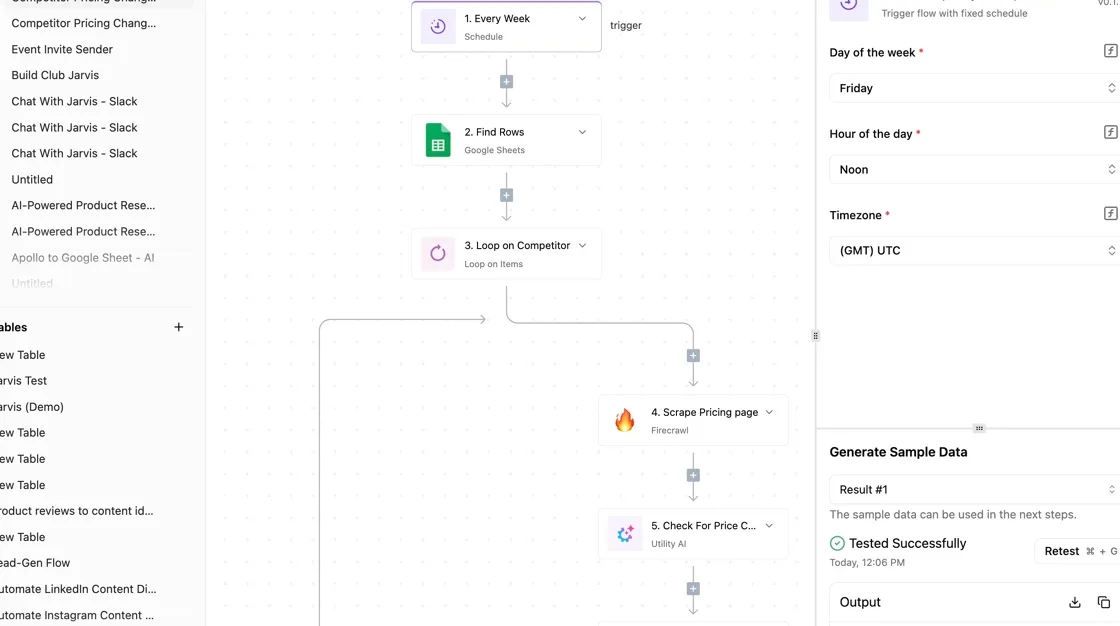
What it can and cannot do here
Triggers start the flow and actions end it: Activepieces connects apps through integrations, roughly 60% of them contributed by the community. It plays no music and has no catalog.
Where an integration exists on both sides, it can handle switching chores, and nowhere else. Examples are copying a playlist's tracks elsewhere or alerting you when an artist you follow releases something.
Check the Spotify integration's documentation, which lists the triggers and actions it supports; that list is your ceiling.
Every integration also sits as source code in the packages/integrations/community folder of the activepieces/activepieces repository on GitHub, among the 750 counted there, so whether a Spotify one exists, and what it can do, is readable line by line.
If the docs don't show an action, assume the flow can't do it.
Qobuz may not have an integration at all, so a copy into it may need a spreadsheet or a dedicated transfer tool as the middle step.
For the bootstrap version, use the open-source edition, whose core is MIT-licensed, self-hosted on a machine you already own. The hosted cloud version saves you the setup but adds a bill. For a one-time migration, self-hosting or the cloud's entry tier is enough.
One-week trial plan for Spotify alternatives
Run this once per candidate service, and treat a step that fails as information about that service, not about you. The order below puts the cheap checks first, so you find a dead end before you've built anything.
- Check the Spotify integration in the Activepieces docs and note which triggers and actions it offers.
- Connect your Spotify account and confirm the flow can read your playlists.
- Build a playlist copy flow toward your first-choice service, or toward a spreadsheet if no integration exists.
- Add a new-release alert for your five most-played artists.
- Test a listening log that records what you play for a few days.
- Review the run log, count failed runs and missing tracks, and decide.
If the log shows the copy mostly worked, you have your answer on migration effort. If it shows gaps you'd fix by hand, the gaps are what that service's switch will cost you.
Frequently asked questions
Can I move my Spotify playlists to another service?
Yes, and for most people the transfer is free or nearly so, but expect to fix some tracks by hand. Third-party transfer tools such as Soundiiz and TuneMyMusic read your Spotify playlists and rebuild them in the new service.
On the free tiers of both tools there's usually a cap on how much you can move at once. The bootstrap version is to transfer your five or six most-played playlists and let the rest rebuild as you listen.
Obscure remixes, podcasts and local files are the usual casualties, so a niche library means more manual repair.
Which Spotify alternative pays artists the most per stream?
Treat any claim that they pay more, and any exact figure, with suspicion: neither Qobuz nor Tidal publishes a per-stream rate you can verify. Payouts also depend on the label deal and on how each service divides revenue.
If artist pay is your main reason for leaving, the surer move is to buy directly. Bandcamp sends a much larger share of each sale to the artist than any streaming service does.
A streaming subscription for discovery plus a few purchases a month costs more than streaming alone, but the money lands where you want it.
Is there a good free alternative to Spotify?
Yes, but "good" means accepting ads and weaker controls. YouTube Music, Deezer and Amazon Music have each offered an ad-supported tier, though what's included changes often, so check the current terms before you commit.
Expect free tiers to limit skipping, offline downloads and audio quality. If you're leaving over price, a free tier is a fine place to start. Lossless audio and offline listening are what you'd give up, and both sit behind the paid plans.
Will I lose my Spotify listening history if I leave?
You lose it inside Spotify's app, and no other service will import it. Before closing the account, request your data export from Spotify's privacy settings. It includes your streaming history as files you keep, even though no new service can use them.
To avoid starting from zero, connect a scrobbling service such as Last.fm to your new player, so your history keeps building from day one.
Related reading
Still comparing
The fastest way to settle it is to build something.
Open source under MIT, so you can self-host the same thing later.
Start free Talk to sales