
Step 5 API Pricing: Cost Per Token and Per Task (2026)

Oct 15, 202614 min read
Step 5 plans, pricing, and limits
Step 5 API pricing today, tier by tier
Step 5 API price per million tokens
The current Step 5 Preview price is 7 yuan per million input tokens on a cache miss and 20 yuan per million output tokens., and anyone budgeting a workflow built in tools like Activepieces should check the provider's pricing page directly.
Step 5 API pricing is the structure of charges for using the Step 5 model through its API, covering per-million-token rates for input and output, plan and rate-limit tiers, and the extra usage that retries add to a bill.

You are billed per million tokens sent in and per million tokens generated, with a lower rate for input the provider has already cached. Take the numbers from the vendor's own pricing page, not from a summary like this one.
The meter counts tokens, and a finished task consumes tokens on both sides of it. Output is usually the pricier side, so a task that writes a long answer costs more than its input suggests.
Every plan in one table
I mark an unconfirmed rate as such, because a guessed price is worse than a blank: you'd budget against it.
As of 2026-10-15 all six rates are published, so the two tiers can be ranked on price. Fill in the figures from the pricing page before you compare anything, and note the date, since rates change without notice.
Costs the Step 5 pricing table omits
Fill in every rate and the card is still the smallest part of the bill. It says nothing about how many output tokens a task produces, which rate-limit tier your account sits in, or how often a throttled call is retried and billed again.
Those three set what a finished task costs.
That's why the comparison that matters is cost per finished task. Activepieces gives you unlimited flows on every plan, including free; credits meter AI usage, so cost follows the AI steps you run.

Splitting work into smaller, more reliable steps stays free, and output volume and retries are what's left to watch.
If you are running this arithmetic for your own team, see what the same workload costs on Activepieces.
Plan costs at realistic usage
At 1,500 input tokens and 500 output tokens, one run costs $0.00285 on Step 5 Preview, which means hundreds of runs cost under a dollar. So 1,000 runs cost $2.85 and 100,000 runs cost $285, letting teams conduct testing at whatever scale they want.
Output tokens are a quarter of the volume but nearly half the bill.
Step 5 token assumptions per workflow run
Take one run of a single automation step as the metered unit: summarise an email, or classify a support ticket. I assume 1,500 tokens in (the email or ticket plus instructions) and 500 tokens out (a short summary and a label).
Output tokens are a quarter of the volume but nearly half the bill.
Price input at 7 yuan per million tokens on a cache miss and output at 20 yuan per million, making output length the primary cost lever.
1,000 runs of email summary and ticket classification
At $2.70 per million, 500 output tokens cost $0.00135 per request.
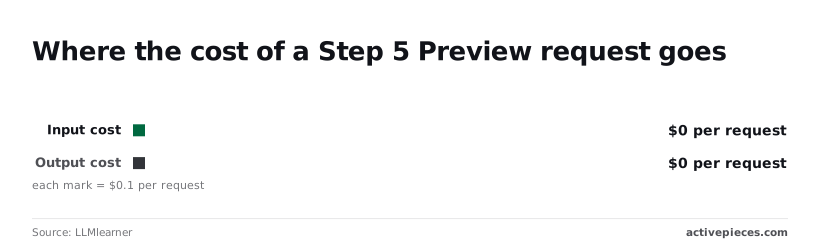
So output is about 47% of each request's cost despite being 25% of its tokens, meaning output tokens carry higher per-token costs than input tokens. Trimming a reply from 500 tokens to 250 saves more than cutting the prompt by a third would.
Across 1,000 runs that's 1.5 million input tokens ($1.50) plus 0.5 million output tokens ($1.35), or $2.85 in total.
Scaling to 10,000 and 100,000 runs
Every row in the table below is the first one multiplied, because nothing in it is nonlinear.
It applies the same per-run assumptions at three volumes, so any difference you see on a real invoice comes from retries, longer outputs or rate-limit effects, not from the list rate.
| Runs | Input tokens (1,500 per run) | Output tokens (500 per run) | Input cost at $1.00/M | Output cost at $2.70/M | Total USD |
|---|---|---|---|---|---|
| 1,000 | 1.5M | 0.5M | $1.50 | $1.35 | $2.85 |
| 10,000 | 15M | 5M | $15.00 | $13.50 | $28.50 |
| 100,000 | 150M | 50M | $150.00 | $135.00 | $285.00 |
At 100,000 runs the output line alone is $135, so a 20% overshoot in reply length adds about $27 to the month.
Hidden costs and billing limits
Expect the invoice to land above the calculator for three reasons: the tier your top-ups put you in, output and reasoning tokens billed at the higher rate, and retries that pay twice for one task.
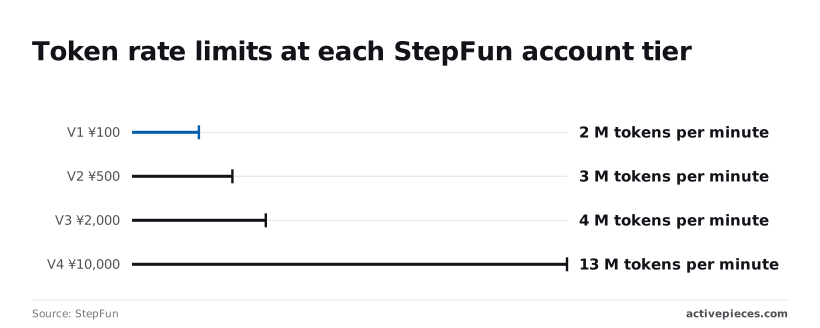
Your workload does not set how many tokens per minute you may send; your cumulative top-up does, and StepFun publishes the thresholds. The table shows the first three tiers; a ¥100 top-up quadruples your token throughput, while concurrency stays low.
| Tier | Cumulative top-up (¥) | Concurrency | Requests per minute | Tokens per minute |
|---|---|---|---|---|
| V0 | Under 100 | 5 | 100 | 500K |
| V1 | 100–499 | 20 | 400 | 2M |
| V2 | 500–1,999 | 30 | 600 | 3M |
Under ¥100 you get 0.5M tokens per minute, so a batch of long-document runs queues behind the cap. V1 at ¥100 gives 2M and V2 at ¥500 gives 3M.
Beyond the table, V3 at ¥2,000 allows 4M and V4 at ¥10,000 allows 13M. That last step adds 9M tokens per minute for ¥8,000 more, so it only pays if your volume actually saturates V3.
Step 5 output and reasoning token costs
Think at length and the step costs several times what its short prompt suggests: output tokens cost more than input tokens, and reasoning tokens count as output. Compare models on output tokens per finished task, not on the input rate in the headline.
Step 5 retries, long context, and credit expiry
When a request times out or returns a rate-limit error, it gets resent, and any attempt that generated tokens before failing can still be billed.
At V0, five concurrent requests means a busy automation hits the ceiling fast, and every retry adds to the task's true cost. Raise the tier before you tune prompts.
Check the pricing page for two further items before a large prepayment: whether long prompts carry a surcharge, and whether top-up credit expires. Unused credit that lapses raises your effective price per task.
Worth checking against a plan that does not meter every step: one credit covers a whole run on Activepieces.
Step 5 versus alternatives per task
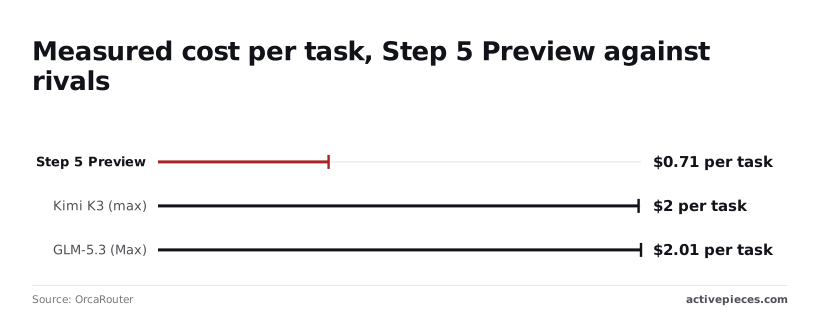
$0.71 per finished task is what Step 5 Preview costs, the cheapest of the four models measured on a single pass. Claude Sonnet 5.5 costs $7.60.
That's the number to budget with, because it already includes the output volume and retries that a list price hides.
Comparison table: price, context window and limits
Same tasks, four models: OrcaRouter measured what each one spent to finish them. The table shows that spread, and the gap between the cheapest and dearest model is far wider than a per-million-token rate would suggest.
| Model | Measured cost per task | Source |
|---|---|---|
| Step 5 Preview | $0.71 | OrcaRouter |
| Kimi K3 (max) | $2.00 | OrcaRouter |
| GLM-5.3 (Max) | $2.01 | OrcaRouter |
| Claude Sonnet 5.5 | $7.60 | OrcaRouter |
I've left list prices, context windows and entry rate limits out. I couldn't confirm them against each vendor's own page, and a figure I can't source doesn't belong in a cost comparison.
Cost of the same 1,000 runs on each
1,000 finished tasks cost $710 on Step 5 Preview and $2,000 on Kimi K3, transforming platform choice into a cost-optimization decision. On GLM-5.3 they cost $2,010 and on Claude Sonnet 5.5 $7,600.
Sonnet 5.5 therefore costs about 10.7 times as much as Step 5 for the same volume.
Between Kimi K3 and GLM-5.3 there is little to choose: both sit about 2.8 times above Step 5. The two are effectively tied with each other, so choosing between them on price alone gains you a dollar per 100 tasks.
When a cheaper model costs more per task
Treat these figures as a benchmark rather than a quote for your workload: they come from one source and one task set. Cost per task says nothing about whether the output was good enough.
If your tasks need a result you wouldn't send back for rework, run a few hundred of your own through each model and count the retries.
Three attempts at $0.71 come to about $2.13, which is already near Kimi K3's single-pass price, and the financial case for the cheaper model collapses. The comparison is only decisive when your own retry rate is similar across models.

Routing cheap steps to a cheaper model with Activepieces
Stop sending easy steps to Step 5 at all. That is the safest saving, because retry rates differ by model. An Activepieces flow can classify with a cheaper model and call Step 5 only for the cases that need it.
In Activepieces, the open-source AI automation platform, each flow combines triggers, branches and steps across hundreds of integrations, and if an API has no integration you can generate one with AI and add it privately.

I can't point to a dedicated Step 5 integration there, so Step 5 would be a privately generated integration, reached through a branch that routes only the hard cases to it.
Which steps can use the cheaper model
Short output and a closed set of answers: that describes labelling a ticket, sorting an email by intent, or deciding whether a message needs a human. Those are the candidates. They produce few output tokens, and a wrong label is cheap to catch.
When a step drafts long replies, reasons across several documents or must be right the first time, it stays on Step 5, since output volume and retries are what drive its bill.
The cheaper model's job is to decide which group a task belongs to, not to finish the hard ones.
How the routing works in a workflow
Read the flow below as an order of operations. The point to take from it is that Step 5 sits behind a gate, so it's billed only for tasks the cheap model couldn't settle.
- Trigger: a new email, ticket or form submission starts the flow.
- Call to the cheaper model, asking it to return one label, such as "simple" or "hard".
- Router branch on that label. Simple cases follow the cheap path and finish there.
- Call to Step 5 through the privately generated integration, on the "hard" branch only.
- Log the tokens used by each call, input and output separately, to a sheet or database.
Divide each model's logged tokens, including retried calls, by the tasks finished, and you have a cost per finished task for the routed flow. The log in the last step is what makes that comparison honest.
Set that figure against sending everything to Step 5 and the saving is yours to measure, not a vendor's claim.
Monday checklist for Step 5 budgeting
Measuring that saving comes down to five steps, done in this order before real traffic reaches Step 5. Each one turns a headline rate into a cost per finished task, which is the number you compare.
- Re-check the pricing page, because the rate you budget on should be the one billed today.
- Measure token counts on 50 sample items from your own data.
- Set a spend cap and a usage alert in the console.
- Pick the tier by its rate limit, not its price.
- Log cost per task for two weeks.
Where it goes wrong most often is covered in the three stages below.
Run 50 real items through Step 5, not invented ones, and record input and output tokens for each.
Bills drift on output, since a model that writes long answers multiplies the metered unit on every task. If your average output is double what you assumed, your per-task cost moves with it, whatever the list price says.
Note how often a call fails and gets repeated, because each retry bills again.
Set Step 5 spend caps and alerts
Set the spend cap and usage alert in the console first, then choose the tier. Compare tiers by rate limit: a tier that throttles your peak traffic produces errors, errors produce retries, and retries add tokens you didn't plan for.
Save money on a tier that throttles you and you can end up paying more per finished task than on a pricier one that doesn't.
Set the alert below the cap, so you hear about a runaway loop while there's still budget left to fix it.
Reviewing your Step 5 bill after two weeks
Log cost per finished task each day: total spend divided by tasks that actually completed, not calls made.
To catch a slow week, a bad batch of inputs and a retry spike, two weeks is long enough.
If the logged figure sits well above your 50-item estimate, the gap's your retry rate or output length, and both can be fixed. Only then compare against any alternative model, using the same logged measure.
Frequently asked questions
Is there a free tier for the Step 5 API?
Treat any free allowance as a testing budget, not capacity you can plan around. Whether Step 5 offers one, and what it covers, is settled only by the vendor's current pricing page.
If there's one, use it to log output tokens and retries on your real tasks. Those logs give you cost per finished task, which is the number the free allowance can't tell you.
Does Step 5 charge for cached or repeated input?
Check the pricing page for a separate cached-input line before assuming a discount. Providers that discount cached input bill repeated prompt prefixes at a lower rate, but only when the start of the prompt is identical between calls.
If Step 5 has this, put your fixed instructions first and the changing content, such as the email body or ticket text, last.
If it doesn't, every repeated instruction is billed in full on every run, and a long system prompt becomes a recurring cost you should trim.
How do I stop a runaway workflow from overspending?
Cap the three things that multiply: output length, retries and concurrency. Set a maximum output length on every request, so a model that rambles can't turn a short classification into a long bill.

Limit retries and add a growing delay between them. Hit a rate limit and retry at once, and each failed attempt costs you in time and sometimes in tokens.
If the console offers a spend limit or usage alerts, switch both on. Then log cost per finished task and watch for it jumping, which catches a slow leak that a monthly invoice would show too late.
Does the price differ by region or by billing method?
Don't assume one rate applies everywhere; confirm it on the pricing page for your region and your account type. Pricing can differ by deployment location, or between pay-as-you-go and committed plans.
Commit only if your volume reliably fills the commitment, so work out your own task volume first. Unused commitment raises your effective cost per task, and a headline discount can hide that.
Related reading
References
Running the numbers
See what the same workload costs here.
Free forever plan, and every paid plan self-hosts at no extra cost.
See pricing Talk to sales