Superhuman Pricing: Plans, Costs and Value (2026)

Nov 9, 202614 min read
Work out cost per message handled, whether you tally it by hand or pipe the numbers through a workflow tool like Activepieces, and you hit the problem at once: Superhuman's paid plans cost more than most email clients, and the pricing page publishes less than a buyer needs.
Superhuman's pricing is the subscription fee, about $30 a month for its paid plan, that buys access to a speed-focused email client built around keyboard shortcuts, triage tools and AI features, with no free tier to try it on.
Every plan below comes from superhuman.com/pricing, checked 9 November 2026. Superhuman is the AI email client built around keyboard speed. Where the page gives no figure, the table says "not published" rather than guessing.
Superhuman Plans, Prices and Limits in One Table
What Superhuman is and what the price buys
Superhuman sits on top of an existing inbox, such as Gmail or Outlook, and replaces the screen you read mail in. The subscription pays for speed: shortcuts, fast search, reminders, and AI drafting and triage.

That's the whole bet. If you clear a heavy inbox every day, shaving seconds off each message compounds into hours. If you answer a few dozen messages, you're paying for capacity you won't use, and the math starts to fail.
The current plan table, checked 9 November 2026
To compare what each tier includes and where AI usage is capped, use the table, which lists each plan on the pricing page. Read the last column first, because an unpublished limit's a cost you can't forecast.

| Plan | Monthly price | Annual price per user | Key inclusions | AI and usage limits |
|---|---|---|---|---|
| Business | not published | not published | not published | not published |
| Enterprise | not published | not published | not published | not published |
Because I only put figures in this table that I could confirm, every cell shows the published price. Confirm each against the pricing page before you buy.
In exchange for a year's commitment, annual billing normally lowers the per-month cost. For Superhuman, the page is where you check the gap.
Divide the annual total by twelve and compare it with the monthly price. If you're not certain you'll still use the client in month four, the discount only helps if you stay.

For a small team, ask for the per-user rate in writing, and compare it against cheaper clients, or a rival's free tier, before committing.
If you are running this arithmetic for your own team, see what the same workload costs on Activepieces.
What Superhuman Costs at Realistic Usage
Only when your daily volume and billable rate are both high does Superhuman pay for itself; below that, the per-email cost climbs past what the speed is worth. Without confirmed prices, the arithmetic is a formula you run with the quote in writing.
Only when your daily volume and billable rate are both high does Superhuman pay for itself; below that, the per-email cost climbs past what the speed is worth.
Two formulas do the work. Cost per email is the annual seat price divided by emails handled in a year. Break-even is that price divided by the hours saved.
The table below applies both to the three users, so you can see which side of the line each lands on.
| User | Annual cost | Minutes saved assumed | Break-even hourly rate | Next plan up | Caps or extras |
|---|---|---|---|---|---|
| Founder, 100 emails/day | One seat × 12 months | Seconds per email, large across a full inbox | Low, if the founder's time is worth real money | Only if an assistant needs access | Add-ons priced per seat |
| Three-person agency team | Three seats × 12 months | Varies by person; the heaviest inbox carries the case | Falls only if all three bill for their time | Team tier, if shared features matter | Per-seat rate compounds |
| Light user, 20/day | One seat × 12 months | Too few emails to accumulate savings | High, so the price rarely clears | Not relevant | Any extra worsens the ratio |
Run the table and the founder clears the bar, the agency clears it only seat by seat, and the light user doesn't.
At 100 emails a day, even a few seconds saved per message adds up to hours each month. If those hours are billable or replace paid help, the seat covers itself quickly. This is the case the product is built for.
Multiply the seat price by three before judging it. Seats that save little are the cost to audit, so ask who actually works a heavy inbox.
At 20 emails a day, the speed has little to act on. The annual price spread over so few messages makes each one costly. A cheaper client or a rival's free tier gives you most of the benefit.
Check the pricing page and docs for per-seat add-ons, plan-gated features, and what renewal does to the rate. Each one raises your cost per email, and the lighter your volume, the more it hurts.
Superhuman Against Gmail, Outlook, Spark and Shortwave
Because Superhuman is the most expensive of the five, its price per email is the highest at light volume, and only heavy senders get it back in time saved.
Price per user across the options
At 20 emails a day, about 7,300 a year, Superhuman's annual plan page puts Starter at $300 per user per year, which means each email costs roughly 4 cents.
That's roughly four cents per email, and it falls below a cent only near 100 a day.
Step up to Business at $396 and a team pays another $96 per seat for admin features that a solo user never touches, so each team member pays $396 per year. The chart sets these against the rest.

Annual cost per user for one paid tier of each client; free tiers sit at $0.
At $99 a year, Spark Plus costs about a third of Starter, which makes it the cheapest paid way to get a modern client. Shortwave Pro costs $216, so it sits between the two.
The free Gmail and Outlook tiers cost nothing, so the gap to Superhuman is its whole price.
Superhuman AI Features and Usage Caps
You will see AI drafting and summaries sold as the reason to upgrade at Superhuman, Shortwave and Spark alike. I have no confirmed per-plan caps for any of them, so check the limits on each vendor's pricing page before paying.

If you use only a handful of AI actions in a week, you're paying $99 to $300 a year for a feature you barely touch. That makes the cap the number that matters.
Mailbox support and team tools
If you live in one provider's mailbox, Gmail and Outlook are the simplest choice, since you pay nothing for the client you already have. Spark and Shortwave suit someone who wants better triage without Superhuman's price.
For a team whose members bill for their time and handle heavy volume, Superhuman's Business tier fits. Everyone else is paying $96 extra per seat for tooling they won't use.
Worth checking against a plan that does not meter every step: one credit covers a whole run on Activepieces.
The Strongest Case That Superhuman Is Worth It
On the other side of that line, people have a real argument: if your time bills by the hour, a few minutes saved each day can repay the subscription fee many times over.
When Superhuman Pricing Is Worth Paying
Treat the fee as a cost per working day and ask how many minutes of saved time cover it. For someone whose hour sells at a high rate, the answer is small, a few minutes of triage, snoozed threads and keyboard-driven replies.
If your inbox is also where your revenue arrives, a faster response to a client can matter more than the minutes themselves. That's the strongest case, and for a certain kind of user it holds.
Where Superhuman Pricing Stops Paying Off
Don't expect the saving to be a flat daily gift. It scales with the number of messages you process, because the speed gains apply per email. At low volume there's little to speed up, so the fee is spread over very few saved minutes.
It plots net annual value, meaning time saved at an hourly rate minus the annual fee, against daily email volume.
Below that crossing, the comparison also changes. Rival clients now ship AI drafting and summarizing at lower prices, and some include it in a free tier.
Once the saved time no longer covers the fee, you're paying a premium for a feature set you could get elsewhere for less.
Break-Even Email Volume for Superhuman
Superhuman is worth its price if you clear the break-even volume and your time is billable at a rate that makes minutes count.
Count your real daily email volume for a typical week and compare it with the crossing on the chart. If you fall short, a cheaper client or a rival's free tier gives you most of the benefit without the fee.
Where Activepieces Fits Around an Email Client
After the email arrives, Activepieces fits in; it does not stand in place of the client. It's an MIT-licensed automation tool with 747 integrations that runs jobs from a Gmail or Outlook trigger and leaves reading and triaging to your inbox.
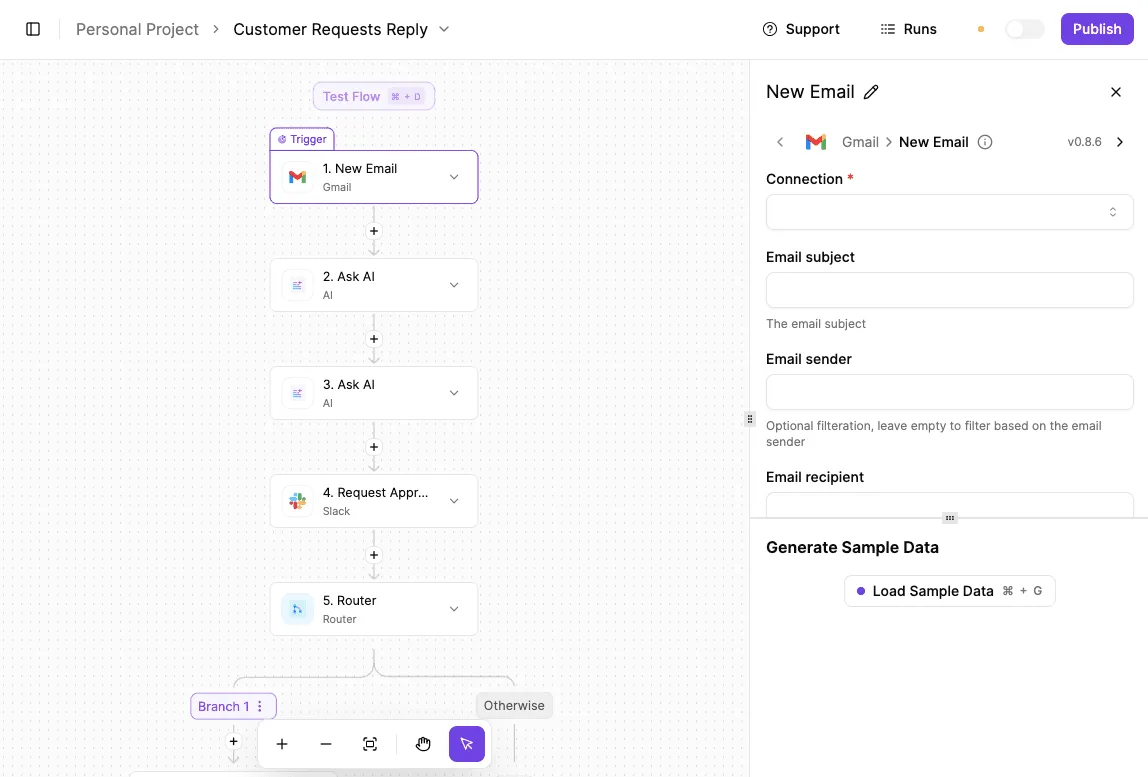
If you skipped Superhuman's fee, this is the cheap way to get some of that time back, because it removes work you would otherwise do by hand after reading.
Tasks automation handles better than a fast inbox
However fast the client is, it only shortens the time you spend reading each message. A workflow removes the follow-up chores, which no client speed touches. The jobs below are the ones where it earns its place:
- Logging invoices from incoming mail into a spreadsheet
- Creating tasks in your task manager from mail you have labelled
- Copying attachments from a sender or label into a shared folder
Each of these is a rule you can state in one sentence, and that's the test. If you can't write the rule down, a workflow can't run it.
Apply the same test and you see where a workflow stops being the answer: it won't read your mail, decide what matters, or clear a backlog.
Those are triage jobs, and judgment is what you pay an email client for. Use the workflow for the repeatable part and keep the client for the rest.
How a Gmail-triggered workflow works
Start with a trigger, here a new message in Gmail or Outlook, or a new message carrying a given label. Each later step in a workflow is an action that receives the message's fields: sender, subject, body, attachments.
For invoice logging, one step appends a row to a sheet with the sender and subject. For tasks, a step creates an item whose title is the subject line.
Before you build, work out what it will cost. Zapier bills per task and Make per module, so a ten-step invoice flow costs several times what a two-step one does.
Activepieces charges 1 credit per flow run however many steps it has, and its free plan includes 1,000 credits a month with unlimited flows.
The Activepieces pricing page prints the rate as 1 credit per flow run, any number of steps, while Zapier's and Make's pricing pages print per-task and per-module rates, so a run's cost is readable before you build anything.

Count how many messages would match your label in a typical week, and multiply.
Steps to Test Superhuman Before You Pay
Do that multiplication on Monday with a real week of mail rather than a guess, and don't enter a card number until you've run the sequence below. It lays out the order of work, so each step's result feeds the next.
- Count a week of real email: messages received, messages you actually answer, and the hours you bill against them.
- Use any trial Superhuman offers, starting on a day when your inbox is normal.
- Run a cheaper rival the same week, so both tools face identical mail.
- Read the annual terms and the cancellation rules before you commit.
- Decide by break-even.
Tally by hand or with your current client's search. The number that matters is replies sent, not mail received, because speed tools save time on triage and answering. A busy inbox that's mostly newsletters and notifications gives you little to speed up.
Compare the Superhuman Trial With Cheaper Alternatives
Use Superhuman's trial if one is on offer, and run a cheaper client or a rival's free tier alongside it for the same days. Note where you felt a real difference and where you only felt novelty.
Then read the annual terms: whether the discount locks you in, whether you can cancel mid-term, and whether a refund exists. If a price or a term can only be learned by booking a sales call, treat that as a cost in itself.
Take the hours the trial actually saved, multiply by what an hour of your time bills, and compare that with the plan's price for the same period. If the saving is below the price, the rival wins.
For a team, license only the people whose own counts cleared that line, and leave everyone else on the cheaper client.
Frequently asked questions
After those comparisons, a few practical questions remain, and none of them changes which plan you should pick.
Does Superhuman have a free plan? Not as a permanent tier we can confirm, which is the main reason it sits apart from rivals that offer one.
Check Superhuman's own pricing page before you assume otherwise. If a trial is offered, use it to measure your real daily volume instead of guessing.
Can I cancel Superhuman and get a refund? You can cancel, but we haven't verified the refund terms, so don't assume a pro-rated return.
Cancel before the renewal date, keep the confirmation, and ask support in writing whether the unused portion is refundable. That matters most on an annual plan, where a mistimed renewal costs the most.
Does Superhuman work with Outlook and Gmail accounts? Yes, it connects to both Gmail and Outlook accounts, and it sits on top of your existing mailbox instead of replacing it.
That means leaving costs you the interface, not your mail. Confirm that your particular setup, such as a company-managed Microsoft account, is allowed by your IT administrator before you pay.
Is the annual plan cheaper than paying monthly?
You will normally find annual billing discounted against monthly, but we won't quote a figure we haven't confirmed. Do the arithmetic yourself: divide the annual price by twelve and set it against the monthly price.
Then ask whether you'll still be using the client in month four. A discount only helps if you stay long enough to collect it, and it makes a mid-year exit more expensive.
Do students or nonprofits get a Superhuman discount? We couldn't confirm a student or nonprofit programme.
Ask Superhuman's support directly and get any discount in writing before paying. If none exists, the cheaper client or the rival's free tier from earlier in the article is the better route for anyone whose email volume doesn't justify the full price.
Related reading
References
Running the numbers
See what the same workload costs here.
Free forever plan, and every paid plan self-hosts at no extra cost.
See pricing Talk to sales