
Tableau Pricing in 2026 by Role, Cloud and Add-Ons

Nov 2, 202614 min read
Tableau charges per user, per month, billed annually, and the rate depends on the role each person holds, which matters even for teams that already pipe their data through automation tools like Activepieces.
The seat count tells you little. Price the mix of roles and you have the real bill.
Tableau pricing is the per-user, per-month subscription cost of Tableau's analytics platform, set by each person's role (Creator, Explorer or Viewer), by whether it runs on Tableau Cloud or on your own servers, and by any add-ons layered on top.
Tableau pricing in 2026: the direct answer
What Tableau licensing is
Buy Tableau and you get a subscription with three kinds of user. Creators build data connections and dashboards. Explorers work inside dashboards that already exist, asking their own questions of approved data. Viewers look at finished work and filter it.
Each role has its own monthly rate. A company with ten builders and two hundred readers has a very different bill from one with two hundred builders, even at the same total headcount.
Two other decisions then move the total: where Tableau runs (Tableau's hosted cloud or servers you manage yourself) and which add-ons you take on top.
A company with ten builders and two hundred readers has a very different bill from one with two hundred builders, even at the same total headcount.
Date and source of every price in this guide
Before you rely on any number here, know where it came from: Tableau's published list price, taken from its public pricing page and quoted per user, per month, billed annually.
List price's the starting point for a negotiation, not the end of one. Discounts, contract length and volume change what you pay, and vendors revise their tiers.
If you are running this arithmetic for your own team, see what the same workload costs on Activepieces.
Review current Tableau plans, prices and limits
Look for a published price and you will find only three: Viewer, Explorer and Creator. The rest of the lineup's contact sales, so any quote above those three is a negotiation, not a lookup.
The table below was compiled on 2 November 2026 from AgentSQL. Confirm the figures on Tableau's own page before you sign.
| Role or plan | Standard, per user/month | Enterprise, per user/month | What is included | Usage limits |
|---|---|---|---|---|
| Viewer | $15 | $35 | View and filter dashboards others built | No building or editing |
| Explorer | $42 | $70 | Explore published data and make your own views | Works only from data sources already published |
| Creator | $75 | $115 | Build dashboards and connect new data | Contact sales |
| Enterprise | Contact sales | Contact sales | Company-wide agreement | Contact sales |
| Tableau+ | Contact sales | Contact sales | Premium bundle | Contact sales |
| Tableau Public | Free | Free | Publish dashboards to the open web | Everything you publish is visible to anyone |
The Enterprise and Tableau+ rows are not the Enterprise price column. The column prices a higher tier of the same three roles, while those two rows are company-wide agreements that only sales can quote.
The Enterprise tier adds a governance and administration layer on top of Standard: finer control over who sees which data, wider tools for managing content and deployments, and the bundled management add-ons described below.
Ask your rep for the exact feature list, since Tableau changes what each tier holds.
What each role can and cannot do
If you want new data in Tableau, you need a Creator, at $75 on Standard or $115 on Enterprise. Everyone else depends on that person, so one Creator can feed many cheaper seats.

For staff who ask their own questions of approved data, an Explorer at $42 to $70 is the fit, so they get answers without waiting for someone else. A Viewer at $15 to $35 only reads, which is all most managers need.
For Enterprise and Tableau+, ask for a written quote built on your role mix.
What Tableau costs at different user sizes
The bill follows how many of your people build dashboards, not how many people you have. The arithmetic's the same at every size: count people in each role, multiply by that role's monthly price, then by twelve.
, and a wrong price in a worked example's worse than none. Take the three prices from Tableau's own page and run the sums yourself.
10-user team
At this size one extra Creator moves the total more than any other decision. Most small teams need one or two people who build, and everyone else can look.
Start with the fewest Creators who can keep the dashboards current, and add one only when the work is stuck waiting.
50-user company
Here the spread between roles starts to show. A handful of Creators, a middle group of Explorers who dig into existing data, and a large crowd of Viewers is the usual shape.

Get the middle group wrong and you either overpay for people who only read, or you leave analysts unable to answer their own questions. They then come back to the Creators with requests.
At 200 people, Viewer count's the multiplier, so a small per-seat difference repeats two hundred times.
Uncover hidden Tableau costs and limits
Check each item on a quote, because five of them change the total without touching the per-user price.
- Data Management and Advanced Management're available only in bundled editions since September 2024
- Server hosting and the admin labour to run it
- A premium for a single-year term over a longer commitment
- Limits on extract refreshes
- Whether Pulse and the AI features're included in your edition
When viewers ask to edit, they move up a tier, and each request adds to the bill.
Server hosting, add-ons and refresh limits
A few terms on that list are worth pinning down. An extract refresh is the scheduled update of the copy of your data that Tableau stores for a dashboard. Pulse is Tableau's feature that sends plain-language summaries and alerts about the metrics you track.
Data Management covers cataloguing and preparing data sources, and Advanced Management adds administration, security and scaling controls for larger deployments.
Pick Cloud and Tableau runs the machinery. Pick Server and you do, so you pay for hardware, patching, upgrades and the person who does them. That labour never appears on the quote, but it lands on your payroll.

To get Data Management or Advanced Management you pay for the whole bundle, because they're no longer sold on their own.
Ask for written confirmation of what Pulse and the AI features require. I couldn't verify which editions include them, and assuming they're included is how a surprise invoice starts.
If your team needs hourly numbers, it may be reading yesterday's, because extract refresh limits cap how often your dashboards pull new data. I have no confirmed API limits to quote, so ask for them in writing.
Getting Tableau's numbers in front of people is a smaller job than the licence, and Activepieces can take it on: it runs scheduled workflows around Tableau's API that send alerts and exports to the apps those people already use.
The run is the meter, at 1 credit whether the flow has two steps or ten, so splitting an export into smaller checks costs nothing extra, and the Free plan's 1,000 credits a month with unlimited flows keeps this add-on small next to the seats.

Ask also about support tiers and the renewal uplift, since a discount in year one can reverse at renewal.
Worth checking against a plan that does not meter every step: one credit covers a whole run on Activepieces.
Compare Tableau against Power BI, Looker and Qlik
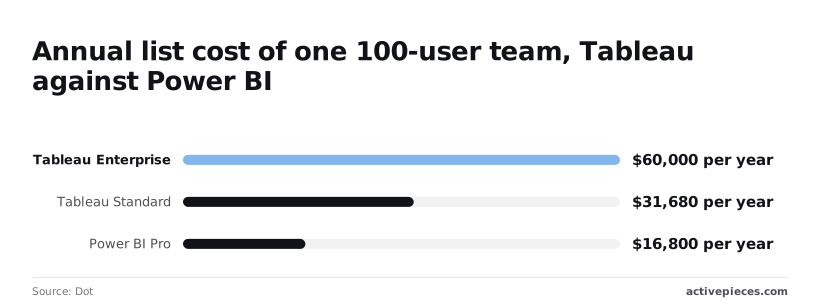
For the same 100 people, Tableau costs roughly twice to nearly four times what Power BI Pro does. Looker and Qlik Cloud are priced on different bases, so a per-seat comparison alone misleads.
Comparison table on price, free tier, and licensing model
Read the licensing column first, because it decides whether a per-seat number can be compared at all. The table shows the entry price and what each vendor's cheapest door actually opens.
| Entry price per user per month | Free tier | Entry inclusions | Licensing model | |
|---|---|---|---|---|
| Tableau | About $26 (Standard) to $50 (Enterprise), worked out from the 100-user totals below | No free tier for business use | Role-based access to dashboards and authoring | Per user, by role |
| Power BI | $14 (Pro); $24 (Premium Per User) | Free licence for personal use | Publishing and sharing reports (Pro) | Per user, with capacity options |
| Looker | Quoted by the vendor | Looker Studio is free, but it is a separate product | Set in the sales quote | Negotiated contract |
| Qlik Cloud | Listed on the vendor's page | Trial only | Varies by tier | Tiered subscription |
For 100 users, Tableau Standard comes to $31,680 a year. Tableau Enterprise comes to $60,000. That $28,320 gap's what the Enterprise features cost you, whether or not anyone uses them. Power BI Pro for the same team's $16,800.

Both Tableau totals assume the same mix of 10 Creators, 20 Explorers and 70 Viewers, which is the split the published role prices work out to. Treat it as illustrative, because a different split moves both figures.
Power BI against Tableau
When most of your people only view and share reports, Power BI wins. At $16,800, Pro saves about $14,880 a year against Tableau Standard. Even Premium Per User at $24 comes to $28,800 for 100 people, still under Tableau Standard.
But the saving shrinks if you need capacity-based licensing for wide distribution.
Pay the premium when analysts spend their days building and exploring visuals, since that's where Tableau's design strength shows. Pay it too if Enterprise management features are a requirement. If they aren't, Standard at $31,680's the fairer test against Power BI.

Cut your Tableau bill without losing reports
You can cut the bill without losing a single report by paying only for the roles people actually use. The usage data Tableau already keeps will show you which those are.
Audit role usage first
Doing nothing has a price: every Creator who last built something a year ago still costs the full Creator rate at renewal. Creators build and publish. Explorers change existing reports. Viewers only read them. Most idle Creators are really Viewers, and Viewers cost the least.
Follow the steps below in order, because each one shrinks the list the next one has to work through.
- Export the license usage report from your Tableau administration pages.
- Flag every Creator with no sign-in or publishing activity in the last 90 days, which means you're paying for Creator licenses no one uses.
- Downgrade those people to Explorer if they still tweak reports, or to Viewer if they only read them. Their access to existing reports stays the same.
- Merge duplicate workbooks. Near-identical copies of one report keep people tied to Creator seats just to maintain them.
- Take the new role-mix numbers into the renewal conversation.
Negotiate on the role mix
Open the renewal with your counts per role, not a total seat figure. A vendor can refuse a request for a lower price, but it's harder to argue with a usage export showing most Creators went unused.
Choose the contract term deliberately too. A longer commitment's worth offering only if it buys a lower rate on the roles you keep. It should also leave you room to move seats between roles at the next renewal.
What to do before your next Tableau quote
Before you sign anything, sort your people by what each one does with the tool, price that mix, and make the rep fill in what the public page leaves out.
Questions to ask before a Tableau quote
Skip these five questions, which the public price page leaves unanswered, and the cost is a surprise on the invoice later.
- Which add-ons does my deployment need that the quoted price doesn't include?
- Does the price change if I run on Tableau's hosted service rather than on my own servers?
- In writing, can I move seats between the creator, explorer and viewer roles at renewal?
- What rate do I get for a longer commitment, and on which roles does it apply?
- Do any discounts you're offering carry over to the add-ons, or only to the seats?
- On Monday, list every proposed user by what they need to do: build, explore or only view. Mark anyone you're unsure about.
- The same day, re-check the vendor's pricing page, since list prices and role definitions change and your notes may be stale.
- Send the five questions to the rep and ask for answers by email, so the reply can be compared with the final quote.
- Trial the cheapest role that does the job for the people you marked unsure. If a viewer can do the work, you've saved a more expensive seat.
- Put a renewal review date in the calendar, early enough to move seats before the contract rolls over.
What Activepieces does about this
Tableau's bill is set by the role mix, and the role mix drifts. Activepieces can run the audit that keeps it honest.
A scheduled flow pulls Tableau's license usage on a calendar, flags Creators with no activity in 90 days, and sends the list to whoever owns the renewal. That gives you counts per role to bring to the negotiation instead of a headcount.
Pricing is per run, not per step. A run costs 1 credit whether the flow has two steps or ten.
viz type=groupedbars title="Tableau list prices by role, Standard against Enterprise" unit="$ per user per month" source="AgentSQL - https://agentsql.com/tableau-pricing" cols="Standard,Enterprise"15 against $75, Explorer $70 against $42, Viewer $35 against The Free plan includes 1,000 credits a month with unlimited flows, so a quarterly audit or a weekly alert costs next to nothing against the seats.

The core is open source under the MIT licence, so you can self-host the flows. That sits well with the deployment choice the article tells you to price.
Frequently asked questions
Once you've costed the mix in all three tools, a handful of questions still come up, and each has a short answer.
Free use and trials
Is Tableau free to use? Not for work inside a company.
Tableau Public's free, but everything you publish there's visible to anyone, so it's a poor place for sales figures or customer data.
Per-user pricing
Does Tableau charge per user or per viewer? Per user, and the price depends on the role.
People who build content cost more than people who only look at dashboards, so a team of mostly viewers costs far less than the same headcount of builders. That's why the role mix matters more than the seat count.
Tableau against Power BI
Is Tableau more expensive than Power BI? Often, at list price, but the answer depends on who your users are.
A company with few builders and many viewers can find the gap smaller than expected. Compare the full mix, including add-ons and hosting, not the headline per-user rate.
Buying a single Creator license
Can I buy just one Creator license? Usually, yes, and for a small team it's a sensible start.
Tableau expects a deployment to have at least one Creator, because someone has to build the content others will view. Ask your rep to confirm the minimums for the product tier you choose, since they can change.
Does Tableau pricing include Tableau Server?
If you host Tableau Server yourself, you pay for more than the license. The per-user license covers the right to use the software, but it doesn't cover the machines or the person who keeps them patched and running.
Related reading
Running the numbers
See what the same workload costs here.
Free forever plan, and every paid plan self-hosts at no extra cost.
See pricing Talk to sales