
Tailscale Alternatives: Best Options Compared (2026)

Nov 11, 202615 min read
Tailscale Alternatives and the Short Answer
Which Tailscale alternative fits your team
Which one fits depends on which limit bit you: control, access rules, or the amount of machinery you now carry, whether that's a hosted tool, a self-run workflow engine like Activepieces, or a stack of scripts you wrote yourself.
A Tailscale alternative is an open source or self-hostable mesh VPN, such as Headscale, NetBird, or Nebula, that connects devices over encrypted WireGuard-style tunnels and replaces Tailscale's hosted coordination server, pricing, or access controls.
Read the three picks below, by need, as the whole answer in short form. The rest of the article tests each one against the bad day that sent you looking.
- Headscale, if you want to keep Tailscale's own clients and own the server that hands out keys and routes.
- NetBird, if you want group-based access policies and are willing to operate the management server yourself.
- WireGuard on its own, if your network is small enough that a handful of static peer configs beats any coordination layer.
Each pick removes one limit and adds a cost. The sections after this one name that cost, so you can judge whether it's worse than the limit you are leaving.
What counts as an alternative
In this article, anything counts as a Tailscale alternative if it is a WireGuard-based or mesh VPN that lets devices reach each other across networks without a hub-and-spoke gateway. You can adopt it in place of Tailscale's hosted coordination service.
Two things fall outside that definition here.
Where a central concentrator sits in the middle, you have a classic remote-access VPN, which is a different architecture. Zero-trust access brokers that proxy individual applications are a different product category, even where a vendor sells both.
The team this article follows
To keep the comparisons concrete, the article follows one composite team. It isn't a real company.
Picture a small platform group that supports a few dozen engineers and some outside contractors. They reach staging databases, an internal wiki and a few build machines over a mesh VPN, and Activepieces runs their onboarding and offboarding flows.
Flows are unlimited on every plan, free included, so the number of flows they add never changes the bill.
On an ordinary day, their Tailscale setup has never failed them. What changes it is a bad day, such as a contractor who needs narrower access than the current rules allow.

Every vendor fact in this article was checked on 11 November 2026, so treat anything after that date as unverified.
The fastest way to settle a shortlist is to try one. Activepieces is free to try, no credit card.
The Day One Tailscale Limit Forced a Decision
Whichever limit a team hits first forces the move, usually while someone is waiting on access, and it is almost never the one they planned around.
Dated as of the check above, the three limits below arrived in this order for the team in this story.
Tailscale plan limits and pricing for teams
The task failed before any bill arrived.
The first limit was the plan: the team tried to add a contractor to the tailnet (Tailscale's name for your private network of devices) and found the free Personal plan no longer fit how many people and machines they had.

Because the pricing page lists what each plan includes, the cost of the next tier was readable in minutes. The cost was the per-user pricing, which grows with every contractor and every intern.
The team tried trimming users and sharing machines first. That bought a few weeks and cost hours of tidying that nobody had budgeted.
Tailscale's closed-source coordination server and control
No error message announced the second limit; it was a question. The coordination server is the service that hands out keys and tells devices where to find each other, and Tailscale hosts it.

Its documentation describes the client as open source, but the server isn't something you can run yourself.
When the team's security reviewer asked where that key exchange lives and who can change it, the honest answer was "Tailscale's infrastructure, on Tailscale's terms."
The team looked at Headscale, an independent open-source reimplementation of that server, and found it meant owning uptime and upgrades themselves. That was a real trade, not a free exit.
Tailscale ACL groups and access rules
What ended the debate was the third limit. The team wanted rules like "contractors reach staging, not production," which in Tailscale means ACL groups.
Read it as a prompt: the access model the team needed sat on a higher tier than the one they were paying for.
After the chart, the choice was plain. Pay to move up, or leave for something that gives the same rules without the jump. Everything the team had tried by then had only postponed that choice.

Tailscale Alternatives Compared in One Table
Since none of these seven options removes every limit, the choice is which limit you can live with. Each follows the same four questions, and the table shows price, core strength, main limit and who each option suits, with blanks wherever a cell wasn't confirmed.
| Option | Price | Core strength | Main limit | Who it suits |
|---|---|---|---|---|
| Headscale | Self-hosted, open-source coordination server | Teams that want to control the coordination server | ||
| NetBird | ||||
| ZeroTier | ||||
| Netmaker | ||||
| Nebula | ||||
| Twingate or Cloudflare Zero Trust | ||||
| Plain WireGuard | Minimal, kernel-level tunnel | No built-in coordination or access rules | Teams with a few static peers |
Read each row against the one limit that pushed your team out, not against the whole row.
How the Tailscale alternatives table was checked
Where a cell is filled, it is meant to come from the vendor's own pricing page, docs or changelog. Where I couldn't confirm a cell, it's blank, and a blank price means you check the vendor's page before budgeting.
Speed is the one figure not on a vendor's page. In Netmaker's 2024 benchmark, Tailscale reached 1270 Mbps and plain WireGuard 1165 Mbps. That's about 92% of Tailscale's rate, so dropping the coordination layer buys no speed.
According to Netmaker's benchmark, ZeroTier managed 626 Mbps, roughly half of Tailscale, and Nebula 334 Mbps, about a quarter, so bandwidth-intensive workloads are best served by Tailscale or plain WireGuard. If your links carry bulk transfers, those two gaps matter more than any feature row.
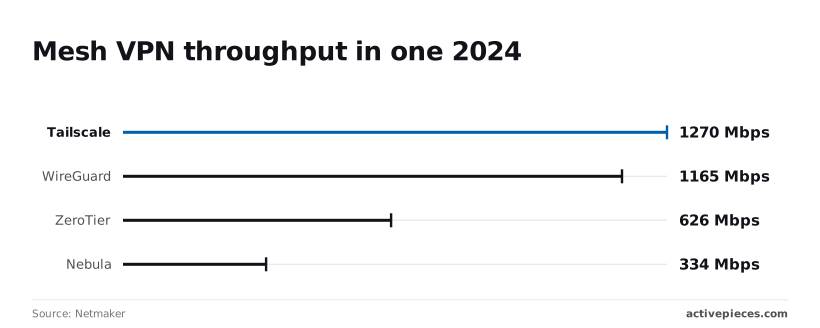
Netmaker sells a competing product, so treat the ranking as one test. Re-run it on your own hardware before it decides anything.
Match your limit to the column that names it:
- If the limit is price, read the price column first, and fill the blanks yourself from each vendor's page.
- If the limit is control of the coordination server, the strength column decides. Headscale exists for that case.
- If the limit is access rules, read the main-limit column, because plain WireGuard has no rules layer at all.
Once one row survives, test it against the specific bad day that made you look.
Reading a table only gets you so far. Build the same workflow in Activepieces and compare it yourself.
Self-hosting an Open Source Tailscale Alternative
Only if the bad day was price or vendor control does self-hosting pass the bad-day test. You stop paying for coordination and start being the one who answers when it breaks.
What the team takes on is the same whichever project you pick. The list below shows what lands on your side of the table, and the decision turns on whether your team can absorb it.
- Running the control server as a service someone is paged for
- Upgrading it, and the clients, in an order the docs specify
- Backing up the coordination database, and testing a restore
- Reading the licence for the exact version you deploy
- Checking each project's docs for what it lists as unsupported
Each item is small on its own. The cost comes from owning all of them at once.
Headscale and NetBird: closest to Tailscale
Because Headscale is an open source reimplementation of Tailscale's coordination server, the official clients keep working. Its docs scope it to a single tailnet, so a team that needs separate isolated networks for separate customers is asking for something it doesn't promise.
NetBird ships its own clients and a management server with built-in identity provider integration. That puts it nearer to a product than to a hobby tool, but you still operate the server and its database.
Nebula and WireGuard as Tailscale alternatives
Nobody has to keep a coordination server alive with Nebula. Instead you run lighthouse nodes and your own certificate authority, so key issuance and revocation become your procedure.
Raw WireGuard removes even that layer, and with it the device enrolment, access rules and single sign-on that you were using.
Between them sits Netmaker, with a server that manages WireGuard configuration. Check its licence file before you build on it.
What self-hosting costs in hours
Someone upgrades the control server, the database migration fails or a certificate lapses, and existing tunnels keep running while new devices can't join. The typical first-week outage is self-caused.
Diagnosis eats an afternoon, and rebuilding from a backup that was never restored in a test eats the rest of the day. Those hours are the real price.
Whenever the hours of engineer time spent on upkeep and incidents exceed the subscription you were trying to escape, a managed plan is cheaper. If the bad day was a rules limit rather than price, self-hosting often adds the same limit in a worse place.
Where Activepieces Fits Around a Mesh VPN
Activepieces doesn't replace Tailscale or any other VPN; its 747 integrations, about 60% of them community-contributed, plus an HTTP step cover the routine work around whichever one you pick, only as far as that vendor's documented API allows.
Self-hosting raises the same question for this tool that it raised for the VPN: whether you get the whole product or a trimmed one. Most vendors keep the controls a security reviewer asks about for their own cloud.
Activepieces ships its air-gapped build with the same enterprise feature list as the managed cloud (SSO, SCIM, custom RBAC, audit logs, release management and secret managers), and MoneyGram and Moneypenny run it in production.
The buyers who need the most control don't get the smallest product, and it still never touches your network paths, only the admin tasks around them.
In the screenshot below, the product is a flow builder canvas with a vertical workflow called "Test Flow".
It starts with a Schedule trigger set to "Every Day", then a Code step, an HTTP step, and two Agent steps, each joined by a connector with a plus button.
Take from the screenshot the shape, not the content. A trigger, then ordinary steps, then optional AI steps. The HTTP step is the one that matters here, because it's where you'd call a VPN vendor's API.
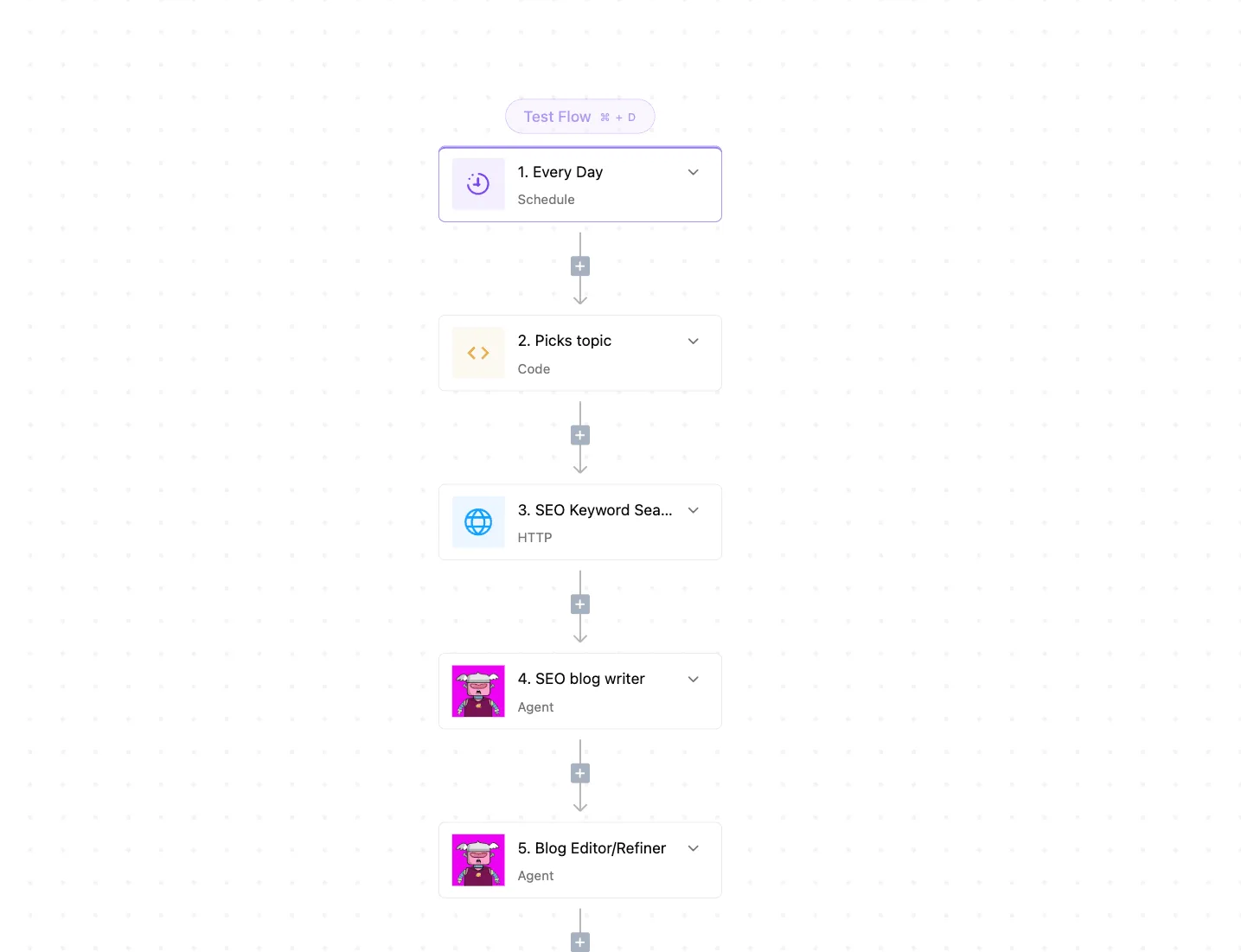
That's also the limit to check before you build anything. A prebuilt connector can claim to support an action and then not expose the endpoint you need, so read the vendor's API reference first and test the exact call.
If the action you need is missing, the HTTP step is the fallback, and it's only as good as the documentation behind it.
Offboarding access removal
Start with offboarding, the most useful fit. When someone leaves, a flow can start from your HR or identity system's event, look up the person's devices through the VPN vendor's API, and remove them.
Test the lookup first: confirm the API can find devices by user, since a flow that can't match a person to a device removes nothing.
Add a final step that posts the result to a ticket or chat channel, so a failed removal is visible rather than silent.
Run it against a test account before relying on it. An offboarding flow that fails quietly is worse than a manual checklist, because everyone assumes it worked.
Scheduled VPN device and key audits
Next comes the fit the Schedule trigger in the screenshot is built for.
**An offboarding flow that fails quietly is worse than a manual checklist, because everyone assumes it worked.
A daily or weekly flow can pull the device and key list through the vendor's API and use a Code step to flag entries that match your own rules (no owner, unfamiliar name, long-unused).
It then sends the list to whoever owns access.
The flow only reports. Whether a flagged key can be revoked automatically depends on what the chosen vendor's API permits, so check that before you wire in a delete step.
The Monday Checklist for Leaving Tailscale
Move only once you can state the one limit forcing it and have tested that the replacement removes it. Test it the way you'd test a delete call before trusting it.
You've given me the instructions for how to do this work, but the actual sentences aren't included. After the instruction section, I see: A step with no output isn't done.
- Name the one limit forcing the move: price, control of the coordination server, or access rules.
- Pick the option that removes that limit without adding a worse one.
- Pilot one subnet with two people.
- Map the exported ACLs by hand.
- Set a rollback date.
- Run a monthly access review.
Steps one and two happen at a desk, three to five are the move itself, and six keeps you from moving again.
Before you switch from Tailscale
Write the limit as a sentence a colleague could prove wrong. "Too expensive" fails that test. "We pay for seats that only run a nightly job" passes.
Then check the candidate against it. A self-hosted coordination server fixes control and may hand you an upgrade-and-uptime job nobody owns, which is a worse limit.
Map the exported ACLs (the access-rule policy file) by hand. Converters claim to translate them, but open the output and read every rule against the original.
Groups, tags and the behaviour when no rule matches differ between products, and a rule that converts cleanly can still grant more than it did before.
Pick one subnet and two people who use it daily. Leave Tailscale running beside the new setup so nobody's stranded.
Write the rollback date into the ticket before you start. If it arrives with failures still open, you go back and write up what broke. You don't extend the pilot.
Monthly access review after leaving Tailscale
Once a month, list who can reach what and compare it to the mapped ACLs. Drift shows up there first, long before it shows up as an outage.
The same review will also show whether the limit that sent you away is creeping back under the new tool.
Frequently asked questions
Because the body already covers the reasoning, each answer below is short. The table pairs each answer with the vendor page it rests on, checked on 11 November 2026.
Where a row says "no", the source page is the place to confirm what the limit is.
| Question | Short answer | Vendor source | Checked |
|---|---|---|---|
| Is Headscale a drop-in replacement? | No, it covers the core control server only | Headscale | 11 November 2026 |
| Free alternative for a home lab? | Yes, Tailscale's free personal plan or self-hosted Headscale | Tailscale pricing | 11 November 2026 |
| Tailscale clients with a self-hosted server? | Yes, by pointing them at your login server | Headscale docs | 11 November 2026 |
| Is plain WireGuard enough for a small team? | Yes while peers are few and rarely change | WireGuard | 11 November 2026 |
| Migrate everyone at once? | No, move in batches | Headscale docs | 11 November 2026 |
The longer version of each answer follows.
Is Headscale a drop-in replacement for Tailscale?
No. Headscale is an open-source reimplementation of the coordination server, and its README describes it as serving a single tailnet. Anything you relied on in Tailscale's hosted admin console is a feature to re-check, not assume.
Is there a free Tailscale alternative for a home lab?
Yes, and the cheapest one may be Tailscale itself: its pricing page lists a free personal plan.
If the goal is owning the coordination server, Headscale costs nothing beyond the machine it runs on and your time keeping it patched.
Can I use Tailscale clients with a self-hosted control server?
Yes. The Headscale documentation shows the official clients being pointed at your own server through a login-server setting, so nothing on the device side needs replacing.
The server is what changes, and with it who holds your node keys.
Is plain WireGuard enough for a small team?
It is, until someone leaves or a laptop changes network. WireGuard gives you the encrypted tunnel and nothing else: you distribute keys and edit peer lists by hand, and you handle NAT traversal yourself.
That's the work a coordination server exists to do.
Do I need to migrate everyone at once?
No. Move one group of devices, confirm they reach what they need, then move the next. A dated batch with a rollback path is what makes leaving the reversible task described above.
Related reading
References
Still comparing
The fastest way to settle it is to build something.
Open source under MIT, so you can self-host the same thing later.
Start free Talk to sales