
Tavily API Pricing: Credits and Rate Limits (2026)

Nov 20, 202616 min read
Tavily is a search API built for AI agents and retrieval-augmented generation (RAG, where an app fetches fresh text and hands it to a language model).
You copy a key from the dashboard, send HTTPS requests, and get back results already trimmed for a prompt, whether you call it from your own code or from a workflow builder like Activepieces.
Wiring it up is the easy part. Credits and rate limits decide whether it holds up in production, and I'd rather you hear that now than after launch.
Think of it like a contractor's estimate. The framing goes up in a day, but what you're really buying is materials and permits.
Here the credits are the materials, and the rate limit is the permit. Skip them and a demo that worked on Tuesday can stall under real traffic.
Access web search for your LLM apps
Confirm both pages before you commit to a plan. Every figure below was checked against docs.tavily.com and tavily.com/pricing on 2026-11-20.
It's a short flow. Your app sends a query with one API key. Every request spends credits and passes a per-key rate limit. Ranked results come back and go straight into your prompt.

On every call, not only the busy ones, the credit meter and the rate-limit gate both act. Next, what each part of the API does.
What the API does
You send a query and get back ranked web results, each with the page text cut down to the relevant passage. The model reads that text directly, so you don't write a scraper or clean up HTML yourself.

If your app needs current information, such as prices, news or documentation that changed last week, this is the step that supplies it.
Tavily offers four endpoints:
- Search takes a question and returns ranked results.
- Extract takes URLs you already have and returns their page content.
- Crawl starts at a site and follows links to collect many pages.
- Map walks a site and returns its structure, the list of pages, without the content.
Because all four endpoints draw on the same credit balance, a heavy Crawl can use up what Search needed. Check the pricing page for how each endpoint is charged before you plan volume.
Who should use the Tavily Search API
It suits a developer who wants live web search in an LLM app quickly and can budget credits and retry when throttled. It also suits teams who'd rather not run their own search and scraping.
Look elsewhere if you need a fixed monthly cost with no usage metering, or if your traffic is bursty enough that a single key's rate limit would block users.
Teams who prefer no code can call the same endpoints through Activepieces, which has 750 integrations in an MIT-licensed core, but the Tavily credit and rate-limit math stays the same either way, so cost can't drive your choice between them.
If you are running this arithmetic for your own team, see what the same workload costs on Activepieces.
Set up Tavily and make your first request
You get a Tavily key by signing up at tavily.com, copying it from the dashboard, and sending it as a Bearer token on a POST to /search. The whole path is short, and the order below matters.
Put the key into an environment variable before you write any code. The list shows the five steps from nothing to a working search, so the setup is straightforward.
- Sign up at tavily.com.
- Copy the key from the dashboard.
- Store it as an environment variable.
- Send
POST /searchwith theAuthorization: Bearerheader. - Read the results JSON.
Starting with the account, each step gets a closer look below.
Create a Tavily account and API key
Sign up, open the dashboard, and copy the key it shows. Check the pricing page for which plans include API access, including the free one, because plans change and I'd rather you read the current terms than trust my memory.
Then put the key in an environment variable such as TAVILY_API_KEY. A key pasted straight into source code ends up in a repository, and a leaked key means someone else spends your credits.
Send the key in an Authorization header, written as the word Bearer, a space, then the key. Read it from the environment so it never appears in your code.
curl -X POST https://api.tavily.com/search \
 -H "Authorization: Bearer $TAVILY_API_KEY" \
 -H "Content-Type: application/json" \
 -d '{"query": "latest news on open-weight language models"}'
The same call in Python:
import os, requests

resp = requests.post(
 "https://api.tavily.com/search",
 headers={"Authorization": f"Bearer {os.environ}"},
 json={"query": "latest news on open-weight language models"},
)
print(resp.json())
Back comes JSON with a list of results. Each one carries a title, a URL, and a snippet of page content, and many carry a relevance score too.
Feed the snippets to your model and keep the URLs so you can cite sources. Every call like this spends credits, which is what the next section puts numbers on.
Tavily credit pricing per request and per plan
At basic depth a Tavily search costs 1 credit, and at advanced depth it costs 2, while a credit itself costs between $0.005 and $0.008 depending on your plan, per Tavily's credits documentation.
Choosing advanced depth doubles what each search costs, so a default you never questioned can double your bill. Extract and crawl are metered on their own rules, which the same docs page lays out. Check them before you wire either into a loop.
**Choosing advanced depth doubles what each search costs, so a default you never questioned can double your bill.
Tavily cost per credit by plan
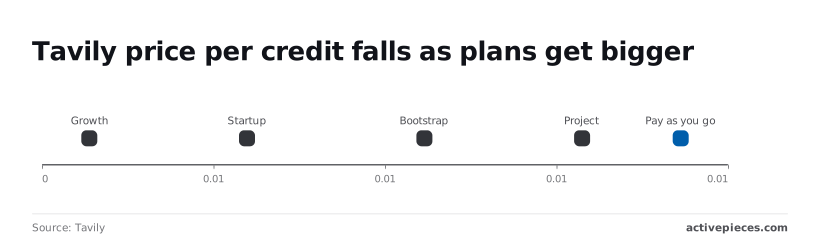
At $0.008 per credit, pay as you go carries the highest rate, which means costs climb quickly at any real volume.
Project drops it to $0.0075, Bootstrap to $0.0067, Startup to $0.0058 and Growth to $0.005, according to the Tavily docs, so tier selection directly determines your effective rate.
Only if you actually use the credits does a flat monthly fee buy a lower rate. The table shows the entry tiers.
| Plan | Monthly credits | Monthly price | Price per credit |
|---|---|---|---|
| Researcher | 1,000 | Free | Free |
| Project | 4,000 | $30 | $0.0075 |
| Bootstrap | 15,000 | $100 | $0.0067 |
| Pay as you go | Billed by use | No monthly fee | $0.008 |

Leave credits unused on a plan and the money is spent for nothing; run out mid-month and you get errors in production.
Pay as you go avoids the first problem and costs you a few tenths of a cent per credit. Startup and Growth, the two cheapest rates, sit above these entry tiers.
A worked 10,000-search example
Ten thousand basic searches use 10,000 credits. On pay as you go that's $80. On Bootstrap it fits inside the 15,000-credit allowance for the flat $100, making it accessible for teams running moderate search volume.
Run those same 10,000 searches at advanced depth and they use 20,000 credits, or $160 on pay as you go. That's already past Bootstrap's 15,000 credits, so you'd be buying a bigger plan or topping up.
Doing nothing about depth is the expensive choice here. Run basic by default, and switch to advanced only for the queries where the shallower answer fails you.
Worth checking against a plan that does not meter every step: one credit covers a whole run on Activepieces.
Know your rate limits by plan
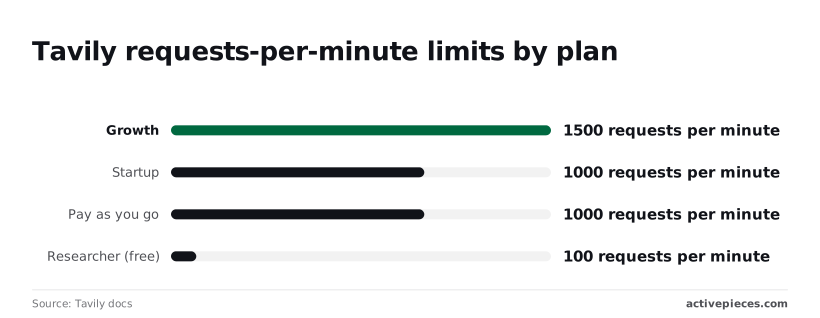
100 search requests per minute is all the free Researcher plan allows, so production use requires a paid plan immediately. Paid plans allow 1,000 to 1,500. A busy app can hit the speed limit long before it runs out of credits.
Limits by plan and key type
According to Tavily's rate-limit docs, Researcher (free) gets 100 requests per minute. That is under two a second, so a handful of users searching at once can use it up.
Step up to pay as you go or Startup and you get 1,000 per minute. Growth gets 1,500. The chart shows the real jump's from free to paid; the paid tiers sit close together.
(chart)
Moving from Startup to Growth buys you only 500 more requests per minute, so don't upgrade a plan just to escape a limit you could fix with a queue.
Don't assume the search ceiling covers extraction or other calls.
The figures above are for search requests. Tavily's other endpoints may carry their own limits, and I haven't confirmed any numbers for them here. Check the rate-limit page for the endpoints you actually use before you size your traffic.
Handle Tavily 429 rate limit errors with backoff
Send too many requests too fast and the server answers with a 429. If your code ignores it, your users see failed searches and blank answers, and a naive retry loop makes the pile-up worse.
- Catch the 429 instead of letting it crash the request.
- Wait before retrying, and double the wait each time (one second, two, four).
- Add a small random delay so many workers don't all retry at the same instant.
- Stop after a fixed number of attempts and return a plain "search unavailable" message.

If the response tells you how long to wait, use that number instead of guessing.
Cap how many searches your app sends at once, too. Backoff handles the occasional spike, but a queue in front of the API keeps you under the limit in the first place.
An agent that decides for itself when to search is where the 1-or-2-credit math bites hardest, because the spend is no longer yours to schedule.
Activepieces registers an integration once and it runs two ways: as a step in a flow and as a tool on the per-project MCP server, so Claude, ChatGPT, Cursor or an agent you built can call it without a second integration.
In packages/pieces in the open source repo, the action definition that runs as a flow step is the very one exposed as an MCP tool, across 750 integrations under an MIT-licensed core, so each integration is maintained once.
MoneyGram, Moneypenny, Alan and FundingSocieties run it in production.
The case against Tavily
A queue keeps you under the rate limit, but it does nothing for the bill, and the bill is where the best case against Tavily starts. Here're the five objections that hold up, so you can check each against your own traffic before committing:
- Spend is hard to predict, because credits are consumed by how each request is configured, not by how many requests you send, so a traffic forecast alone won't give you a monthly number.
- Advanced search depth costs more credits than basic, so one setting changed in a hurry can raise your bill without a single extra user.
- Exa, a search API built for AI apps, lists a slightly lower price per 1,000 searches than Tavily, which adds up at high volume.
- SerpAPI and Brave Search API return raw results in the order a search engine would, which gives you more control over sources and ranking than Tavily's pre-filtered answers.
- Firecrawl, which specializes in turning whole web pages into clean text, extracts page content better than Tavily's extraction.
Those are the costs of choosing Tavily. What follows is where each one bites and where it doesn't.
Cheaper Tavily alternatives for high volume
If you run a large, steady volume of simple lookups, Exa's lower list price wins on arithmetic, and a flat per-search price is easier to forecast than credits.
If you need to control exactly which sources appear, or you plan to rank results yourself, SerpAPI or Brave hands you the raw material without Tavily's filtering in between.
If your real job is reading full pages, such as ingesting documentation, Firecrawl's built for it. Prices change, so read each vendor's pricing page on the day you decide, not the day you read this.
Where Tavily still wins
The cleanup is already done. Tavily returns results trimmed and ranked for a language model to read. With the raw-result APIs you also have to build and maintain that cleanup step, and its engineering time's a cost the per-search price doesn't show.
For a prototype, or an app with modest volume, the time saved usually outweighs the price gap. The objections above matter most once volume is high and the budget is tight.
Fix common Tavily API errors
When volume is high and the budget is tight, a wasted call costs real money. It helps to know which Tavily errors deserve a retry: only rate limits (429) and server errors (500) do.
Retrying the wrong ones burns credits and gains nothing. The table below shows each error's cause as the docs describe it, the fix, and whether retrying helps.
| Code | Cause per the docs | Fix | Retry? |
|---|---|---|---|
| 400 | The request is malformed or a parameter is invalid | Check the request body against the API reference | No |
| 401 | The API key is missing or invalid | Confirm the key and the header it travels in | No |
| 429 | Too many requests on this key | Slow down and back off | Yes, with a pause |
| Usage or plan limit | Credits or the plan's limit are used up | Upgrade the plan or wait for the allowance to reset | No |
| 500 | A fault on Tavily's side | Try again shortly | Yes, a few times |
If the docs change, Tavily's HTTP errors help article is the authority, and each row links to it. The three groups below cover what to do about each.
Repeating a 400 or 401 repeats the failure, because the mistake is yours. Fix the request or the key, then test once. Keep the key in an environment variable, not in code you share, so a leaked key doesn't drain your credits.
Plan and usage limit errors
When you see a 429, you're calling too fast, so wait and retry with growing pauses. A usage or plan limit error means the money is gone, and no pause fixes it.
Prevent both by capping max_results, defaulting to the basic search depth, and caching answers to repeated queries. Check your credit balance on a schedule, because finding out from a failed call means your users found out first.
Set a timeout on every call so a slow search can't hang your app. On a 500 or a timeout, retry a few times with a pause, then give up and return a plain "search unavailable" message instead of letting the failure spread.
Call Tavily endpoints without code using Activepieces
Without writing any code, you can run Tavily Search or Extract on a schedule in Activepieces, which allows unlimited flows on every plan, including the free one with 1,000 Activepieces credits a month.
It's a workflow tool where you chain steps together on a visual canvas, and it keeps the failure handling from the last section on the canvas instead of buried in a script.

If nobody on your team writes code, this is the cheaper route. Doing nothing means a weekly research job gets done by hand, or not at all.
Build the workflow
Start with a trigger, the step that decides when the flow runs. A weekly schedule suits recurring research, and a run costs 1 Activepieces credit however many steps it has.
Add a step that calls Tavily, using the Tavily integration if the catalogue lists it; if it doesn't, generate the integration with AI and add it privately to your own instance, with no public contribution needed.
Store the key and send the request
For the HTTP route, store your Tavily key as a connection, a saved credential the platform keeps for you, and send it as a Bearer token.
That way the key never sits in plain text in a step, and anyone who copies the workflow doesn't copy your key with it.
Pass data between steps
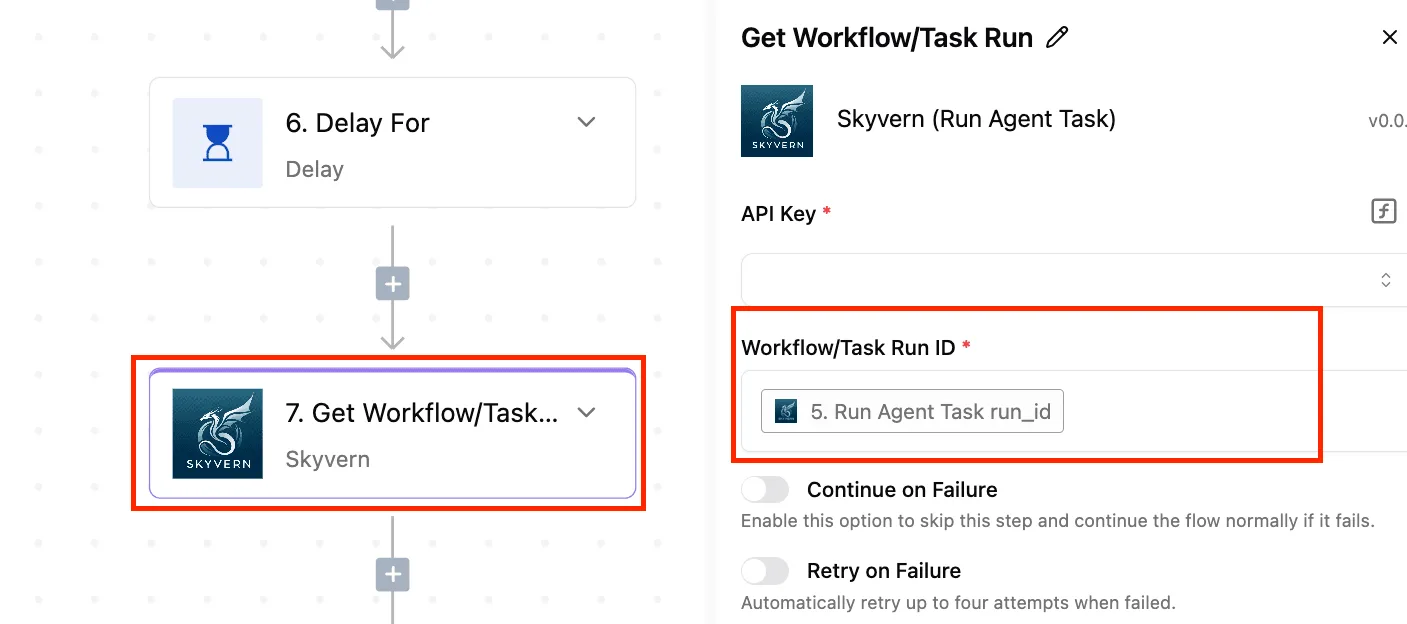
Passing data between steps is the part that trips up beginners, and the screenshot shows it. Here the "Find Rows" step in a Google Sheets flow takes {{step_2['output']}} as its Search Value, which means "use whatever step 2 produced."

Use that same pattern to feed a row of search queries from a sheet into your Tavily step, so each query becomes one search. Take from it that a step's output's just a reference you drop into the next step's field.
Keep credits and failures under control
Keep the sheet short and the schedule modest, since each query spends credits. Use the error-handling section on the step so a failed search stops or retries instead of writing blanks downstream.
Then add a final step that saves results to a sheet or sends them to an AI step for summarizing.
When to call the API directly instead
For a scheduled job, a few extra seconds are fine. A person typing a question into your app can't spare them.
Each extra step in a workflow adds a hop between your user and the answer, and you also get less control over the retry-then-give-up behavior described above.
For anything a user's waiting on, call Tavily's API from your own code.
Keep Activepieces for the jobs that run while nobody is watching: on the free plan, when the 1,000 credits run out, flows stay on and runs wait until the credits refresh, which means unattended automation won't crash when you've exhausted your monthly allowance.
Related reading
References
Running the numbers
See what the same workload costs here.
Free forever plan, and every paid plan self-hosts at no extra cost.
See pricing Talk to sales