
Best Accounts Payable Automation Software in 2026 Compared

Nov 15, 202613 min read
BILL, Stampli, Tipalti and Ramp are the four purpose-built AP products to compare for core invoice processing. A fifth route, building on Activepieces and its 750 integrations, suits teams that need intake and approvals across many systems.
AP automation software captures invoices, codes them, routes them for approval, and releases payment.
We put the same questions to each product:
- which ERP it connects to
- who maintains the workflow
- cloud or self-hosted
- SSO
- roles and audit logs
- approval depth
- what the plan costs at your invoice volume
Where a vendor doesn't publish a price, treat that as a quote request, not a zero.
Accounts Payable Automation Software Shortlist and Criteria
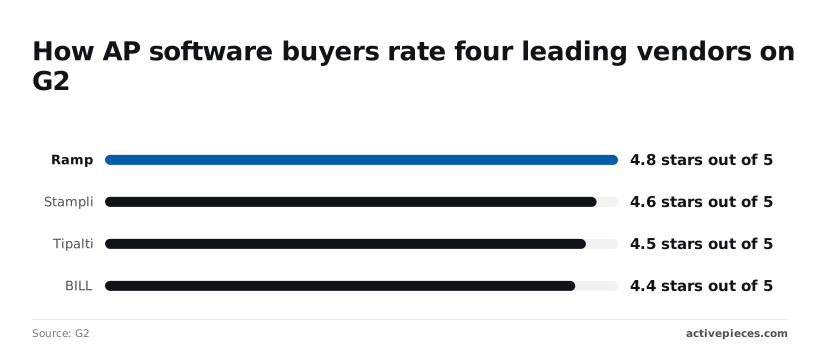
Accounts payable automation software G2 ratings
Read these scores as third-party sentiment, not a test of fit. Ramp holds 4.8 out of 5 on G2, so its reviewers are rarely unhappy. According to G2, Stampli sits at 4.6, Tipalti at 4.5, and BILL at 4.4.
0.4 of a star is the whole spread, too narrow to pick a winner. Use it to confirm none of them is a problem, then decide on ERP match and approval needs.
Confirm prices on each vendor's own page before you commit, because they change by plan and quote. The table shows what each option is for and where it stops.
| Vendor | Published price (checked 15 Nov 2026) | Main strength | Main limit | Best-for team |
|---|---|---|---|---|
| BILL | Vendor pricing page | Bill pay and payments for smaller finance teams | Lowest G2 score of the four rated vendors, at 4.4 | Small teams wanting one place to pay bills |
| Stampli | Vendor pricing page | Invoice-centred review and approval | Scoped to AP, not general cross-system routing | Teams that want approvals handled on the invoice |
| Tipalti | Vendor pricing page | Payouts to many payees | Built around payments more than custom intake | Teams paying suppliers across many payees |
| Ramp | Vendor pricing page | Highest G2 score, at 4.8 | A spend platform first, with bill pay as one part | Teams already running spend management |
| Activepieces | Vendor pricing page | Self-hostable, with RBAC, SSO, SCIM, audit logs and git sync | You build and maintain the AP layer yourself | Teams routing intake and approvals across many systems |
Four finished products, one platform you assemble: that is the split.
The fastest way to settle a shortlist is to try one. Activepieces is free to try, no credit card.
BILL Accounts Payable
If you want invoice capture, approvals and payments in one product, connected to a common accounting system, BILL Accounts Payable suits small and mid-size businesses. It stops fitting when approvals must span systems BILL doesn't sit in front of.
Accounts payable automation software pricing and plans
BILL's AP and AR plans are priced per user, but I haven't confirmed the current rate or the plan limits as of this writing. BILL prices AP per user, by plan tier, on its public pricing page.
A stale rate is worse than none, because it sets a budget the invoice won't match.
Before you commit, check two things on that page. First, which tier includes your accounting system's sync. If the sync sits one tier above the one you priced, the quote's wrong by exactly that gap.
A stale rate is worse than none, because it sets a budget the invoice won't match.
Second, which tier carries the approval depth you need. Per-user pricing means every approver, not just every AP clerk, is a seat. A team with many occasional approvers pays for each of them.
BILL Accounts Payable strengths
When the whole job is accounts payable and the company wants it done in one place, BILL wins. Invoices arrive, get coded, route to approvers, and are paid from the same product.
BILL also integrates with common accounting systems such as QuickBooks Online, Xero, NetSuite and Sage Intacct, so a small finance team doesn't stitch together capture, approval and payment tools. Someone else maintains the product, and nobody on your side owns the plumbing.
BILL Accounts Payable limitations
BILL is built around the AP lifecycle. Intake from other places, such as procurement requests, contract renewals or vendor onboarding, is outside that lifecycle. Those workflows need a separate tool or a manual handoff.
As the approver pool grows, per-user pricing also bites.
And a company that needs self-hosting, or governance controls tied to its own identity provider across many systems, is asking a payments product to be a platform. Check the plan tiers for those controls rather than assuming them.
Stampli Accounts Payable
Stampli's an AP product built around the invoice itself, with approval conversation held on each invoice. It suits mid-market teams running varied ERPs, and its pricing's by quote rather than published.
There's no per-user or per-invoice figure to put in a spreadsheet before a sales call, because Stampli doesn't publish a rate card; this was checked on 2026-11-15.
Treat it as quote-only, and ask the vendor in writing which of your invoice volume, user count and ERP integration set the price, and which the vendor bills separately.
When an approver asks "why is this PO short?", the answer sits in the same place as the invoice, not in an email thread nobody can find at audit time. Stampli keeps the questions, answers and approvals for an invoice attached to that invoice.

When a mid-market team has acquired a second entity running a different system, it matters that Stampli connects to a range of ERPs.
On G2, the software review site, Stampli averages 4.6 across 2,126 reviews, while BILL, a competing AP and payments product, averages 4.4 across 1,216. The larger sample sits higher, so the score isn't a few enthusiastic accounts.
A chart of the two ratings follows, with review counts on the bars.
Read it as satisfaction, not fit. A rating shows how users felt after rollout; it says nothing about whether your ERP is supported or your approval rules fit.
The same invoice-centred design is the limit. Stampli organises everything around the AP workflow, so intake from other channels, approvals for non-invoice requests, and routing across systems outside finance aren't what it's built for. If you need those, you'll be stitching them on from outside.
You can't compare it with a competitor's published tier until you've sat through the sales process, and that is the other cost of quote-only pricing. Confirm governance controls such as SSO and audit logs against the plan you are quoted, and don't assume them.
Reading a table only gets you so far. Build the same workflow in Activepieces and compare it yourself.
Tipalti Accounts Payable
If you pay many suppliers across borders, Tipalti Accounts Payable is the fit. It's more platform than a small team with a few domestic vendors needs, so its quote is the first thing to confirm.
Because this article has no confirmed list price or minimum commitment for Tipalti, none is quoted. Treat the cost as something to get in writing against your own volume.
Ask whether the fee is a platform charge, a per-payment charge, or both, whether a minimum applies, and who pays for currency conversion. The answers decide whether a small team's bill tracks its usage or sits at a fixed floor.
200+ countries and territories, 120+ local currencies and 50+ payment methods: those are the three counts Tipalti's global payments page gives for its reach, shown below. The chart shows a product sized for suppliers in places many AP tools don't pay.
That reach only pays off if your supplier list spans it. If it does, you get one payout run instead of separate bank, wire and wallet processes, and suppliers are paid in their own currency instead of chasing a transfer that arrived short.
At year end, a missing form blocks a payment or a filing. Tipalti removes that spreadsheet-and-email chore by collecting supplier onboarding and tax forms inside the same flow.
When thousands of payouts go out each cycle, automation of the payment step is worth more than the cost of configuring it. High volume is the other case where it fits.
If you pay a few dozen vendors in one country, you buy capability you never use. Onboarding supplier portals, tax-form collection and multi-currency payout rails all take setup, and a small finance team may spend longer configuring them than it saves.

It's also a payables product with its own approval model. If your real problem is intake from email, routing across several internal systems and governance you control, a payments platform won't cover that, and you'll still need something around it.
Ramp Bill Pay
If you already run Ramp cards and spend management and want vendor invoices paid in the same system, Ramp Bill Pay suits you. It's narrower than a dedicated AP suite on purchase-order matching and ERP coverage.
Ramp publishes a Free plan with no per-user charge, and paid tiers above it. Bill payments carry a per-payment fee on ACH, the US bank-transfer rail.
This section quotes no figures. The current numbers belong to Ramp's pricing page, and plan limits change often enough that a copied number is a stale one.
Read the limits for approval workflows, accounting sync and payment methods on your tier before you commit. Those are the places where a plan that looks free turns out to be missing the feature you bought it for.
If your company cards, reimbursements and bill payments already sit in Ramp, the invoice arrives in the same ledger as everything else. Approvers use one interface, and the accounting sync is set up once rather than per product.
Where AP volume is modest and mostly non-PO, as with software subscriptions, agencies and contractors, the team gains most. Ramp's G2 rating is high, and that reflects satisfaction among the people using it for that kind of work.
Do not read a top rating as a measure of your process; it measures the average user.
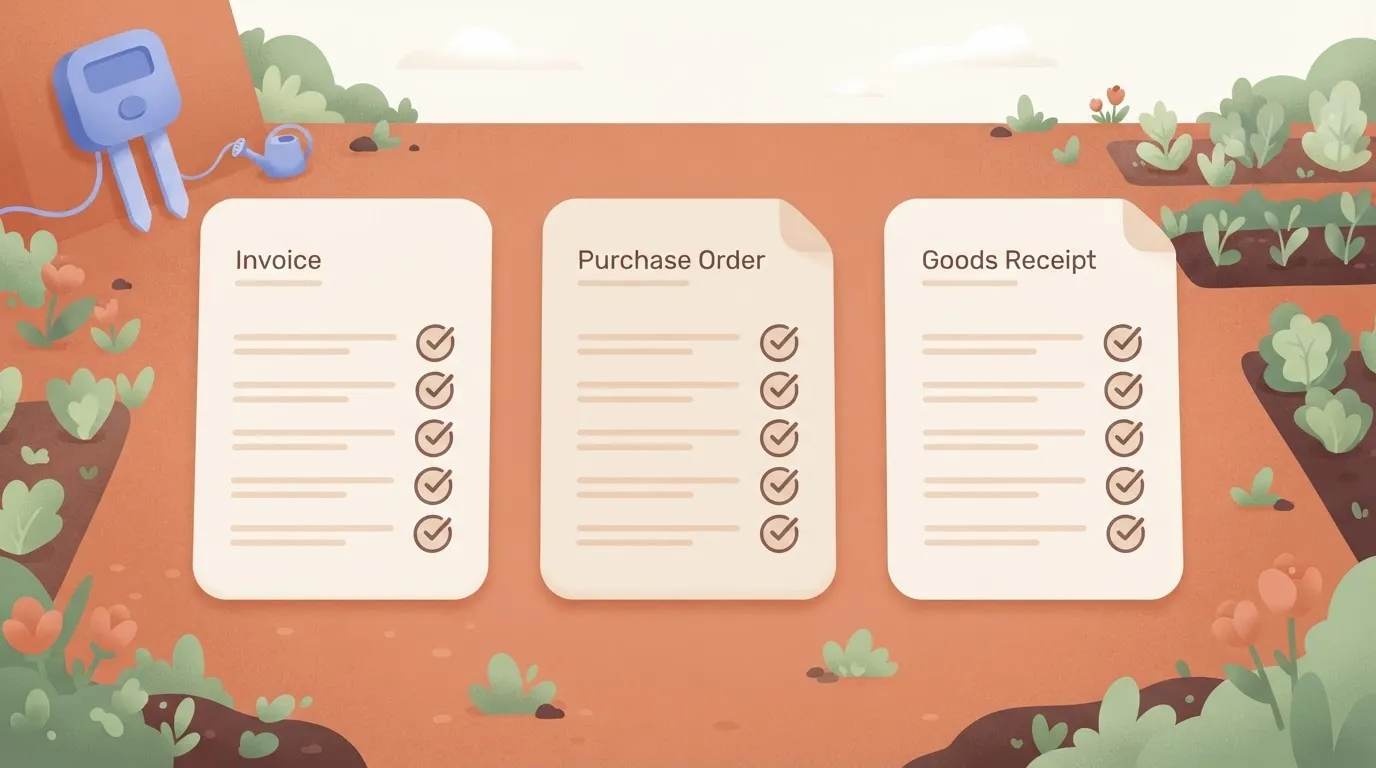
Teams that need three-way matching, meaning invoice, purchase order and receipt checked against each other before payment, should test that against their own documents rather than assume it. The same goes for ERP coverage.
On the list of accounting systems Ramp integrates with, the question is whether yours appears at the depth you need: line-item coding, multi-entity, custom fields.
A sales demo on a clean invoice won't show you that. Run one of your messy ones through a trial instead.
Activepieces Invoice Workflows
As a workflow platform, not an AP suite, Activepieces ranks last here on invoice matching, payments and audit depth. It wins when intake and approvals must run across apps you already own, or when the platform has to be self-hosted, which its MIT-licensed core allows.
Where it fits and where it doesn't
Your messy trial invoice probably failed at the edges: odd inboxes, a manager who lives in chat, an ERP nobody wants to touch. Activepieces handles that layer, and MoneyGram, Moneypenny, Alan and FundingSocieties run it in production.
In one platform you get governance: RBAC, SSO, SCIM, audit logs and git sync, so flows can be reviewed like code. It can also be self-hosted. It won't replace a product built for AP.
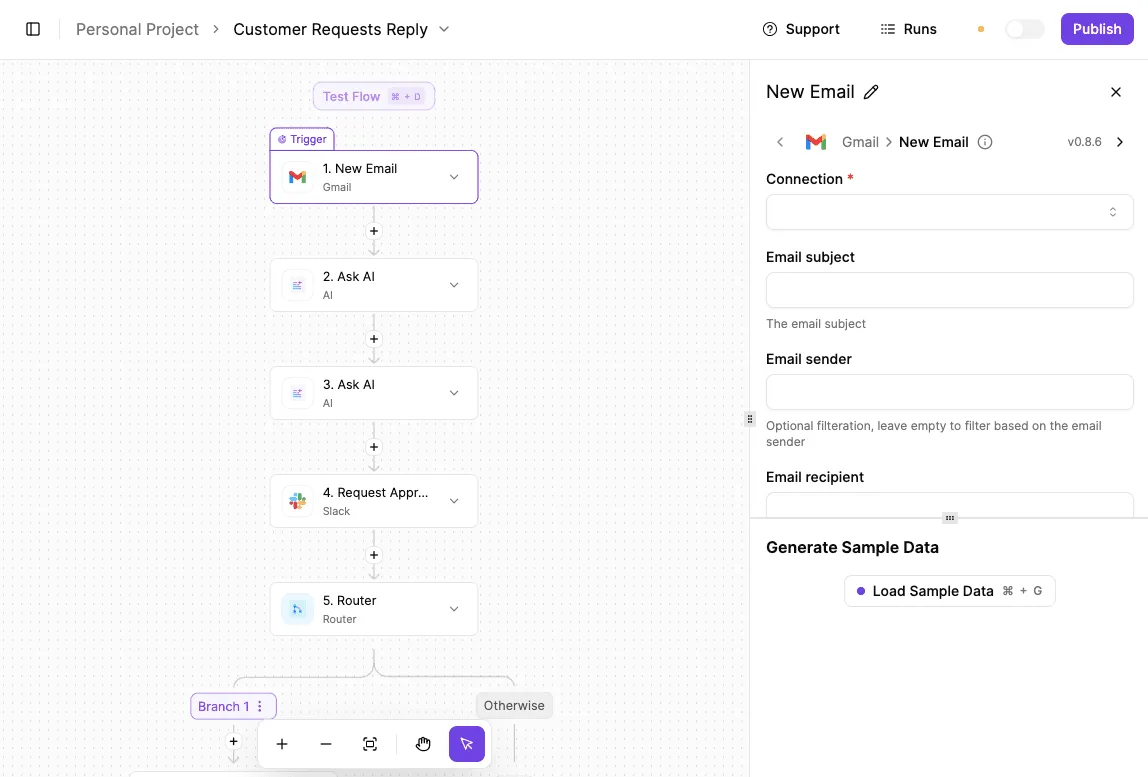
Every step in the flow below is a configurable integration, not custom code, which shows how little glue the intake layer needs.
- Trigger: Gmail integration, New Email, filtered to the shared AP mailbox. Pass on sender, subject and the attachment.
- Extract: AI integration, Extract Structured Data, run on the attachment. Request vendor name, invoice number, invoice date, due date, currency and total.
- Post for approval: Slack integration, Request Approval in A Channel, sent to the approvers' channel with vendor, invoice number, total and due date in the message.
- Branch: Router integration with two branches, one when the response is approved, one when it's rejected.
- Record: Google Sheets integration, Insert Row, on both branches. Write the extracted fields plus the decision, so the rejected invoices leave a trail too.
Test the extract step on your worst scan first. That's where this flow will break, and the run history shows exactly which field came back empty.
None of two- and three-way matching, payment runs, vendor onboarding or deep ledger audit trails is in this flow. Build them yourself and you're maintaining an AP product.
If those are your core need, buy one. If your gap is intake and routing across systems, browse the Activepieces pieces and start free; unlimited flows come on every plan, the free one included.
Activepieces is the better fit for teams whose invoice problem sits at the edges: intake from odd inboxes, approvals routed through chat, and ERPs nobody wants to touch, and who need governance without buying a second product.
RBAC, SSO, SCIM, audit logs, log and event streaming, environments and git sync all ship in one platform, self-hosted or on cloud, with no cut-down version either way.
It ranks last on invoice matching, payments and audit depth, so a team whose main need is a dedicated AP suite should buy one, but for orchestrating invoice workflows across apps already owned, or under a self-hosting requirement, Activepieces is the better choice.
Frequently asked questions
How much does AP automation software cost for a small business?
The price on the page is rarely the price you pay; small teams usually pay per invoice or per user. Read the contract for what sits outside the base plan: extra approvers, ERP connectors, OCR overage and onboarding fees.
A low entry price that charges for each of those costs more than a flat plan that includes them. Ask for a quote at your real monthly invoice count, not the vendor's example.
Do I need AP automation if my ERP has an invoice module?
Not always. An ERP (the accounting system that holds your ledger) can capture, code and approve invoices, and for a single entity with simple approvals that may be enough.
When invoices arrive by email from many vendors, when approvals depend on rules the module can't express, or when you need three-way matching against purchase orders and receipts, the gap shows up. Test the module on your ten messiest invoices before you decide.
Can a general workflow tool replace accounts payable software?
For intake, routing and approvals, yes. For the accounting itself, usually not.
With a workflow tool you assemble and maintain invoice data extraction, duplicate detection, matching and payment handling yourself; purpose-built AP products ship with them already built.
That trade makes sense when your problem is moving invoices between systems under your own governance rules, and less when your problem is processing them.
How long does it take to switch AP automation software?
Longer than the vendor's go-live date suggests, because the work is in the parts around the software. You have to remap vendors, rebuild approval chains, reconnect the ERP and run the old and new systems side by side through at least one close.
Ask any vendor for named customers on your ERP who have migrated, and ask how long their cutover actually took.
Related reading
References
Still comparing
The fastest way to settle it is to build something.
Open source under MIT, so you can self-host the same thing later.
Start free Talk to sales