vidIQ MCP: Setup, Credits, Pricing (2026 Guide)

Nov 18, 202615 min read
The vidIQ MCP is vidIQ's connector that lets Claude or ChatGPT query vidIQ's YouTube data from inside a chat.
Per Vidiq, as of 2026-11-18, it earns its place as a research layer for people who already work from vidIQ data, not as a strategy engine, and anyone who wants to pipe its answers onward into other tools, such as an Activepieces flow, can do so once the research is done.
An MCP (Model Context Protocol) connection is a standard way for an AI assistant to call an outside tool's data, and the vidIQ MCP uses it to let Claude or ChatGPT pull vidIQ's YouTube data, such as channel analytics and keyword research, into a chat.
vidIQ's data store's on the left, the MCP in the middle, your chat window on the right, and one arrow carries a question out and data back.
VidIQ MCP Defined and What It Connects
What MCP means in one paragraph
Instead of guessing from training, an AI assistant can call outside tools and read outside data, and MCP, the Model Context Protocol, is the open standard that lets it.
A server, here vidIQ's, publishes what it can do. The assistant decides when to call it and folds the result into its reply.
Whatever the server returns is all the assistant has to work with. It's only as current and as accurate as that data, and it still writes the conclusions itself.
What vidIQ says the connector exposes
You can ask in plain language what you would otherwise click through dashboards to find. That's how vidIQ describes the connector: a way to put its channel and video data in front of your AI assistant.
I'm not reproducing a tool-by-tool list here, because the exact set can change and vidIQ's own connector documentation's the only place that should settle it.
Check that page before you build a workflow around a specific lookup. If a lookup you rely on isn't listed, you'll otherwise find out mid-project.
vidIQ positions the connector for Claude and ChatGPT, which is the pairing this article covers.
Support can differ by plan and by client version, so confirm yours on vidIQ's page before assuming it works in your setup. Any other client you try is outside what vidIQ has said it supports.
If you are running this arithmetic for your own team, see what the same workload costs on Activepieces.
How the Connection Works Inside Claude and ChatGPT
Type a question and it becomes one or more tool calls that spend vidIQ credits. The vidIQ MCP sits between your chat window and your vidIQ data, and you add it as a connector in Claude or ChatGPT.

The table shows how much of that setup the sources actually document, so treat every "not documented" cell as something to check on screen, not assume.
| Claude | ChatGPT | |
|---|---|---|
| Where the connector is added | Not documented | Not documented |
| Plan tier required | Not documented | Not documented |
| How authorisation works | Not documented | Not documented |
| Stated limits | 0, 5 or 10 credits per call | 0, 5 or 10 credits per call |
| Source | OutlierKit | OutlierKit |
Prices and plan limits checked against docs.claude.com and claude.com and openai.com and gemini.google on November 17, 2026.
Expect to find most of the rest out by trying it. The only stated limit's the credit cost, and the only source's a third-party write-up.
Setting it up in Claude
Open Claude's connector settings and look for vidIQ there. vidIQ's own pages say the MCP is available on every plan, including Free.
OutlierKit notes that Claude's own pricing page lists the free plan as limited usage every 5 hours and every week, making it unusable for continuous work. On a free account, long research sessions compete with that allowance as well as your vidIQ credits.
Because plan tier and sign-in steps are undocumented here, check ChatGPT's pricing page against what your account actually offers before you plan a workflow around it.
How vidIQ MCP tool calls and credits work
Before any answer arrives, every call has a price, and Claude or ChatGPT decides which vidIQ tool to call. According to OutlierKit, utility tools cost 0 credits, so checking what's available costs you nothing.
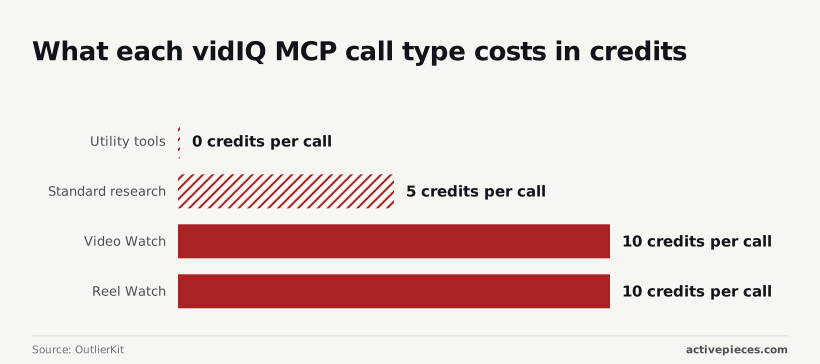
5 credits per call is what OutlierKit indicates for standard research. A question that fans out into six lookups spends 30.
Per OutlierKit, Video Watch and Reel Watch cost 10 credits each, so asking the assistant to "watch" ten videos can use 100 credits before you have read an answer.
VidIQ MCP requirements and costs
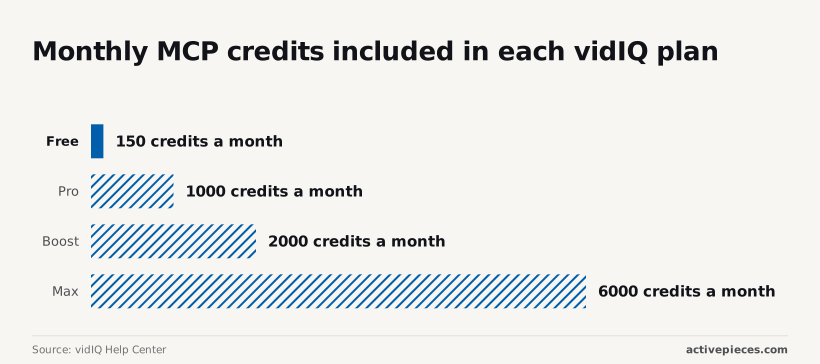
Since the vidIQ MCP's available on every vidIQ tier, the real purchase is the monthly credit allowance, which runs from 150 on Free to 6,000 on Max. Prices below were checked on 18 November 2026.
VidIQ plan and limits
At the low end, Free gets 150 credits a month, Pro 1,000, Boost 2,000 and Max 6,000. The jump from Free to Pro is nearly sevenfold.
At 150, a few research sessions can drain the month, so Free's a trial, not a workflow. The table puts those allowances next to what each plan costs, plus the chat subscription you pair it with.

| Plan | Price | MCP credits per month |
|---|---|---|
| vidIQ Free | $0 | 150 |
| vidIQ Pro | Paid tier | 1,000 |
| vidIQ Boost | $19/mo ($16.58/mo billed yearly) | 2,000 |
| Claude Free | $0 | None; uses your vidIQ credits |
| ChatGPT Free | $0 | None; uses your vidIQ credits |
| ChatGPT Go | $8/mo | None; uses your vidIQ credits |
If your vidIQ allowance is running dry, upgrading ChatGPT won't stretch it. The AI plans add no credits of their own.
Claude Free and ChatGPT Free both cost $0, while ChatGPT Go costs $8 a month, so only the free tiers are directly comparable at no cost.
Before you pay for anything, open your chat app's settings and confirm that your plan lists connectors. That check takes a minute and decides whether the Go upgrade's needed at all.
Total monthly vidIQ MCP cost for solo creators
Pair Boost with a free Claude or ChatGPT account and it comes to $19 a month, or $16.58 if you pay yearly, so annual payment saves roughly $29 per year.
Add ChatGPT Go and it's $27 monthly, or $24.58 with yearly vidIQ billing, putting the total bundle at $8 more monthly than Boost alone, which means ChatGPT Go effectively costs $8/month when bundled. Those are the realistic figures for one person who wants 2,000 credits.
Only if you actually hit the Boost ceiling do Max's 6,000 credits, triple Boost's, pay off. So the question is simple: does the time you save by not switching between vidIQ tabs and your chat window add up to more than $19 a month?
If the same question gets asked every week, Activepieces covers the repeating part: a flow can run every Monday and post a weekly research summary to Slack.
It sits next to vidIQ rather than in place of it, and no vidIQ integration is part of that, so the vidIQ figures still reach the summary through you or the connector.
What carries over is the connector idea itself: once a piece is connected in Activepieces, an agent can call it, because the same piece runs as a flow step and as a tool on the per-project MCP server that Claude, ChatGPT or Cursor connect to.

Nothing gets published or wired up a second time, and you can see it in packages/pieces of the MIT-licensed repo, which holds 750 integrations, roughly 60% of them community-contributed, so community developers maintain the majority of integrations.
Worth checking against a plan that does not meter every step: one credit covers a whole run on Activepieces.
Why connect vidIQ MCP to Claude or ChatGPT
Yes, the time saved's real. The connection removes the copy-paste tax of carrying vidIQ numbers into a chat window by hand, and for a creator who does that daily, the believer's math isn't silly.
Picture 11pm, a half-written content calendar, and six browser tabs of keyword scores you're retyping into a prompt. That's the pain the believers point at. Their case rests on four arguments, each tied to something the connector's documented to do:
- Research happens without tab-switching, because the connector lets Claude or ChatGPT pull vidIQ's data directly into the conversation, so you stop pasting screenshots and numbers.
- You can ask plain-language questions over a database of 135M+ channels, which means a small creator can compare niches without learning a filter interface or exporting a spreadsheet.
- Ideation gets faster, because the assistant works from vidIQ's actual YouTube data instead of guessing, so the first draft of a topic list starts from real signals.
- Setup's quick, because you authorize the connection once inside your AI app and don't build a pipeline, which matters if you have no developer and no budget for one.
Concede the strongest part: none of this is hype. Each claim maps to a documented capability, and for someone already paying for vidIQ, the connector adds convenience without adding a new tool to learn.
But look at what those four arguments actually promise. Every one's about access and speed: getting data into the chat faster and asking about it more easily.
None says the assistant will tell you which video to make, and that gap's where the thesis pushes back.
Human judgement in data decisions
Nothing about the connector makes vidIQ's numbers more accurate. It only moves them into chat, so the decision about which video to make still sits with you. Your 2am spreadsheet habits apply here: check the cell before you trust the formula built on it.
When chat output's treated as a verdict, you get one of four mistakes, each tracing to a documented limit:
- Treating chat output as strategy, when it's a summary of data you still have to interpret.
- Trusting the model's reading of a number instead of checking it against vidIQ itself.
- Burning credits on Video Watch calls for questions a cheaper lookup would have settled.
- Ignoring channel size, so a benchmark from a large channel gets applied to a small one.
Below, each gets its own treatment, and the last subsection says when the case against the connector loses.
When a model restates a score in fluent prose, it sounds like a prediction. A keyword or competition score describes the data vidIQ holds today, though, and it doesn't predict how your video will perform.

Read the number, then open vidIQ and confirm what the model said it saw.
Missing channel context weakens vidIQ MCP answers
Unless you supply your channel's size, audience and upload history, the assistant doesn't know them. Without that, it gives advice that fits the average channel, which's no one in particular.
A small channel in a regional-language niche, working with limited time and equipment, needs different benchmarks from a large one. Put that context in the prompt every time.
vidIQ MCP credit limits and permissions
Loop Video Watch over every competitor video and you can drain an allowance quickly, since each call spends credits. Check what your plan and the connector actually allow before you build a routine around either, and ask for the cheaper lookup first.
None of this sinks the connector. The case against it wins for people with no routine, because a research layer with nothing to feed gives you fast answers to questions you never planned.
It loses for a creator who already pulls vidIQ data on a schedule and wants it in one place.
Monday Setup Plan for Using vidIQ MCP Well
If you can't say which side of that line you sit on, one Monday and one channel will tell you, and the whole test fits in five steps.
The list below runs in order because each step spares you from wasting the next one, and the two subheadings after it cover the steps that go wrong most often.
- Confirm your vidIQ plan and your AI client both support the connection, using the vendors' own pages.
- Connect vidIQ to Claude or ChatGPT.
- Ask the same three questions about one channel.
- Check each answer against the vidIQ dashboard.
- Decide after two weeks whether it stays.
Nothing here replaces vidIQ itself. You're checking whether the assistant reads your data faithfully, not whether it has good ideas.
Check vidIQ MCP plan eligibility and cost
Read vidIQ's current plan and MCP documentation, then your AI client's own page on connectors. Support often depends on the tier on both sides, and these pages change.
Do this before connecting anything, because a connection that half works looks like a bad tool, and you'll blame the wrong thing. If either side puts MCP behind a paid tier you don't have, you have your answer for now and have lost nothing.

Test vidIQ MCP with three questions
Pick one channel you know well, ideally your own, and write three questions you can verify by hand.
For example: what were my top videos recently, which of them gained views fastest after upload, and what are the keyword scores on my latest title? Save the wording and reuse it unchanged.
Keep the questions fixed, because a vague prompt gives you a different answer each day, and you can't tell whether the tool changed or your phrasing did.
Then open the vidIQ dashboard and compare. Note every mismatch, and note how much time you spent reconciling them.
At the end of two weeks, count the mismatches against the time saved. Fewer mismatches and less time than the dashboard alone means it earns a place. Otherwise, keep using the dashboard.
What Activepieces does about this
The problem in this article is a research layer being treated as a strategy engine. Activepieces doesn't fix that, and I'd distrust any tool that claimed to.
What it handles is the plumbing around the layer: the weekly question, the place the answer lands, and the other tools an assistant might need beside vidIQ.
Activepieces is open source under the MIT licence, and its repo holds 750 integrations, roughly 60% of them contributed by the community, meaning the platform achieves its reach primarily through community effort.
Each integration is a integration, and one integration works as a step in a scheduled flow and as a tool on the per-project MCP server that Claude, ChatGPT or Cursor connect to.
If your Monday routine posts a summary to Slack, the same Slack integration is available to your assistant in chat.
There is no vidIQ integration, so the vidIQ numbers still come through the connector or through you. That fits the fixed test in the Monday plan.
Keep reading the figures against the dashboard, and let Activepieces carry the part of the routine that never needed judgement.
Frequently asked questions
Is the vidIQ MCP free to use?
Not on its own terms. The connector's a way into your vidIQ account. What it can return depends on the vidIQ plan behind it, and the plan limits on vidIQ's pricing page are the ones to check before you build a workflow around it.
Be aware that your AI client may also restrict connectors by its own plan. If you pay for neither, test with one small question first, before committing a week of research to it.
Can I use vidIQ MCP with ChatGPT and Claude at the same time?
Yes, as far as anything in the connection itself goes. Each client authorizes separately against the same vidIQ account, so you add the connector in each one.
The catch's that the two clients don't share conversation history. If you ask both the same question, you'll get the same underlying data framed two ways, and you'll need to note which answer came from where.
Reading vidIQ's data is what the vidIQ MCP's meant for, not publishing to your channel.
Treat the permissions screen at authorization as the final word, though. If a prompt ever asks for more access than research needs, stop and read it before you click through. A research layer shouldn't need the keys to your upload page.
No, the vidIQ MCP isn't the vidIQ AI coach. The coach's vidIQ's own assistant, living inside vidIQ's product.
The MCP lets the assistant you already use, Claude or ChatGPT, query vidIQ's data. That means the model, the prompts and the judgement calls are yours, and so's the blame when a vague prompt produces a vague answer.
If your AI client doesn't show the vidIQ connector, it's usually one of four things:
- Your client plan doesn't allow custom connectors.
- The connector was added but never enabled for the current chat.
- You aren't signed in to vidIQ, or the session has expired.
- On a team or company account, an admin has to approve connectors first.
Work through them in that order. If the connector was working yesterday and vanished today, remove it and reconnect it before you debug anything else.
Related reading
References
Running the numbers
See what the same workload costs here.
Free forever plan, and every paid plan self-hosts at no extra cost.
See pricing Talk to sales