What Invideo AI MCP Is and How It Works in 2026

Nov 13, 202614 min read
Invideo AI MCP functions as a standardized communication layer that allows large language models to execute complex video editing tasks through structured API calls, rather than simple text-to-video generation.
By utilizing the Model Context Protocol, it moves video from an isolated creative output to an integrated capability within agentic workflows. You can now instruct an agent using Claude Opus 5.5 to perform non-linear editing, asset sourcing, and timeline adjustments as discrete, repeatable operations.
Traditional video tools carry an operational risk in their reliance on manual, high-latency interfaces that block automated pipelines. Programmatic content assembly becomes possible when you integrate these engines via Activepieces or similar orchestration frameworks.
This works provided the underlying model can see the editing timeline as a set of data points. Specific scene parameters are manipulated when a model like Gemini 3.8 Flash accesses the Invideo MCP server.
This enforces brand guidelines at the protocol level rather than leaving them to the variability of a creative prompt. Scalability makes this structured approach a financial necessity as you expand marketing output to meet rising platform demands.
Invideo AI MCP connects LLMs to video production engines
The following figures represent the projected growth in US digital video ad spend.
| Year | Projected Spend |
|---|---|
| 2024 | $63.8B |
| 2025 | $72.4B |
| 2026 | $81.9B |
As these budgets expand, the margin for error in manual rendering vanishes. This necessitates a move toward the protocol-based orchestration found in current frontier models.
Everything below works on Activepieces' free plan. Start without code or a credit card.
How the Model Context Protocol enables autonomous video editing
Frontier models use the Model Context Protocol (MCP) to standardize how they interface with external rendering engines to execute complex creative workflows without human oversight. This shift moves the burden of technical execution from your prompt to a structured, bi-directional communication layer.
The role of the MCP Server in video rendering
Between high-level reasoning models and the Invideo Engine sits an MCP Server, acting as a secure translation layer. When a model like Claude Sonnet 5.5 identifies a need for visual output, it doesn't attempt to "write" a video file.

Instead, it issues a JSON-based tool call to the MCP Server, which validates the request against available API capabilities. AI agents remain decoupled from the specific rendering hardware under this architecture, allowing you to scale compute resources independently of the model's reasoning cycle.
By centralizing the "handshake" in the MCP Server, you can audit every call the agent makes to the video engine, preventing unauthorized resource consumption. This protocol-based approach establishes the foundation for the granular timeline manipulation that follows.
Instructional mapping from text to timeline
The core utility of MCP, in this context, is its ability to map ambiguous natural language into a strict temporal schema.
Models such as GPT-6 Astra utilize the protocol to translate a request for a "fast-paced montage" into specific millisecond timestamps and transition markers that the Invideo Engine understands.
Immediate feedback reaches the agent through MCP if a proposed timeline exceeds the available clip duration, forcing a corrective reasoning step before the render begins. This eliminates the "hallucination" risk inherent in manual prompting, where a model might describe a scene it can't actually build.
Checking stock asset licensing in Invideo AI MCP
The protocol automates the high-risk task of verifying creative rights by performing real-time checks against stock libraries during the assembly phase. Before a single frame is processed, the system executes the following sequence:

- Querying the asset metadata to confirm the license covers the intended distribution channel.
- Fetching high-resolution source files only after the license is validated.
- Injecting the verified asset ID into the render manifest.
Nobody wants the liability of an AI agent inadvertently using copyrighted material that lacks proper commercial clearances, and this automated verification prevents that.
By the time the final render status is returned to a model like Gemini 3.8 Flash, the legal provenance of every pixel has already been logged by the MCP bridge.
Technical requirements for deploying Invideo AI MCP servers
Deploying an Invideo AI MCP server requires a local runtime environment capable of executing Node.js and a persistent secure tunnel if the agent operates outside the local network.
Installing the Invideo AI MCP server package
The server code is distributed as an open-source package hosted on the official Invideo GitHub repository and published to the npm registry. You do not download a standalone application; instead, you pull the latest protocol implementation directly into your environment using the Node package manager.

This ensures the agent always has access to the most recent tool definitions and security patches.
This architecture moves the processing burden from your workstation to the agent's host environment. The host must maintain a stable connection to the Invideo API to prevent session timeouts during high-bitrate asset transfers.
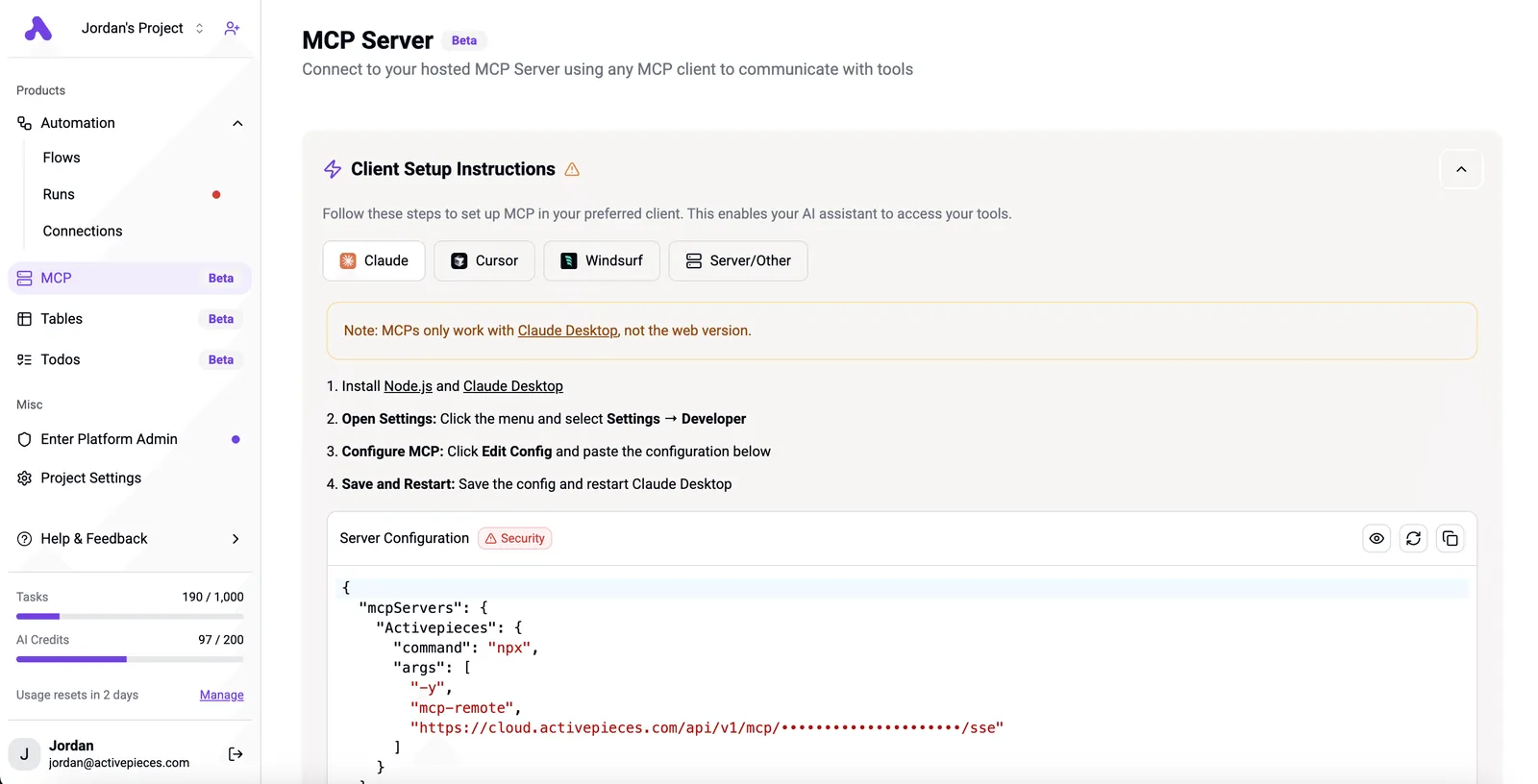
The configuration interface is the bridge between the local machine and the model; it details the specific JSON blocks required to register the server with a compatible client.
The following screenshot illustrates the setup process for remote servers. It shows the npx command used to fetch the latest protocol handlers and the specific endpoint URLs that allow the model to call video creation functions.

You must correctly map the mcp-remote arguments to prevent unauthorized models from attempting to trigger video renders. Once the server is live, it must be paired with a model that supports the Model Context Protocol for tool-calling.
- Anthropic's Claude Sonnet 5.5 and Claude Opus 5.5 orchestrate these servers using native support for complex tool schemas.
- OpenAI's GPT-6 Astra helps maintain context across multi-step video timelines, though very long workflows can still strain its context window.
- Google's Gemini 3.8 Flash processes high-volume video iterations where latency in the MCP handshake must be minimal.
If you fail to use a model with validated MCP support, the agent will treat the video capability as a text-generation task, leading to broken API calls and failed renders.
Why agentic video creation outperforms traditional prompt engineering
Agentic workflows replace the trial-and-error of manual prompting with a structured protocol that allows models to treat video production as a native capability rather than a text-to-video guessing game.
When an agent utilizes the Model Context Protocol (MCP), it has direct visibility into the schema of the video engine. Every request for a scene transition or asset placement adheres to valid technical parameters before the render begins.
Speeding up the Invideo AI MCP preview loop
The transition from manual UI interaction to MCP-enabled orchestration eliminates the latency inherent in human-in-the-loop verification. In a traditional setup, you must manually interpret a model's text output and input it into a video tool.
This creates a bottleneck where errors in syntax or aspect ratio are only discovered after a lengthy rendering process. Logic errors are caught in milliseconds when an agent using Claude Sonnet 5.5 programmatically validates the video structure against the Invideo AI MCP server.
This shift moves the production cycle from a series of disjointed tasks into a continuous stream of execution.
| Metric | Manual Prompting | MCP Agent |
|---|---|---|
| Iteration Speed | Minutes | Seconds |
| Style Consistency | Manual | Protocol-enforced |
| Output Volume | 1x | 10x |
Removing the manual interface layer supports a higher volume of creative experimentation without a linear increase in labor costs, as shown in the efficiency gains above. Consequently, you can pivot from managing single assets to overseeing entire libraries of automated content.
Handling complex multi-scene revisions via chat
Managing revisions across a multi-scene project through a standard chat interface often leads to "context drift," where the AI loses track of previous stylistic choices as the conversation grows.
When using a high-reasoning model like GPT-6 Astra, the MCP integration acts as a persistent state manager. The agent can reference the exact structure of scene three while modifying the dialogue in scene ten because of this persistent state.
This prevents the common failure mode where a request for a minor edit triggers a global change that breaks the visual continuity of the entire project.
By anchoring the conversation in a formal protocol, the agent maintains the integrity of the video's underlying data model regardless of the complexity of your natural language requests.
Easier to see it running than to read about it: set it up free, no card.
Common failure modes in automated MCP video workflows
Automated video generation fails when the agent loses the thread of the narrative. It also fails when it hits hard infrastructure ceilings or attempts to ingest assets it doesn't have the legal right to process.
While the Invideo AI MCP provides a structured interface, the underlying reliance on large language models like Claude Opus 5.5 or GPT-6 Astra introduces a risk of context window exhaustion.
As an agent iterates on a script, the accumulation of previous versions and metadata can exceed the model's active memory.
Infrastructure limits present a second, more rigid operational risk. Even high-intelligence models like Gemini 3.8 Flash can trigger API rate limiting if the orchestration layer doesn't include back-off logic.
This is surfaced to the agent as feedback it can act on, prompting a corrective step rather than a stoppage of the production pipeline. Finally, asset licensing mismatches occur when the agent fetches external media that lacks the required commercial metadata.
Quality control scores help determine when these failures necessitate a full re-roll of the video generation. The following scores represent the minimum acceptable thresholds for an agentic workflow:
- Intent: 80
- Look: 84
- Character: 90
Falling below these thresholds indicates that the agent has drifted too far from the original protocol. Following a failed score, the orchestrator must purge the current context and re-initialize the session to prevent the compounding of errors in subsequent scenes.
Automating Invideo AI MCP triggers with Activepieces workflows
Activepieces provides the MIT-licensed core to run these automated video pipelines on your own infrastructure or a managed cloud. It moves video production from a manual prompt-and-wait cycle into a predictable business capability by mapping external data events directly to the Invideo AI MCP toolset.
While standard chat interfaces require you to copy-paste product details, this workflow engine uses pre-built connectors to listen for state changes in a source of truth. The resulting video is always synchronized with actual inventory.

This transition from "video as a tool" to "video as a protocol" relies on a linear execution path.
- The system catches a Shopify Webhook for a new product.
- It extracts product features via an LLM.
- It calls the Invideo MCP tool to generate a script.
- It triggers the video render.
- It uploads the result to Social Video.
By utilizing Claude Sonnet 5.5 within this sequence, the system evaluates the raw Shopify metadata against brand guidelines before the Invideo tool receives the payload.
Activepieces exposes every registered integration as a tool schema on a per-project MCP server, meaning an agent can call any of the hundreds of community and core integrations without a separate migration step.
Once a integration is connected, it is immediately reachable from Claude or ChatGPT as a native tool, allowing the agent to orchestrate the Invideo engine alongside existing business data.
This removes the need for local file storage. This structured approach transforms a creative task into a background service, though it creates a new operational dependency on the uptime of the webhook listener and the API credit balance of the underlying video engine.
The Monday morning checklist for AI video implementation
Operating an automated video pipeline requires shifting from creative oversight to technical governance to prevent logic failures from depleting production budgets.
Because an agentic workflow lacks the human intuition to stop a failing render, the system must be constrained by hard boundaries before the first request is sent. You should execute the following audit to ensure your infrastructure can support the high-compute demands of video generation:
Operating an automated video pipeline requires shifting from creative oversight to technical governance to prevent logic failures from depleting production budgets.
- Audit API token limits to ensure the monthly quota accommodates the retry logic required when an agent fails to parse a scene description.
- Verify LLM context window size (using a model like Claude Opus 5.5 for its long-horizon reasoning) to confirm the agent can hold the entire script and brand guide in memory during the assembly phase.
- Map brand asset library to MCP paths so the Model Context Protocol server can retrieve approved logos and fonts without the agent hallucinating local file structures.
- Test the 'Style-drift' re-roll threshold to define exactly how many visual variations the system may attempt before halting the process for human intervention.
This checklist establishes a baseline of control that prevents the "infinite loop" scenario where an agent spends credits on unusable assets. Once these parameters are locked, the focus moves from preventing technical waste to maintaining consistent visual output across high-volume batches.
This transition requires a move away from ad-hoc prompting toward a standardized template system that the AI agent can execute predictably.
Frequently asked questions about Invideo AI MCP?
Standardizing video generation through the Model Context Protocol (MCP) requires aligning operational costs with technical architecture to ensure the agent remains within budget and security parameters.
Does Invideo AI MCP require a paid subscription?
Integration with Invideo AI via MCP requires an active subscription to access the generation credits and export rights necessary for commercial output.
While the protocol itself is an open standard, the underlying service operates on a tiered credit system where higher volumes of automated generation necessitate Business or Enterprise commitments to avoid mid-cycle service interruptions.
| Tier | Typical Monthly Cost | Operational Outcome |
|---|---|---|
| Starter | $10/seat/mo billed annually | Individual testing with watermarked or restricted exports. |
| Business | $199 - $499 | Sufficient credits for small-scale agentic automation workflows. |
| Enterprise | Custom | Dedicated support and volume pricing for high-frequency API calls. |
Subscription levels dictate the rate limits available to the agent. A mismatch between the plan and the automation frequency will result in failed executions when the credit balance is exhausted.
Can i use Invideo AI MCP with local LLMs?
Local LLMs can interface with the Invideo AI MCP server provided the local model supports function calling and tool use capabilities.
In this configuration, the local model is the reasoning engine that decides when to trigger a video generation, while the MCP server acts as the bridge to Invideo’s cloud-based rendering infrastructure. Private prompt engineering on-premises is possible with this setup.
The final video synthesis still occurs on external servers. This requires a stable outbound connection.
How does MCP differ from the standard Invideo API?
The primary difference lies in the orchestration layer. The standard API requires you to manually map every request and response, whereas MCP allows an agent to discover and use video capabilities dynamically.
| Feature | Standard Invideo API | Invideo AI MCP |
|---|---|---|
| Integration | Hard-coded endpoints and manual state management for each video project. | Standardized schema that allows models like Claude Opus 5.5 or Gemini 4 Argon to understand the video tool's parameters without custom glue code. |
This shift reduces the overhead of maintaining custom integrations, as the agent can interpret the tool's requirements directly through the protocol.