
WooCommerce Connector Features for Store Operations (2026)

Oct 22, 202615 min read
A robust WooCommerce connector serves as the vital bridge between your storefront and the broader ecosystem of business tools, ensuring that data flows seamlessly across every department.
By synchronizing inventory levels, customer profiles, and order statuses in real-time, these integrations eliminate the manual entry errors that often plague growing enterprises.
Whether you are utilizing custom scripts or leveraging a workflow automation tool like Activepieces to handle repetitive tasks, the primary goal remains the same: creating a unified source of truth for your operational data.
This connectivity allows store owners to focus on strategic growth rather than getting bogged down in the minutiae of cross-platform reconciliation. Ultimately, the right connector transforms a collection of isolated applications into a cohesive, high-performance engine for d
Connect store data to external apps
Functioning as a digital translation layer, WooCommerce connectors move transactional data from a WordPress database into external business systems like accounting software or email marketing platforms.
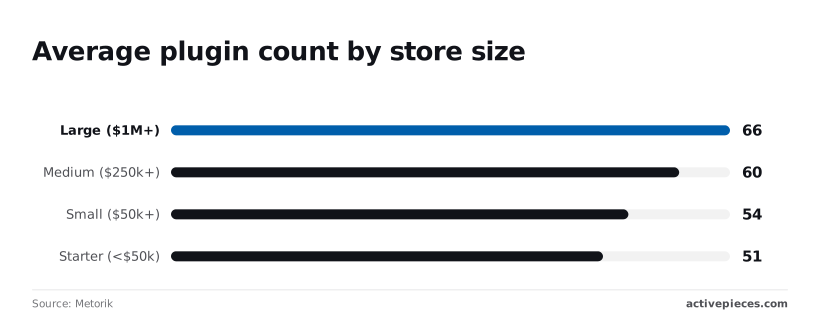
While a store generating under $50,000 in annual revenue averages 51 installed plugins according to Metorik, this count rises to 66 plugins for stores exceeding $1M in revenue, suggesting that complexity scales alongside commercial success.
This means larger operations manage 29% more potential points of failure in their data stack, increasing the likelihood of site-wide performance bottlenecks, which forces engineering teams to dedicate more resources to maintenance than to innovation.
The role of the REST API handshake
The REST API serves as the standard interface that allows different software systems to exchange data using web requests. It acts as a structured bridge, translating complex database entries into a format that external applications can understand and manipulate.
Before allowing an external application to read or write store data, the REST API handshake validates its identity. This process ensures that sensitive customer information is only accessible to authorized tools.
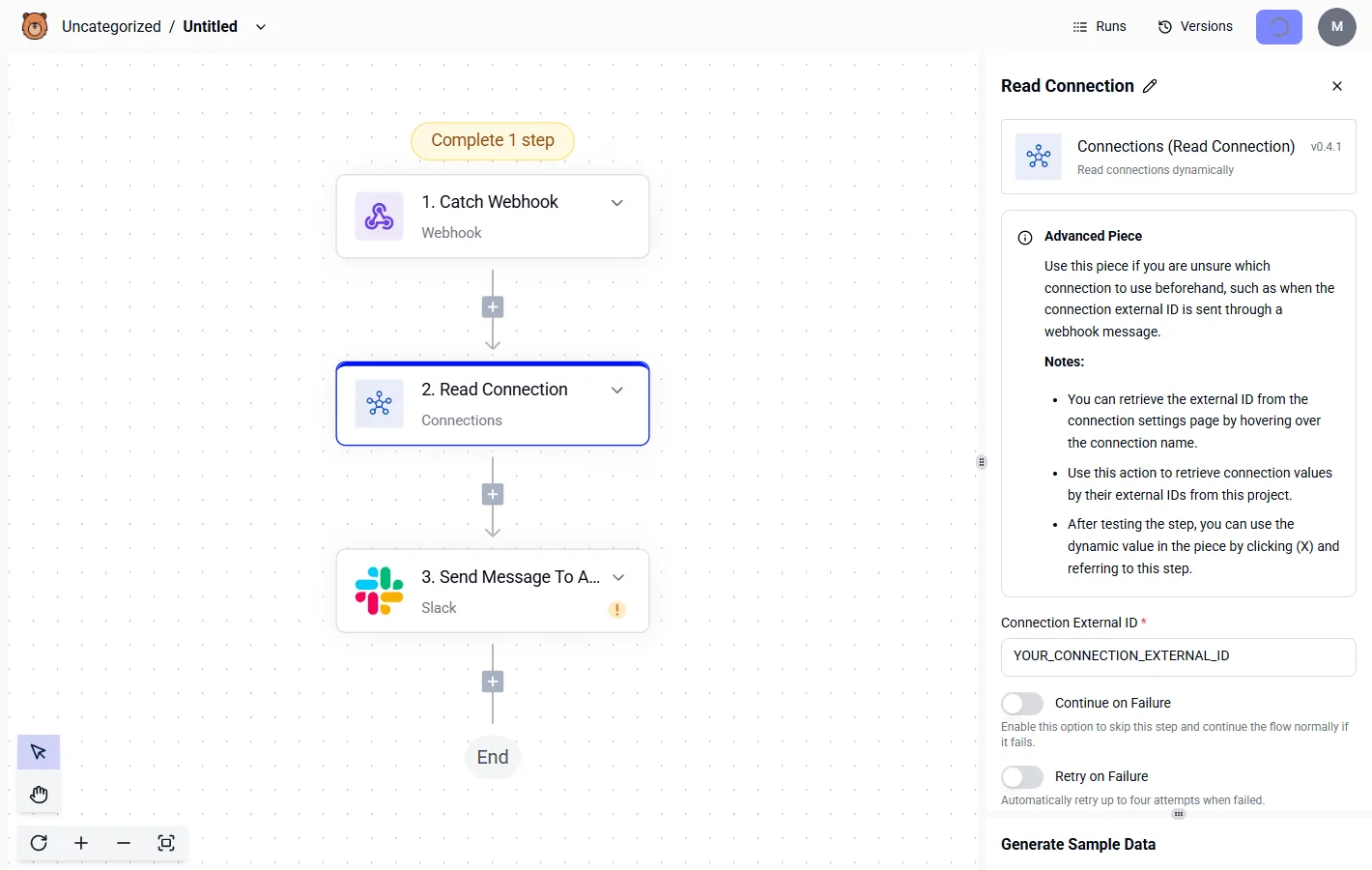
This verification cycle dictates how efficiently an external tool can pull updates. If the handshake fails due to a malformed header, the synchronization halts immediately to protect the store's integrity.
Synchronous vs. asynchronous data transfer
Whether the connector uses synchronous or asynchronous logic determines if data transfer occurs in real-time or in scheduled batches. Synchronous transfers force the store to wait for the external app to confirm receipt, which can increase checkout latency.

By offloading the task to a queue, asynchronous transfers protect the user's browser session. This ensures that a slow CRM response doesn't crash the site.
How message queues buffer order data
A message queue acts as a temporary storage area that holds data tasks until the external system is ready to process them.
When a customer completes a purchase, the connector places the order details into this digital holding pen rather than trying to force an immediate connection to the accounting software.
This architecture decouples the storefront from the external ecosystem. If the destination app is down for maintenance or struggling with high traffic, the queue retains the task in a persistent state.
Once the external system signals it is available, the queue releases the data in a controlled stream, preventing the store from being overwhelmed by backlogged requests.
Why native plugins are not always connectors
To add features like discount rules, native plugins often reside entirely within the WordPress environment. A connector's primary job is to bridge the gap to an external ecosystem.
Metorik’s data shows that medium-sized stores ($250k+) carry 60 plugins and small stores ($50k+) carry 54, indicating that plugin bloat is a persistent challenge, which means store owners are likely sacrificing site speed and security for added functionality.
Few of these are true connectors. Most are feature extensions that increase local database load without syncing data to an external warehouse.
Relying on a feature plugin to do a connector's job often results in "data silos" where information is trapped inside the WordPress wp_options table.
Everything below works on Activepieces' free plan. Start without code or a credit card.
Standard data objects supported by WooCommerce integration tools
By prioritizing stability across a massive user base, standard connectors limit their scope to the primary tables defined in the core WooCommerce schema, leaving any data stored in custom fields inaccessible to the rest of the tech stack.
Because these tools prioritize stability across a massive user base, they only map fields that exist in every default installation.
Syncing WooCommerce order status changes
Pre-built integrations focus on the transition of an order through the standard lifecycle of pending, processing, and completed. When a status changes, the connector pushes the base order ID and total value to the external system.
Rarely do these triggers account for partial refunds or complex tax overrides. This means an accountant must manually reconcile the two systems whenever an order deviates from the standard flow.
Every other platform searches its templates for these scenarios, but Activepieces writes yours. Describe a complex requirement to the built-in AI chat (such as creating a HubSpot task and Slack alert only after a Stripe payment fails twice) and it constructs a runnable flow from scratch.
The catalog stops being the ceiling on what you can automate.
Customer profile and metadata syncing
To keep the mailing list updated, connectors synchronize basic identity fields such as name, email address, and shipping location. Because these tools ignore the wp_usermeta table where custom loyalty tiers or professional certifications are stored, marketing teams often send generic campaigns to high-value segments.
The catalog stops being the ceiling on what you can automate.
Syncing WooCommerce inventory and price data
Inventory syncs are restricted to the stock quantity and the regular price fields found in the product catalog. Updating the stock level in a centralized warehouse triggers a change in the WooCommerce database.

These tools typically lack the logic to handle tiered pricing or wholesale discounts, forcing merchants to choose between a simplified pricing strategy or manual updates for every sale event.
Activepieces allows you to use AI to generate the specific integration logic you need and add it privately to your own instance, ensuring that missing connectors never stall your operations.
Check the open-source monorepo on GitHub, where roughly 60% of the 734 integrations are community-contributed by people who don't work here, allowing the platform to expand into niche WooCommerce use cases without waiting for a vendor release, so the ecosystem grows far faster than a single internal team could manage alone.
Automating WooCommerce coupon code generation
Within the WooCommerce coupon settings, automated workflows can generate unique alphanumeric strings and set an expiration date. This automation allows a customer to receive a welcome code immediately after signing up for a newsletter.
If a merchant requires advanced logic, such as a coupon that only applies to a specific combination of brands, the standard connector can't map these requirements. This renders the automated discount engine useless for complex promotions.
Common failure points in basic WooCommerce integration setups
Operating on a "lowest common denominator" data model, standard connectors break because they ignore the specific database entries that differentiate a business from a default storefront.
Syncing custom checkout field data
Because they are hardcoded to recognize only the core WooCommerce schema, standard plugins fail to sync custom metadata. Most businesses use tools like Advanced Custom Fields (ACF) or Meta Box to collect specialized information such as delivery instructions.
Operating on a "lowest common denominator" data model, standard connectors break because they ignore the specific database entries that differentiate a business from a default storefront.
Because basic connectors don't dynamically map these non-standard fields, the data remains trapped in the WordPress database. This means downstream systems like shipping platforms or CRMs receive incomplete records.
Handling WooCommerce Subscriptions and recurring billing
Generic integrations often struggle with the complex event triggers required by WooCommerce Subscriptions. A successful renewal depends on a precise sequence of status changes.
Basic tools frequently fail to distinguish between a "New Order" and a "Renewal Order." This lack of granularity results in duplicate accounting entries or failure to trigger fulfillment, which increases churn rates.
Rate limits and API throttling during peak sales
When a store experiences a surge in orders, high-volume traffic exposes the fragility of basic connectors through API rate limiting and webhook drops.
The hosting server or the receiving application may impose a limit on the number of requests allowed per second, resulting in "429 Too Many Requests" errors. Excess requests are rejected by the server, leaving the external system out of sync.
Traffic spikes can cause the server to miss signals sent by WooCommerce when an order is completed, so the automation never starts. These failures occur most often when the system is under the most pressure, turning a successful sales event into a manual reconciliation nightmare.
Easier to see it running than to read about it: set it up free, no card.
Maintaining data consistency across the WooCommerce ecosystem
To achieve reliable data integrity, you need an architecture that treats the store as a transactional edge rather than the final repository of truth.
Two-way sync vs. one-way push architectures
A one-way push architecture ensures that the external source of truth, such as an Enterprise Resource Planning (ERP) tool, remains the undisputed authority.
This unidirectional flow prevents the "ping-pong" effect where an update in the store triggers a back-and-forth loop of conflicting updates. Such loops can lead to API rate-limit exhaustion. In contrast, two-way synchronization introduces the risk of race conditions where simultaneous updates result in overselling items.
Conflict resolution when data changes in two places
Maintaining consistency requires a deterministic hierarchy that dictates which system wins when a record is modified in two locations at once.
Without a pre-defined "System of Record" status assigned to the accounting suite, a store manager might update a price in the WooCommerce dashboard while a bookkeeper updates it in the ERP. Effective resolution logic typically follows a specific priority:
- The external accounting suite overrides all financial and tax metadata.
- The WooCommerce storefront overrides customer-facing shipping statuses.
- The inventory management system overrides stock counts across all channels.

Mapping WooCommerce tax rates and currencies
Tax integrity depends on mapping the granular tax classes of WooCommerce to the specific ledger codes in the accounting software.
If a store sells globally, a failure to map the "Standard Rate" to the corresponding VAT or GST code means every international transaction requires a manual tax adjustment.
Because WooCommerce calculates tax at the point of sale while ERPs often calculate it at the point of invoicing, the integration must pass raw tax amounts to avoid rounding errors.
Building custom store logic with Activepieces workflows
Functioning as a visual logic engine, Activepieces decouples WooCommerce events from rigid vendor templates, allowing you to map custom metadata to any destination via a step-by-step workflow builder.
Connecting WooCommerce to non-standard CRMs
Because they lack necessary API mappings, standard connectors often fail when a store uses a niche CRM.
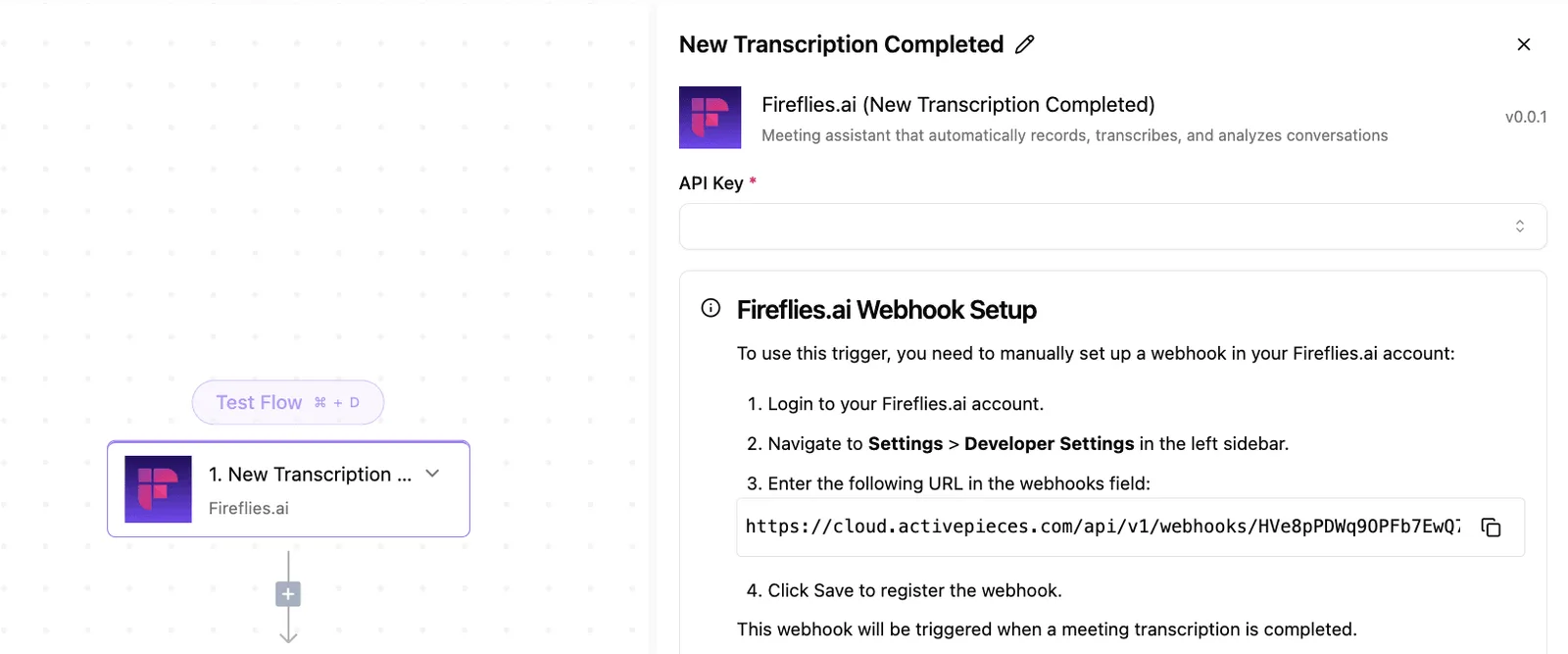
By using the Activepieces flow builder, you can define a "new flavor created" trigger from a custom ice-cream management integration to push specific product attributes directly into a database.
The screenshot shows a single-step workflow where this custom trigger is configured. It shows that even non-standard product types can be captured and routed without writing a single line of PHP.
Filtering triggers to prevent automation loops
Granular control over triggers is the only way to prevent "automation loops," where a sync from WooCommerce to a CRM accidentally triggers a sync back.
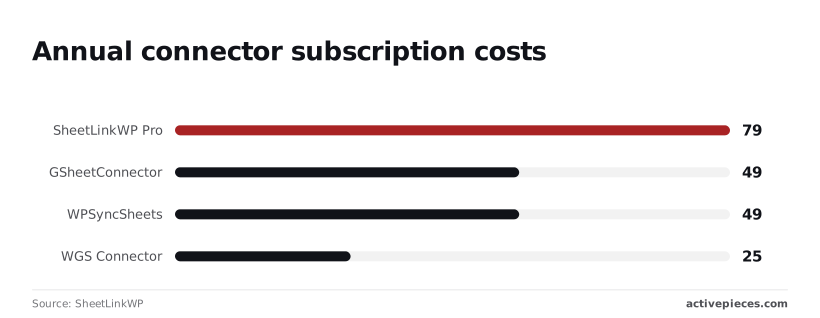
Without these filters, costs spiral. For example, SheetLinkWP Pro costs $79 annually, which is a 61% premium over the $49 charged by GSheetConnector or WPSyncSheets.
As SheetLinkWP points out, even the entry-level WGS Connector at $25 becomes a liability if it lacks the conditional logic to stop redundant updates. Activepieces allows you to set "if-then" branches so that an update only fires if the source data has actually changed.
Automating post-purchase follow-ups based on SKU tags
Custom workflows allow you to trigger post-purchase sequences based on specific SKU tags. This ensures customers receive relevant technical documentation rather than generic marketing spam.
By using the "Generate Sample Data" feature in the builder, you can verify that the workflow correctly identifies a specific tag, such as "refrigerated," before the automation goes live. This reduces the administrative overhead that typically scales linearly with order volume.

A checklist for evaluating your WooCommerce connector requirements
A robust audit of your WooCommerce connector requires verifying that the middleware can ingest, map, and transform every non-standard data point your business logic relies upon.
Audit your custom meta-data needs audit
The primary failure point in most integrations is the inability to sync custom fields. This means your fulfillment software may never receive critical data like personalized engraving text.
You must verify that your connector allows for dynamic mapping of the postmeta table. To ensure your data remains actionable across platforms, check for the following capabilities:
- Bidirectional syncing of hidden metadata keys.
- Conditional logic based on specific meta-values.
- Support for serialized data arrays within a single field.
Testing WooCommerce webhook reliability under load
A connector is only as stable as its ability to queue and retry webhooks during traffic spikes.
If the middleware doesn't offer a visible dead-letter queue, your technical team will spend hours digging through raw server logs to find out why a confirmation was never sent.
You should demand a connector that provides:
- Automated retry backing-off schedules.
- Log retention for successful and failed payloads.
- Manual trigger overrides for individual lost packets.
Checking payment gateway event support
Your integration must recognize the distinct status changes triggered by your specific payment processor, such as Stripe or PayPal. Many basic connectors only look for a generic "processing" status, which fails to distinguish between a captured payment and a temporary authorization hold.
This lack of granularity leads to financial risk, as your warehouse might fulfill an order that is still pending a fraud review or has been flagged for insufficient funds.
Frequently asked questions about WooCommerce connectivity
Does a connector slow down the store's front-end performance?
Standard connectors rarely impact page load speeds for customers. They interact with the WooCommerce REST API, which is a dedicated interface for external data requests that operates independently of the WordPress theme engine.
However, poorly optimized connectors that trigger heavy database queries during the checkout process can increase server response times. This means your customers face a higher risk of cart abandonment due to perceived lag.
To maintain performance, ensure the connector uses asynchronous processing so that data transfers occur in the background without forcing the user's browser to wait for a confirmation from the external system.
Can i sync historical order data with a new connector?
Most connectors allow for historical synchronization. They are often limited by the specific metadata fields the developer chose to map in the pre-built template.
If your legacy data includes custom fields from a specialized checkout plugin, a standard connector may ignore these attributes.
This results in incomplete financial records that require manual reconciliation by your accounting team. You must verify if the tool supports bulk-importing via the WooCommerce API’s batch endpoints to avoid hitting rate limits that could stall the migration for days.
What is the difference between a webhook and a polling connector?
Webhooks and polling differ in how they initiate data transfers. Webhooks send data immediately from WooCommerce to your destination when a specific event occurs, such as a new order. This ensures your warehouse receives shipping instructions in near real-time.
Polling connectors ask the WooCommerce API for updates at set intervals, which creates a delay between the customer's action and the system's response.
Choosing polling over webhooks often results in higher server overhead because the system must process "empty" requests even when no new sales have occurred.
How do i handle deleted products in a synced inventory system?
Hard-deleting a product in WooCommerce often fails to trigger a "delete" event in basic connectors. This leaves "ghost" listings active on your secondary sales channels like Amazon or eBay.
This discrepancy leads to overselling items you no longer stock, which forces your staff to issue refunds and damages your seller rating.
A robust integration strategy uses a "soft delete" or "draft" status change to ensure the connector recognizes the state change and removes the item from all synchronized platforms simultaneously.