
Zero Downtime Upgrade Workflow Automation: 5 Tools

Nov 23, 202615 min read
Use a durable orchestrator such as Temporal for the upgrade itself. It persists every step. Pair it with Activepieces, an MIT-licensed workflow tool with 750 integrations, for the approval and notification layer around it.
Zero downtime upgrade automation is a release scripted so that traffic moves to the new version in stages. It returns to the old one automatically when a check fails, with no window where users see errors.
The tool that controls that shift and the way back decides the outcome.
Zero downtime upgrade automation: short answer and criteria
The failure an upgrade workflow must survive
In the 2025 DORA data, as reported by changefailurerate.com, only 16.6% of respondents fail fewer than 4% of changes, and 19.6% sit at 4-8%.
According to changefailurerate.com, the largest group, 26%, sits at 8-16%, so a typical team should expect an upgrade to break something fairly often.
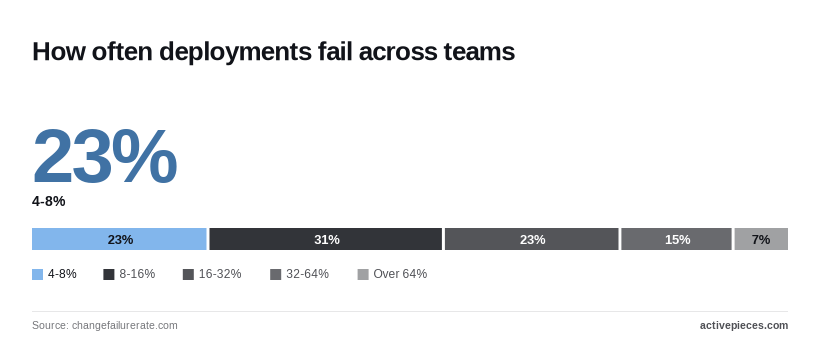
Another 19.5% fail 16-32% of changes, 12.5% fail 32-64%, and 5.9% fail more than 64%. Nearly one team in five loses over a third of its changes, so rollback can't wait for someone to notice and click.
Before the criteria, the date: list prices were checked on 23 November 2026. Survives a mid-upgrade crash: if the worker dies at 50% traffic, does the run resume at that step or restart from zero, which means a failure is either recovered in seconds or requires complete restart.
- Where state lives: in the tool's own durable store, or in variables you must persist yourself.
- Retry behavior: whether retries are configurable per step, and whether a retried step can shift traffic twice.
- Rollback trigger: whether a failed health check can reverse traffic automatically, or only a human can.
- Self-hosting option: whether you can run it inside your own network, which matters when the upgrade touches regulated systems.
Nearly one team in five loses over a third of its changes, so **rollback can't wait for someone to notice and click.
You can't trust a tool that fails the first two tests with the traffic shift, whatever its connector count. The comparison that follows applies these tests to each platform in turn.
Everything below works on Activepieces' free plan. Start without code or a credit card.
Comparison table of the five tools
Run all five tools through the same columns and a pattern shows: Argo Rollouts owns traffic shifting and rollback, Temporal owns durable execution, and the other three mainly sequence steps. List prices read "not confirmed" wherever there's no vendor page checked on a date.
| Tool | List price (check date) | Strength | Limit | Best for | Self-hosting |
|---|---|---|---|---|---|
| Temporal | not confirmed | Durable workflow state that survives crashes | Doesn't shift traffic itself | Orchestrating the upgrade | Yes, open source |
| Argo Rollouts | not confirmed | Canary and blue-green traffic shifting, automated rollback | Kubernetes only | Releasing and reverting the new version | Yes, runs in your cluster |
| GitHub Actions | not confirmed | Pipelines next to the code | Not built for long-lived state | Build and deploy triggers | Self-hosted runners; service itself not confirmed |
| Windmill | not confirmed | Scripts and flows with approval steps | Rollback logic is yours to write | Approval and notification layer | Yes |
| Activepieces | not confirmed | No-code flows, 750 integrations | Upgrade fit not confirmed | not confirmed | Yes, MIT-licensed core |
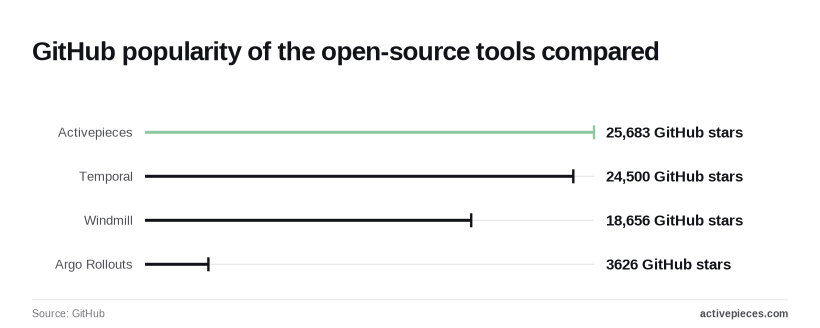
Don't lean on community size here. Per Daylight, on GitHub:
- Activepieces has 25,683 stars and Temporal 24,500, so both have large user bases to ask for help
- Windmill has 18,656, which is still a healthy pool
- Argo Rollouts has 3,626, and that reflects a narrow job, not a weaker tool
Do not rank on stars.
When every list price reads "not confirmed", that is deliberate: we won't print a figure without a vendor page and a check date behind it. Pull current prices before you budget, since seat, execution and usage metering differ by vendor.
That leaves the real choice on the limit column: pair a tool that controls the traffic with one that collects approvals.
Temporal workflow durability
If a crash hits mid-upgrade, Temporal is the half of that pairing that keeps going. It keeps a multi-step upgrade alive through crashes and retries, but it's code you write and it doesn't move traffic itself.
What it does for upgrades
Think of a Temporal workflow as a function whose progress Temporal records step by step in an event history. If the worker running your upgrade dies halfway through a database migration, another worker replays the history and resumes at the step that hadn't finished.

Nothing restarts from the top, so a migration isn't run twice by accident.
Nobody hand-rolls retry loops here; retries are policy on each step. You declare how often and how patiently a failed call is retried, and the platform enforces it.
Waiting for a human sign-off is just a pause in the function, which can last as long as the approval takes without holding a server.
There is a catch: every step is code. Someone on your team writes, tests and deploys the workflow and its workers.
Temporal pricing and self-hosting options
Run the server yourself if you like, since it is open source. Doing so means operating the cluster and its database, plus upgrading it, which is a fair irony for a tool you're using to avoid upgrade risk.
If you would rather not run the cluster, Temporal Cloud is the managed alternative, billed on usage. I have no confirmed list price to quote, so get the current figures from Temporal's pricing page before you budget.
Where it stops
Don't expect it to weight a load balancer, watch an error rate or decide a canary is bad. Temporal has no built-in traffic shifting.
You write those calls as steps against your ingress, mesh or deploy tool, and you write the rollback logic too. That's workable, but it means Temporal sequences the upgrade without owning the traffic, so pair it with something that does.
Argo Rollouts traffic shifting on Kubernetes
If you run on Kubernetes, Argo Rollouts is the traffic-owning tool that pairing calls for. It replaces the Deployment object with one that shifts traffic in stages and reverses itself when metrics turn bad.
Blue-green and canary upgrade strategies
Most teams are still on rolling updates by default.
In the Vamp survey reported by InfoQ, 57% of participants used them in production, against 22% for blue-green, 9% for canary and 7% for big-bang, so this approach has effectively become the standard in real-world deployment scenarios.
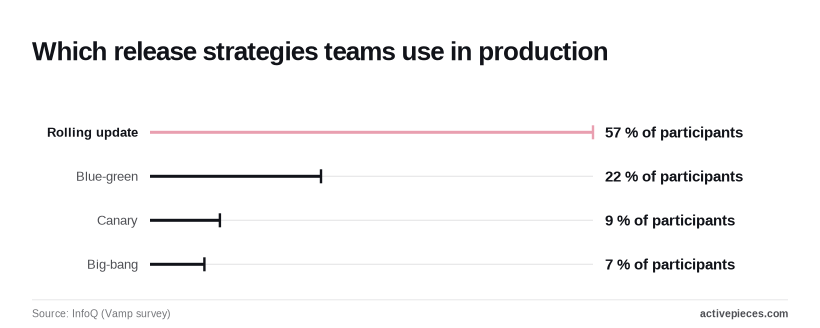
So most teams replace pods gradually and have no controlled way to hold back a bad version. Only about three in ten use blue-green or canary, the two strategies Argo Rollouts adds, and that gap's the case for adopting it.
Automated analysis and rollback
During a canary, Rollouts can pause at set weights and run an analysis against your metrics provider. If error rate or latency crosses the threshold you defined, it aborts and returns traffic to the stable version without anyone paging a human.

Written down as a query you can review in advance, the rollback decision is therefore not made under pressure at 2 a.m.
Because Rollouts works only on Kubernetes workloads, databases, virtual machines and anything outside the cluster need another mechanism.
It also has little to offer for human coordination: a rollout can pause for manual promotion, but there's no approval chain, no record of who signed off and no notification routing.
For the visibility that layer needs, look at a queue dashboard such as Bull-Board. Its overview here lists 132 active and 136 failed jobs across billing, email, notification and report queues, which means failures roughly match work in flight and someone has to see them.
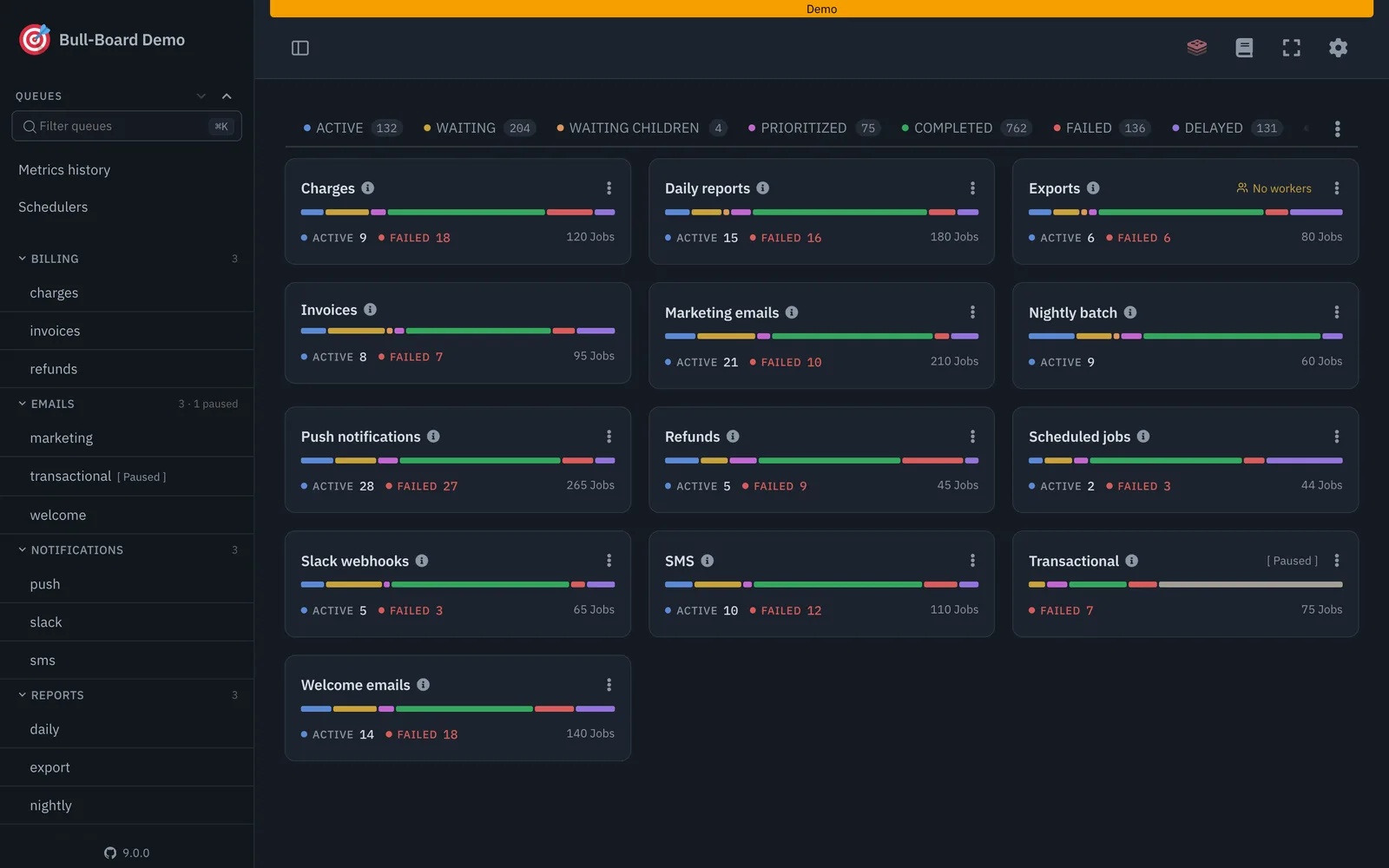
For approvals, Argo gives you nothing equivalent, which is the job of the lighter workflow tool in the next part of the setup.
Activepieces fills that approval gap without pretending to be a deploy engine, and its catalogue is something you can count yourself: the 750 integrations are the entries in the packages/pieces/community directory of the open-source monorepo on GitHub, counted from that directory rather than quoted from a marketing page, so you're assessing what's genuinely available rather than what a sales claim suggests.
The core is under the MIT licence, and roughly 60% of those integrations were contributed by the community.
If your ingress or deploy tool has no integration, you can generate one with AI and keep it private to your own instance, so the approval step never waits on a vendor release. MoneyGram, Moneypenny, Alan and FundingSocieties run it in production.
Easier to see it running than to read about it: set it up free, no card.
GitHub Actions upgrade sequencing
Sequencing an upgrade is fine in GitHub Actions, but holding it for human approval has limits. Shifting traffic or rolling back by itself are not, so it belongs in front of your orchestrator rather than in place of it.
When a workflow targets a named environment such as production, that environment can require named reviewers before any job touching it starts. A concurrency group then ensures only one upgrade run proceeds at a time.
Together these give you an approval record tied to a specific run, which is what an auditor asks for first.
GitHub Actions pricing, plan limits and runners
The table shows the range for each runner OS, because hosted runners are billed per minute and the rate depends on the operating system and runner size.
| Runner OS | Per-minute rate |
|---|---|
| Linux | $0.002 to $0.252 |
| Windows | $0.010 to $0.552 |
| macOS | $0.062 to $0.077 |
About a thirtieth. That is what the cheapest Linux minute costs next to the cheapest macOS minute, so upgrade jobs that only call a cluster API or a deploy tool should run on Linux.
Windows and macOS runners are only worth paying for when the upgrade needs them.
Where the upgrade must reach a private cluster that a hosted runner can't see, self-hosted runners remove the per-minute charge for hosted compute and sit inside your network. You then own the runner's patching and uptime.
Leave a run waiting on a reviewer long enough and it will time out, and a runner that dies mid-job loses its place, because a workflow run is a chain of jobs, not a durable process.

Weighted routing, health-based promotion, automatic reversal: Actions has none of them. Those belong to the tool that owns traffic, and Actions can only call it. Use Actions to ask "may this proceed?" and let the orchestrator answer "is it safe to keep going?"
Windmill code-first workflows
You script the traffic shift and the rollback yourself; Windmill is a code-first workflow engine that can sequence an upgrade and pause for a human.
That fits the split above: it can ask "may this proceed?" well, and it leaves "is it safe to keep going?" to code you own.
Retries, approvals and error handlers
Because each step in a Windmill flow is a script in a language such as Python, TypeScript or Go, a health check against the new version is just a function that returns or throws.
Steps can be given retry policies, and a flow can name an error handler that runs when a step finally fails.
Approval steps suspend the flow until someone resumes or cancels it, which gives you the gate before a cutover and a record of who released it.
For upgrades the consequence is this: the error handler's where your rollback lives. If you write it, it runs. If you skip it, a failed step leaves traffic wherever the last step put it.
You can run Windmill on your own infrastructure, since it is open source, and it also sells a hosted cloud. I'm not quoting list prices here because none were confirmed for this integration.
Read the vendor's pricing page on the day you buy, and check whether the plan you need includes the approval and permission features your audit team will ask about.
Weighted routing, canary analysis and automatic reversal are not native to Windmill. Shifting traffic means a script that calls your load balancer, ingress or service mesh, then a second script that verifies the result and undoes it. That's workable, but you own the failure modes.
For a durable orchestrator that treats rollback as a first-class operation, Windmill is the lighter tool, better suited to the approval layer than to the upgrade itself.
Activepieces
Don't put Activepieces in the step that moves traffic: it is a workflow tool, not a deploy engine, so it belongs in the approval and notification layer around an upgrade, where its 750 integrations reach the chat, ticketing and deploy tools that layer talks to.
It sequences calls to systems that do the real work, and that's a useful job as long as nobody mistakes it for the thing that owns the cutover.
Where it genuinely fits
Gluing a trigger to a chain of steps with a human in the middle is the product's strength.
An event starts a flow, it calls an HTTP endpoint, branches on the response, pauses for a person to approve, and posts to Slack, the team chat tool.
For an upgrade, that covers the parts finance and audit people ask about first: who approved the cutover, when, and what the health check said at that moment. You get a run history per flow, so the approval trail exists without writing it yourself.
If the flow touches internal health endpoints you don't want exposed to a cloud service, self-hosting matters, and Activepieces can be self-hosted. I haven't confirmed current plan tiers or list prices as of 2026-11-23, so check the vendor's pricing page before budgeting.
Read the flow below as a checkpoint: it shows the whole gate in six steps, so you have the complete validation process visible in one diagram. The orchestrator does the upgrade, and this flow decides whether a human's asked and whether rollback gets called.
- Release trigger: a webhook or release event starts the flow.
- HTTP call to the health check on the new version.
- Branch on the returned status: healthy continues, anything else skips to the rollback call.
- Approval step: a named person approves or rejects the promotion.
- Slack message: the result and the approver are posted to the team channel.
- HTTP rollback call: sent to the orchestrator when the branch or the approval says no.
Steps two and six are where everything that actually changes state happens, and both are calls out to something else.
What it doesn't do
No traffic shifting, no canaries, no tracking of which version is serving what: the 750 integrations are connectors to the systems that do that work, not a substitute for them.
Rollback here is just an HTTP request, so it works only if your orchestrator exposes a rollback endpoint and executes it reliably.
Whether a flow survives a mid-run failure of the Activepieces host itself, and how retries behave in that case, I couldn't confirm from the documentation.
The core is MIT-licensed, so you can read the execution code in the open-source monorepo before you decide, but don't make it the sole holder of rollback logic.
Frequently asked questions
Can a workflow automation tool do a zero downtime upgrade on its own?
Only for the steps around the upgrade, not the traffic shift itself. A workflow tool can sequence approvals, run a deploy script and notify the channel.
If it's the only thing holding rollback logic, a failed run leaves you with a half-shifted release and no owner.
Put traffic weights and automatic rollback in a deployment tool, and let the workflow tool call it.
Is blue-green or canary better for a first setup?
For a first setup, blue-green is easier, because you run two full environments and flip all traffic at once, with a single switch back if checks fail.
Canary needs metrics you trust and a controller that shifts weight in stages, so adopt it once you have those signals.
Finance will ask about the cost of blue-green: paying for two environments during the cutover, so budget becomes a key factor in deployment choice.
Do database schema changes break zero downtime upgrades?
They can, and no traffic-shifting tool fixes that for you. If the new version needs a schema the old version can't read, rolling back the application strands the data.
Split the change into steps: add columns first, deploy code that works with both shapes, and remove old columns only after the old version is gone. Put each step behind its own approval so the audit trail shows who signed off on what.
Which of these tools can run fully self-hosted?
It varies by tool, and the answer sits in each vendor's own documentation, so check it before you commit.
Temporal and Airflow are open source and can be run on your own infrastructure. Windmill's and n8n's self-hosting terms, and which features sit behind a paid plan, should be confirmed in their docs.
If you don't run a cluster, confirm in Argo Rollouts' docs what it needs, since it is built for Kubernetes. For GitHub Actions, check whether runners and long approval waits fit your environment.